instrument panel CITROEN C5 2018 User Guide
[x] Cancel search | Manufacturer: CITROEN, Model Year: 2018, Model line: C5, Model: CITROEN C5 2018Pages: 348, PDF Size: 10.72 MB
Page 24 of 348

22
C5 _en_Chap01_instruments-bord_ed01-2016
More than 1 700 miles (3 000 km)
remain before the next service
is due
When the ignition is switched on, no service
information appears in the instrument panel
screen.
Between 600 miles (1 000 km) and 1 800 miles
(3 000 km) remain before the next service is due
For a few seconds after the ignition is switched
on, the spanner symbolising the service
operations comes on and a message is
displayed in the instrument panel indicating
the distance or time remaining before the next
service is due.
Example: 1 900 miles (2 800 km) remain
before the next service is due.
When the ignition is switched on, the
instrument panel screen temporarily indicates:
Less than 600 miles (1 000 km)
remain before the next service is due
For a few seconds after the ignition is switched
on, the spanner symbolising the service
operations flashes and a message is displayed
in the instrument panel indicating the distance or
time remaining before the next service is due.
Example: 500 miles (900 km) remain before the
next service is due.
When the ignition is switched on, the instrument
panel screen indicates for a few seconds:
After the message disappears, the spanner
remains on alongside the mileage recorder as
a reminder that a service must be carried out
soon.
Service indicator
System which informs the driver when the
next service is due, in accordance with the
manufacturer's service schedule.
The point at which the service is due is
calculated from the last service indicator reset
to zero, according to the mileage covered and
the time elapsed since the last service.
A few seconds after the ignition is switched on,
the spanner goes off.
For BlueHDi Diesel versions, depending
on the country of sale, the degree of
deterioration of the engine oil may also
be taken into account.
Instruments
Page 25 of 348

23
C5 _en_Chap01_instruments-bord_ed01-2016
Service indicator
zero resetService overdue
For a few seconds after the ignition is switched
on, the spanner flashes to indicate that
the service must be carried out as soon as
possible.
Example: the service is overdue by 300 miles.
When the ignition is switched on, the
instrument panel screen indicates:
The spanner remains on alongside the
mileage recorder to indicate that a service is
overdue. For BlueHDi Diesel versions, the
spanner may also come on early,
according to the level of deterioration
of the engine oil, which depends on the
driving conditions in which the vehicle
is used.
After each service, the service indicator must
be reset to zero.
If you have carried out the service yourself:
F
s
witch off the ignition,
F
p
ress and hold the trip distance recorder
zero reset button,
F
s
witch on the ignition; the distance recorder
display begins a countdown,
F
w
hen the display indicates "=0", release
the button; the spanner disappears.
Following this operation, if you wish to
disconnect the battery, lock the vehicle and
wait at least five minutes for the zero reset to
be taken into account.
For BlueHDi Diesel versions, the
Service
warning lamp also comes on
when the ignition is switched on. The spanner may come on if you have
exceeded the period since the last service,
as indicated in the manufacturer's service
schedule.
1
Instruments
Page 26 of 348

24
C5 _en_Chap01_instruments-bord_ed01-2016
Engine oil level indicator
The engine oil level is displayed in the
instrument panel screen for a few seconds
when the ignition is switched on, after the
servicing information.Oil level correct
This is indicated by the display of the message
"Oil level incorrect" in the instrument panel
screen, accompanied by the service warning
lamp and an audible signal.
Oil level indicator fault
In the event of a fault with the electric
indicator, the oil level is no longer
monitored.
If the system is faulty, you must check
the engine oil level using the manual
dipstick located under the bonnet.
For more information on Checking
levels, refer to the corresponding
section.
Oil level incorrect
This is signalled by the display of the message
"Oil level measurement invalid" in the
instrument panel screen.
Contact a CITROËN dealer or a qualified
workshop.
If the low oil level is confirmed by a
check using the dipstick, the level must
be topped-up to avoid damage to the
engine.
For more information on Checking
levels , refer to the corresponding
section.
The level read will only be correct if
the vehicle is on level ground and the
engine has been off for more than
30
m
inutes.
Instruments
Page 39 of 348

37
C5 _en_Chap01_instruments-bord_ed01-2016
Monochrome screen C
Displays in the screenControls
Displays according to context:
-
t ime,
-
date,
-
e
xterior temperature with air conditioning
(the value displayed flashes if there is a
risk of ice),
-
p
arking sensor information,
-
a
udio functions,
-
a
lert messages. A.
A
ccess to the "Main Menu"
B.
C
ancel the operation or return to the
previous display
C.
S
croll through the screen menus
C
onfirmation at the steering wheel
D.
C
onfirmation at the audio system control
panel
Selection of the type of
information displayed (Mode)
Successive presses on the end of the
wiper stalk or on the MODE button of the
audio system permit selection of the type of
information presented in the multifunction
screen (date or audio system, CD, MP3).
For safety reasons, it is recommended
that the driver does not operate the
controls while the vehicle is in motion.
1
Instruments
Page 42 of 348
40
C5 _en_Chap01_instruments-bord_ed01-2016
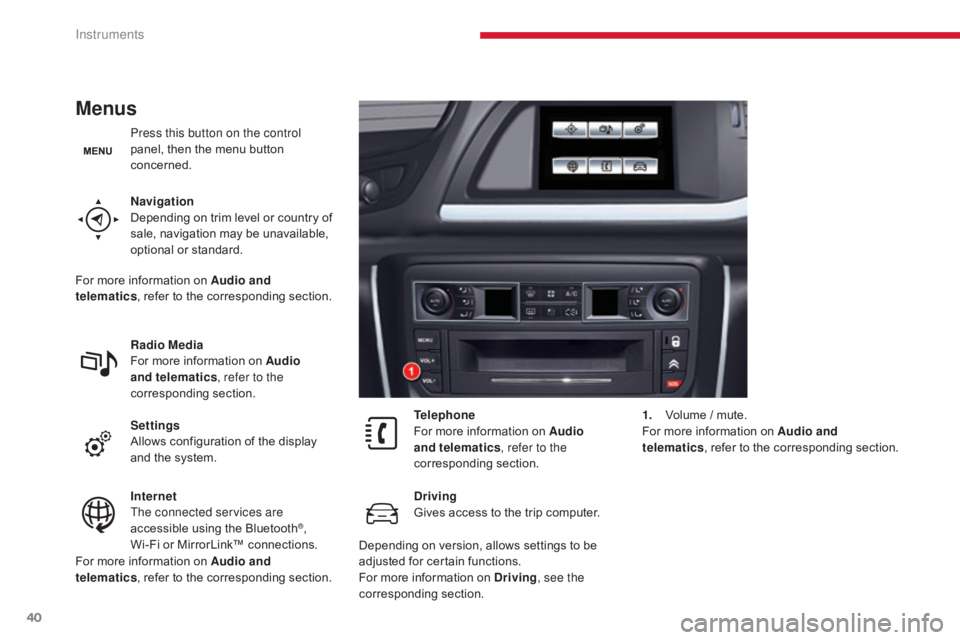
Menus
Press this button on the control
panel, then the menu button
concerned.
Navigation
Depending on trim level or country of
sale, navigation may be unavailable,
optional or standard.
Radio Media
For more information on Audio
and telematics, refer to the
corresponding section.
Settings
Allows configuration of the display
and the system.
Internet
The connected services are
accessible using the Bluetooth
®,
Wi-Fi or MirrorLink™ connections. Telephone
For more information on Audio
and telematics
, refer to the
corresponding section.
Driving
Gives access to the trip computer. 1.
V
olume / mute.
For more information on Audio and
telematics , refer to the corresponding section.
For more information on Audio and
telematics , refer to the corresponding section.
For more information on Audio and
telematics
, refer to the corresponding section.
Depending on version, allows settings to be
adjusted for certain functions.
For more information on Driving, see the
corresponding section.
Instruments
Page 46 of 348
44
C5_en_Chap02_ouverture_ed01-2016
Remote control key
System which permits central unlocking or locking of the vehicle using the lock or from a distance. It is also used to open the boot, locate and start
the vehicle, as well as providing protection against theft.
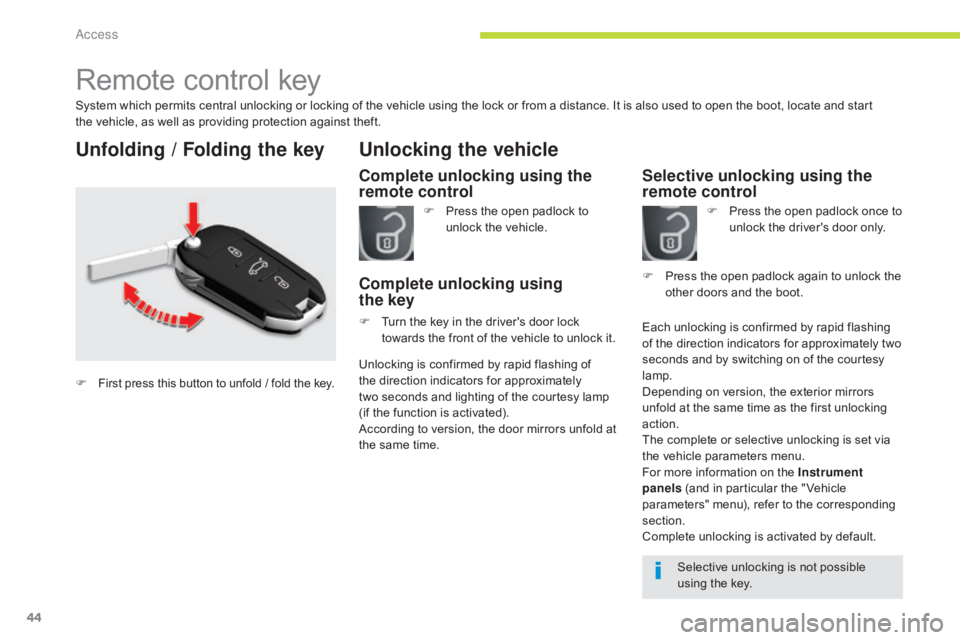
Unfolding / Folding the key
Complete unlocking using the
remote control
Unlocking the vehicle
F Press the open padlock to unlock the vehicle.
Complete unlocking using
the key
F Turn the key in the driver's door lock
towards the front of the vehicle to unlock it.
Selective unlocking using the
remote control
F Press the open padlock once to unlock the driver's door only.
Each unlocking is confirmed by rapid flashing
of the direction indicators for approximately two
seconds and by switching on of the courtesy
lamp.
Depending on version, the exterior mirrors
unfold at the same time as the first unlocking
action.
The complete or selective unlocking is set via
the vehicle parameters menu.
For more information on the Instrument
panels (and in particular the " Vehicle
parameters" menu), refer to the corresponding
section.
Complete unlocking is activated by default. F
P
ress the open padlock again to unlock the
other doors and the boot.
Selective unlocking is not possible
using the key.
Unlocking is confirmed by rapid flashing of
the direction indicators for approximately
two
seconds and lighting of the courtesy lamp
(if the function is activated).
According to version, the door mirrors unfold at
the same time.
F
First press this button to unfold / fold the key.
Access
Page 55 of 348
53
C5_en_Chap02_ouverture_ed01-2016
Reinitialisation
If a window does not rise automatically, its
operation must be reinitialised:
F
p
ull the control until the window stops,
F
r
elease the control and pull it again until
the window closes fully,
F
c
ontinue to hold the control for
approximately one second after the window
has closed,
F
p
ress the control to lower the window
automatically to the low position,
F
w
hen the window has reached the low
position, press the control again for
approximately one second.
The safety anti-pinch function is not
operational during these operations.
Deactivation of the rear
electric window and door
controls
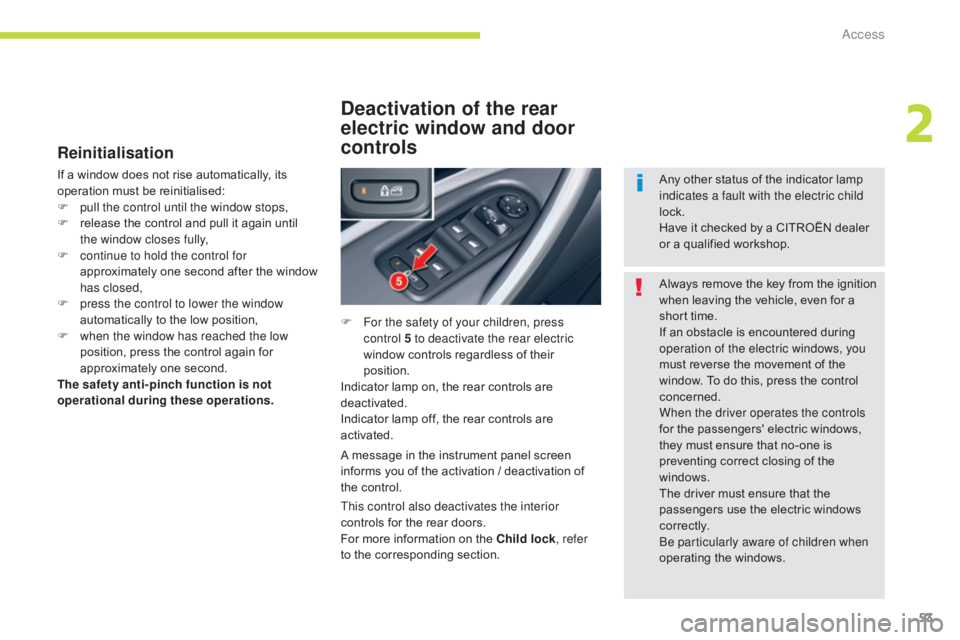
F For the safety of your children, press control 5 to deactivate the rear electric
window controls regardless of their
position.
Indicator lamp on, the rear controls are
deactivated.
Indicator lamp off, the rear controls are
activated.
A message in the instrument panel screen
informs you of the activation / deactivation of
the control. Always remove the key from the ignition
when leaving the vehicle, even for a
short time.
If an obstacle is encountered during
operation of the electric windows, you
must reverse the movement of the
window. To do this, press the control
concerned.
When the driver operates the controls
for the passengers' electric windows,
they must ensure that no-one is
preventing correct closing of the
windows.
The driver must ensure that the
passengers use the electric windows
c o r r e c t l y.
Be particularly aware of children when
operating the windows.
This control also deactivates the interior
controls for the rear doors.
For more information on the Child lock
, refer
to the corresponding section. Any other status of the indicator lamp
indicates a fault with the electric child
lock.
Have it checked by a CITROËN dealer
or a qualified workshop.
2
Access
Page 57 of 348
55
C5_en_Chap02_ouverture_ed01-2016
Unlocking
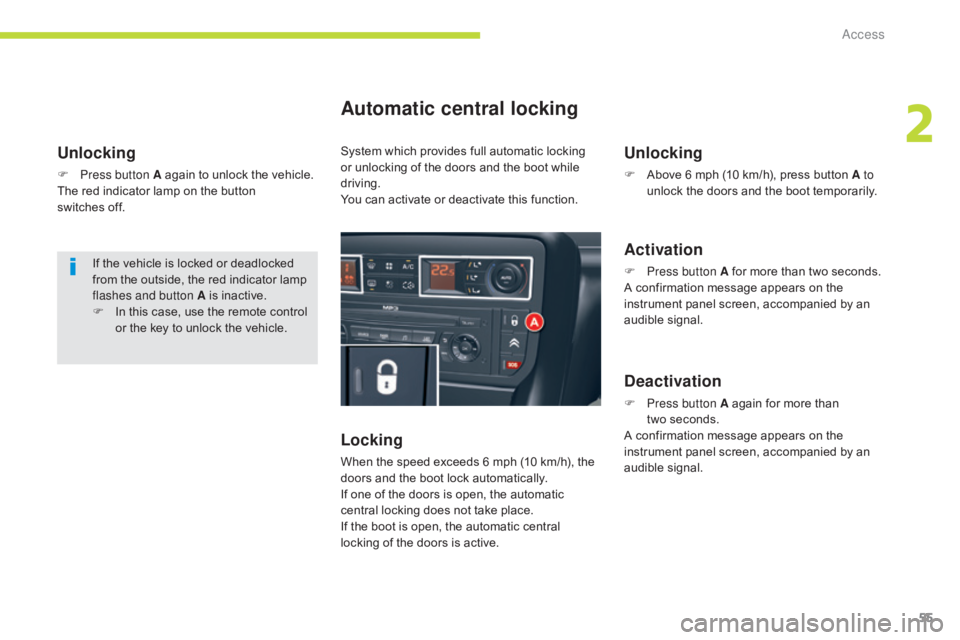
F Press button A again to unlock the vehicle.
The red indicator lamp on the button
switches off.
Automatic central locking
Locking
When the speed exceeds 6 mph (10 km/h), the
doors and the boot lock automatically.
If one of the doors is open, the automatic
central locking does not take place.
If the boot is open, the automatic central
locking of the doors is active.
Unlocking
F Above 6 mph (10 km/h), press button A to unlock the doors and the boot temporarily.
Activation
F Press button A for more than two seconds.
A confirmation message appears on the
instrument panel screen, accompanied by an
audible signal.
Deactivation
F Press button A again for more than two seconds.
A confirmation message appears on the
instrument panel screen, accompanied by an
audible signal.
If the vehicle is locked or deadlocked
from the outside, the red indicator lamp
flashes and button A is inactive.
F
I
n this case, use the remote control
or the key to unlock the vehicle. System which provides full automatic locking
or unlocking of the doors and the boot while
driving.
You can activate or deactivate this function.
2
Access
Page 79 of 348
77
C5_en_Chap03_ergonomie-et-confort_ed01-2016
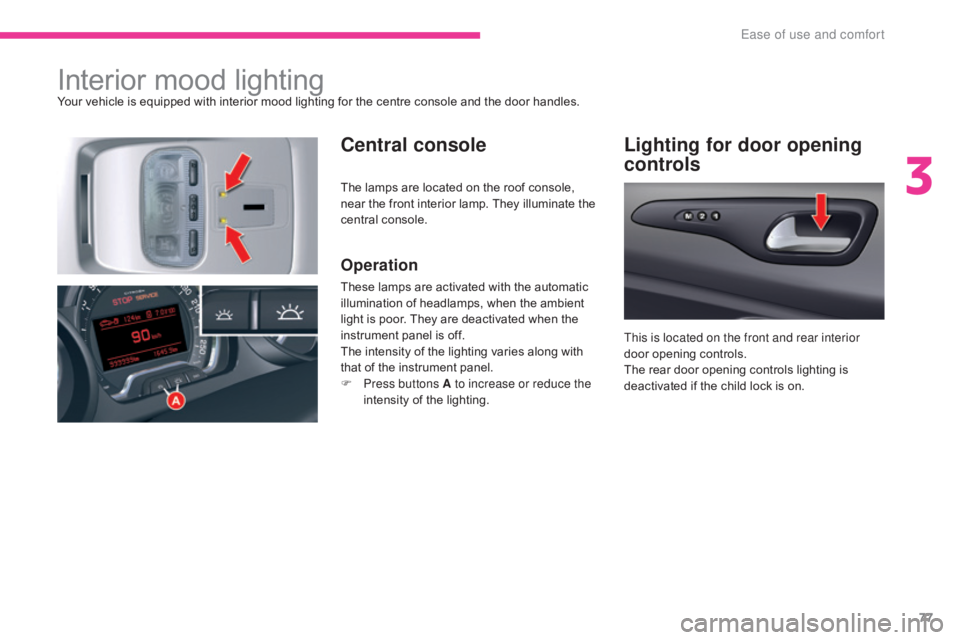
Interior mood lightingYour vehicle is equipped with interior mood lighting for the centre console and the door handles.
Central consoleLighting for door opening
controls
Operation
These lamps are activated with the automatic
illumination of headlamps, when the ambient
light is poor. They are deactivated when the
instrument panel is off.
The intensity of the lighting varies along with
that of the instrument panel.
F
P
ress buttons A to increase or reduce the
intensity of the lighting. This is located on the front and rear interior
door opening controls.
The rear door opening controls lighting is
deactivated if the child lock is on.
The lamps are located on the roof console,
near the front interior lamp. They illuminate the
central console.
3
Ease of use and comfort
Page 95 of 348
93
C5_en_Chap04_conduite_ed01-2016
Starting the engine
Wait until this warning lamp goes off in the
instrument panel then operate the starter
motor by turning the key to position 3
without pressing the accelerator pedal,
until the engine starts. Once the engine is
running, release the key.
With the parking brake applied and the gearbox
in neutral or position N or P:
F
d
epress the clutch pedal fully (manual
gearbox),
or
F
p
ress the brake pedal firmly (automatic
gearbox),
F
i
nsert the key into the ignition switch; the
system recognises the code,
F
u
nlock the steering column by simultaneously
turning the steering and the key.
F
W
ith a petrol engine, operate the starter
motor by turning the key to position 3
without pressing the accelerator pedal,
until the engine starts. Once the engine is
running, release the key. Never leave the engine running in
an enclosed area without adequate
ventilation: internal combustion
engines emit toxic exhaust gases,
such as carbon monoxide. Danger of
intoxication and death!
In very severe wintry conditions
(temperatures below -23°C), to ensure
the correct operation and durability of
the mechanical components of your
vehicle, engine and gearbox, it is
necessary to leave the engine running
for 4 minutes before moving off.
In wintry conditions, the warning lamp
can stay on for a longer period. When
the engine is hot, the warning lamp
does not come on.
In certain cases, you may have to apply
more force to the steering (wheels on
full lock, for example). F
W ith a Diesel engine, turn the key to
position 2 , ignition on, to operate the
engine pre-heating system.
If the engine does not start straight
away, switch off the ignition. Wait a
few moments before operating the
starter motor again. If the engine does
not start after several attempts, do not
keep trying: you risk damaging the
starter motor or the engine. Contact
a CITROËN dealer or a qualified
workshop. In temperate conditions, do not leave
the engine at idle to warm up but move
off straight away and drive at moderate
speed.
4
Driving