brake light CITROEN C5 2022 User Guide
[x] Cancel search | Manufacturer: CITROEN, Model Year: 2022, Model line: C5, Model: CITROEN C5 2022Pages: 228, PDF Size: 6.78 MB
Page 100 of 228

98
Driving
Electric power is used to supplement the petrol
engine as long as there is energy left in the
battery.
Hill start assist
This system keeps the vehicle briefly stationary
(for approximately 2 seconds) when making a hill
start, while you transfer your foot from the brake
pedal to the accelerator pedal.
The system is only active when:
–
The vehicle is completely stationary
, with your
foot on the brake pedal.
–
Certain slope conditions are met.
–
The driver
’s door is closed.
Do not leave the vehicle while it is being
held temporarily by hill start assist.
If someone needs to get out of the vehicle
with the engine running, apply the parking
brake manually. Then check that the parking
brake indicator lamp and the P indicator lamp
in the electric parking brake control are on
fixed.
The hill start assist function cannot be deactivated. However, using the parking
brake to immobilise the vehicle interrupts its
operation.
Operation
Facing uphill, with the vehicle stationary,
the vehicle is held for a short time when the
driver releases the brake pedal:
–
If mode
D or M is selected on an automatic
gearbox.
Facing downhill, with the vehicle stationary
and reverse gear engaged, the vehicle is held
for a short time when the driver releases the
brake pedal.
Malfunction
If the event of a malfunction, these
warning lamps light up on the
instrument panel, accompanied by the display of
a message.
Have it checked by a CITROËN dealer or a
qualified workshop.
Gear shift indicator
(Depending on engine)
This system is designed to reduce fuel
consumption by recommending the most suitable
gear.
Operation
Depending on the driving situation and
the vehicle's equipment, the system may
recommend skipping one or more gears.
Gear engagement recommendations are
not to be considered mandatory. Indeed, the
configuration of the road, the traffic density and
safety remain determining factors when choosing
the best gear. Therefore, the driver remains
responsible for deciding whether or not to follow
the system’s advice.
The system cannot be deactivated.
The system is only active in mode M of
the automatic gearbox.
The information appears on the instrument panel, in the form of an arrow
and the recommended gear.
The system adapts the gear change instructions according to the driving
conditions (e.g.
slope, load) and driving style
(e.g.
power demand, acceleration, braking).
The system never suggests:
–
engaging first gear;
–
engaging reverse gear
.
Page 101 of 228

99
Driving
6Stop & Start
The Stop & Start function puts the engine temporarily into standby - STOP mode - during
phases when the vehicle is stationary (e.g.
red
lights, traffic jams). The engine automatically
restarts - START mode - as soon as the driver
indicates the intention of moving off again.
Primarily designed for urban use, the function
is intended to reduce fuel consumption and
exhaust emissions as well as the noise level
when stationary.
The function does not affect the functionalities of
the vehicle, in particular the braking.
Deactivation/Reactivation
By default, the function is activated when the
ignition is switched on.
It is configured in the ADAS touch screen
application.
or
Direct access to the Shortcuts for driving aids .
The display of a message on the instrument
panel confirms the change of state.
If the function is deactivated while the engine is
in STOP mode, it will restart immediately.
Associated indicator lamps
Function activated: engine on standy
(STOP mode)
Function deactivated or malfunction
Opening the bonnet
Before doing anything under the bonnet,
deactivate the Stop & Start system to avoid
any risk of injury caused by the engine
restarting automatically.
Driving on flooded roads
Before entering into a flooded area, it is
strongly recommended that you deactivate
the Stop & Start system.
For more information on Driving
recommendations, particularly on flooded
roads, refer to the corresponding section.
Operation
Main conditions for operation
– The driver ’s door must be closed.
– The driver's seat belt must be fastened.
–
The level of charge in the battery must be
sufficient.
–
The temperature of the engine must be within
its nominal operating range.
–
The outside temperature must be between
0°C and 35°C.
Putting the engine into standby
(STOP mode)
The engine automatically enters standby mode
as soon as the driver indicates their intention to
stop:
–
With the gear selector in mode D
or M, with
the brake pedal depressed until the vehicle
stops.
–
With the gear selector in mode N
, with the
vehicle stationary.
Time counter
A time counter adds up the time spent in standby
during the journey. It is reset to zero every time
the ignition is switched on.
Special cases:
The engine will not go into standby if the
conditions for operation are not met and in the
following cases:
–
Steep slope (ascending or descending).
–
Needed
to maintain a comfortable temperature
in the passenger compartment.
–
Demisting active.
In these cases, this indicator lamp flashes
for a few seconds, then goes off.
After the engine has restarted, STOP mode is not available until the vehicle
has reached a speed of 5 mph (8
km/h).
During parking manoeuvres, STOP mode
is not available for a few seconds after
Page 122 of 228
120
Driving
Operating conditions
– Eligible roads: roads with separate
carriageways with prohibited access for
pedestrians and cyclists.
–
Highway Driver
Assist 2.0 activated.
–
V
ehicle speed between 43 and 112 mph (70
and 180 km/h).
Operation
The vehicle is moving at the
speed setting and is monitoring
bends.
The system gradually decreases
the speed in the bend to
negotiate it comfortably.
Temporary driver intervention
If the driver believes that the speed is too slow or
too fast, they can act on the pedals.
Pressing the brake pedal deactivates Highway
Driver Assist 2.0, while pressing the accelerator
pedal temporarily suspends it.
Semi-automatic lane
changing
(with Highway Driver Assist 2.0)
For more information, refer to the
General recommendations on the use
of driving and manoeuvring aids .
This system assists the driver in changing lanes.
To do this, it uses the camera located at the top
of the windscreen, the radar located at the front
and the four angle radars fitted in the bumpers.
The steering wheel is equipped with a hands-on detection system to avoid
distraction on the part of the driver.
For more information on the Hands-on
detection, refer to the corresponding section.
The system cannot in any circumstances replace the need for vigilance on the part
of the driver. The driver remains responsible
for their driving by monitoring their
surroundings and keeping their hands on the
steering wheel.
The driver must act promptly if they believe
that the traffic conditions or the state of the
road surface require their intervention, by
moving the steering wheel to temporarily
suspend system operation.
Any intervention on the brake pedal or the
accelerator pedal that causes the adaptive
cruise control to be paused or suspended will
also cause the system to deactivate.
System selection
Two possibilities:
– Either , when the vehicle is already driving on
an eligible road, the driver selects the system via
the Highway Driver Assist 2.0 system activation.
–
Or
, when the driver is already using Highway
Driver Assist, the vehicle suggests selecting
the system upon arriving at an eligible road by
pressing the OK button.
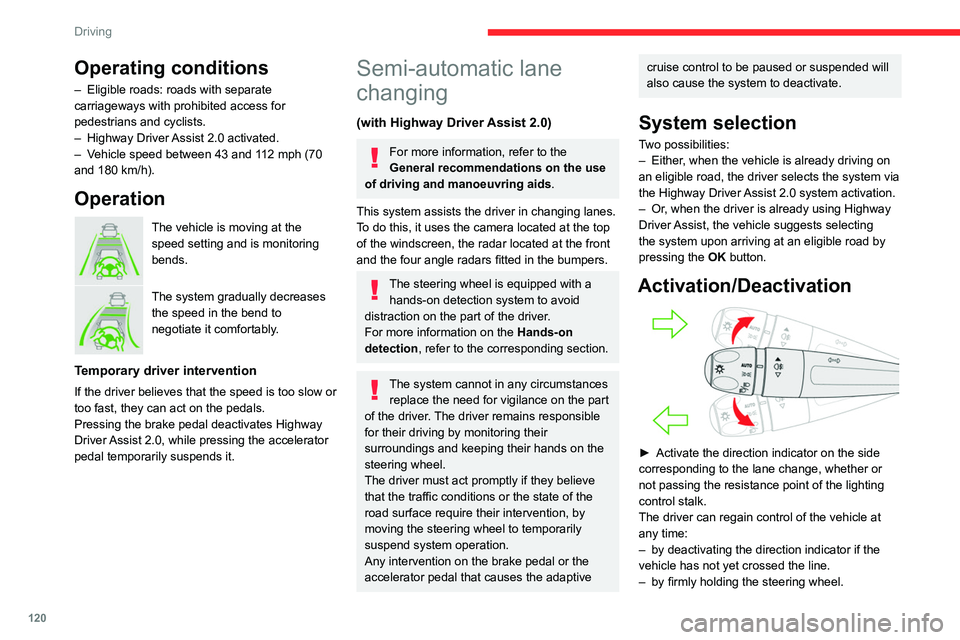
Activation/Deactivation
► Activate the direction indicator on the side
corresponding to the lane change, whether or
not passing the resistance point of the lighting
control stalk.
The driver can regain control of the vehicle at
any time:
–
by deactivating the direction indicator if the
vehicle has not yet crossed the line.
–
by firmly holding the steering wheel.
Page 125 of 228
123
Driving
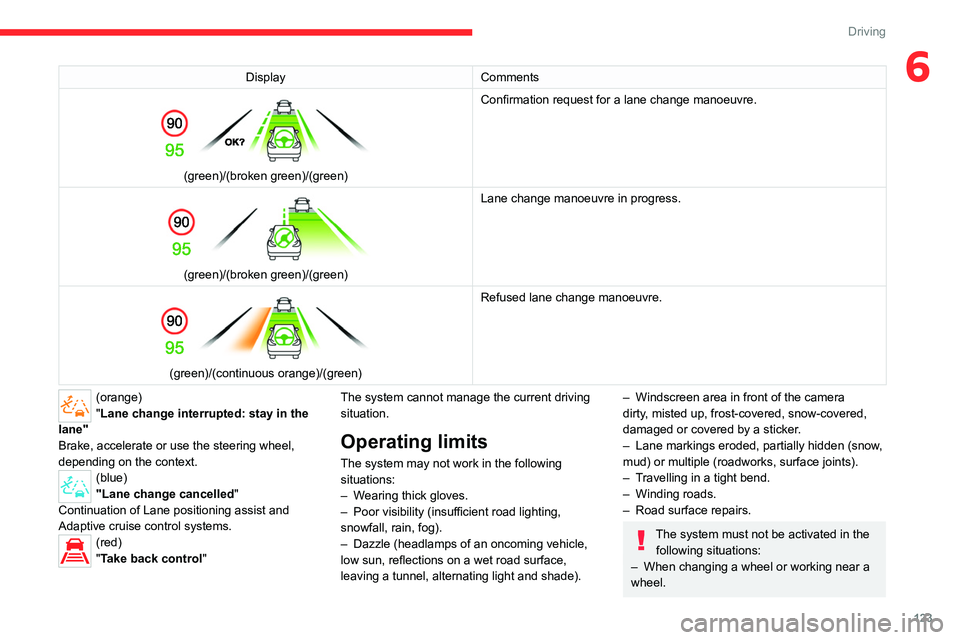
6DisplayComments
(green)/(broken green)/(green) Confirmation request for a lane change manoeuvre.
(green)/(broken green)/(green)Lane change manoeuvre in progress.
(green)/(continuous orange)/(green) Refused lane change manoeuvre.
(orange)
"Lane change interrupted: stay in the
lane"
Brake, accelerate or use the steering wheel,
depending on the context.
(blue)
"Lane change cancelled"
Continuation of Lane positioning assist and
Adaptive cruise control systems.
(red)
"Take back control" The system cannot manage the current driving
situation.
Operating limits
The system may not work in the following
situations:
–
W
earing thick gloves.
–
Poor visibility (insufficient road lighting,
snowfall, rain, fog).
–
Dazzle (headlamps of an oncoming vehicle,
low sun, reflections on a wet road surface,
leaving a tunnel, alternating light and shade).
– Windscreen area in front of the camera
dirty , misted up, frost-covered, snow-covered,
damaged or covered by a sticker.
–
Lane markings eroded, partially hidden (snow
,
mud) or multiple (roadworks, surface joints).
–
T
ravelling in a tight bend.
–
Winding roads.
–
Road surface repairs.
The system must not be activated in the following situations:
–
When changing a wheel or working near a
wheel.
Page 126 of 228
124
Driving
– Towing or with a bicycle carrier on a towing
device, especially with trailer not plugged in or
not approved.
–
Adverse weather conditions.
–
Road with low grip (risk of aquaplaning,
snow
, ice).
–
Road works and toll areas.
–
Driving on racing circuits.
–
Driving on a rolling road.
If the system detects that the driver is not
holding the steering wheel enough, it
triggers a series of progressive alerts and
then, if there is no response from the driver,
the system deactivates itself.
Malfunction
In the event of a malfunction, this warning
lamp lights up on the instrument panel,
accompanied by the display of a message and
an audible signal.
Have it checked by a CITROËN dealer or a
qualified workshop.
Active Safety Brake with Collision Risk Alert and
Intelligent emergency
braking assistance
For more information, refer to the
General recommendations on the use
of driving and manoeuvring aids .
This system:
–
warns the driver that their vehicle is at risk of
collision with the preceding vehicle, a pedestrian
or a cyclist.
–
reduces the vehicle's speed to avoid a
collision or to limit its severity
.
The speed will be reduced by a maximum of 16 mph (25 km/h) (versions
with camera only) or by a maximum of 31
mph (50 km/h) (versions with camera and
radar).
The system also takes motorcyclists into account. It may also react on animals.
Animals (especially animals smaller than
0.5
m) and objects on the road are not
necessarily detected.
This system includes three functions:
– Collision Risk Alert.
–
Intelligent emergency braking assistance
(iEBA).
–
Active Safety Brake (automatic emergency
braking).
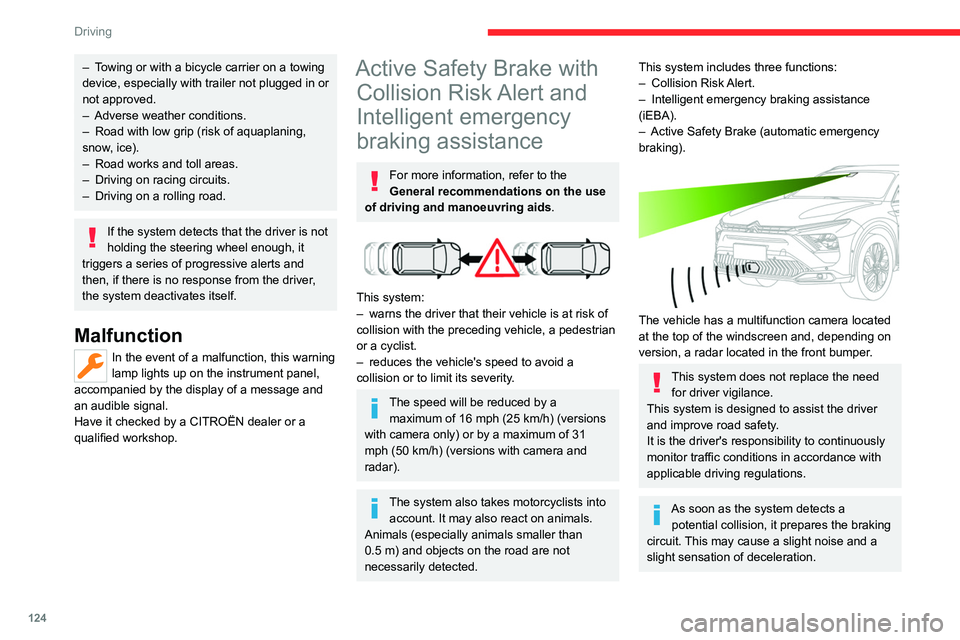
The vehicle has a multifunction camera located
at the top of the windscreen and, depending on
version, a radar located in the front bumper.
This system does not replace the need for driver vigilance.
This system is designed to assist the driver
and improve road safety.
It is the driver's responsibility to continuously
monitor traffic conditions in accordance with
applicable driving regulations.
As soon as the system detects a potential collision, it prepares the braking
circuit. This may cause a slight noise and a
slight sensation of deceleration.
Page 127 of 228

125
Driving
6Deactivation/Activation
By default, the system is automatically activated
at every engine start.
It is configured in the ADAS touch screen
application.
Deactivation of the system is signalled by
the illumination of this warning lamp,
accompanied by the display of a message.
Operating conditions and
limits
Vehicle moving forward without trailer.
Brake system operational.
ASR / ESP system activated.
Seat belts fastened for all passengers.
Stabilised speed on roads with no or low
curvature.
This warning lamp lights up on the instrument panel without any additional
message, to indicate that the “automatic braking
system” is not available. This is a normal
behavior indicating that a condition is not fulfilled
and which does not request the support of a
workshop.
In any situations with ignition on where automatic
braking presents a risk, deactivating the
system via ADAS touch screen application is
recommended, for instance:
–
T
owing a trailer (particularly a trailer without its
own braking system).
–
Carrying long objects on roof bars.
–
Driving with snow chains.
– Using an automatic car wash.
– Performing any maintenance (e.g. changing a
wheel, working underhood).
–
Placing the vehicle on a rolling bench in a
workshop.
–
T
owing the vehicle.
–
Following a front bumper deformation (version
with radar).
–
Following
an impact to the windscreen close to
the detection camera.
The system is automatically deactivated if:
–
A
spare wheel with a too small diameter is
detected.
–
A
fault with the brake pedal switch or with
the right or left brake lamp is detected.
–
A
fault in the sensors, in the electronic or in
the brake system is detected.
–
A
trailer is detected by the equipped vehicle
hitch (with an electrical connection plug).
The system diagnoses permanently its capability and may inhibit itself without
specific driver indication, if the system is
outside of the regular operating conditions.
Examples: sensor initialization, board voltage
out of regular range, activation of stability
system…
Therefore the system may not be available
just after starting the vehicle.
It can be dangerous to drive if the brake
lamps are not in perfect working order.
The driver must not load his vehicle excessively (respect of MTAC values,
MTRA values and loading height on roof
bars).
Following an impact (e.g. a collision), the
system is automatically deactivated.
Have it checked by a CITROËN dealer or a
qualified workshop.
Collision Risk Alert
This function warns the driver if there is a risk
of collision with the preceding vehicle, or with a
pedestrian or cyclist.
Modifying the alert trigger threshold
The trigger threshold determines the sensitivity
with which the function warns of the risk of
collision.
It is configured in the ADAS touch screen
application.
►
Select one of the 3 preset thresholds: “ Far
”,
“Medium” or “Near”.
The selected threshold is memorised when the
ignition is switched off.
Operation
Depending on the collision risk detected by the
system and the alert trigger threshold chosen
Page 129 of 228

127
Driving
6Operation
The system operates subject to the following
conditions:
–
The vehicle's speed does not exceed 50
mph (80 km/h) when a pedestrian or a cyclist is
detected.
–
The vehicle's speed does not exceed 50 mph
(80 km/h) when a stationary vehicle is detected.
–
The vehicle's speed is between 6 mph and
53 mph (10
km/h and 85 km/h) (versions with
camera only) or 87 mph (140 km/h) (versions
with camera and radar) when a moving vehicle
is detected.
This warning lamp flashes (for approximately 10 seconds) as soon as
the function applies the vehicle’s brakes. During
the flashing time, the function is not available.
In the event of automatic emergency braking,
keep the brake pedal depressed, also after a
complete stop is reached, to prevent the vehicle
from rolling away.
The driver can override the "automatic emergency braking" at any time by firmly
turning the steering wheel and/or firmly
depressing the accelerator pedal.
The brake pedal may feel hard and vibrate slightly while the function is
operating.
If the vehicle comes to a complete stop,
automatic braking is maintained for 1 to 2
seconds.
Turning scenarios
Crossing road with another vehicle
The system may operate when the vehicle is
turning and detects another vehicle, on the
adjacent lane, approaching from the opposite
direction if:
–
The corresponding direction indicator is
activated.
–
Then the vehicle is about to cross the path of
another vehicle.
–
The vehicle speed is between 3 and 12
mph
(5 and 20
km/h).
–
A
collision on the side of the other vehicle is
probable.
Crossing road with a pedestrian
The system may operate when the vehicle
is turning left or right and detects a crossing
pedestrian if:
–
The pedestrian is crossing in front of the
vehicle.
–
The pedestrian can clearly be detected by the
sensors.
–
The scenery is detectable by the sensors (e.g.
brightness, contrast vs background).
–
The vehicle speed is between 3 and 15
mph
(5 and 25
km/h).
Malfunction
This warning lamp lights up on the instrument panel with the message
"Sensor blind" in certain cases. With the variant
"camera only", the system is deactivated. With
the variant "camera and radar", the system may
continue to operate in a degraded mode. This
may be caused by a reduced visibility (rain, fog,
snow, blending by low sun…) or by a real sensor
blockage. In this case, stop the vehicle and verify
Page 133 of 228

131
Driving
6Operating limits
The system goes into standby automatically in
the following cases:
–
ESC deactivated or operation triggered.
–
Speed below 40 mph (65
km/h) or greater
than 112 mph (180
km/h),
–
Electrical connection of a trailer
.
–
Use of a"space-saver" spare wheel detected
(as detection is not immediate, deactivation of
the system is recommended).
–
Dynamic driving style detected, pressure on
the brake or accelerator pedal.
–
Driving over lane markings.
–
Activation of the direction indicators.
–
Crossing the inside line on a bend.
–
Driving on a tight bend.
–
Inactivity by the driver detected during
correction.
–
Narrow lane detected.
The following situations may interfere with the operation of the system or
prevent it from working:
–
Insufficient contrast between the road
surface and the side of the road (e.g. shade).
–
Lane markings worn, hidden (snow
, mud)
or multiple (roadworks, etc.),
–
Running close to the vehicle in front (the
lane markings may not be detected).
–
Roads that are narrow
, winding.
Risk of undesirable operation
The system should be deactivated in the
following situations:
–
When changing a wheel or working near a
wheel.
–
T
owing or with a bicycle carrier on a towing
device, especially with trailer not plugged in or
not approved.
–
Road in poor condition, unstable or with very
poor grip (risk of aquaplaning, snow
, ice).
–
Adverse weather conditions.
–
Driving on racing circuits.
–
Driving on a rolling road.
Deactivation/Activation
By default, the system is automatically activated
at every engine start.
It is configured in the ADAS touch screen
application.
or
Direct access to the Shortcuts for driving aids .
Deactivation is confirmed by the
illumination of this indicator lamp on the
instrument panel.
Malfunction
In the event of a malfunction,
these warning lamps light up on
the instrument panel, accompanied by the
display of a message and an audible signal.
Have it checked by a CITROËN dealer or a
qualified workshop.
Long-distance blind spot
monitoring
For more information, refer to the
General recommendations on the use
of driving and manoeuvring aids .
This system warns the driver of vehicles
approaching rapidly from the rear in adjacent
lanes (up to around 75 m) and of the presence of
a vehicle in the blind spots of their vehicle, using
corner radars located in the rear bumper.
This system takes into account vehicles
such as cars, lorries and motorcycles by
monitoring the blind spots or areas hidden
from the driver's field of vision.
Page 173 of 228
171
In the event of a breakdown
8
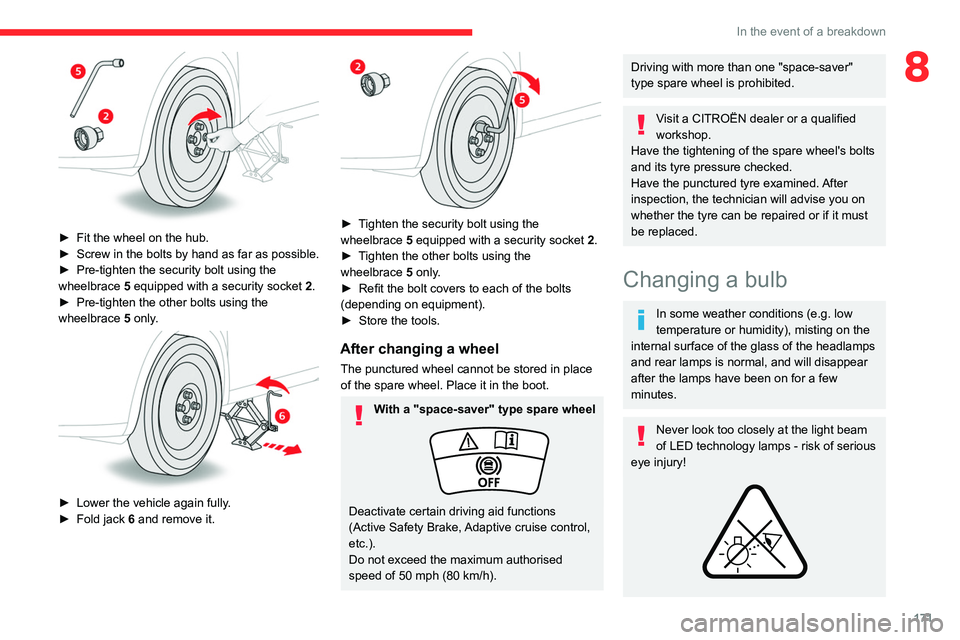
► Fit the wheel on the hub.
► Screw in the bolts by hand as far as possible.
►
Pre-tighten the security bolt using the
wheelbrace
5
equipped with a security socket
2
.
►
Pre-tighten the other bolts using the
wheelbrace
5
only.
► Lower the vehicle again fully .
► Fold jack 6 and remove it.
► Tighten the security bolt using the
wheelbrace 5 equipped with a security socket 2 .
►
T
ighten the other bolts using the
wheelbrace
5
only.
►
Refit the bolt covers to each of the bolts
(depending on equipment).
►
Store the tools.
After changing a wheel
The punctured wheel cannot be stored in place
of the spare wheel. Place it in the boot.
With a "space-saver" type spare wheel
Deactivate certain driving aid functions
(Active Safety Brake, Adaptive cruise control,
etc.).
Do not exceed the maximum authorised
speed of 50 mph (80 km/h).
Driving with more than one "space-saver"
type spare wheel is prohibited.
Visit a CITROËN dealer or a qualified
workshop.
Have the tightening of the spare wheel's bolts
and its tyre pressure checked.
Have the punctured tyre examined. After
inspection, the technician will advise you on
whether the tyre can be repaired or if it must
be replaced.
Changing a bulb
In some weather conditions (e.g. low
temperature or humidity), misting on the
internal surface of the glass of the headlamps
and rear lamps is normal, and will disappear
after the lamps have been on for a few
minutes.
Never look too closely at the light beam
of LED technology lamps - risk of serious
eye injury!
Page 174 of 228
172
In the event of a breakdown
The headlamps have polycarbonate lenses with a protective coating:
–
Do not clean them with a dry or abrasive
cloth, nor with detergent or solvent
products.
–
Use a sponge and soapy water or a pH
neutral product.
–
When using a high-pressure washer on
persistent marks, do not keep the lance
directed towards the headlamps, lamps or
their edges for too long, so as not to damage
their protective coating and seals.
Light-emitting diode (LED)
headlamps and lamps
Replacement of this type of bulb
Contact a CITROËN dealer or a qualified
workshop.
Do not touch LED or Full LED
technology
headlamps - risk of electrocution!
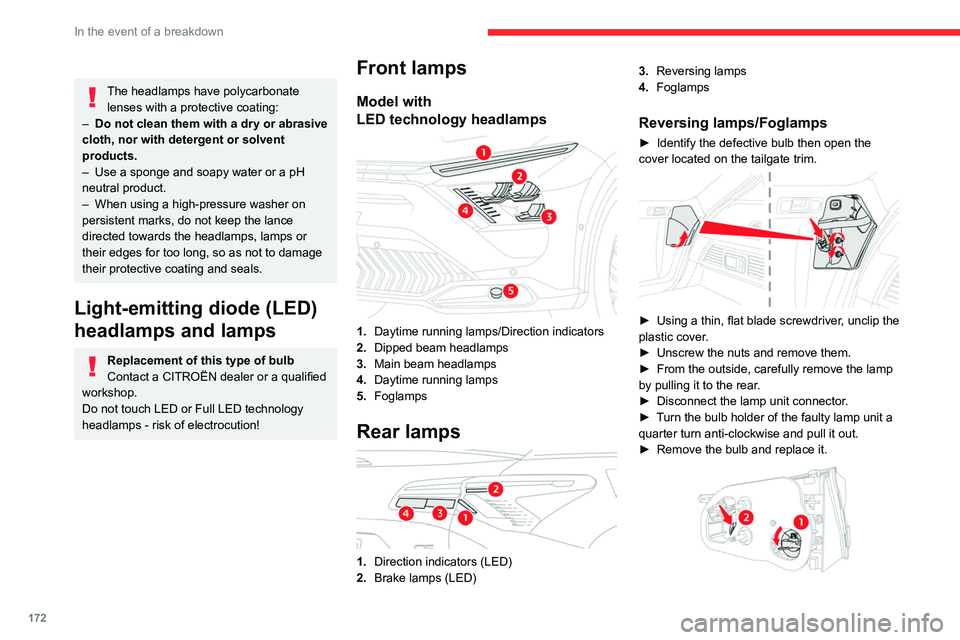
Front lamps
Model with
LED technology headlamps
1.Daytime running lamps/Direction indicators
2. Dipped beam headlamps
3. Main beam headlamps
4. Daytime running lamps
5. Foglamps
Rear lamps
1.Direction indicators (LED)
2. Brake lamps (LED) 3.
Reversing lamps
4. Foglamps
Reversing lamps/Foglamps
► Identify the defective bulb then open the
cover located on the tailgate trim.
► Using a thin, flat blade screwdriver , unclip the
plastic cover.
►
Unscrew the nuts and remove them.
►
From the outside, carefully remove the lamp
by pulling it to the rear
.
►
Disconnect the lamp unit connector
.
►
T
urn the bulb holder of the faulty lamp unit a
quarter turn anti-clockwise and pull it out.
►
Remove the bulb and replace it.