lock Citroen C5 DAG 2007.5 (DC/DE) / 1.G Owner's Guide
[x] Cancel search | Manufacturer: CITROEN, Model Year: 2007.5, Model line: C5 DAG, Model: Citroen C5 DAG 2007.5 (DC/DE) / 1.GPages: 231, PDF Size: 8.02 MB
Page 102 of 231
106
III
1
2
3
R E A R S E A T S
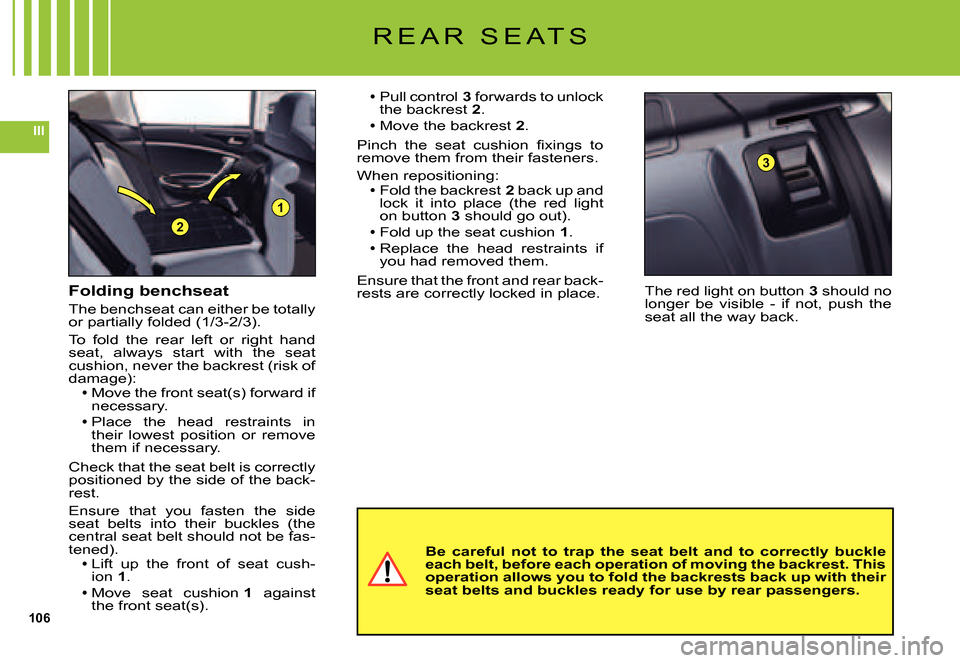
The red light on button 3 should no longer be visible - if not, push the seat all the way back.
Pull control 3 forwards to unlock the backrest 2.Move the backrest 2.
Pinch the seat cushion fi xings to remove them from their fasteners.
When repositioning:Fold the backrest 2 back up and lock it into place (the red light on button 3 should go out).Fold up the seat cushion 1.
Replace the head restraints if you had removed them.
Ensure that the front and rear back-rests are correctly locked in place.
Page 108 of 231
112
III
2
2
1
I N T E R I O R L I G H T I N G
1. Interior lamps
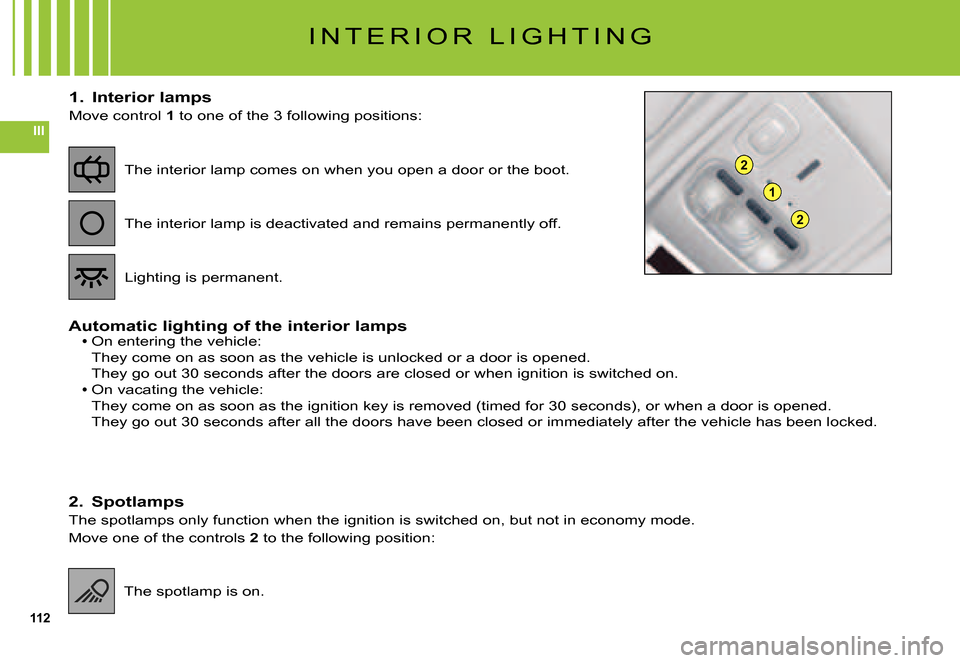
Move control 1 to one of the 3 following positions:
Automatic lighting of the interior lampsOn entering the vehicle:They come on as soon as the vehicle is unlocked or a door is opened.
They go out 30 seconds after the doors are closed or when ignition is switched on.
On vacating the vehicle:They come on as soon as the ignition key is removed (timed for 30 seconds), or when a door is opened.
They go out 30 seconds after all the doors have been closed or immediately after the vehicle has been locked.
Page 121 of 231
125
IV
Notes on radio reception
Your radio will be subject to certain phenomena that are not encoun-tered by domestic systems.
The reception of AM and FM sig-nals may suffer from interference, which is caused by the nature and propagation of the signals and does not refl ect on the quality of your radio installation.
In AM, the reception may be affected when passing under power lines or bridges, or when travelling through tunnels.
In FM mode, the reception may be affected by the distance from the station transmitter, the refl ect-ing of signals off obstacles (moun-tains, hills, tower blocks) and radio blackspots (no coverage from the station transmitter).
Selection of radio source
Press button D to select the source.
R A D I O S O U R C E
Selection of frequencies and memory banks
Press button E successively to go through the memory banks FM1, FM2 and FM3, for the FM waveband, and the mem-ory banks MW/LW, for the AM waveband.
Manual search
Manual search is via buttons Jor M.
By keeping button J or M pressed, you will be able to scroll through the waveband. Scrolling will stop as soon as you release the button. The radio will remain tuned to the frequency that is displayed.
Tuning sensitivity
Automatic searches can be carried out according to two levels of sen-sitivity:To capture the most powerful transmitters, choose the local search mode “LO” (default option).To capture the weakest or most distant transmitters, choose the sensitive search mode “DX”.
Page 133 of 231
137
IV
F R E Q U E N T L Y - A S K E D Q U E S T I O N S
QUESTIONANSWERSOLUTION
Traffi c Announcements (TA) is displayed. I do not receive any traffi c informa-tion or public announce-ments.
The particular radio station is not in the regional traffi c information network.Change to a radio station that does broadcast traffi c information.
The reception quality of the radio station being lis-tened to gradually deterio-rates.
The vehicle is too distant from the transmit-ter, or no transmitter is present in the geo-graphical area you are passing through.
Activate the RDS function to allow the system to check whether a more pow-erful transmitter is to be found in the geographical area.
The environment (hills, high buildings, tun-nels, underground car parks, etc.) is blocking reception, even in RDS mode.
This phenomenon is normal and does not imply anything wrong with the radio.
The aerial is absent or has been damaged (for example after going through a car wash or in an underground car park).
Have the aerial checked by a CITROËN dealer.
Cutting of sound for 1 to 2 seconds in radio mode.
The RDS system during this brief sound cut-off is searching for a better frequency that might offer improved reception of the station.
Deactivate the RDS function if the phe-nomenon occurs too frequently and always on the same journey.
When the engine is not running, the radio stops after a few minutes.
When the engine is switched off, the work-ing time for the radio depends on the battery charge. The interruption is normal: the radio goes into economy mode, cutting off in order to save the vehicle’s battery.
You have to start the engine so as to increase the battery charge.
The message “the audio system is overheating” appears on the screen.
In order to protect the audio equipment in excessive ambient temperatures, the radio goes into an automatic thermic protection mode which results in a reduction in sound volume or stopping of the CD player.
Switch off the audio system for a few minutes in order to allow the system to cool down.
Page 134 of 231
138
V
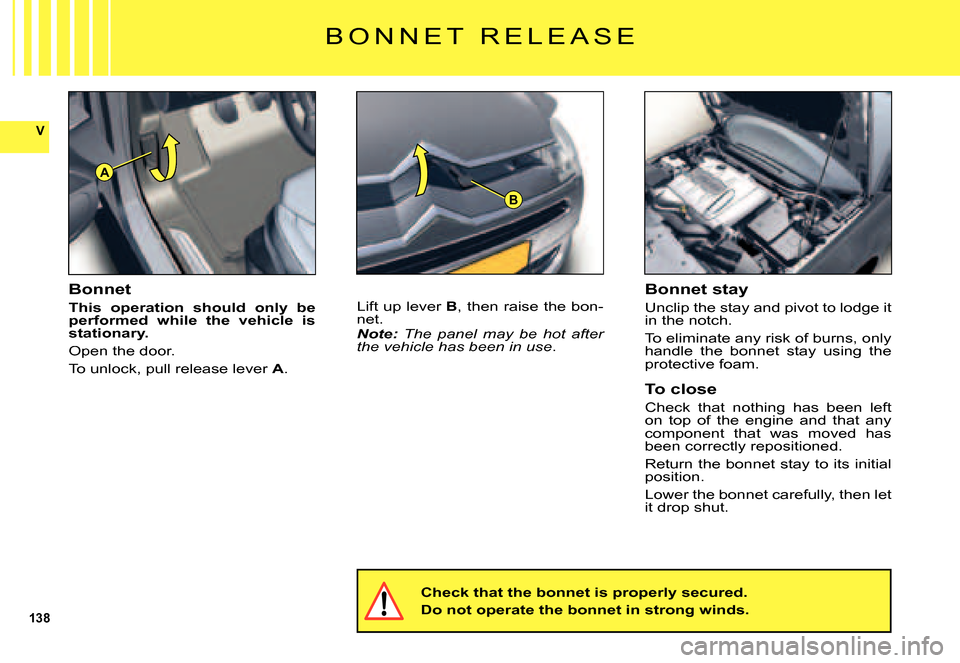
A
B
B O N N E T R E L E A S E
Bonnet
This operation should only be performed while the vehicle is stationary.
Open the door.
To unlock, pull release lever A.
Lift up lever B, then raise the bon-net.Note: The panel may be hot after the vehicle has been in use.
Check that the bonnet is properly secured.
Do not operate the bonnet in strong winds.
Bonnet stay
Unclip the stay and pivot to lodge it in the notch.
To eliminate any risk of burns, only handle the bonnet stay using the protective foam.
To close
Check that nothing has been left on top of the engine and that any component that was moved has been correctly repositioned.
Return the bonnet stay to its initial position.
Lower the bonnet carefully, then let it drop shut.
Page 153 of 231
157
V
T A B L E O F F U S E S
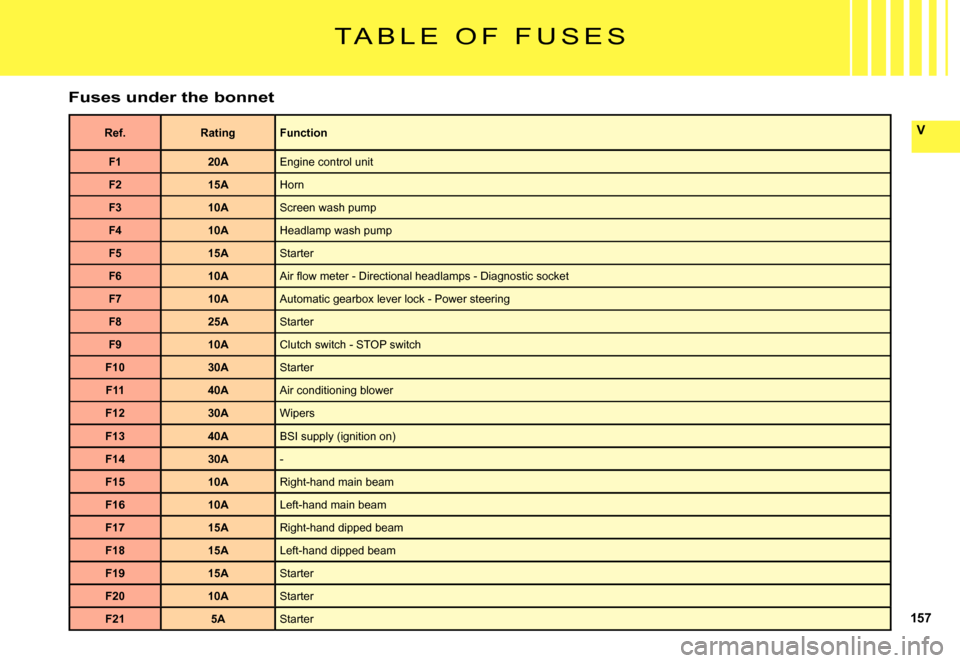
Fuses under the bonnet
Ref.RatingFunction
F120AEngine control unit
F215AHorn
F310AScreen wash pump
F410AHeadlamp wash pump
F515AStarter
F610AAir fl ow meter - Directional headlamps - Diagnostic socket
F710AAutomatic gearbox lever lock - Power steering
F825AStarter
F910AClutch switch - STOP switch
F1030AStarter
F1140AAir conditioning blower
F1230AWipers
F1340ABSI supply (ignition on)
F1430A-
F1510ARight-hand main beam
F1610ALeft-hand main beam
F1715ARight-hand dipped beam
F1815ALeft-hand dipped beam
F1915AStarter
F2010AStarter
F215AStarter
Page 155 of 231
159
VI
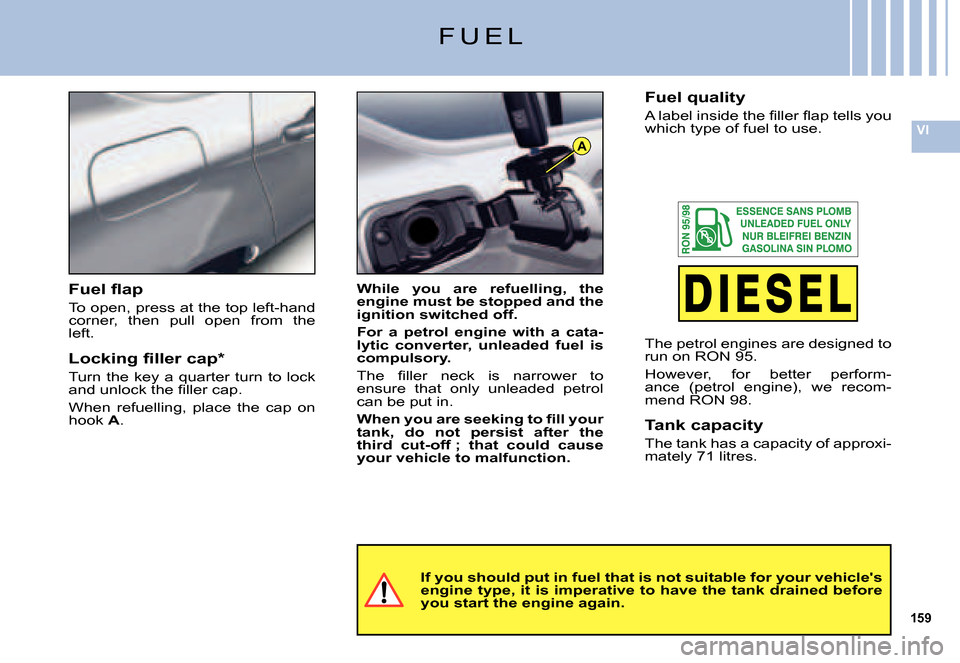
A
F U E L
If you should put in fuel that is not suitable for your vehicle's engine type, it is imperative to have the tank drained be fore you start the engine again.
While you are refuelling, the engine must be stopped and the ignition switched off.
For a petrol engine with a cata-lytic converter, unleaded fuel is compulsory.
The fi ller neck is narrower to ensure that only unleaded petrol can be put in.
When you are seeking to fi ll your tank, do not persist after the third cut-off ; that could cause your vehicle to malfunction.
Fuel fl ap
To open, press at the top left-hand corner, then pull open from the left.
Locking fi ller cap*
Turn the key a quarter turn to lock and unlock the fi ller cap.
When refuelling, place the cap on hook A.
Fuel quality
A label inside the fi ller fl ap tells you which type of fuel to use.
The petrol engines are designed to run on RON 95.
However, for better perform-ance (petrol engine), we recom-mend RON 98.
Tank capacity
The tank has a capacity of approxi-mately 71 litres.
Page 231 of 231
555555
IX
F R E Q U E N T LY - A S K E D Q U E S T I O N S
QUESTIONSANSWERSSOLUTIONS
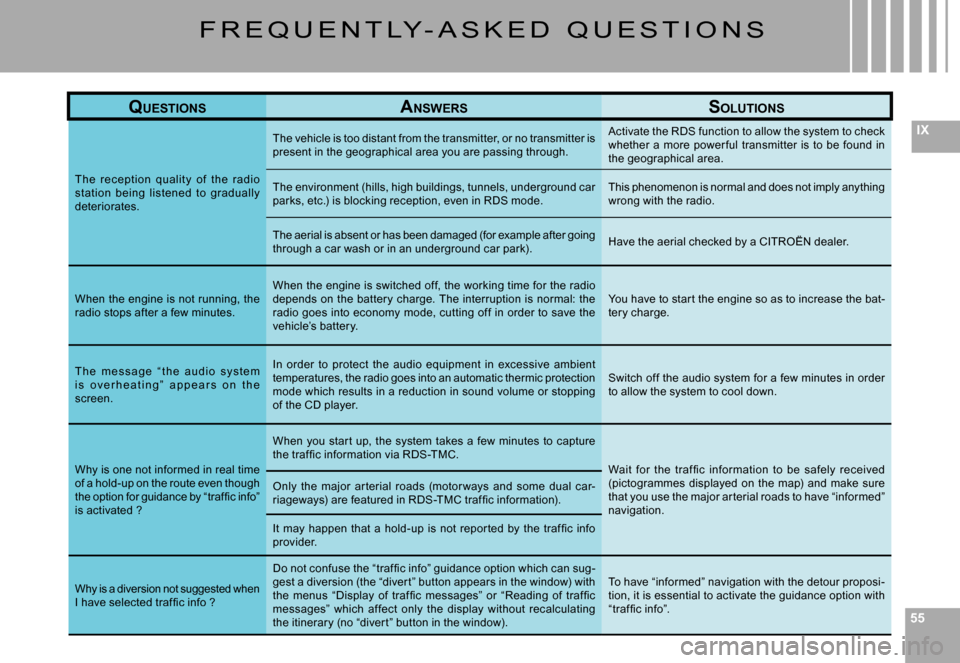
The rec eption qualit y of the radio station being listened to gradually deteriorates.
The vehicle is too distant from the transmitter, or no transmitter is present in the geographical area you are passing th rough.
Activate the RDS function to allow the system to chec k whether a more power ful transmitter is to be found in the geographical area.
The environment (hills, high buildings, tunnels, underground car parks, etc.) is blocking reception, even in RDS mode.This phenomenon is normal and does not imply anythi ng wrong with the radio.
The aerial is absent or has been damaged (for example after going through a car wash or in an underground car park).Have the aerial checked by a CITROËN dealer.
When the engine is not running, the radio stops after a few minutes.
When the engine is switched off, the working time fo r the radio depends on the batter y charge. The interruption is nor mal: the radio goes into economy mode, cutting off in order to save the vehicle’s batter y.
You have to star t the engine so as to increase the bat-ter y charge.
T h e m e s s a g e “ t h e a u d i o s y s t e m i s o v e r h e a t i n g ” a p p e a r s o n t h e screen.
In order to protect the audio equipment in excessiv e ambient temperatures, the radio goes into an automatic thermic protection mode which results in a reduction in sound volume or stopping of the CD player.
Switch off the audio system for a few minutes in order to allow the system to cool down.
Why is one not informed in real time of a hold-up on the route even though the option for guidance by “traffi c info” is activated ?
When you star t up, the system takes a few minutes to c apture the traf fi c information via RDS-TMC.Wait for the traf fi c information to be safely received (pictogrammes displayed on the map) and make sure that you use the major ar terial roads to have “inform ed” navigation.
Only the major ar terial roads (motor ways and some d ual car-riageways) are featured in RDS-TMC traf fi c information).
It may happen that a hold-up is not repor ted by the tr af fi c info provider.
Why is a diversion not suggested when I have selected traf fi c info ?
Do not confuse the “traf fi c info” guidance option which can sug-gest a diversion (the “diver t” button appears in the w indow) with the menus “Display of traf fi c messages” or “Reading of traf fi c messages” which af fect only the display without recalculating the itinerar y (no “diver t” button in the window).
To have “informed” navigation with the detour proposi-tion, it is essential to activate the guidance option with “traf fi c info”.