ignition Citroen C5 RHD 2015 (RD/TD) / 2.G User Guide
[x] Cancel search | Manufacturer: CITROEN, Model Year: 2015, Model line: C5 RHD, Model: Citroen C5 RHD 2015 (RD/TD) / 2.GPages: 344, PDF Size: 12.96 MB
Page 44 of 344
42
Operating problem
Following disconnection of the vehicle battery,
replacement of the remote control battery or in
the event of a remote control fault, you can no
longer unlock, lock or locate your vehicle.
F
F
irst of all, use the key in the lock to unlock
or lock your vehicle.
F
T
hen, reinitialise the remote control.
If the problem persists, contact a CITROËN
dealer or a qualified workshop as soon as
possible.
Reinitialisation
F Switch off the ignition.
F T urn the key to position 2 (Igntion on) .
(
Refer to the "Starting-switching off the
engine" section).
F
P
ress the closed padlock immediately for a
few seconds, until the operation requested
is triggered.
F
S
witch off the ignition and remove the key
from the ignition switch.
The remote control is fully operational again.
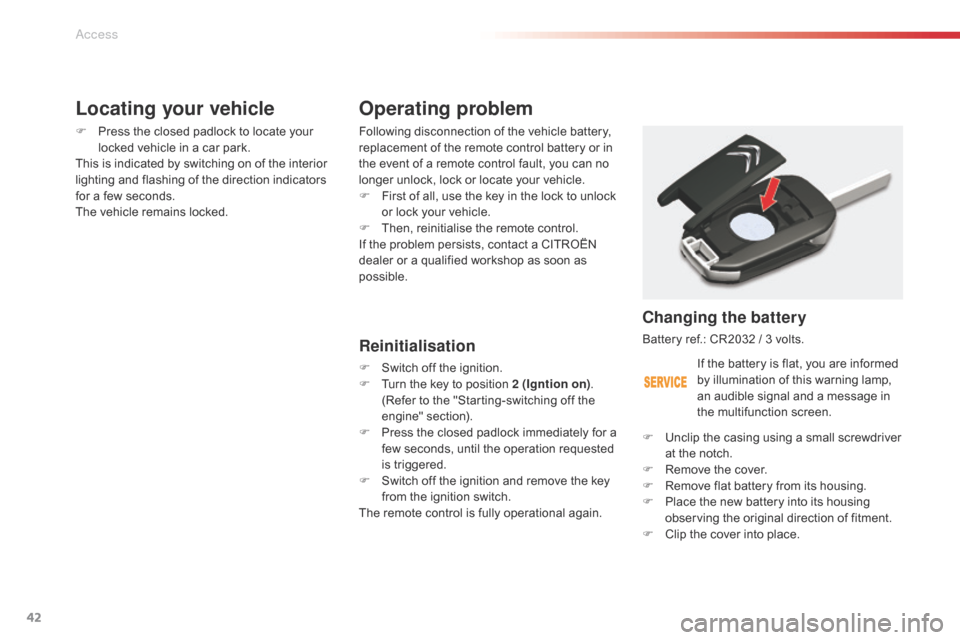
Changing the battery
Battery ref.: CR2032 / 3 volts.
F
U
nclip the casing using a small screwdriver
at the notch.
F
R
emove the cover.
F
R
emove flat battery from its housing.
F
P
lace the new battery into its housing
observing the original direction of fitment.
F
C
lip the cover into place.
Locating your vehicle
F Press the closed padlock to locate your locked vehicle in a car park.
This is indicated by switching on of the interior
lighting and flashing of the direction indicators
for a few seconds.
The vehicle remains locked.
If the battery is flat, you are informed
by illumination of this warning lamp,
an audible signal and a message in
the multifunction screen.
Access
Page 45 of 344

43
Lost keys
Go to a CITROËN dealer with the vehicle's registration document, your personal
identification documents and if possible the key code label.
The CITROËN dealer will be able to look up the key code and the transponder code
required to order a new key.
Remote control
The high frequency remote control is a sensitive system; do not operate it while it is in your
pocket as there is a possibility that it may unlock the vehicle, without you being aware of it.
Do not repeatedly press the buttons of your remote control out of range and out of sight of
your vehicle. You run the risk of stopping it from working and the remote control would have
to be reinitialised.
No remote control can operate when the key is in the ignition switch, even when the ignition
is switched off, except for reinitialisation.
Locking the vehicle
Driving with the doors locked may make access to the passenger compartment by the
emergency services more difficult in an emergency.
As a safety precaution, never leave children alone in the vehicle, except for a very short
period.
In all cases, it is essential to remove the key from the ignition switch when leaving the vehicle.
Anti-theft protection
Do not make any modifications to the electronic engine immobiliser system; this could
cause malfunctions.
When purchasing a second-hand vehicle
Have the pairing of all of the keys in your possession checked by a CITROËN dealer, to
ensure that only your keys can be used to open and start the vehicle.Do not throw the remote control
batteries away, they contain metals
which are harmful to the environment.
Take them to an approved collection
point.
2
Access
Page 46 of 344

44
Alarm*
- exterior perimeter
The system checks for opening of the vehicle.
The alarm is triggered if anyone tries to open a
door, the boot, the bonnet...
- interior volumetric
The system checks for any variation in the
volume in the passenger compartment.
The alarm is triggered if anyone breaks a
window, enters the passenger compartment or
moves inside the vehicle.
- tilt
The system checks for any change in the
attitude of the vehicle.
The alarm is triggered if the vehicle is lifted,
moved or knocked.
Locking the vehicle with full
alarm system
Activation
* According to country.
Self-protection function
The system checks for the putting out of
service of its components.
The alarm is triggered if the battery, the
central control or the siren wiring are
put out of service or damaged.
For all work on the alarm system,
contact a CITROËN dealer or a
qualified workshop.
System which protects and provides a deterrent
against theft and break-ins. It provides the
following types of monitoring:
F
Switch off the ignition and get out of the
vehicle.
F Press the locking button on the remote control.The monitoring system is active: the indicator
lamp in the button flashes once per second.
After the locking button on the remote control
is pressed, the exterior perimeter monitoring
is activated after a delay of 5 seconds and the
interior volumetric and anti-tilt monitoring after
a delay of 45 seconds.
If an opening (door, boot...) is not closed
fully, the vehicle is not locked but the exterior
perimeter monitoring will be activated after a
delay of 45 seconds at the same time as the
interior volumetric and anti-tilt monitoring.
Access
Page 47 of 344

45
Deactivation
F Press the unlocking button on the remote control.
The alarm system is deactivated: the indicator
lamp in the button goes off.
Locking the vehicle
with exterior perimeter
monitoring only
Deactivate the interior volumetric and anti-tilt
monitoring to avoid unwanted triggering of the
alarm in certain cases such as:
-
l
eaving a pet in the vehicle,
-
l
eaving a window partially open,
-
w
ashing your vehicle,
-
c
hanging a wheel,
-
h
aving your vehicle towed,
-
t
ransport by sea.
Deactivation of the interior
volumetric and anti-tilt
monitoring
F Switch off the ignition.
F W ithin ten seconds, press the button until
the indicator lamp is on continuously.
F
G
et out of the vehicle.
F
P
ress the locking button on the remote
control immediately.
The exterior perimeter monitoring alone is
activated: the indicator lamp in the button
flashes once per second.
To be effective, this deactivation must be carried
out each time the ignition is switched off.
Reactivation of the interior
volumetric and anti-tilt monitoring
F Press the unlocking button on the remote control to deactivate the exterior perimeter
monitoring.
F
P
ress the locking button on the remote
control to activate all the monitoring
functions.
The indicator lamp in the button again flashes
once per second.
2
Access
Page 48 of 344
46
Triggering of the alarm
This is indicated by sounding of the siren
and flashing of the direction indicators for
thirty seconds.
The monitoring functions remain active until
the alarm has been triggered eleven times in
succession.
When the vehicle is unlocked using the remote
control, rapid flashing of the indicator lamp
in the button informs you that the alarm was
triggered during your absence. When the
ignition is switched on, this flashing stops
immediately.
Failure of the remote control
F unlock the vehicle using the key in the driver's door lock,
F
o
pen the door; the alarm is triggered,
F
s
witch on the ignition; the alarm stops; the
indicator lamp in the button goes off.
Locking the vehicle without
activating the alarm
F Lock or deadlock the vehicle using the key in the driver's door lock.
Operating fault
When the ignition is switched on, fixed
illumination of the indicator lamp in the button
indicates a fault with the system.
Have it checked by a CITROËN dealer or a
qualified workshop.
Automatic activation*
2 minutes after closing the last door or the
boot, the system is activated automatically.
F
T
o avoid triggering the alarm when entering
the vehicle, first press the remote control
unlocking button.
* Depending on country of sale.
To deactivate the monitoring functions:
Access
Page 49 of 344

47
Electric windows
1. Driver's electric window control.
2. Passenger's electric window control.
3.
R
ear right electric window control.
4.
R
ear left electric window control.
5.
D
eactivation of the rear electric window
and door controls.
One-touch electric windows
- automatic mode F P ress or pull the control firmly. The
window opens or closes fully when the
control is released.
F
P
ressing the control again stops the
movement of the window.
Safety anti-pinch
When the window rises and meets an obstacle,
it stops and partially lowers again.
The electric window controls remain
operational for approximately
45
seconds after the ignition is switched
off or until the vehicle is locked after a
door is opened.
If one of the passenger windows cannot
be operated from the driver's door
control panel, carry out the operation
from the control panel of the passenger
door concerned, and vice versa. If the window cannot be closed (for
example, in the presence of ice),
immediately after the movement is
reversed:
F
p
ress and hold the control until the
window opens fully,
F
t
hen pull the control immediately
and hold it until the window closes,
F
c
ontinue to hold the control for
approximately one second after the
window has closed.
The safety anti-pinch function is not
operational during these operations.
There are two options:
-
m
anual mode
F
P
ress or pull the control gently. The
window stops when the control is
released.
2
Access
Page 50 of 344
48
Reinitialisation
If a window does not rise automatically, its
operation must be reinitialised:
F
p
ull the control until the window stops,
F
r
elease the control and pull it again until
the window closes fully,
F
c
ontinue to hold the control for
approximately one second after the window
has closed,
F
p
ress the control to lower the window
automatically to the low position,
F
w
hen the window has reached the low
position, press the control again for
approximately one second.
The safety anti-pinch function is not
operational during these operations.
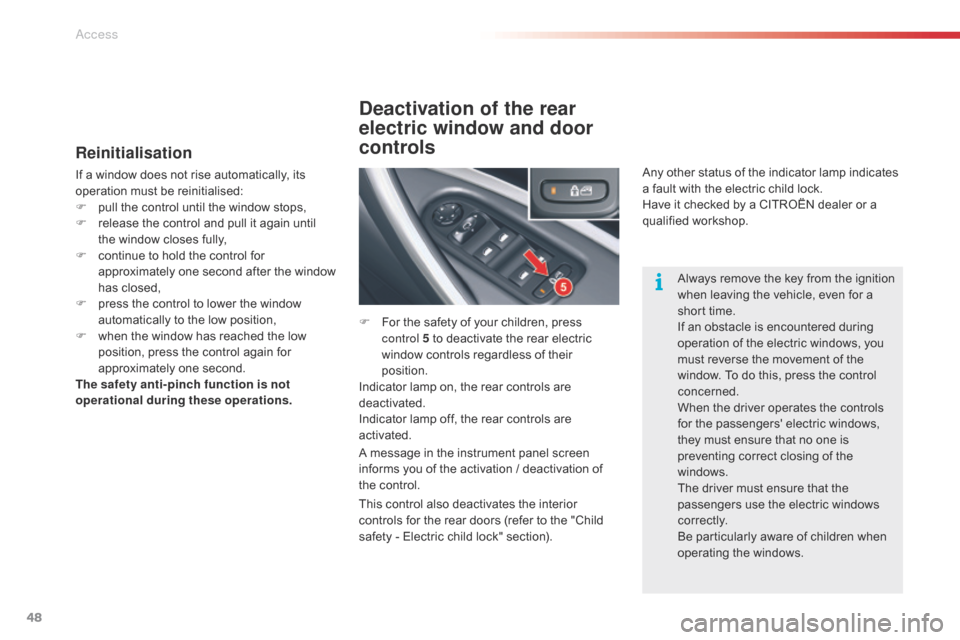
Deactivation of the rear
electric window and door
controls
F For the safety of your children, press control 5 to deactivate the rear electric
window controls regardless of their
position.
Indicator lamp on, the rear controls are
deactivated.
Indicator lamp off, the rear controls are
activated.
A message in the instrument panel screen
informs you of the activation / deactivation of
the control. Any other status of the indicator lamp indicates
a fault with the electric child lock.
Have it checked by a CITROËN dealer or a
qualified workshop.
Always remove the key from the ignition
when leaving the vehicle, even for a
short time.
If an obstacle is encountered during
operation of the electric windows, you
must reverse the movement of the
window. To do this, press the control
concerned.
When the driver operates the controls
for the passengers' electric windows,
they must ensure that no one is
preventing correct closing of the
windows.
The driver must ensure that the
passengers use the electric windows
c o r r e c t l y.
Be particularly aware of children when
operating the windows.
This control also deactivates the interior
controls for the rear doors (refer to the "Child
safety - Electric child lock" section).
Access
Page 57 of 344
55
Panoramic sunroof (Saloon)
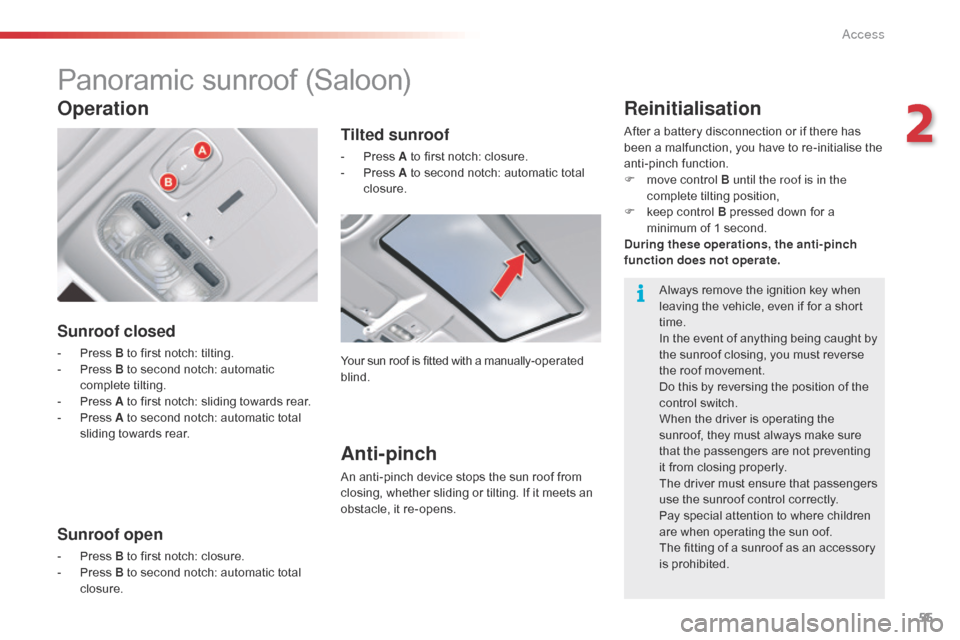
Sunroof closed
- Press B to first notch: tilting.
- P ress B to second notch: automatic
complete tilting.
-
P
ress A to first notch: sliding towards rear.
-
P
ress A to second notch: automatic total
sliding towards rear.
Sunroof open
- Press B to first notch: closure.
- P ress B to second notch: automatic total
closure.
Operation
Tilted sunroof
- Press A to first notch: closure.
- P ress A to second notch: automatic total
closure.
Your sun roof is fitted with a manually-operated
blind.
Anti-pinch
An anti-pinch device stops the sun roof from
closing, whether sliding or tilting. If it meets an
obstacle, it re-opens.
Reinitialisation
After a battery disconnection or if there has
been a malfunction, you have to re-initialise the
anti-pinch function.
F
m
ove control B until the roof is in the
complete tilting position,
F
k
eep control B pressed down for a
minimum of 1 second.
During these operations, the anti-pinch
function does not operate .
Always remove the ignition key when
leaving the vehicle, even if for a short
time.
In the event of anything being caught by
the sunroof closing, you must reverse
the roof movement.
Do this by reversing the position of the
control switch.
When the driver is operating the
sunroof, they must always make sure
that the passengers are not preventing
it from closing properly.
The driver must ensure that passengers
use the sunroof control correctly.
Pay special attention to where children
are when operating the sun oof.
The fitting of a sunroof as an accessory
is prohibited.
2
Access
Page 61 of 344

59
Electric adjustments
To adjust the electric seats, switch on the
ignition or start the engine if the vehicle has
gone into economy mode.
Seat adjustments are also possible for a short
period after opening one of the front doors or
switching off the ignition.
1.
A
djustment of the seat height and
angle, and longitudinal position
R
aise or lower the front of the control to
adjust the seat cushion angle.
R
aise or lower the rear of the control to
raise or lower the seat.
S
lide the control for wards or backwards to
move the seat for ward or back.
2.
A
djustment of the backrest angle
M
ove the control for wards or backwards to
adjust the backrest angle.
3.
A
djustment of the angle of the top of
the backrest
M
ove the control for wards or backwards to
adjust the angle of the top of the backrest. Before moving the seat backwards,
ensure that there is nothing that might
prevent the full travel of the seat, so
as to avoid the risk of of jamming the
seat caused by the presence of objects
on the floor behind the seat or rear
passengers. If the seat jams, stop the
movement immediately.
Move the control:
-
F
or wards or backwards to increase or
reduce the lumbar support.
-
U
pwards or downwards to raise or lower
the lumbar support zone.
4.
A
djustment of lumbar support
T
his function allows you to independently
adjust the height and level of lumbar
support.
3
Ease of use and comfort
Page 63 of 344

61
Storing driving positions
System which stores the settings of the driver's
seat. Up to two positions can be stored using
the buttons on the side of the driver's seat.
When storing a driving position, the air
conditioning settings are also memorised.
Storing a position
Using buttons M / 1 / 2
F Switch on the ignition.
F A djust your seat.
F
P
ress button M , then press button 1 or 2
within four seconds.
A
n audible signal confirms that the settings
have been stored.
Storing a new position cancels the previous
position.
Welcome function
The welcome function assists entry and leaving
the vehicle.
After switching off the ignition and opening
the driver’s door, the seat moves back
automatically and then stays in this position,
ready for the next entry to the vehicle.
When switching on the ignition, the seat moves
for ward to the memorised driving position.
When moving the seat, take care that no
person or object hinders the automatic
movement of the seat.
This function is deactivated by default. You may
activate or deactivate this function using the
"Main Menu" on the instrument panel screen.
To do so, select " Vehicle parameters/Comfort /
Driver welcome".
To adjust the air conditioning, refer to
the "Air conditioning" section.For your safety, avoid storing a driving
position while driving.
Recalling a stored position
Ignition on or engine running
F briefly press button 1 or 2 to recall the
corresponding position.
A
n audible signal indicates the end of the
adjustment.
When the ignition is on, after a few consecutive
position recalls, the function will be deactivated
until the engine is started, to prevent
discharging of the battery.
3
Ease of use and comfort