welcome CITROEN C5 X 2022 Owners Manual
[x] Cancel search | Manufacturer: CITROEN, Model Year: 2022, Model line: C5 X, Model: CITROEN C5 X 2022Pages: 228, PDF Size: 6.78 MB
Page 3 of 228
Welcome
Thank you for choosing a Citroën C5 X.
This document presents the key information and recommendations required
for you to be able to explore your vehicle in complete safety. We strongly
recommend familiarising yourself with this document and the Warranty and
Maintenance Record.
003C
00470052004600580050004800510057
country in which it was sold.
The descriptions and illustrations are for guidance only.
0024005800570052005000520045004C004F004800560003
equipment and accessories without having to update this guide.
If ownership of your vehicle is transferred, please ensure this Han is
passed on to the new owner.
Key
Safety warning
Additional information
Environmental protection feature
Left-hand drive vehicle
Right-hand drive vehicleLocation of the equipment / button
described
using a black area.
For any work on your vehicle, contact a member of the Manufacturer's
004700480044004F00480055
workshop.
Page 4 of 228
2
Contents
■
Overview
■
Eco-driving
1InstrumentsInformation to the driver 10
Digital instrument panel 10
E-HUD 11
Warning and indicator lamps 12
Indicators 17
Manual test 20
Total distance recorder 20
Trip computer 20
Touch screen 21
Remote functions (Rechargeable hybrid) 23
2AccessElectronic key with remote control function and
built-in key 25
Proximity Keyless Entry and Start 27
Central locking 29
Back-up procedures 29
Doors 31
Boot 32
Motorised tailgate 32
Alarm 35
Electric windows 38
Sunroof 39
3Ease of use and comfortDriving position 41
Front seats 42
Steering wheel adjustment 45
Mirrors 46
Rear bench seat 47
Heating and Ventilation 49
Dual-zone automatic air conditioning 50
Front demisting - defrosting 52
Rear screen demisting/defrosting 52
Heated windscreen 53
Temperature pre-conditioning
(Rechargeable hybrid)
53
Front fittings 54
Courtesy lamps 57
Interior ambient lighting 57
Rear fittings 58
Boot fittings 59
4Lighting and visibilityExterior lighting control stalk 61
Direction indicators 62
Headlamp beam height adjustment 63
Automatic illumination of headlamps 63
Guide-me-home and welcome lighting 63
Automatic lighting systems - General
recommendations
64
Automatic headlamp dipping 64
Cornering lighting 65
Wiper control stalk 65
Automatic wipers 66
Changing a wiper blade 68
5SafetyGeneral safety recommendations 69
Hazard warning lamps 69
Horn 69
Pedestrian horn (Rechargeable hybrid) 70
Emergency or assistance 70
Electronic stability control (ESC) 72
Seat belts 75
Airbags 77
Active bonnet 79
Child seats 79
Deactivating the front passenger airbag 81
ISOFIX child seats 82
i-Size child seats 84
Installing child seats 85
Child lock 87
6DrivingDriving recommendations 88
Starting/Switching off the engine with
Keyless Entry and Starting
89
Starting rechargeable hybrid vehicles 90
Electric parking brake 91
Automatic gearbox 93
Citroën Advanced Comfort active suspension 96
Driving modes 96
Hill start assist 98
Gear shift indicator 98
Stop & Start 99
Tyre under-inflation detection 100
Driving and manoeuvring aids - General
recommendations
101
Steering wheel with hands-on detection 103
Shortcuts for driving aids 103
Road signs recognition 104
Speed limiter 107
Cruise control - Specific recommendations 109
Cruise control 109
Highway Driver Assist 111
Page 29 of 228
27
Access
2inoperative. It would then be necessary to
reset it.
Anti-theft protection
Do not modify the electronic vehicle
immobiliser, as this might result in
malfunctions.
Locking the vehicle
Driving with the doors locked could make
it more difficult for the emergency services
to enter the passenger compartment in an
emergency.
As a safety precaution, take the electronic key
with you when leaving the vehicle, even for a
short time.
Purchasing a second-hand vehicle
Have the key codes memorised by a
CITROËN dealer, to ensure that the keys in
your possession are the only ones able to
start the vehicle.
Proximity Keyless Entry
and Start
This Keyless Entry and Starting system enables
automatic vehicle locking/unlocking simply by
detection of the electronic key. As long as the driver has the electronic key
on their person, the vehicle unlocks as they
approach and locks when they walk away.
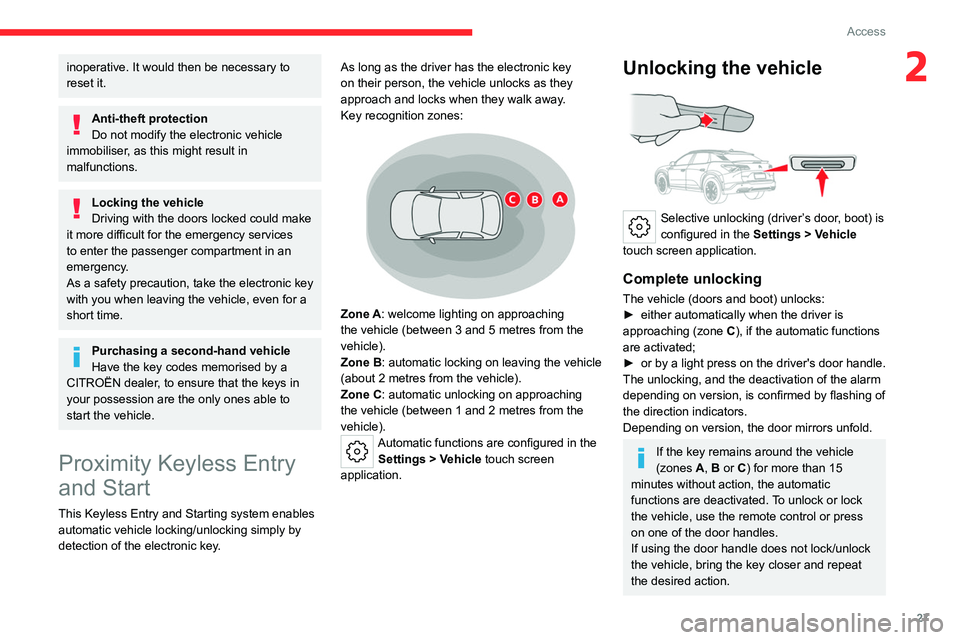
Key recognition zones:
Zone A: welcome lighting on approaching
the vehicle (between 3 and 5
metres from the
vehicle).
Zone B: automatic locking on leaving the vehicle
(about 2
metres from the vehicle).
Zone C: automatic unlocking on approaching
the vehicle (between 1 and 2
metres from the
vehicle).
Automatic functions are configured in the Settings > Vehicle touch screen
application.
Unlocking the vehicle
Selective unlocking (driver’s door, boot) is
configured in the Settings > Vehicle
touch screen application.
Complete unlocking
The vehicle (doors and boot) unlocks:
► either automatically when the driver is
approaching (zone C
), if the automatic functions
are activated;
►
or
by a light press on the driver's door handle.
The unlocking, and the deactivation
of the alarm
depending on version, is confirmed by flashing of
the direction indicators.
Depending on version, the door mirrors unfold.
If the key remains around the vehicle
(zones A, B or C) for more than 15
minutes without action, the automatic
functions are deactivated. To unlock or lock
the vehicle, use the remote control or press
on one of the door handles.
If using the door handle does not lock/unlock
the vehicle, bring the key closer and repeat
the desired action.
Page 31 of 228

29
Access
2taking the Keyless Entry and Starting
system’s electronic key with you.
Be aware of the risk of theft of the vehicle if
the key is present in one of the defined areas
while the vehicle is unlocked.
In order to preserve the battery in the
electronic key and the vehicle's battery:
–
The unlock on approach function (zone
C
)
automatically switches to standby mode
after several days (approximately one week)
without being used. To unlock the vehicle, use
the remote control or press on one of the door
handles. The next time the vehicle is started,
the automatic unlocking and locking functions
will be reactivated.
–
If the welcome lighting is triggered
several times in succession without the
vehicle subsequently being started, it will be
deactivated.
–
All "hands-free" functions switch to
extended standby mode after 21 days of non-
use.
To restore these functions, unlock the
vehicle using the remote control and start the
engine.
Electrical interference
The electronic key may not operate
if close to certain electronic devices (e.g.
telephones (switched on or on standby),
laptop computers, strong magnetic fields). If
this is the case, move the electronic key away
from the electronic device.
Central locking
Manual
► Press this button to lock/unlock the vehicle
(doors and boot) from inside the vehicle.
The indicator lamp comes on to confirm the
central locking of the vehicle.
Central locking does not take place if any
of the doors are open.
When locking/deadlocking from the
outside
When the vehicle is locked or deadlocked
from the outside, the indicator lamp flashes
and the button is deactivated.
►
After normal locking, pull one of the
interior door controls to unlock the vehicle.
►
After deadlocking, you must use the
remote control, the "Keyless Entry and
Starting" system or the built-in key to unlock
the vehicle.
Automatic (anti-intrusion security)
The doors and boot lock automatically while
driving (speed above 6 mph (10
km/h)).
To deactivate/reactivate this function (activated
by default):
►
Press the button until a confirmation
message appears.
Transporting long or voluminous
objects
Press the central locking control to drive
with the boot open and the doors locked.
Otherwise, every time the speed of the
vehicle exceeds 6 mph (10 km/h), the sound
of the locks rebounding will be heard and an
alert will be displayed.
Back-up procedures
Lost keys, remote control,
electronic key
Go to a CITROËN dealer with the vehicle's
registration certificate, your personal
identification documents and if possible, the label
bearing the key code.
Page 65 of 228

63
Lighting and visibility
4Headlamp beam height
adjustment
To avoid dazzling other road users, the height
of the headlamp beams must be adjusted
according to the load in the vehicle.
0 (Initial setting) Driver only or driver + front passenger
1 5 people
2 5 people + load in the boot
3 Driver only + load in the boot
4 5 6 Not used
Automatic illumination of
lamps
With the lighting control stalk in the “ AUTO”
position and if a low level of exterior brightness
is detected by the rain/sunshine sensor, the
sidelamps and dipped beam headlamps are
switched on automatically, without any action on
the part of the driver. They may also come on if
rain is detected, at the same time as automatic
operation of the windscreen wipers.
As soon as the brightness returns to a sufficient
level or after the windscreen wipers are switched
off, the lamps are switched off automatically.
Malfunction
In the event of a malfunction of the rain/
sunshine sensor, the vehicle’s lamps
come on and this warning lamp is displayed on
the instrument panel, accompanied by an
audible signal and/or the display of a message.
Have it checked by a CITROËN dealer or a
qualified workshop.
Do not cover the rain/sunshine sensor
located at the top centre of the
windscreen behind the interior rear view
mirror; the associated functions would no
longer be controlled.
In fog or snow, the rain/sunshine sensor
may detect sufficient light. For this
reason, the lighting will not come on
automatically.
The inner surface of the windscreen may become misted up and affect the proper
operation of the rain/sunshine sensor.
In humid and cold weather, demist the
windscreen regularly.
Guide-me-home and
welcome lighting
Guide-me-home lighting
Automatic
With the ring of the lighting control stalk in the
"AUTO” position and when the light is poor, the
dipped beam headlamps come on automatically
when the ignition is switched off.
You can activate/deactivate and adjust the duration of the guide-me-home
lighting in the Settings
> Vehicle touch screen
application.
Manual
► With the ignition off, pull the lighting control
stalk towards you ("headlamp flash") to activate/
deactivate the function.
Manual guide-me-home lighting goes off
automatically after a period of time.
Welcome lighting
This system automatically switches on:
Page 66 of 228
64
Lighting and visibility
– On the outside, sidelamps, dipped beam
headlamps and door mirror spotlamps.
–
Inside, courtesy lamps and footwell lighting.
Door mirror spotlamps
These spotlamps facilitate access to the vehicle
by lighting the ground near the front doors.
The spotlamps come on automatically:
–
when the vehicle is unlocked.
–
when a door is opened.
–
when a request to locate the vehicle is
received from the remote control.
They also come on with the welcome lighting
and guide-me-home lighting functions.
They go off automatically after 30 seconds.
Automatic lighting systems - General
recommendations
The automatic lighting systems use a detection
camera, located at the top of the windscreen.
Operating limits
The system may be disrupted or not work
correctly:
–
When visibility conditions are poor
(e.g.
snowfall, heavy rain).
–
If the windscreen is dirty
, misted-up or
masked (e.g.
sticker) in front of the camera.
–
If the vehicle is facing highly reflective signs
or safety barrier reflectors.
The system is not able to detect:
– Road users that do not have their own
lighting, such as pedestrians.
–
V
ehicles with hidden lighting (e.g. travelling
behind a safety barrier on the motorway).
–
V
ehicles at the top or bottom of a steep
slope, on winding roads, on crossroads.
Maintenance
Clean the windscreen regularly,
particularly the area in front of the camera.
The internal surface of the windscreen can
also become misted around the camera.
In humid and cold weather, demist the
windscreen regularly.
Do not allow snow to accumulate on the
bonnet or roof of the vehicle as this could
obstruct the camera.
Automatic headlamp dipping
For more information, refer to the
General recommendations for
automatic lighting systems.
When the lighting control ring is in the " AUTO”
position and the function is activated on the
touch screen, this system automatically switches
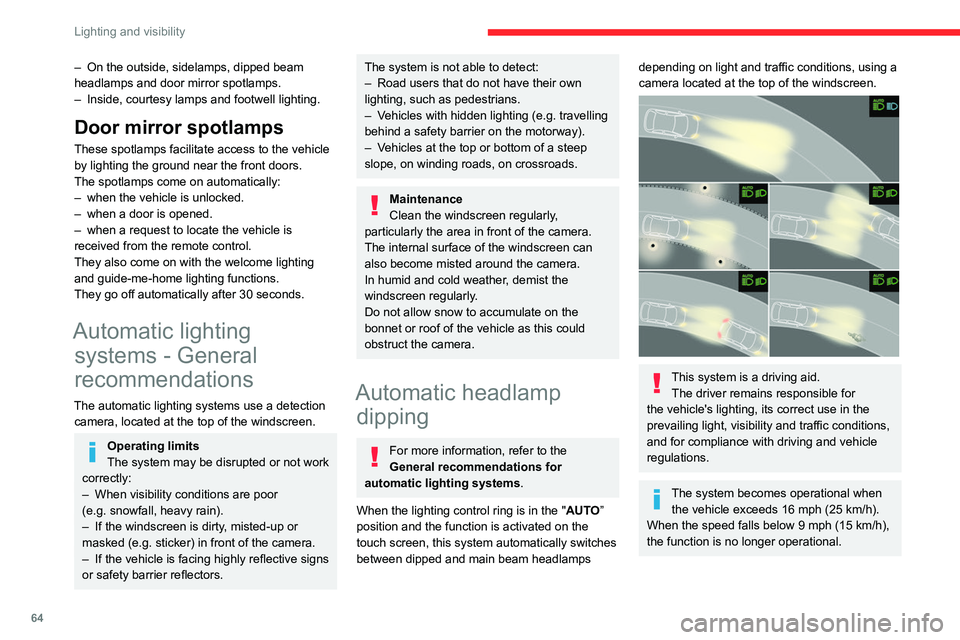
between dipped and main beam headlamps
depending on light and traffic conditions, using a
camera located at the top of the windscreen.
This system is a driving aid. The driver remains responsible for
the vehicle's lighting, its correct use in the
prevailing light, visibility and traffic conditions,
and for compliance with driving and vehicle
regulations.
The system becomes operational when the vehicle exceeds 16 mph (25 km/h).
When the speed falls below 9 mph (15 km/h),
the function is no longer operational.
Page 145 of 228

143
Practical information
7If it becomes necessary to replace the battery,
contact the CITROËN dealer for instructions on
its disposal. Improper disposal carries the risk of
severe burns, electric shock, and damage to the
environment.
In accordance with regulations, CITROËN
ensures a second life or recycling of this
component in collaboration with qualified
operators.
Charging flap
The charging flap is located on the rear left-hand
side of the vehicle.
1.Deferred charging activation button
2. Indicator lamp confirming that the nozzle is
locked into the charging connector.
Fixed red: nozzle correctly positioned and
locked.
Flashing red: nozzle incorrectly positioned or
locking not possible.
3.Charging connector
4. Light guides
Status of light
guides Meaning
Fixed white Welcome lighting when flap
is opened
Fixed blue Deferred charging
Flashing green Charging
Fixed green Charging complete
Fixed red Malfunction
In case of impact, even light, against the
charging flap, do not use it.
Do not dismantle or modify the charging
connector - risk of electrocution and/or fire!
Contact a CITROËN dealer or a qualified
workshop.
Charging cables, sockets
and chargers
The traction battery can be charged using
several types of cables. The charging cable supplied with the vehicle is
compatible with the electrical installations of the
country of sale. If you are travelling abroad, refer
to the following tables to check the compatibility
of local electrical installations with the charging
cable.
Contact a CITROËN dealer or a qualified
workshop to obtain the appropriate charging
cable(s).
Identification labels on charging
sockets/connectors
Identification labels are affixed to the vehicle,
charging cable and charger to inform the user
about which device needs to be used.
The meaning of each identification label is as
follows:
Page 200 of 228
198
MYCITROËN DRIVE PLUS - MYCITROËN PLAY PLUS
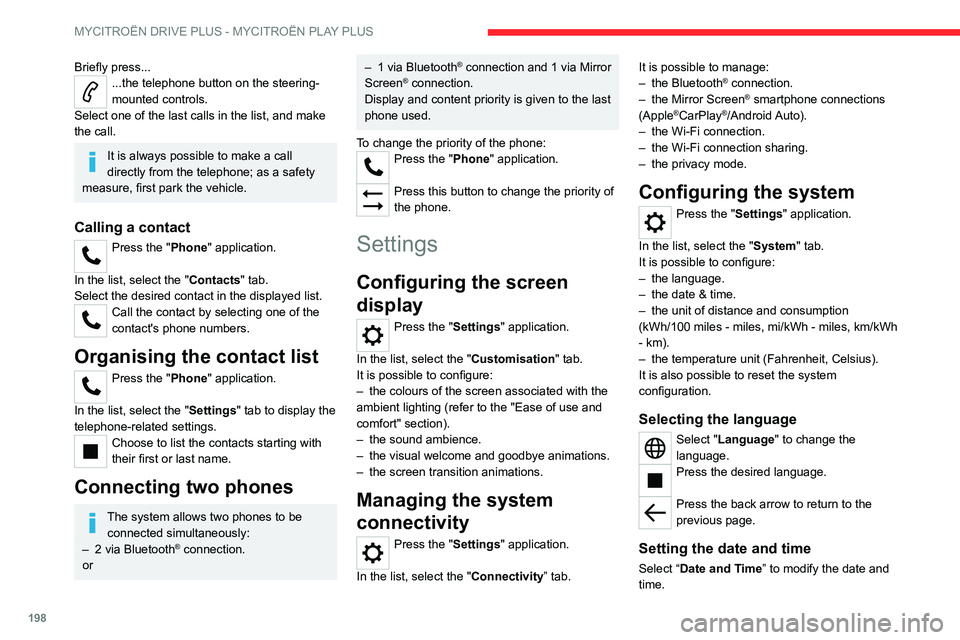
Briefly press......the telephone button on the steering-
mounted controls.
Select one of the last calls in the list, and make
the call.
It is always possible to make a call
directly from the telephone; as a safety
measure, first park the vehicle.
Calling a contact
Press the "Phone" application.
In the list, select the "Contacts" tab.
Select the desired contact in the displayed list.
Call the contact by selecting one of the
contact's phone numbers.
Organising the contact list
Press the "Phone" application.
In the list, select the "Settings" tab to display the
telephone-related settings.
Choose to list the contacts starting with
their first or last name.
Connecting two phones
The system allows two phones to be connected simultaneously:
–
2 via
Bluetooth
® connection.
or
– 1 via Bluetooth® connection and 1 via Mirror
Screen® connection.
Display and content priority is given to the last
phone used.
To change the priority of the phone:
Press the "Phone" application.
Press this button to change the priority of
the phone.
Settings
Configuring the screen
display
Press the "Settings" application.
In the list, select the "Customisation" tab.
It is possible to configure:
–
the colours of the screen associated with the
ambient lighting (refer to the "Ease of use and
comfort" section).
–
the sound ambience.
–
the visual welcome and goodbye animations.
–
the screen transition animations.
Managing the system
connectivity
Press the "Settings" application.
In the list, select the "Connectivity” tab. It is possible to manage:
–
the Bluetooth® connection.
–
the Mirror Screen® smartphone connections
(Apple®CarPlay®/Android Auto).
–
the Wi-Fi connection.
–
the Wi-Fi connection sharing.
–
the privacy mode.
Configuring the system
Press the "Settings" application.
In the list, select the "System" tab.
It is possible to configure:
–
the language.
–
the date & time.
–
the unit of distance and consumption
(kWh/100 miles - miles, mi/kWh - miles, km/kWh
- km).
–
the temperature unit (Fahrenheit, Celsius).
It is also possible to reset the system
configuration.
Selecting the language
Select "Language" to change the
language.
Press the desired language.
Press the back arrow to return to the
previous page.
Setting the date and time
Select “Date and Time” to modify the date and
time.
Page 209 of 228
207
Alphabetical index
Lane departure warning active 129
Leather (care)
163
LEDs - Light-emitting diodes
62
Level, brake fluid
159
Level, engine coolant
19, 159
Level, engine oil
18, 158
Levels and checks
158–159
Level, screenwash fluid
66, 159
Light-emitting diodes - LEDs
62
Lighting dimmer
20
Lighting, directional
65
Lighting, exterior
61, 64
Lighting, guide-me home
63
Lighting, interior
57
Lighting, mood
57
Lighting, welcome
63
Loading
154–155
Load reduction mode
156
Locating your vehicle
26
Locking
26, 28
Locking from the inside
29
Locking the doors
29
Log, alerts
20
Long objects, transporting
58
Low fuel level
140
Lumbar
43
M
Mains socket (domestic network) 143–144
Maintenance (advice)
142, 162
Maintenance, routine
103, 159, 161
Manoeuvring aids (recommendations) 101
Map reading lamps
57
Markings, identification
184
Massage function
45
Massage, multi-point
45
Mat
57, 103
Menu short cuts
22
Mirror, rear view
47
Mirrors, door
46, 52, 131
Mirror, vanity
54
Mobile application
23, 53, 148, 150
Motor, electric
97, 141, 183
Motorised tailgate
32–33
Mountings, ISOFIX
82, 85–86
N
Net, luggage retaining 59
O
Obstacle detection 132
Oil change
158
Oil consumption
158
OIl, engine
158
On-board tools
60, 165–166
Opening the bonnet
157
Opening the boot
27, 32
Opening the doors
27, 31
Opening the windows
25
P
Pads, brake 160
Paint
162, 184
Paint colour code
184
Parcel shelf, rear
59
Parking brake, electric
91–93, 160
Parking sensors, audible and visual
132
Parking sensors, front
133
Parking sensors, rear
133
Passenger compartment temperature pre-
conditioning (Rechargeable hybrid)
23, 53
Pedestrian horn (Rechargeable hybrid)
70
Personalisation
11
Plates, identification
184
Port, USB
54, 58
Post Collision Safety Brake
73
Power
19
Power indicator (Rechargeable hybrid)
8, 19
Pressures, tyres
160, 167, 184
Pre-tensioning seat belts
76
Profiles
186
Protecting children
77, 79–84
Proximity Keyless Entry & Start
27
Puncture
166–167, 169
R
Radar (warnings) 102
Radio
195–196
Reading lamps
57
READY lamp
157
Page 211 of 228

209
Alphabetical index
T
Tables of engines 182–183
Tables of fuses
173
Tailgate
32
Tank, fuel
140
Technical data
182–183
Telephone
193–194, 197–198
Temperature, coolant
19
Time (setting)
198
Tool box
60
Tools
165–166
Top Tether (fixing)
82, 85–86
Total distance recorder
20
Touch screen
21–23, 53
Touch-sensitive reading lamps
57
Towball, quickly detachable
151–154
Towbar
74, 150
Towbar with quickly detachable
towball
151–154
Towed loads
181–183
Towing another vehicle
178, 180
Traction battery charge
145
Traction battery (Rechargeable
hybrid)
19, 141–142, 148
Traction control (ASR)
73
Trailer
74, 150
Trailer stability assist (TSA)
74
Trajectory control systems
72
Triangle, warning
165
Trip computer
20–21
Trip distance recorder
20
Tyres
160, 184
Tyre under-inflation detection
100, 167
U
Under-inflation (detection) 100
Unlocking
25, 27
Unlocking from the inside
29
Unlocking the boot
25, 28
Unlocking the doors
29
Unlocking the tailgate
25, 28
Updating the time
198
V
Vehicle data recording and privacy 201
Ventilation
49
W
Wallbox (Rechargeable hybrid) 143–144, 149
Warning and indicator lamps
12
Warning lamp, driver's seat belt
not fastened
75
Warning lamps
12
Warning lamp, seat belts
75
Warnings and indicators
12–13
Washing
103
Washing (advice)
142, 162
Weights
181
Welcome lighting
64
Wheel, spare
160, 165–166, 169
Window controls
38
Windscreen, heated
53
Windscreen wipers
66
Wiper blades (changing) 67–68
Wipers
65
Wipers, automatic rain sensitive
66