engine Citroen C6 2009 1.G User Guide
[x] Cancel search | Manufacturer: CITROEN, Model Year: 2009, Model line: C6, Model: Citroen C6 2009 1.GPages: 189, PDF Size: 9.28 MB
Page 72 of 189
88
III
5
6
7
A U T O M A T I C A I R C O N D I T I O N I N G
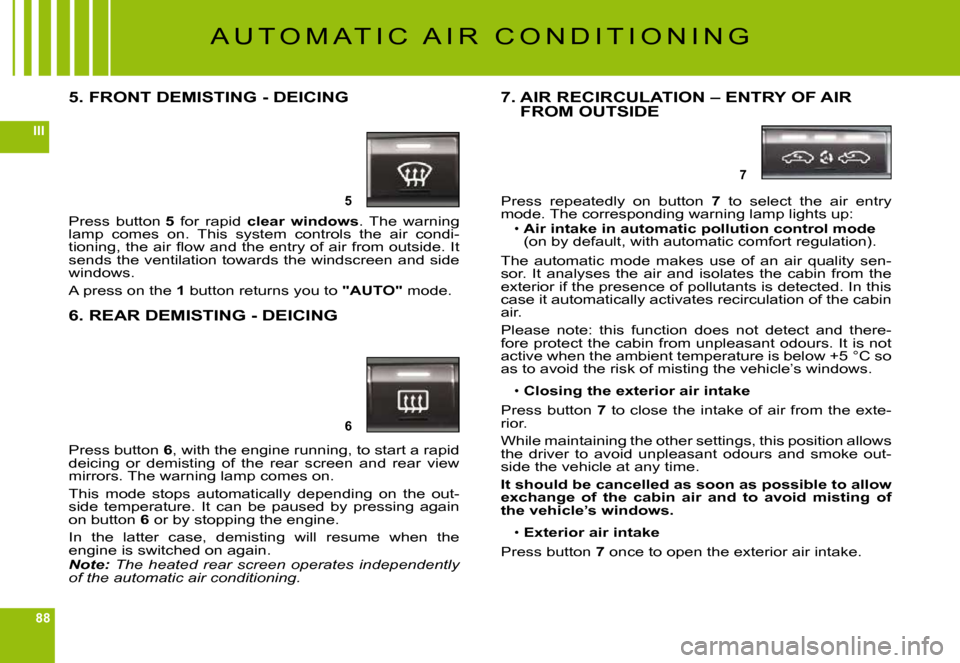
5. FRONT DEMISTING - DEICING
Press button 5 for rapid clear windows. The warning lamp comes on. This system controls the air condi-tioning, the air fl ow and the entry of air from outside. It sends the ventilation towards the windscreen and side windows.
A press on the 1 button returns you to "AUTO" mode.
6. REAR DEMISTING - DEICING
Press button 6, with the engine running, to start a rapid deicing or demisting of the rear screen and rear view mirrors. The warning lamp comes on.
This mode stops automatically depending on the out-side temperature. It can be paused by pressing again on button 6 or by stopping the engine.
In the latter case, demisting will resume when the engine is switched on again.Note: The heated rear screen operates independently of the automatic air conditioning.
7. AIR RECIRCULATION – ENTRY OF AIR FROM OUTSIDE
Press repeatedly on button 7 to select the air entry mode. The corresponding warning lamp lights up:Air intake in automatic pollution control mode (on by default, with automatic comfort regulation).
The automatic mode makes use of an air quality sen-sor. It analyses the air and isolates the cabin from the exterior if the presence of pollutants is detected. In this case it automatically activates recirculation of the cabin air.
Please note: this function does not detect and there-fore protect the cabin from unpleasant odours. It is not active when the ambient temperature is below +5 °C so as to avoid the risk of misting the vehicle’s windows.
Closing the exterior air intake
Press button 7 to close the intake of air from the exte-rior.
While maintaining the other settings, this position allows the driver to avoid unpleasant odours and smoke out-side the vehicle at any time.
It should be cancelled as soon as possible to allow exchange of the cabin air and to avoid misting of the vehicle’s windows.
Exterior air intake
Press button 7 once to open the exterior air intake.
Page 75 of 189
91
III
The programmable heating sys-tem operates independently of the engine.
With the engine off, it is used to preheat the engine cooling system so as to have an optimum engine operating temperature on starting.
The programmable heating sys-tem is started using a long-range remote control. It can be started immediately or programmed to start later.
In the event of a malfunction of the programmable heating sys-tem, contact a CITROËN dealer.the programmable heating sys-programmable heating
Remote control
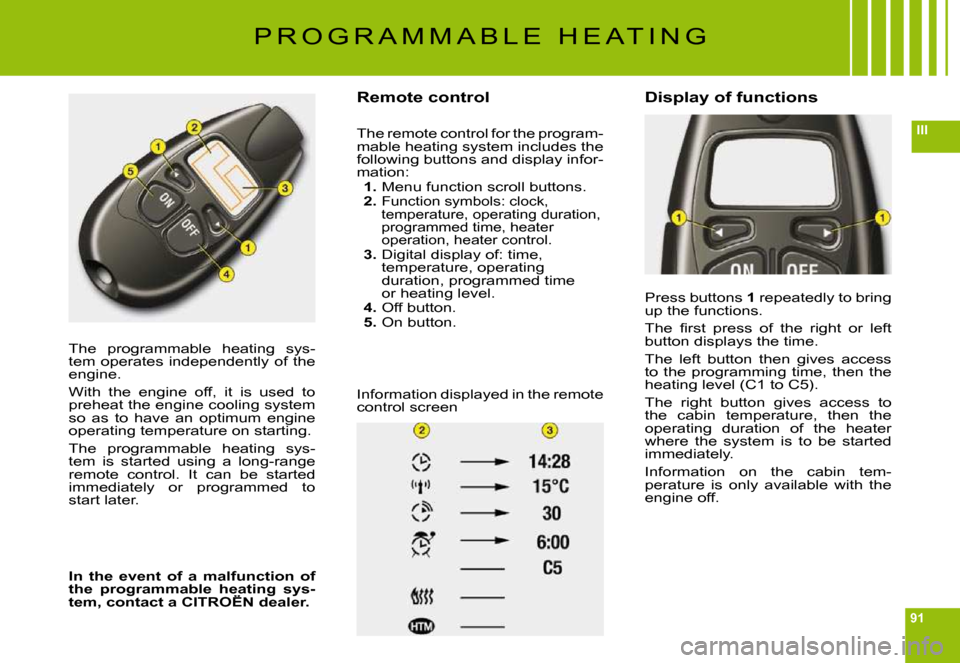
The remote control for the program-mable heating system includes the following buttons and display infor-mation:1. Menu function scroll buttons.2. Function symbols: clock, temperature, operating duration, programmed time, heater operation, heater control.3. Digital display of: time, temperature, operating duration, programmed time or heating level.4. Off button.5. On button.
Information displayed in the remote control screen
Display of functions
Press buttons 1 repeatedly to bring up the functions.
The fi rst press of the right or left button displays the time.
The left button then gives access to the programming time, then the heating level (C1 to C5).
The right button gives access to the cabin temperature, then the operating duration of the heater where the system is to be started immediately.
Information on the cabin tem-perature is only available with the engine off.
P R O G R A M M A B L E H E A T I N G
Page 88 of 189
104
III
G R O U N D C L E A R A N C E A D J U S T M E N T
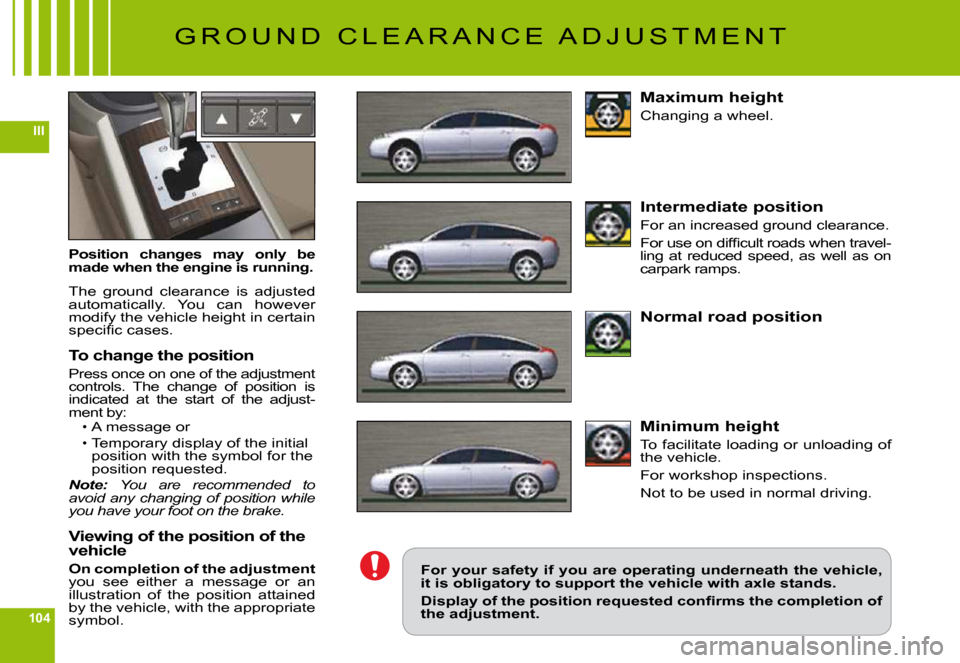
Position changes may only be made when the engine is running.
The ground clearance is adjusted automatically. You can however modify the vehicle height in certain specifi c cases.
To change the position
Press once on one of the adjustment controls. The change of position is indicated at the start of the adjust-ment by:A message or
Temporary display of the initial position with the symbol for the position requested.Note: You are recommended to avoid any changing of position while you have your foot on the brake.
Viewing of the position of the vehicle
On completion of the adjustmentyou see either a message or an illustration of the position attained by the vehicle, with the appropriate symbol.
Page 101 of 189
118
IVA
B
C
D
L E V E L S
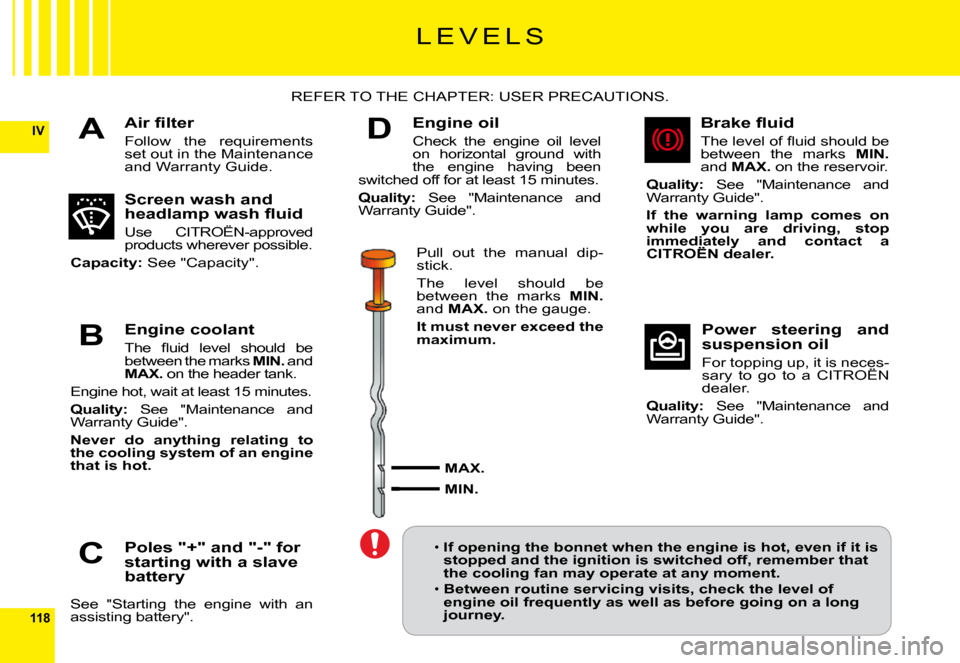
Air fi lter
Follow the requirements set out in the Maintenance and Warranty Guide.
REFER TO THE CHAPTER: USER PRECAUTIONS.
Screen wash and headlamp wash fl uid
Use CITROËN-approved products wherever possible.
Capacity: See "Capacity".
Engine coolant
The fl uid level should be between the marks MIN. and MAX. on the header tank.
Engine hot, wait at least 15 minutes.
Quality: See "Maintenance and Warranty Guide".
Never do anything relating to the cooling system of an engine that is hot.
Poles "+" and "-" for starting with a slave battery
See "Starting the engine with an assisting battery".
Engine oil
Check the engine oil level on horizontal ground with the engine having been switched off for at least 15 minutes.
Quality: See "Maintenance and Warranty Guide".
Pull out the manual dip-stick.
The level should be between the marks MIN.and MAX. on the gauge.
It must never exceed the maximum.
MAX.
MIN.
Brake fl uid
The level of fl uid should be between the marks MIN.and MAX. on the reservoir.
Quality: See "Maintenance and Warranty Guide".
If the warning lamp comes on while you are driving, stop immediately and contact a CITROËN dealer.immediately and immediately
Power steering and suspension oil
For topping up, it is neces-sary to go to a CITROËN For topping up, it is neces-neces-
dealer.
Quality: See "Maintenance and Warranty Guide".
If opening the bonnet when the engine is hot, even if it is stopped and the ignition is switched off, remember that the cooling fan may operate at any moment.
Between routine servicing visits, check the level of engine oil frequently as well as before going on a long journey.
Page 102 of 189
121
IVB
1
1
D
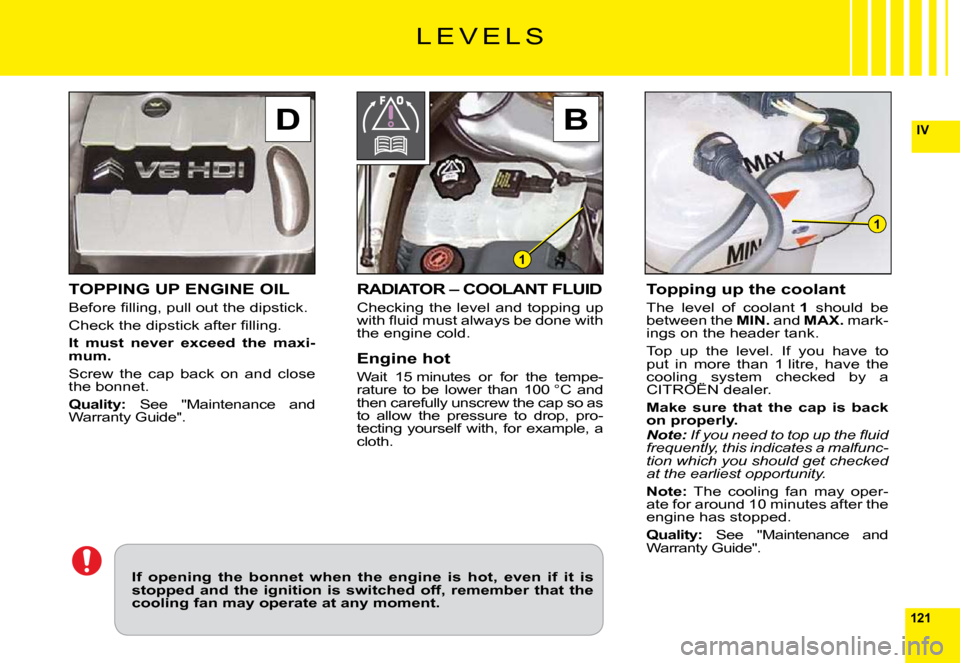
TOPPING UP ENGINE OIL
Before fi lling, pull out the dipstick.
Check the dipstick after fi lling.
It must never exceed the maxi-mum.
Screw the cap back on and close the bonnet.
Quality: See "Maintenance and Warranty Guide".
L E V E L S
RADIATOR – COOLANT FLUID
Checking the level and topping up with fl uid must always be done with the engine cold.
Engine hot
Wait 15 minutes or for the tempe-rature to be lower than 100 °C and then carefully unscrew the cap so as to allow the pressure to drop, pro-tecting yourself with, for example, a cloth.
Topping up the coolant
The level of coolant 1 should be between the MIN. and MAX. mark-ings on the header tank.
Top up the level. If you have to put in more than 1 litre, have the cooling system checked by a CITROËN dealer.cooling system checked cooling system
Make sure that the cap is back on properly.Note: If you need to top up the fl uid frequently, this indicates a malfunc-tion which you should get checked at the earliest opportunity.
Note: The cooling fan may oper-ate for around 10 minutes after the engine has stopped.
Quality: See "Maintenance and Warranty Guide".
If opening the bonnet when the engine is hot, even if it is stopped and the ignition is switched off, remember that the cooling fan may operate at any moment.
Page 104 of 189
120
IV
D
BA
C
D
BA
C
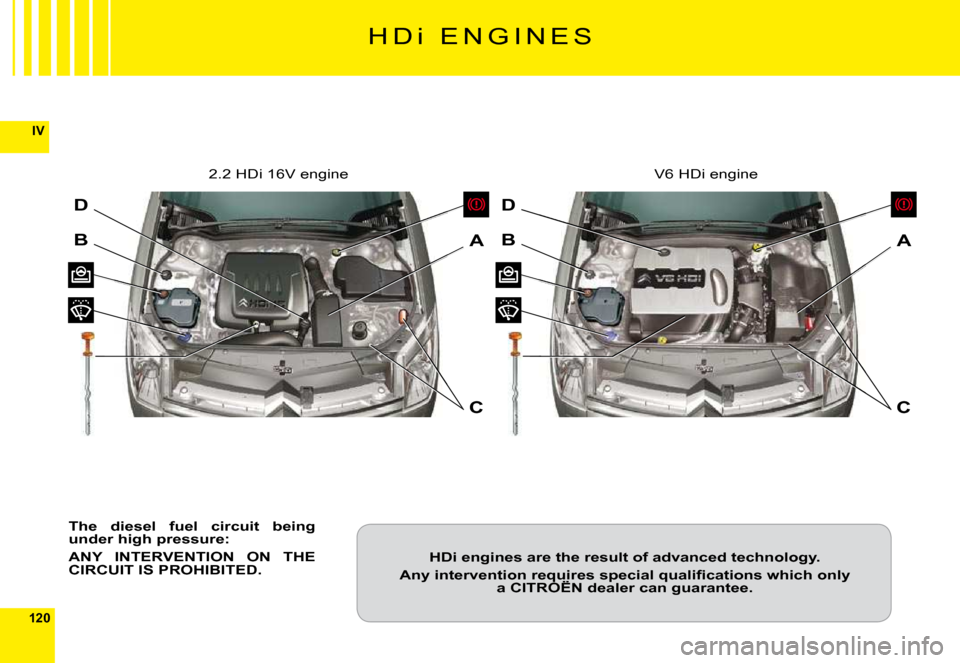
H D i E N G I N E S
The diesel fuel circuit being under high pressure:
ANY INTERVENTION ON THE CIRCUIT IS PROHIBITED.
2.2 HDi 16V engineV6 HDi engine
HDi engines are the result of advanced technology.
Any intervention requires special qualifi cations which only a CITROËN dealer can guarantee.Any intervention requires special qualifi cations which only Any intervention requires special qualifi cations which only
Page 106 of 189
123
IV
STARTING THE ENGINE AFTER DISCONNECTING AND RECONNECTING THE BATTERY1. Turn the ignition key.2. Wait approximately 1 minute before operating the starter in order to allow the electronic systems to re-initialise.
After the battery has been disconnected for a lengthy period o f time, it may be necessary to re-initialise the following functions:The anti-pinch on the windows.
The anti-pinch on the sun roof.
The multifunction display parameters (date, time, language, units of distance and of temperature).The Radio stations.
The NaviDrive. See NaviDrive instructions.
IMPORTANT
In the event of a battery failure, and if the boot is closed, it is then necessary to feed an electrical supply to your vehicle. See following page.
Page 107 of 189
124
IV
BC
A
i
1 2 V B A T T E R Y
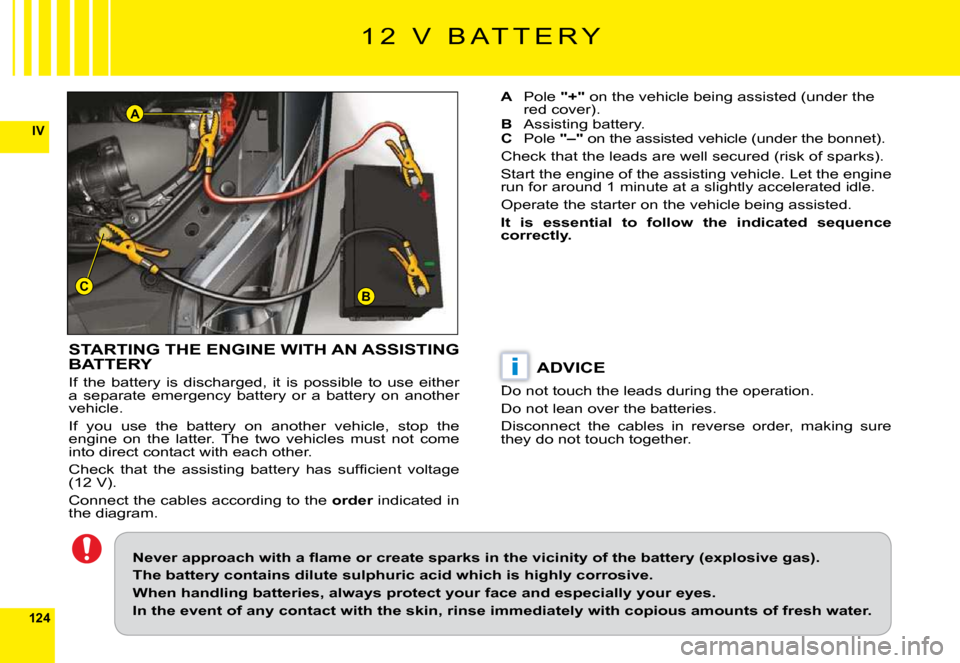
STARTING THE ENGINE WITH AN ASSISTING BATTERY
If the battery is discharged, it is possible to use either a separate emergency battery or a battery on another vehicle.
If you use the battery on another vehicle, stop the engine on the latter. The two vehicles must not come into direct contact with each other.
Check that the assisting battery has suffi cient voltage (12 V).
Connect the cables according to the order indicated in orderthe diagram.
A Pole "+" on the vehicle being assisted (under the red cover).B Assisting battery.C Pole "–" on the assisted vehicle (under the bonnet).
Check that the leads are well secured (risk of sparks).
Start the engine of the assisting vehicle. Let the engine run for around 1 minute at a slightly accelerated idle.
Operate the starter on the vehicle being assisted.
It is essential to follow the indicated sequence correctly.
ADVICE
Do not touch the leads during the operation.
Do not lean over the batteries.
Disconnect the cables in reverse order, making sure they do not touch together.
Never approach with a fl ame or create sparks in the vicinity of the battery (explosive gas).
The battery contains dilute sulphuric acid which is hig hly corrosive.
When handling batteries, always protect your face and es pecially your eyes.
In the event of any contact with the skin, rinse immediatel y with copious amounts of fresh water.
Page 108 of 189
125
IV
F2 F9 F6 F5 F1 F7 F4 F3 F10 F8 F13 F12 F14F17
SH
F11
F15
F15
G29 G30 G31 G32
G33 G34 G35
G36 G38 G40 G37 G39
F U S E S
D A S H B O A R D
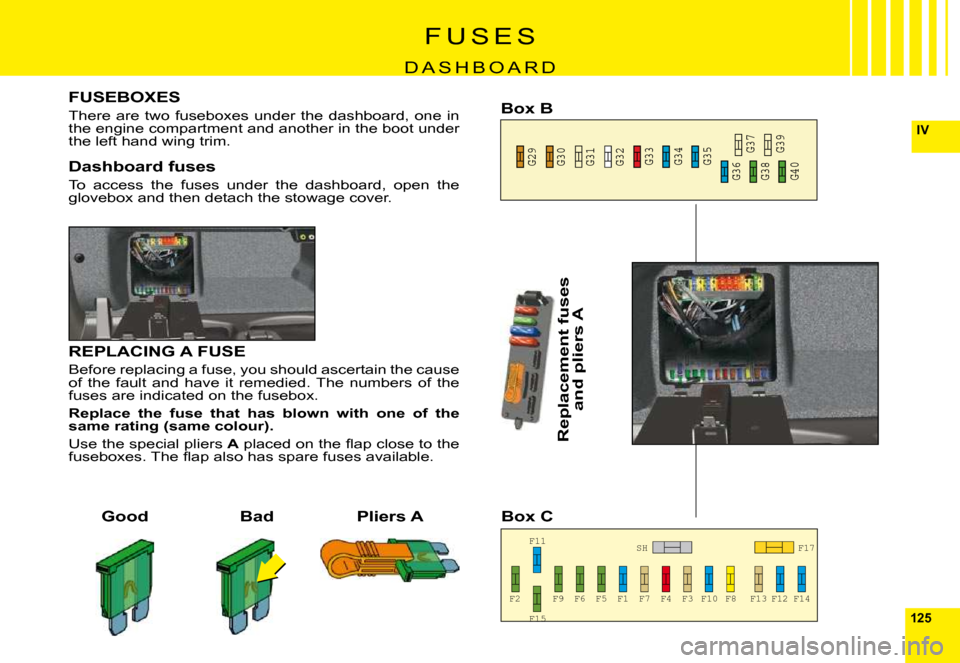
FUSEBOXES
There are two fuseboxes under the dashboard, one in the engine compartment and another in the boot under the left hand wing trim.
Dashboard fuses
To access the fuses under the dashboard, open the glovebox and then detach the stowage cover.
GoodBad
Replacement fuses
and pliers A
Pliers A
Box B
Box C
REPLACING A FUSE
Before replacing a fuse, you should ascertain the cause of the fault and have it remedied. The numbers of the fuses are indicated on the fusebox.
Replace the fuse that has blown with one of the same rating (same colour).
Use the special pliers A placed on the fl ap close to the fuseboxes. The fl ap also has spare fuses available.
Page 111 of 189
128
IV
F U S E S
U N D E R T H E B O N N E T
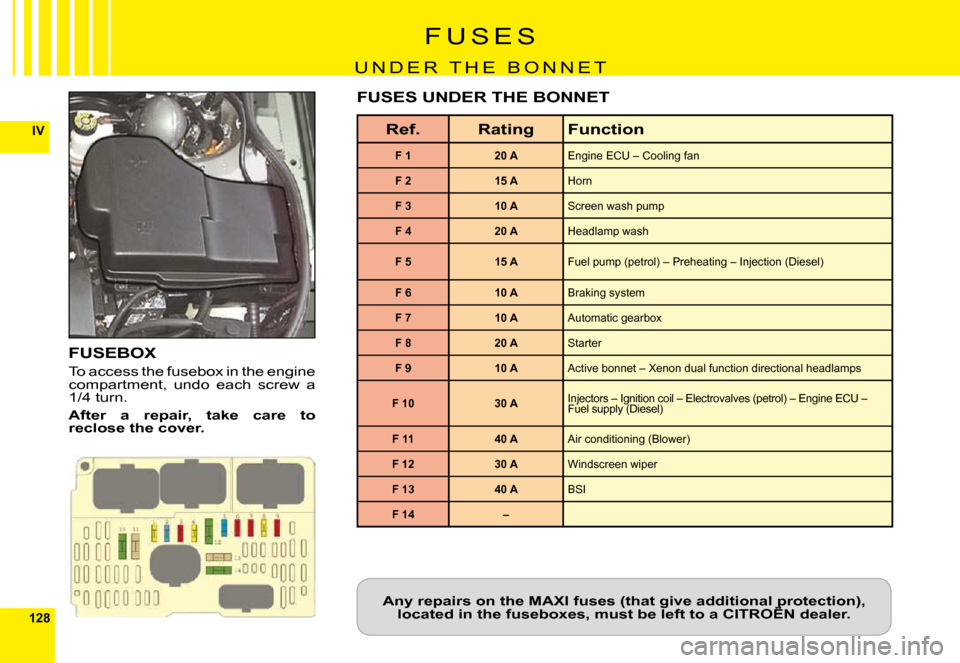
FUSEBOX
To access the fusebox in the engine compartment, undo each screw a 1/4 turn.
After a repair, take care to reclose the cover.
Ref.RatingFunction
F 120 AEngine ECU – Cooling fan
F 215 AHorn
F 310 AScreen wash pump
F 420 AHeadlamp wash
F 515 AFuel pump (petrol) – Preheating – Injection (Diesel)
F 610 ABraking system
F 710 AAutomatic gearbox
F 820 AStarter
F 910 AActive bonnet – Xenon dual function directional headlamps
F 1030 AInjectors – Ignition coil – Electrovalves (petrol) – Engine ECU – Fuel supply (Diesel)Injectors – Ignition coil – Electrovalves (petrol) – Engine ECU – Injectors – Ignition coil – Electrovalves (petrol) – Engine ECU –
F 1140 AAir conditioning (Blower)
F 1230 AWindscreen wiper
F 1340 ABSI
F 14–
FUSES UNDER THE BONNET
Any repairs on the MAXI fuses (that give additional protectio n), located in the fuseboxes, must be left to a CITROËN dealer.Any repairs on the MAXI fuses (that give additional protection), Any repairs on the MAXI fuses (that give additional protection),