start stop button Citroen C6 2011 1.G User Guide
[x] Cancel search | Manufacturer: CITROEN, Model Year: 2011, Model line: C6, Model: Citroen C6 2011 1.GPages: 216, PDF Size: 10.31 MB
Page 97 of 216

95
III
Programming the heaterActivation – deactivation Stopping the heater
You should programme your depar-
ture time so that the system can
automatically calculate the opti-mum start time for the heater.
Programming your departure time
The "HTM" symbol stays on.
PROGRAMMABLE HEATING
Press buttons 1to display the pro-
gramme time.
This symbol is displayed.
After displaying the programme
time, within 10 seconds press but-
t
ons 4 and 5 simultaneously.
This s
ymbol fl ashes.
Adjust the time by pressing buttons 1and press buttons 4and 45simultane-
ously to store the setting.
This symbol is displayed (constant).
When the signal has been received, the "OK"message
is displayed together with the
"HTM" symbol.
This symbol is displayed
when the heater starts.
After displaying the programme time using buttons 1, press button5 (ON) until the "OK" message appears.
HTM: Heat Thermo Management (heater control system).
To cancel a pro
gramme, press but-
ton 4 (OFF) until the "OK" message appears
The"HTM"symbol goes off.
If th
e"FAIL" message appears
during these operations, this indi-cates that the signal was not
received.
Go to a different location and then
repeat the procedure.
Press button 5 (ON).
Modifi cation of the heating level
The system offers5 levels of heat-
ing (C1, the lowest level, toC5, thehighest level).
After displaying the heating levelusing buttons 1, press buttons4and5simultaneously.
The letter "C"fl ashes.
Adjust the level of heating usingbuttons1.
Press buttons4and 5 simultane-ously to store the level setting cho-sen. The letter "C"is displayed(constant).
The factory settings are replaced
by the new values entered. The
times programmed are memoriseduntil the next modifi cation.
When the de
parture time is acti-
vated, it is not possible to modifythe heating level. The departure
time should fi rst be deactivated.
Page 135 of 216
133
VA
A
FUEL
If you should put in fuel that is not suitable for your vehicle'sengine type, it is imperative to have the tank drained beforeyou start the engine again.
While you are refuelling, theengine must be stopped and the
ignition switched off.
When you are seeking to fi ll your
tank, do not persist after the
third cut-off; that could cause
your vehicle to malfunction.
Fuel must be added in quantitiesof more than 5 litres to be recog-
nised by the fuel gauge.
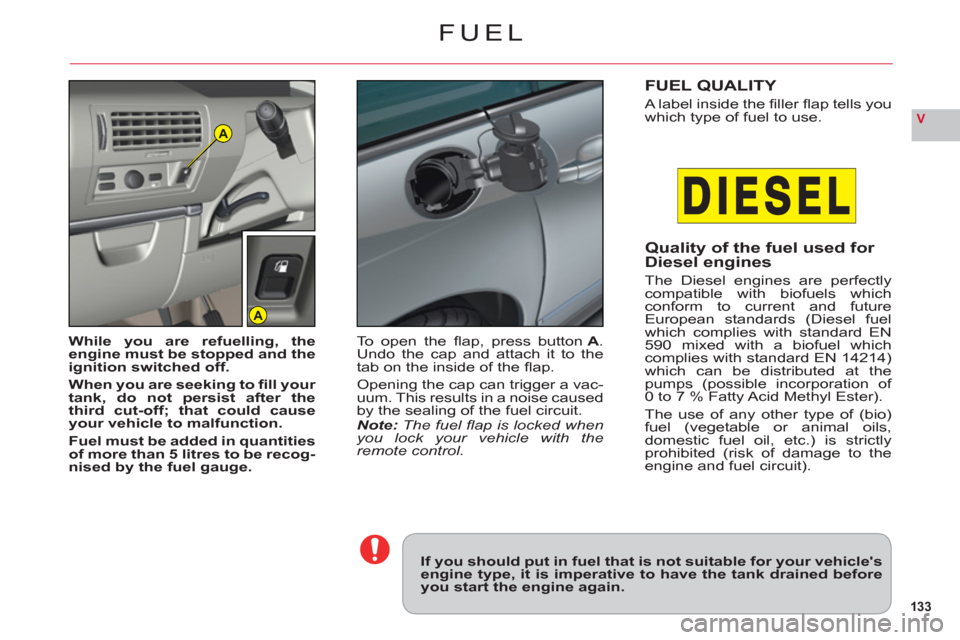
To open the fl ap, press button A. Undo the cap and attach it to the
tab on the inside of the fl ap.
Opening the cap can trigger a vac-uum. This results in a noise caused
by the sealing of the fuel circuit.Note: The fuel fl ap is locked when you lock your vehicle with the remote control.
FUEL QUALITY
A label inside the fi ller fl ap tells you
which type of fuel to use.
Quality of the fuel used for Diesel engines
The Diesel engines are perfectlycompatible with biofuels whichconform to current and futureEuropean standards (Diesel fuel
which complies with standard EN
590 mixed with a biofuel whichcomplies with standard EN 14214)which can be distributed at thepumps (possible incorporation of0 to 7 % Fatty Acid Methyl Ester).
The use of an
y other type of (bio)fuel (vegetable or animal oils,
domestic fuel oil, etc.) is strictlyprohibited (risk of damage to theengine and fuel circuit).
Page 169 of 216
7.19
22
33
11
55
66
44
COPY CD TO JUKEBOX
OK
STOP COPY
COMPLETE CD
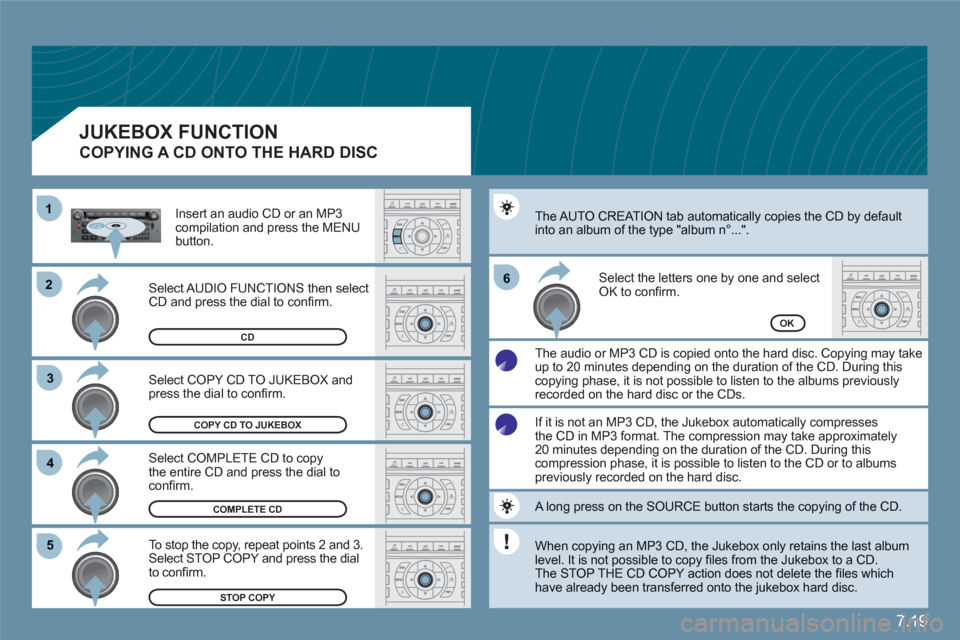
Select COPY CD TO JUKEBOX andpress the dial to confi rm.
Select COMPLETE CD to copy the entire CD and press the dial toconfi rm.
To stop the copy, repeat points 2 and 3.Select STOP COPY and press the dialto confi rm.
The AUTO CREATION tab automatically copies the CD by defaultinto an album of the type "album n∞...".
The audio or MP3 CD is copied onto the hard disc. Copying may take up to 20 minutes depending on the duration of the CD. During this copying phase, it is not possible to listen to the albums previously recorded on the hard disc or the CDs.
Select the letters one by one and select OK to confi rm.
CD
If it is not an MP3 CD, the Jukebox automatically compressesthe CD in MP3 format. The compression may take approximately20 minutes depending on the duration of the CD. During thiscompression phase, it is possible to listen to the CD or to albumspreviously recorded on the hard disc.
A long press on the SOURCE button starts the copying of the CD.
When copying an MP3 CD, the Jukebox only retains the last album level. It is not possible to copy fi les from the Jukebox to a CD.
The STOP THE CD COPY action does not delete the fi les which have already been transferred onto the jukebox hard disc.
Select AUDIO FUNCTIONS then selectCD and press the dial to confi rm.
Insert an audio CD or an MP3 compilation and press the MENUbutton.
JUKEBOX FUNCTION
COPYING A CD ONTO THE HARD DISC
Page 182 of 216
7.32
2 1
VOICE COMMANDS
DISPLAYING THE LIST AND USING THEM
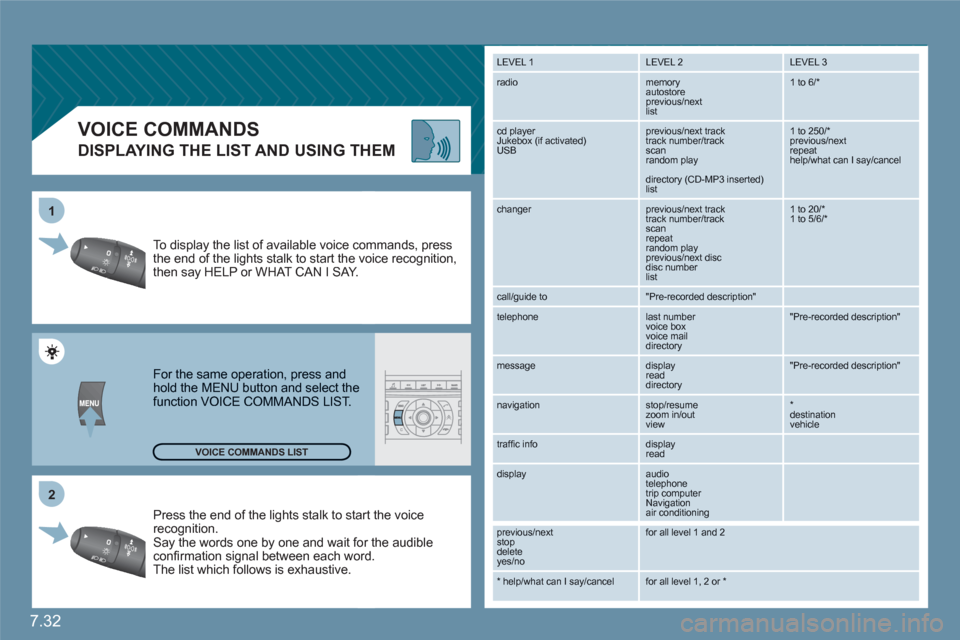
Press the end of the lights stalk to staart the voicerecognition. Say the words one by one and wait foor the audibleconfi rmation signal between each woord.
The list which follows is exhaustive.
To display the list of available voice coommands, press the end of the lights stalk to start the vvoice recognition,then say HELP or WHAT CAN I SAY.
For the same operation, press and hold the MENU button and select the function VOICE COMMANDS LIST.
LEVEL 1
LEVEL 2 LEVEL 3
radio memory autostore
previous/next list
1 to 6/*
cd player
Jukebox (if activated) USB
previous/next track
track number/track scan
random play
directory (CD-MP3 inserted) list
1 to 250/* previous/next repeat help/what can I say/cancel
changer
previous/next track
track number/track scan
repeat
random play previous/next disc disc number list
1 to 20/* 1 to 5/6/*
call/guide to
"Pre-recorded description"
telephone
last number
voice box
voice mail
directory
"Pre-recorded description"
message
display
read directory
"Pre-recorded description"
navigation
stop/resume
zoom in/out
view
*destination vehicle
traffi c info display
read
display audio
telephone
trip computer
Navigation
air conditioning
previous/next
stop delete
yes/no
for all level 1 and 2
* help/what can I say/cancel for all level 1, 2 or * VOICE COMMANDS LIST
Page 190 of 216
7.40
QUESTION SOLUTIONRESPONSE
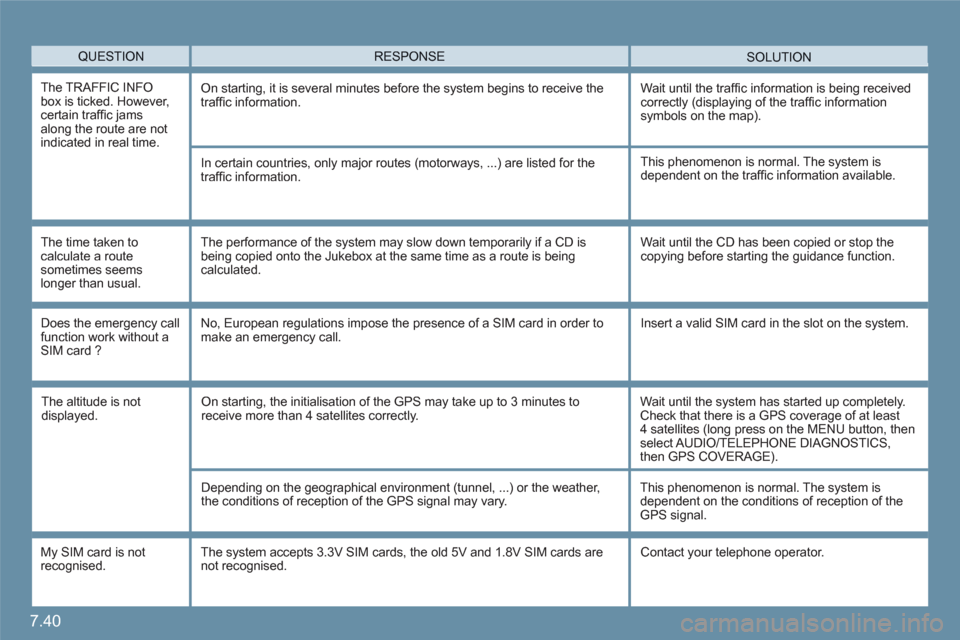
The TRAFFIC INFO box is ticked. However, certain traffi c jams along the route are notindicated in real time.
On starting, it is several minutes before the system begins to receive the traffi c information.Wait until the traffi c information is being receivedcorrectly (displaying of the traffi c information symbols on the map).
In certain countries, only major routes (motorways, ...) are listed for the traffi c information.
The time taken tocalculate a routesometimes seems longer than usual.
This phenomenon is normal. The system isdependent on the traffi c information available.
The performance of the system may slow down temporarily if a CD is being copied onto the Jukebox at the same time as a route is beingcalculated.
Wait until the CD has been copied or stop thecopying before starting the guidance function.
Does the emergency call function work without aSIM card ?
No, European regulations impose the presence of a SIM card in order tomake an emergency call. Insert a valid SIM card in the slot on the system.
My SIM card is not recognised.
The system accepts 3.3V SIM cards, the old 5V and 1.8V SIM cards are not recognised. Contact your telephone operator.
The altitude is notdisplayed. On starting, the initialisation of the GPS may take up to 3 minutes toreceive more than 4 satellites correctly.
Wait until the system has started up completely. Check that there is a GPS coverage of at least 4 satellites (long press on the MENU button, thenselect AUDIO/TELEPHONE DIAGNOSTICS,then GPS COVERAGE).
Depending on the geographical environment (tunnel, ...) or the weather, the conditions of reception of the GPS signal may vary.
This phenomenon is normal. The system isdependent on the conditions of reception of theGPS signal.
Page 208 of 216
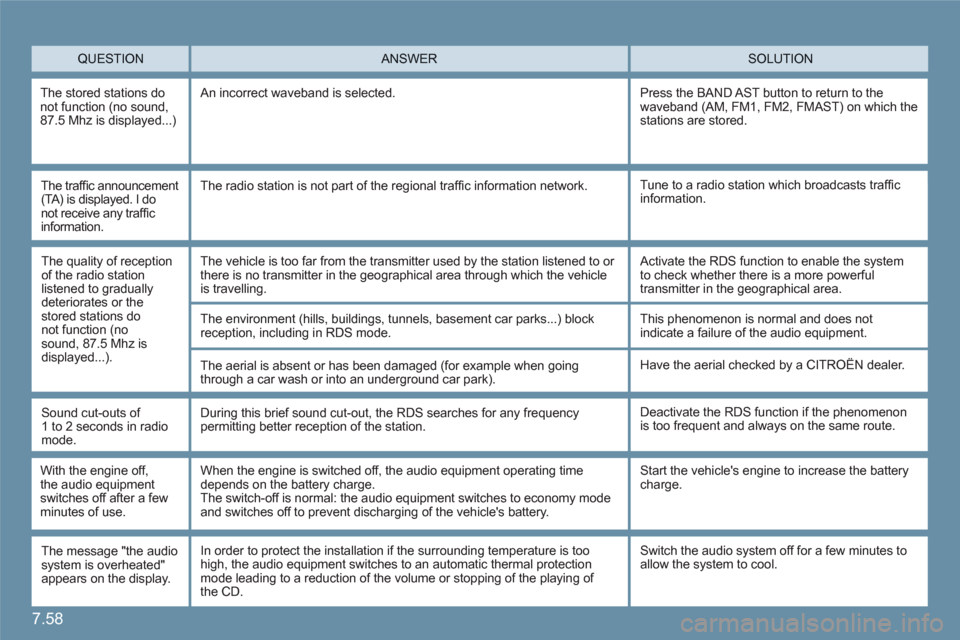
7.58
QUESTION SOLUTION ANSWER
The stored stations donot function (no sound,87.5 Mhz is displayed...)
An incorrect waveband is selected.
Press the BAND AST button to return to the waveband (AM, FM1, FM2, FMAST) on which thestations are stored.
The traffi c announcement (TA) is displayed. I do not receive any traffi c information.
Tune to a radio station which broadcasts traffi cinformation. The radio station is not part of the regional traffi c information network.
The quality of receptionof the radio stationlistened to graduallydeteriorates or the stored stations donot function (no sound, 87.5 Mhz isdisplayed...).
The vehicle is too far from the transmitter used by the station listened to or there is no transmitter in the geographical area through which the vehicleis travelling.
The environment (hills, buildings, tunnels, basement car parks...) block reception, including in RDS mode.
The aerial is absent or has been damaged (for example when goingthrough a car wash or into an underground car park).
Activate the RDS function to enable the systemto check whether there is a more powerful transmitter in the geographical area.
This phenomenon is normal and does notindicate a failure of the audio equipment.
Have the aerial checked by a CITROÀN dealer.
Sound cut-outs of1 to 2 seconds in radiomode.
During this brief sound cut-out, the RDS searches for any frequencypermitting better reception of the station.
Deactivate the RDS function if the phenomenonis too frequent and always on the same route.
With the engine off, the audio equipmentswitches off after a few minutes of use.
When the engine is switched off, the audio equipment operating time depends on the battery charge.The switch-off is normal: the audio equipment switches to economy modeand switches off to prevent discharging of the vehicle's battery.
Start the vehicle's engine to increase the batterycharge.
The message "the audiosystem is overheated"appears on the display.
Switch the audio system off for a few minutes to allow the system to cool.In order to protect the installation if the surrounding temperature is toohigh, the audio equipment switches to an automatic thermal protection mode leading to a reduction of the volume or stopping of the playing of the CD.