display Citroen C6 2011 1.G Workshop Manual
[x] Cancel search | Manufacturer: CITROEN, Model Year: 2011, Model line: C6, Model: Citroen C6 2011 1.GPages: 216, PDF Size: 10.31 MB
Page 151 of 216
7.1
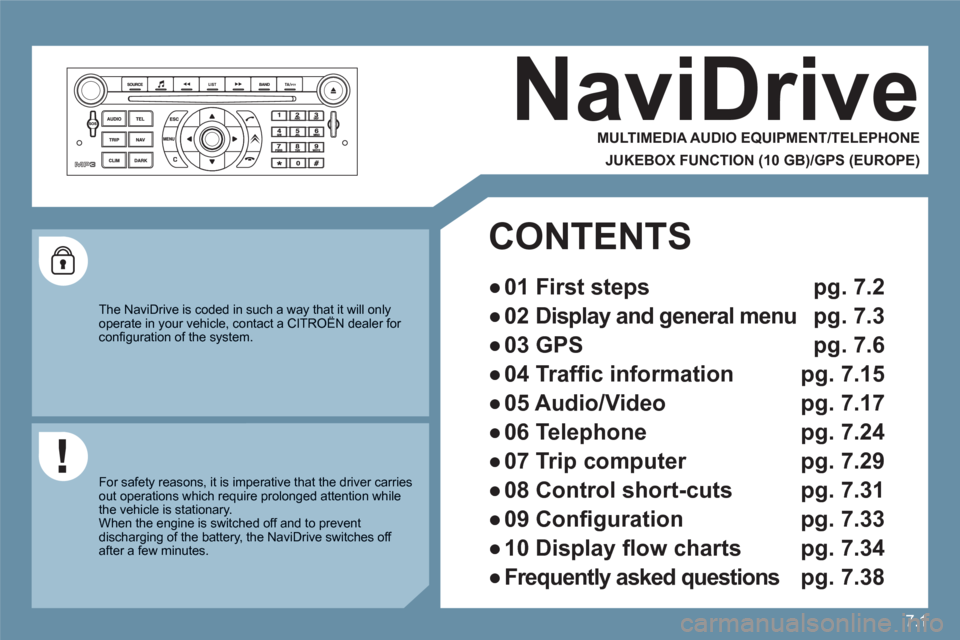
NaviDrive
MULTIMEDIA AUDIO EQUIPMENT/TELEPHONE
JUKEBOX FUNCTION (10 GB)/GPS (EUROPE)
The NaviDrive is coded in such a way that it will onlyoperate in your vehicle, contact a CITROËN dealer for yy
confi guration of the system.
For safety reasons, it is imperative that the driver carriesout operations which require prolonged attention while the vehicle is stationary.
When the engine is switched off and to prevent discharging of the battery, the NaviDrive switches off after a few minutes.
CONTENTS
●
01 First steps pg. 7.2
●
02 Display and general menu pg. 7.3
●
03 GPS pg. 7.6
●
04 Traffi c information pg. 7.15
●
05 Audio/Video pg. 7.17
●
06 Telephone pg. 7.24
●
07 Trip computer pg. 7.29
●
08 Control short-cuts pg. 7.31
●
09 Confi guration pg. 7.33
●
10 Display fl ow charts pg. 7.34
●
Frequently asked questions pg. 7.38
Page 152 of 216
7.2
11
2020
88
99
55
44
3322
199
1661111
1001818
122
6677
1313
155
144
177
01
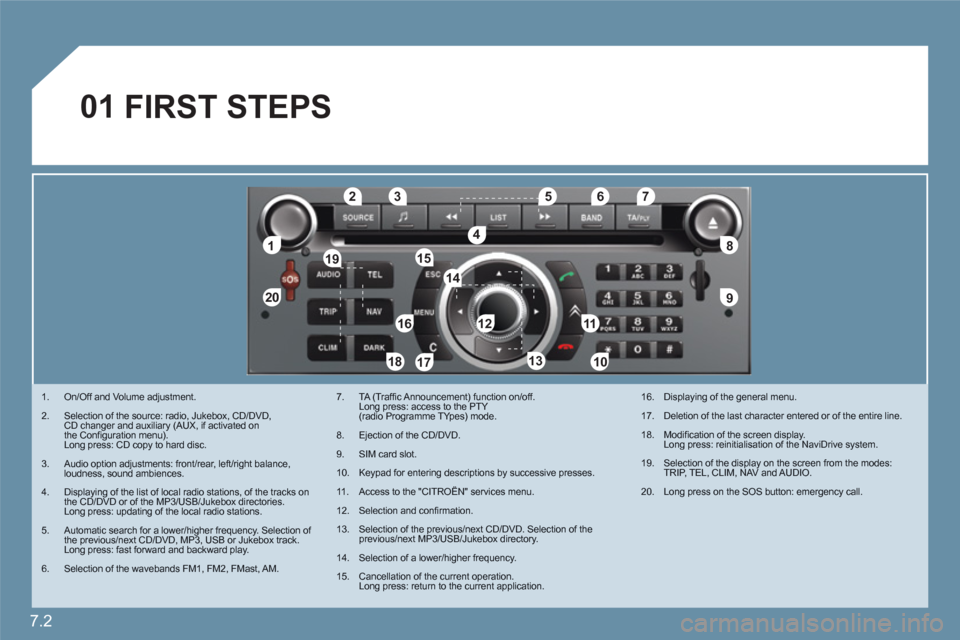
1. On/Off and Volume adjustment.
2. Selection of the source: radio, Jukebox, CD/DVD, CD changer and auxiliary (AUX, if activated on the Confi guration menu).Long press: CD copy to hard disc.
3.Audio option adjustments: front/rear, left/right balance,loudness, sound ambiences.
4. Displaying of the list of local radio stations, of the tracks onthe CD/DVD or of the MP3/USB/Jukebox directories.Long press: updating of the local radio stations.
5.Automatic search for a lower/higher frequency. Selection of the previous/next CD/DVD, MP3, USB or Jukebox track. Long press: fast forward and backward play.
6.Selection of the wavebands FM1, FM2, FMast, AM.
7. TA (Traffi c Announcement) function on/off. Long press: access to the PTY(radio Programme TYpes) mode.
8.Ejection of the CD/DVD.
9. SIM card slot.
10.Keypad for entering descriptions by successive presses.
11 . Access to the "CITROÀN" services menu.
12.Selection and confi rmation.
13. Selection of the previous/next CD/DVD. Selection of the previous/next MP3/USB/Jukebox directory.
14.Selection of a lower/higher frequency.
15.Cancellation of the current operation.Long press: return to the current application.
16. Displaying of the general menu.
17. Deletion of the last character entered or of the entire line.
18. Modifi cation of the screen display. Long press: reinitialisation of the NaviDrive system.
19. Selection of the display on the screen from the modes:TRIP, TEL, CLIM, NAV and AUDIO.
20. Long press on the SOS button: emergency call.
FIRST STEPS
Page 153 of 216
7.3
02
°
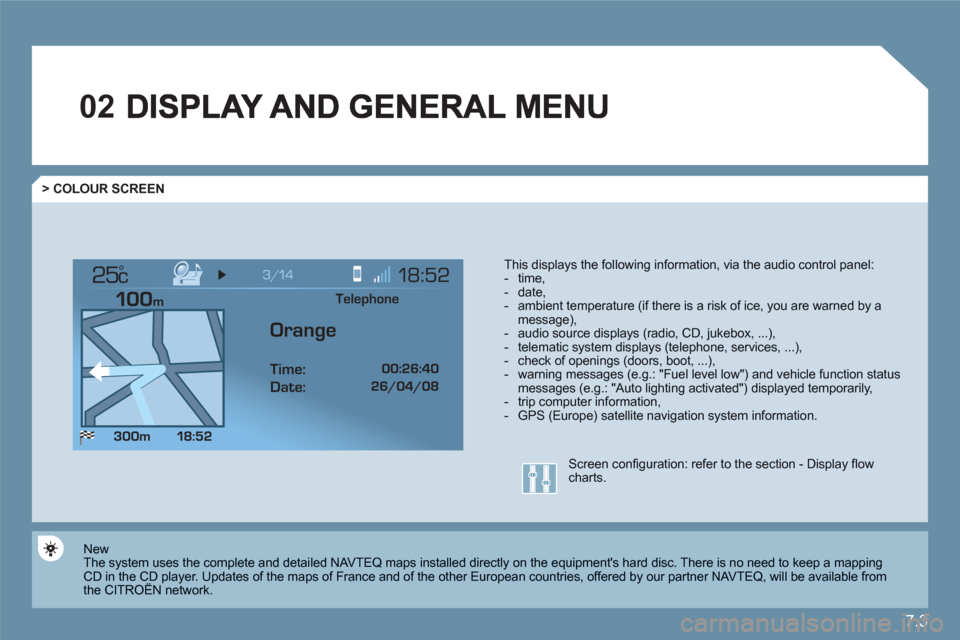
> COLOUR SCREEN
This displays the following information, via the audio control panel: - time,- date, - ambient temperature (if there is a risk of ice, you are warned by amessage),- audio source displays (radio, CD, jukebox, ...), - telematic system displays (telephone, services, ...),- check of openings (doors, boot, ...),- warning messages (e.g.: "Fuel level low") and vehicle function statusmessages (e.g.: "Auto lighting activated") displayed temporarily,- trip computer information,- GPS (Europe) satellite navigation system information.
New
The system uses the complete and detailed NAVTEQ maps installed directly on the equipment's hard disc. There is no need to keep a mapping CD in the CD player. Updates of the maps of France and of the other European countries, offered by our partner NAVTEQ, will be available from the CITROËN network. y
Screen confi guration: refer to the section - Display fl owcharts.
Telephone
Orange
Time:
Date:
Page 154 of 216
7.4
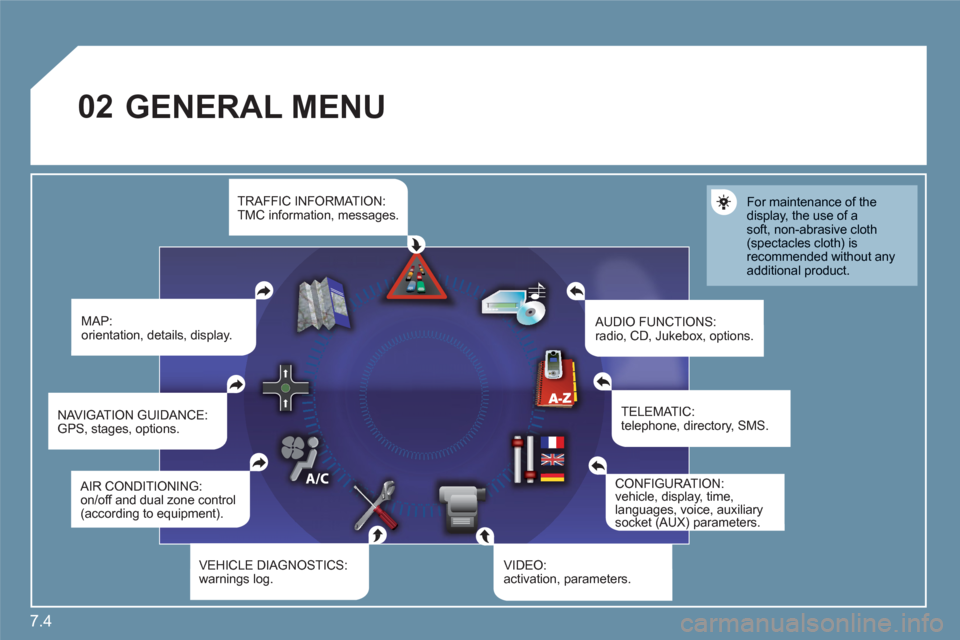
02 GENERAL MENU
MAP:orientation, details, display.
AUDIO FUNCTIONS:radio, CD, Jukebox, options.
For maintenance of the display, the use of asoft, non-abrasive cloth(spectacles cloth) is recommended without anyadditional product.
TELEMATIC:telephone, directory, SMS.
CONFIGURATION:vehicle, display, time, languages, voice, auxiliarysocket (AUX) parameters.()p
VIDEO:activation, parameters.VEHICLE DIAGNOSTICS: warnings log.
NAVIGAT ION GUIDANCE: GPS, stages, options.
TRAFFIC INFORMATION:TMC information, messages.
AIR CONDITIONING:on/off and dual zone control (according to equipment).
Page 155 of 216
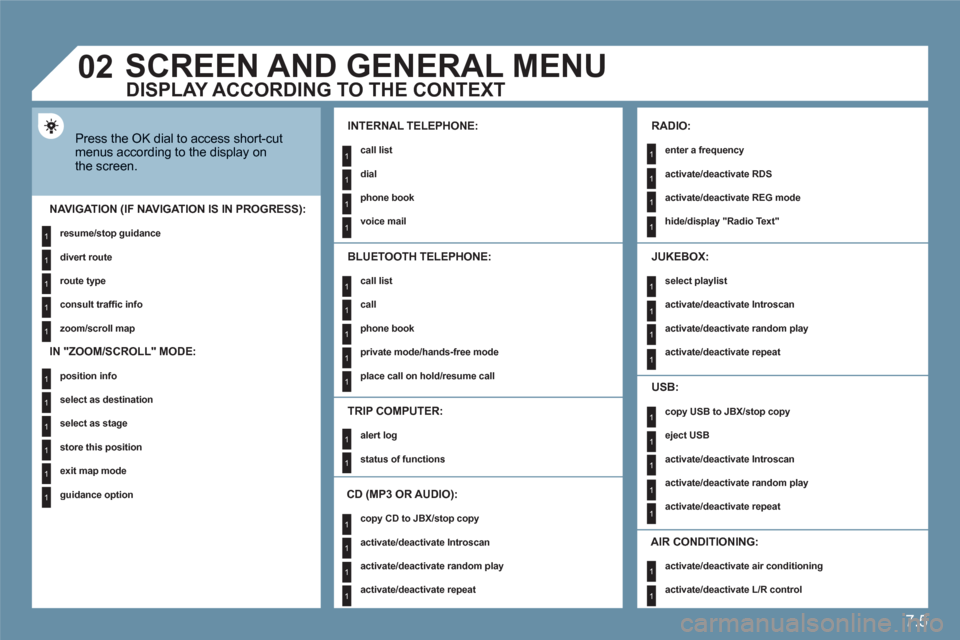
7.5
1
1
1
1
1
1
1
1
1
1
1
1
1
1
1
1
1
1
1
1
1
1
1
1
1
1
1
1
1
1
1
1
1
1
1
1
1
1
1
02
1
1
SCREEN AND GENERAL MENU
Press the OK dial to access short-cutmenus according to the display onthe screen.
INTERNAL TELEPHONE:
call list
dial
phone book
voice mail
NAVIGATION (IF NAVIGATION IS IN PROGRESS):
resume/stop guidance
divert route
route type
consult traffi c info
zoom/scroll map
TRIP COMPUTER:
alert log
status of functions
BLUETOOTH TELEPHONE:
call list
call
phone book
private mode/hands-free mode
place call on hold/resume call
CD (MP3 OR AUDIO):
copy CD to JBX/stop copy
activate/deactivate Introscan
activate/deactivate random play
activate/deactivate repeat
RADIO:
enter a frequency
activate/deactivate RDS
activate/deactivate REG mode
hide/display "Radio Text"
JUKEBOX:
select playlist
activate/deactivate Introscan
activate/deactivate random play
activate/deactivate repeat
USB:
copy USB to JBX/stop copy
eject USB
activate/deactivate Introscan
activate/deactivate random play
activate/deactivate repeat
DISPLAY ACCORDING TO THE CONTEXT
IN "ZOOM/SCROLL" MODE:
position info
select as destination
select as stage
store this position
exit map mode
guidance option
AIR CONDITIONING:
activate/deactivate air conditioning
activate/deactivate L/R control
Page 156 of 216
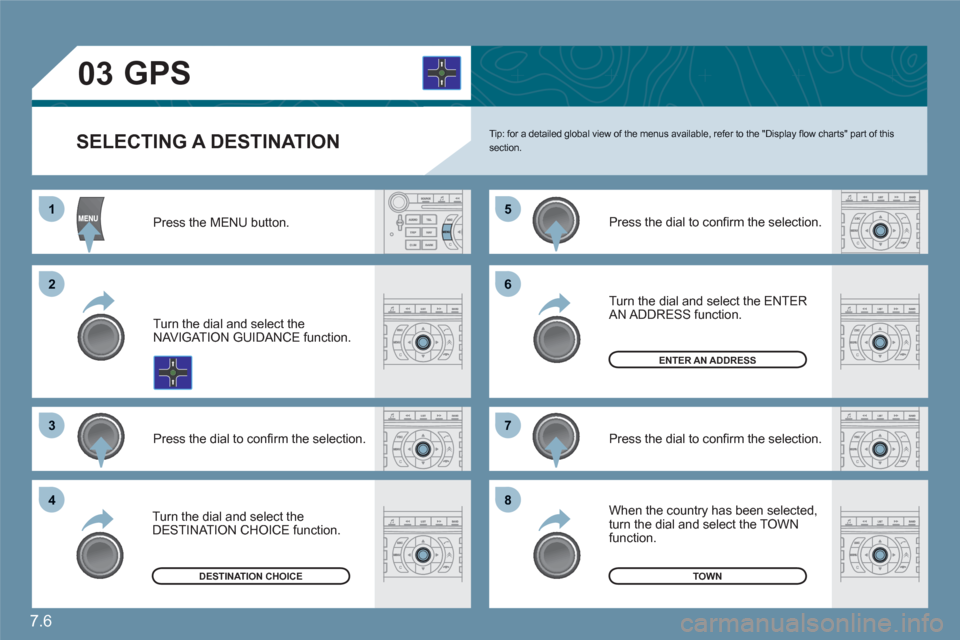
7.6
11
22
33
55
77
44
66
88
03
SELECTING A DESTINATION Tip: for a detailed global view of the menus available, refer to the "Display fl ow charts" part of thissection.
Press the MENU button.
Turn the dial and select theNAVIGAT ION GUIDANCE function.
Press the dial to confi rm the selection.
Turn the dial and select the DESTINATION CHOICE function.
Press the dial to confi rm the selection.
Press the dial to confi rm the selection.
Turn the dial and select the ENTER AN ADDRESS function.
When the country has been selected,turn the dial and select the TOWN function.
TOWNDESTINATION CHOICE
ENTER AN ADDRESS
GPS
Page 162 of 216
7.12
11
22
33
44
55
66
77
03
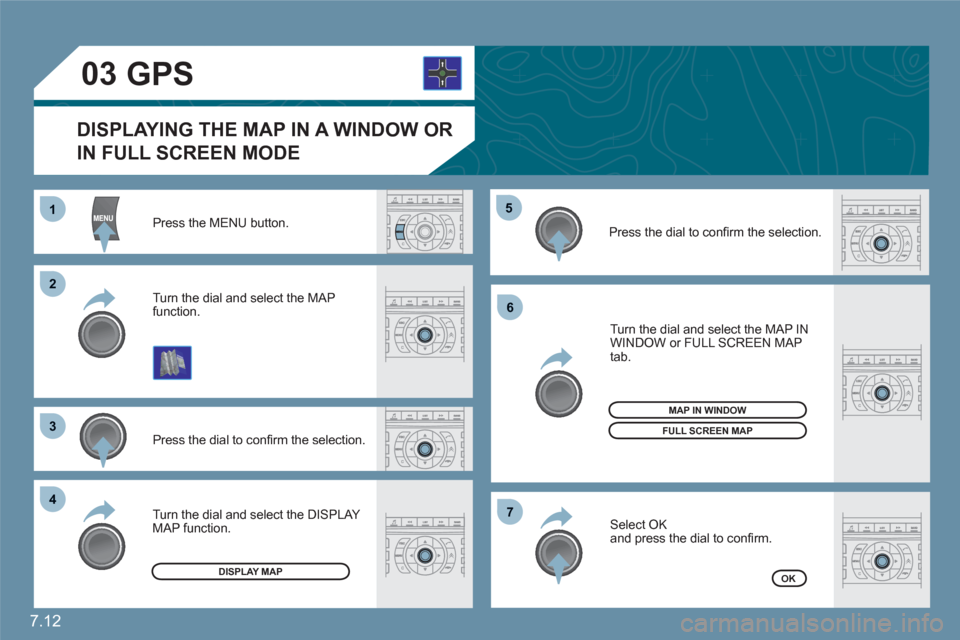
Press the MENU button.
Press the dial to confi rm the selection.
Turn the dial and select the MAP function.
Turn the dial and select the MAP IN WINDOW or FULL SCREEN MAP tab.
Select OK
and press the dial to confi rm.
Press the dial to confi rm the selection.
Turn the dial and select the DISPLAY MAP function.
DISPLAYING THE MAP IN A WINDOW OR
IN FULL SCREEN MODE
GPS
DISPLAY MAP
FULL SCREEN MAP
OK
MAP IN WINDOW
Page 166 of 216
7.16
11
22
33
44
66
55
77
04
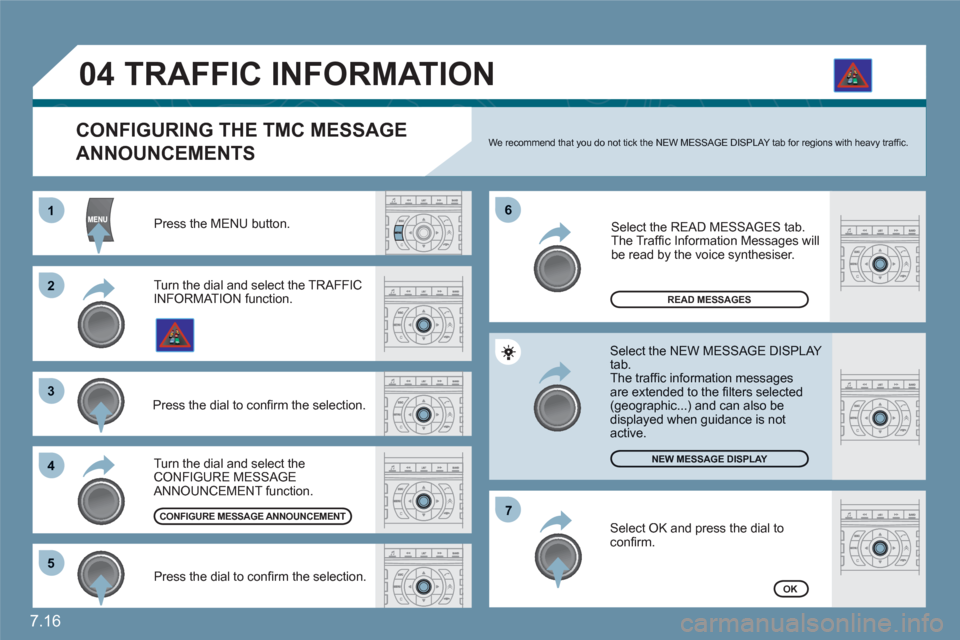
Press the MENU button.
READ MESSAGES
NEW MESSAGE DISPLAY
OK
CONFIGURING THE TMC MESSAGE
ANNOUNCEMENTS
We recommend that you do not tick the NEW MESSAGE DISPLAY tab for regions with heavy traffi c.
Turn the dial and select the TRAFFICINFORMATION function.
Press the dial to confi rm the selection.
Press the dial to confi rm the selection.
Turn the dial and select the CONFIGURE MESSAGE ANNOUNCEMENT function.
Select the READ MESSAGES tab.
The Traffi c Information Messages will be read by the voice synthesiser.
Select the NEW MESSAGE DISPLAY tab.
The traffi c information messages are extended to the fi lters selected(geographic...) and can also bedisplayed when guidance is not active.
CONFIGURE MESSAGE ANNOUNCEMENT
TRAFFIC INFORMATION
Select OK and press the dial toconfi rm.
Page 167 of 216
7.17
11
22
33
44
11
22
33
44
05AUDIO/VIDEO
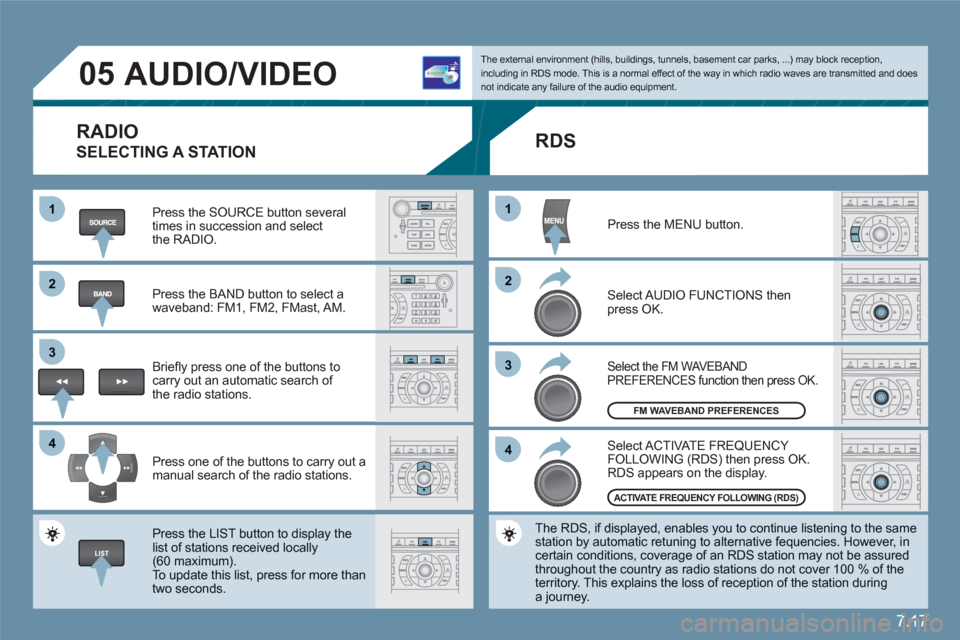
RADIO
SELECTING A STATION
Press the SOURCE button several times in succession and select the RADIO.
Press the BAND button to select awaveband: FM1, FM2, FMast, AM.
Briefl y press one of the buttons to carry out an automatic search of the radio stations.
Press one of the buttons to carry out a manual search of the radio stations.
Press the LIST button to display the list of stations received locally(60 maximum).
To update this list, press for more than two seconds.
The external environment (hills, buildings, tunnels, basement car parks, ...) may block reception,including in RDS mode. This is a normal effect of the way in which radio waves are transmitted and does not indicate any failure of the audio equipment.
RDS
Select ACTIVATE FREQUENCY FOLLOWING (RDS) then press OK. RDS appears on the display.
Select the FM WAVEBANDPREFERENCES function then press OK.
Select AUDIO FUNCTIONS then press OK.
Press the MENU button.
The RDS, if displayed, enables you to continue listening to the samestation by automatic retuning to alternative fequencies. However, in certain conditions, coverage of an RDS station may not be assuredthroughout the country as radio stations do not cover 100 % of the territory. This explains the loss of reception of the station duringa journey.
FM WAVEBAND PREFERENCES
ACTIVATE FREQUENCY FOLLOWING (RDS)
Page 168 of 216
7.18
1
22
05AUDIO/VIDEO
INFORMATION AND ADVICE
The MP3 format, an abbreviation of MPEG 1.2 & 2.5 Audio Layer 3,is an audio compression standard which permits the recording of several tens of music fi les on a single disc.
In order to be able to play a recorded CDR/DVDR or CDRW/DVDRW, when recording it is preferable to select standardsISO 9660 level 1.2 or Joliet. If the disc is recorded in another format, it may not be played correctly.It is recommended that the same recording standard is always used for an individual disc, with as low a speed as possible (4x maximum)for optimum sound quality. In the particular case of a multi-session CD, the Joliet standard isrecommended.
The audio equipment will only play audio fi les with the extension ".mp3" with a sampling rate of 22.05 KHz or 44.1 KHz. No other type of fi le (.wma, .mp4, .m3u...) can be played.
It is advisable to restrict fi le names to 20 characters without usingspecial characters (e.g.: " " ? ; ù) to avoid any playing or displayingproblems.
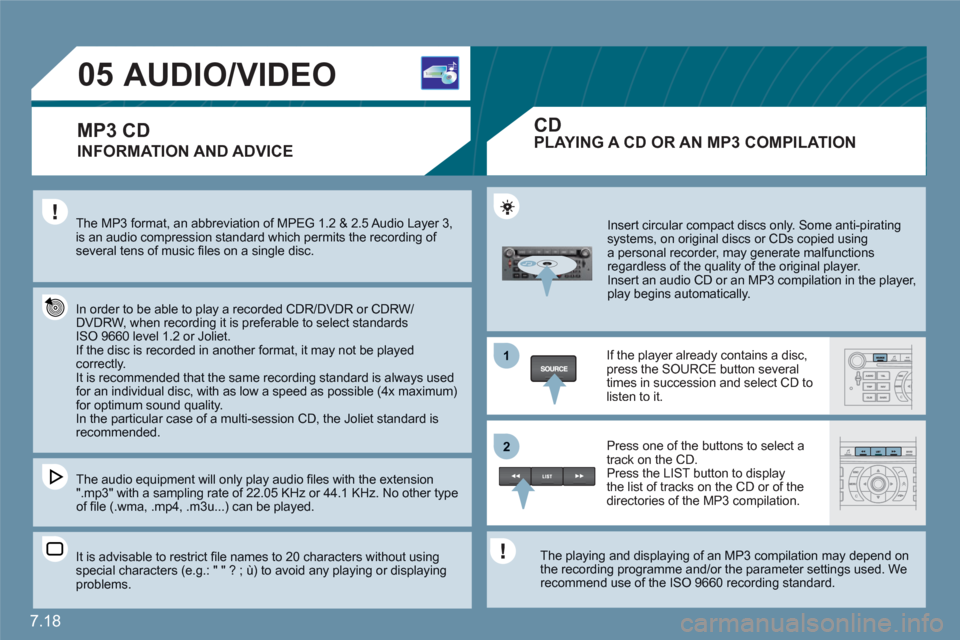
Insert circular compact discs only. Some anti-piratingsystems, on original discs or CDs copied usinga personal recorder, may generate malfunctionsregardless of the quality of the original player.
Insert an audio CD or an MP3 compilation in the player, play begins automatically.
If the player already contains a disc,press the SOURCE button several times in succession and select CD tolisten to it.
Press one of the buttons to select atrack on the CD. Press the LIST button to display the list of tracks on the CD or of thedirectories of the MP3 compilation.
The playing and displaying of an MP3 compilation may depend on the recording programme and/or the parameter settings used. We recommend use of the ISO 9660 recording standard.
MP3 CDPLAYING A CD OR AN MP3 COMPILATION
CD