audio Citroen C8 2010 1.G Owner's Guide
[x] Cancel search | Manufacturer: CITROEN, Model Year: 2010, Model line: C8, Model: Citroen C8 2010 1.GPages: 236, PDF Size: 11.67 MB
Page 169 of 236
9.30
11
22
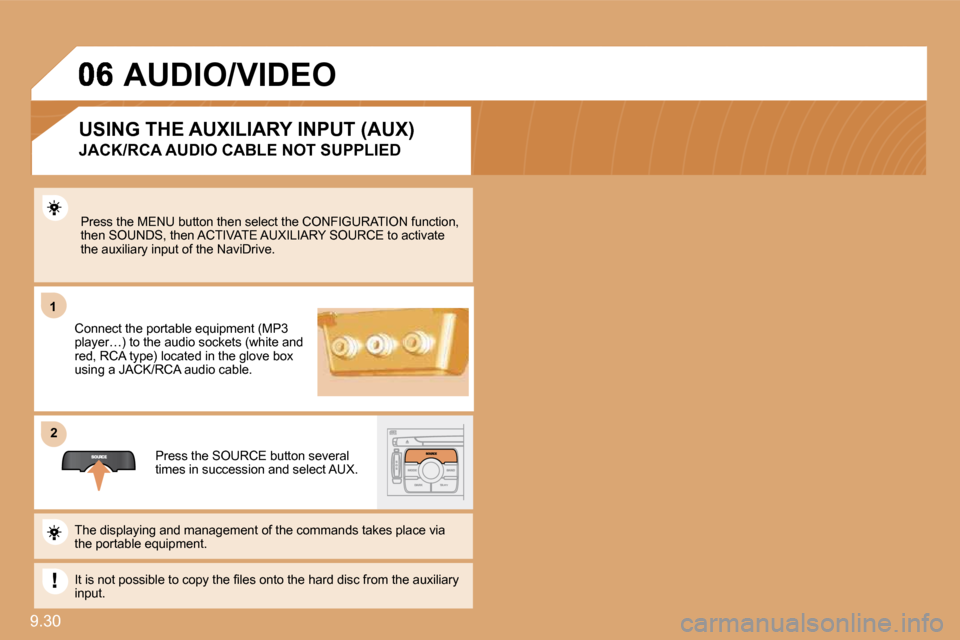
Press the MENU button then select the CONFIGURATION function, then SOUNDS, then ACTIVATE AUXILIARY SOURCE to acti vate the auxiliary input of the NaviDrive.
Connect the portable equipment (MP3 player…) to the audio sockets (white and red, RCA type) located in the glove box using a JACK/RCA audio cable.
Press the SOURCE button several times in succession and select AUX.
The displaying and management of the commands takes place via the portable equipment.
It is not possible to copy the fi les onto the hard disc from the auxiliary input.
USING THE AUXILIARY INPUT (AUX)
JACK/RCA AUDIO CABLE NOT SUPPLIED
AUDIO/VIDEO
Page 170 of 236
9.31
11
22
33
44
55
66
77
06
ACTIVATE VIDEO MODE
VIDEO PARAMETERS
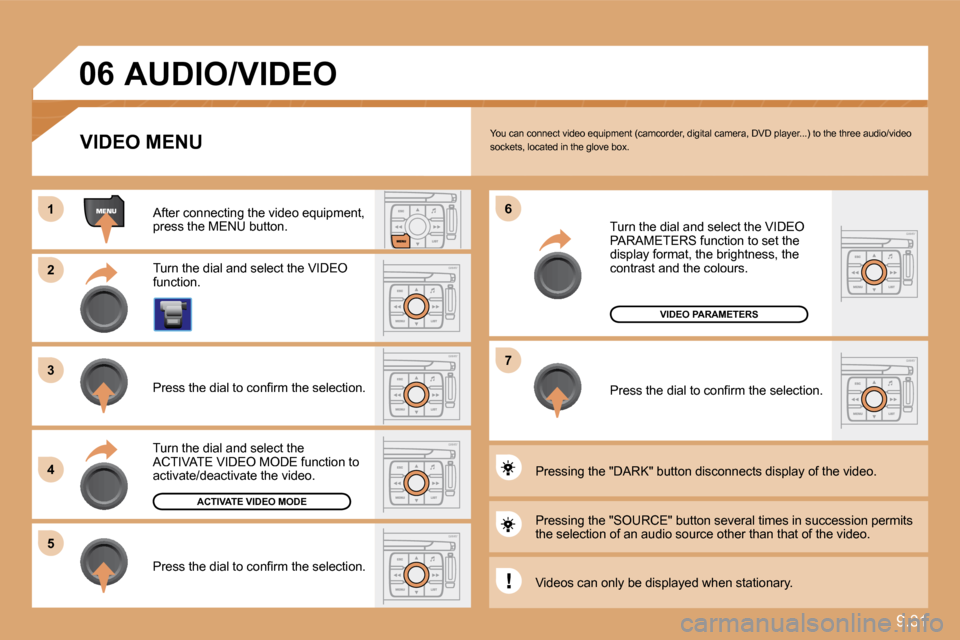
You can connect video equipment (camcorder, digital camera, DVD player...) to the three audio/video sockets, located in the glove box.
Turn the dial and select the VIDEO function.
After connecting the video equipment, press the MENU button.
Turn the dial and select the ACTIVATE VIDEO MODE function to activate/deactivate the video.
Press the dial to confi rm the selection.
Press the dial to confi rm the selection.
Pressing the "SOURCE" button several times in suc cession permits the selection of an audio source other than that of the video.
Pressing the "DARK" button disconnects display of the video.
Turn the dial and select the VIDEO PARAMETERS function to set the display format, the brightness, the contrast and the colours.
Press the dial to confi rm the selection.
VIDEO MENU
Videos can only be displayed when stationary.
AUDIO/VIDEO
Page 171 of 236

9.32
11
22
33
11
22
07 INTERNAL TELEPHONE
ENTERING THE PIN CODE
Access the slot by pressing the button using the tip of a pen.
Install the SIM card in the holder and then insert it in the slot.
To remove the SIM card, repeat step 1.
Your SIM card must be installed and removed with the NaviDrive audio and telematics system switched off and the ig nition off.
Enter the PIN code on the keypad.
Confi rm the PIN code by pressing button #.
PIN CODE
When entering your PIN code, tick the STORE PIN t ab to gain access to the telephone without having to enter this code when it is used subsequently.
INSTALLING YOUR SIM CARD
(NOT SUPPLIED)
Page 172 of 236
9.33
33
22
11
44
07
The services offered by the telephone depend on the network, the SIM card and the compatibility of the Bluetooth equipment used. Refer to your telepho ne's manual and your operator to check which services you have access to. A list of mobile telephones which offer the best range of services is available from dealers.
INTERNAL TELEPHONE
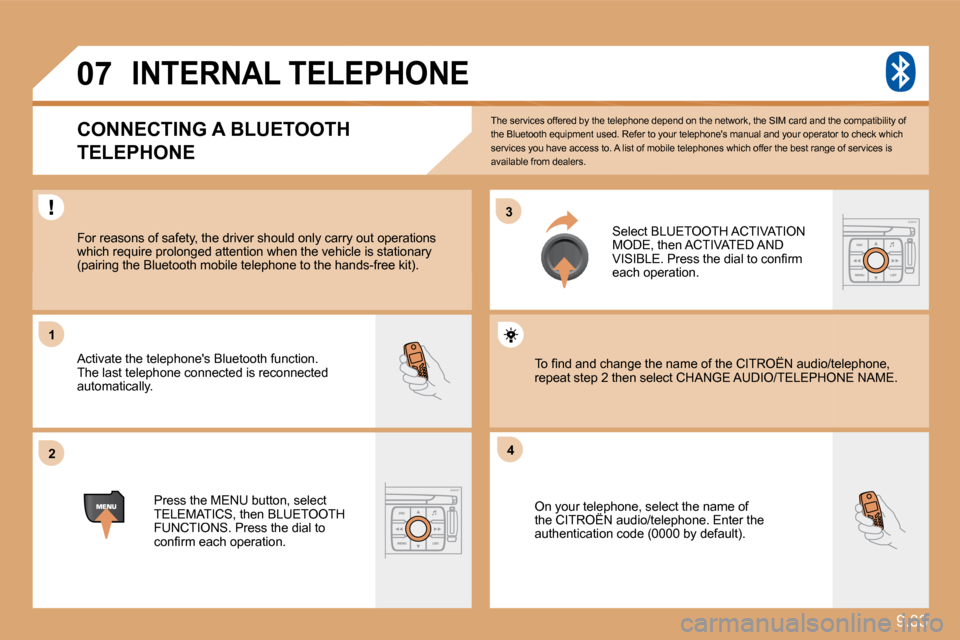
CONNECTING A BLUETOOTH
TELEPHONE
For reasons of safety, the driver should only car ry out operations which require prolonged attention when the vehicle is stationary (pairing the Bluetooth mobile telephone to the hands-free kit).
Activate the telephone's Bluetooth function. The last telephone connected is reconnected automatically.
Select BLUETOOTH ACTIVATION MODE, then ACTIVATED AND VISIBLE. Press the dial to confi rm each operation.
Press the MENU button, select TELEMATICS, then BLUETOOTH FUNCTIONS. Press the dial to confi rm each operation.
On your telephone, select the name of the CITROËN audio/telephone. Enter the On your telephone, select the name of r telep
authentication code (0000 by default).
To fi nd and change the name of the CITROËN audio/ telephone, To fi nd and change the name of the CITROËN audio/telephone, repeat step 2 then select CHANGE AUDIO/TELEPHONPHONE NAME.
Page 177 of 236

9.38
22
11
09
Press the end of the lights stalk to start the voice recognition. Say the words one by one and wait for the audible confi rmation signal between each word. The list which follows is exhaustive.
To display the list of available voice commands, p ress the end of the lights stalk to start the voice recognition, then say HELP or WHAT CAN I SAY.
For the same operation, press and hold the MENU button and select the function VOICE COMMANDS LIST.
VOICE COMMANDS LIST
VOICE COMMANDS
DISPLAYING THE LIST AND USING THEM
LEVEL 1 LEVEL 2 LEVEL 3
radio memory autostore previous/next list
1 to 6/*
cd player Jukebox (if activated) USB
previous/next track track number/track scan random play
directory (CD-MP3 inserted) list
1 to 250/* previous/next repeat help/what can I say/cancel
call/guide to "Pre-recorded description"
telephone last number voice box voice mail directory
"Pre-recorded description"
message display read directory
"Pre-recorded description"
navigation stop/resume zoom in/out view
* destination vehicle
traffi c info display read
display audio telephone trip computer Navigation air conditioning
previous/next stop delete yes/no
for all level 1 and 2
* help/what can I say/cancel for all level 1, 2 or *
VOICE COMMANDS
Page 180 of 236
9.41
4
4
3
1
2
3
4
4
3
4
4
4
4
4
1
2
3
3
3
3
3
3
3
3
2
3
2
3
3
2
4
4
2
4
4
4
3
3
4
4
4
4
4
4
4
3
3
4
4
4
4
3
3
2
2
2
3
3
3
4
4
4
4
2
3
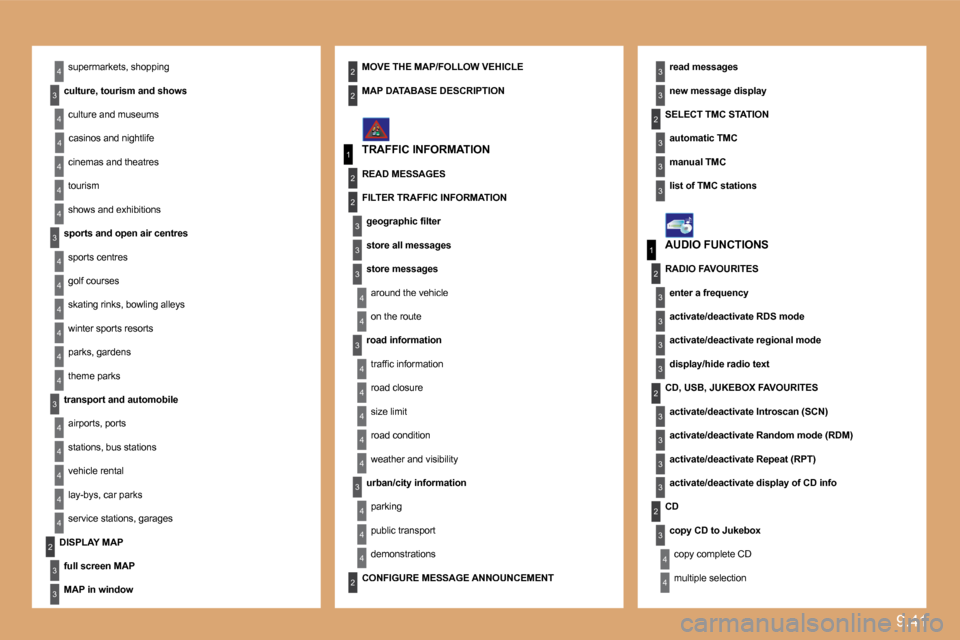
supermarkets, shopping
culture, tourism and shows
culture and museums
casinos and nightlife
cinemas and theatres
tourism
shows and exhibitions
sports and open air centres
sports centres
golf courses
skating rinks, bowling alleys
winter sports resorts
parks, gardens
theme parks
transport and automobile
airports, ports
stations, bus stations
vehicle rental
lay-bys, car parks
service stations, garages
read messages
new message display
TRAFFIC INFORMATION
SELECT TMC STATION
automatic TMC
manual TMC
list of TMC stations
MOVE THE MAP/FOLLOW VEHICLE
DISPLAY MAP
full screen MAP
MAP in window
MAP DATABASE DESCRIPTION
READ MESSAGES
FILTER TRAFFIC INFORMATION
geographic fi lter
store all messages
store messages
around the vehicle
on the route
road information
traffi c information
road closure
size limit
road condition
weather and visibility
urban/city information
parking
public transport
demonstrations
AUDIO FUNCTIONS
RADIO FAVOURITES
enter a frequency
activate/deactivate RDS mode
activate/deactivate regional mode
display/hide radio text
CD, USB, JUKEBOX FAVOURITES
activate/deactivate Introscan (SCN)
activate/deactivate Random mode (RDM)
activate/deactivate Repeat (RPT)
activate/deactivate display of CD info
CD
copy CD to Jukebox
copy complete CD
multiple selection CONFIGURE MESSAGE ANNOUNCEMENT
Page 183 of 236

9.44
1
2
2
2
1
1
1
Press the MENU button for more than 2 seconds to access the following fl ow chart.
VOICE COMMANDS LIST
Press the Music button several times in succession to access the following settings.
AUTO VOLUME CORRECTION
Each audio source (Radio, CD, MP3, Jukebox, CD changer) has its own separate settings.
AUDIO/TELEPHONE DIAGNOSTICS
GPS COVERAGE
UNIT BACKUP POWER
UNIT DESCRIPTION
NAVIGATION DEMONSTRATION
SERVICES CONFIGURATION
LOUDNESS CORRECTION TREBLE BASS MUSICAL AMBIENCE
FR - RR BALANCE LH - RH BALANCE
Page 184 of 236
9.45
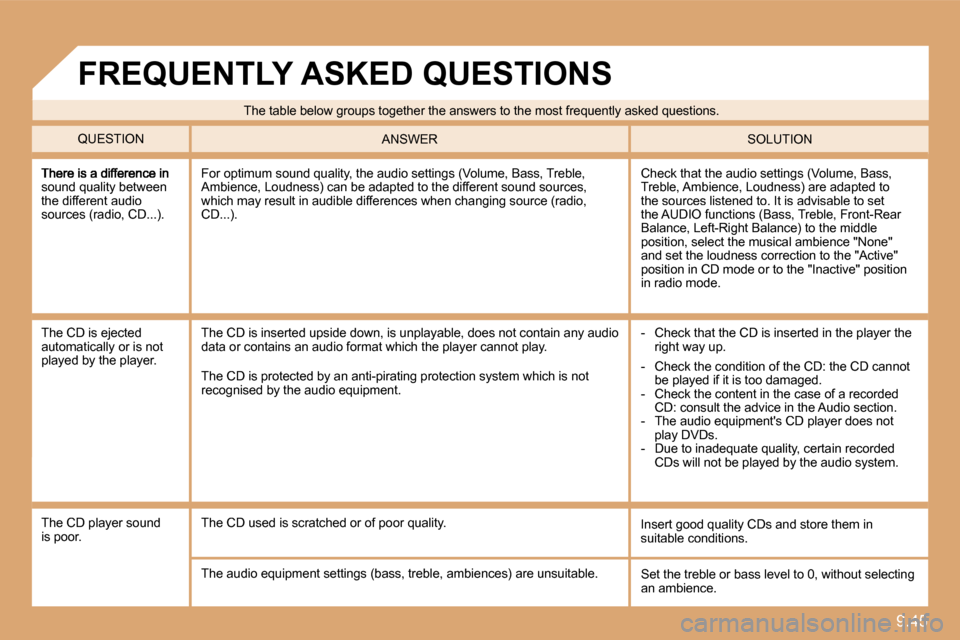
sound quality between the different audio sources (radio, CD...).
Check that the audio settings (Volume, Bass, Treble, Ambience, Loudness) are adapted to the sources listened to. It is advisable to set the AUDIO functions (Bass, Treble, Front-Rear Balance, Left-Right Balance) to the middle position, select the musical ambience "None" and set the loudness correction to the "Active" position in CD mode or to the "Inactive" position in radio mode.
For optimum sound quality, the audio settings (Volume, Bass, Treble, Ambience, Loudness) can be adapted to the different sound sources, which may result in audible differences when changing source (radio, CD...).
The CD is ejected automatically or is not played by the player.
- Check that the CD is inserted in the player the right way up. The CD is inserted upside down, is unplayable, doe s not contain any audio data or contains an audio format which the player cannot play.
The CD is protected by an anti-pirating protection system which is not recognised by the audio equipment.
The CD player sound is poor. Insert good quality CDs and store them in suitable conditions. The CD used is scratched or of poor quality.
The audio equipment settings (bass, treble, ambien ces) are unsuitable. Set the treble or bass level to 0, without selecting an ambience.
The table below groups together the answers to the most frequently asked questions.
QUESTION SOLUTION ANSWER
FREQUENTLY ASKED QUESTIONS
- Check the condition of the CD: the CD cannot be played if it is too damaged. - Check the content in the case of a recorded CD: consult the advice in the Audio section. - The audio equipment's CD player does not play DVDs. - Due to inadequate quality, certain recorded CDs will not be played by the audio system.
Page 185 of 236
9.46
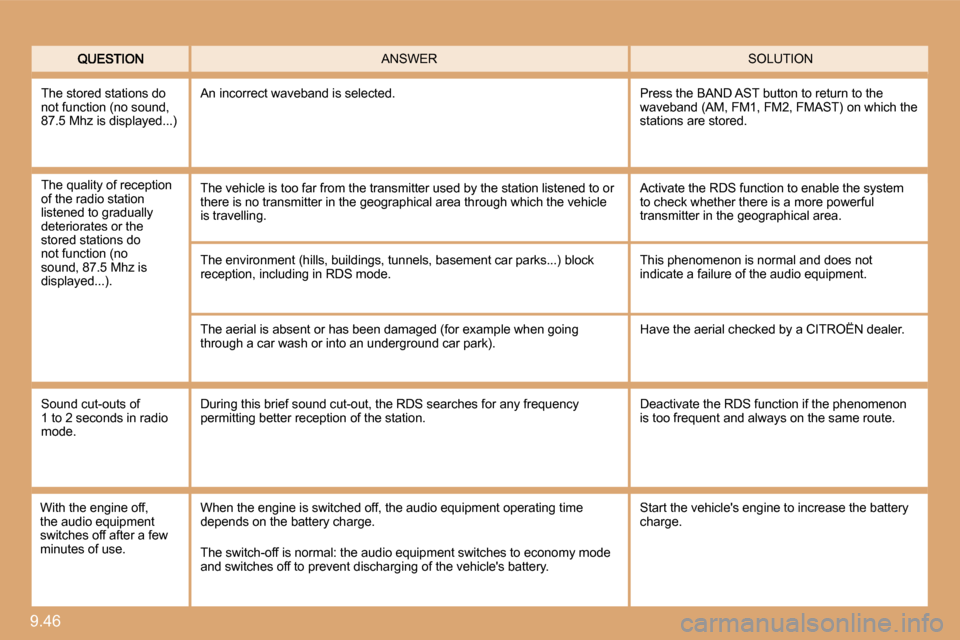
SOLUTION ANSWER
The environment (hills, buildings, tunnels, basement car parks...) block reception, including in RDS mode.
The aerial is absent or has been damaged (for exam ple when going through a car wash or into an underground car park).
This phenomenon is normal and does not indicate a failure of the audio equipment.
Have the aerial checked by a CITROËN dealer.
Sound cut-outs of 1 to 2 seconds in radio mode.
During this brief sound cut-out, the RDS searches for any frequency permitting better reception of the station. Deactivate the RDS function if the phenomenon is too frequent and always on the same route.
With the engine off, the audio equipment switches off after a few minutes of use.
When the engine is switched off, the audio equipme nt operating time depends on the battery charge.
The switch-off is normal: the audio equipment switches to economy mode and switches off to prevent discharging of the vehicle's battery.
The stored stations do not function (no sound, 87.5 Mhz is displayed...)
An incorrect waveband is selected. Press the BAND AST button to return to the waveband (AM, FM1, FM2, FMAST) on which the stations are stored.
Start the vehicle's engine to increase the battery charge.
The quality of reception of the radio station listened to gradually deteriorates or the stored stations do not function (no sound, 87.5 Mhz is displayed...).
The vehicle is too far from the transmitter used by the station listened to or there is no transmitter in the geographical area th rough which the vehicle is travelling.
Activate the RDS function to enable the system to check whether there is a more powerful transmitter in the geographical area.
Page 186 of 236

9.47
QUESTION SOLUTION ANSWER
The TRAFFIC INFO box is ticked. However, certain traffi c jams along the route are not indicated in real time.
On starting, it is several minutes before the system begins to receive the traffi c information. Wait until the traffi c information is being received correctly (displaying of the traffi c information symbols on the map).
In certain countries, only major routes (motorways , ...) are listed for the traffi c information.
The time taken to calculate a route sometimes seems longer than usual.
This phenomenon is normal. The system is dependent on the traffi c information available.
The performance of the system may slow down tempor arily if a CD is being copied onto the Jukebox at the same time as a route is being calculated.
Wait until the CD has been copied or stop the copying before starting the guidance function.
Does the emergency call function work without a SIM card?
Certain national regulations impose the presence of a SIM card in order to make an emergency call. Insert a valid SIM card in the slot on the system.
My SIM card is not recognised. The system accepts 3.3 V SIM cards, the old 5 V an d 1.8 V SIM cards are not recognised. Contact your telephone operator.
The altitude is not displayed. On starting, the initialisation of the GPS may take up to 3 minutes to receive more than 4 satellites correctly. Wait until the system has started up completely. Check that there is a GPS coverage of at least 4 satellites (long press on the MENU button, then select AUDIO/TELEPHONE DIAGNOSTICS, then GPS COVERAGE).
Depending on the geographical environment (tunnel, ...) or the weather, the conditions of reception of the GPS signal may vary. This phenomenon is normal. The system is dependent on the conditions of reception of the GPS signal.