ECU Citroen C8 2013 1.G User Guide
[x] Cancel search | Manufacturer: CITROEN, Model Year: 2013, Model line: C8, Model: Citroen C8 2013 1.GPages: 234, PDF Size: 8.86 MB
Page 103 of 234
SAFETY
101
4
Child safety
a
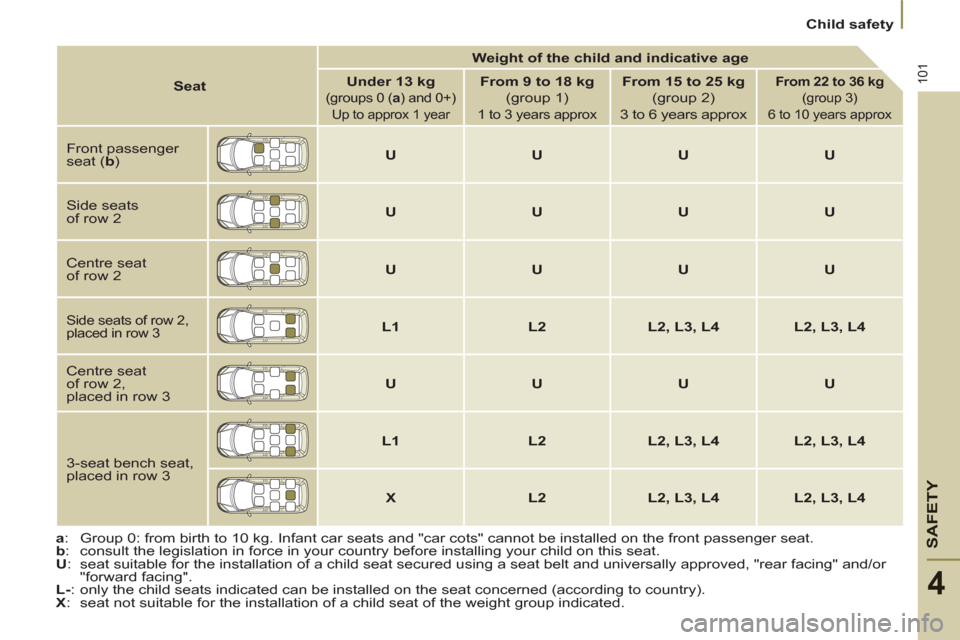
: Group 0: from birth to 10 kg. Infant car seats and "car cots" cannot be installed on the front passenger seat.
b
: consult the legislation in force in your country before installing your child on this seat.
U
: seat suitable for the installation of a child seat secured using a seat belt and universally approved, "rear facing" and/or
"forward facing".
L-
: only the child seats indicated can be installed on the seat concerned (according to country).
X
: seat not suitable for the installation of a child seat of the weight group indicated.
Seat
Weight of the child and indicative age
Under 13 kg
(groups 0 ( a
) and 0+)
Up to approx 1 year
From 9 to 18 kg
(group 1)
1 to 3 years approx
From 15 to 25 kg
(group 2)
3 to 6 years approx
From 22 to 36 kg
(group 3)
6 to 10 years approx
Front passenger
seat ( b
)
U
U
U
U
Side seats
of row 2
U
U
U
U
Centre seat
of row 2
U
U
U
U
Side seats of row 2,
placed in row 3
L1
L2
L2, L3, L4
L2, L3, L4
Centre seat
of row 2,
placed in row 3
U
U
U
U
3-seat bench seat,
placed in row 3
L1
L2
L2, L3, L4
L2, L3, L4
X
L2
L2, L3, L4
L2, L3, L4
Page 104 of 234
102
Child safety
ADVIC
The incorrect installation of a child seat
in a vehicle compromises the child's
protection in the event of an accident.
Remember to fasten the seat belts or
the child seat harnesses keeping the
slack
in relation to the child's body to a
minimum
, even for short journeys.
To protect young children from the
rays of the sun, fi t side blinds to
the rear windows.
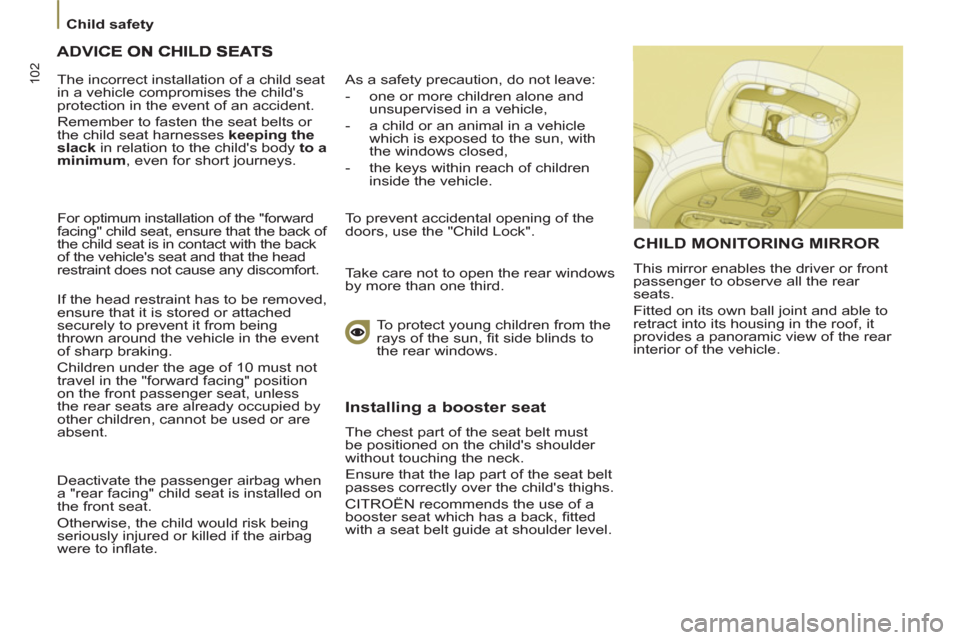
CHILD MONITORING MIRROR
This mirror enables the driver or front
passenger to observe all the rear
seats.
Fitted on its own ball joint and able to
retract into its housing in the roof, it
provides a panoramic view of the rear
interior of the vehicle. For optimum installation of the "forward
facing" child seat, ensure that the back of
the child seat is in contact with the back
of the vehicle's seat and that the head
restraint does not cause any discomfort.
If the head restraint has to be removed,
ensure that it is stored or attached
securely to prevent it from being
thrown around the vehicle in the event
of sharp braking.
Children under the age of 10 must not
travel in the "forward facing" position
on the front passenger seat, unless
the rear seats are already occupied by
other children, cannot be used or are
absent.
Deactivate the passenger airbag when
a "rear facing" child seat is installed on
the front seat.
Otherwise, the child would risk being
seriously injured or killed if the airbag
were to infl ate.
As a safety precaution, do not leave:
- one or more children alone and
unsupervised in a vehicle,
- a child or an animal in a vehicle
which is exposed to the sun, with
the windows closed,
- the keys within reach of children
inside the vehicle.
To prevent accidental opening of the
doors, use the "Child Lock".
Take care not to open the rear windows
by more than one third.
Installing a booster seat
The chest part of the seat belt must
be positioned on the child's shoulder
without touching the neck.
Ensure that the lap part of the seat belt
passes correctly over the child's thighs.
CITROËN recommends the use of a
booster seat which has a back, fi tted
with a seat belt guide at shoulder level.
Page 109 of 234
107
Other accessories
ACCESSORIES
5
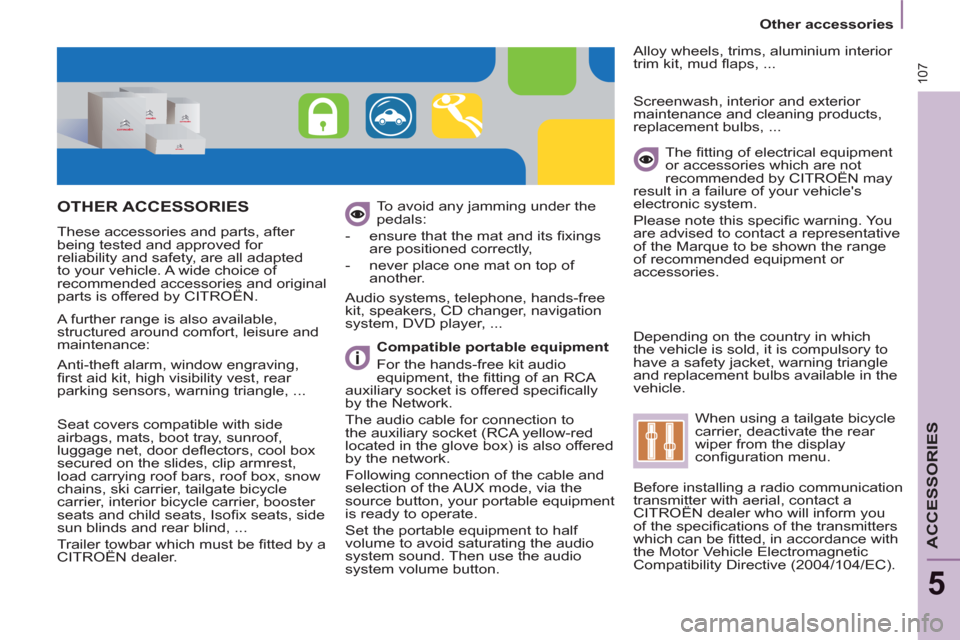
OTHER ACCESSORIES
These accessories and parts, after
being tested and approved for
reliability and safety, are all adapted
to your vehicle. A wide choice of
recommended accessories and original
parts is offered by CITROËN. To avoid any jamming under the
pedals:
- ensure that the mat and its fi xings
are positioned correctly,
- never place one mat on top of
another.
Compatible portable equipment
For the hands-free kit audio
equipment, the fi tting of an RCA
auxiliary socket is offered specifi cally
by the Network.
The audio cable for connection to
the auxiliary socket (RCA yellow-red
located in the glove box) is also offered
by the network.
Following connection of the cable and
selection of the AUX mode, via the
source button, your portable equipment
is ready to operate.
Set the portable equipment to half
volume to avoid saturating the audio
system sound. Then use the audio
system volume button.
Audio systems, telephone, hands-free
kit, speakers, CD changer, navigation
system, DVD player, ...
Alloy wheels, trims, aluminium interior
trim kit, mud fl aps, ...
Seat covers compatible with side
airbags, mats, boot tray, sunroof,
luggage net, door defl ectors, cool box
secured on the slides, clip armrest,
load carrying roof bars, roof box, snow
chains, ski carrier, tailgate bicycle
carrier, interior bicycle carrier, booster
seats and child seats, Isofi x seats, side
sun blinds and rear blind, ...
Trailer towbar which must be fi tted by a
CITROËN dealer.
The fi tting of electrical equipment
or accessories which are not
recommended by CITROËN may
result in a failure of your vehicle's
electronic system.
Please note this specifi c warning. You
are advised to contact a representative
of the Marque to be shown the range
of recommended equipment or
accessories.
Screenwash, interior and exterior
maintenance and cleaning products,
replacement bulbs, ...
Depending on the country in which
the vehicle is sold, it is compulsory to
have a safety jacket, warning triangle
and replacement bulbs available in the
vehicle.
A further range is also available,
structured around comfort, leisure and
maintenance:
Anti-theft alarm, window engraving,
fi rst aid kit, high visibility vest, rear
parking sensors, warning triangle, ...
When using a tailgate bicycle
carrier, deactivate the rear
wiper from the display
confi guration menu.
Before installing a radio communication
transmitter with aerial, contact a
CITROËN dealer who will inform you
of the specifi cations of the transmitters
which can be fi tted, in accordance with
the Motor Vehicle Electromagnetic
Compatibility Directive (2004/104/EC).
Page 113 of 234
111
CHECK
S
6
Opening the bonnet
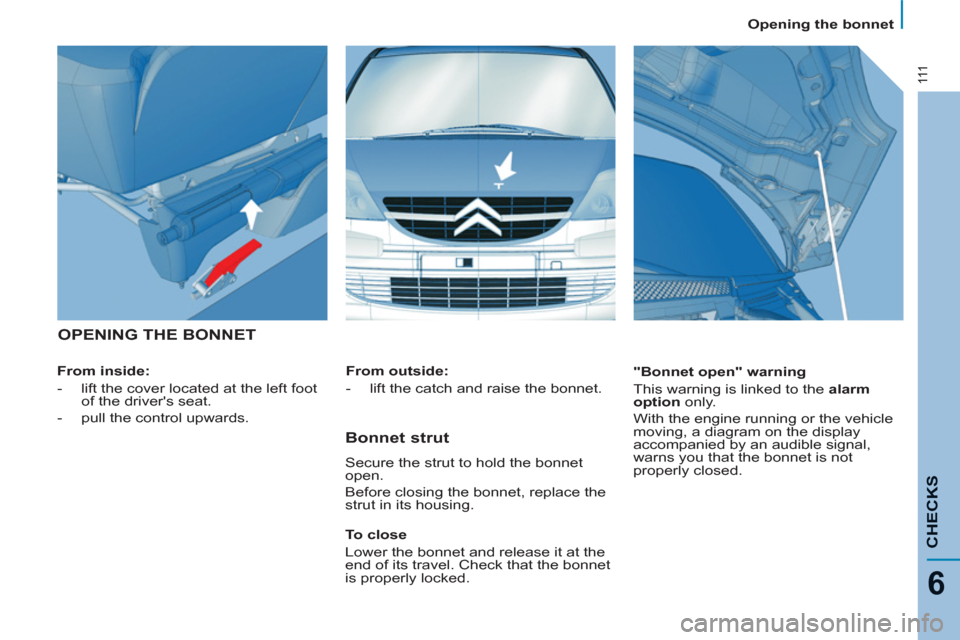
OPENING THE BONNET
From inside:
-
lift the cover located at the left foot
of the driver's seat.
-
pull the control upwards.
"Bonnet open" warning
This warning is linked to the alarm
option
only.
With the engine running or the vehicle
moving, a diagram on the display
accompanied by an audible signal,
warns you that the bonnet is not
properly closed.
From outside:
- lift the catch and raise the bonnet.
Bonnet strut
Secure the strut to hold the bonnet
open.
Before closing the bonnet, replace the
strut in its housing.
To close
Lower the bonnet and release it at the
end of its travel. Check that the bonnet
is properly locked.
Page 122 of 234
120
Changing a wheel
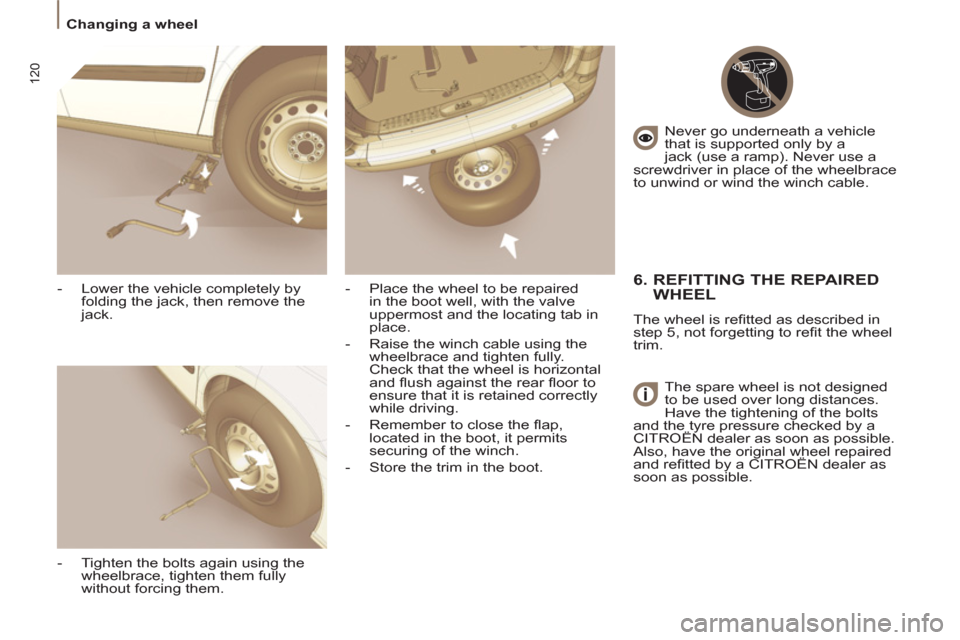
- Lower the vehicle completely by
folding the jack, then remove the
jack.
- Tighten the bolts again using the
wheelbrace, tighten them fully
without forcing them.
- Place the wheel to be repaired
in the boot well, with the valve
uppermost and the locating tab in
place.
- Raise the winch cable using the
wheelbrace and tighten fully.
Check that the wheel is horizontal
and fl ush against the rear fl oor to
ensure that it is retained correctly
while driving.
- Remember to close the fl ap,
located in the boot, it permits
securing of the winch.
- Store the trim in the boot. Never go underneath a vehicle
that is supported only by a
jack (use a ramp). Never use a
screwdriver in place of the wheelbrace
to unwind or wind the winch cable.
6. REFITTING THE REPAIRED
WHEEL
The wheel is refi tted as described in
step 5, not forgetting to refi t the wheel
trim.
The spare wheel is not designed
to be used over long distances.
Have the tightening of the bolts
and the tyre pressure checked by a
CITROËN dealer as soon as possible.
Also, have the original wheel repaired
and refi tted by a CITROËN dealer as
soon as possible.
Page 123 of 234
121
QUICK HELP
7
Changing a bulb
CHANGING A BULB
Handle the bulbs with a dry cloth.
Make access easier on the right-
hand side by removing the wash-wipe
pipe and the fuse box cover.
High pressure washing: when using
this type of washing on stubborn dirt,
do not persist on the headlamps, the
lights and their surrounds to avoid
damaging their coating and their seal.
2 - Main beam headlamps
H7-55 W or xenon bulb.
- Turn the protective cover
corresponding to the faulty bulb
a quarter of a turn to the left and
remove it.
- Disconnect the connector.
- Press the end of the securing clip
to free it. Change the bulb.
When fi tting the new bulb, ensure that
the direction notches are positioned
correctly and the securing clip is fi xed
properly.
- Reconnect the connector.
- Refi t the protective cover, then turn
it a quarter of a turn to the right.
3 - Fog lamps
H1-55 W.
FRONT LIGHTS
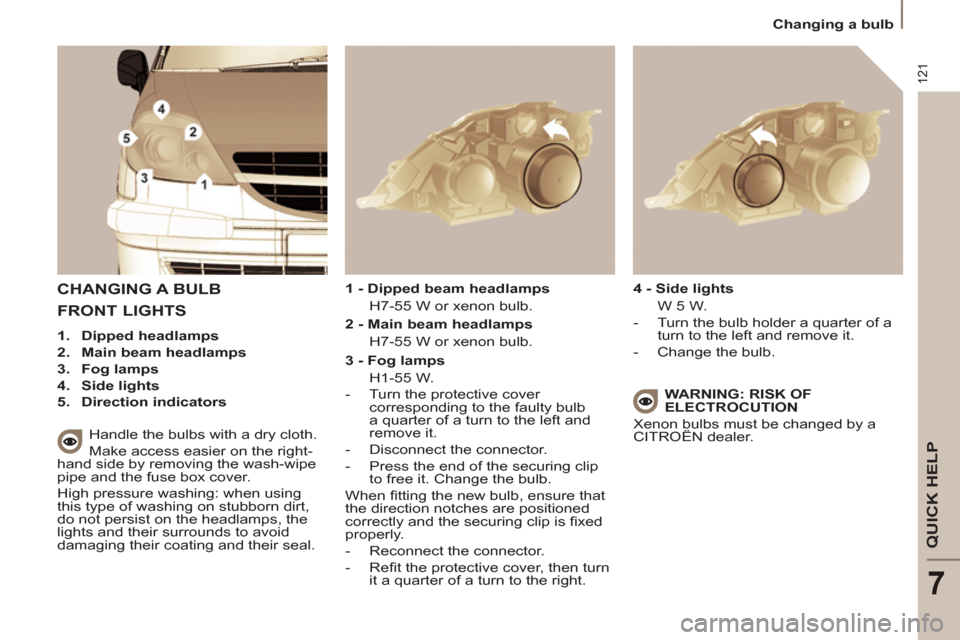
1.
Dipped headlamps
2.
Main beam headlamps
3.
Fog lamps
4.
Side lights
5.
Direction indicators
1 - Dipped beam headlamps
H7-55 W or xenon bulb.
4 - Side lights
W 5 W.
- Turn the bulb holder a quarter of a
turn to the left and remove it.
- Change the bulb.
WARNING: RISK OF
ELECTROCUTION
Xenon bulbs must be changed by a
CITROËN dealer.
Page 125 of 234
123
QUICK HELP
7
Changing a bulb
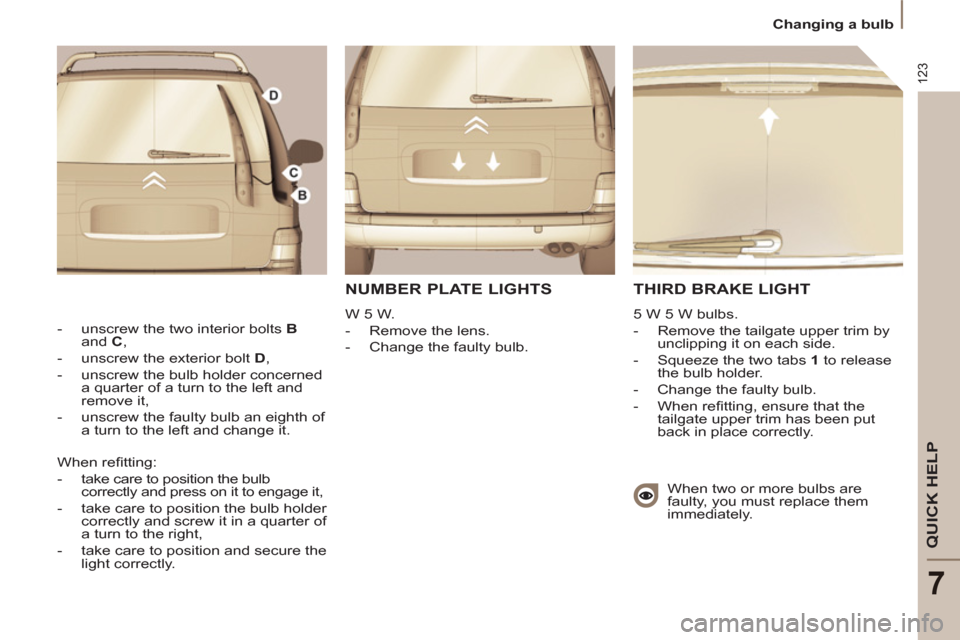
THIRD BRAKE LIGHT
5 W 5 W bulbs.
- Remove the tailgate upper trim by
unclipping it on each side.
- Squeeze the two tabs 1
to release
the bulb holder.
- Change the faulty bulb.
- When refi tting, ensure that the
tailgate upper trim has been put
back in place correctly.
- unscrew the two interior bolts B
and C
,
- unscrew the exterior bolt D
,
- unscrew the bulb holder concerned
a quarter of a turn to the left and
remove it,
- unscrew the faulty bulb an eighth of
a turn to the left and change it.
When two or more bulbs are
faulty, you must replace them
immediately. When refi tting:
- take care to position the bulb
correctly and press on it to engage it,
- take care to position the bulb holder
correctly and screw it in a quarter of
a turn to the right,
- take care to position and secure the
light correctly.
NUMBER PLATE LIGHTS
W 5 W.
- Remove the lens.
- Change the faulty bulb.
Page 143 of 234
9.3
01
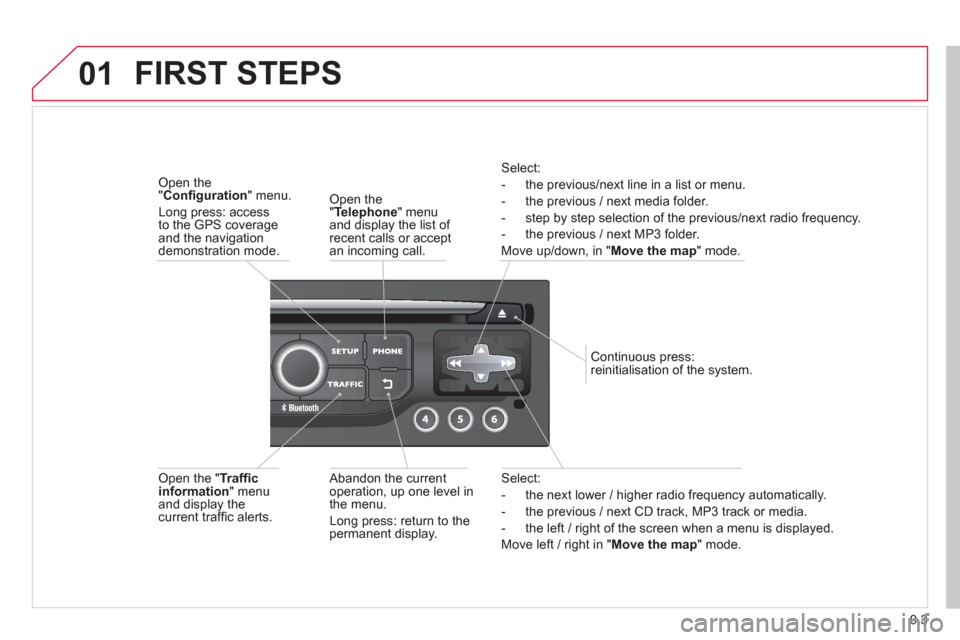
Select:
- the next lower / hi
gher radio frequency automatically.
- the previous
/ next CD track, MP3 track or media.
- the le
ft / right of the screen when a menu is displayed.
Move le
ft / right in "Move the map
" mode.
Abandon the current
operation, up one level in
t
he menu.
Long press: return to thepermanent display.
Continuous
press:
reinitialisation of the system.
Open the" Telephone" menu
and display the list of recent calls or accept
an incoming call.
Open the "Confi guration
" menu.
Long press: access
to the GPS coverageand the navigation demonstration mode.
Open the "Traffi c information " menuand display thecurrent traffi c alerts.
Select:
- the previous
/next line in a list or menu.
- the previous
/ next media folder.
- step b
y step selection of the previous/next radio frequency.
- the previous / next MP3 folder.
Move up/down, in "
Move the map " mode.
FIRST STEPS
Page 218 of 234
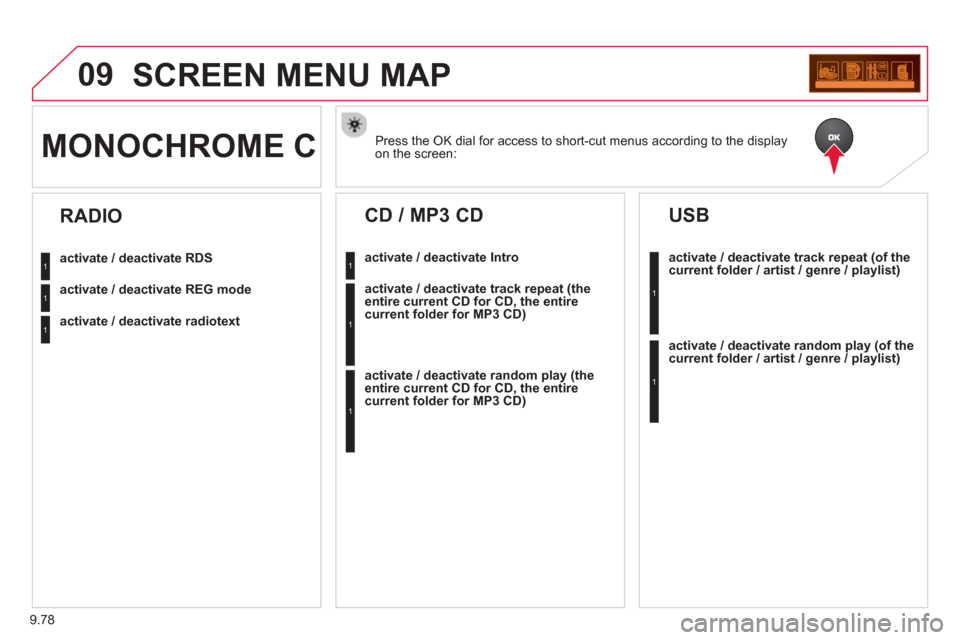
9.78
09SCREEN MENU MAP
Press the OK dial for access to short-cut menus according to the displayon the screen: MONOCHROME C
activate / deactivate RDS
activate / deactivate REG mode
activate / deactivate radiotext
RADIO
activate / deactivate Intro
CD / MP3 CD
activate / deactivate track repeat (the
entire current CD for CD, the entire
current folder for MP3 CD)
activate / deactivate random play (the
entire current CD for CD, the entire
current folder for MP3 CD)
activate / deactivate track repeat (of the current folder / artist / genre / playlist)
USB
activate / deactivate random play(of thecurrent folder / artist / genre / playlist)
1
1
1
1
1
1
1
1