ignition Citroen C8 2013 1.G Owner's Guide
[x] Cancel search | Manufacturer: CITROEN, Model Year: 2013, Model line: C8, Model: Citroen C8 2013 1.GPages: 234, PDF Size: 8.86 MB
Page 52 of 234

Steering mounted controls
50
Switching the function off
- Place the dial in position 0
or switch
off the ignition to switch everything
off.
Good practice
When changing the programmed
reference speed by means of a
maintained press, pay attention as
the speed can increase or decrease
rapidly.
Do not use the cruise control on
slippery roads or in heavy traffi c.
In the event of a steep slope, the cruise
control cannot prevent the vehicle from
exceeding the programmed speed.
In any event, the cruise control cannot
replace the need to observe the speed
limits, nor can it replace the need for
vigilance and responsibility on the part
of the driver.
You are advised to keep your feet near
the pedals.
To avoid any jamming under the
pedals:
- ensure that the mat and its fi xings
on the fl oor are positioned correctly,
- never place one mat on top of
another
Changing the
programmed speed
There are two methods
of memorising a
speed higher than the
previous one:
Without using the accelerator:
- press the Set +
button.
A brief press increases the speed by
1 mph (km/h).
A maintained press increases the
speed in steps of 5 mph (km/h).
Operating fault
The programmed speed is cleared and
the dashes fl ash for a few seconds.
Consult a CITROËN dealer to have the
system checked. Using the accelerator:
- exceed the memorised speed until
the speed required is reached,
- press the Set +
or Set -
button.
To memorise a speed lower than the
previous one:
- press the Set -
button.
A brief press decreases the speed by
1 mph (km/h).
A maintained press decreases the
speed in steps of 5 mph (km/h).
Cancelling the programmed
reference speed
When the vehicle becomes stationary,
after switching off the ignition, the
system no longer memorises a speed.
Page 55 of 234

Steering wheel controls
EASE OF USE and COMFORT
3
53
Switching the function off
- Place the dial in position 0
or switch
off the ignition to switch the system
off. The last programmed speed
remains in the memory.
Exceeding the programmed
speed
Pressing the accelerator pedal in order
to exceed the programmed speed
will have no effect unless you press
the pedal fi rmly
beyond the point of
resistance
.
The limiter is deactivated temporarily
and the programmed speed fl ashes.
To return to the limiter function, reduce
your speed to below the programmed
speed.
Operating fault
The programmed speed is cleared and
the dashes fl ash for a few seconds.
Contact a CITROËN dealer to have the
system checked.
Flashing of the speed
The speed fl ashes:
- following forcing of the accelerator
point of resistance,
- when the limiter cannot prevent an
increase in the vehicle speed due
to the profi le of the road or on a
steep descent,
- in the event of sharp acceleration.
Good practice
In any event, the speed limiter cannot
replace the need to observe speed limits,
nor can it replace the need for vigilance
and responsibility on the part of the driver.
Always pay attention to the profi le of the
road, take care on sharp acceleration and
stay in complete control of your vehicle.
To avoid any jamming under the
pedals:
- ensure that the mat and its fi xings
positioned correctly,
- never place one mat on top of
another.
Page 58 of 234

56
Ventilation
Do not cover the sunshine sensor
located in the centre of the fascia.
This is used to regulate the air
conditioning. Located on the centre console, the
control panel is to the right of the gear
lever.
1 - AUTO mode
This is the normal air
conditioning operating mode.
Refer to the beginning of the
"Ventilation" section of chapter 6.
The driver and front passenger can
each adjust the air temperature to suit
their requirements.
They can also activate or disarm the
rear ventilation adjustment controls.
For your comfort, the settings selected
when the ignition is switched off will be
retained when it is switched on again, if the
temperature in the passenger compartment
has not changed signifi cantly; otherwise,
operation will resume in automatic mode.
- Press the "AUTO"
button.
Depending on the comfort temperature
selected, the system controls the air
distribution, fl ow and intake so that the
passenger compartment is comfortable
and has an adequate circulation of air.
You do not have to make any further
adjustments.
When the engine is cold, in order
to prevent a rush of cold air, the
ventilation will reach its optimum level
progressively.
The "AUTO"
symbol is displayed.
Page 64 of 234
62
Seats
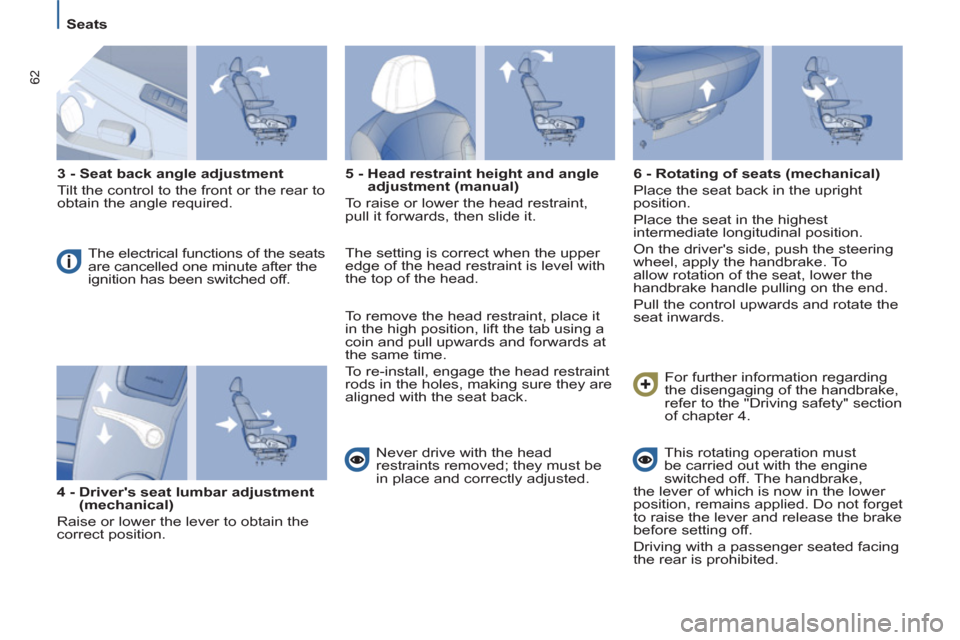
3 - Seat back angle adjustment
Tilt the control to the front or the rear to
obtain the angle required.
The electrical functions of the seats
are cancelled one minute after the
ignition has been switched off.
4 - Driver's seat lumbar adjustment
(mechanical)
Raise or lower the lever to obtain the
correct position.
5 - Head restraint height and angle
adjustment (manual)
To raise or lower the head restraint,
pull it forwards, then slide it.
Never drive with the head
restraints removed; they must be
in place and correctly adjusted.
6 - Rotating of seats (mechanical)
Place the seat back in the upright
position.
Place the seat in the highest
intermediate longitudinal position.
On the driver's side, push the steering
wheel, apply the handbrake. To
allow rotation of the seat, lower the
handbrake handle pulling on the end.
Pull the control upwards and rotate the
seat inwards.
This rotating operation must
be carried out with the engine
switched off. The handbrake,
the lever of which is now in the lower
position, remains applied. Do not forget
to raise the lever and release the brake
before setting off.
Driving with a passenger seated facing
the rear is prohibited. For further information regarding
the disengaging of the handbrake,
refer to the "Driving safety" section
of chapter 4. The setting is correct when the upper
edge of the head restraint is level with
the top of the head.
To remove the head restraint, place it
in the high position, lift the tab using a
coin and pull upwards and forwards at
the same time.
To re-install, engage the head restraint
rods in the holes, making sure they are
aligned with the seat back.
Page 65 of 234
EASE OF USE and COMFORT
3
63
Seats
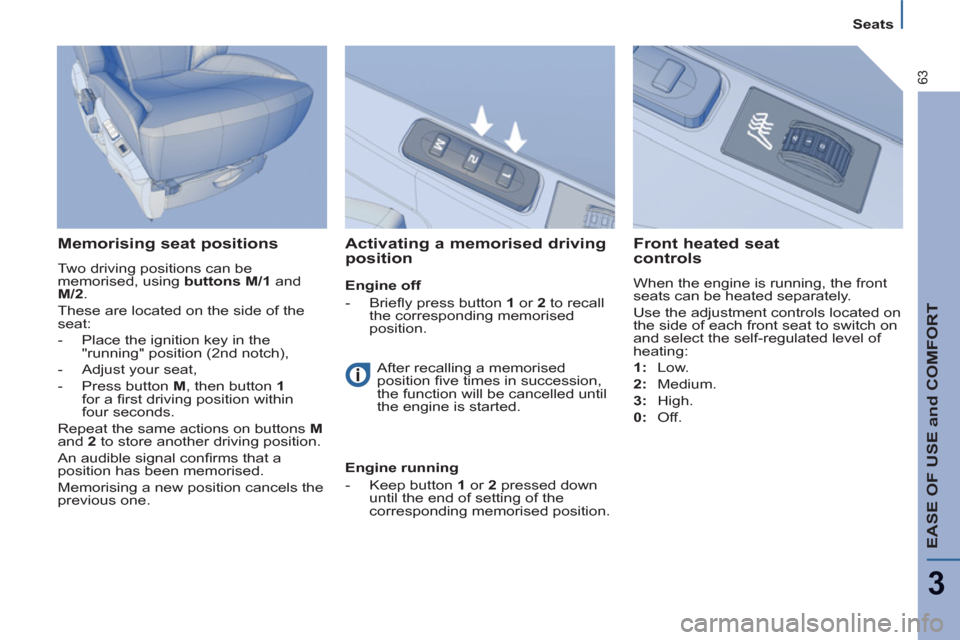
Memorising seat positions
Two driving positions can be
memorised, using buttons M/1
and
M/2
.
These are located on the side of the
seat:
- Place the ignition key in the
"running" position (2nd notch),
- Adjust your seat,
- Press button M
, then button 1
for a fi rst driving position within
four seconds.
Repeat the same actions on buttons M
and 2
to store another driving position.
An audible signal confi rms that a
position has been memorised.
Memorising a new position cancels the
previous one.
Activating a memorised driving
position
Front heated seat
controls
When the engine is running, the front
seats can be heated separately.
Use the adjustment controls located on
the side of each front seat to switch on
and select the self-regulated level of
heating:
1:
Low.
2:
Medium.
3:
High.
0:
Off.
After recalling a memorised
position fi ve times in succession,
the function will be cancelled until
the engine is started.
Engine running
-
Keep button 1
or 2
pressed down
until the end of setting of the
corresponding memorised position.
Engine off
- Briefl y press button 1
or 2
to recall
the corresponding memorised
position.
Page 82 of 234
80
Practical information
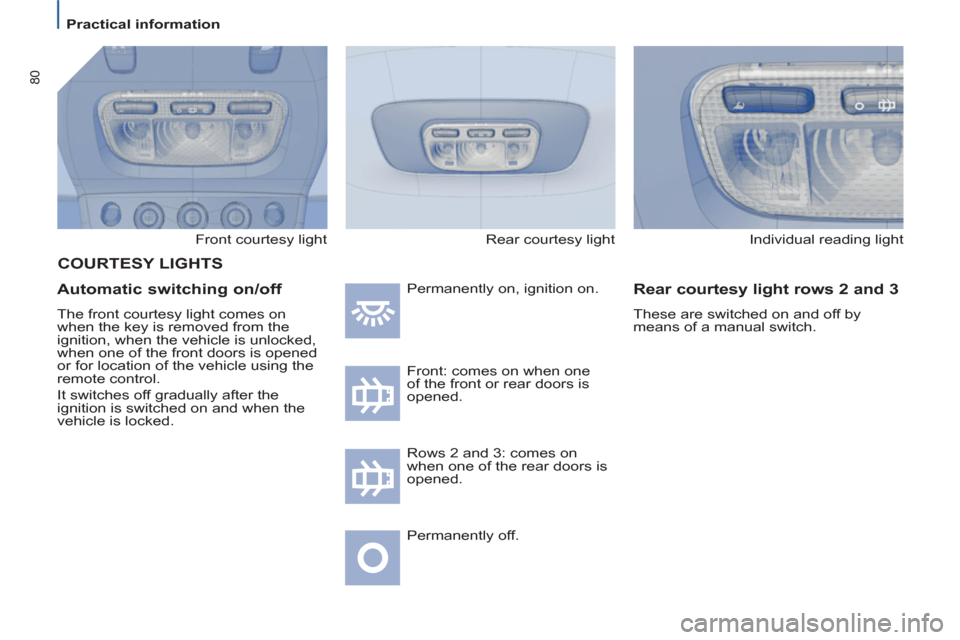
Front courtesy light
Automatic switching on/off
The front courtesy light comes on
when the key is removed from the
ignition, when the vehicle is unlocked,
when one of the front doors is opened
or for location of the vehicle using the
remote control.
It switches off gradually after the
ignition is switched on and when the
vehicle is locked. Permanently on, ignition on.
Front: comes on when one
of the front or rear doors is
opened.
Permanently off.
Individual reading light
Rear courtesy light rows 2 and 3
These are switched on and off by
means of a manual switch.
COURTESY LIGHTS
Rows 2 and 3: comes on
when one of the rear doors is
opened. Rear courtesy light
Page 83 of 234
EASE OF USE and COMFORT
3
81
Practical information
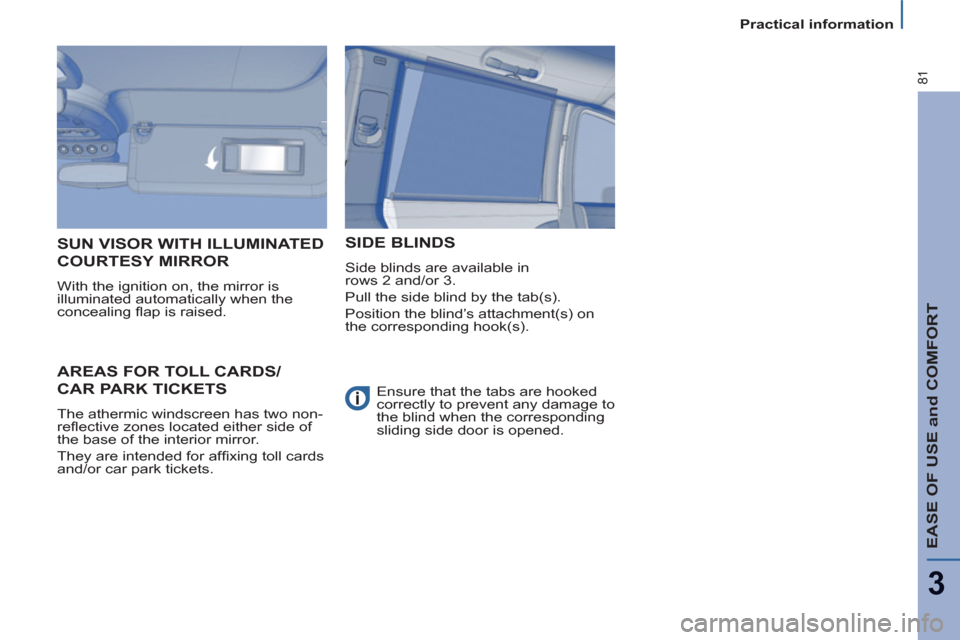
AREAS FOR TOLL CARDS/
CAR PARK TICKETS
The athermic windscreen has two non-
refl ective zones located either side of
the base of the interior mirror.
They are intended for affi xing toll cards
and/or car park tickets.
SUN VISOR WITH ILLUMINATED
COURTESY MIRROR
With the ignition on, the mirror is
illuminated automatically when the
concealing fl ap is raised.
SIDE BLINDS
Side blinds are available in
rows 2 and/or 3.
Pull the side blind by the tab(s).
Position the blind’s attachment(s) on
the corresponding hook(s).
Ensure that the tabs are hooked
correctly to prevent any damage to
the blind when the corresponding
sliding side door is opened.
Page 85 of 234
EASE OF USE and COMFORT
3
83
Mirrors and windows
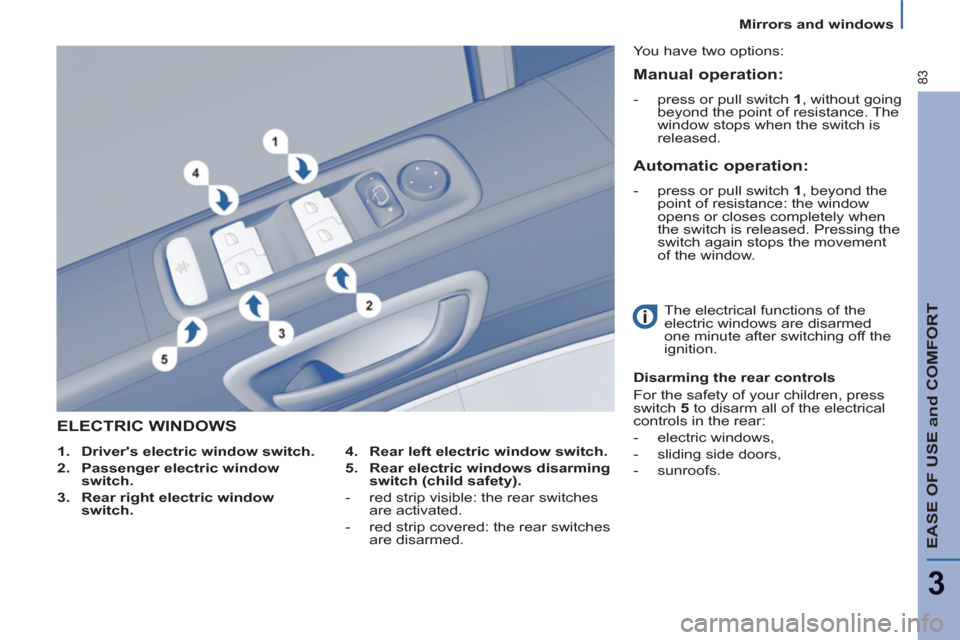
ELECTRIC WINDOWS
4.
Rear left electric window switch.
5.
Rear electric windows disarming
switch (child safety).
- red strip visible: the rear switches
are activated.
- red strip covered: the rear switches
are disarmed. You have two options:
The electrical functions of the
electric windows are disarmed
one minute after switching off the
ignition.
Disarming the rear controls
For the safety of your children, press
switch 5
to disarm all of the electrical
controls in the rear:
- electric windows,
- sliding side doors,
- sunroofs.
1.
Driver's electric window switch.
2.
Passenger electric window
switch.
3.
Rear right electric window
switch.
Manual operation:
- press or pull switch 1
, without going
beyond the point of resistance. The
window stops when the switch is
released.
Automatic operation:
- press or pull switch 1
, beyond the
point of resistance: the window
opens or closes completely when
the switch is released. Pressing the
switch again stops the movement
of the window.
Page 86 of 234
84
Mirrors and windows
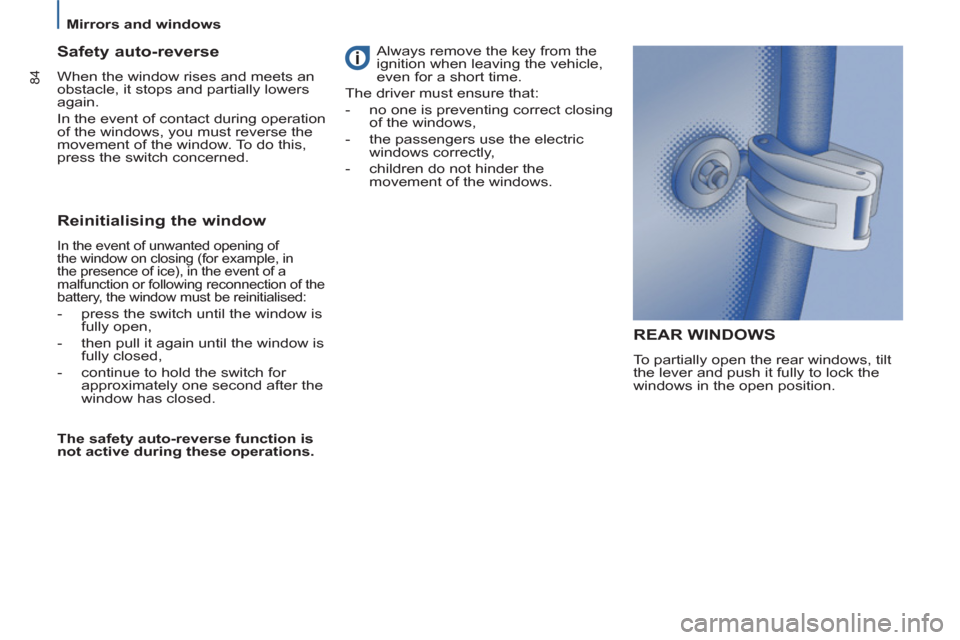
REAR WINDOWS
To partially open the rear windows, tilt
the lever and push it fully to lock the
windows in the open position.
Safety auto-reverse
When the window rises and meets an
obstacle, it stops and partially lowers
again.
In the event of contact during operation
of the windows, you must reverse the
movement of the window. To do this,
press the switch concerned.
Reinitialising the window
In the event of unwanted opening of
the window on closing (for example, in
the presence of ice), in the event of a
malfunction or following reconnection of the
battery, the window must be reinitialised:
- press the switch until the window is
fully open,
- then pull it again until the window is
fully closed,
- continue to hold the switch for
approximately one second after the
window has closed.
The safety auto-reverse function is
not active during these operations. Always remove the key from the
ignition when leaving the vehicle,
even for a short time.
The driver must ensure that:
- no one is preventing correct closing
of the windows,
- the passengers use the electric
windows correctly,
- children do not hinder the
movement of the windows.
Page 88 of 234
86
Driving safely
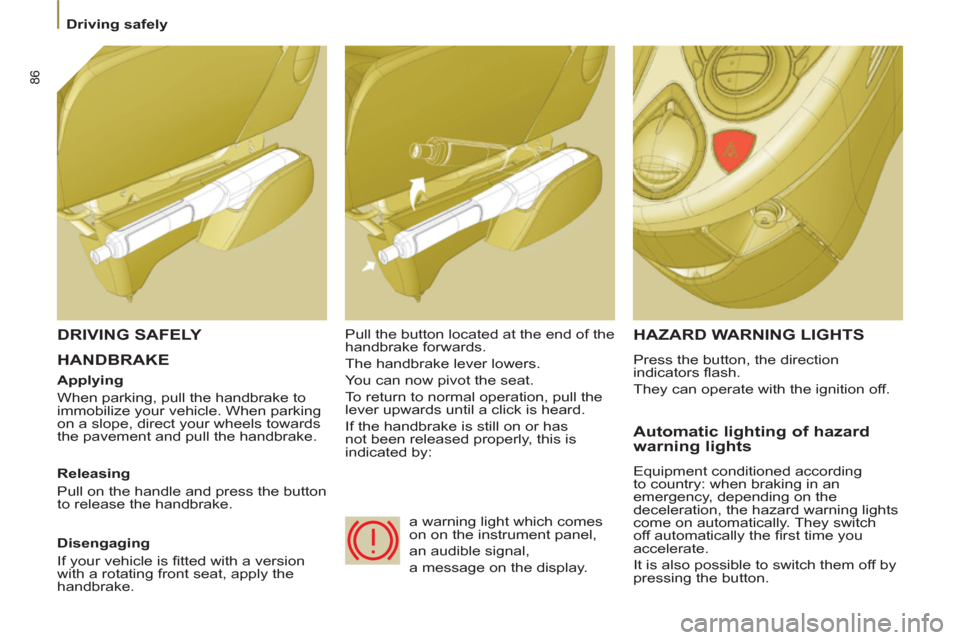
HANDBRAKE
HAZARD WARNING LIGHTS
Press the button, the direction
indicators fl ash.
They can operate with the ignition off.
Automatic lighting of hazard
warning lights
Equipment conditioned according
to country: when braking in an
emergency, depending on the
deceleration, the hazard warning lights
come on automatically. They switch
off automatically the fi rst time you
accelerate.
It is also possible to switch them off by
pressing the button.
DRIVING SAFELY
Applying
When parking, pull the handbrake to
immobilize your vehicle. When parking
on a slope, direct your wheels towards
the pavement and pull the handbrake.
Releasing
Pull on the handle and press the button
to release the handbrake. Pull the button located at the end of the
handbrake forwards.
The handbrake lever lowers.
You can now pivot the seat.
To return to normal operation, pull the
lever upwards until a click is heard.
If the handbrake is still on or has
not been released properly, this is
indicated by:
Disengaging
If your vehicle is fi tted with a version
with a rotating front seat, apply the
handbrake. a warning light which comes
on on the instrument panel,
an audible signal,
a message on the display.