instrument panel CITROEN DISPATCH SPACETOURER DAG 2018 Handbook (in English)
[x] Cancel search | Manufacturer: CITROEN, Model Year: 2018, Model line: DISPATCH SPACETOURER DAG, Model: CITROEN DISPATCH SPACETOURER DAG 2018Pages: 400, PDF Size: 16.99 MB
Page 4 of 400
2
.
.
Instrument panel 10
Warning and indicator lamps 1 3
Indicators
2
7
Lighting dimmer
3
3
Trip computer
3
4
Date and time adjustment
3
6
Key
38
Key, remote control
3
8
"
K
eyless Entry and Starting"
4
3
Locking/unlocking from inside
5
5
Front doors
5
6
Manual sliding side door(s)
5
7
Electric sliding side door(s)
5
9
Manual or electric sliding side door(s)
6
2
Hands-free sliding side door(s)
6
5
Side-hinged rear doors
6
8
Tailgate
7
0
Tailgate rear screen
7
1
Alarm
72
Electric windows
7
4Steering wheel adjustment
7
6
Mirrors
76
F
ront seats
7
8
2-seat front bench seat
8
4
Fixed one-piece bench seat
8
5
Fixed rear seat and bench seat
8
8
Rear seat and bench seat on rails
9
1
Individual rear seat(s) on rails 9 6
Interior fittings 1 00
Seating area fittings
1
05
Panoramic sunroof
1
09
Retractable sliding table
1
10
Manual air conditioning
1
15
Dual-zone automatic air conditioning
1
16
Front demist – defrost
1
19
Door mirrors demist – defrost
1
20
Rear screen demist – defrost
1
21
Rear Heating – Air conditioning
1
23
Programmable Heating/Ventilation
1
24
Courtesy lamps
1
26Lighting control stalk
1
27
Daytime running lamps
1
29
Automatic illumination of headlamps
1
29
Cornering lighting
1
31
Automatic headlamp dipping
1
32
Headlamp beam height adjustment
1
33
Interior ambient lighting
1
34
Wiper control stalk 1 34
General safety recommendations
1
39
Hazard warning lamps
1
40
Emergency or assistance call
1
40
Hor n
142
Electronic stability control (ESC)
1
42
Grip control
1
45
Seat belts
1
47
Airbags
1
51
Child seats
1
55
Deactivating the passenger front airbag
1
57
ISOFIX mountings and child seats
1
65
Manual child lock
1
75
Electric child lock
1
75
Child lock on rear windows
1
76
Over view
Instruments
Access Ease of use and comfort
Safety
Lighting and visibility
Eco-driving
Instruments and controls 4
L abels 7
Eco-driving
8
Contents
Page 7 of 400
5
1.Open glove box.
2. 12
V accessory sockets (120 W).
Obser ve the maximum power rating to
avoid damaging your accessory.
3. USB port.
4. Auxiliary socket (JACK).
5. Cup or can holder.
6. Storage compartments.
7. Cooled glove box (if fitted).
Via a ventilation nozzle, if opened, engine
running and air conditioning on.
8. Upper glove box.
9. 230
V accessory socket (150 W, if fitted).
Obser ve the maximum power rating to
avoid damaging your accessory.
10. Horn.
Depending on your vehicle's equipment,
the storage compartments may be open
or closed. This configuration is shown for
illustrative purposes.Steering mounted controls Central switch panel
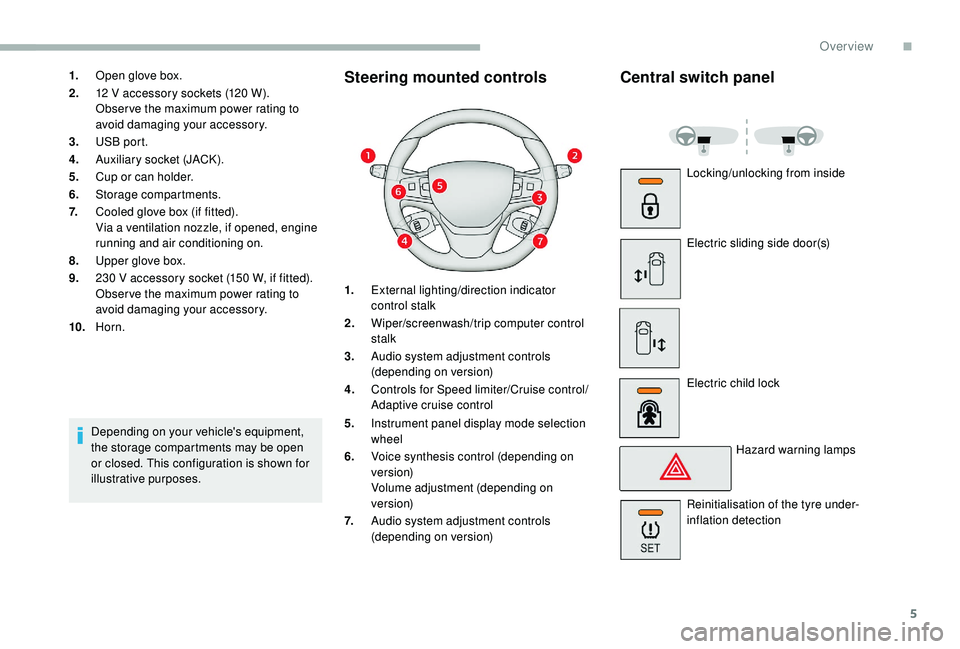
1.External lighting/direction indicator
control stalk
2. Wiper/screenwash/trip computer control
stalk
3. Audio system adjustment controls
(depending on version)
4. Controls for Speed limiter/Cruise control/
Adaptive cruise control
5. Instrument panel display mode selection
wheel
6. Voice synthesis control (depending on
ve r s i o n)
Volume adjustment (depending on
ve r s i o n)
7. Audio system adjustment controls
(depending on version) Locking/unlocking from inside
Electric sliding side door(s)
Electric child lock
Hazard warning lamps
Reinitialisation of the tyre under-
inflation detection
.
Over view
Page 10 of 400
8
As a passenger, if you avoid connecting your
multimedia devices (film, music, video game
etc.), you will contribute towards limiting the
consumption of electrical energy, and so of
fuel.
Disconnect your portable devices before
leaving the vehicle.
Eco- driving
Eco-driving is a range of everyday practices that allow the motorist to optimise their fuel consumption and CO2 emissions.
Optimise the use of your
gearbox
With a manual gearbox, move off gently
and change up without waiting. During
acceleration, change up early.
With an automatic gearbox, favour automatic
mode and avoid pressing the accelerator
pedal heavily or suddenly.
The gear efficiency indicator invites you to
engage the most suitable gear: as soon as the
indication is displayed in the instrument panel,
follow it straight away.
For vehicles fitted with an automatic gearbox,
this indicator appears only in manual mode.
Drive smoothly
Maintain a safe distance between vehicles,
use engine braking rather than the
brake pedal, and press the accelerator
progressively. These practices contribute
towards a reduction in fuel consumption and
CO
2 emissions and also help reduce the
background traffic noise.
If your vehicle has cruise control, make use of
the system at speeds above 25
mph (40 km/h)
when the traffic is flowing well.
Control the use of your electrical
equipment
Before moving off, if the passenger
compartment is too warm, ventilate it by
opening the windows and air vents before
using the air conditioning.
Above around 30
mph (50 km/h), close the
windows and leave the air vents open.
Consider using equipment that can help
keep the temperature in the passenger
compartment down (sunroof blind and window
blinds, etc.). Switch off the headlamps and front foglamps
when the ambient light level does not require
their use.
Avoid running the engine before moving off,
particularly in winter; your vehicle will warm up
much faster while driving. Unless it has automatic regulation, switch off
the air conditioning as soon as the desired
temperature has been reached.
Switch off the demisting and defrosting
controls, if these are not automatically
managed.
Switch off the heated seat as soon as
possible.
Eco-driving
Page 12 of 400

10
Instrument panel
Speedometer
Analogue speedometer (mph or km/h).
Indicators with LCD text or
matrix instrument panel
1.Fuel gauge.
2. Coolant temperature gauge.
Display screen
When travelling abroad, you may need to
change the units of distance: the speed
display must be expressed in the official
unit of the country (miles or km). The units
are changed in the screen configuration
menu, with the vehicle stationary.
With LCD text instrument panel
1.Speed limiter or cruise control settings.
2. Digital speedometer (mph or km/h).
3. Gear efficiency indicator.
Gear with an automatic or electronic
gearbox.
4. Ser vice indicator, then total distance
recorder (km or miles), trip distance
recorder (km or miles), message displays,
etc.
Instruments
Page 13 of 400
11
With matrix instrument panel
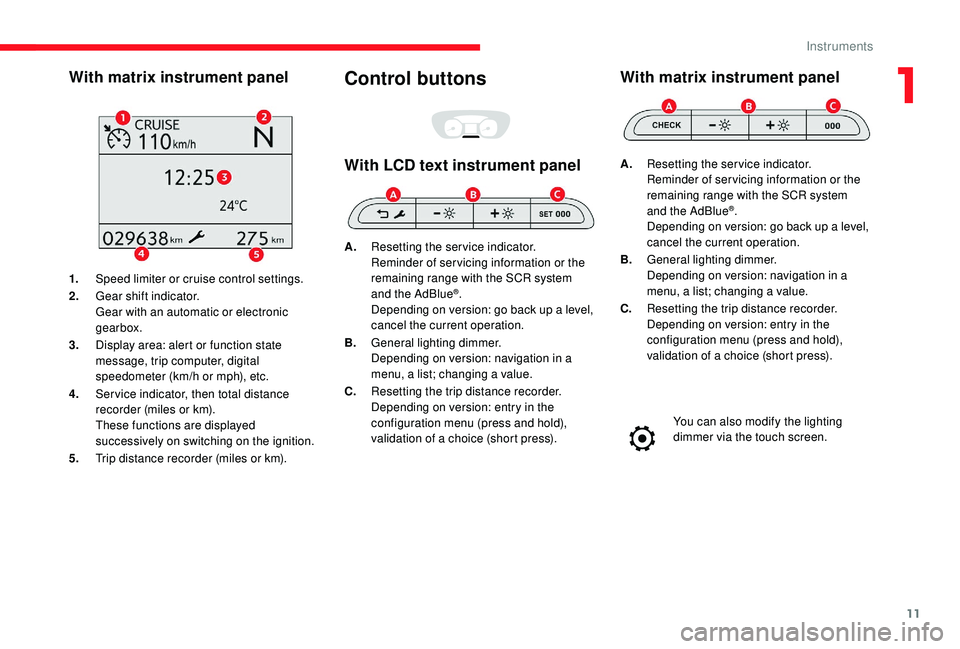
1.Speed limiter or cruise control settings.
2. Gear shift indicator.
Gear with an automatic or electronic
gearbox.
3. Display area: alert or function state
message, trip computer, digital
speedometer (km/h or mph), etc.
4. Ser vice indicator, then total distance
recorder (miles or km).
These functions are displayed
successively on switching on the ignition.
5. Trip distance recorder (miles or km).
Control buttons
With LCD text instrument panel
A.Resetting the service indicator.
Reminder of servicing information or the
remaining range with the SCR system
and the AdBlue
®.
Depending on version: go back up a level,
cancel the current operation.
B. General lighting dimmer.
Depending on version: navigation in a
menu, a list; changing a value.
C. Resetting the trip distance recorder.
Depending on version: entry in the
configuration menu (press and hold),
validation of a choice (short press).
With matrix instrument panel
A.Resetting the service indicator.
Reminder of servicing information or the
remaining range with the SCR system
and the AdBlue
®.
Depending on version: go back up a level,
cancel the current operation.
B. General lighting dimmer.
Depending on version: navigation in a
menu, a list; changing a value.
C. Resetting the trip distance recorder.
Depending on version: entry in the
configuration menu (press and hold),
validation of a choice (short press).
You can also modify the lighting
dimmer via the touch screen.
1
Instruments
Page 15 of 400
13
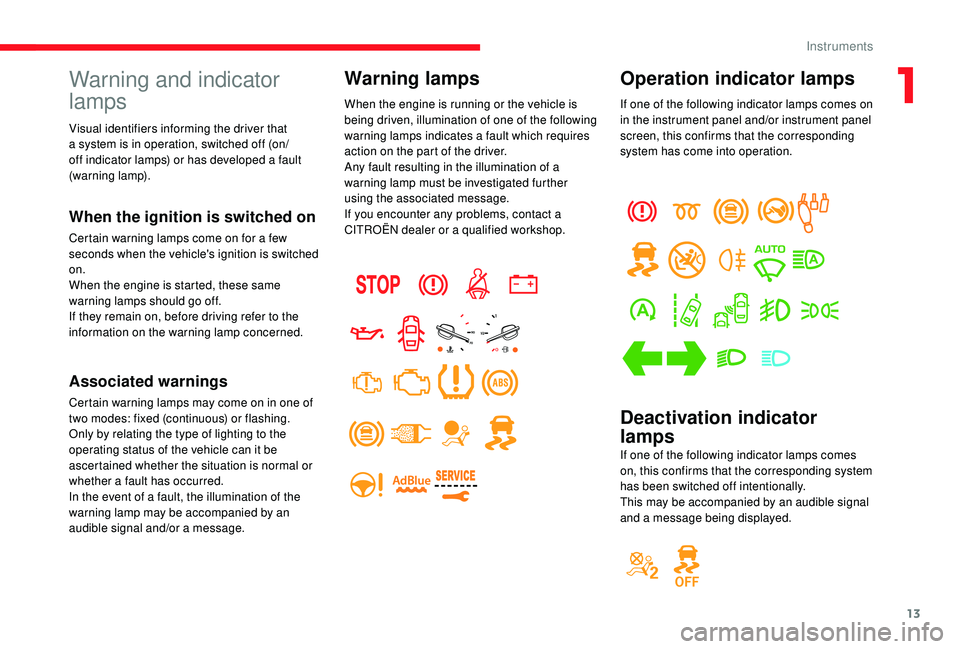
Operation indicator lamps
If one of the following indicator lamps comes on
in the instrument panel and/or instrument panel
screen, this confirms that the corresponding
system has come into operation.
Deactivation indicator
lamps
If one of the following indicator lamps comes
on, this confirms that the corresponding system
has been switched off intentionally.
This may be accompanied by an audible signal
and a message being displayed.
Warning and indicator
lamps
When the ignition is switched on
Certain warning lamps come on for a few
seconds when the vehicle's ignition is switched
on.
When the engine is started, these same
warning lamps should go off.
If they remain on, before driving refer to the
information on the warning lamp concerned.
Associated warnings
Certain warning lamps may come on in one of
two modes: fixed (continuous) or flashing.
Only by relating the type of lighting to the
operating status of the vehicle can it be
ascertained whether the situation is normal or
whether a fault has occurred.
In the event of a fault, the illumination of the
warning lamp may be accompanied by an
audible signal and/or a message.
Warning lamps
When the engine is running or the vehicle is
being driven, illumination of one of the following
warning lamps indicates a fault which requires
action on the part of the driver.
Any fault resulting in the illumination of a
warning lamp must be investigated further
using the associated message.
If you encounter any problems, contact a
CITROËN dealer or a qualified workshop.
Visual identifiers informing the driver that
a system is in operation, switched off (on/
off indicator lamps) or has developed a fault
(warning lamp).
1
Instruments
Page 26 of 400
24
Warning/indicator lampStateCause Action/Observations
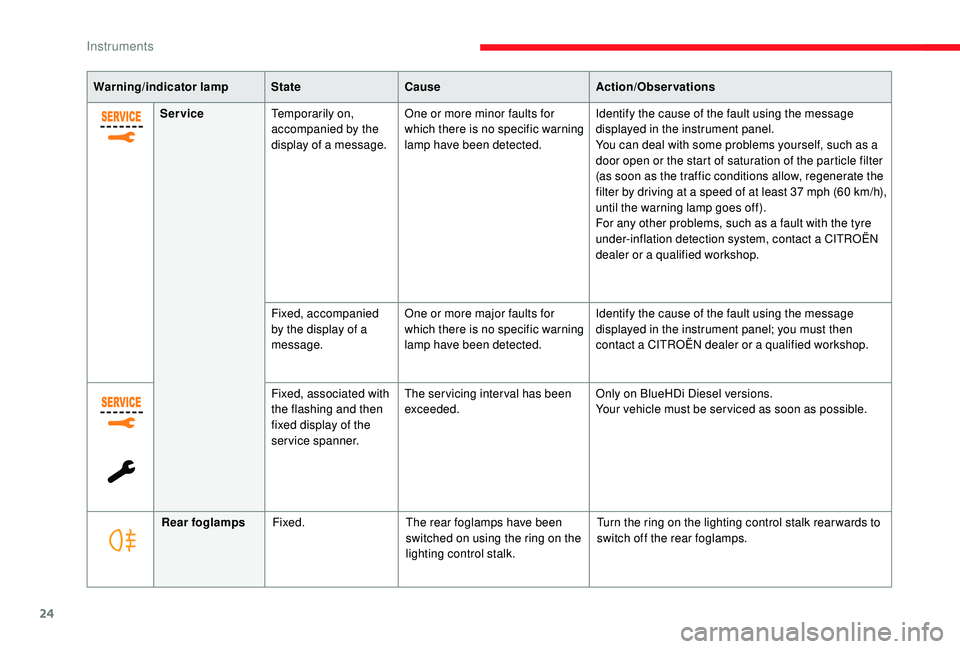
Service Temporarily on,
accompanied by the
display of a message. One or more minor faults for
which there is no specific warning
lamp have been detected. Identify the cause of the fault using the message
displayed in the instrument panel.
You can deal with some problems yourself, such as a
door open or the start of saturation of the particle filter
(as soon as the traffic conditions allow, regenerate the
filter by driving at a speed of at least 37
mph (60 km/h),
until the warning lamp goes off).
For any other problems, such as a fault with the tyre
under-inflation detection system, contact a CITROËN
dealer or a qualified workshop.
Fixed, accompanied
by the display of a
message. One or more major faults for
which there is no specific warning
lamp have been detected. Identify the cause of the fault using the message
displayed in the instrument panel; you must then
contact a CITROËN dealer or a qualified workshop.
Fixed, associated with
the flashing and then
fixed display of the
service spanner. The servicing interval has been
exceeded.
Only on BlueHDi Diesel versions.
Your vehicle must be ser viced as soon as possible.
Rear foglamps Fixed. The rear foglamps have been
switched on using the ring on the
lighting control stalk. Turn the ring on the lighting control stalk rear wards to
switch off the rear foglamps.
Instruments
Page 29 of 400

27
Indicators
Service indicator
Warning/indicator lampStateCause Actions/Observations
Service spanner Fixed, temporary when
the ignition is switched
on. There are between 620
miles
(1,000
km) and 1,860 miles
(3,000
km) before the next
service is due. The ser vice indicator is displayed for a few seconds on
the instrument panel. Depending on version:
-
t
he distance recorder display line indicates the
distance remaining (in kilometres or miles) before
the next ser vice is due.
-
a
n alert indicates the distance remaining
(in kilometres or miles) as well as the period before
the next ser vice is due.
The ser vice spanner goes off after a few seconds.
The alert may be triggered close to the due date.
Fixed, when the
ignition is switched on. Less than 620
miles (1,000 km)
remain before the next ser vice
is due. The ser vice indicator is displayed for a few seconds on
the instrument panel. Depending on version:
-
t
he distance recorder display line indicates the
distance remaining before the next ser vice is due.
-
a
n alert message indicates the distance remaining
as well as the period before the next ser vice is due.
The ser vice spanner remains on to indicate that the
ser vice is required very soon.
The alert may be triggered close to the due date.
1
Instruments
Page 30 of 400
28
Warning/indicator lampStateCause Actions/Observations
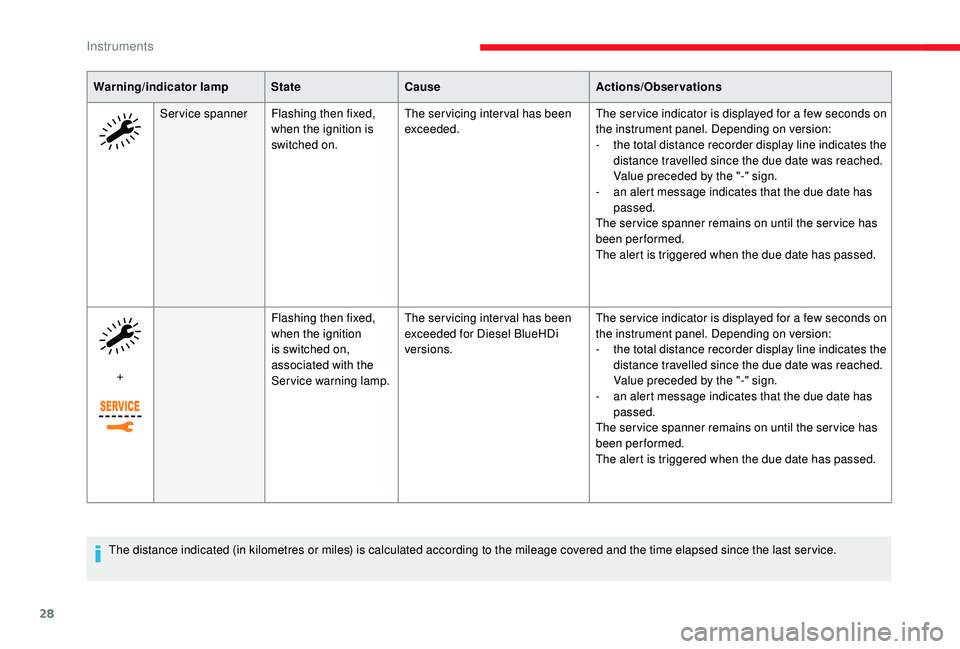
Service spanner Flashing then fixed,
when the ignition is
switched on. The servicing interval has been
exceeded.
The ser vice indicator is displayed for a few seconds on
the instrument panel. Depending on version:
-
t
he total distance recorder display line indicates the
distance travelled since the due date was reached.
Value preceded by the "-" sign.
-
a
n alert message indicates that the due date has
passed.
The ser vice spanner remains on until the ser vice has
been performed.
The alert is triggered when the due date has passed.
+ Flashing then fixed,
when the ignition
is switched on,
associated with the
Service warning lamp.The servicing interval has been
exceeded for Diesel BlueHDi
versions.
The ser vice indicator is displayed for a few seconds on
the instrument panel. Depending on version:
-
t
he total distance recorder display line indicates the
distance travelled since the due date was reached.
Value preceded by the "-" sign.
-
a
n alert message indicates that the due date has
passed.
The ser vice spanner remains on until the ser vice has
been performed.
The alert is triggered when the due date has passed.
The distance indicated (in kilometres or miles) is calculated according to the mileage covered and the time elapsed since the last ser vice.
Instruments
Page 32 of 400
30
Checking the level
After driving for a few minutes, the temperature
and pressure in the cooling system increase.
To top up the level:
F
w
ait at least one hour for the engine to cool,
F
u
nscrew the cap by two turns to allow the
pressure to drop,
F
w
hen the pressure has dropped, remove the
cap,
F
t
op up the level to the "MA X" mark.
Checking levels
Be aware of the risk of burns when topping
up the cooling system. Do not fill above
the maximum level (indicated on the
expansion tank).
Engine oil level indicator
On versions fitted with an electric oil level
indicator, the state of the engine oil level is
displayed in the instrument panel for a few
seconds upon turning the ignition on, at the
same time as the ser vicing information. The level read will only be correct if
the vehicle is on level ground and the
engine has been stopped for more than
30
minutes.
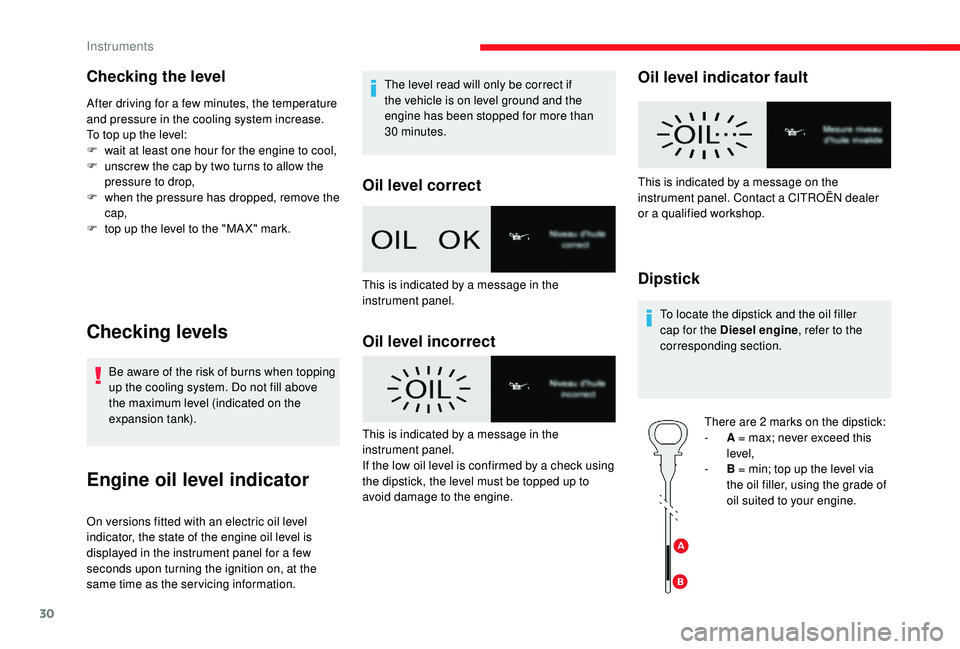
Oil level correct
Oil level incorrect
Oil level indicator fault
Dipstick
To locate the dipstick and the oil filler
cap for the Diesel engine
, refer to the
corresponding section.
There are 2
marks on the dipstick:
-
A
= max; never exceed this
level,
-
B
= min; top up the level via
the oil filler, using the grade of
oil suited to your engine.
This is indicated by a message in the
instrument panel.
This is indicated by a message in the
instrument panel.
If the low oil level is confirmed by a check using
the dipstick, the level must be topped up to
avoid damage to the engine. This is indicated by a message on the
instrument panel. Contact a CITROËN dealer
or a qualified workshop.
Instruments