light Citroen DS3 2010 1.G Owner's Guide
[x] Cancel search | Manufacturer: CITROEN, Model Year: 2010, Model line: DS3, Model: Citroen DS3 2010 1.GPages: 257, PDF Size: 7.45 MB
Page 65 of 257
87Access
Following disconnection of the vehicle battery,
replacement of the remote control battery or in the event of a remote control malfunction, you can no longer unlock, lock or locate your vehicle. First of all, use the key in the lock to unlock or lock your vehicle. Then, reinitialise the remote control. If the problem persists, contact a CITROËN dealer as soon as possible.
Remote control problem
Reinitialisation
Switch off the ignition. Turn the key to position 2 (Ignition) . Press the closed padlock immediately for a few seconds. Switch off the ignition and remove the key from the ignition switch. The remote control is fully operational again.
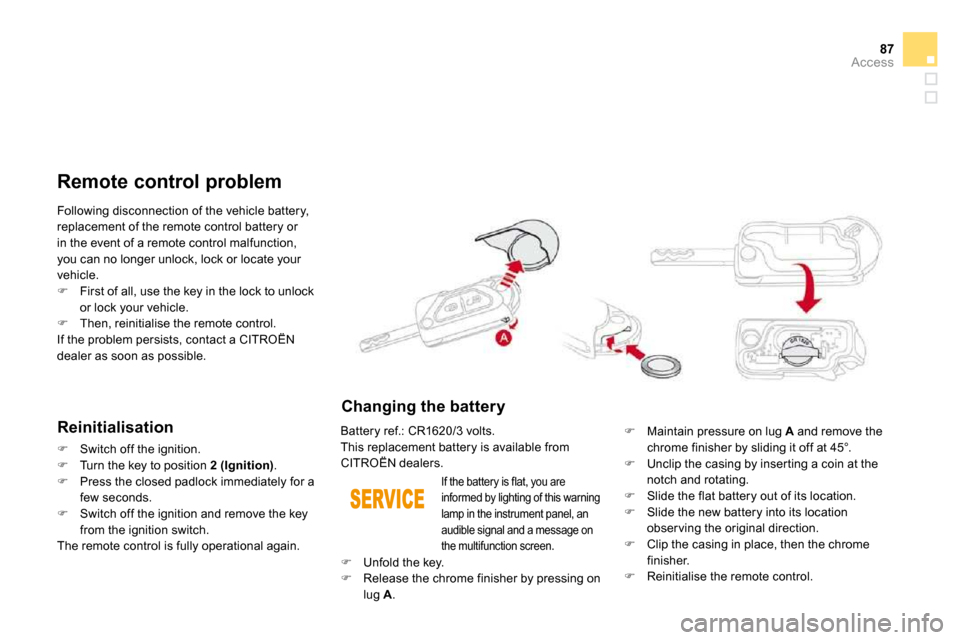
Changing the battery
Battery ref.: CR1620/3 volts. This replacement battery is available from CITROËN dealers.
Maintain pressure on lug A and remove the chrome finisher by sliding it off at 45°. Unclip the casing by inser ting a coin at the
notch and rotating. Slide the flat battery out of its location. Slide the new battery into its location obser ving the original direction. Clip the casing in place, then the chrome finisher. Reinitialise the remote control.
If the battery is flat, you are informed by lighting of this warning lamp in the instrument panel, an audible signal and a message on the multifunction screen.
Unfold the key. Release the chrome finisher by pressing on
lug A .
Page 69 of 257
91Access
If the alarm is triggered ten times in succession, the eleventh time will result in it becoming inactive. If the indicator lamp on button A flashes rapidly, this indicates that the alarm
was triggered during your absence. When the ignition is switched on, this flashing stops immediately. To avoid triggering the alarm when washing your vehicle, lock it using the key in the driver’s door lock.
Triggering of the alarm
This is indicated by sounding of the siren and flashing of the direction indicators for approximately thir ty seconds. After it has been triggered, both types of protection are again operational.
Failure of the remote control
Unlock the vehicle using the key in the driver’s door lock. Open the door; the alarm is triggered. Switch on the ignition; the alarm stops.
Locking the vehicle without
activating the alarm
Lock or deadlock the vehicle using the key in the driver’s door lock.
Malfunction
When the ignition is switched on, lighting of the indicator lamp on button A for ten seconds indicates a siren fault. Have it checked by a CITROËN dealer.
* According to country.
Automatic activation *
2 minutes after the last door or the boot is closed, the alarm is activated automatically. To avoid triggering the alarm on entering
the vehicle, first press the unlocking button on the remote control.
Page 78 of 257
Lighting controls System for selection and control of the various front and rear lamps providing the vehicle's lighting.
The various front and rear lamps of the vehicle
are designed to adapt the driver's visibility progressively according to climatic conditions: - sidelamps, to be seen, - dipped beam headlamps to see without dazzling other drivers, - main beam headlamps to see clearly when the road is clear.
Main lighting
Other lamps are installed to fulfil the requirements of par ticular conditions of
visibility: - a rear foglamp to be seen from afar, - front foglamps for improved vision. - LED lamps to be seen during the daytime.
Additional lighting
Various automatic lighting control modes
are also available according to the following options: - guide-me-home lighting, - automatic illumination of headlamps.
Programming
In some weather conditions (e.g. low
temperature or humidity), the presence of misting on the internal sur face of the glass of the headlamps and rear lamps is normal; it disappears after the lamps have been on for a few minutes.
Page 79 of 257
103Visibility
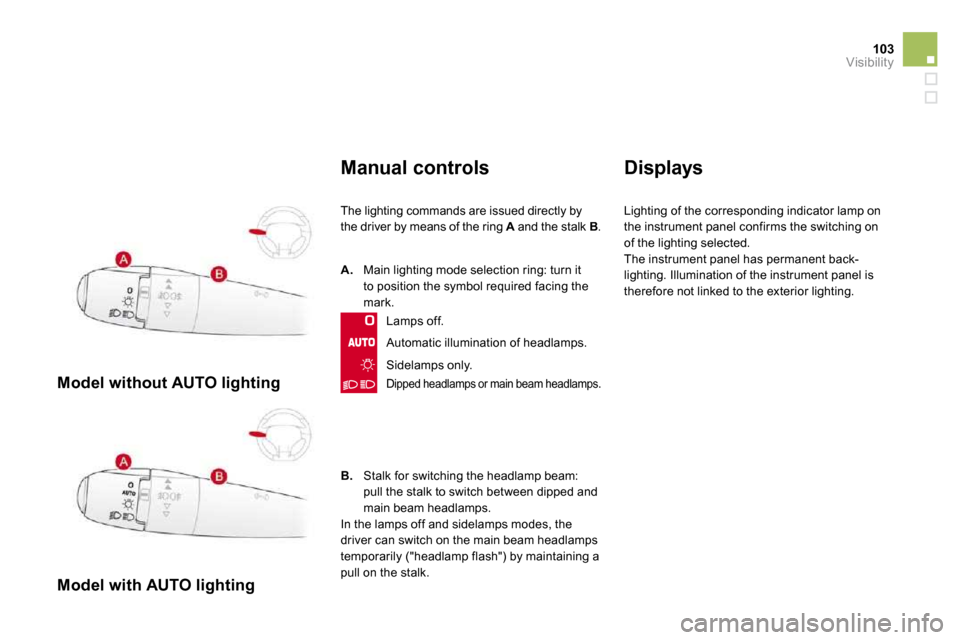
Model without AUTO lighting
Model with AUTO lighting
Manual controls
The lighting commands are issued directly by
the driver by means of the ring A and the stalk AB .
Automatic illumination of headlamps.
B. Stalk for switching the headlamp beam: pull the stalk to switch between dipped and main beam headlamps. In the lamps off and sidelamps modes, the driver can switch on the main beam headlamps temporarily ("headlamp flash") by maintaining a pull on the stalk.
A. Main lighting mode selection ring: turn it to position the symbol required facing the mark.
Lamps off.
Sidelamps only.
Dipped headlamps or main beam headlamps.
Displays
Lighting of the corresponding indicator lamp on
the instrument panel confirms the switching on of the lighting selected. The instrument panel has permanent back-lighting. Illumination of the instrument panel is therefore not linked to the exterior lighting.
Page 80 of 257
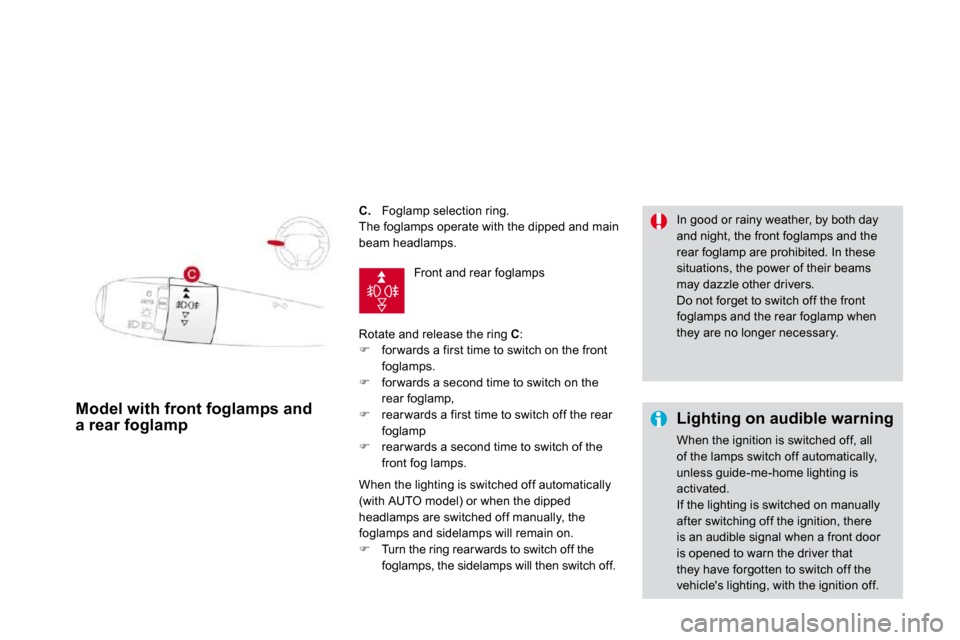
C. Foglamp selection ring.
The foglamps operate with the dipped and main beam headlamps.
Rotate and release the ring C : for wards a first time to switch on the front foglamps. for wards a second time to switch on the rear foglamp, rear wards a first time to switch off the rear foglamp rear wards a second time to switch of the front fog lamps.
Model with front foglamps and a rear foglamp Lighting on audible warning
When the ignition is switched off, all of the lamps switch off automatically, unless guide-me-home lighting is activated. If the lighting is switched on manually after switching off the ignition, there is an audible signal when a front door is opened to warn the driver that they have forgotten to switch off the
vehicle's lighting, with the ignition off.
In good or rainy weather, by both day and night, the front foglamps and the rear foglamp are prohibited. In these situations, the power of their beams may dazzle other drivers. Do not forget to switch off the front foglamps and the rear foglamp when they are no longer necessary.
Front and rear foglamps
When the lighting is switched off automatically (with AUTO model) or when the dipped headlamps are switched off manually, the foglamps and sidelamps will remain on. Turn the ring rearwards to switch off the foglamps, the sidelamps will then switch off.
Page 81 of 257

105Visibility
Temporarily keeping the dipped beam headlamps on after the vehicle's ignition has been switched off makes the driver's exit easier when the light is poor.
Switching on
With the ignition off, "flash" the headlamps using the lighting stalk. A fur ther "headlamp flash" switches the function off.
Switching off
The manual guide-me-home lighting switches off automatically after a set time.
Manual guide-me-home
lighting
Page 82 of 257
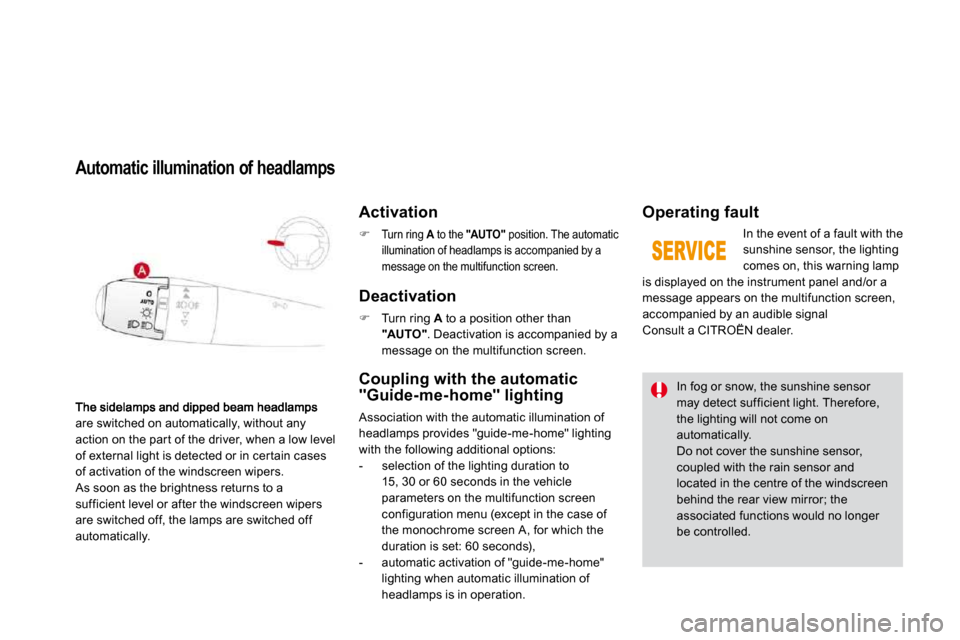
are switched on automatically, without any action on the par t of the driver, when a low level of external light is detected or in cer tain cases of activation of the windscreen wipers. As soon as the brightness returns to a sufficient level or after the windscreen wipers are switched off, the lamps are switched off automatically.
Automatic illumination of headlamps
Activation
Turn ring A to the A"AUTO" position. The automatic illumination of headlamps is accompanied by a message on the multifunction screen.
Deactivation
Turn ring A to a position other than "AUTO" . Deactivation is accompanied by a message on the multifunction screen.
Coupling with the automatic "Guide-me-home" lighting
Association with the automatic illumination of headlamps provides "guide-me-home" lighting with the following additional options: - selection of the lighting duration to
15, 30 or 60 seconds in the vehicle parameters on the multifunction screen configuration menu (except in the case of the monochrome screen A, for which the duration is set: 60 seconds), - automatic activation of "guide-me-home" lighting when automatic illumination of headlamps is in operation.
Operating fault
In the event of a fault with the sunshine sensor, the lighting comes on, this warning lamp is displayed on the instrument panel and/or a message appears on the multifunction screen, accompanied by an audible signal Consult a CITROËN dealer.
In fog or snow, the sunshine sensor may detect sufficient light. Therefore, the lighting will not come on
automatically. Do not cover the sunshine sensor, coupled with the rain sensor and located in the centre of the windscreen behind the rear view mirror; the associated functions would no longer be controlled.
Page 83 of 257
107Visibility
LED lamps
Daytime external lighting using specific front lamp s providing a signature of the vehicle. Comprising two sets of six light emitting diodes (LEDs), they are located in the ver tical scoops below each headlamp.
On star ting the vehicle, in daylight the LED lamps come on automatically, if the lighting stalk is in position "0" or "AUTO" . If the sidelamps and headlamps are switched
on manually or automatically, the LED lamps switch off.
For countries where exterior lighting by day is not a legal requirement, you can activate or deactivate the function via the multifunction screen configuration menu.
Headlamp
adjustment
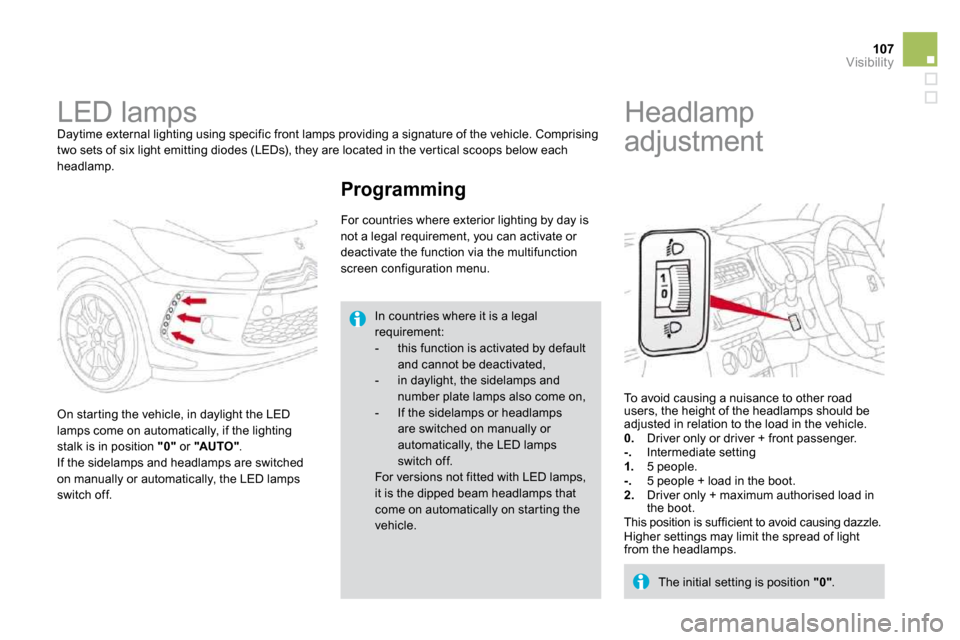
To avoid causing a nuisance to other road users, the height of the headlamps should be adjusted in relation to the load in the vehicle. 0. Driver only or driver + front passenger. - . Intermediate setting 1. 5 people. - . 5 people + load in the boot. 2. Driver only + maximum authorised load in the boot. This position is sufficient to avoid causing dazzle. Higher settings may limit the spread of light from the headlamps.
The initial setting is position "0" .
Programming
In countries where it is a legal requirement: - this function is activated by default and cannot be deactivated, - in daylight, the sidelamps and number plate lamps also come on, - If the sidelamps or headlamps are switched on manually or
automatically, the LED lamps switch off.
For versions not fitted with LED lamps, it is the dipped beam headlamps that come on automatically on star ting the vehicle.
Page 86 of 257
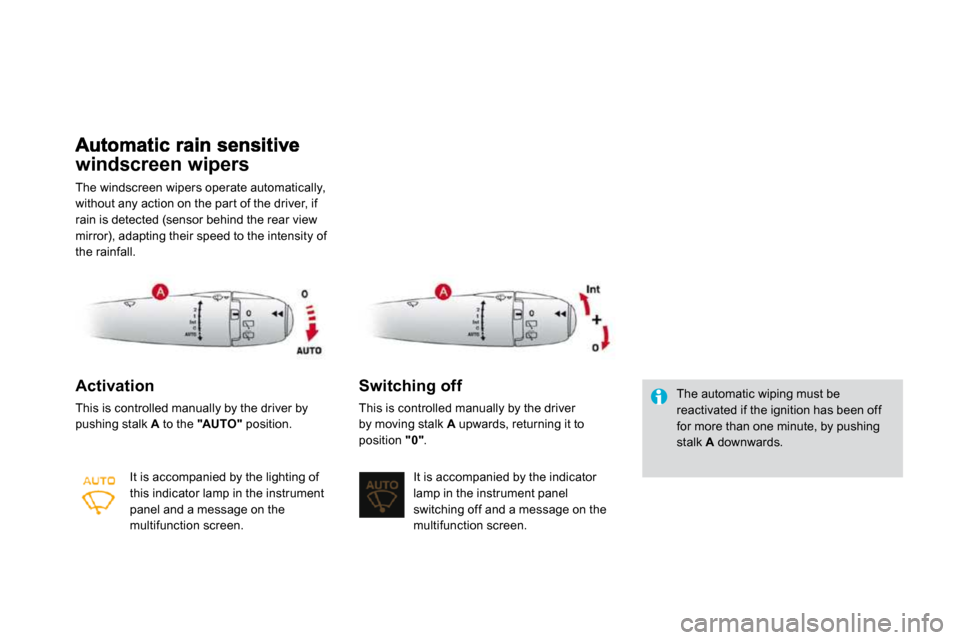
windscreen wipers
The windscreen wipers operate automatically, without any action on the par t of the driver, if rain is detected (sensor behind the rear view mirror), adapting their speed to the intensity of the rainfall.
Activation
This is controlled manually by the driver by pushing stalk A to the "AUTO" position.
It is accompanied by the lighting of this indicator lamp in the instrument panel and a message on the multifunction screen.
Switching off
This is controlled manually by the driver by moving stalk A upwards, returning it to
position "0" .
It is accompanied by the indicator lamp in the instrument panel switching off and a message on the multifunction screen.
The automatic wiping must be reactivated if the ignition has been off for more than one minute, by pushing stalk A downwards.
Page 88 of 257
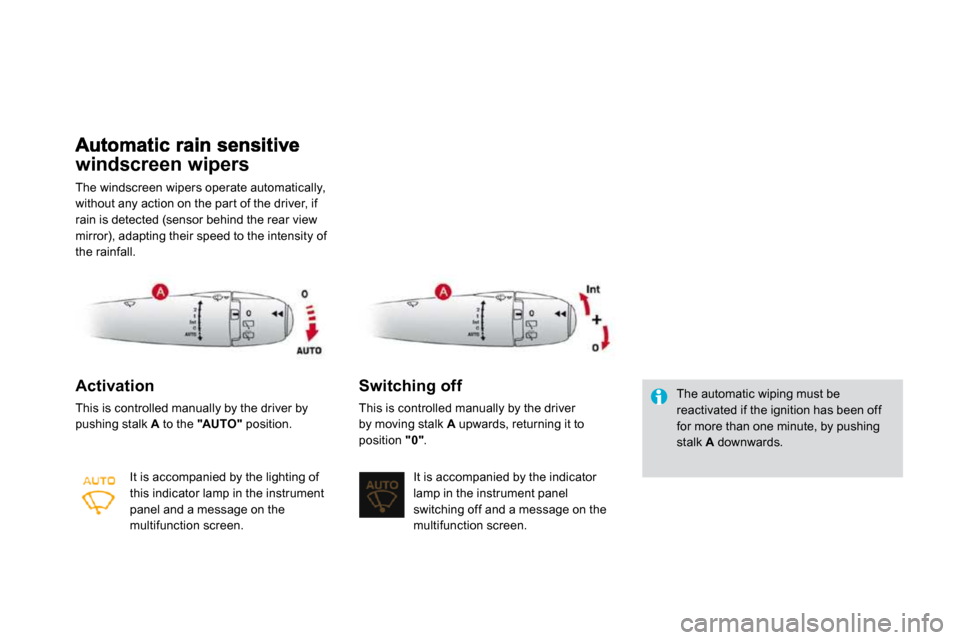
windscreen wipers
The windscreen wipers operate automatically, without any action on the par t of the driver, if rain is detected (sensor behind the rear view mirror), adapting their speed to the intensity of the rainfall.
Activation
This is controlled manually by the driver by pushing stalk A to the "AUTO" position.
It is accompanied by the lighting of this indicator lamp in the instrument panel and a message on the multifunction screen.
Switching off
This is controlled manually by the driver by moving stalk A upwards, returning it to
position "0" .
It is accompanied by the indicator lamp in the instrument panel switching off and a message on the multifunction screen.
The automatic wiping must be reactivated if the ignition has been off for more than one minute, by pushing stalk A downwards.