audio Citroen DS3 2012.5 1.G User Guide
[x] Cancel search | Manufacturer: CITROEN, Model Year: 2012.5, Model line: DS3, Model: Citroen DS3 2012.5 1.GPages: 332, PDF Size: 9.62 MB
Page 64 of 332
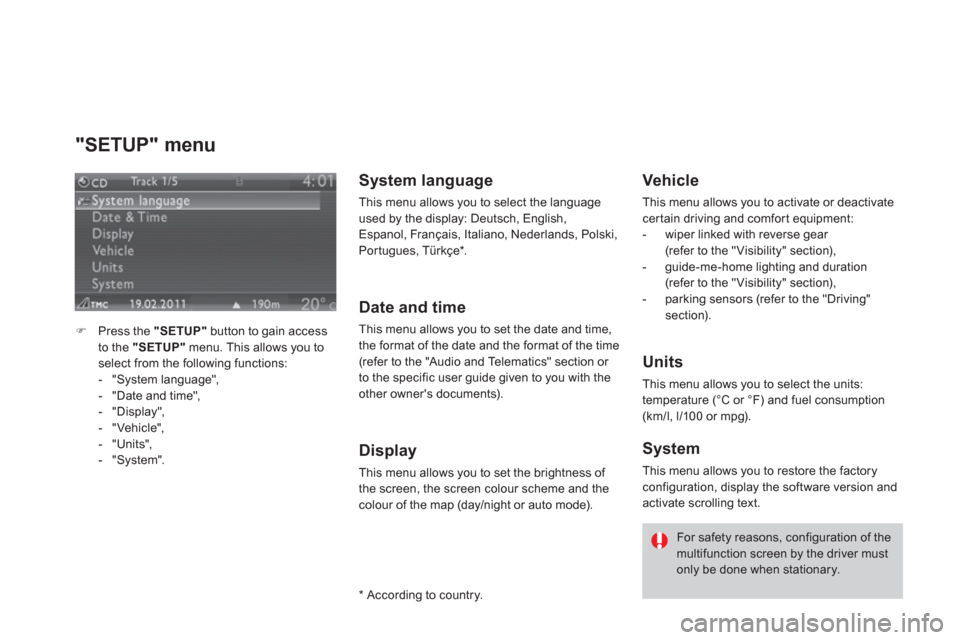
"SETUP" menu
)Press the "SETUP"button to gain access
to the "SETUP"
menu. This allows you to
select from the following functions:
- "System language",
- "Date and time",
- "Displa
y",
- "Vehicle",- "Units",
- "System".
System language
This menu allows you to select the language used by the display: Deutsch, English,
Espanol, Français, Italiano, Nederlands, Polski,
Por tugues, Türkçe * .
Date and time
This menu allows you to set the date and time,
the format of the date and the format of the time (refer to the "Audio and Telematics" section or
to the specific user guide given to you with the
other owner's documents).
Display
This menu allows you to set the brightness of
the screen, the screen colour scheme and the
colour of the map (day/night or auto mode).
*
Accordin
g to country.
Vehicle
This menu allows you to activate or deactivatecertain driving and comfor t equipment:
- wiper linked with reverse gear(refer to the "Visibility" section),
- guide-me-home lighting and duration(refer to the "Visibility" section),
- parking sensors (refer to the "Driving" section).
Units
This menu allows you to select the units:
temperature (°C or °F) and fuel consumption(km/l, l/100 or mpg).
System
This menu allows you to restore the factory configuration, display the software version and
activate scrolling text.
For safety reasons, configuration of the multifunction screen by the driver mustonly be done when stationary.
Page 130 of 332
Auxiliary socket
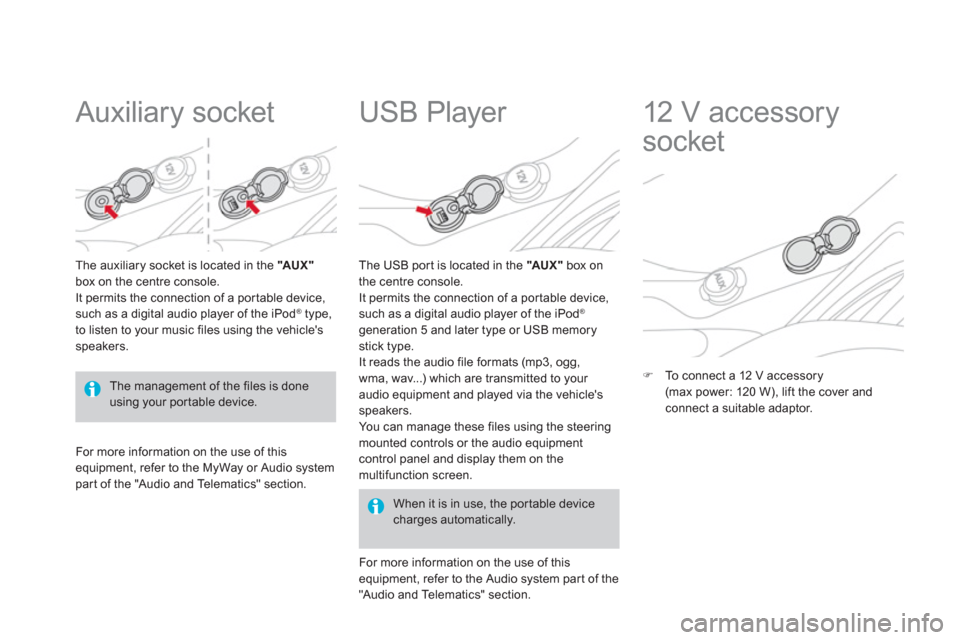
The auxiliary socket is located in the " AUX "box on the centre console.
It permits the connection of a por table device,such as a digital audio player of the iPod ®type,
to listen to your music files using the vehicle'sspeakers.
USB Player
For more information on the use of this equipment, refer to the MyWay or Audio systempar t of the "Audio and Telematics" section.
When it is in use, the por table devicecharges automatically.
The U
SB por t is located in the "AU X "box on
the centre console.
It permits the connection of a por table device,
such as a digital audio player of the iPod®
generation 5 and later type or USB memory
stick type.
It reads the audio file formats (mp3, ogg,
wma, wav...) which are transmitted to your
audio equipment and played via the vehicle's
speakers.
You can manage these files using the steering
mounted controls or the audio equipmentcontrol panel and display them on the
multifunction screen.
F
or more information on the use of thisequipment, refer to the Audio system par t of the
"Audio and Telematics" section.
12 V accessory
socket
)To connect a 12 V accessory(max power: 120 W), lift the cover and connect a suitable adaptor.
The management of the files is doneusing your por table device.
Page 149 of 332
147Safety
Automatic operation of
hazard warnin
g lamps
When braking in an emergency, depending on
the deceleration, the hazard warning lamps come on automatically.
They switch off automatically the first time you accelerate.)You can also switch them off by pressingthe button.
Horn
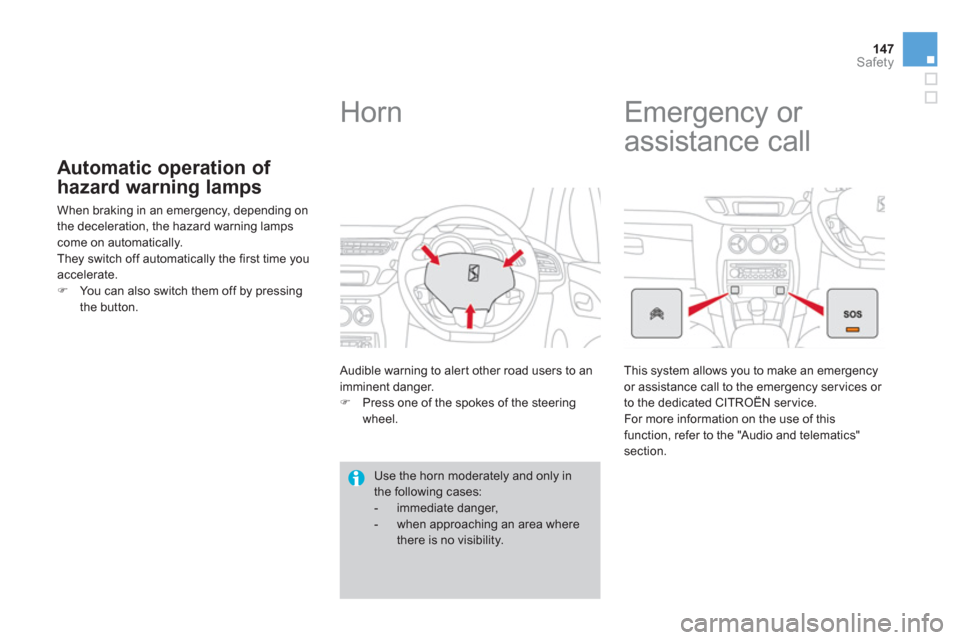
Audible warning to aler t other road users to an
imminent danger. )Press one of the spokes of the steeringwheel.
Use the horn moderately and only inthe following cases:
- immediate danger,
- when approaching an area where
there is no visibility.
Emergency or
assistance call
This system allows you to make an emergency or assistance call to the emergency ser vices or
to the dedicated CITROËN ser vice.
F
or more information on the use of this function, refer to the "Audio and telematics" section.
Page 222 of 332
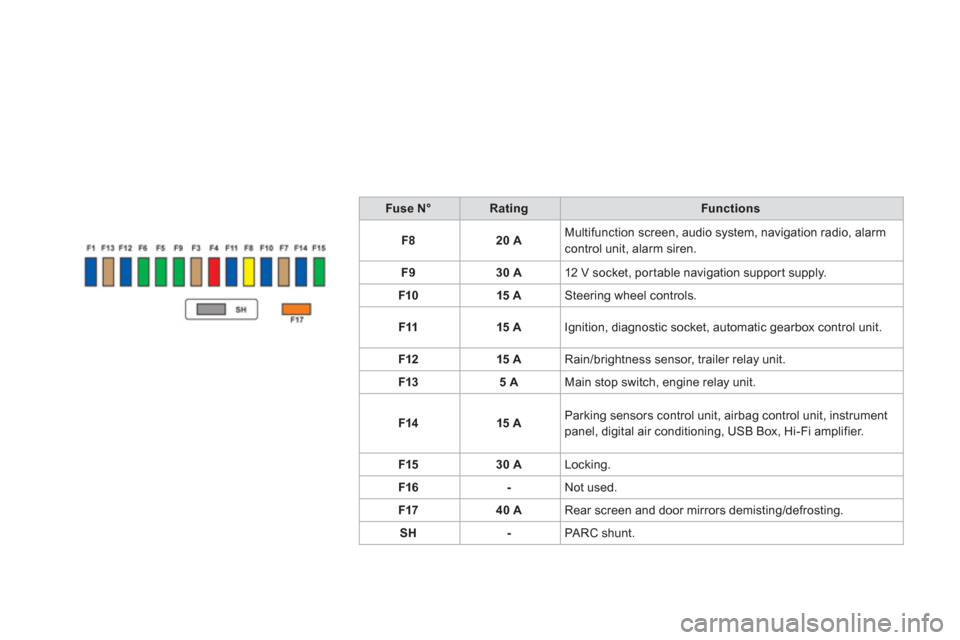
Fuse N°RatingFunctions
F
820 AMultifunction screen, audio system, navigation radio, alarm control unit, alarm siren.
F
930 A12 V socket, portable navigation suppor t supply.
F1
015 ASteering wheel controls.
F1
115 AIgnition, diagnostic socket, automatic gearbox control unit.
F12 15
ARain/brightness sensor, trailer relay unit.
F1
35 AMain stop switch, engine relay unit.
F1415 AParking sensors control unit, airbag control unit, instrument panel, digital air conditioning, USB Box, Hi-Fi amplifier.
F1
530 ALocking.
F16
-Not used.
F1740 ARear screen and door mirrors demisting/defrosting.
S
H-PA RC shunt.
Page 229 of 332
227Practical information
Energy economy mode System which manages the period of use of cer tain functions to conser ve a sufficient level of charge in the battery.
After the engine has stopped, you can still use functions such as the audio equipment, windscreen wipers, dipped beam headlamps, cour tesylamps, etc. for a maximum combined period of thirty minutes.
This period may be greatly reduced if the battery is not fully charged.
A flat battery prevents the engine from starting (refer to the correspondingparagraph).
If the telephone is being used at the same time on the MyWay audionavigation system, it will be interrupted after 10 minutes.
Switching to economy mode
Once this period has elapsed, a message
appears on the multifunction screen indicating
that the vehicle has switched to economy mode and the active functions are put on standby.
Exiting economy mode
These functions are reactivated automatically
t
he next time the vehicle is driven. ) In order to resume the use of thesefunctions immediately, star t the engine and
let it run for a few minutes.
The time available to you will then be double
the period
for which the engine is left running. However, this period will always be between five and thir ty minutes.
Page 237 of 332
235
Practical information
"Multimedia":
hands-free system, audio systems, semi-
integral satellite navigation system, por table
navigation systems, mapping update CD, speed camera warning, DVD player, reversing camera, USB Box, speakers, Hi-Fi module,
230 V socket, WiFi on Board...B
y visiting a CITROËN dealer, you can also
obtain cleaning and maintenance products
(interior and exterior) - including ecologicalproducts from the "TECHNATURE" range,products for topping up (screenwash fluid...),
touch-up pens and paint aerosols for the exact
colour of your vehicle, refills (cartridge for the
temporary puncture repair kit...), ...
Installation of radiocommunication transmitters
Before installing any after-market radio communication transmitter, you can contact a CITROËN dealer for the specification of transmitters which canbe fitted (frequency, maximum power, aerial position, specific installationrequirements), in line with the VehicleElectromagnetic Compatibility Directive(2004/104/EC).
The fitting of electrical equipment or accessories which are not recommended by CITROËN may resultin a failure of your vehicle's electronicsystem and excessive electrical consumption. Please note this precaution. Youare advised to contact a CITROËNrepresentative to be shown the rangeof recommended equipment and accessories.
Depending on the legislation in force in the country, it may be compulsoryto have a high visibility safety vest, warning triangle and spare bulbs and fuses available in the vehicle.
Page 252 of 332
013
Audio and telematics
This section covers emergency and assistance calls, as well as
the functions of the audio-navigation units, such as MP3 -compatibleplayer, USB player, Bluetooth system, MyWay with 16/9 colour screen,auxiliary inputs, Hi-Fi audio system.
Page 257 of 332
255
The MyWay is protected in such a way that it will onlyoperate in your vehicle. If it is to be installed in another vehicle, contact a CITROËN dealer for confi guration of py
the system.
Certain functions described in this handbook will
become available during the year.
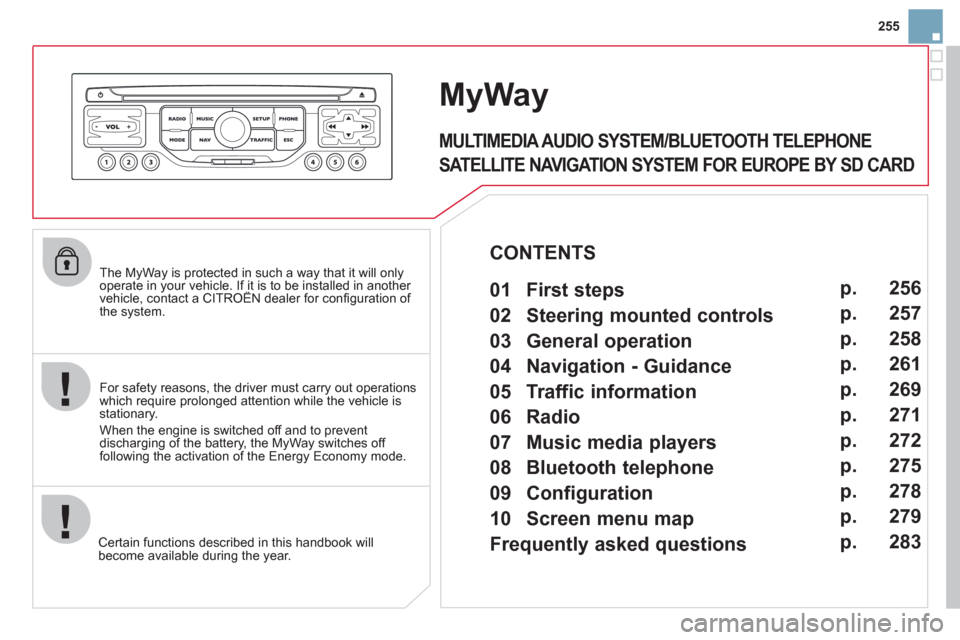
MyWay
For safety reasons, the driver must carry out operations which require prolonged attention while the vehicle is stationary.
When the en
gine is switched off and to prevent
discharging of the battery, the MyWay switches off
following the activation of the Energy Economy mode.
MULTIMEDIA AUDIO SYSTEM/BLUETOOTH TELEPHONE
SATELLITE NAVIGATION SYSTEM FOR EUROPE BY SD CARD
01 First steps
CONTENTS
02 Steering mounted controls
03 General operation
04 Navigation - Guidance
05 Traffic information
06 Radio
07 Music media players
08 Bluetooth telephone
09 Configuration
10 Screen menu map p.
p.
p.
p.
p.
p.
p.
p.
p.
p.
Frequently asked questions p. 256
257
258
261
269
271
272
275
278
279
283
Page 258 of 332
01
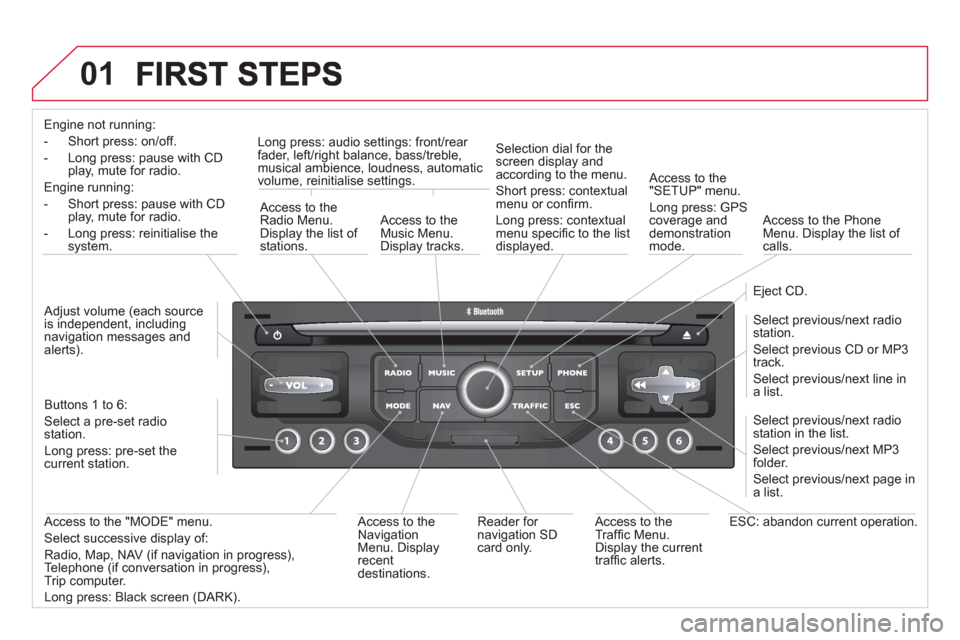
Engine not running:
-
Short press: on/off.
- Long press: pause with
CD play, mute for radio.
Engine running:
- Short
press: pause with CD play, mute for radio.
-
Long press: reinitialise thesystem.
Access to theRadio Menu.Display the list of stations.
Access to theMusic Menu. Display tracks. Lon
g press: audio settings: front/rear fader, left/right balance, bass/treble,
musical ambience, loudness, automatic
volume, reinitialise settings.
Selection dial for the
screen display and according to the menu.
Short press: contextual
menu or confi rm.
Long press: contextual
menu specifi c to the list
displayed.
A
ccess to the"SETUP" menu.
Lon
g press: GPS coverage anddemonstration
mode.
Access to the PhoneMenu. Display the list of calls.
E
ject CD.
Select previous/next radio station.
Select previous CD or MP3
track.
Select previous/next line in a list.
Select
previous/next radio station in the list.
Select previous/next MP3
folder.
Select previous/next page in a list.
E
SC: abandon current operation.
Access to theTraffi c Menu. Display the current
traffi c alerts. R
eader for navigation SDcard only.
A
ccess to theNavigation Menu. Displayrecent destinations.
A
ccess to the "MODE" menu.
Select successive display of:
Radio, Map, NAV (if navigation in progress),
Telephone (if conversation in progress),Trip computer.
Long press: Black screen (DARK). Buttons 1 to
6:
Select a pre-set radiostation.
Long press: pre-set the current station.
Ad
just volume (each source
is independent, including
navigation messages andalerts).
Page 259 of 332
257
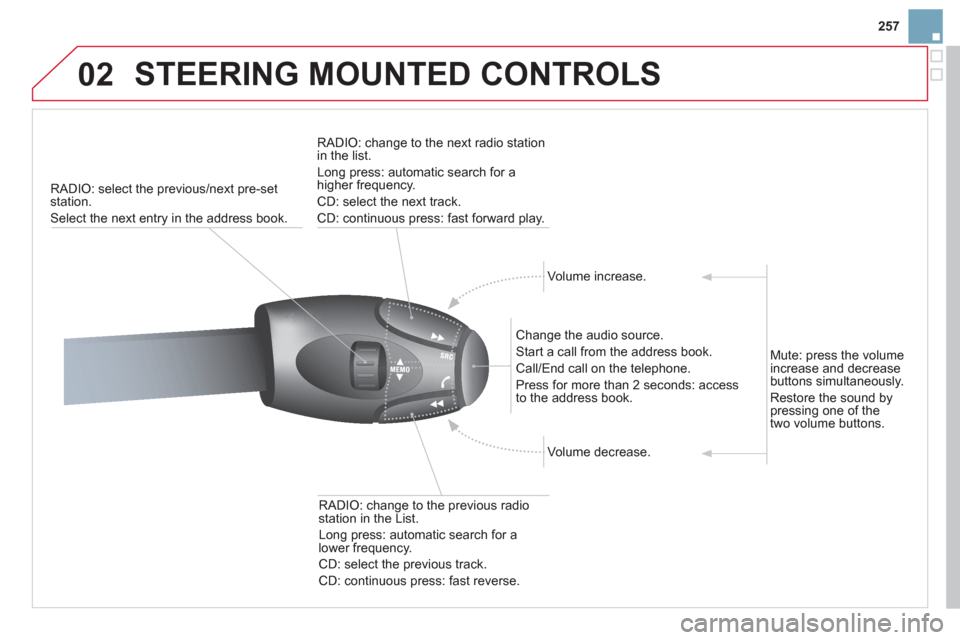
02 STEERING MOUNTED CONTROLS
RADIO: select the previous/next pre-set station.
Select the next entr
y in the address book.
RADI
O: change to the next radio station in the list.
Lon
g press: automatic search for ahigher frequency.
CD: select the next track.
CD: continuous press: fast forward pla
y.
Volume increase.
Change the audio source.
Start a call from the address book.
Call/End call on the tele
phone.
Pr
ess for more than 2 seconds: accessto the address book.
V
olume decrease.
RADI
O: change to the previous radio station in the List.
Lon
g press: automatic search for a
lower frequency.
CD: select the previous track.
CD: continuous press: fast reverse.
Mute:
press the volume
increase and decrease
buttons simultaneously.
Restore the sound bypressing one of the
two volume buttons.