trip computer Citroen DS3 2012.5 1.G User Guide
[x] Cancel search | Manufacturer: CITROEN, Model Year: 2012.5, Model line: DS3, Model: Citroen DS3 2012.5 1.GPages: 332, PDF Size: 9.62 MB
Page 261 of 332
259
03GENERAL OPERATION
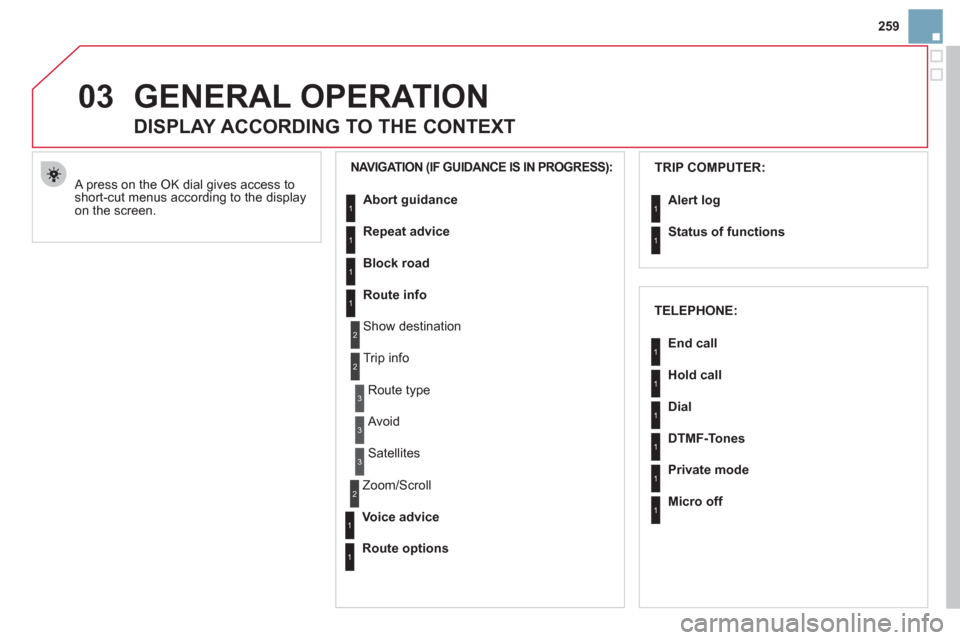
A press on the OK dial gives access to short-cut menus according to the displayon the screen.
DISPLAY ACCORDING TO THE CONTEXT
NAVIGATION (IF GUIDANCE IS IN PROGRESS): TRIP COMPUTER:
Abort
guidance
Repeat advice
Block road
Route info
Show destination
Tri
p info
Route t
ype
Avoid
Satellites
Zoom
/Scroll
Voice advice
Route options
Alert log
Status of functions
1
2
3
3
2
1
1
1
3
1
1
1
1
2
TELEPHONE:
End call
Hold call
Dial
DTMF-Tones
Private mode
Micro off
1
1
1
1
1
1
Page 290 of 332
01 FIRST STEPS
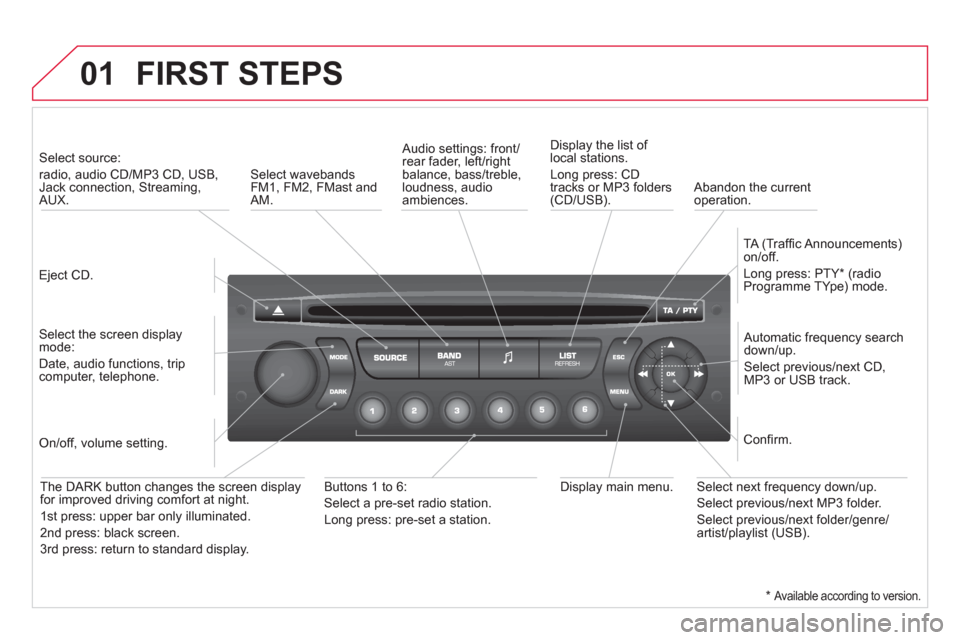
Eject CD.
Select source:
radio, audio CD/MP3 CD, USB, Jack connection, Streaming,AUX.
Select the screen displaymode:
Date, audio functions, tripcomputer, telephone.
Automatic frequency search
down/up.
Select previous/next CD,MP3 or USB track.
Audio settings: front/rear fader, left/right
balance, bass/treble, loudness, audio ambiences. Displa
y the list of local stations.
Lon
g press: CD
tracks or MP3 folders(CD/USB).
TA
(Traffi c Announcements)
on/off.
Lon
g press: PTY * (radio
Programme TYpe) mode.
Display main menu. The DARK button changes the screen display
for improved driving comfort at night.
1
st press: upper bar only illuminated.
2
nd press: black screen.
3 rd press: return to standard displa
y.
On/off, volume setting.
Buttons 1 to 6:
Select a pre-set radio station.
Lon
g press: pre-set a station.
Select next frequency down/up.
Select previous/next MP3 folder.
Select previous/next folder/genre/artist/playlist (USB).
Confi rm.
Select wavebandsFM1, FM2, FMast and AM.
Abandon the current
operation.
*
Available according to version.
Page 292 of 332

03 MAIN MENU
AUDIO FUNCTIONS
:radio, CD, USB, options.
> MONOCHROME SCREEN C
For a detailed
global view of the
menus available, refer to the
"Screen menu ma
p" section.
TELEPHONE
:
Bluetooth hands-free,
pairing, managementof a call.
PERSONALISATION-
CONFIGURATION:
vehicle parameters,
display, languages.
TRIP COMPUTER: entering of distances,alerts, status of functions.
> MONOCHROME
SCREEN A
Page 307 of 332

305
08
MONOCHROME C SCREEN MENU MA
P
AUDIO FUNCTIONS
alternative frequencies (RDS)
activate/deactivate
FM BAND PREFERENCE
S
regional mode (REG)
activate/deactivate
radio-text information (RDTXT)
activate/deactivate
1
2
3
4
3
4
3
4
PLAY MODES
album repeat (RPT)
activate/deactivate
track random play (RDM)
activate/deactivate
2
3
4
3
4
TRIP COMPUTER
Distance: x miles
ENTER DISTANCE TO DESTINATION
Diagnostic s
ALERT LOG
Functions activated or deactivated
STAT US OF THE FUNCTIONS *
1
2
3
3
2
3
2
Pressing the MENU button displays:
*
The parameters vary according to vehicle.
Page 316 of 332
Instruments and controls
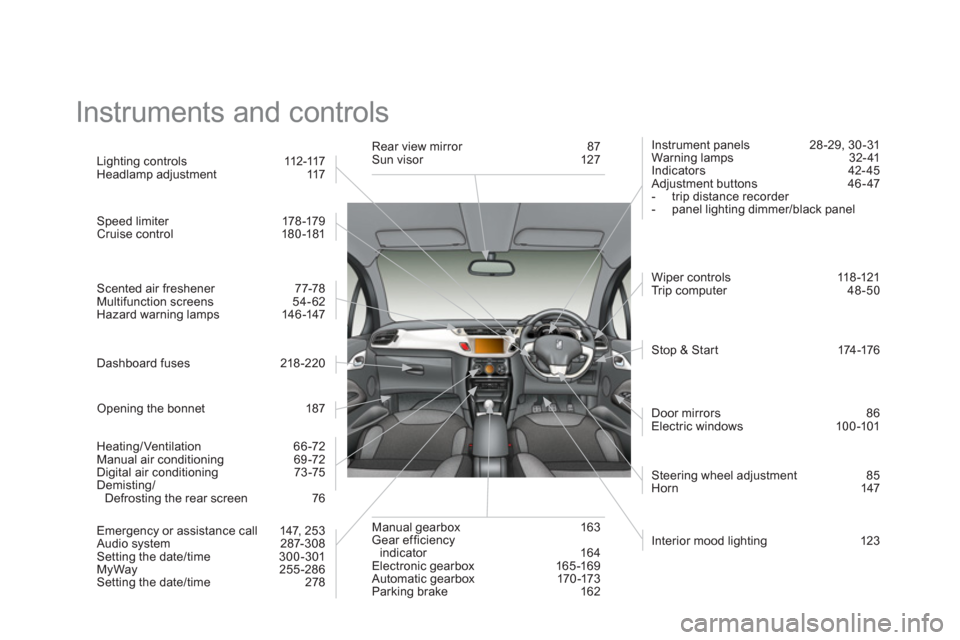
Interior mood lighting 123
Li
ghting controls 112-117
Headlamp adjustment 117
Speed limiter 178 -179 Cruise control 180-181
Scented air freshener 77-78
Multifunction screens 54-62
Hazard warning lamps 146 -147
Dashboard fuses 218 -220
Opening the bonnet 187
Heatin
g/Ventilation 66 -72
Manual air conditioning 69 -72
Digital air conditioning 73 -75
Demisting/
Defrosting the rear screen 76
Emer
gency or assistance call 147, 253
Audio system 287-308
Setting the date/time 300 -301
MyWay 255-286 Setting the date/time 278 R
ear view mirror 87 Sun visor 127
Manual
gearbox 163
Gear efficiencyindicator 164
Electronic gearbox 165 -169
Automatic gearbox 170 -173
Parking brake 162 Instrument
panels 28 -29, 30 -31
Warning lamps 32- 41
Indicators 42- 45
Adjustment buttons 46 - 47
- trip distance recorder
- panel li
ghting dimmer/black panel
Wi
per controls 118-121
Tr ip computer 48-50
Stop & St a r t 174 -176
Door mirrors
86
Electric windows 100-101
Steerin
g wheel adjustment 85
Horn 147