lock Citroen DS3 2012.5 1.G Owner's Guide
[x] Cancel search | Manufacturer: CITROEN, Model Year: 2012.5, Model line: DS3, Model: Citroen DS3 2012.5 1.GPages: 332, PDF Size: 9.62 MB
Page 175 of 332
173Driving
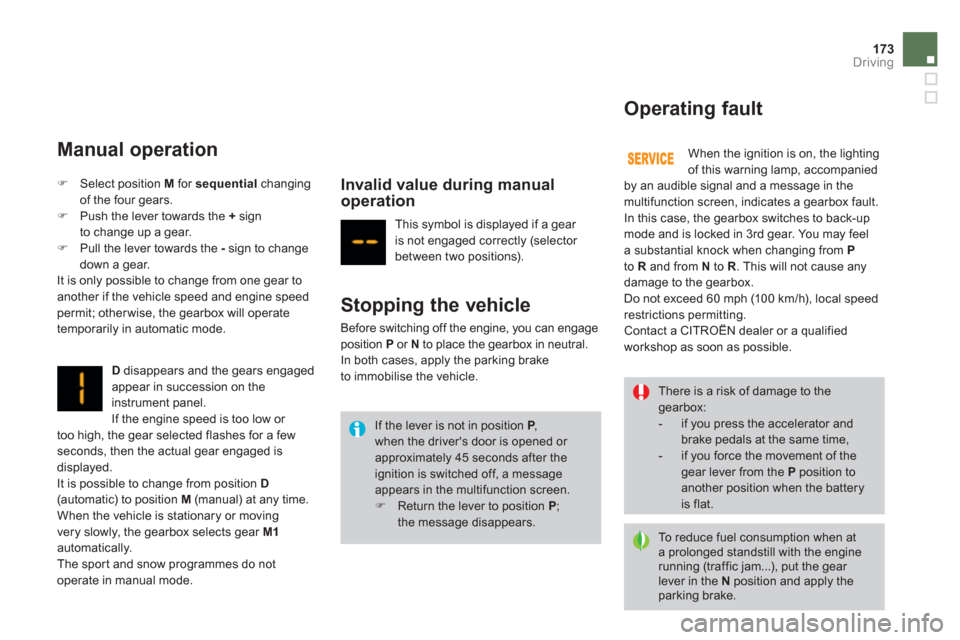
Manual operation
Ddisappears and the gears engaged appear in succession on the
instrument panel.
If the en
gine speed is too low or
too high, the gear selected flashes for a fewseconds, then the actual gear engaged isdisplayed.
It is possible to change from position D(automatic) to position M
(manual) at any time.
When the vehicle is stationary or moving
ver
y slowly, the gearbox selects gear M1automatically.
The spor t and snow programmes do not
operate in manual mode.
Invalid value during manualoperation
)Select position M for sequential
changing
of the four gears. )Push the lever towards the + sign
to change up a gear.)Pull the lever towards the - sign to changedown a gear.
It is only possible to change from one gear to
another if the vehicle speed and engine speedpermit; other wise, the gearbox will operate
temporarily in automatic mode. This s
ymbol is displayed if a gear
is not engaged correctly (selector
between two positions).
Stopping the vehicle
Before switching off the engine, you can engageposition Por Nto place the gearbox in neutral. In both cases, apply the parking brake
to immobilise the vehicle. When the i
gnition is on, the lighting
of this warning lamp, accompanied
by an audible signal and a message in the
multifunction screen, indicates a gearbox fault.
In this case, the gearbox switches to back-up
mode and is locked in 3rd gear. You may feel
a substantial knock when changing from Pto R
and from N
to R
. This will not cause any
damage to the gearbox.
Do not exceed 60 mph (10 0 km/h), local speed
restrictions permitting.
Contact a CITROËN dealer or a qualified
wor
kshop as soon as possible.
Operating fault
If the lever is not in position P,P
when the driver's door is opened or approximately 45 seconds after the ignition is switched off, a message appears in the multifunction screen. )Return the lever to position P
; the message disappears.
There is a risk of damage to thegearbox:
- if you press the accelerator and brake pedals at the same time,
- if you force the movement of the gear lever from the Pposition to another position when the battery is flat.
To r e d u c e fuel consumption when at a prolonged standstill with the enginerunning (traffic jam...), put the gear lever in the Nposition and apply the parking brake.
Page 184 of 332
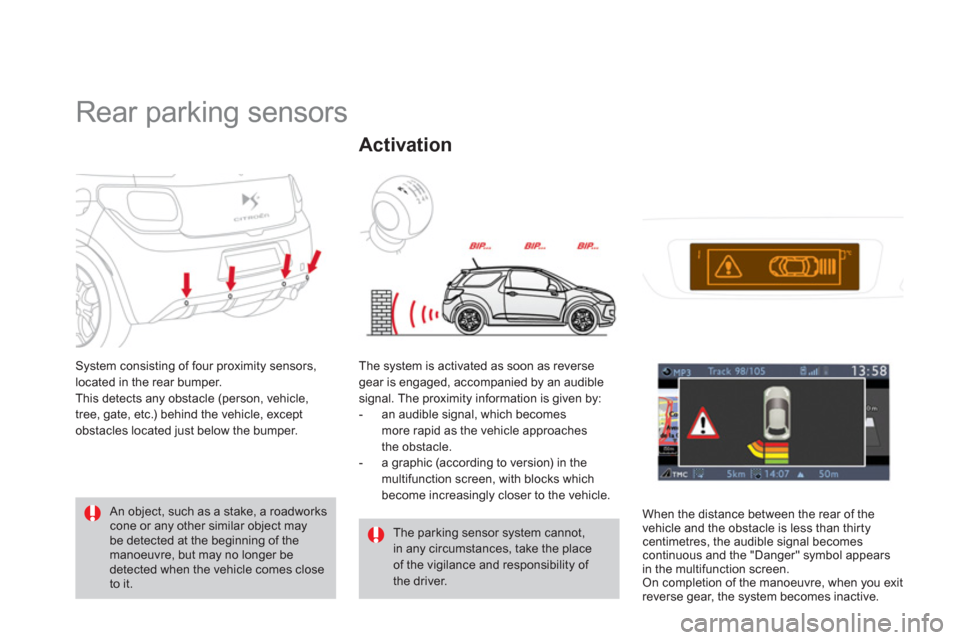
Rear parking sensors
System consisting of four proximity sensors,
located in the rear bumper.
This detects an
y obstacle (person, vehicle,
tree, gate, etc.) behind the vehicle, except
obstacles located just below the bumper.
An object, such as a stake, a roadworks cone or any other similar object may be detected at the beginning of themanoeuvre, but may no longer be detected when the vehicle comes close to it.
The parking sensor system cannot, in any circumstances, take the place of the vigilance and responsibility of the driver. The system is activated as soon as reverse
gear is engaged, accompanied by an audible
signal. The proximity information is given by:
- an audible signal, which becomes
more rapid as the vehicle approaches
th
e obstacle.
- a graphic (according to version) in the
multifunction screen, with blocks whichbecome increasingly closer to the vehicle.
Activation
When the distance between the rear of thevehicle and the obstacle is less than thirtycentimetres, the audible signal becomescontinuous and the "Danger" symbol appears
in the multifunction screen.
On completion of the manoeuvre, when you exit
reverse gear, the system becomes inactive.
Page 209 of 332

Practical information
Removing a wheel
Parking the vehicle
Immobilise the vehicle where it doesnot block traffic: the ground must belevel, stable and not slippery. Apply the parking brake, switch off the ignition and engage first gear *to lock the wheels.
If necessary, place a chock under thewheel diagonally opposite the wheelto be changed. It is imperative that you ensure that the occupants get out of the vehicle and wait where they are safe.
Never go underneath a vehicle raised using a jack; use an axle stand.
List of operations
)
Remove the chromed bolt cover from each
of the bolts using the tool 3(alloy wheels
only). ) Fit the socket 4on the wheelbrace 1
toslacken the security bolt (if your vehicle isfitted with them).)
Slacken the other bolts using
the wheelbrace 1only.
*
position
P
for an automatic gearbox.
Page 222 of 332
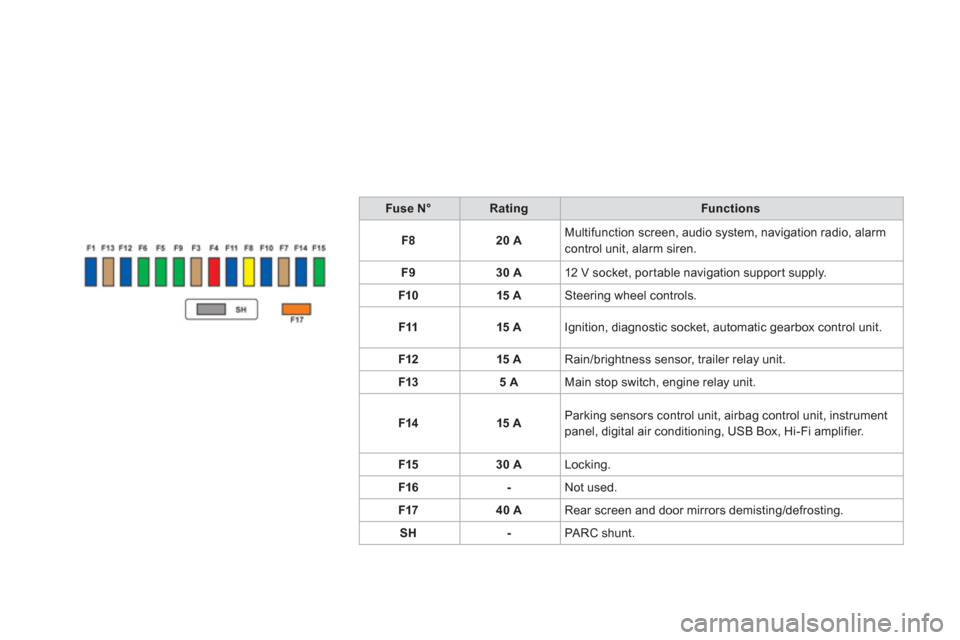
Fuse N°RatingFunctions
F
820 AMultifunction screen, audio system, navigation radio, alarm control unit, alarm siren.
F
930 A12 V socket, portable navigation suppor t supply.
F1
015 ASteering wheel controls.
F1
115 AIgnition, diagnostic socket, automatic gearbox control unit.
F12 15
ARain/brightness sensor, trailer relay unit.
F1
35 AMain stop switch, engine relay unit.
F1415 AParking sensors control unit, airbag control unit, instrument panel, digital air conditioning, USB Box, Hi-Fi amplifier.
F1
530 ALocking.
F16
-Not used.
F1740 ARear screen and door mirrors demisting/defrosting.
S
H-PA RC shunt.
Page 231 of 332
Practical information
Towing the vehicle
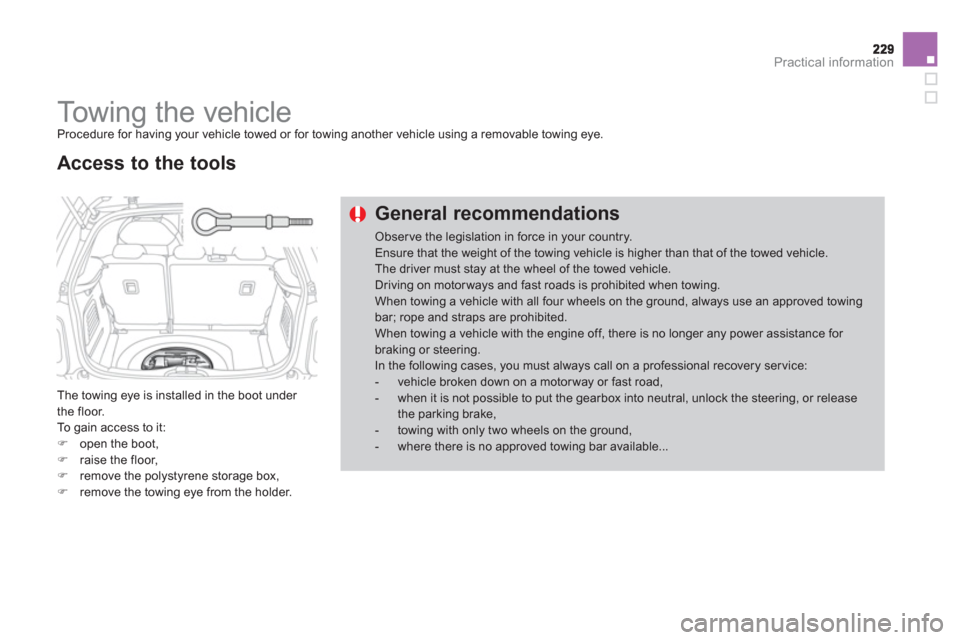
Procedure for having your vehicle towed or for towing another vehicle using a removable towing eye.
The towing eye is installed in the boot under
the floor.
To gain access to it: )open the boot, )raise the floor,)remove the polystyrene storage box,)remove the towing eye from the holder.
Access to the tools
General recommendations
Obser ve the legislation in force in your country. Ensure that the weight of the towing vehicle is higher than that of the towed vehicle. The driver must stay at the wheel of the towed vehicle.Driving on motorways and fast roads is prohibited when towing.When towing a vehicle with all four wheels on the ground, always use an approved towingbar; rope and straps are prohibited. When towing a vehicle with the engine off, there is no longer any power assistance for braking or steering. In the following cases, you must always call on a professional recovery service: - vehicle broken down on a motor way or fast road, - when it is not possible to put the gearbox into neutral, unlock the steering, or releasethe parking brake,- towing with only two wheels on the ground, - where there is no approved towing bar available...
Page 232 of 332
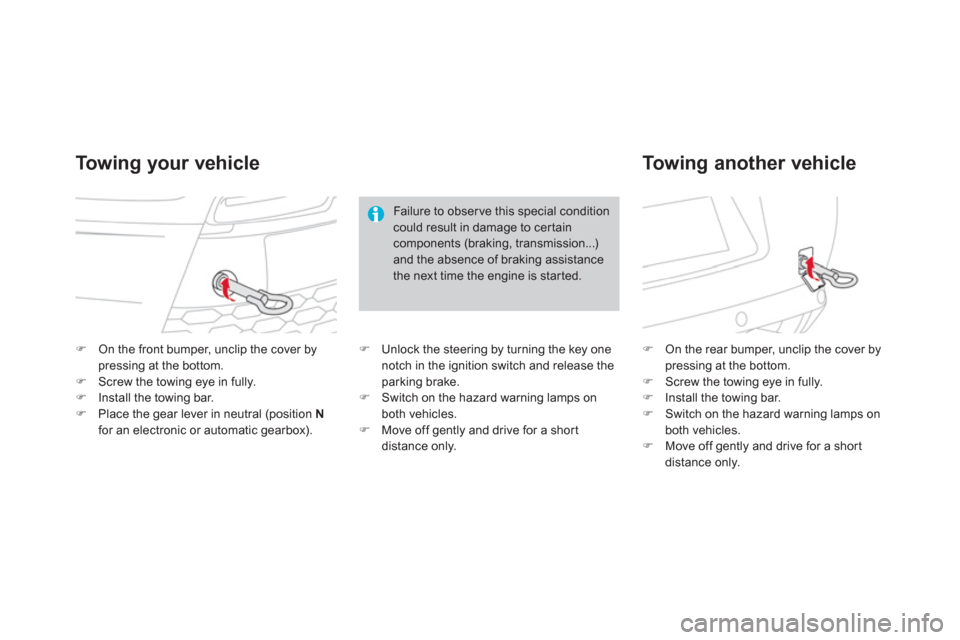
)On the front bumper, unclip the cover by pressing at the bottom. )Screw the towing eye in fully. )Install the towing bar.)Place the gear lever in neutral (position Nfor an electronic or automatic gearbox).
)On the rear bumper, unclip the cover by pressing at the bottom. )Screw the towing eye in fully. )Install the towing bar. )Switch on the hazard warning lamps on both vehicles.)Move off gently and drive for a shor tdistance only.
To w i ng your vehicle
To w i ng another vehicle
Failure to obser ve this special condition
could result in damage to cer taincomponents (braking, transmission...)and the absence of braking assistancethe next time the engine is started.
)
Unlock the steering by turning the key one
notch in the ignition switch and release the
parking brake.
) Switch on the hazard warning lamps onboth vehicles. )
Move off gently and drive for a shor t
distance only.
Page 261 of 332
259
03GENERAL OPERATION
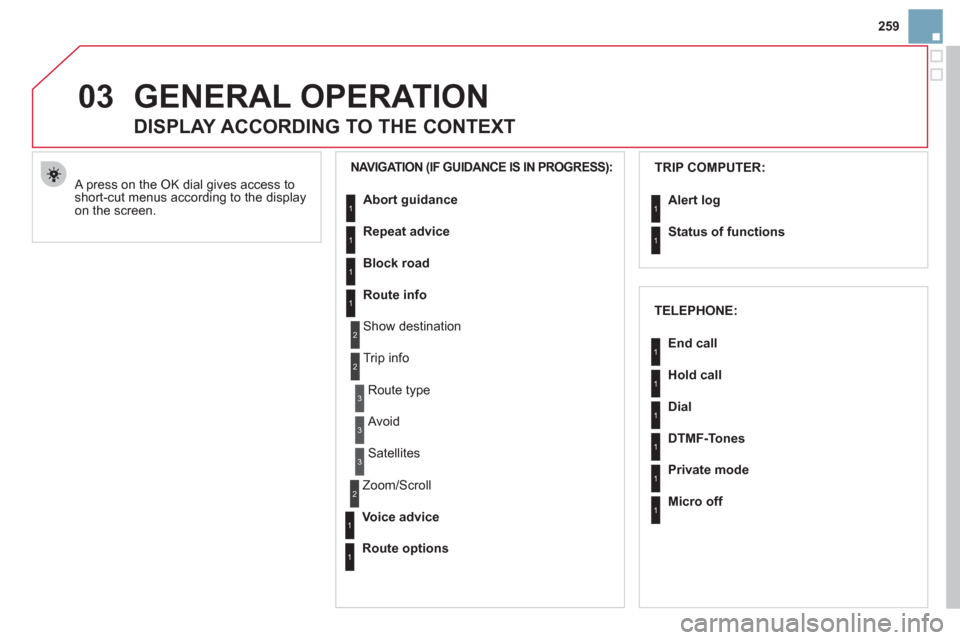
A press on the OK dial gives access to short-cut menus according to the displayon the screen.
DISPLAY ACCORDING TO THE CONTEXT
NAVIGATION (IF GUIDANCE IS IN PROGRESS): TRIP COMPUTER:
Abort
guidance
Repeat advice
Block road
Route info
Show destination
Tri
p info
Route t
ype
Avoid
Satellites
Zoom
/Scroll
Voice advice
Route options
Alert log
Status of functions
1
2
3
3
2
1
1
1
3
1
1
1
1
2
TELEPHONE:
End call
Hold call
Dial
DTMF-Tones
Private mode
Micro off
1
1
1
1
1
1
Page 286 of 332
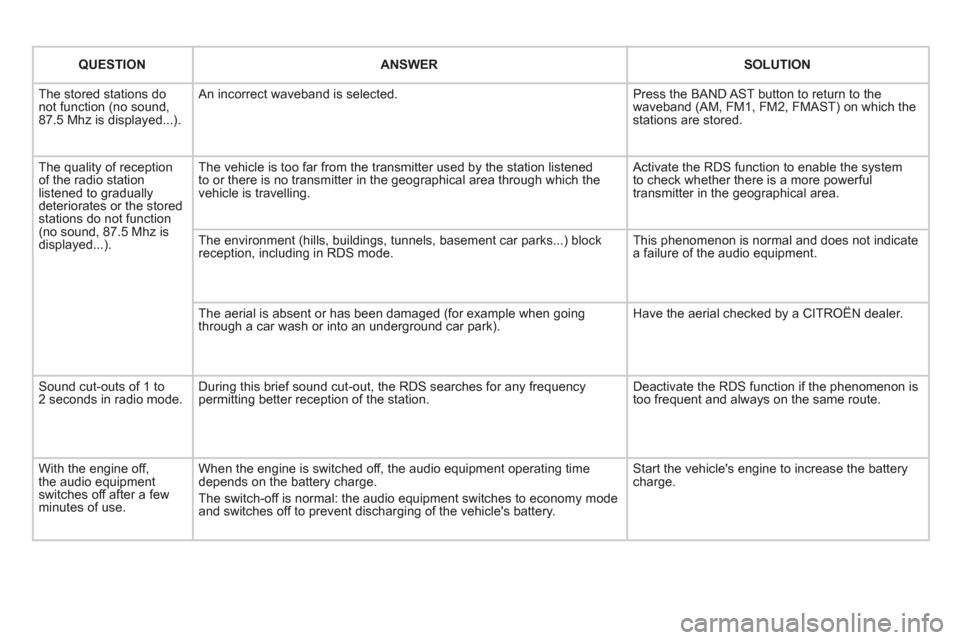
QUESTIONANSWERSOLUTION
The stored stations donot function (no sound, 87.5 Mhz is displayed...).
An incorrect waveband is selected.
Press the BAND AST button to return to the waveband (AM, FM1, FM2, FMAST) on which thestations are stored.
The quality of receptionof the radio station listened to graduallydeteriorates or the stored stations do not function(no sound, 87.5 Mhz is displayed...).
The vehicle is too far from the transmitter used by the station listenedto or there is no transmitter in the geographical area through which the vehicle is travelling.
Activate the RDS function to enable the system to check whether there is a more powerful transmitter in the geographical area.
The environment (hills, buildings, tunnels, basement car parks...) block reception, including in RDS mode.
This phenomenon is normal and does not indicate a failure of the audio equipment.
The aerial is absent or has been damaged (for example when goingthrough a car wash or into an underground car park).
Have the aerial checked by a CITROËN dealer.
Sound cut-outs of 1 to2 seconds in radio mode.During this brief sound cut-out, the RDS searches for any frequency permitting better reception of the station.
Deactivate the RDS function if the phenomenon is too frequent and always on the same route.
With the engine off, the audio equipment switches off after a few minutes of use.
When the engine is switched off, the audio equipment operating timedepends on the battery charge.
The switch-off is normal: the audio equipment switches to economy mode and switches off to prevent discharging of the vehicle's battery.
Start the vehicle's engine to increase the batterycharge.
Page 293 of 332

291
04
1
2
3
4
1
2
3
4
SOURCE
BANDAST
LISTREFRESH
MENU
AUDIO
Press the SOURCE button several
times in succession and select theradio.
Press the BAND A
ST button to select
a waveband: FM1, FM2, FMast, AM.
Briefl
y press one of the buttons tocarry out an automatic search of theradio stations.
Press one o
f the buttons to carry out
a manual search up/down for radiofrequencies.
Press the LI
ST REFRESH button to
display the list of stations received
locally (30 stations maximum).
To update this list, press for more
t
han two seconds.
The external environment (hills, buildings, tunnels, basement car parks, ...) mayblock reception, including in RDS mode. This is a normal effect of the way in which
radio waves are transmitted and does not indicate any failure of the audio system.
RDS
RADIO
SELECTING A STATION
Press the MENU button.
Select AUDIO FUNCTIONS thenpress OK.
Select the FM WAVEBANDPREFERENCES function thenpress OK.
Select ACTIVATE RDS then pressOK. RDS appears on the screen.
In radio mode, press
OK directly to activate/deactivate RDS mode.
The RDS, if displayed, enables you to continue listening to the samestation by automatic retuning to alternative frequencies. However, in certainconditions, coverage of an RDS station may not be assured throughout thecountry as radio stations do not cover 100 % of the territory. Under conditions
of very weak reception, the system may change to a regional station.
Page 310 of 332
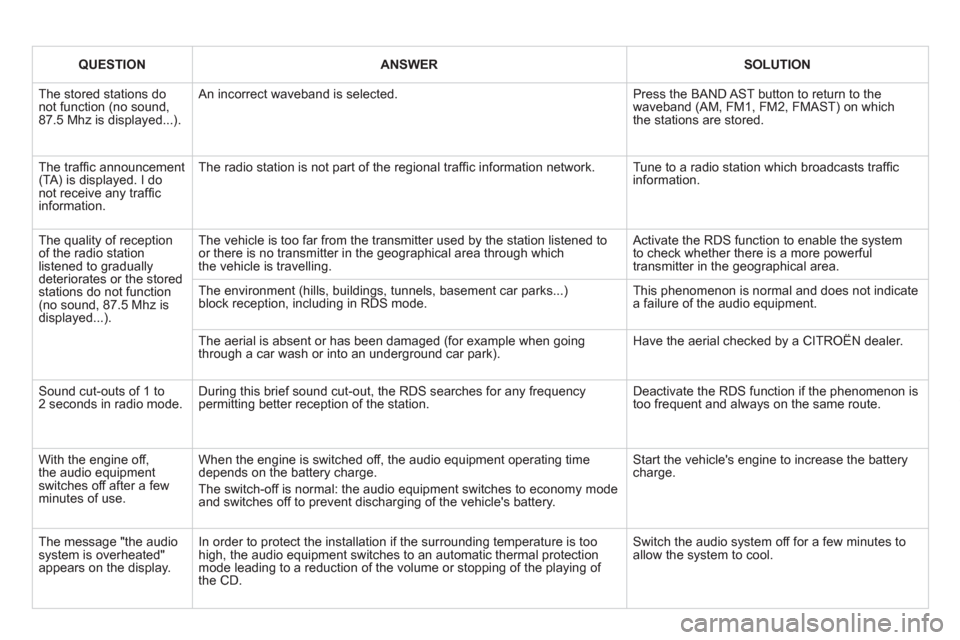
QUESTIONANSWERSOLUTION
The stored stations donot function (no sound, 87.5 Mhz is displayed...).
An incorrect waveband is selected.
Press the BAND AST button to return to the waveband (AM, FM1, FM2, FMAST) on whichthe stations are stored.
The traffi c announcement(TA) is displayed. I donot receive any traffi c information.
The radio station is not part of the regional traffi c information network.
Tune to a radio station which broadcasts traffi c information.
The quality of receptionof the radio station listened to graduallydeteriorates or the stored stations do not function(no sound, 87.5 Mhz is displayed...).
The vehicle is too far from the transmitter used by the station listened to or there is no transmitter in the geographical area through whichthe vehicle is travelling.
Activate the RDS function to enable the system to check whether there is a more powerful transmitter in the geographical area.
The environment (hills, buildings, tunnels, basement car parks...)block reception, including in RDS mode. This phenomenon is normal and does not indicate a failure of the audio equipment.
The aerial is absent or has been damaged (for example when goingthrough a car wash or into an underground car park).
Have the aerial checked by a CITROËN dealer.
Sound cut-outs of 1 to2 seconds in radio mode.During this brief sound cut-out, the RDS searches for any frequency permitting better reception of the station.
Deactivate the RDS function if the phenomenon is too frequent and always on the same route.
With the engine off, the audio equipment switches off after a few minutes of use.
When the engine is switched off, the audio equipment operating timedepends on the battery charge.
The switch-off is normal: the audio equipment switches to economy mode and switches off to prevent discharging of the vehicle's battery.
Start the vehicle's engine to increase the batterycharge.
The message "the audio system is overheated" appears on the display.
In order to protect the installation if the surrounding temperature is toohigh, the audio equipment switches to an automatic thermal protectionmode leading to a reduction of the volume or stopping of the playing of the CD.
Switch the audio system off for a few minutes toallow the system to cool.