lock Citroen DS3 2014 1.G User Guide
[x] Cancel search | Manufacturer: CITROEN, Model Year: 2014, Model line: DS3, Model: Citroen DS3 2014 1.GPages: 376, PDF Size: 12.55 MB
Page 67 of 376
65
DS3_en_Chap03_ouvertures_ed01-2014
Do not throw the remote control batteries away, they contain metals
w
hich are harmful to the environment.
Take
them to an approved collection
po
int.Lost keys
Go to a CITROËN dealer with the vehicle's registration document, your personal identification documents and if possible the key code label.
The
CITROËN dealer will be able to look up the key code and the transponder code
r
equired to order a new key.
Remote control
The high frequency remote control is a sensitive system; do not operate it while it is in your pocket as there is a possibility that it may unlock the vehicle, without you being aware of it.
Do
not repeatedly press the buttons of your remote control out of range and out of sight of
y
our vehicle. You run the risk of stopping it from working and the remote control would have
t
o be reinitialised.
No
remote control can operate when the key is in the ignition switch, even when the ignition
i
s switched off, except for reinitialisation.
Locking the vehicle
Driving with the doors locked may make access to the passenger compartment by the emergency services more difficult in an emergency.
As
a safety precaution, never leave children alone in the vehicle, except for a very short period.
In
all cases, it is essential to remove the key from the ignition switch when leaving
t
he vehicle.
Anti-theft protection
Do not make any modifications to the electronic engine immobiliser system; this could c ause m alfunctions.
When purchasing a second-hand vehicle
Have the pairing of all of the keys in your possession checked by a CITROËN dealer, to ensure that only your keys can be used to open and start the vehicle.
Access
Page 70 of 376
DS3_en_Chap03_ouvertures_ed01-2014
Doors
Opening
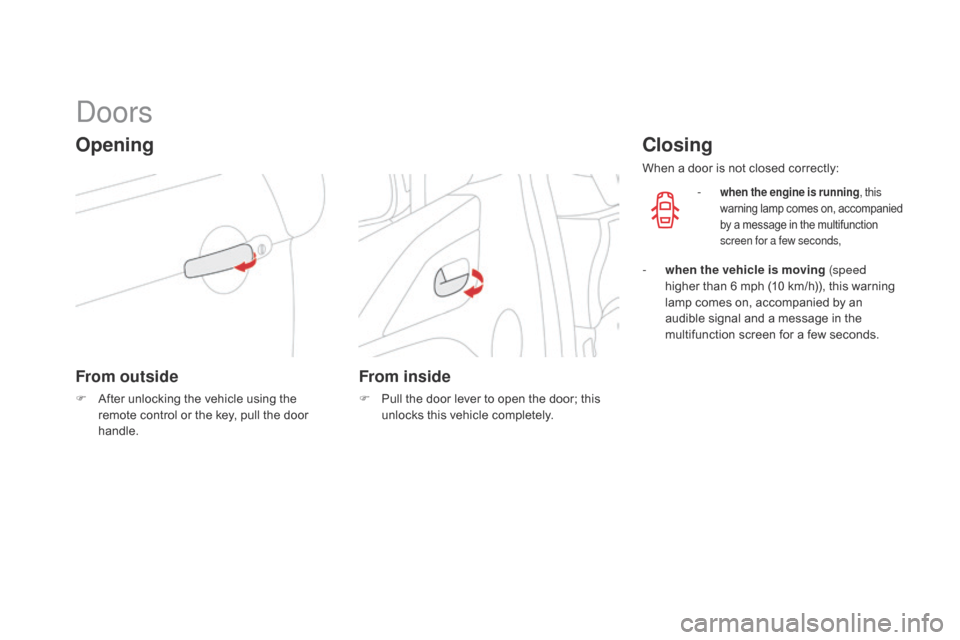
From outside
F After unlocking the vehicle using the r
emote control or the key, pull the door
han
dle.
From inside
F Pull the door lever to open the door; this u
nlocks this vehicle completely.
closing
When a door is not closed correctly:
-
when the engine is running , this
warning lam p c omes o n, a ccompanied b
y a message in the multifunction
s
creen for a few seconds,
- when the vehicle is moving (speed higher than 6 mph (10 km/h)), this warning
l
amp comes on, accompanied by an
a
udible signal and a message in the
m
ultifunction screen for a few seconds.
Page 71 of 376
69
DS3_en_Chap03_ouvertures_ed01-2014
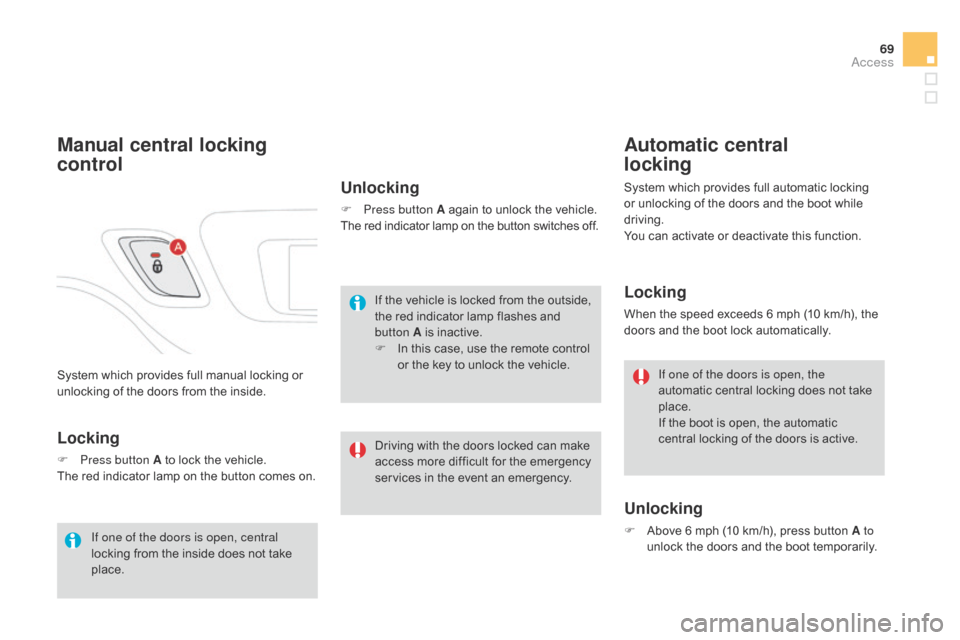
System which provides full manual locking or unlocking of the doors from the inside.
Manual central locking
control
Locking
F Press button A to lock the vehicle.
The red indicator lamp on the button comes on.
Unlocking
F Press button A again to unlock the vehicle.
The red indicator lamp on the button switches off.
If one of the doors is open, central
locking
from
the
inside
does
not
take
p
lace. If
the vehicle is locked from the outside,
t
he red indicator lamp flashes and
b
utton A is inactive.
F
I
n this case, use the remote control
o
r the key to unlock the vehicle.
Automatic central
locking
System which provides full automatic locking or unlocking of the doors and the boot while
d
riving.
You
can activate or deactivate this function.
Locking
When the speed exceeds 6 mph (10 km/h), the doors and the boot lock automatically.
Unlocking
F Above 6 mph (10 km/h), press button A to
unlock the doors and the boot temporarily.
If one of the doors is open, the
automatic
central locking does not take
p
lace.
If the boot is open, the automatic
c
entral locking of the doors is active.
Driving
with
the
doors
locked
can
make
a
ccess
more
difficult
for
the
emergency
s
ervices
in
the
event
an
emergency.
Access
Page 72 of 376
DS3_en_Chap03_ouvertures_ed01-2014
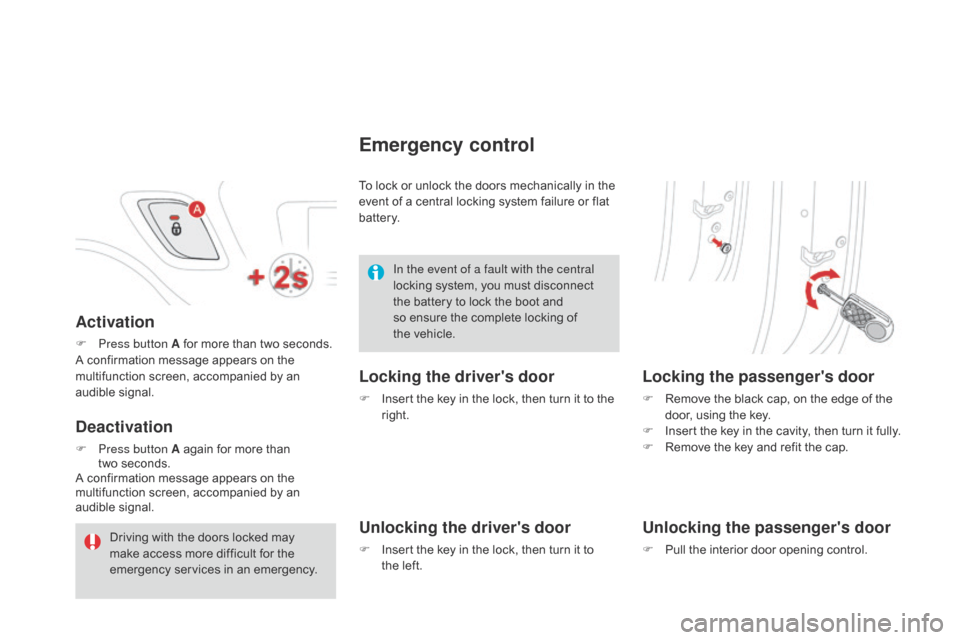
Activation
F Press button A for more than two seconds.
A confirmation message appears on the
m
ultifunction screen, accompanied by an
a
udible
s
ignal.
deactivation
F Press button A again for more than
two seconds.
A
confirmation message appears on the
m
ultifunction screen, accompanied by an
a
udible
s
ignal. To
lock or unlock the doors mechanically in the
e
vent of a central locking system failure or flat
b
attery.
Emergency control
Locking the driver's door
F Insert
the key in the lock, then turn it to the r
ight.
Unlocking the driver's door
F Insert the key in the lock, then turn it to t
he left.
Locking the passenger's door
F Remove the black cap, on the edge of the d
oor, using the key.
F
I
nsert the key in the cavity, then turn it fully.
F
R
emove the key and refit the cap.
Unlocking the passenger's door
F Pull the interior door opening control.
In the event of a fault with the central
locking
system,
you
must
disconnect
t
he
battery
to
lock
the
boot
and
s
o
ensure
the
complete
locking
of
t
he vehicle.
Driving
with
the
doors
locked
may
m
ake
access
more
difficult
for
the
em
ergency
ser
vices
i
n
a
n
em
ergency.
Page 73 of 376
71
DS3_en_Chap03_ouvertures_ed01-2014
boot
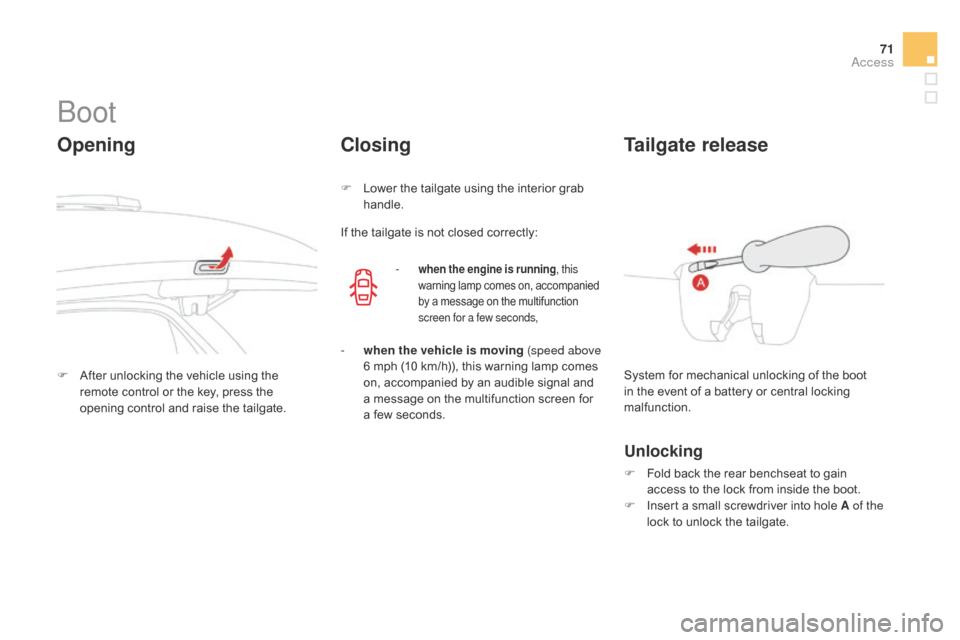
Opening
F After unlocking the vehicle using the r
emote control or the key, press the
o
pening control and raise the tailgate.
closing
F Lower the tailgate using the interior grab han
dle.
If
the tailgate is not closed correctly:
-
when the engine is running , this
warning lamp comes on, accompanied b
y a message on the multifunction
s
creen for a few seconds,
- when the vehicle is moving (speed above 6 mph (10 km/h)), this warning lamp comes
o
n, accompanied by an audible signal and
a
message on the multifunction screen for
a
few seconds. System
for mechanical unlocking of the boot
i
n the event of a battery or central locking
m
alfunction.
Tailgate release
Unlocking
F Fold back the rear benchseat to gain a
ccess to the lock from inside the boot.
F
I
nsert a small screwdriver into hole A of the
lock
to unlock the tailgate.
Access
Page 80 of 376
DS3_en_Chap04_confort_ed01-2014
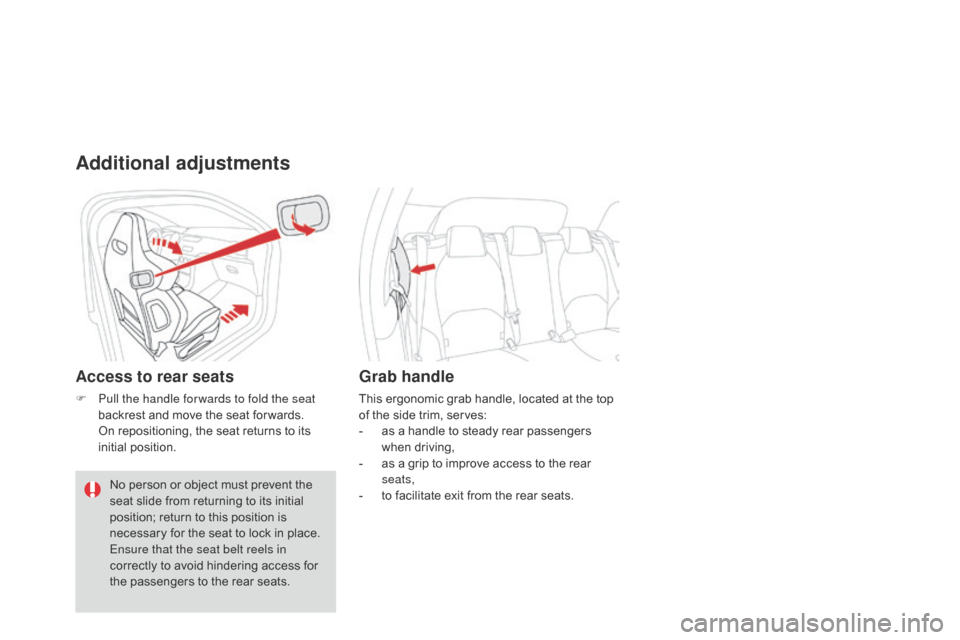
Additional adjustments
Access to rear seats
F Pull the handle for wards to fold the seat backrest and move the seat for wards.
O
n repositioning, the seat returns to its
in
itial
p
osition.
Grab handle
This ergonomic grab handle, located at the top of the side trim, serves:
-
a
s a handle to steady rear passengers
w
hen
d
riving,
-
a
s a grip to improve access to the rear
sea
ts,
-
t
o facilitate exit from the rear seats.
No
person
or
object
must
prevent
the
s
eat
slide
from
returning
to
its
initial
p
osition;
return
to
this
position
is
n
ecessary
for
the
seat
to
lock
in
place.
Ensure that the seat belt reels in
correctly
to
avoid
hindering
access
for
t
he
passengers
to
the
rear
seats.
Page 82 of 376
DS3_en_Chap04_confort_ed01-2014
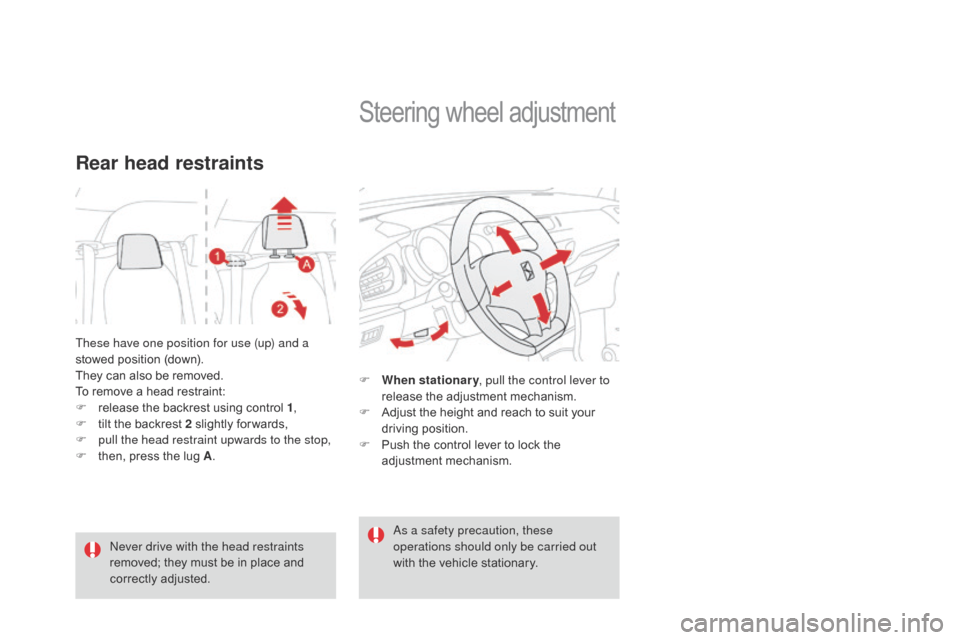
These have one position for use (up) and a
stowed position (down).
They
can also be removed.
To
remove a head restraint:
F
r
elease the backrest using control 1,
F
t
ilt the backrest 2 slightly for wards,
F
p
ull the head restraint upwards to the stop,
F
t
hen, press the lug A.
Rear head restraints
Never drive with the head restraints
removed;
they must be in place and
c
orrectly
adj
usted.
Steering wheel ad justment
F When stationary , pull the control lever to
release the adjustment mechanism.
F
A
djust the height and reach to suit your
d
riving position.
F
P
ush the control lever to lock the
a
djustment
m
echanism.
as a s
afety precaution, these
operations should only be carried out
with
the vehicle stationary.
Page 83 of 376
81
DS3_en_Chap04_confort_ed01-2014
Mirrors
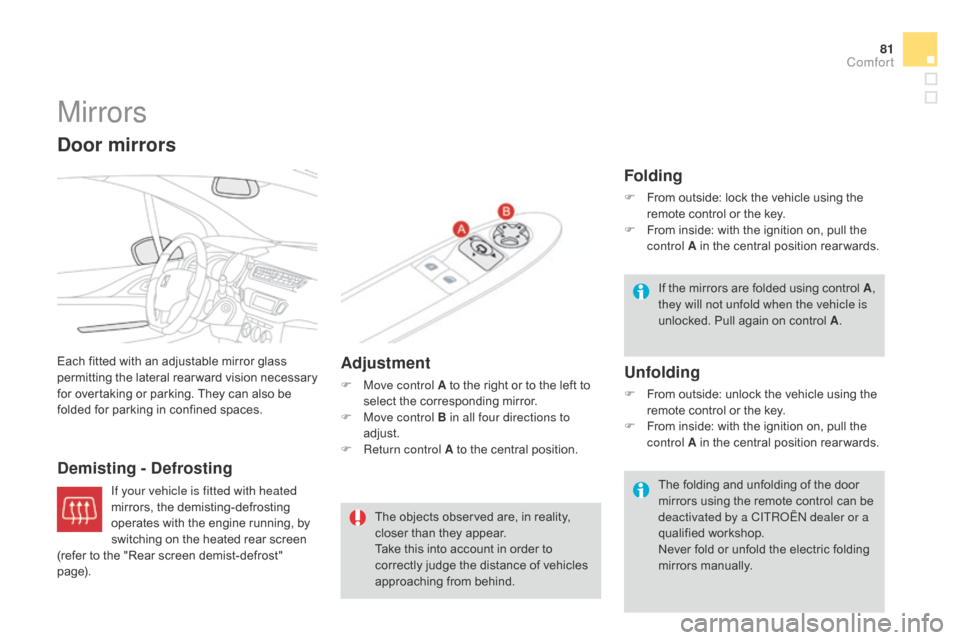
Each fitted with an adjustable mirror glass permitting t he la teral r earward v ision n ecessary f
or overtaking or parking. They can also be
f
olded for parking in confined spaces.
demisting - def rosting Adjustment
F Move control A
to the right or to the left to s
elect the corresponding mirror.
F
M
ove control B in all four directions to
adjust.
F
R
eturn control A to the central position.
door mirrors
The objects observed are, in reality, closer than they appear.
Take
this into account in order to
c
orrectly judge the distance of vehicles
a
pproaching from behind.
Folding
F From outside: lock the vehicle using the r
emote control or the key.
F
F
rom inside: with the ignition on, pull the
c
ontrol A in the central position rear wards.
Unfolding
F From outside: unlock the vehicle using the r
emote control or the key.
F
F
rom inside: with the ignition on, pull the
c
ontrol A in the central position rear wards.
If
t
he
m
irrors
a
re
f
olded
u
sing
c
ontrol
A,
they will not unfold when the vehicle is
unlocked. Pull again on control A
.
The folding and unfolding of the door
m
irrors using the remote control can be
d
eactivated by a CITR
oË
N dealer or a
qualified
w
orkshop.
Never
fold or unfold the electric folding
m
irrors
m
anually.
If your vehicle is fitted with heated
mirrors,
the
demisting-defrosting
o
perates
with
the
engine
running,
by
s
witching
on
the
heated
rear
screen
(
refer
to
the
"Rear
screen
demist-defrost"
pag
e).
comfort
Page 97 of 376
95
DS3_en_Chap04_confort_ed01-2014
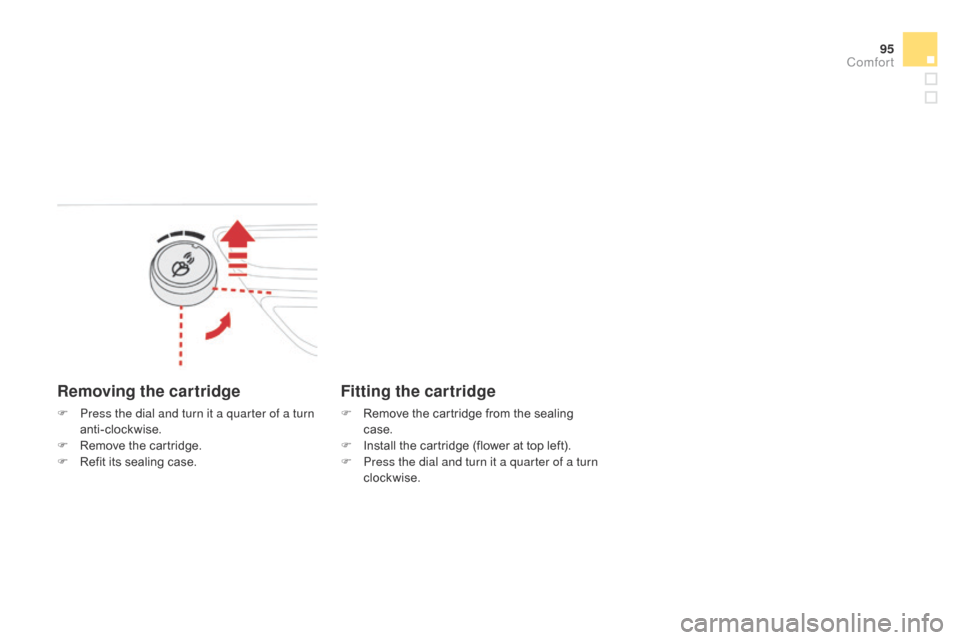
Removing the cartridge
F Press the dial and turn it a quarter of a turn anti-clockwise.
F
R
emove the cartridge.
F
R
efit its sealing case.
Fitting the cartridge
F Remove the cartridge from the sealing c
ase.
F
I
nstall the cartridge (flower at top left).
F
P
ress the dial and turn it a quarter of a turn
clockwise.
comfort
Page 118 of 376
DS3_en_Chap06_conduite_ed01-2014
There is a risk of damage to the gearbox:
- i f you press the accelerator and
brake
pedals at the same time,
-
i
f you force the movement of the
g
ear lever from the P position to
another position when the battery
is
flat.
To
reduce fuel consumption when at
a
prolonged standstill with the engine
r
unning (traffic jam...), put the gear lever in
t
he N
position and apply the parking brake.
If the lever is not in position P
,
when the driver's door is opened or
approximately
45
seconds
after
the
i
gnition
is
switched
off,
a
warning
m
essage
appears
in
the
screen.
F
R
eturn the lever to position P ;
the
m
essage
d
isappears.
When
driving
on
flooded
roads
or
when
c
rossing
a
ford,
proceed
at
walking
p
ace.
Operating fault
Manual operation
When the ignition is on, the lighting o f this warning lamp, accompanied
b
y
an
audible signal and a message in the
m
ultifunction screen, indicates a gearbox fault.
In
this
case, the gearbox switches to back-up
m
ode
and
is locked in 3rd gear. You may feel
a
substantial knock when changing from P
to R
and
from N to R .
This will not cause any
d
amage
to
the gearbox.
Do
not
exceed 60 mph (100 km/h), local speed
r
estrictions
p
ermitting.
Contact a CITR
oË
N dealer or a qualified
workshop
as soon as possible.
F
Sel
ect position M for sequential
c
hanging
o
f
the
four
gears.
F
P
ush the lever towards the +
sign
to
c
hange
up
a
gear.
F
P
ull the lever towards the -
sign
to
change
d
own
a
gear.
It
is
only
possible
to
change
from
one
gear
to
a
nother
if
the
vehicle
speed
and
engine
speed
p
ermit;
other wise,
the
gearbox
will
operate
t
emporarily
in
automatic
mode. This
symbol
is
displayed
if
a
gear
i
s
not
engaged
correctly
(selector
b
etween
two
positions).
d
disappears
and
the
gears
e
ngaged
appear
in
succession
in
the
in
strument
pan
el.
Stopping the vehicle
Before switching off the engine, you can engage p osition P or N
to place the gearbox in neutral.
In
both cases, apply the parking brake to
i
mmobilise the vehicle.
Invalid value during manual
operation
If the engine speed is too low or too high, the gear selected flashes for a few seconds, then
t
he actual gear engaged is displayed.
It
is possible to change from position d
(automatic)
to position M (manual) at any time.
When
the vehicle is stationary or moving
v
ery slowly, the gearbox selects gear M1
automatically.
The
sport and snow programmes do not
o
perate in manual mode.