pairing phone Citroen DS3 2014 1.G Owner's Manual
[x] Cancel search | Manufacturer: CITROEN, Model Year: 2014, Model line: DS3, Model: Citroen DS3 2014 1.GPages: 376, PDF Size: 12.55 MB
Page 56 of 376
DS3_en_Chap02_ecrans-multifonction_ed01-2014
Display configuration
Once this menu has been selected, you can gain access to the following settings:
-
b
rightness-video
s
etting,
-
d
ate and time setting,
-
s
election of units.
Once
the fuel consumption units have
b
een changed to mpg, the information
i
n the screen relating to speed and
d
istance also changes to mph and
mil
es
re
spectively. For
safety
reasons,
configuration
by
the
d
river of the multifunction screen must
o
nly be done when stationary.
choice of language
Once this menu has been selected, you can change the language used by the screen by
c
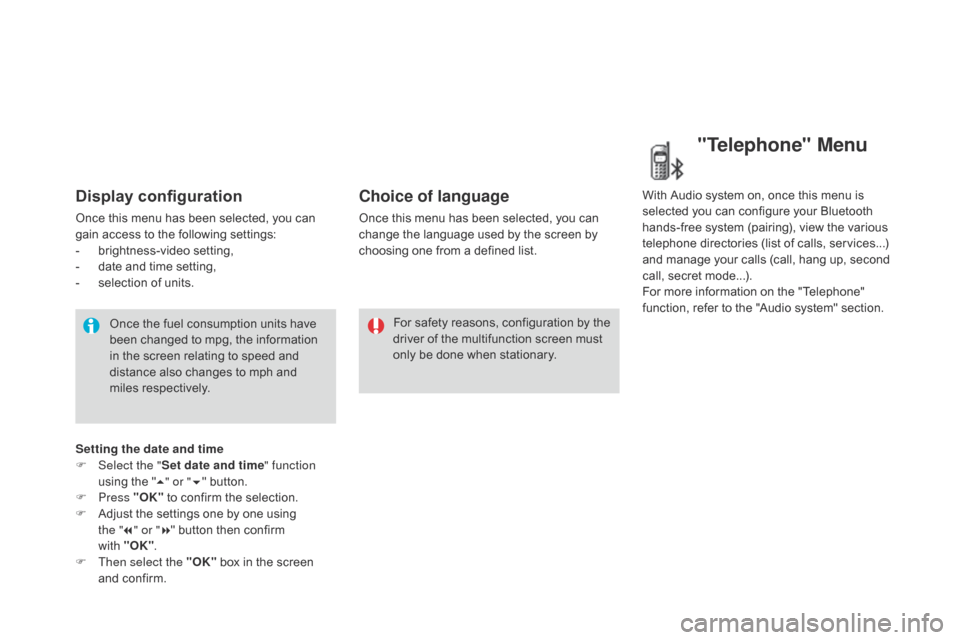
hoosing one from a defined list.With
Audio system on, once this menu is s
elected you can configure your Bluetooth h
ands-free system (pairing), view the various
t
elephone directories (list of calls, services...)
a
nd manage your calls (call, hang up, second
c
all, secret mode...).
For
more information on the "Telephone"
f
unction, refer to the "Audio system" section.
"Telephone" Menu
Setting the date and time
F Sel ect the " Set date and time" function
using
the "5 " or " 6"
button.
F
Press "OK"
to confirm the selection.
F
A
djust the settings one by one using
the " 7" or " 8"
button then confirm
with "OK" .
F
T
hen select the "OK"
box in the screen
a
nd confirm.
Page 306 of 376
06
DS3_en_Chap13b_RT6-2-8_ed01-2014
USING THE TELEPHONE
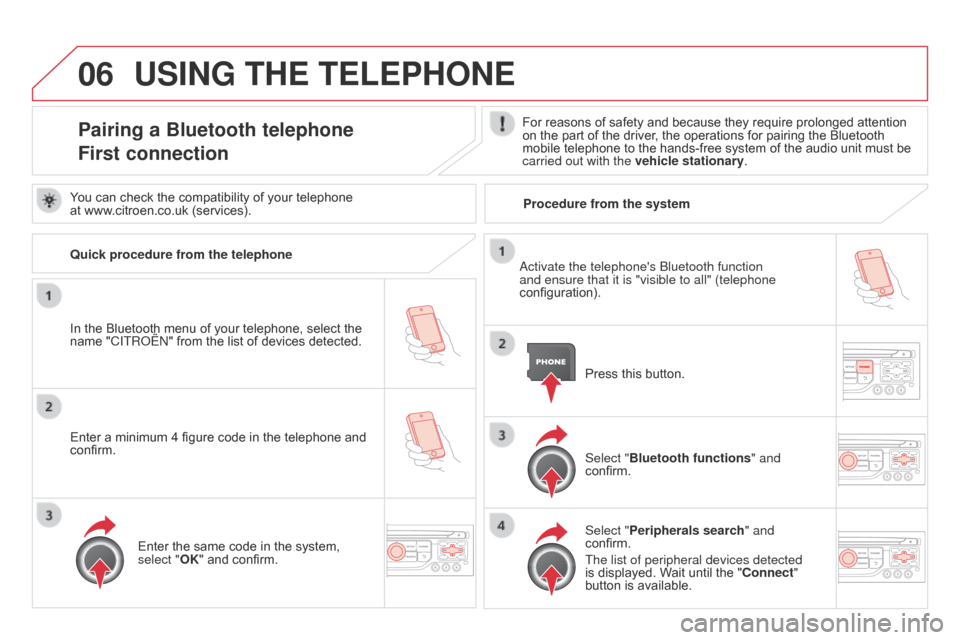
Pairing a Bluetooth telephone
First connectionFor reasons of safety and because they require prolonged attention on the part of the driver, the operations for pairing the Bluetooth
mobile
telephone to the hands-free system of the audio unit must be
carried out with the vehicle stationary
.
In
the
Bluetooth
menu
of
your
telephone,
select
the
name
"C
ITR
o
ËN
"
from
the
list
of
devices
detected. Press
this button.
Select "Bluetooth functions " and
confirm.
Select "Peripherals search " and
confirm.
The list of peripheral devices detected
is
displayed. Wait until the " c onnect"
button
is available.
You
can
check
the
compatibility
of
your
telephone
at
www.citroen.co.uk
(services).
a
ctivate the telephone's b luetooth function
and ensure that it is "visible to all" (telephone
configuration).
Quick procedure from the telephone
Enter
a
minimum
4
figure
code
in
the
telephone
and
confirm. Enter
the
same
code
in
the
system,
select "
OK"
and
confirm. Procedure from the system
Page 307 of 376
06
305
DS3_en_Chap13b_RT6-2-8_ed01-2014
USING THE TELEPHONE
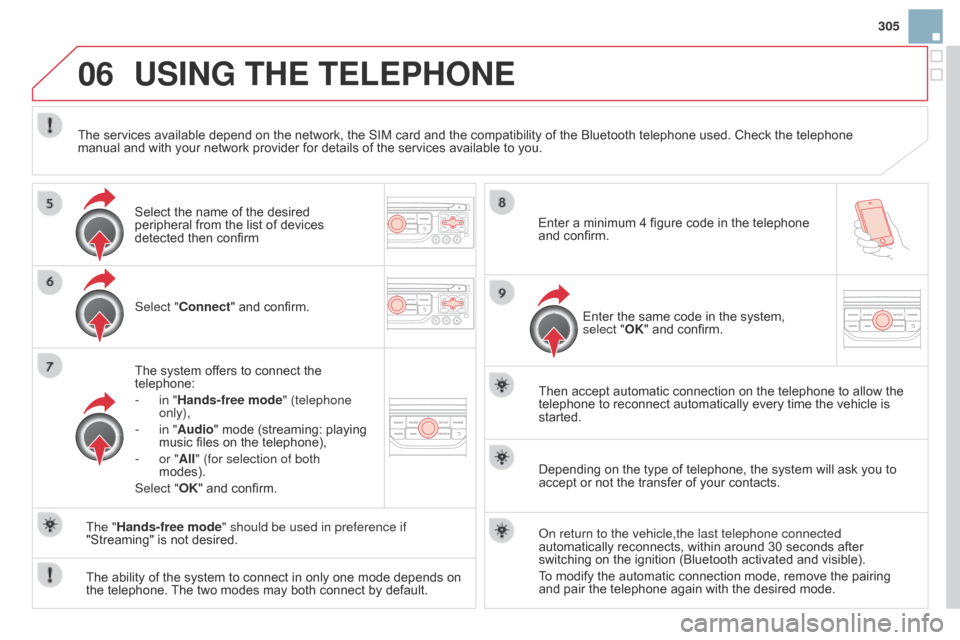
Select "connect" and confirm.
The system offers to connect the
telephone:
-
in "
Hands-free mode" (telephone
only),
-
in "
Audio" mode (streaming: playing
music
files on the telephone),
-
or "
All" (for selection of both
modes).
Select "OK"
and confirm. Then
accept automatic connection on the telephone to allow the
telephone
to reconnect automatically every time the vehicle is
started.
The
ability of the system to connect in only one mode depends on
the
telephone.
The
two modes may both connect by default.
The "Hands-free mode" should be used in preference if
"Streaming"
is not desired.
The
services available depend on the network, the SIM card and the compatibility of the Bluetooth telephone used. Check the telephone
manual
and with your network provider for details of the services available to you.
Depending on the type of telephone, the system will ask you to
accept
or not the transfer of your contacts.
o
n return to the vehicle,the last telephone connected
automatically
reconnects, within around 30 seconds after
switching
on the ignition (Bluetooth activated and visible).
To
modify the automatic connection mode, remove the pairing
and
pair the telephone again with the desired mode.
Enter
a minimum 4 figure code in the telephone
and
confirm.
Enter the same code in the system,
select "
OK" and confirm.
Select
the name of the desired
peripheral
from the list of devices
detected
then confirm
Page 314 of 376
06
DS3_en_Chap13b_RT6-2-8_ed01-2014
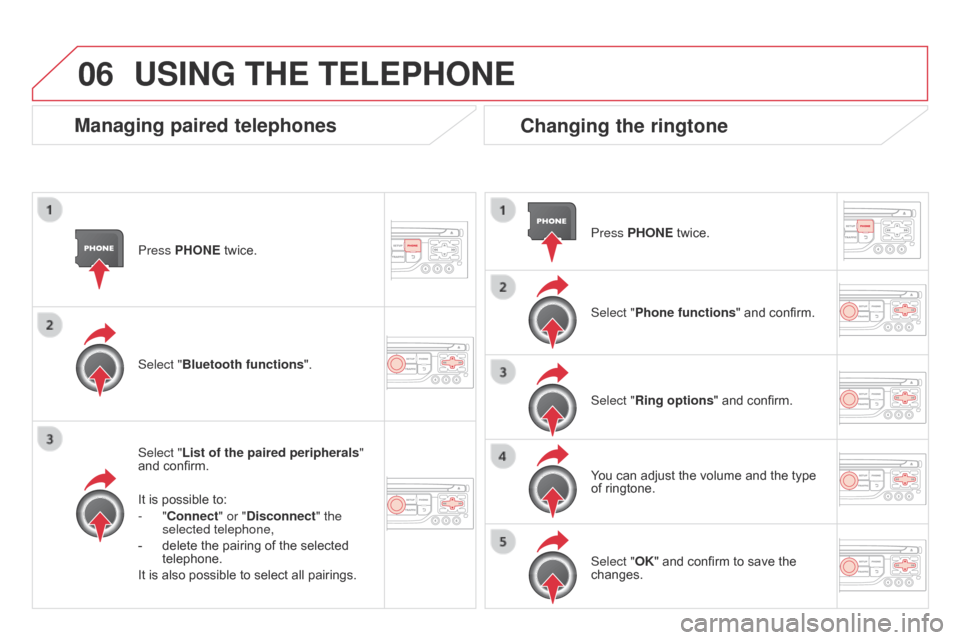
Press PHONE twice.
Select " List of the paired peripherals "
and
confirm.
It
is possible to:
-
" c onnect" or " d isconnect" the
selected telephone,
-
delete
the pairing of the selected
telephone.
It
is also possible to select all pairings.
Managing paired telephonesc hanging the ringtone
Press PHONE twice.
Select " Phone functions "
and confirm.
Select "Ring options "
and confirm.
You
can adjust the volume and the type
of
ringtone.
Select "Bluetooth functions
".
Select "OK"
and confirm to save the
changes.
USING THE TELEPHONE
Page 340 of 376
03
DS3_en_Chap13c_RD45_ed01-2014
MAIN MENU
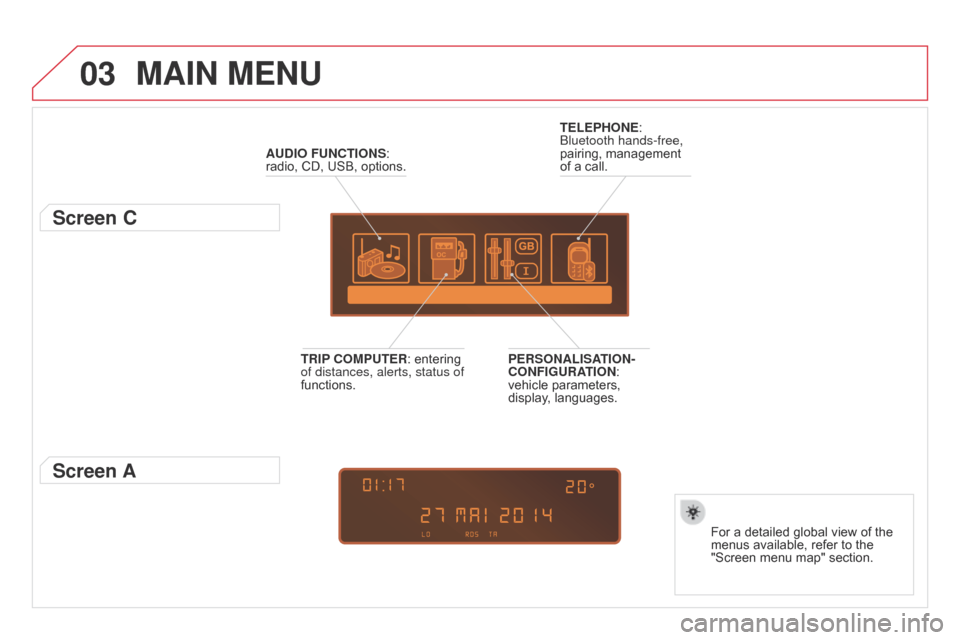
AUdIO FUNcTIONS: radio, CD, USB, options.
Screen c
For a detailed global view of the menus available, refer to the
"Screen
menu map" section.
TELEPHONE:
b
luetooth hands-free,
pairing,
management
of
a
call.
PERSONALISATION-
c
ONFIGURATION:
vehicle
parameters,
display
,
languages.
TRIP
c
OMPUTER:
entering
of distances, alerts, status of
functions.
Screen A
Page 347 of 376
06
345
DS3_en_Chap13c_RD45_ed01-2014
BLUETOOTH FUNcTIONS
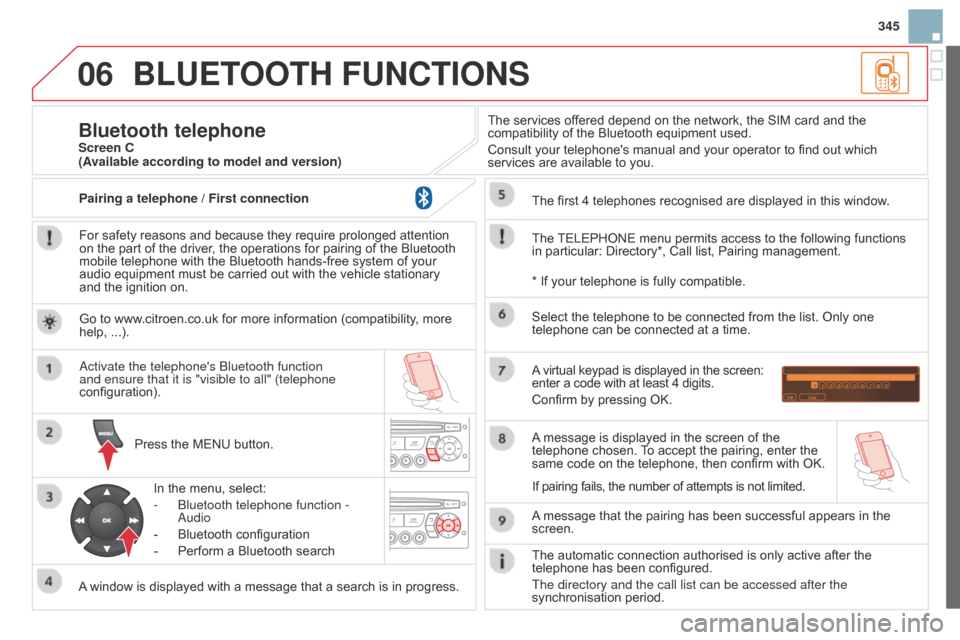
For safety reasons and because they require prolonged attention on the part of the driver, the operations for pairing of the Bluetooth
mobile
telephone with the Bluetooth hands-free system of your
audio
equipment must be carried out with the vehicle stationary
and
the ignition on.
Press
the MENU button.
A
window is displayed with a message that a search is in progress.
a
ctivate the telephone's b luetooth function
and ensure that it is "visible to all" (telephone
configuration).
In
the menu, select:
-
b luetooth telephone function -
a
udio
-
Bluetooth
configuration
-
Perform
a Bluetooth searchThe
services offered depend on the network, the SIM card and the
compatibility
of the Bluetooth equipment used.
Consult your telephone's manual and your operator to find out which
services
are available to you.
Bluetooth telephoneScreen c
The
TELEPHONE
menu permits access to the following functions
in
particular: Directory*, Call list, Pairing management.
The
first 4 telephones recognised are displayed in this window.
A
virtual keypad is displayed in the screen:
enter
a code with at least 4 digits.
Confirm
by pressing OK.
A
message that the pairing has been successful appears in the
screen. Select
the telephone to be connected from the list. Only one
telephone
can be connected at a time.
A
message is displayed in the screen of the
telephone
chosen.
T
o accept the pairing, enter the
same
code on the telephone, then confirm with OK.
The
automatic connection authorised is only active after the
telephone
has been configured.
The directory and the call list can be accessed after the
synchronisation
period.
(Available according to model and version)
*
If your telephone is fully compatible.
If
pairing fails, the number of attempts is not limited.
Go
to www.citroen.co.uk for more information (compatibility, more
help,
...).
Pairing a telephone / First connection
Page 349 of 376
06
347
DS3_en_Chap13c_RD45_ed01-2014
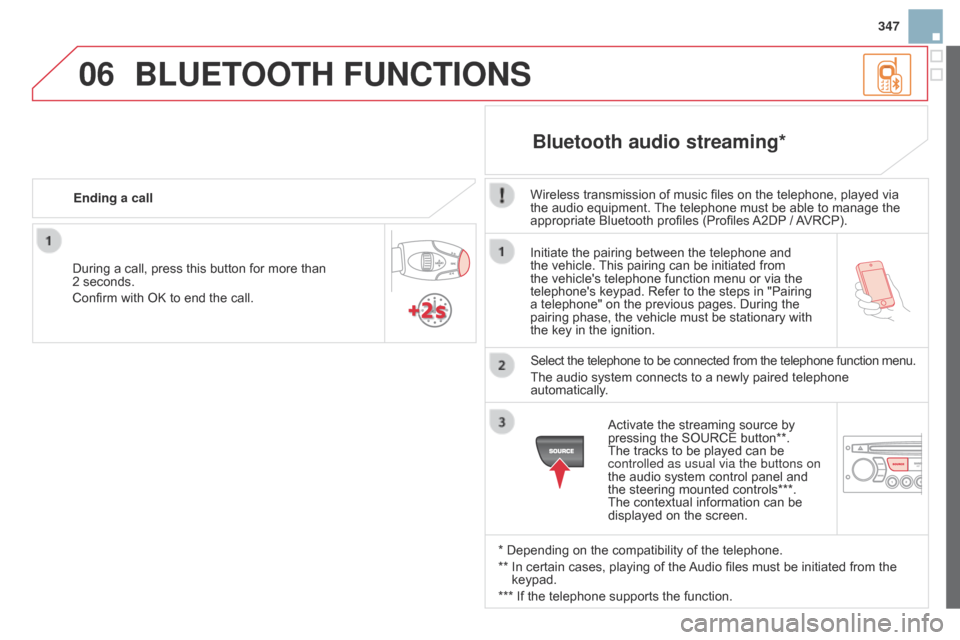
Initiate the pairing between the telephone and the vehicle. This pairing can be initiated from
the
vehicle's telephone function menu or via the
telephone's
keypad. Refer to the steps in "Pairing
a
telephone" on the previous pages. During the
pairing
phase, the vehicle must be stationary with
the
key in the ignition.
Select
the telephone to be connected from the telephone function menu.
The
audio system connects to a newly paired telephone
automatically
.
Bluetooth audio streaming*
Wireless transmission of music files on the telephone, played via the audio equipment. The telephone must be able to manage the
appropriate
Bluetooth profiles (Profiles
A2DP
/
A
VRCP).
*
Depending on the compatibility of the telephone.
**
In
certain cases, playing of the
Audio
files must be initiated from the
keypad.
***
If
the telephone supports the function.
Activate
the streaming source by
pressing
the SOURCE button**.
The
tracks to be played can be
controlled as usual via the buttons on
the
audio system control panel and
the
steering mounted controls***.
The
contextual information can be
displayed
on the screen.
During
a
call,
press
this
button
for
more
than
2
seconds.
Confirm
with
OK
to
end
the
call.
Ending a call
BLUETOOTH FUNcTIONS