MPG Citroen DS3 2015 1.G Owner's Manual
[x] Cancel search | Manufacturer: CITROEN, Model Year: 2015, Model line: DS3, Model: Citroen DS3 2015 1.GPages: 415, PDF Size: 11.95 MB
Page 46 of 415

DS3_en_Chap01_controle-de-marche_ed01-2015
Languages
Once the "Languages" menu has been selected, you can change the language used by the s
creen by choosing one from a defined list.
Units
Once the "Units" menu has been selected, you can change the units of the following
par
ameters:
-
t
emperature (°C or °F),
-
f
uel consumption (l/100 km, mpg or km/l).
Once
the fuel consumption units have
b
een set to mpg, the information in the
i
nstrument panel screen on speed and
d
istance will also be in mph and miles.
As
a safety measure, configuration by
t
he driver of the multifunction screen
s
hould only be done when stationary.
display settings
Once the "Display settings" menu has been selected, you can gain access to the following settings:
- year,
- m onth,
-
d ay,
-
h o u r,
-
m
inutes,
-
1
2 or 24 hour mode.
F
O
nce you have selected a setting, press
t
he "7" or " 8"
buttons to change its value.
F
P
ress the " 5" or " 6" buttons to switch
respectively
to the previous or next setting.
F
P
ress the "OK"
button to save the change
a
nd return to the normal display or press
t
he "Back"
button to cancel. Setting the date and time
F
P
ress the ME
n
U
button.
F
S
elect "Display settings" using the "5 "
or
"6 "
button.
F
Press "OK"
to confirm the selection.
F
S
elect the "Year" function using the "5 "
or
"6 "
button.
F
Press "OK"
to confirm the selection.
F
C
hoose the desired value, using the "7 "
or
"8 "
button.
F
Press "OK"
to confirm the selection.
F
R
epeat the procedure to set the "Month",
"Day",
"Hours", and "Minutes".
Page 50 of 415

DS3_en_Chap01_controle-de-marche_ed01-2015
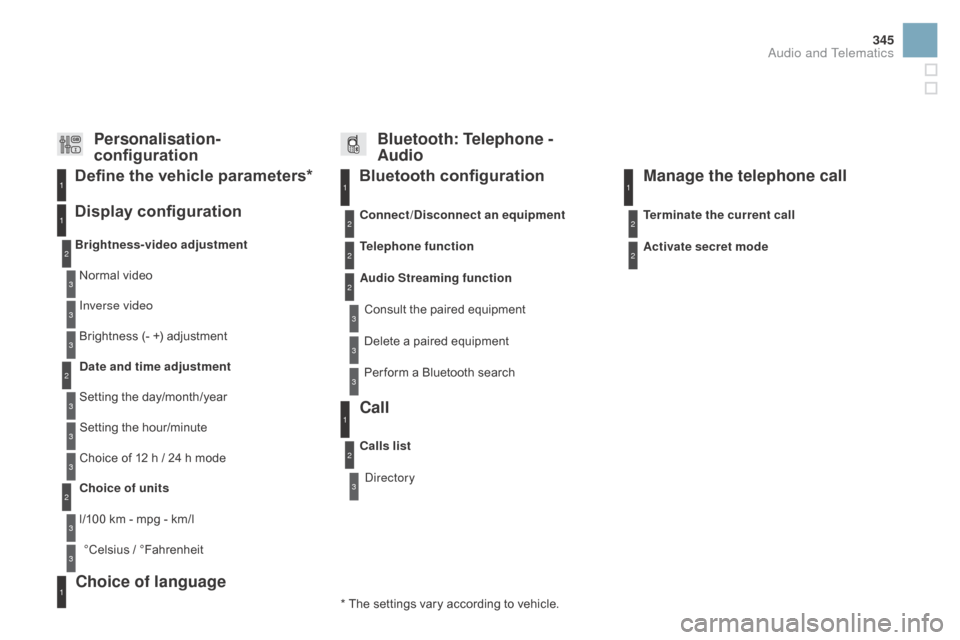
Display configuration
Once this menu has been selected, you can gain access to the following settings:
-
b
rightness-video
s
etting,
-
d
ate and time setting,
-
s
election of units.
Once
the fuel consumption units have
b
een changed to mpg, the information
i
n the screen relating to speed and
d
istance also changes to mph and
mil
es
re
spectively. As
a safety measure, configuration by
t
he driver of the multifunction screen
s
hould only be done when stationary.
Choice of language
Once this menu has been selected, you can change the language used by the screen by
c
hoosing one from a defined list.With
Audio system on, once this menu is s
elected you can configure your Bluetooth h
ands-free system (pairing), view the various
t
elephone directories (list of calls, services...)
a
nd manage your calls (call, hang up, second
c
all, secret mode...).
For
more information on the "Telephone"
f
unction, refer to the "Audio system" section.
"Telephone" Menu
Setting the date and time
F Sel ect the " Set date and time" function
using
the "5 " or " 6"
button.
F
Press "OK"
to confirm the selection.
F
A
djust the settings one by one using
t
he "7 " or " 8"
button then confirm
w
ith "OK".
F
T
hen select the "OK"
box in the screen
a
nd confirm.
Page 54 of 415
DS3_en_Chap01_controle-de-marche_ed01-2015
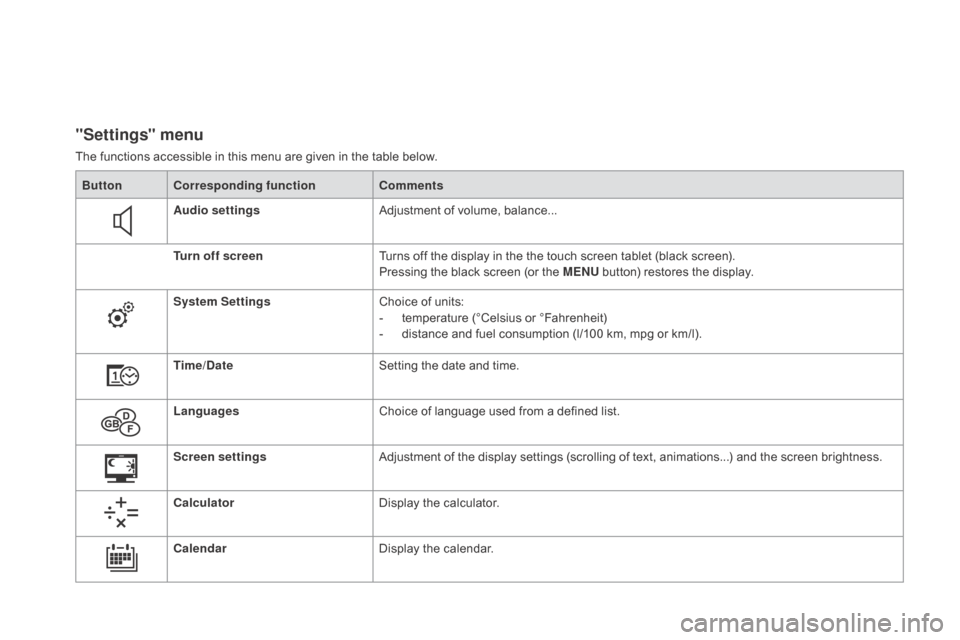
"Settings" menu
The functions accessible in this menu are given in the table below.
Bu tton Corresponding function Comments
Audio settings Adjustment
of volume, balance...
Turn off screen Turns
off the display in the the touch screen tablet (black screen).
Pressing
the black screen (or the ME
n
U
button) restores the display.
System Settings Choice
of units:
-
t
emperature (°Celsius or °Fahrenheit)
-
d
istance and fuel consumption (l/100 km, mpg or km/l).
Time/
d
a
te Setting
the date and time.
Languages Choice
of language used from a defined list.
Screen settings Adjustment
of the display settings (scrolling of text, animations...) and the screen brightness.
Calculator Display
the calculator.
Calendar Display
the calendar.
Page 59 of 415

57
DS3_en_Chap01_controle-de-marche_ed01-2015
Trip computer, a few definitions
Range
(miles or km)
Current fuel consumption
(mpg or l/100 km or km/l)
Stop & Start time
counter
(minutes / seconds or hours / minutes)
This
value
may
vary
following
a
change
i
n
the
style
of
driving
or
the
relief,
r
esulting
in
a
significant
change
in
the
c
urrent
fuel
consumption.
If dashes are displayed continuously
while
driving
in
place
of
the
digits,
c
ontact a CITROËN dealer or a
qualified
w
orkshop.
When
the
range
falls
below
20
miles
(30
km),
d
ashes
are
displayed.
After
filling
with
at
least
5
litres
of
fuel,
the
range
is
recalculated
and
is
d
isplayed
when
it
exceeds
60
miles
(100
km).
distance remaining to
destination
(miles or km)
T
he distance which can still be travelled with
the
fuel
remaining
in
the
tank
(related
to
the
a
verage
fuel
consumption
over
the
last
few
m
iles
(
kilometres)
t
ravelled). Calculated
over
the
last
few
seconds.
This
is
the distance remaining to be travelled
t
o
the
final destination. It can be entered by
t
he user.
If the distance is not entered, dashes are
displayed
in place of the digits.
If
your
vehicle is fitted with Stop & Start, a time
c
ounter
calculates the time spent in STOP
m
ode
during a journey.
I
t
resets
to zero every time the ignition is
s
witched
on with the key.
distance travelled
(miles or km)
C
alculated
since the last trip computer reset.
Average speed
(mph or km/h)
C
alculated since the last trip computer reset.
Average fuel
consumption
(mpg or l/100 km or km/l)
C
alculated
since the last trip computer reset.
This
function is only displayed from
2
0 mph
(30 km/h).
Monitoring
Page 347 of 415
345
DS3_en_Chap11d_RD45_ed01-2015
Bluetooth configuration11
1
22
22
2
3
3
3
2
3
Normal video
Brightness-video adjustment
Display configuration Define the vehicle parameters*
Inverse video
Brightness
(- +) adjustment
da
te and time adjustment
Setting
the day/month/year
Setting
the hour/minute
Choice
of 12 h / 24 h mode
Choice of units
l/100
km - mpg - km/l
°Celsius
/ °
Fahrenheit
1
1
3
3
2
3
2
3
3
2
3
3
3
Personalisation-
configuration Bluetooth: Telephone -
Audio
Telephone function
Delete a paired equipment
Connect/
di
sconnect an equipment
Audio Streaming function Consult
the paired equipment
Per form
a Bluetooth search
Calls list
Call
Directory Terminate the current call
Manage the telephone call
Activate secret mode
*
The
settings
vary
according
to
vehicle.
Choice of language1
Audio and Telematics