reset Citroen DS3 2015 1.G Owner's Manual
[x] Cancel search | Manufacturer: CITROEN, Model Year: 2015, Model line: DS3, Model: Citroen DS3 2015 1.GPages: 415, PDF Size: 11.95 MB
Page 38 of 415

DS3_en_Chap01_controle-de-marche_ed01-2015
System which informs the driver when the next service is due, in accordance with the
ma
nufacturer's
ser
vicing
s
chedule.
Service indicator
Between 600 miles (1 000 km)
and 1 800 miles (3 000 km) remain
before the next service is due
For 5 seconds after the ignition is switched on, the spanner symbolising the service operations
c
omes on. The distance recorder display line
i
ndicates the distance remaining before the
n
ext service is due.
Example:
1 739 miles (2 800 km) remain
b
efore the next service is due.
For
5 seconds after the ignition is switched on,
t
he screen indicates:
5
seconds after the ignition is switched on,
t
he spanner goes off ;
the distance recorder
r
esumes its normal operation. The screen then
i
ndicates the total distance.
For BlueHDi Diesel versions, the
degree
of
deterioration
of
the
engine
oil
i
s
also
taken
into
account
(depending
o
n
the
country
of
sale).
The
point
at
which
the
next
service
is
due
is
c
alculated
from
the
last
indicator
zero
reset,
d
epending
on
the
distance
travelled
and
the
t
ime
elapsed
since
the
last
service.
More than 1 800 miles (3 000 km)
remain before the next service is
due
When the ignition is switched on, no service i nformation appears in the screen.
Page 40 of 415

DS3_en_Chap01_controle-de-marche_ed01-2015
Service indicator zero reset
After each service, the service indicator must be reset to zero.
The
procedure for resetting to zero is as
f
ollows:
F
s
witch off the ignition,
F
p
ress and hold the trip distance recorder
zero reset button,
F
s
witch
o
n
t
he
i
gnition;
t
he
d
istance
r
ecorder
d
isplay begins a countdown,
F
w
hen the display indicates "=0" , release
the
button; the spanner disappears. Following
this operation, if you wish to
d
isconnect the battery, lock the vehicle
a
nd wait at least five minutes for the
z
ero reset to be taken into account.
Retrieving the service
information
You can access the service information at any t
ime.
F
P
ress the trip distance recorder zero reset
button.
T
he service information is displayed for a
f
ew seconds, then disappears.
Page 56 of 415
DS3_en_Chap01_controle-de-marche_ed01-2015
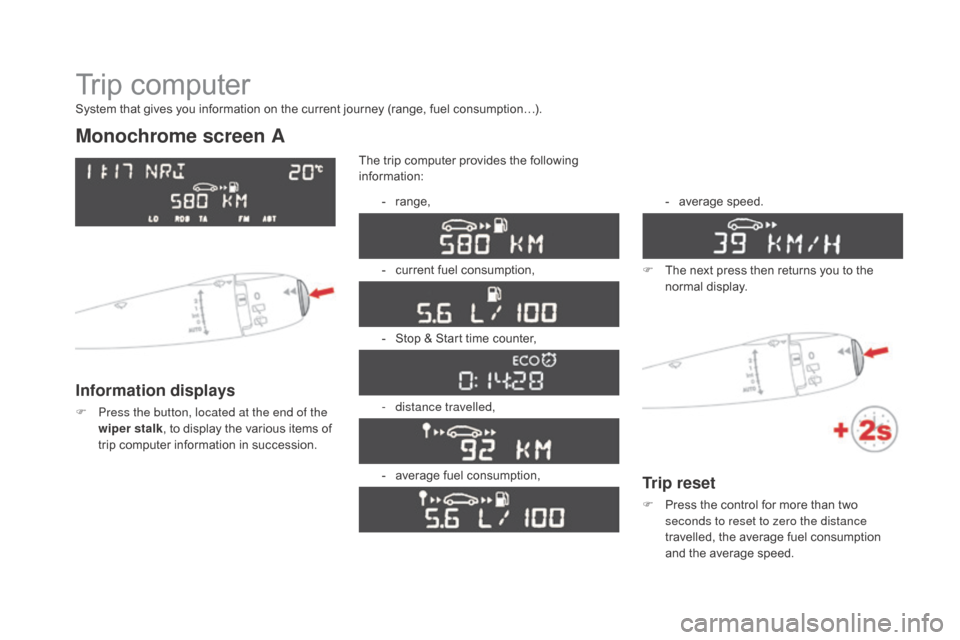
Trip computer
Monochrome screen A
Information displays
F Press the button, located at the end of the wiper stalk ,
to display the various items of
t
rip computer information in succession.The
trip computer provides the following
i
nformation:
-
ra
nge,
-
c
urrent fuel consumption,
-
S
top & Start time counter,
- d istance travelled,
-
a
verage fuel consumption,-
a
verage
s
peed.
F
T
he next press then returns you to the
n
ormal
d
isplay.
System that gives you information on the current journey (range, fuel consumption…).
Trip reset
F Press
the control for more than two s
econds to reset to zero the distance
travelled,
the average fuel consumption
a
nd the average speed.
Page 57 of 415

55
DS3_en_Chap01_controle-de-marche_ed01-2015
Monochrome screen C
Information displays
F Press the button, located at the end of the wiper stalk , to display the various trip
computer
tabs in succession: -
t
he current information tab
w
ith:
●
t
he range,
●
t
he current fuel
c
onsumption,
●
t
he distance remaining
to be travelled or the
Stop & Start time counter,
-
t
he trip "1"
tab with:
●
t
he distance travelled,
●
t
he average fuel
c
onsumption,
● t he average speed, f
or the first trip.
-
t
he trip "2"
tab with:
●
t
he distance travelled,
●
t
he average fuel
c
onsumption,
●
t
he average speed,
f
or the second trip.
F
P
ressing the button again returns you to
t
he normal display.
Zero reset
F When the trip required is displayed, press t
he button on the end of the wiper stalk for
m
ore than two seconds.
Tr i p s "1" and "2" are independent but their use
is
identical.
For
example, trip "1" can be used for daily
figures,
and trip "2"
for monthly figures.
Monitoring
Page 58 of 415

DS3_en_Chap01_controle-de-marche_ed01-2015
Touch screen tablet
Information display
F Press the MEnU button, then select
"dr iving",
to display the various tabs.
F
S
elect the desired tab using your finger.-
T
he "
Instantaneous " tab with:
●
t
he range,
●
t
he current fuel consumption,
●
t
he Stop & Start time counter.
-
T
he "
Tr i p 1 " tab with:
●
t
he distance travelled.
●
t
he average fuel consumption,
●
t
he average speed,
f
or the first trip.
-
T
he "Tr i p 2 "
tab with:
●
t
he distance travelled.
●
t
he average fuel consumption,
●
t
he average speed,
f
or the second trip.
Trip reset
F When the desired trip is displayed, press the reset button.
Tr i p s "1" and "2" are independent but their use
is
identical.
For
example, trip "1" can be used for daily
figures,
and trip "2"
for monthly figures.
Page 59 of 415

57
DS3_en_Chap01_controle-de-marche_ed01-2015
Trip computer, a few definitions
Range
(miles or km)
Current fuel consumption
(mpg or l/100 km or km/l)
Stop & Start time
counter
(minutes / seconds or hours / minutes)
This
value
may
vary
following
a
change
i
n
the
style
of
driving
or
the
relief,
r
esulting
in
a
significant
change
in
the
c
urrent
fuel
consumption.
If dashes are displayed continuously
while
driving
in
place
of
the
digits,
c
ontact a CITROËN dealer or a
qualified
w
orkshop.
When
the
range
falls
below
20
miles
(30
km),
d
ashes
are
displayed.
After
filling
with
at
least
5
litres
of
fuel,
the
range
is
recalculated
and
is
d
isplayed
when
it
exceeds
60
miles
(100
km).
distance remaining to
destination
(miles or km)
T
he distance which can still be travelled with
the
fuel
remaining
in
the
tank
(related
to
the
a
verage
fuel
consumption
over
the
last
few
m
iles
(
kilometres)
t
ravelled). Calculated
over
the
last
few
seconds.
This
is
the distance remaining to be travelled
t
o
the
final destination. It can be entered by
t
he user.
If the distance is not entered, dashes are
displayed
in place of the digits.
If
your
vehicle is fitted with Stop & Start, a time
c
ounter
calculates the time spent in STOP
m
ode
during a journey.
I
t
resets
to zero every time the ignition is
s
witched
on with the key.
distance travelled
(miles or km)
C
alculated
since the last trip computer reset.
Average speed
(mph or km/h)
C
alculated since the last trip computer reset.
Average fuel
consumption
(mpg or l/100 km or km/l)
C
alculated
since the last trip computer reset.
This
function is only displayed from
2
0 mph
(30 km/h).
Monitoring
Page 274 of 415
DS3_en_Chap11c_SMEGplus_ed01-2015
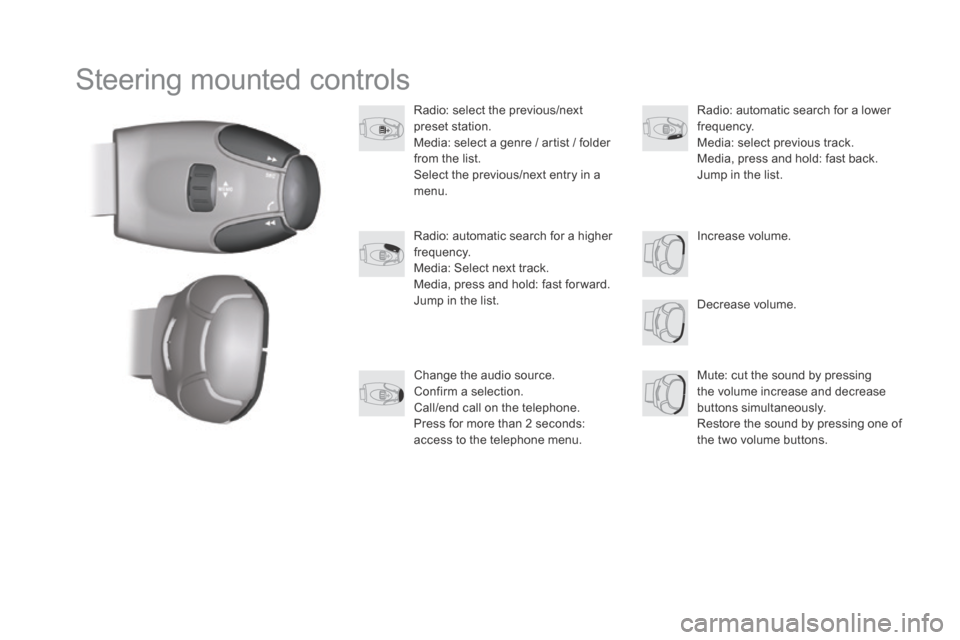
Steering mounted controls
Radio: select the previous/next preset s tation.
Media:
select a genre / artist / folder
f
rom the list.
Select
the previous/next entry in a
m
enu.
Decrease
volume.
Radio:
automatic search for a higher
f
requency.
Media:
Select next track.
Media,
press and hold: fast for ward.
Jump
in the list. Mute:
cut the sound by pressing
t
he volume increase and decrease
bu
ttons
s
imultaneously.
Restore
the sound by pressing one of
t
he two volume buttons.
Radio:
automatic search for a lower f
requency.
Media:
select previous track.
Media,
press and hold: fast back.
Jump
in the list.
Change
the audio source.
Confirm
a selection.
Call/end
call on the telephone.
Press
for more than 2 seconds:
a
ccess to the telephone menu. Increase
volume.
Page 290 of 415
4
213
DS3_en_Chap11c_SMEGplus_ed01-2015
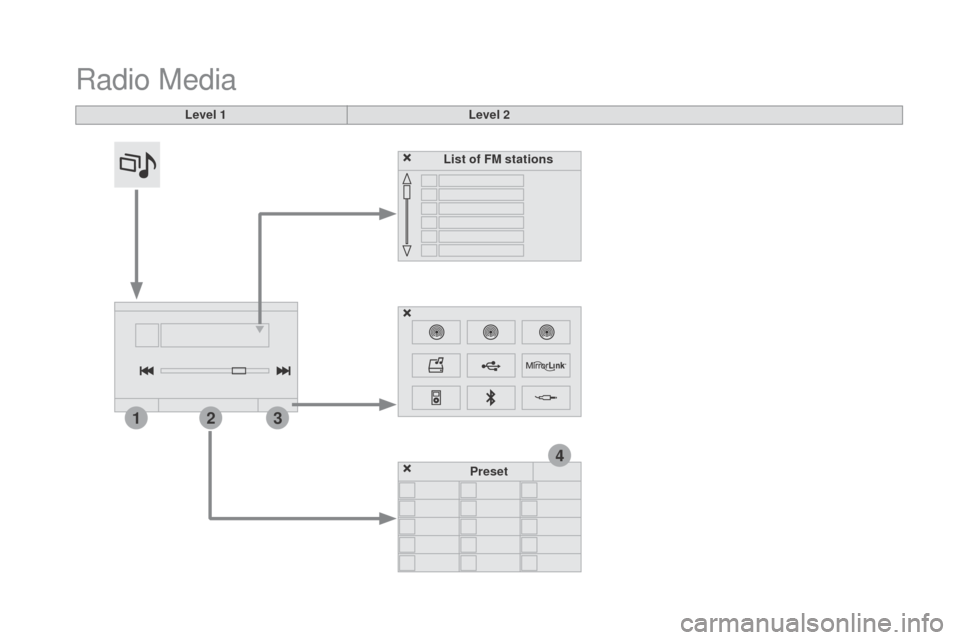
Radio Media
Level 1Level 2
List of FM stations
Preset
Page 291 of 415

3
2
289
DS3_en_Chap11c_SMEGplus_ed01-2015
Level 1Level 2 Comments
Radio Media
List List of FM stations
Press
on a radio station to select it.
Radio Media Source FM Radio
Select
change of source
d
AB Radio
AM Radio
Jukebox
USB
MirrorLink
iPod
Bluetooth
AUX
Radio Media
Preset Press
an empty location to Preset it.
Audio and Telematics
Page 293 of 415
15
5
12
8
16
6
13
9
17
7
14
10
11
18
1
1
1
291
DS3_en_Chap11c_SMEGplus_ed01-2015
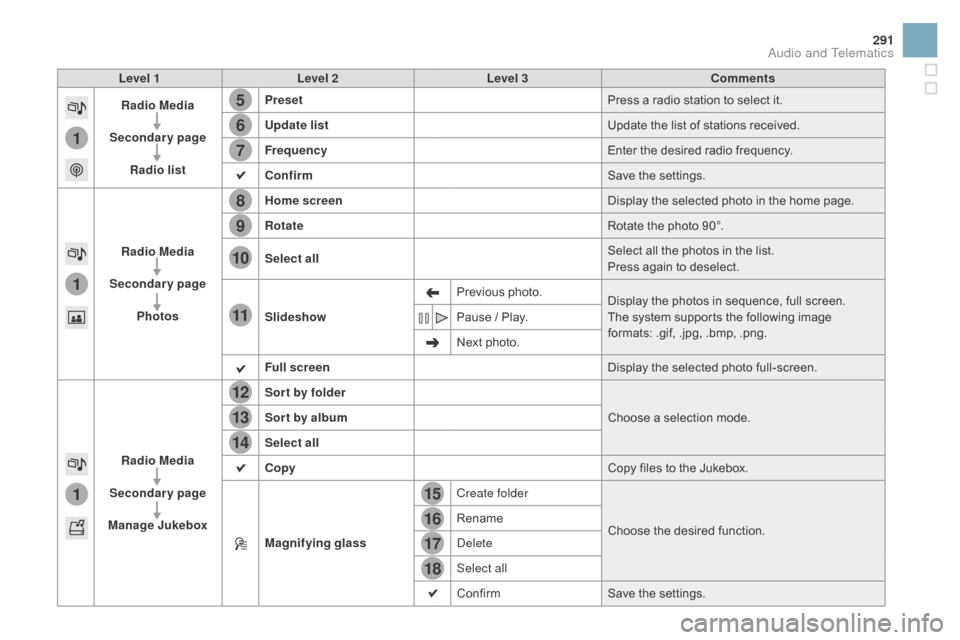
Level 1Level 2 Level 3 Comments
Radio Media
Secondary page Radio list Preset
Press
a radio station to select it.
Update list Update
the list of stations received.
Frequency Enter
the desired radio frequency.
Confirm Save
the settings.
Radio Media
Secondary page Photos Home screen
Display
the selected photo in the home page.
Rotate Rotate
the photo 90°.
Select all Select
all the photos in the list.
Press
again to deselect.
Slideshow Previous
pho
to.Display
the photos in sequence, full screen.
The
system supports the following image
f
ormats: .gif, .jpg, .bmp, .png.
Pause
/ Play.
Next
photo.
Full screen Display
the selected photo full-screen.
Radio Media
Secondary page
Manage Jukebox Sor t by folder
Choose
a selection mode.
Sor t by album
Select all
Copy Copy
files to the Jukebox.
Magnifying glass Create folder
Choose
the desired function.
Rename
Delete
Select all
Confirm
Save
the settings.
Audio and Telematics