apple Citroen DS3 2016 1.G Owner's Manual
[x] Cancel search | Manufacturer: CITROEN, Model Year: 2016, Model line: DS3, Model: Citroen DS3 2016 1.GPages: 412, PDF Size: 12.7 MB
Page 305 of 412

303
DS3_en_Chap11c_SMEGplus_ed02-2015
The audio equipment will only play audio
files with " .wma, . aac, . flac, . ogg a nd . mp3" fi
le
e
xtensions
a
nd
w
ith
a b
it
r
ate
o
f
b
etween
32 K
bps
a
nd
3
20
K
bps.
It
a
lso
s
upports
V
BR
(
Variable
B
it
R
ate)
m
ode.
No
o
ther
t
ype
o
f
f
ile
(
.mp4, ...)
c
an
b
e
p
layed.
".wma"
f
iles
m
ust
b
e
o
f
t
he
s
tandard
w
ma
9 t
ype.
The
s
ampling
r
ates
s
upported
a
re
3
2,
4
4
a
nd
48 K
Hz.
It is advisable to restrict file names to
20 characters,
w
ithout
u
sing
o
f
s
pecial
ch
aracters
(
e.g.:
" " ? ; ù
)
t
o
a
void
a
ny
p
laying
an
d
di
splaying
proble
ms.
Information and advice
Use only USB memory sticks formatted FAT32 (file a llocation t able).
The system supports USB mass
storage
p
ortable
p
layers,
B
lackBerry
®
devices or Apple® players via USB
ports. T
he a
daptor c able n ot s upplied.
Control of the peripheral device is with
the
a
udio
s
ystem
c
ontrols.
Other
p
eripherals,
n
ot
r
ecognised
o
n
con
nection, must be connected to the
auxiliary
s
ocket
u
sing
a J
ack
c
able
(
not
supp
lied). It is recommended that the USB cable
for
t
he
p
ortable
d
evice
i
s
u
sed.
The system does not support the simultaneous
connection of t wo i dentical d evices ( two me
mory
s
ticks
o
r
t
wo
A
pple
® players) but it is po
ssible t
o c
onnect o
ne m
emory s tick a nd o ne Apple® player at the same time.
Audio and Telematics
Page 306 of 412

DS3_en_Chap11c_SMEGplus_ed02-2015
Bluetooth® audio streaming
Streaming allows audio files on your telephone to be p layed t hrough t he v ehicle's s peakers.
Connect
t
he
t
elephone:
s
ee
t
he
"T
elephone"
section, then " Bluetooth".
Choose the " Audio" or "All"
prof
ile.
If play does not start automatically, it may be
necessary
t
o
s
tart
t
he
a
udio
p
layback
f
rom
t
he
te
lephone.
Control is from the peripheral device or by
using
t
he
a
udio
s
ystem
b
uttons.
Once
c
onnected
i
n
s
treaming
m
ode,
th
e telephone is considered to be a
media
s
ource.
It is recommended that you activate
" Repeat "
o
n
t
he
B
luetooth
p
eripheral.
Connecting Apple® players
Connect the Apple® player to the USB port
using a s
uitable c
able ( not s upplied).
Play
s
tarts
a
utomatically.
Control
i
s
v
ia
t
he
a
udio
s
ystem. The classifications available are those
of the portable device connected
(artists
/ a
lbums
/ g
enres
/ p
laylists
/ au
diobooks
/ p
odcasts).
The default classification used is by
artist.
T
o
m
odify
t
he
c
lassification
u
sed,
re
turn to the first level of the menu
then select the desired classification
(playlists f or e xample) a nd c onfirm to g
o d own t hrough t he m enu t o t he desi
red
tr
ack.
The version of software in the audio system
may
n
ot
b
e
c
ompatible
w
ith
t
he
g
eneration
o
f
yo
ur Apple
® player.
Page 327 of 412
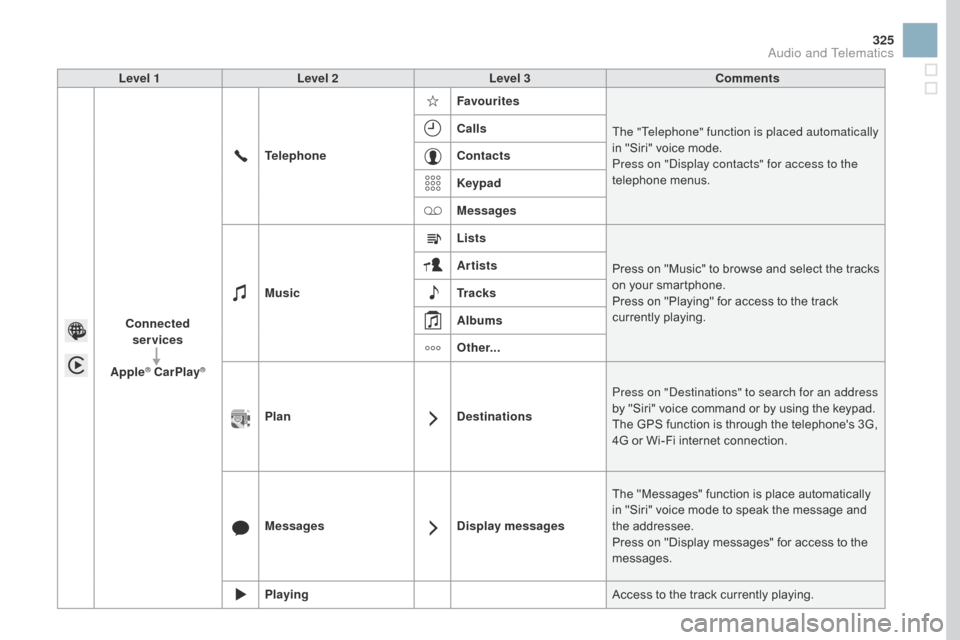
325
DS3_en_Chap11c_SMEGplus_ed02-2015
Level 1Level 2 Level 3 Comments
Connected services
Apple
® CarPlay®
Telephone Favourites
The "Telephone" function is placed automatically
in " Siri" v oice m ode.
Press on "Display contacts" for access to the
telephone
men
us.
Calls
Contacts
Keypad
Messages
Music Lists
Press
o
n
"
Music"
t
o
b
rowse
a
nd
s
elect
t
he
t
racks
on y
our
s
martphone.
Press
o
n
"
Playing"
f
or
a
ccess
t
o
t
he
t
rack
cu
rrently
p
laying.
Artists
Tr a c k s
Albums
Other...
Plan DestinationsPress on "Destinations" to search for an address
by
"
Siri"
v
oice
c
ommand
o
r
b
y
u
sing
t
he
k
eypad.
The
G
PS
f
unction
i
s
t
hrough
t
he
t
elephone's
3
G,
4G o
r
W
i-Fi
i
nternet
c
onnection.
Messages Display messagesThe
"
Messages"
f
unction
i
s
p
lace
a
utomatically
in "
Siri"
v
oice
m
ode
t
o
s
peak
t
he
m
essage
a
nd
the add
ressee.
Press
o
n
"
Display
m
essages"
f
or
a
ccess
t
o
t
he
mes
sages.
Playing Access
t
o
t
he
t
rack
c
urrently
p
laying.
Audio and Telematics
Page 351 of 412

349
DS3_en_Chap11d_RD45_ed02-2015
Use only USB memory sticks formatted FAT32 (File A llocation T able).
It is recommended that you use
genuine
Apple® USB cables for correct
operation.
*
In c
ertain cases, play of the audio files must
be
i
nitiated
f
rom
t
he
k
eypad.
**
I
f
t
he
t
elephone
s
upports
t
he
f
unction.
Bluetooth® audio streaming
Streaming allows music files on the telephone to be p layed v ia t he a udio s ystem.
Connect
t
he
t
elephone:
s
ee
t
he
"T
elephone"
section.
Select in the " Bluetooth: Telephone - Audio "
menu
t
he
t
elephone
t
o
b
e
c
onnected.
The audio system connects to a newly paired
telephone
au
tomatically.
Control
o
f
t
racks
t
o
b
e
p
layed
i
s
v
ia
t
he
b
uttons
on t
he audio system control panel and the
steering
m
ounted
c
ontrols**.
T
he
c
ontextual
in
formation
c
an
b
e
d
isplayed
i
n
t
he
s
creen.
Activate
t
he
s
treaming
s
ource
b
y
pr
essing
t
he
S
OURCE
bu
t to n*.
Connecting Apple® players
Connect the Apple® player to the USB port
using a s
uitable c
able ( not s upplied).
Play
s
tarts
a
utomatically.
Control
i
s
v
ia
t
he
a
udio
s
ystem.
The classifications available are those of the
portable
d
evice
c
onnected
(
artists
/ a
lbums
/ ge
nres
/ p
laylists
/ a
udiobooks
/ p
odcasts).
The version of software in the audio system
may
n
ot
b
e
c
ompatible
w
ith
t
he
g
eneration
o
f
yo
ur Apple
® player.
Audio and Telematics
Page 370 of 412

DS3_en_Chap12_index-recherche_ed02-2015
Maintenance (advice) .................................... 237
M aintenance, routine ...................................... 14
Ma
p
r
eading
lam
ps
.................................................. 14
4, 219
Markings,
ide
ntification
................................. 266
M
at
.................................................................. 95
M
enu
........................... 27
8, 280, 284, 292, 294,
296, 306, 308, 310, 326, 328
Menu, main
................................................... 3
44
Menus
(
audio)
.............................. 292
, 294, 296
Menus
(
Touch
s
creen
t
ablet)
.................................................. 2
73, 277
Mirror, rear view
.............................................. 80
Mi
rrors, door .................................................... 79
Mirror, vanity
................................................... 93
M
isfuel prevention
......................................... 19
0
Mountings,
Is
ofix
................................... 18
2, 18 4
MP3 CD
......................................................... 3
48
M
Navigation ....................................2 78, 280, 284
Number plate lamps .............................. 216
, 217
N
O
Oil change .....................................................24 8
Oil consumption ............................................ 248
O
Il,
engi
ne
..................................................... 24
8
Opening
t
he
b
onnet
...................................... 245
O
pening
t
he
b
oot
...................................... 6
0, 69
Opening
t
he
d
oors
............................. 60
, 66, 68
Opening
t
he
f
uel
f
iller
f
lap
.............................188
J
ack
......................................................
2
04, 302
Jukebox
(
copy)
..............................................
3
05
Jukebox
(
playing)
..........................................
305
J
ump
s
tarting
................................................
2
28
LLabels, identification .....................................
266
L amp, boot ............................................ 14
5, 219
Lamps, front
.......................................... 212
, 214
Lamps, rear
................................................... 2
16
Lamps, rear, 3D
............................................ 217
L
eather
(c
are)
................................................ 23
8
Level, AdBlue
® additive ................................. 192
L
evel, b
rake f
luid ........................................... 249
L
evel, Diesel additive
............................ 251
, 252
Level,
e
ngine
c
oolant
.............................. 35
, 250
Level,
e
ngine
o
il
...................................... 3
9, 248
Levels
a
nd
c
hecks
................................ 2
4 6 - 2 51
Level, screenwash fluid
................................ 250
Li
ghting,
dashb
oard
........................................ 41
Li
ghting
d
immer
.............................................. 41
L
ighting,
g
uide-me
h
ome
...................... 137
, 13 8
JLighting, interior ............................14 4 , 145, 219
Lighting, mo od .............................................. 14
5
Loading
........................................................... 14
L
oad reduction mode
.................................... 23
1
Localised Assistance Call
.............................................................. 2
70
Locating
y
our
v
ehicle
...................................... 61
Lo
cking
f
rom
t
he inside
...................................................... 67
L
ow fuel level
................................................ 18
8
Luggage
r
etaining
st
rap
.............................................................. 96
Ke
y with remote control
.................... 60
, 63, 101
Kit, hands-free
.............................. 330
, 331, 350
Kit, temporary puncture repair
...................... 19 9
K
P
Pads, brake ...................................................253
P aint colour code .......................................... 266
P
arcel shelf, rear
............................................. 97
Pa
rking
b
rake
........................................ 104
, 253
Parking
s
ensors,
f
ront
................................... 129
P
arking
s
ensors,
r
ear.................................... 128
Petrol
............................................................. 18
9
Player, Apple
® ...................................... 3 04, 349
Player, MP3 CD ..................................... 34
7, 348
Player, USB
.......................................... 30
2, 346
Port, USB
....................................... 94
, 302, 346
Pre-heater, Diesel
........................................... 24
P
ressures, tyres
................................... 203
, 266
Pre-tensioning
s
eat
b
elts
.............................. 163