cruise control CITROEN DS3 CABRIO 2016 Handbook (in English)
[x] Cancel search | Manufacturer: CITROEN, Model Year: 2016, Model line: DS3 CABRIO, Model: CITROEN DS3 CABRIO 2016Pages: 450, PDF Size: 17.47 MB
Page 16 of 450
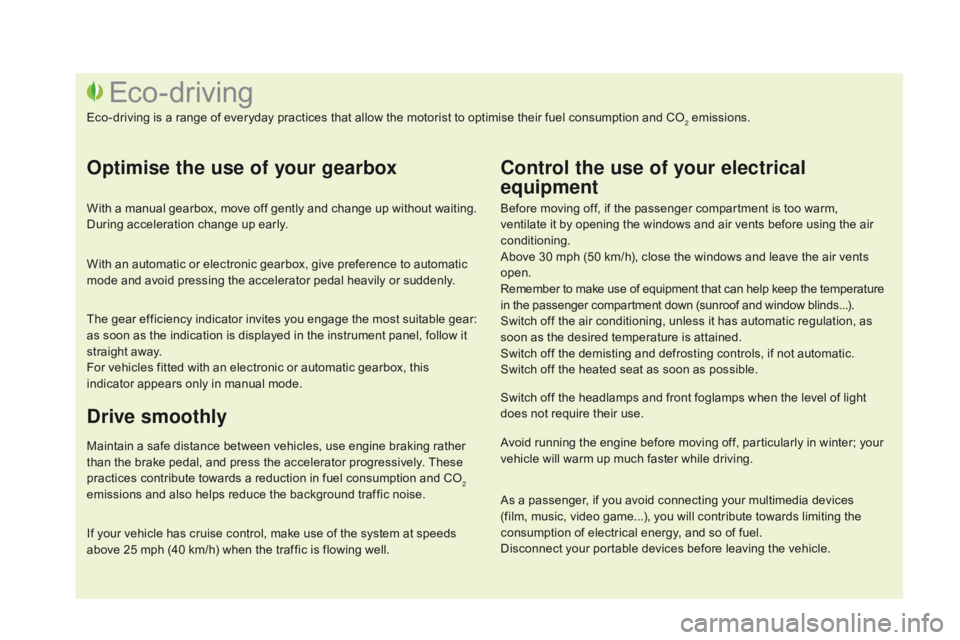
Before moving off, if the passenger compartment is too warm, ventilate it by opening the windows and air vents before using the air
c
onditioning.
Above
30 mph (50 km/h), close the windows and leave the air vents
ope
n.
Remember
to make use of equipment that can help keep the temperature
i
n the passenger compartment down (sunroof and window blinds...).
Switch
off the air conditioning, unless it has automatic regulation, as
s
oon as the desired temperature is attained.
Switch
off the demisting and defrosting controls, if not automatic.
Switch
off the heated seat as soon as possible.
Switch
off the headlamps and front foglamps when the level of light
d
oes not require their use.
Avoid
running the engine before moving off, particularly in winter; your
v
ehicle will warm up much faster while driving.
Eco-driving
Eco-driving is a range of everyday practices that allow the motorist to optimise their fuel consumption and CO2 emissions.
Optimise the use of your gearbox
With a manual gearbox, move off gently and change up without waiting. During acceleration change up early.
With
an automatic or electronic gearbox, give preference to automatic
m
ode and avoid pressing the accelerator pedal heavily or suddenly.
The
gear efficiency indicator invites you engage the most suitable gear:
a
s soon as the indication is displayed in the instrument panel, follow it
s
traight away.
For
vehicles fitted with an electronic or automatic gearbox, this
i
ndicator appears only in manual mode.
drive smoothly
Maintain a safe distance between vehicles, use engine braking rather than the brake pedal, and press the accelerator progressively. These
p
ractices contribute towards a reduction in fuel consumption and CO
2
emissions
and
also
helps
reduce
the
background
traffic
noise.
Control the use of your electrical
equipment
If your vehicle has cruise control, make use of the system at speeds a bove 25 mph (40 km/h) when the traffic is flowing well.As
a passenger, if you avoid connecting your multimedia devices
(
film, music, video game...), you will contribute towards limiting the c
onsumption of electrical energy, and so of fuel.
Disconnect your portable devices before leaving the vehicle.
Page 43 of 450
41
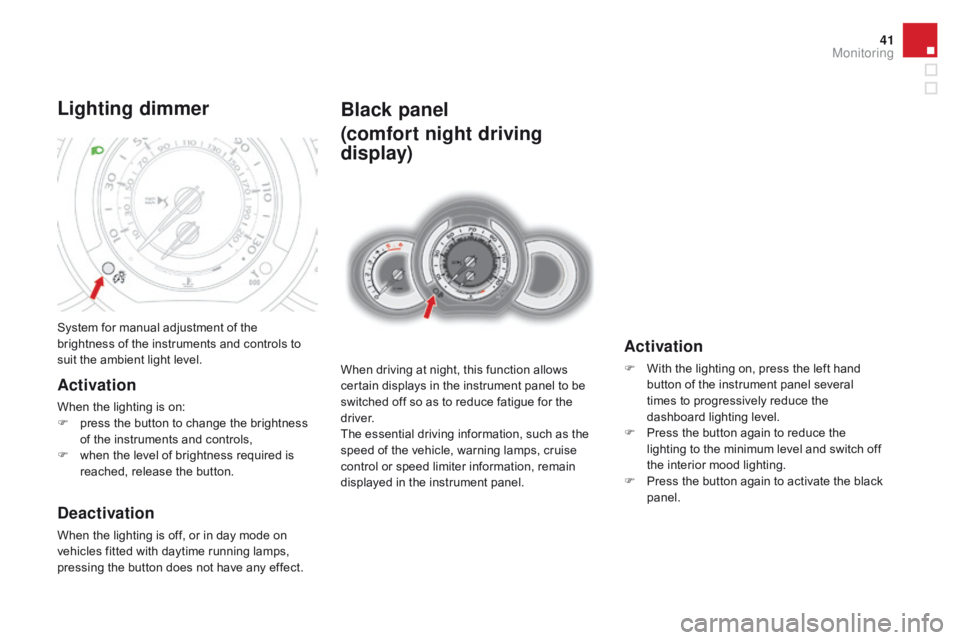
Black panel
(comfort night driving
display)
When driving at night, this function allows certain displays in the instrument panel to be
s
witched off so as to reduce fatigue for the
d
river.
The
essential driving information, such as the
s
peed of the vehicle, warning lamps, cruise
c
ontrol or speed limiter information, remain
d
isplayed in the instrument panel.
Activation
F With the lighting on, press the left hand b
utton of the instrument panel several
t
imes to progressively reduce the
d
ashboard lighting level.
F
P
ress the button again to reduce the
l
ighting to the minimum level and switch off
t
he interior mood lighting.
F
P
ress the button again to activate the black
pan
el.
System
for
manual
adjustment
of
the
b
rightness
of
the
instruments
and
controls
to
s
uit
the
ambient
light
level.
Lighting dimmer
Activation
When the lighting is on:
F p ress the button to change the brightness
o
f the instruments and controls,
F
w
hen the level of brightness required is
r
eached, release the button.
deactivation
When the lighting is off, or in day mode on vehicles fitted with daytime running lamps,
p
ressing the button does not have any effect.
Monitoring
Page 101 of 450
99
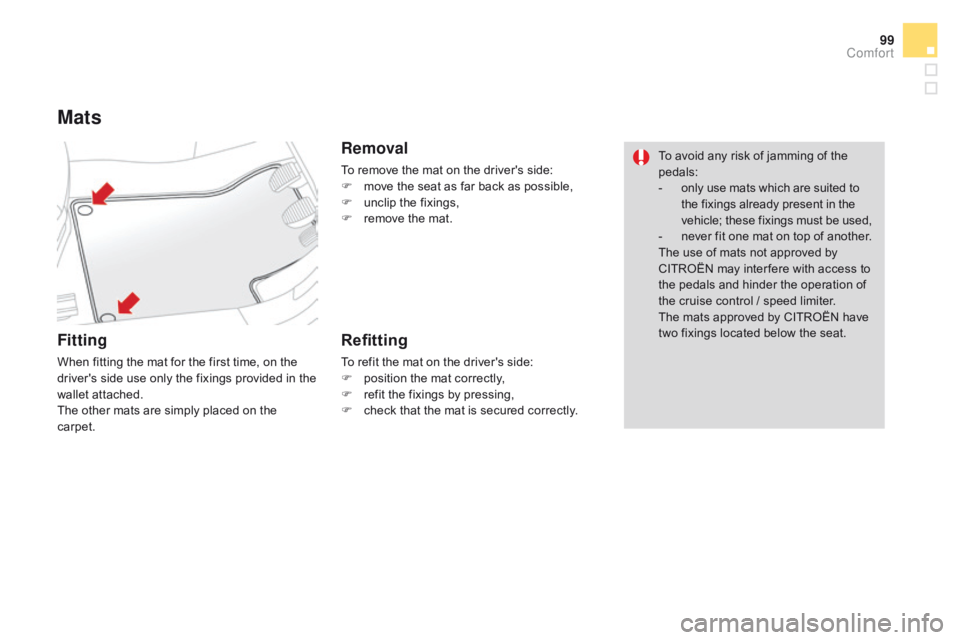
Mats
Fitting
When fitting the mat for the first time, on the driver's side use only the fixings provided in the
w
allet attached.
The
other mats are simply placed on the
c
arpet.
Removal
To remove the mat on the driver's side:
F m ove the seat as far back as possible,
F
u
nclip the fixings,
F
r
emove the mat.
Refitting
To refit the mat on the driver's side:
F p osition the mat correctly,
F
r
efit the fixings by pressing,
F
c
heck that the mat is secured correctly.To
avoid any risk of jamming of the
ped
als:
-
o
nly use mats which are suited to
t
he fixings already present in the
v
ehicle; these fixings must be used,
-
n
ever fit one mat on top of another.
The use of mats not approved by
C
ITROËN may inter fere with access to
t
he pedals and hinder the operation of
t
he cruise control / speed limiter.
The mats approved by CITROËN have
t
wo fixings located below the seat.
Comfort
Page 128 of 450

Cruise control
System which automatically maintains the speed of the vehicle at the value programmed
b
y the driver, without any action on the
a
ccelerator
ped
al.
The cruise control is switched on
m
anually:
it r
equires a minimum vehicle speed of 25 mph
(
40 km/h), as well as the engagement of:
-
f
ourth gear on a manual gearbox,
-
s
econd gear on a or automatic or electronic
g
earbox, in sequential mode,
-
p
osition A on an electronic gearbox or
p
osition d on an automatic gearbox.
The cruise control is switched off
m
anually
o
r by pressing the brake or clutch pedal or on
t
riggering of the trajectory control systems for
s
afety reasons.
It
is possible to exceed the programmed speed
t
emporarily by pressing the accelerator pedal.
To
return to the programmed speed, simply
r
elease the accelerator pedal.
Switching
off the ignition cancels any
p
rogrammed speed value. The
controls of this system are grouped
t
ogether on stalk A.
1.
C
ruise control mode selection thumb wheel.
2.
V
alue decrease button.
3.
V
alue increase button.
4.
C
ruise control off/resume button.Steering mounted controls
The cruise control cannot, in any
circumstances, replace the need to r
espect speed limits, nor can it replace the
n
eed for vigilance on the part of the driver.The
programmed information is grouped
t
ogether in the instrument panel screen.
5.
C
ruise control off/resume indication.
6.
C
ruise control mode selection indication.
7.
P
rogrammed speed value.
displays in the instrument panel
Page 129 of 450

127
Programming
F Turn thumb wheel 1 to the "CRUISE"
position: the cruise control mode is
s
elected but is not switched on (PAUSE).
F
S
et the programmed speed by
a
ccelerating to the required speed, then
p
ress button 2 or 3 (e.g.: 70 mph
(110
km/h)).
You
can
then
change
the
programmed speed using buttons 2 and 3:
-
b
y
+
or
-
1
mph
(km/h)
= short press,
-
b
y
+
or
-
5
mph
(km/h)
= long press,
-
i
n
steps
of
+
or
-
5
mph (km/h) = maintained press.
F
S
witch
off
the
cruise
control by pressing button 4:
the screen
c
onfirms
that
it
has
been switched off (PAUSE).
F
S
witch
the
cruise
control back on by pressing button 4
ag
ain.
Exceeding the programmed speed
Intentional or unintentional exceeding of the programmed speed results in flashing of this speed in the screen.
Return
to the programmed speed, by means of intentional or unintentional
d
eceleration of the vehicle, automatically cancels the flashing of the speed.
Leaving cruise control mode
F Turn thumb wheel 1 to the "0" position: the cruise control mode is d
eselected. The display returns to the distance recorder.
Operating fault
In the event of a cruise control malfunction, the speed is cleared resulting in flashing of the
d
ashes. Have it checked by a CITROËN dealer
o
r a qualified workshop.
When
the cruise control is switched on,
b
e careful if you maintain the pressure
o
n one of the programmed speed
c
hanging buttons: this may result in a
v
ery rapid change in the speed of your
v
ehicle.
Do
not use the cruise control on
s
lippery roads or in heavy traffic.
On
a steep descent, the cruise control
w
ill not be able to prevent the vehicle
from
exceeding the programmed
s
peed.
To
avoid any risk of jamming of the
ped
als:
-
e
nsure that the mat is secured
c
o r r e c t l y,
-
n
ever fit one mat on top of another.
driving
Page 360 of 450
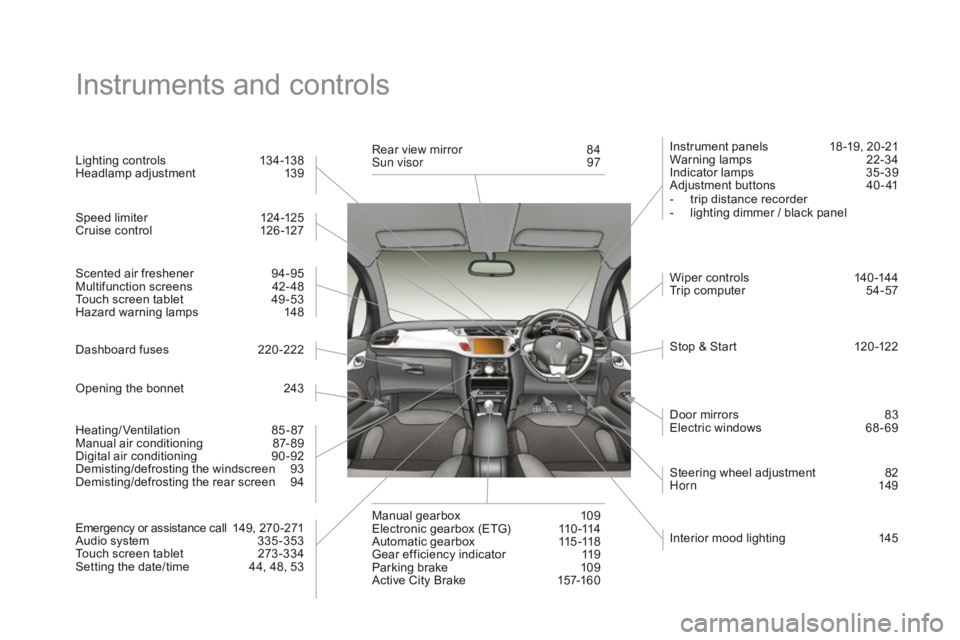
Instruments and controls
Instrument panels 18 -19, 20 -21
Warning lam ps 2 2-34
Indicator
lamps
3
5 -39
Adjustment
buttons
4
0 - 41
-
t
rip distance recorder
-
l
ighting dimmer / black panel
Lighting
controls
1
34-138
Headlamp
adj
ustment
1
39
Stop
& Start
1
20 -122
Door
mirrors
8
3
Electric
windows
6
8 - 69
Dashboard
fuses
2
20 -222
Opening
the
bonnet
2
43 Steering
wheel adjustment
8
2
Hor n
149
Scented
air
freshener
9
4-95
Multifunction
screens
4
2- 48
Touch
screen
tablet
4
9 -53
Hazard
warning
lamps
1
48
Manual
g
earbox
1
09
Electronic
gearbox
(ETG)
1
10 -114
Automatic
gearbox
1
15 -118
Gear
efficiency
indicator
1
19
Parking
brake
1
09
Active
City
Brake
1
57-160
Rear
view
mirror
8
4
Sun visor
9
7
Wiper
controls
1
40 -144
Trip
computer
5
4-57
Heating/Ventilation
8
5-87
Manual
air
conditioning
87
- 89
Digital
a
ir
c
onditioning
9
0-92
Demisting/defrosting
t
he
w
indscreen
9
3
Demisting/defrosting
the
rear
screen
9
4
Emergency
or
assistance
call
1
49,
2
70 -271
Audio
system
3
35 -353
Touch
screen
tablet
2
73 -334
Setting
the
date/time
4
4,
48,
53
Speed
limiter
1
24-125
Cruise
control
1
26 -127
Interior
mood lighting
1
45
Page 362 of 450
3D rear lamps................................................2 17
Battery
...............................
....................227, 250
Battery,
c
harging
...............................
............227
Battery,
remote control
.............................6
2, 63
Black
pan
el...................................................... 41
BlueHDi
...............................
....... 33, 34, 36, 192
Bluetooth connection
............................3
24, 340
Bluetooth
(
telephone)
............................3
24, 340
Bonnet
...............
............................................243
Boot
........
.........................................................73
Boot
lamp
..............................................14
5, 219
Brake
discs
....................................................2
51
Brake
lamps
...............................
...216, 217, 218
Brake
p
ads
...............................
.....................2 51
Braking
assistance system
...........................15
4CD
MP3 ................ .........................................342
Central
locking ..........................................6
0, 71
Changing
a bu
lb
.....................................21
2-219
Changing
a f
use
....................................2
20-226
Changing
a wheel
...............................
..204 -210
Changing
a wiper blade
........................ 1
43, 231
Changing
the date
.............................. 4
4, 48, 53
Changing
the remote control battery
..............62
C
hanging
t
he
t
ime
.............................. 4
4, 48, 53
Checking
levels
.....................................24
6 -249
Checking
the engine oil level
..................3
9, 242
Checking
tyre pressures (using the kit)
........19
9
Checks
...............
...................................24 4 - 2 51
Children
...............................
.. 163, 166, 170 -184
Child
seats
..............................
..............172-18 4
Child
seats, conventional
..............................17
8
Child
seats, ISOFIX
...............................18
2-18 4
C
ITROËN
Localised Emergency Call...........270
Cleaning
(
advice)
..........................................23
6
Closing
the boot
...............................
.........60, 73
Closing
the doors
...............................
.......60, 70
Connectors,
audio
.......................... 9
8, 302, 341
Coolant level
..............................
.............35, 248
Coolant
temperature indicator
........................35
C
ourtesy lamps
.............................................2
19
Cruise control
................................................ 12
6
Cup
holder
...............................
........................96Audio cable ...........................................3 02, 337
Audio streaming
(Bluetooth)
..............................
........... 304, 343
Audio
system
...............................
..................335
Automatic
illumination of
h
eadlamps
.................................. 1
35, 137, 138
Automatic
operation of hazard
warning
lam
ps
............................................ 14
8
Automatic
rain sensitive
windscreen
w
ipers
.............................. 14
0, 142
Auxiliary
socket
...............................9
4, 302, 341
ABS and EBFD systems ...............................15 4
Accessories .............................. ....................238
Accessory
socket, 12V
...................................98
A
ccess to rear seats
.................................7
8, 79
Active
City Brake
................................... 15
7, 15 8
Additive,
Ad
Blue
..............................3
3, 192, 196
Adjusting
h
eadlamps
.................................... 13
9
Adjusting
head restraints
................................77
A
djusting the steering wheel
..........................8
2
Advice
on care and maintenance
.................23
6
Advice
on driving
..............................
............104
Airbags
...............
..................................... 31, 164
Airbags,
c
urtain
..................................... 16
8, 169
Airbags,
front......................................... 165, 169
Airbags,
la
teral
...................................... 16
7, 169
Air
conditioning, automatic
.......................8
6, 90
Air
c
onditioning,
m
anual
...........................8
6, 88
Air filter
...............
........................................... 250
Air flow
..............................
........................84, 88
Air
intake
...............
.................................... 84, 87
Air recirculation
......................................... 8
4, 87
Air vents
..............................
............................85
Alarm
............................................................... 64
A
lloy wheels
.................................................. 23
6
Anti-lock
braking system (ABS)
....................15
4
Anti-pinch
........................................................ 68
A
nti-theft
..............................
.........................105
Apple
® player ....................................... 3 04, 343
Armrest, front .................................................. 97
A
ssistance call
...............................
.......149, 270
Audible
w
arning
............................................ 14
9 DAB
(Digital Audio Broadcasting) ....... 3 00, 301
Date (setting) ............................... ....... 44, 48, 53
Deactivating t he p assenger a irbag ...............16
5
Deadlocking
...............................
.....................61
Demisting
- defrosting, front
.............. 8
8, 90, 93
Capacity, fuel tank ........................................188
CD .............................. ...................................3 41