radio controls CITROEN DS3 CABRIO 2016 Handbook (in English)
[x] Cancel search | Manufacturer: CITROEN, Model Year: 2016, Model line: DS3 CABRIO, Model: CITROEN DS3 CABRIO 2016Pages: 450, PDF Size: 17.47 MB
Page 44 of 450

Monochrome screen A
This displays the following information:
- t ime,
-
d
ate,
-
a
mbient temperature (this flashes if there is
a
risk of ice),
-
s
tatus of the doors and boot,
-
c
urrent audio source (radio, CD...),
-
t
rip computer,
-
i
nformation or alert messages,
-
s
ettings menus for the screen and the
v
ehicle systems.
displays in the screen
From the control panel of your Audio system, you can:
F
p
ress the "ME
n
U"
button to gain access to
t
he main menu ,
F
p
ress the " 5" or " 6" buttons to scroll
through
the items in the screen,
F
p
ress the "MO
dE"
button to change
t
he permanent application (date, audio
s
ource...),
F
p
ress the " 7" or " 8"
buttons to change a
s
etting value,
F
p
ress the "OK"
button to confirm,
or
F
p
ress the "Back"
button to abandon the
o
peration in progress.
Controls
F Press the "MEn U" button to gain access t
o the main menu , then press the "5"
or
"6 "
buttons to scroll through the various
m
enus:
-
r
adio - CD,
-
v
ehicle configuration,
-
op
tions,
-
d
isplay
se
ttings,
-
lan
guages,
-
un
its.
F
P
ress the "OK"
button to select the menu
r
equired.
Main menu
Page 47 of 450

45
Monochrome screen C
This displays the following information:
- t ime,
-
d
ate,
-
a
mbient temperature (this flashes if there is
a
risk of ice),
-
s
tatus of doors and boot,
-
a
udio sources (radio, CD, USB port /
a
uxiliary socket etc.),
-
t
rip computer,
-
i
nformation or alert messages,
-
s
ettings menus for the screen and vehicle
s
ystems.
displays in the screen
From your Audio system control panel, you can:
F p ress the "MEn U" button to gain access to
t
he main menu ,
F
p
ress the " 5" or " 6" buttons to scroll
through
the items in the screen,
F
p
ress the "MO
dE"
button to change the
p
ermanent application (trip computer,
a
udio
s
ource...),
F
p
ress the " 7" or " 8"
buttons to change a
s
etting value,
F
p
ress the "OK"
button to confirm,
or
F
p
ress the "Back"
button to abandon the
o
peration in progress.
Controls
F Press the "MEn U" button to gain access t
o the main menu :
-
a
udio functions,
-
t
he trip computer,
-
pe
rsonalisation-configuration,
-
t
elephone (hands-free kit).
F
P
ress the " 5" or " 6" buttons to select the
menu
required, then confirm by pressing
t
he "OK"
button.
Main menu
Monitoring
Page 224 of 450

Fuse n°R ating Functions
F8 20 AMultifunction
screen, audio system, navigation radio, alarm
c
ontrol unit, alarm siren.
F9 30 A12
V socket, portable navigation support supply.
F10 15 ASteering
wheel controls.
F11 15 AIgnition,
diagnostic socket, automatic gearbox control unit.
F12 15 ARain
/ brightness sensor, trailer relay unit.
F13 5 AMain
stop switch, engine relay unit.
F14 15 AParking
sensors control unit, airbag control unit, instrument
p
anel, digital air conditioning, USB Box, Hi-Fi amplifier.
F15 30 ALocking.
F16 -Not
used.
F17 40 ARear
screen and door mirrors demisting/defrosting.
SH -PARC
shunt.
Page 275 of 450
273
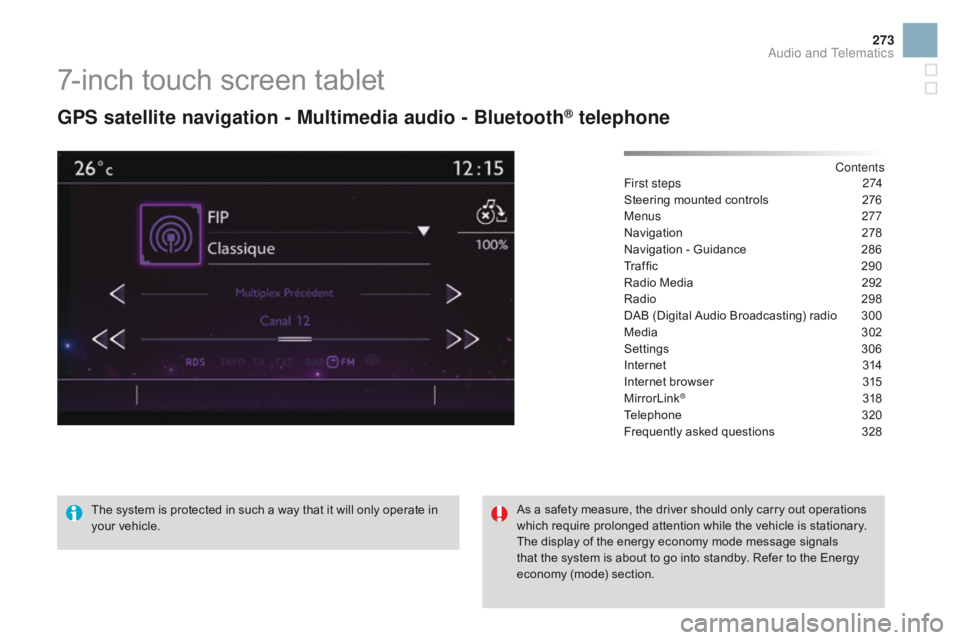
7-inch touch screen tablet
gPS satellite navigation - Multimedia audio - Bluetooth® telephone
Contents
First steps
2 74
Steering
mounted
controls
2
76
Menus
277
Navigation
2
78
Navigation
-
Guidance
2
86
Traffic
29
0
Radio
Media
2
92
Radio
2
98
DAB
(Digital
Audio
Broadcasting)
radio
3
00
Media
3
02
Settings
3
06
Internet
3
14
Internet
browser
3
15
MirrorLink
® 31 8
Telephone
3
20
Frequently
asked questions
3
28
The
system
is
protected
in
such
a
way
that
it
will
only
operate
in
y
our
vehicle. As
a
safety
measure,
the
driver should only carry out operations
w
hich
require
prolonged
attention while the vehicle is stationary.
The
display
of
the
energy
economy mode message signals
t
hat
the
system
is
about
to
go
into standby. Refer to the Energy
ec
onomy
(
mode)
s
ection.
Audio and Telematics
Page 278 of 450
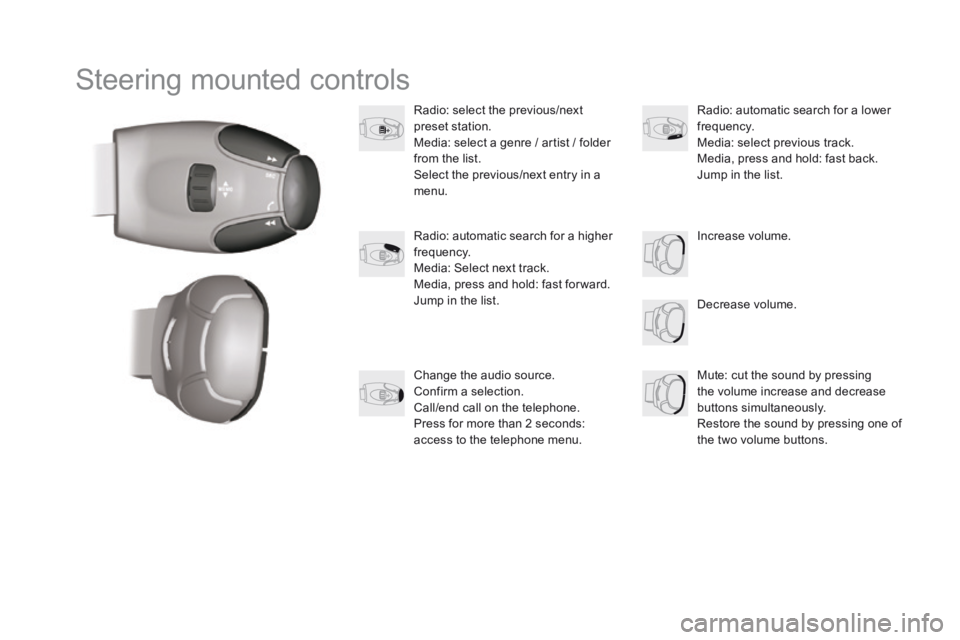
Steering mounted controls
Radio: select the previous/next preset s tation.
Media:
select a genre / artist / folder
f
rom the list.
Select
the previous/next entry in a
m
enu.
Decrease
volume.
Radio:
automatic search for a higher
f
requency.
Media:
Select next track.
Media,
press and hold: fast for ward.
Jump
in the list. Mute:
cut the sound by pressing
t
he volume increase and decrease
bu
ttons
s
imultaneously.
Restore
the sound by pressing one of
t
he two volume buttons.
Radio:
automatic search for a lower f
requency.
Media:
select previous track.
Media,
press and hold: fast back.
Jump
in the list.
Change
the audio source.
Confirm
a selection.
Call/end
call on the telephone.
Press
for more than 2 seconds:
a
ccess to the telephone menu. Increase
volume.
Page 279 of 450
277
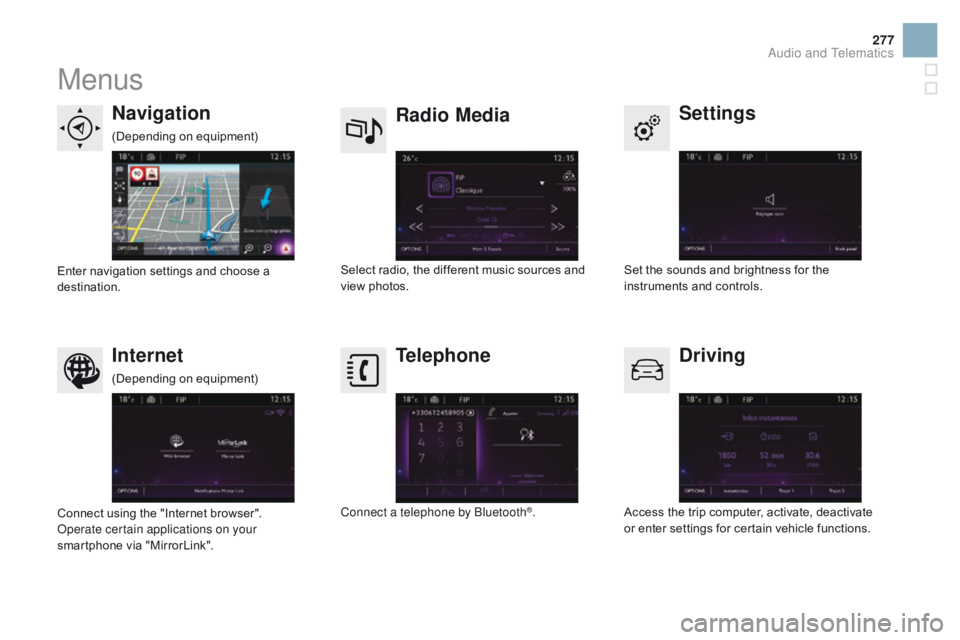
Menus
Settings
Radio Mediana
vigation
dr
iving
Internet Telephone
Set the sounds and brightness for the i
nstruments and controls.
Select
radio,
the
different
music
sources
and
vi
ew pho
tos.
Enter
navigation
settings
and
choose
a
d
estination.
Access
the trip computer, activate, deactivate
o
r enter settings for certain vehicle functions.
Connect
using
the
"Internet
browser".
Operate certain applications on your
smartphone
via
"MirrorLink". Connect a telephone by Bluetooth
®.
(Depending
o
n
e
quipment)
(Depending
o
n
e
quipment)
Audio and Telematics
Page 337 of 450

335
Audio system
Audio system / Bluetooth®
Contents
First
steps
3 36
Steering
mounted
controls
3
37
Menus
3
38
Radio
3
38
Media
3
40
Telephone
3
44
Screen
menu
map(s)
3
46
Frequently
asked
questions
3
50
Your
Audio
system
is
coded
in
such
a
way
that
it
will
only
operate
i
n
your
vehicle. As
a
safety
measure,
the
driver
must
only
carry
out
operations
w
hich
require
prolonged
attention
while
the
vehicle
is
stationary.
When
the
engine
is
switched
off
and
to
prevent
discharging
of the
b
attery,
the
audio
equipment
may
switch
off
after
a
few
minutes.
Audio and Telematics
Page 339 of 450
337
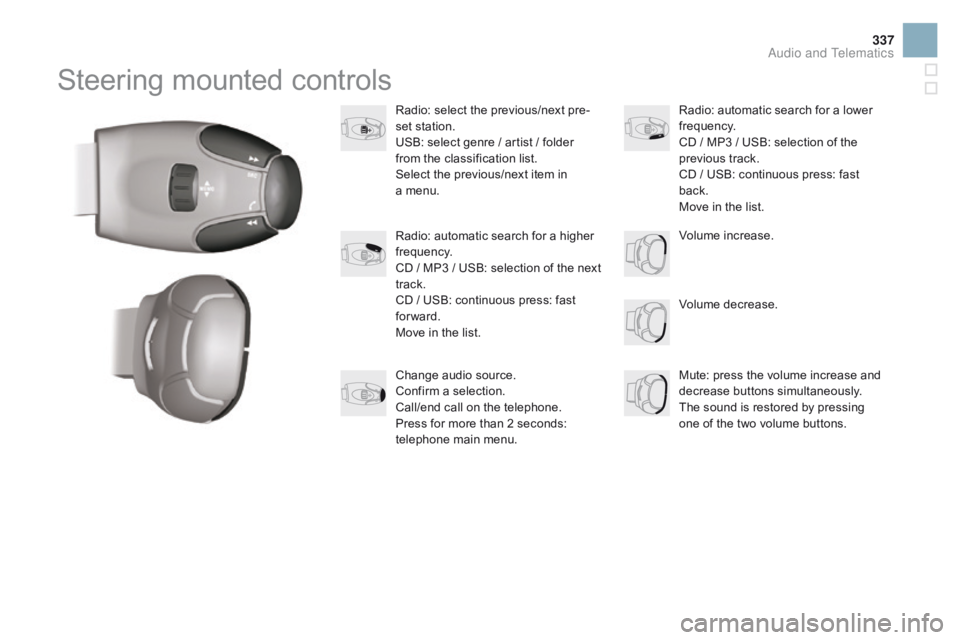
Steering mounted controls
Radio: select the previous/next pre-
s et station.
USB:
select genre / artist / folder
f
rom the classification list.
Select
the previous/next item in
a m
enu.
Volume
decrease.
Radio:
automatic search for a higher
f
requency.
CD
/ MP3 / USB: selection of the next
t
rack.
CD
/ USB: continuous press: fast
fo
rward.
Move
in the list. Mute:
press the volume increase and
d
ecrease
b
uttons
s
imultaneously.
The
sound is restored by pressing
o
ne of the two volume buttons.
Radio:
automatic search for a lower f
requency.
CD
/ MP3 / USB: selection of the
p
revious track.
CD
/ USB: continuous press: fast
b
ack.
Move
in the list.
Change
audio source.
Confirm
a selection.
Call/end
call on the telephone.
Press
for more than 2 seconds:
t
elephone main menu. Volume
increase.
Audio and Telematics
Page 363 of 450

361
EBA (Emergency braking
a ssistance) .......................................... 15
4, 155
Eco-driving
...............................
......................14
Economy
mode
...............................
..............230
Electric
window controls
.................................68
E
lectronic brake force distribution
(EBFD)
...............................
.........................15 4
Electronic
eng
ine
i
mmobiliser.................63,
105
Emergency
b
oot
r
elease
................................. 73
E
mergency braking system
..........................15
5
Emergency
c
all
..................................... 14
9, 270
Emergency
w
arning
lam
ps
...........................14
8
Emissions
control system, SCR
.......3
3, 34, 192
Energy
economy mode
.................................23
0
Engine
c
ompartment
............................ 24
4, 245
Engine
c
ompartment
f
usebox
..............................
.........................220
Engine,
Diesel
......................... 2
4, 189, 245, 262Filling
with fuel
......................................
1
8 8 -19 0
Fitting a wheel
...............................
................
209
Fittings, boot
.................................................
10
0
Flashing
in
dicators
........................................
14
8
Foglamps,
f
ront
...............................
...... 136, 215
Foglamps,
re
ar
...................................... 1
36, 217
Fragrance
c
artridge
........................................
94
F
requency (radio)
.................................
29
8, 299
Front seats .............................. ..................
76, 79
Fuel .......................................................... 14, 18 9
Fuel c
onsumption ............................................14
F
uel filler flap
.........................................18
8, 19 0
Fuel
gauge
........................................18
, 20, 188
Fuel
tank................................................188, 19 0
Fusebox,
das
hboard
.....................................2
21
Fuses
................
.............................................220
Gear lever, automatic gearbox .....................11 5
Gear lever, manual gearbox .........................10
9
Gear
selector, electronic gearbox
........11
0 , 2 51
Glove
box
........................................................ 97
G
rab
han
dles
............................................ 7
8, 80Demisting - defrosting, rear ............................94
D ials and gauges ...................................... 1
8, 20
Diesel
additive level
...................................... 24
9
Diesel
engine pre-heat warning lamp
............24
D
igital Audio Broadcasting (DAB)
....... 3
00, 301
Dimensions
..............................
.....................264
Dipped
be
am
...............................
..........13 4,
2
13
Dipstick
................
....................................39, 246
Direction
i
ndicators
....................... 1
48, 216, 217
Doors
..............................................................
.70
Doors
emergency control
...............................72
D
oor pockets
................................................... 96
D
ynamic stability control (DSC)
....................15
5
Driving
economically
...................................... 14E
ngine oil ......................................................24
6
Engine
oil level indicator .........................3 9, 246
Engine,
petrol
.......................1
89, 244, 254, 257
Environment
............... 1
4, 63, 94, 150, 198, 249
Equipment
se
ttings
..................... 4
2, 45, 51, 347
Halogen
h
eadlamps
......................................2
12
Hands-free
kit
.............................. 3
24, 325, 344
Hazard
w
arning
lam
ps
..................................14
8
Head
restraints, front
......................................77
H
ead restraints, rear
.......................................81
H
eating
................
................................87, 88, 90
Height
and reach adjustment,
steering
w
heel
..............................
................82
Hill start assist
...............................................12
3
Horn ............................................................... 149
Gearbox, automatic ................1 4, 115, 229, 251
Gearbox, e lectronic ............................... 1
4 , 11 0 ,
120, 229, 251
Gearbox,
m
anual
.................... 1
4, 109, 120, 251
Gear
efficiency indicator
...............................11
9
Indicators, direction ...................................... 14 8
Inflating a ccessories
(
using the kit)
..............................
................202
Inflating
tyres
..............................
............14, 26 4
Instrument
panel lighting
................................41
In
strument
p
anels
...............................
......18, 20
Instrument
panel screen
...................1
8, 20, 119
Interior
f
ittings
........................................... 9
6, 97
Interior
lamp
...............................
...................14 4
Interior
m
ood
l
ighting
.................................... 14
5
Internet
...............
................................... 314,
31
5
Alphabetical index
Page 365 of 450
363
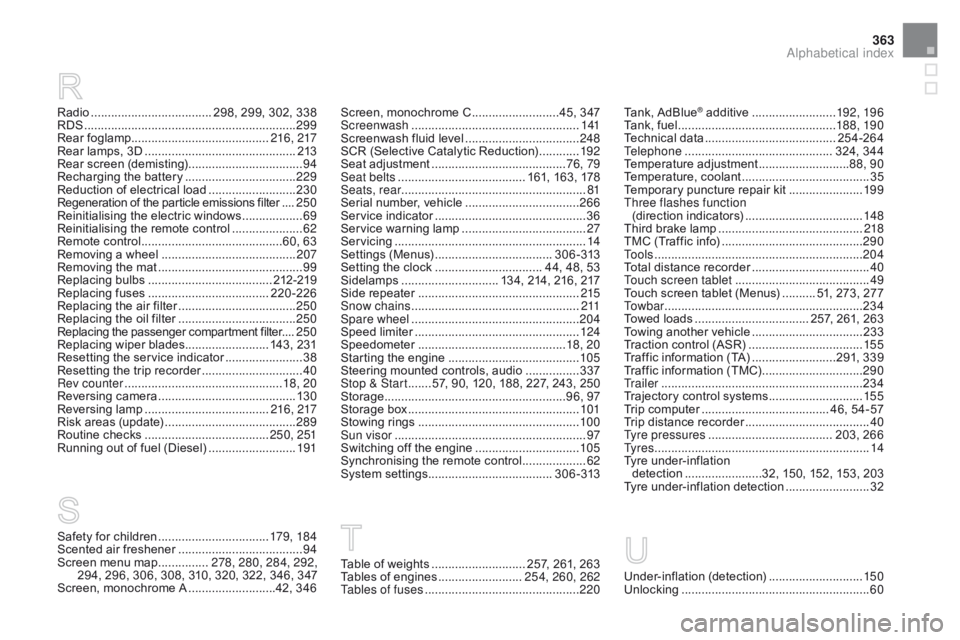
Radio .................................... 298, 299, 302, 338
RDS ................ ............................................... 299
Rear
fo
glamp......................................... 216, 217
Rear
lamps, 3D
............................................. 2
13
Rear
s
creen
(
demisting)
.................................. 94
R
echarging the battery
.................................2
29
Reduction
of electrical load
..........................23
0
Regeneration
of the particle emissions filter
....25
0
Reinitialising
the electric windows
..................69
R
einitialising the remote control
.....................62
R
emote control
..........................................6
0, 63
Removing
a wheel
..............................
..........207
Removing
the mat
...............................
............99
Replacing
bu
lbs
..............................
.......212-219
Replacing
f
uses
..............................
......220-226
Replacing
the air filter
...................................25
0
Replacing
the oil filter
...................................25
0
Replacing
t
he
p
assenger
c
ompartment
f
ilter....250
Replacing
wiper blades......................... 143, 231
Resetting
the service indicator
.......................38
R
esetting the trip recorder
..............................40
R
ev counter
............................................... 1
8, 20
Reversing
c
amera
...............................
..........13 0
Reversing
lam
p
..................................... 21
6, 217
Risk
areas (update)
....................................... 28
9
Routine
checks
..................................... 25
0, 251
Running
out of fuel (Diesel)
..........................19
1Screen,
monochrome C ..........................4 5, 347
Screenwash ..............................
....................141
Screenwash
fluid level
..................................24
8
SCR
(Selective Catalytic Reduction)
............19
2
Seat
adjustment
...............................
.........76, 79
Seat belts
...................................... 1
61, 163, 178
Seats, rear
....................................................... 81
S
erial number, vehicle
..................................26
6
Service
i
ndicator
.............................................36
S
ervice warning lamp
.....................................2
7
Servicing
...............................
..........................14
Settings
(
Menus)
...............................
....3 0 6 - 313
Setting
the clock
................................ 4
4, 48, 53
Sidelamps
............................. 1
34, 214, 216, 217
Side
r
epeater
..............................
..................215
Snow chains
.................................................. 2
11
Spare wheel
...............................
...................204
Speed
l
imiter
...............................
..................124
Speedometer
..............................
..............18, 20
Starting
the engine
.......................................10
5
Steering
mounted controls, audio
................3
37
Stop & Start
....... 5
7, 90, 120, 188, 227, 243, 250
Storage
................
......................................96, 97
Storage
b
ox
...................................................10
1
Stowing
r
ings
..............................
..................10 0
Sun visor
......................................................... 97
S
witching off the engine
...............................10
5
Synchronising
the remote control
...................62
S
ystem
se
ttings
.....................................3
0 6 - 313
Safety for children .................................17 9, 18 4
Scented air freshener ..................................... 94
S
creen menu map
...............2
78, 280, 284, 292,
294,
296, 306, 308, 310, 320, 322, 346, 347
Screen,
monochrome A
..........................4
2, 346 Tank,
AdBlue
® additive .........................
19 2, 19 6
Tank,
fuel
............................... ................188, 19 0
Technical
da
ta
....................................... 2
54-264
Telephone
............................................ 3
24, 344
Temperature
adj
ustment
........................... 8
8, 90
Temperature,
c
oolant
...................................... 35
T
emporary
puncture repair kit
......................19
9
Three flashes function (direction
i
ndicators)
................................... 14
8
Third
brake
lamp
........................................... 2
18
TMC
(Traffic
info)
.......................................... 29
0
To o l s
................
.............................................. 204
Total
distance
recorder
................................... 40
T
ouch screen tablet
........................................ 49
T
ouch
screen
tablet (Menus)
.......... 5
1, 273, 277
To w b a r
................
........................................... 234
Towed
loads
.................................. 2
57, 261, 263
Towing
another vehicle
................................. 23
3
Traction
control (ASR)
.................................. 15
5
Traffic
information (TA)
.........................2
91, 339
Traffic
information (TMC)
.............................. 29
0
Tr a i l e r
...............
............................................. 234
Trajectory
control systems
............................ 15
5
Trip
computer
...................................... 4
6, 54-57
Trip
distance
recorder
..................................... 40
T
yre pressures
..............................
....... 203, 266
Ty r e s
..............................................................
..14
Tyre
under-inflation
detection
...............
........32, 150, 152, 153, 203
Tyre
under-inflation detection
......................... 32
Table of weights ............................ 2 57, 261, 263
Tables of engines .........................2
54, 260, 262
Tables of fuses
.............................................. 2
20Under-inflation (detection) ............................ 15 0
Unlocking .............................. ..........................60
Alphabetical index