radio CITROEN DS3 CABRIO DAG 2017 Handbook (in English)
[x] Cancel search | Manufacturer: CITROEN, Model Year: 2017, Model line: DS3 CABRIO DAG, Model: CITROEN DS3 CABRIO DAG 2017Pages: 444, PDF Size: 14.09 MB
Page 297 of 444
15
5
12
8
16
6
13
9
17
7
14
10
11
18
1
1
1
295
DS3_en_Chap11c_SMEGplus_ed02-2015
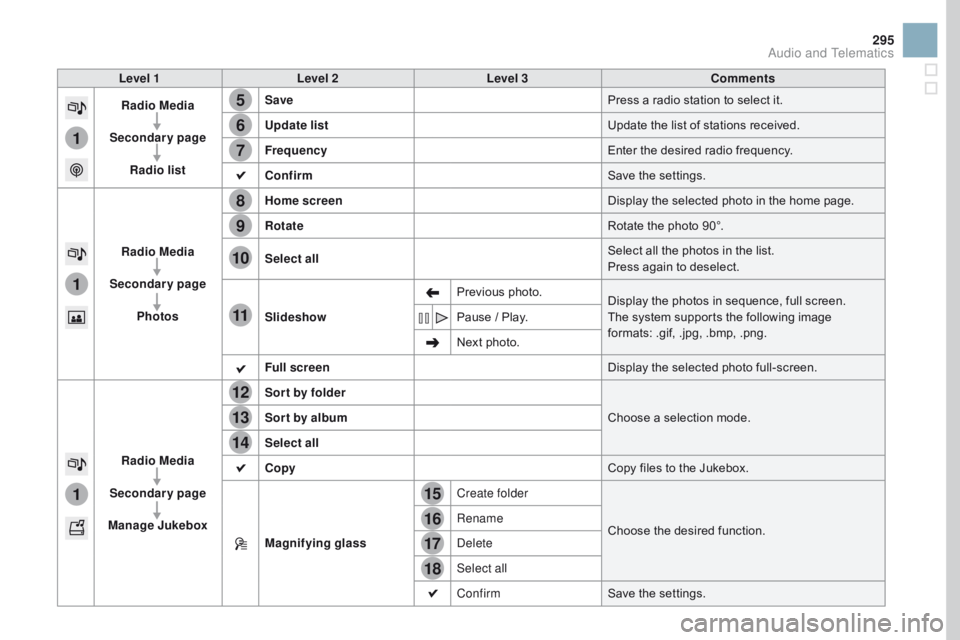
Level 1Level 2 Level 3 Comments
Radio Media
Secondary page Radio list Save
Press
a r
adio
s
tation
t
o
s
elect
i
t.
Update list Update
t
he
l
ist
o
f
s
tations
r
eceived.
Frequency Enter
t
he
d
esired
r
adio
f
requency.
Confirm Save
t
he
s
ettings.
Radio Media
Secondary page Photos Home screen
Display
t
he
s
elected
p
hoto
i
n
t
he
h
ome
p
age.
Rotate Rotate
t
he
p
hoto
9
0°.
Select all Select
a
ll
t
he
p
hotos
i
n
t
he
l
ist.
Press
a
gain
t
o
d
eselect.
Slideshow Previous
phot
o.Display
t
he
p
hotos
i
n
s
equence,
f
ull
s
creen.
The
s
ystem
s
upports
t
he
f
ollowing
i
mage
fo
rmats:
.
gif,
.
jpg,
.
bmp,
.
png.
Pause
/ P
lay.
Next
p
hoto.
Full screen Display
t
he
s
elected
p
hoto
f
ull-screen.
Radio Media
Secondary page
Manage Jukebox Sor t by folder
Choose
a s
election
m
ode.
Sor t by album
Select all
Copy Copy
f
iles
t
o
t
he
J
ukebox.
Magnifying glass Create folder
Choose
t
he
d
esired
f
unction.
Rename
Delete
Select all
Confirm
Save
t
he
s
ettings.
Audio and Telematics
Page 299 of 444
1
1
21
20
19
297
DS3_en_Chap11c_SMEGplus_ed02-2015
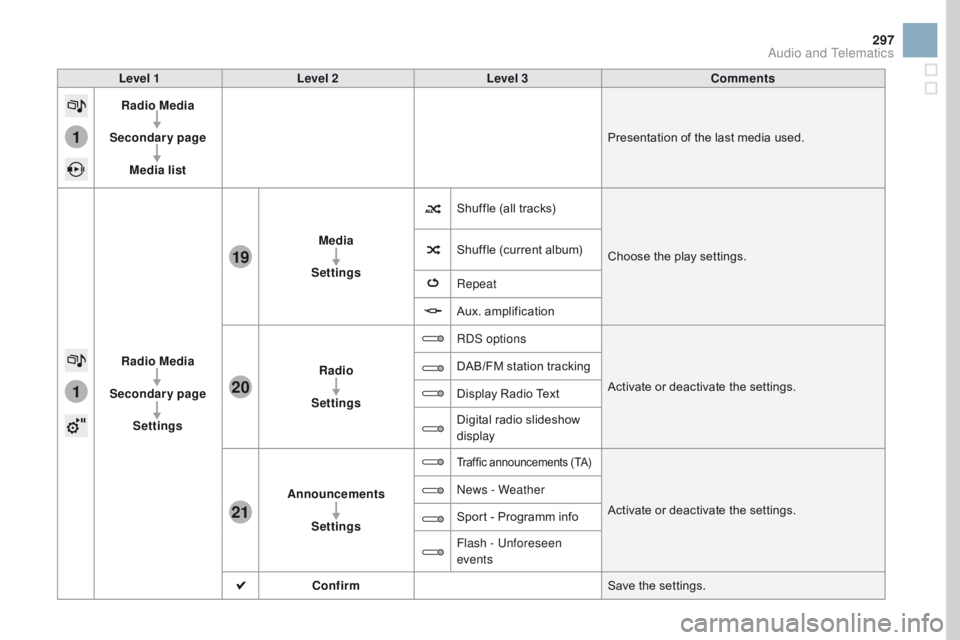
Level 1Level 2 Level 3 Comments
Radio Media
Secondary page Media list Presentation
o
f
t
he
l
ast
m
edia
u
sed.
Radio Media
Secondary page Settings Media
Settings Shuffle
(
all
t
racks)Choose
t
he
p
lay
s
ettings.
Shuffle
(
current
a
lbum)
Repeat
Aux.
am
plification
Radio
Settings RDS options
Activate
o
r
d
eactivate
t
he
s
ettings.
DAB/FM
s
tation
t
racking
Display
R
adio
T
ext
Digital
r
adio
s
lideshow
di
splay
Announcements Settings
Traffic announcements (TA)
Activate or deactivate the settings.
Ne
ws - Weather
Sport - P
rogramm i
nfo
Flash - Unforeseen
events
Confirm Save
t
he
s
ettings.
Audio and Telematics
Page 300 of 444
2
3
3
1
DS3_en_Chap11c_SMEGplus_ed02-2015
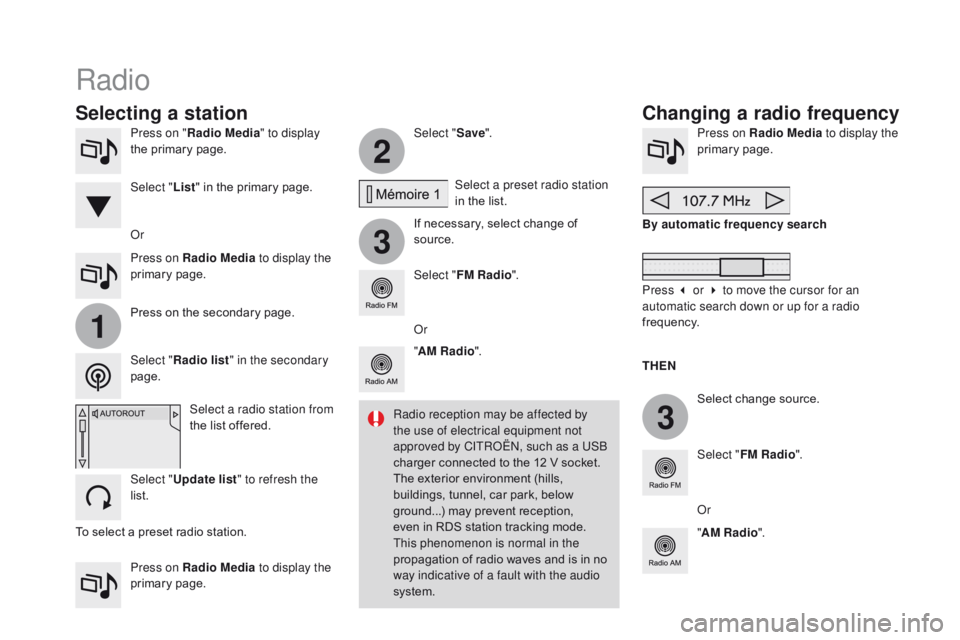
Press on "Radio Media " to display
the p rimary p age.
Press on Radio Media to display the
primary
page
. Select "
Save".
If
n
ecessary,
s
elect
c
hange
o
f
so
urce.Press on Radio Media
to display the
primary page .
Select
c
hange
s
ource.
"
AM Radio ". By automatic frequency search
Select "FM Radio ".
" AM Radio ".
Press on Radio Media
to display the
primary
page
.
Or Select a preset radio station
in
t
he
l
ist.
Select " FM Radio ".
Select a radio station from
the
l
ist
o
ffered.
Select " Update list " to refresh the
list. Press
o
n
t
he
s
econdary
p
age.
Select " Radio list " in the secondary
page. Select " List"
i
n
t
he
p
rimary
p
age.
Radio
Changing a radio frequency
Selecting a station
THEn
Ra
dio reception may be affected by
the use of electrical equipment not
approved by CITROËN, such as a USB
charger
c
onnected
t
o
t
he
1
2
V s
ocket.
The
e
xterior
e
nvironment
(
hills,
bu
ildings,
t
unnel,
c
ar
p
ark,
b
elow
gr
ound...)
m
ay
p
revent
r
eception,
ev
en
i
n
R
DS
s
tation
t
racking
m
ode.
Th
is phenomenon is normal in the
propagation
o
f
r
adio
w
aves
a
nd
i
s
i
n
n
o
wa
y indicative of a fault with the audio
system. Or
Press 3 or 4 to move the cursor for an
automatic search down or up for a radio
frequency.
Or
To
s
elect
a p
reset
r
adio
s
tation.
Page 301 of 444
1
1
20
5
4
2
7
299
DS3_en_Chap11c_SMEGplus_ed02-2015
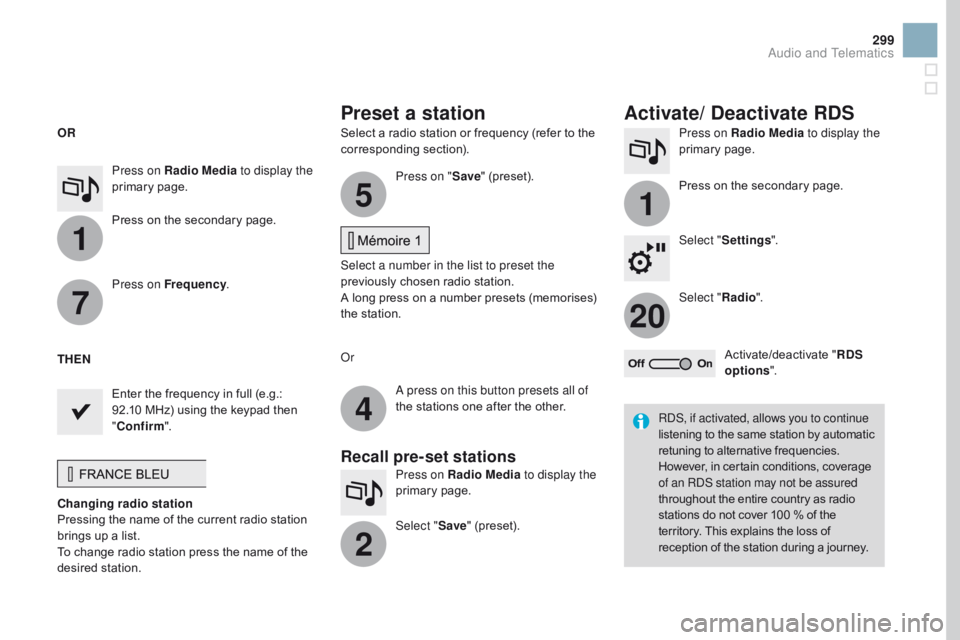
Select a radio station or frequency (refer to the corresponding se ction). Press on Radio Media
to display the
primary page .
Press
o
n
t
he
s
econdary
p
age.
Select " Settings ".
Select " Radio".
Activate/deactivate
" RD
S
options ".
Press on Radio Media
to display the
primary
page
.
Press
o
n
t
he
s
econdary
p
age. Press on "
Save"
(
preset).
Select a number in the list to preset the
previously
c
hosen
r
adio
s
tation.
A
l
ong
p
ress
o
n
a n
umber
p
resets
(
memorises)
th
e
s
tation.
Press on Frequency
.
Enter
t
he
f
requency
i
n
f
ull
(
e.g.:
92
.10
M
Hz)
u
sing
t
he
k
eypad
t
hen
" Con
firm ".
Changing radio station
Pressing
t
he
n
ame
o
f
t
he
c
urrent
r
adio
s
tation
br
ings
u
p
a l
ist.
To
c
hange
r
adio
s
tation
p
ress
t
he
n
ame
o
f
t
he
desi
red
st
ation. Or
Press on Radio Media to display the
primary
page
.
Select " Save"
(
preset).
Preset a station Activate/ Deactivate RDS
OR
THE
n
A pr
ess on this button presets all of
the
s
tations
o
ne
a
fter
t
he
o
ther.
Recall pre-set stations
RDS, if activated, allows you to continue
listening to t he s ame s tation b y a utomatic re
tuning
t
o
a
lternative
f
requencies.
Ho
wever,
i
n
c
ertain
c
onditions,
c
overage
of a
n RDS station may not be assured
throughout
t
he
e
ntire
c
ountry
a
s
r
adio
st
ations
d
o
n
ot
c
over
1
00
% o
f
t
he
te
rritory.
T
his
e
xplains
t
he
l
oss
o
f
re
ception
o
f
t
he
s
tation
d
uring
a j
ourney.
Audio and Telematics
Page 302 of 444
DS3_en_Chap11c_SMEGplus_ed02-2015
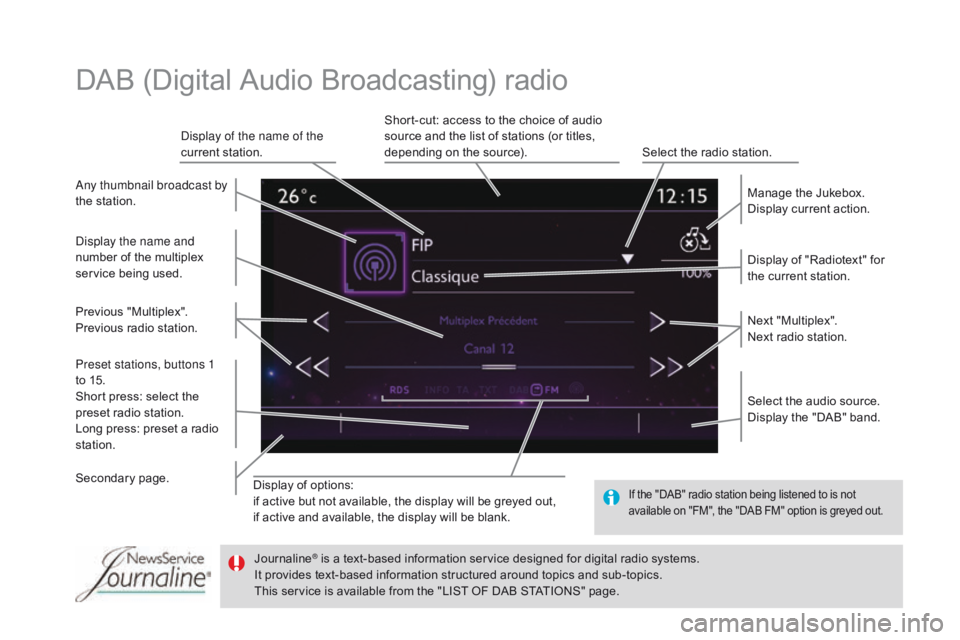
Display of options:
if a ctive b ut n ot a vailable, t he d isplay w ill b e g reyed o ut,
if
a
ctive
a
nd
a
vailable,
t
he
d
isplay
w
ill
b
e
b
lank. Display
o
f
"
Radiotext"
f
or
th
e
c
urrent
s
tation.
Manage
t
he
J
ukebox.
Display
c
urrent
a
ction.
Select
t
he
a
udio
s
ource.
Display
t
he
"
DAB"
b
and.
Display of the name of the
current
s
tation.
Short-cut:
a
ccess
t
o
t
he
c
hoice
o
f
a
udio
so
urce
a
nd
t
he
l
ist
o
f
s
tations
(
or
t
itles,
de
pending
o
n
t
he
s
ource).
Select
t
he
r
adio
s
tation.
Any thumbnail broadcast by
the
s
tation.
Preset stations, buttons 1
to
1
5.
Short
p
ress:
s
elect
t
he
pr
eset
r
adio
s
tation.
Long
p
ress:
p
reset
a r
adio
st
ation. Next
"Mu
ltiplex".
Next
r
adio
s
tation.
Secondary pa
ge.
Display the name and
number
o
f
t
he
m
ultiplex
serv
ice
bei
ng
use
d.
Previous
"M
ultiplex".
Previous
r
adio
s
tation.
DAB (Digital Audio Broadcasting) radio
If the "DAB" radio station being listened to is not av
ailable o n " FM", t he " DAB F M" o ption i s g reyed o ut.
Journaline® is a text-based information service designed for digital radio systems.
It p
rovides t ext-based i nformation s tructured a round t opics a nd s ub-topics.
This
s
ervice
i
s
a
vailable
f
rom
t
he
"
LIST
O
F
D
AB
S
TATIONS"
p
age.
Page 303 of 444
31
20
301
DS3_en_Chap11c_SMEGplus_ed02-2015
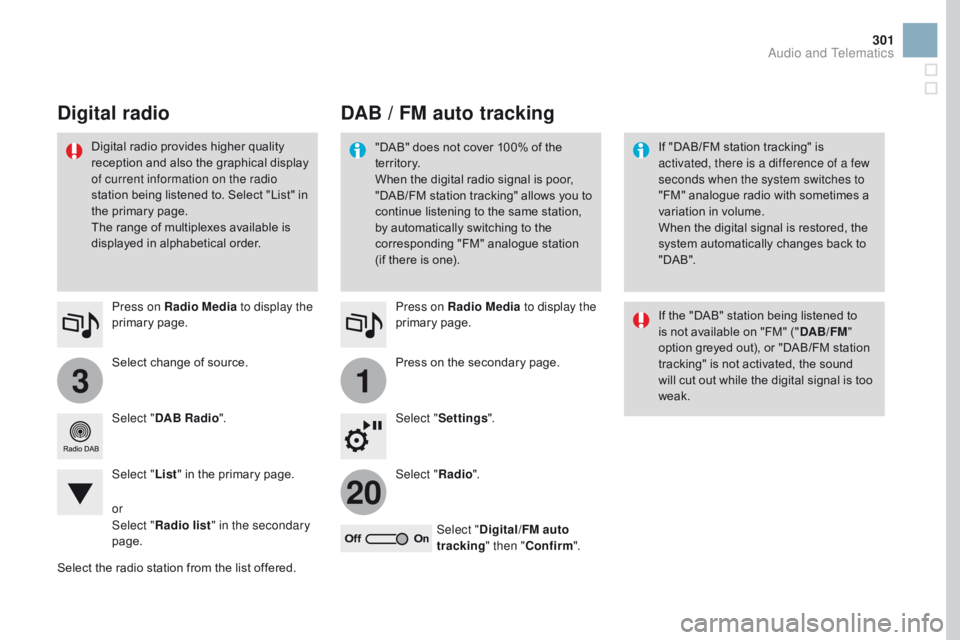
Select change of source.
Pr ess on Radio Media
to display the
primary
page
.
Select " DAB Radio ".
Select " List"
i
n
t
he
p
rimary
p
age.
Select
t
he
r
adio
s
tation
f
rom
t
he
l
ist
o
ffered.Press on Radio Media
to display the
primary
page
.
Press o n t he s econdary p age.
Select " Settings ".
Select " Radio".
Select " Digital/FM auto
tracking " then "Confirm ".
DAB / FM auto tracking
Digital radio
"DAB" does not cover 100% of the te
r r i to r y.
When
t
he
d
igital
r
adio
s
ignal
i
s
p
oor,
"D
AB/FM
st
ation
tr
acking"
al
lows
yo
u
to co
ntinue
l
istening
t
o
t
he
s
ame
s
tation,
by a
utomatically
s
witching
t
o
t
he
co
rresponding
"
FM"
a
nalogue
s
tation
(i
f
t
here
i
s
o
ne). If "
DAB/FM s tation t racking" i s ac
tivated, there is a difference of a few
seconds when the system switches to
"FM"
a
nalogue
r
adio
w
ith
s
ometimes
a va
riation
i
n
v
olume.
When
t
he
d
igital
s
ignal
i
s
r
estored,
t
he
sy
stem
a
utomatically
c
hanges
b
ack
t
o
" D
A B ".
Digital r
adio p
rovides h
igher q
uality re
ception a
nd a
lso t
he g
raphical d
isplay of c
urrent information on the radio
station
b
eing
l
istened
t
o.
S
elect
"
List"
i
n
th
e
p
rimary
p
age.
The
r
ange
o
f
m
ultiplexes
a
vailable
i
s
di
splayed
i
n
a
lphabetical
o
rder. If
t
he
"
DAB"
s
tation
b
eing
l
istened
t
o
is n
ot
a
vailable
o
n
"
FM"
(
"DAB/FM "
option
g
reyed
o
ut),
o
r
"
DAB/FM
s
tation
tr
acking"
i
s
n
ot
a
ctivated,
t
he
s
ound
wi
ll
c
ut
o
ut
w
hile
t
he
d
igital
s
ignal
i
s
t
oo
wea
k.
or
Select " Radio list " in the secondary
page.
Audio and Telematics
Page 304 of 444
3
DS3_en_Chap11c_SMEGplus_ed02-2015
Media
USB playerSelection of source
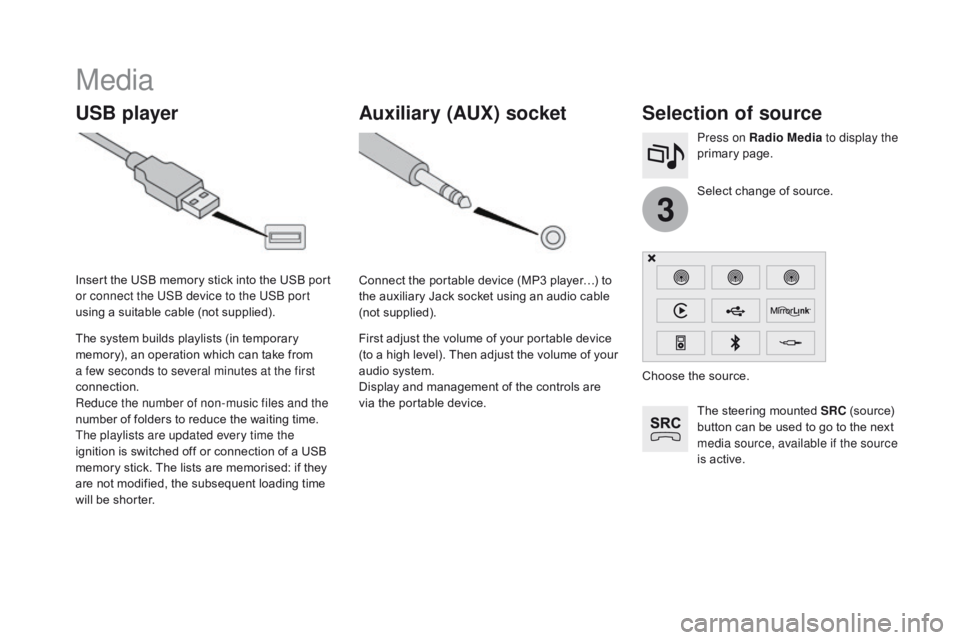
The steering mounted SRC (source) bu
tton c an b e u sed t o g o t o t he n ext me
dia source, available if the source
is
a
ctive.
Select
c
hange
o
f
s
ource.
Press on Radio Media
to display the
primary
page
.
The
s
ystem
b
uilds
p
laylists
(
in
t
emporary
me
mory),
a
n
o
peration
w
hich
c
an
t
ake
f
rom
a fe
w seconds to several minutes at the first
connection.
Reduce the number of non-music files and the
number o
f f
olders t
o r
educe t
he w
aiting t
ime.
The playlists are updated every time the
ignition
i
s
s
witched
o
ff
o
r
c
onnection
o
f
a U
SB
me
mory
s
tick.
T
he
l
ists
a
re
m
emorised:
i
f
t
hey
ar
e
n
ot
m
odified,
t
he
s
ubsequent
l
oading
t
ime
wi
ll
b
e
s
horter.
Insert
t
he
U
SB
m
emory
s
tick
i
nto
t
he
U
SB
p
ort
or c
onnect the USB device to the USB port
using
a s
uitable
c
able
(
not
s
upplied).
Auxiliary (AUX) socket
Connect the portable device (MP3 player…) to th
e a uxiliary J ack s ocket u sing a n a udio c able (n
ot
supp
lied).
First
a
djust
t
he
v
olume
o
f
y
our
p
ortable
d
evice
(t
o
a h
igh
l
evel).
T
hen
a
djust
t
he
v
olume
o
f
y
our
au
dio
s
ystem.
Display
a
nd
m
anagement
o
f
t
he
c
ontrols
a
re
vi
a
t
he
p
ortable
d
evice. Choose
t
he
s
ource.
Page 338 of 444
DS3_en_Chap11c_SMEGplus_ed02-2015
Radio
QUESTIOnAnSWERSOLUTIOn
Th
e quality of reception of
the radio station listened
to
g
radually
d
eteriorates
or t
he stored stations do
not
f
unction
(
no
s
ound,
87.
5 Mhz
i
s
d
isplayed...). The vehicle is too far from the transmitter used by the station
listened
t
o
o
r
t
here
i
s
n
o
t
ransmitter
i
n
t
he
g
eographical
a
rea
th
rough
w
hich
t
he
v
ehicle
i
s
t
ravelling.Activate the "RDS" function by means of the
short-cut
m
enu
t
o
e
nable
t
he
s
ystem
t
o
c
heck
wh
ether there is a more power ful transmitter in
the
g
eographical
a
rea.
The
e
nvironment
(
hills,
b
uildings,
t
unnels,
b
asement
c
ar
p
arks...)
bl
ock
r
eception,
i
ncluding
i
n
R
DS
m
ode.This phenomenon is normal and does not
indicate
a f
ault
w
ith
t
he
a
udio
s
ystem.
The
a
erial
i
s
a
bsent
o
r
h
as
b
een
d
amaged
(
for
e
xample
w
hen
g
oing
th
rough
a c
ar
w
ash
o
r
i
nto
a
n
u
nderground
c
ar
p
ark).Have
t
he
a
erial
c
hecked
b
y
a C
ITROËN
d
ealer.
I cannot find some radio
stations in the list of
stations
rec
eived. The
s
tation
i
s
n
ot
r
eceived
o
r
i
ts
n
ame
h
as
c
hanged
i
n
t
he
l
ist.Press on the "Update list" function in the system
to
u
pdate
t
he
l
ist
o
f
s
tations
r
eceived.
Some radio stations send other information in place of their name
(the
t
itle
o
f
t
he
s
ong
f
or
e
xample).
The
s
ystem
i
nterprets
t
his
i
nformation
a
s
t
he
n
ame
o
f
t
he
s
tation.
The name of the radio
station
ch
anges.
Page 343 of 444
341
DS3_en_Chap11d_RD45_ed02-2015
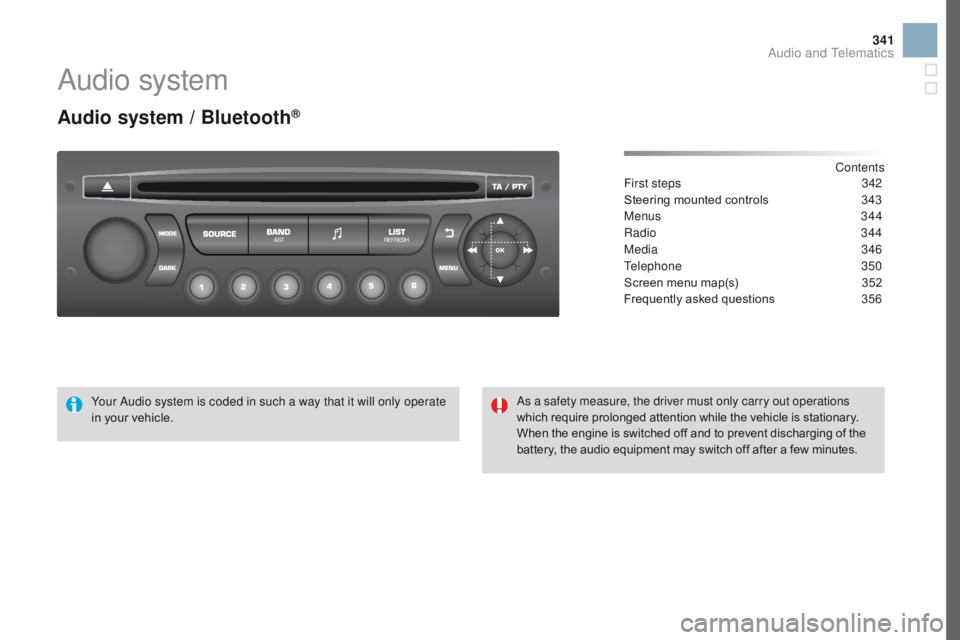
Audio system
Audio system / Bluetooth®
Contents
First steps 34 2
Steering
m
ounted
c
ontrols
34
3
Menus
3
44
Radio
3
44
Media
3
46
Telephone
3
50
Screen
m
enu
m
ap(s)
35
2
Frequently
a
sked
q
uestions
35
6
Your Audio system is coded in such a way that it will only operate
in
y
our
v
ehicle. As a safety measure, the driver must only carry out operations
which
r
equire
p
rolonged
a
ttention
w
hile
t
he
v
ehicle
i
s
s
tationary.
When
t
he
e
ngine
i
s
s
witched
o
ff
a
nd
t
o
p
revent
d
ischarging
o
f
t
he
ba
ttery,
t
he
a
udio
e
quipment
m
ay
s
witch
o
ff
a
fter
a f
ew
m
inutes.
Audio and Telematics
Page 344 of 444
DS3_en_Chap11d_RD45_ed02-2015
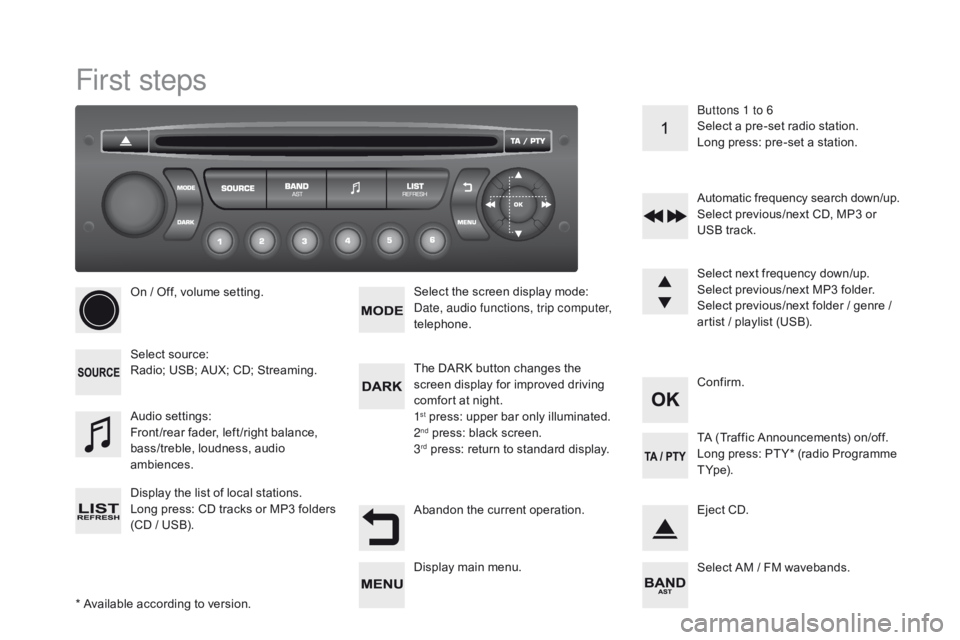
First steps
* Available according to version.
On
/ O
ff,
v
olume
s
etting.
Select
so
urce:
Radio;
U
SB;
A
UX;
C
D;
S
treaming.
Display
t
he
l
ist
o
f
l
ocal
s
tations.
Long
pr
ess:
CD tr
acks
or MP
3
fo
lders
(C
D
/ U
SB). Select
t
he
s
creen
d
isplay
m
ode:
Date, audio functions, trip computer,
telephone.
Audio
set
tings:
Front /rear
f
ader,
l
eft /right
b
alance,
ba
ss/treble,
l
oudness,
a
udio
amb
iences.
The
D
ARK
b
utton
c
hanges
t
he
sc
reen
d
isplay
f
or
i
mproved
d
riving
co
mfort
a
t
n
ight.
1
st press: upper bar only illuminated.
2nd press: black screen.
3rd press: return to standard display. Se lect
n
ext
f
requency
d
own/up.
Select
p
revious/next
M
P3
f
older.
Select
p
revious/next
f
older
/ g
enre
/ ar
tist
/ p
laylist
(
USB).
Abandon
t
he
c
urrent
o
peration. Confirm. Buttons 1 to 6
Select
a p
re-set
r
adio
s
tation.
Long
p
ress:
p
re-set
a s
tation.
Automatic
f
requency
s
earch
d
own/up.
Select
p
revious/next
C
D,
M
P3
o
r
US
B
t
rack.
Eject
C
D.
Display
m
ain
m
enu. TA (
Traffic A nnouncements) o n/off.
Long p ress: P T Y* ( radio P rogramme T Y
p e).
Select
A
M
/ F
M
w
avebands.