ABS CITROEN DS3 CROSSBACK 2018 User Guide
[x] Cancel search | Manufacturer: CITROEN, Model Year: 2018, Model line: DS3 CROSSBACK, Model: CITROEN DS3 CROSSBACK 2018Pages: 244, PDF Size: 7.7 MB
Page 169 of 244
167In the event of a breakdown08
absence of braking assistance the next time
the engine is started.
Automatic gearbox: never tow the vehicle
with the driving wheels on the ground and
the engine off.
► Unlock the steering and release the parking
brake.
► Switch on the hazard warning lamps on both
vehicles.
► Move off gently, drive slowly and only for a
short distance.
Towing another vehicle
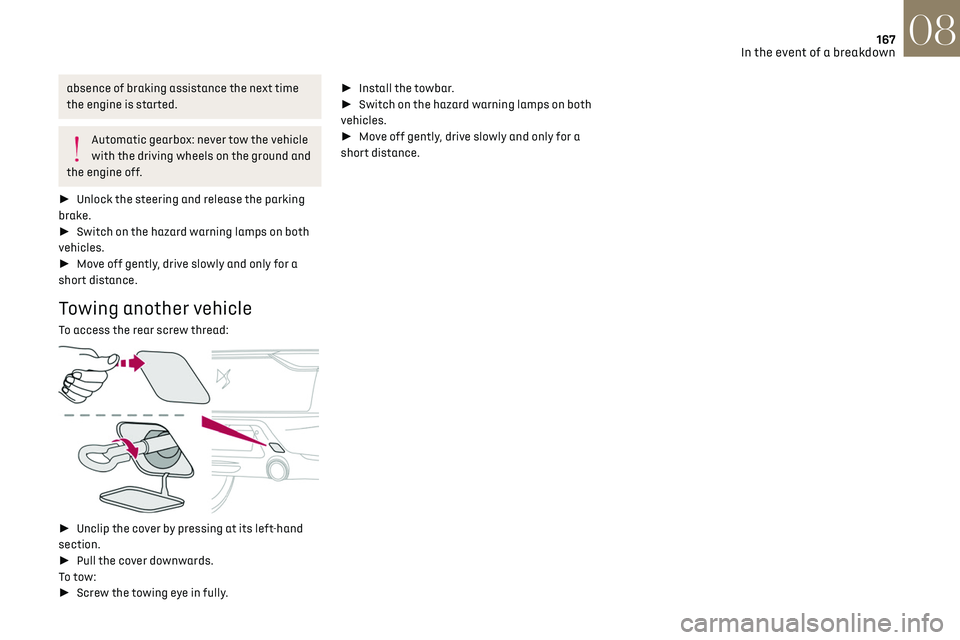
To access the rear screw thread:
► Unclip the cover by pressing at its left-hand
section.
► Pull the cover downwards.
To tow:
► Screw the towing eye in fully. ►
Install the towbar.
► Switch on the hazard warning lamps on both
vehicles.
► Move off gently, drive slowly and only for a
short distance.
Page 184 of 244
182
DS CONNECT RADIO11
DS CONNECT RADIO
Multimedia audio system
- Applications - Bluetooth
®
telephone
The functions and settings described vary
according to the vehicle version and
configuration.
For safety reasons and because they
require sustained attention by the driver,
the following operations must be carried out
with the vehicle stationary and the ignition on:
–
Pairing the smartphone with the s
ystem in
Bluetooth mode.
–
U
sing the smartphone.
–
Connection t
o the CarPlay
®, MirrorLinkTM
or Android Auto applications (certain
applications interrupt their display while the
vehicle is moving).
– Changing the system settings and
configuration.
The system is protected in such a way
that it will only operate in the vehicle.
The Energy Economy Mode message is
displayed when the system is about to enter
the corresponding mode.
The system’s Open Source Software (OSS)
source codes are available at the
following addresses:
https://www.groupe-psa.com/fr/oss/
https://www.groupe-psa.com/en/oss/
First steps
With the engine running, a press mutes the
sound.
With the ignition off, a press turns the system on.
Increase or decrease the volume using the wheel
or the "plus" or "minus" buttons (depending on
the equipment).
Use the buttons on either side of or below the
touch screen for access to the menus, then press
the virtual buttons in the touch screen.
At all times it is possible to display the rolling
menus by pressing the screen briefly with three
fingers.
All of the touch areas of the screen are white.
For pages with multiple tabs at the bottom of the
screen, it is possible to switch between pages
either by tapping the tab for the desired page, or
by using a finger, sliding the pages to the left or
to the right.
Press in the grey zone to go back up a level or to
confirm.
Press the back arrow to go back a level or confirm.
The touch screen is of the "capacitive"
type.
To clean the screen, use a soft, non-abrasive
cloth (e.g. spectacles cloth) with no additional
product.
Do not use sharp objects on the screen.
Do not touch the screen with wet hands.
Certain information is displayed permanently in
the upper bar of the touch screen:
–
Air c
onditioning status information
(depending on version), and direct access to the
corresponding menu.
–
Radio Media and T
elephone menu status
information.
–
Priv
acy status information.
–
Ac
cess to the touch screen and digital
instrument panel settings.
Audio source selection (depending on equipment):
–
FM/D
AB/AM radio stations (depending on
equipment).
–
T
elephone connected via Bluetooth and
Bluetooth multimedia broadcast (streaming).
–
USB Memory stick.
–
Media pla
yer connected via the auxiliary socket
(depending on equipment).
In the "Settings" menu, it is possible to
create a profile for an individual or for a
group of people with shared interests, and
configure a wide range of settings (radio
presets, audio settings, ambiences, etc.).
Settings are applied automatically.
In very hot conditions, the volume may be
limited to protect the system. It may enter
standby mode (with the screen and sound off)
for 5 minutes or more.
The system will resume normal operation
when the temperature in the passenger
compartment has dropped.
Steering mounted controls
Steering mounted controls -
Type 1
Page 222 of 244

220
Alphabetical index
A
ABS 66
Accessories
63
Active Safety Brake
115–117
AdBlue®
18, 144
AdBlue® tank
145
Additive, Diesel
143
Adjusting headlamps
56
Adjusting head restraints
39
Adjusting seat
38–39
Adjusting the air distribution
44, 46
Adjusting the air flow
44–45
Adjusting the date
193, 215
Adjusting the height and reach of
the steering wheel
40
Adjusting the lumbar support
39
Adjusting the seat angle
38
Adjusting the temperature
44–45
Adjusting the time
180, 193, 216
Advanced Traction Control
67
Advice on care and maintenance
131, 146
Advice on driving
7, 80–81
Airbags
70–72, 74
Airbags, curtain
71–72
Airbags, front
70–71, 74
Airbags, lateral
71–72
Air conditioning
43, 46
Air conditioning, automatic
45
Air conditioning, manual
44
Air intake
47
Air vents
43
Alarm
34–36
Amplifier, audio
50
Android Auto connection
207
Anti-lock braking system (ABS)
66
Antitheft / Immobiliser 31, 81
Apple CarPlay connection
189, 206
Applications
207
Armrest, front
49
Assistance call
64
Assistance, emergency braking
66, 116
Audible warning
64
Audio streaming (Bluetooth)
177–178, 187, 211
B
Battery 138
Battery, 12 V
142, 161–164
Battery, ancillaries
161–162
Battery, charging
130, 134, 163–164
Battery, remote control
32–33
Blind spot monitoring system, active
114
Blind spot sensors
113–114
BlueHDi
18, 142, 148
Bluetooth (hands-free)
178, 190, 212
Bluetooth (telephone)
178, 190, 212–213
Bodywork
147
Bonnet
139
Boot
34, 53
Brake discs
143
Brake lamps
157–158
Brakes
143
Braking
90
Braking assistance system
66
Braking, automatic emergency
115–117
Braking, dynamic emergency
84–85
Brightness
179, 192
Bulbs
156
Bulbs (changing)
155–158
C
Cable, audio 211
Cable, Jack
211
Capacity, fuel tank
129
Cap, fuel filler
129
Care of the bodywork
147
CD
177, 187
CD, MP3
177, 187
Central locking
30
Changing a bulb
155–158
Changing a fuse
159–161
Changing a wheel
149, 152
Changing a wiper blade
61
Changing the remote control battery
32
Charger, induction
50
Charger, wireless
50
CHECK
21
Checking the levels
140–142
Checking tyre pressures
(using the kit)
150, 152
Checks
140, 142–144
Checks, routine
142–143
Child lock
79
Children
69, 75–76
Children (safety)
79
Child seats
69, 72–74
Child seats, conventional
74
Child seats, i-Size
76
Child seats, ISOFIX
75–76
Cleaning (advice)
131, 146–147
Closing the boot
30, 34
Closing the doors
29–30, 33
Collision Risk Alert
115–116
Configuration, vehicle
24
Connected applications
207