towing CITROEN DS3 CROSSBACK 2018 User Guide
[x] Cancel search | Manufacturer: CITROEN, Model Year: 2018, Model line: DS3 CROSSBACK, Model: CITROEN DS3 CROSSBACK 2018Pages: 244, PDF Size: 7.7 MB
Page 98 of 244
96
Driving06
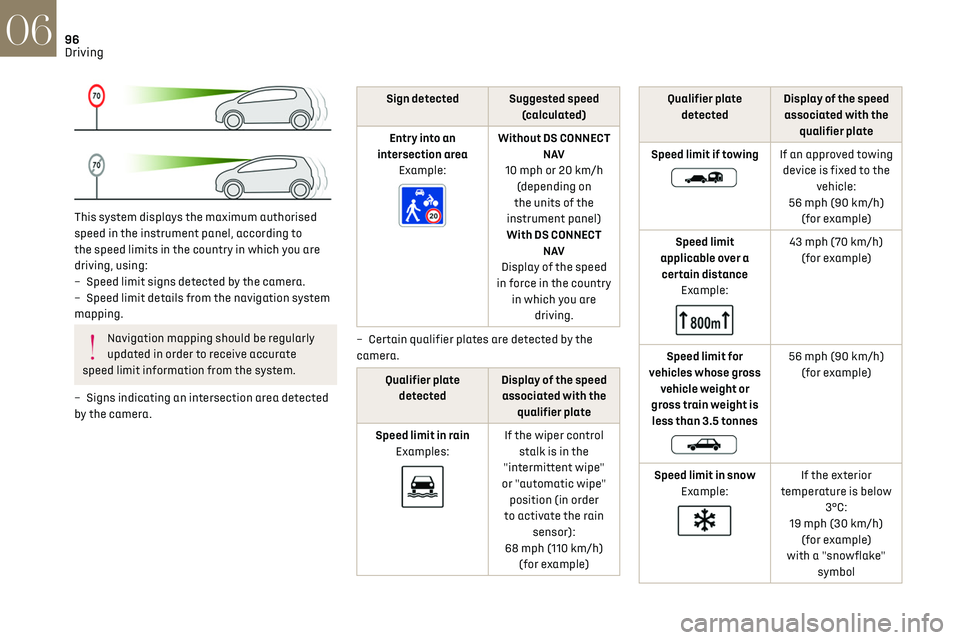
This system displays the maximum authorised
speed in the instrument panel, according to
the speed limits in the country in which you are
driving, using:
–
Speed limit signs det
ected by the camera.
–
Speed limit det
ails from the navigation system
mapping.
Navigation mapping should be regularly
updated in order to receive accurate
speed limit information from the system.
–
Signs indic
ating an intersection area detected
by the camera.
Sign detected Suggested speed (calculated)
Entry into an
intersection area Example:
Without DS CONNECT N AV
10 mph or 20 km/h (depending on
the units of the
instrument panel)
With DS CONNECT N AV
Display of the speed
in force in the country in which you are driving.
–
Cert
ain qualifier plates are detected by the
camera.
Qualifier plate detected Display of the speed
associated with the qualifier plate
Speed limit in rain Examples:
If the wiper control stalk is in the
"intermittent wipe"
or "automatic wipe" position (in order
to activate the rain sensor):
68 mph (110 km/h) (for example)
Qualifier plate detected Display of the speed
associated with the qualifier plate
Speed limit if towing
If an approved towing device is fixed to the vehicle:
56 mph (90 km/h) (for example)
Speed limit
applicable over a certain distance Example:
43 mph (70 km/h) (for example)
Speed limit for
vehicles whose gross vehicle weight or
gross train weight is less than 3.5 tonnes
56 mph (90 km/h) (for example)
Speed limit in snow Example:
If the exterior
temperature is below 3°C:
19 mph (30 km/h) (for example)
with a "snowflake" symbol
Page 99 of 244
97
Driving06
Qualifier plate
detected Display of the speed
associated with the qualifier plate
Speed limit at certain times
Example:
19 mph (30 km/h) (for example)
with a "clock" symbol
The units for the speed limit (mph or
km/h) depend on the country you are
driving in.
This should be taken into account so that you
observe the speed limit.
For the system to work correctly when
changing country, the speed unit in the
instrument panel must correspond to that of
the country you are driving in.
The automatic reading of road signs is a
driving aid system and does not always
display speed limits correctly.
The speed limit signs present on the road
always take priority over the display by the
system.
The system is designed to detect signs that
conform to the Vienna Convention on road
signs.
Specific speed limits, such as those for
heavy goods vehicles, are not displayed.
The display of the speed limit in the instrument
panel is updated when passing a speed limit
sign intended for cars (light vehicles).
Activation / Deactivation
By default, the system is automatically activated
at every engine start.
It is set via the Driving / Vehicle touch
screen menu.
Information displayed on the
instrument panel
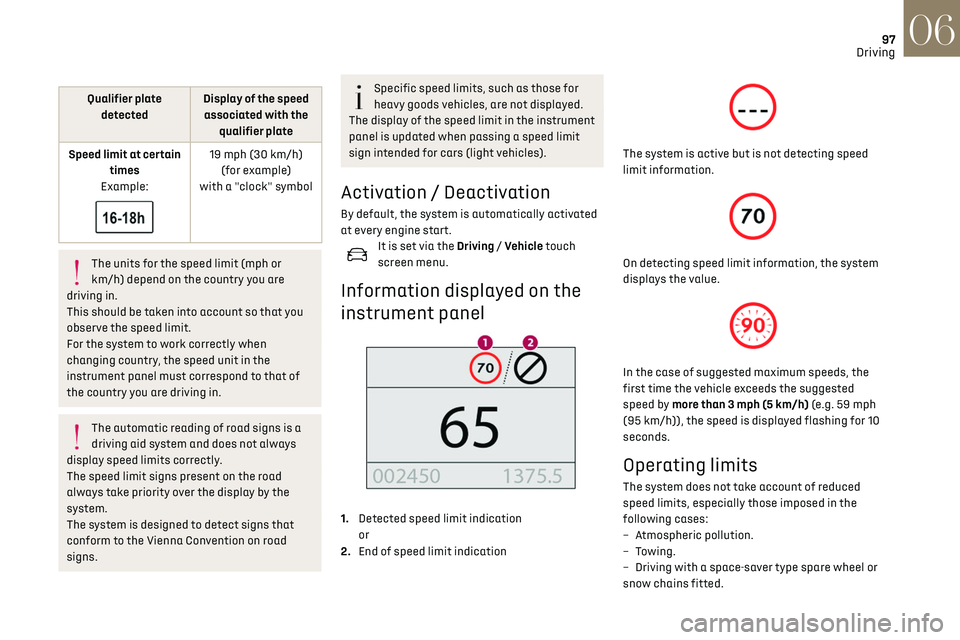
1. Detected speed limit indication
or
2. End of speed limit indication
The system is active but is not detecting speed
limit information.
On detecting speed limit information, the system
displays the value.
In the case of suggested maximum speeds, the
first time the vehicle exceeds the suggested
speed by more than 3 mph (5 km/h) (e.g. 59 mph
(95 km/h)), the speed is displayed flashing for 10
seconds.
Operating limits
The system does not take account of reduced
speed limits, especially those imposed in the
following cases:
–
A
tmospheric pollution.
–
Towing.
–
D
riving with a space-saver type spare wheel or
snow chains fitted.
Page 102 of 244
100
Driving06
Adjusting the limit speed
setting
You do not have to switch the speed limiter on in
order to set the speed.
To modify the limit speed setting based on the
vehicle’s current speed:
► Briefly press button 2 or 3 to change the value
in steps of + or - 1 mph (1.6 km/h).
► Press and hold button 2 or 3 to change the
value in steps of + or - 5 mph (8 km/h).
To change the limit speed setting using
memorised speeds, via the touch screen:
► Press button 5 to display the memorised speed
settings.
► Press the touch screen button for the desired
speed setting.
The selection screen closes after a few moments.
This setting becomes the new limit speed.
To modify the cruise speed setting based on the
speed suggested by the Speed Limit Recognition
and Recommendation, as shown on the
instrument panel:
► Press button 5 once; a message is displayed to
confirm the memorisation request.
► Press button 5 again to save the suggested
speed.
The speed is immediately shown on the
instrument panel as the new speed setting.
Temporarily exceeding the
speed setting
► Press the accelerator pedal down fully.
The speed limiter is deactivated temporarily and
the displayed speed setting flashes.
► Release the accelerator pedal to return to
below the programmed speed.
When the limit speed is exceeded but this is not
due to action by the driver (in case of a steep
slope, for example), an audible signal triggers
immediately.
On a steep descent or in the event of
sharp acceleration, the speed limiter will
not be able to prevent the vehicle from
exceeding the speed setting.
Brake if necessary to control the speed of your
vehicle.
Once the speed of the vehicle returns to the
programmed setting, the speed limiter functions
again: the display of the speed setting becomes
fixed again.
Switching off
► Turn the thumbwheel 1 to the "OFF" position:
the display of information on the speed limiter
disappears.
Malfunction
The display of dashes (flashing then fixed)
indicates a fault with the speed limiter.
Have it checked by a dealer or a qualified
workshop.
Cruise control - particular
recommendations
For the safety of everyone, only use the
cruise control where the driving
conditions allow running at a constant speed
and keeping an adequate safety distance.
Remain vigilant when the cruise control is
activated. If you hold one of the speed setting
modification buttons down, a very rapid
change in the speed of your vehicle may occur.
When descending a steep hill, the cruise
control system cannot prevent the vehicle from
exceeding the set speed. Brake if necessary to
control the speed of your vehicle.
On steep climbs or when towing, the set speed
may not be reached or maintained.
Exceeding the programmed speed setting
The speed setting can be exceeded
temporarily by pressing the accelerator pedal
(the programmed speed flashes).
To return to the speed setting, release the
accelerator pedal (when this speed is reached
again, the display of the speed stops flashing).
Operating limits
Never use the system in the following
situations:
– In an urban area with the risk of pedestrians
crossing the road.
– In heavy traffic (except versions with the
Stop & Go function).
– On winding or steep roads.
– On slippery or flooded roads.
– In poor weather conditions.
– Driving on a speed circuit.
– Driving on a rolling road.
– When using snow chains, non-slip covers or
studded tyres.
Cruise control
Refer to the General recommendations on the use
of driving and manoeuvring aids and to Cruise
control - particular recommendations.
This system automatically keeps the
vehicle’s speed at the cruise value
programmed by the driver (speed setting),
without using the accelerator pedal.
Cruise control is switched on manually.
It requires a minimum vehicle speed of 25 mph
(40 km/h).
With a manual gearbox, third gear or higher must
be engaged.
With an automatic gearbox, mode D or second
gear or higher in mode M must be engaged.
With a drive selector, mode D or B must be
engaged.
Page 108 of 244
106
Driving06
– Vehicles crossing your lane.
– V ehicles driving in the opposite direction.
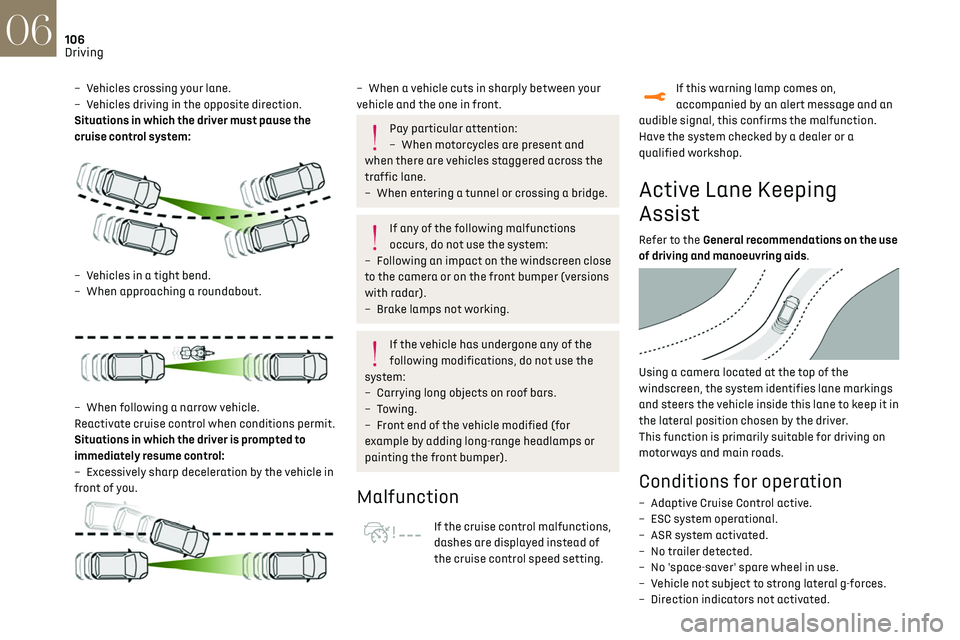
Situations in which the driver must pause the
cruise control system:
– Vehicles in a tight bend.
– When approaching a roundabout.
– When follo wing a narrow vehicle.
Reactivate cruise control when conditions permit.
Situations in which the driver is prompted to
immediately resume control:
–
Ex
cessively sharp deceleration by the vehicle in
front of you.
– When a vehicle cuts in sharply between your
vehicle and the one in front.
Pay particular attention:
– When mo torcycles are present and
when there are vehicles staggered across the
traffic lane.
–
When en
tering a tunnel or crossing a bridge.
If any of the following malfunctions
occurs, do not use the system:
–
Follo
wing an impact on the windscreen close
to the camera or on the front bumper (versions
with radar).
–
B
rake lamps not working.
If the vehicle has undergone any of the
following modifications, do not use the
system:
–
Carrying long objects on roo
f bars.
–
Towing.
–
F
ront end of the vehicle modified (for
example by adding long-range headlamps or
painting the front bumper).
Malfunction
If the cruise control malfunctions,
dashes are displayed instead of
the cruise control speed setting.
If this warning lamp comes on,
accompanied by an alert message and an
audible signal, this confirms the malfunction.
Have the system checked by a dealer or a
qualified workshop.
Active Lane Keeping
Assist
Refer to the General recommendations on the use
of driving and manoeuvring aids.
Using a camera located at the top of the
windscreen, the system identifies lane markings
and steers the vehicle inside this lane to keep it in
the lateral position chosen by the driver.
This function is primarily suitable for driving on
motorways and main roads.
Conditions for operation
– Adaptive C ruise Control active.
– ESC s ystem operational.
–
ASR s
ystem activated.
–
No trailer det
ected.
–
No '
space-saver' spare wheel in use.
–
V
ehicle not subject to strong lateral g-forces.
–
Direction indic
ators not activated.
Activation/Deactivation
► With the Adaptive Cruise Control with Stop &
Go function activated, press this button.
The action is confirmed by:
– The indicator lamp in the button lighting up
green.
– The following symbol being displayed on the
instrument panel.
The colour of the symbol on the instrument panel
depends on the operating status of the system:
(grey colour)
One or more operating conditions is not
met; the system is paused.
(green colour)
All operating conditions are met; the
system is active.
(orange colour)
System malfunction.
For vehicles equipped with a head-up
display, the information is projected onto
the blade.
Page 115 of 244
113
Driving06
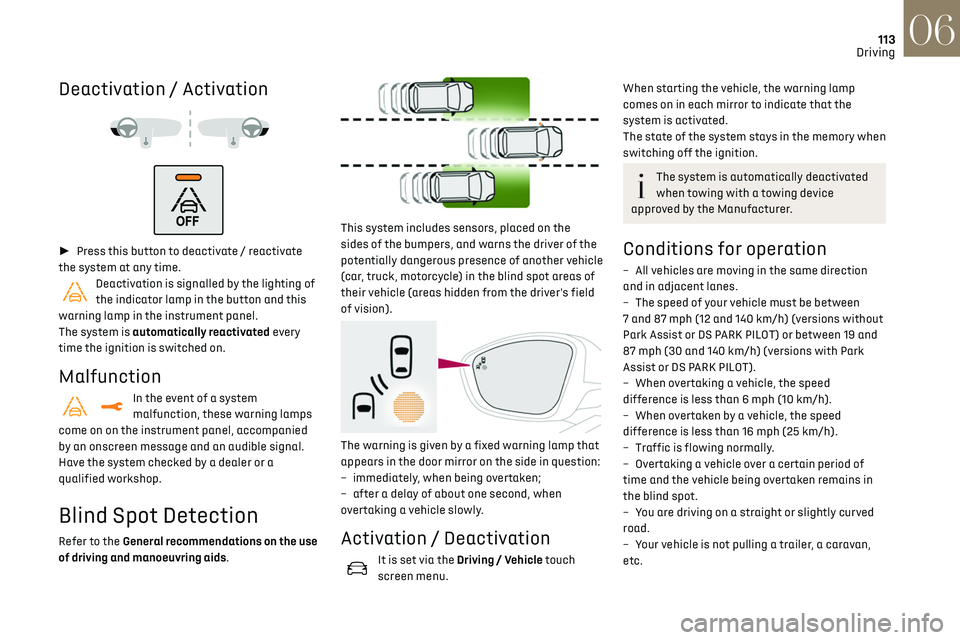
Deactivation / Activation
► Press this button to deactivate / reactivate
the system at any time.
Deactivation is signalled by the lighting of
the indicator lamp in the button and this
warning lamp in the instrument panel.
The system is automatically reactivated every
time the ignition is switched on.
Malfunction
In the event of a system
malfunction, these warning lamps
come on on the instrument panel, accompanied
by an onscreen message and an audible signal.
Have the system checked by a dealer or a
qualified workshop.
Blind Spot Detection
Refer to the General recommendations on the use
of driving and manoeuvring aids.
This system includes sensors, placed on the
sides of the bumpers, and warns the driver of the
potentially dangerous presence of another vehicle
(car, truck, motorcycle) in the blind spot areas of
their vehicle (areas hidden from the driver's field
of vision).
The warning is given by a fixed warning lamp that
appears in the door mirror on the side in question:
–
immedia
tely, when being overtaken;
–
a
fter a delay of about one second, when
overtaking a vehicle slowly.
Activation / Deactivation
It is set via the Driving / Vehicle touch
screen menu.
When starting the vehicle, the warning lamp
comes on in each mirror to indicate that the
system is activated.
The state of the system stays in the memory when
switching off the ignition.
The system is automatically deactivated
when towing with a towing device
approved by the Manufacturer.
Conditions for operation
– All vehicles are moving in the same direction
and in adjacent lanes.
–
The speed o
f your vehicle must be between
7 and 87 mph (12 and 140 km/h) (versions without
Park Assist or DS PARK PILOT) or between 19 and
87 mph (30 and 140 km/h) (versions with Park
Assist or DS PARK PILOT).
–
When o
vertaking a vehicle, the speed
difference is less than 6 mph (10 km/h).
–
When o
vertaken by a vehicle, the speed
difference is less than 16 mph (25 km/h).
–
Tra
ffic is flowing normally.
–
Ov
ertaking a vehicle over a certain period of
time and the vehicle being overtaken remains in
the blind spot.
–
Y
ou are driving on a straight or slightly curved
road.
–
Y
our vehicle is not pulling a trailer, a caravan,
etc.
Page 120 of 244

118
Driving06
which increases as the vehicle approaches the
obstacle.
When the distance between the vehicle and
the obstacle becomes less than about thirty
centimetres, the audible signal becomes
continuous.
The sound emitted by the speaker (right or
left) indicates the side on which the obstacle is
located.
Adjusting the audible signalWith DS CONNECT RADIO or DS
CONNECT NAV, pressing this
button opens the window for adjusting the
volume of the audible signal.
Visual assistance
This supplements the audible signal by displaying
bars on the screen that represent the distance
between the obstacle and the vehicle (white:
more distant, orange: close, red: very close).
When the obstacle is very close, the "Danger"
symbol is displayed on the screen.
Front parking sensors
Supplementing the rear parking sensors, the front
parking sensors are triggered when an obstacle
is detected in front and the speed of the vehicle is
still below 6 mph (10 km/h).
Front parking sensor operation is suspended if
the vehicle stops for more than three seconds in
forward gear, if an obstacle is no longer detected
or the vehicle speed exceeds 6 mph (10 km/h).
The sound emitted by the speaker (front
or rear) locates the obstacle relative to
the vehicle, in front or behind it.
Deactivation / Activation
It is set via the Driving / Vehicle touch
screen menu.
The state of the system stays in the memory when
the ignition is switched off.
The rear parking sensors system will be
deactivated automatically if a trailer or
bicycle carrier is connected to a towing device
installed in accordance with the
manufacturer's recommendations.
In this case, the outline of a trailer is displayed
at the rear of the image of the vehicle.
The parking sensors are deactivated while the
Park Assist and DS PARK PILOT functions are
measuring a space.
For more information on the Park Assist or the DS
PARK PILOT, refer to the corresponding section.
When the vehicle is started, the visual and
audible aids will be available after the
touch screen has started up.
Operating limits
If the boot is heavily loaded, the vehicle may tilt,
affecting distance measurements.
Malfunction
In the event of a malfunction when shifting
to reverse, this warning lamp comes on on
the instrument panel, accompanied by the display
of a message and an audible signal (short beep).
Contact a dealer or a qualified workshop to have
the system checked.
Reversing camera
Refer to the General recommendations on the use
of driving and manoeuvring aids.
As soon as reverse gear is engaged with the
engine running, this system displays views of your
Page 138 of 244
136
Practical information07
The red indicator lamp in the flap comes on to
indicate that the nozzle is locked.
If charging has finished but the cable is
still connected, opening the driver's door
restarts charging for around 20 seconds.
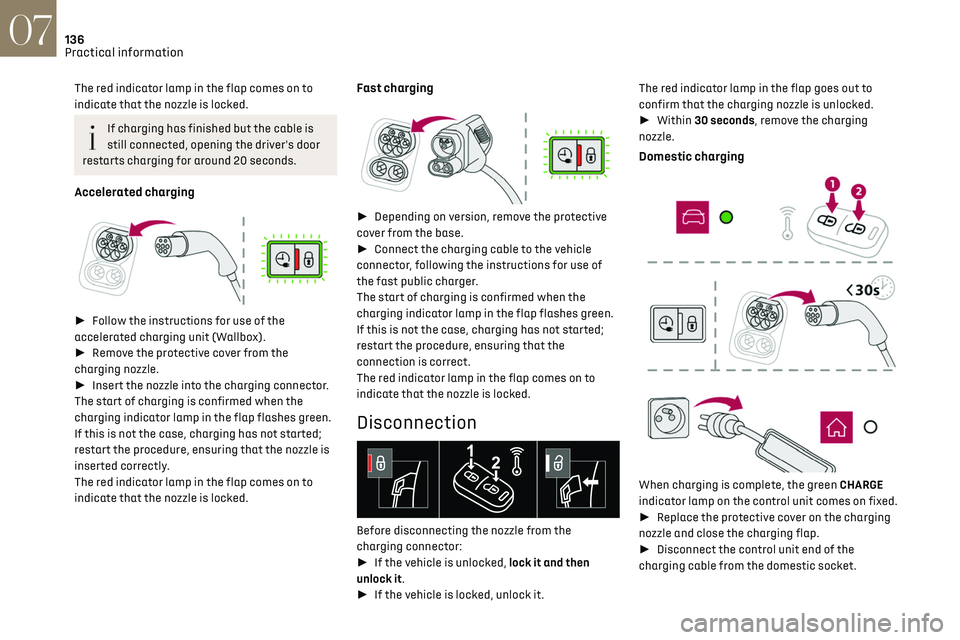
Accelerated charging
► Follow the instructions for use of the
accelerated charging unit (Wallbox).
► Remove the protective cover from the
charging nozzle.
► Insert the nozzle into the charging connector.
The start of charging is confirmed when the
charging indicator lamp in the flap flashes green.
If this is not the case, charging has not started;
restart the procedure, ensuring that the nozzle is
inserted correctly.
The red indicator lamp in the flap comes on to
indicate that the nozzle is locked.
Fast charging
► Depending on version, remove the protective
cover from the base.
► Connect the charging cable to the vehicle
connector, following the instructions for use of
the fast public charger.
The start of charging is confirmed when the
charging indicator lamp in the flap flashes green.
If this is not the case, charging has not started;
restart the procedure, ensuring that the
connection is correct.
The red indicator lamp in the flap comes on to
indicate that the nozzle is locked.
Disconnection
Before disconnecting the nozzle from the
charging connector:
► If the vehicle is unlocked, lock it and then
unlock it.
► If the vehicle is locked, unlock it. The red indicator lamp in the flap goes out to
confirm that the charging nozzle is unlocked.
►
Within 30 seconds, remove the charging
nozzle.
Domestic charging
When charging is complete, the green CHARGE
indicator lamp on the control unit comes on fixed.
► Replace the protective cover on the charging
nozzle and close the charging flap.
► Disconnect the control unit end of the
charging cable from the domestic socket.
Accelerated charging
The end of charging is indicated by the charging
control unit and by the fixed lighting of the green
indicator lamp in the flap.
► Hang up the nozzle on the charging unit and
close the charging flap.
Fast charging
The end of charging is indicated by the charger
and by the fixed lighting of the green indicator
lamp in the flap.
► Hang up the nozzle on the charging station.
► Depending on version, replace the protective
cover on the base and close the charging flap.
Towing device
Load distribution
► Distribute the load in the trailer so that
the heaviest items are as close as possible to
the axle, and the nose weight approaches the
maximum permitted without exceeding it.
Air density decreases with altitude, thus reducing
engine performance. The maximum load which
can be towed must be reduced by 10% per
1,000 metres of altitude.
Use towing devices and their genuine
wiring harnesses approved by the
Manufacturer. It is recommended that the
Page 139 of 244

137
Practical information07
Accelerated charging
The end of charging is indicated by the charging
control unit and by the fixed lighting of the green
indicator lamp in the flap.
► Hang up the nozzle on the charging unit and
close the charging flap.
Fast charging
The end of charging is indicated by the charger
and by the fixed lighting of the green indicator
lamp in the flap.
► Hang up the nozzle on the charging station.
► Depending on version, replace the protective
cover on the base and close the charging flap.
Towing device
Load distribution
► Distribute the load in the trailer so that
the heaviest items are as close as possible to
the axle, and the nose weight approaches the
maximum permitted without exceeding it.
Air density decreases with altitude, thus reducing
engine performance. The maximum load which
can be towed must be reduced by 10% per
1,000 metres of altitude.
Use towing devices and their genuine
wiring harnesses approved by the
Manufacturer. It is recommended that the
fitting be performed by a dealer or a qualified
workshop.
If not fitted by a dealer, it must still be fitted
in accordance with the Manufacturer's
instructions.
Certain driving or manoeuvring aid functions
are automatically deactivated if an approved
towing system is used.
Observe the maximum authorised towable
weight, indicated on the vehicle's
registration certificate, the manufacturer's
label as well as in the Technical data section of
this guide.
Complying with the maximum authorised
nose weight (towball) also includes the use of
accessories (bicycle carriers, tow boxes, etc.).
Observe the legislation in force in the
country where you are driving.
Electric motor
Electric vehicles must never be equipped
with towing devices.
It is therefore not possible to tow a trailer or
caravan.
Roof bars
As a safety measure and to avoid
damaging the roof, it is essential to use
the transverse bars approved for the vehicle.
Observe the instructions on fitting and use
contained in the guide supplied with the roof
bars.
To install the roof bars, you must secure them
only to the four fixing points on the roof frame.
These points are concealed by the vehicle's doors
when they are closed.
The roof bar fixings include a lug to be fitted into
the hole at each fixing point.
Maximum load distributed over the roof
bars, for a loading height not exceeding
40 cm: 75 kg.
As this value may change, please verify the
maximum load set out in the manual supplied
with the roof bars.
Page 151 of 244
149In the event of a breakdown08
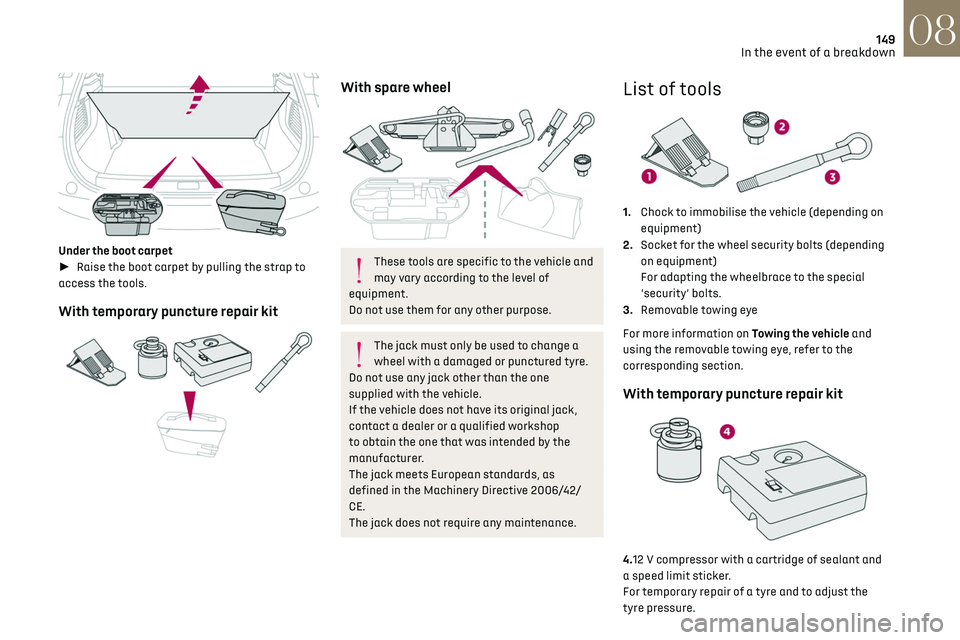
Under the boot carpet
► Raise the boot carpet by pulling the strap to
access the tools.
With temporary puncture repair kit
With spare wheel
These tools are specific to the vehicle and
may vary according to the level of
equipment.
Do not use them for any other purpose.
The jack must only be used to change a
wheel with a damaged or punctured tyre.
Do not use any jack other than the one
supplied with the vehicle.
If the vehicle does not have its original jack,
contact a dealer or a qualified workshop
to obtain the one that was intended by the
manufacturer.
The jack meets European standards, as
defined in the Machinery Directive 2006/42/
CE.
The jack does not require any maintenance.
List of tools
1. Chock to immobilise the vehicle (depending on
equipment)
2. Socket for the wheel security bolts (depending
on equipment)
For adapting the wheelbrace to the special
‘security’ bolts.
3. Removable towing eye
For more information on Towing the vehicle and
using the removable towing eye, refer to the
corresponding section.
With temporary puncture repair kit
4.12 V compressor with a cartridge of sealant and
a speed limit sticker.
For temporary repair of a tyre and to adjust the
tyre pressure.
Page 166 of 244
164In the event of a breakdown08
► At the end of the charging operation, switch
off charger B before disconnecting the cables
from battery A.
24v 12v
If this label is present, use only a 12 V
charger to avoid causing irreversible
damage to the electrical components related
to the Stop & Start system.
Never try to charge a frozen battery - risk
of explosion!
If the battery has frozen, have it checked by
a dealer or by a qualified workshop who will
verify that the internal components have not
been damaged and that the case has not
cracked, which would mean a risk of toxic and
corrosive acid leaking.
Some functions, including Stop & Start,
are not available if the battery is not
sufficiently charged.
Disconnecting the battery
In order to maintain an adequate state of charge
for starting the engine, it is recommended that
the battery be disconnected if the vehicle is taken
out of service for a long period. Before disconnecting the battery:
►
Close all openings (doors, boot, windows,
roof).
► Switch off all electrical consumers (audio
system, wipers, lighting, etc.).
► Switch off the ignition and wait for 4 minutes.
At the battery, it is only necessary to disconnect
the (+) terminal.
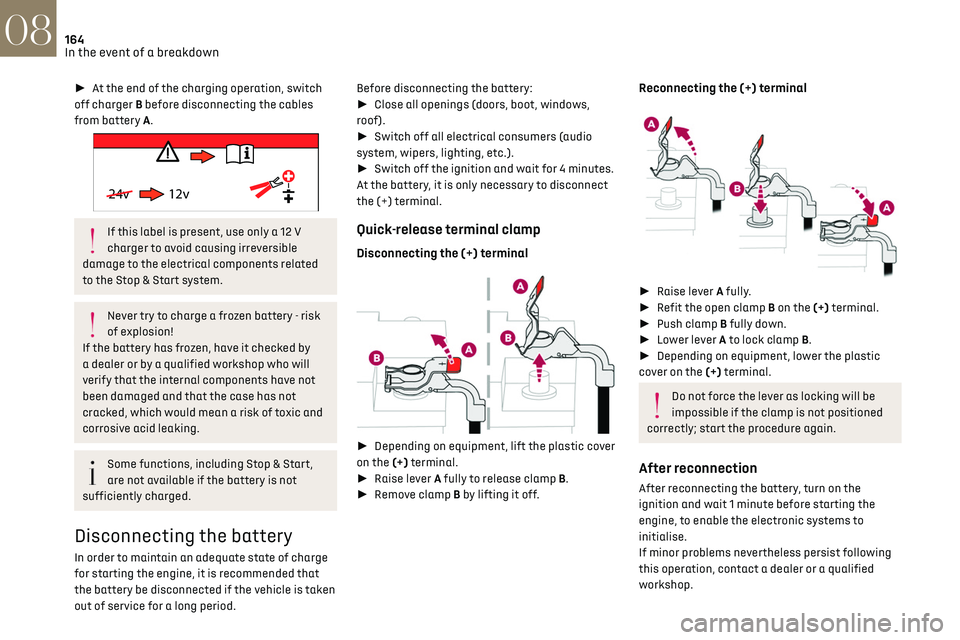
Quick-release terminal clamp
Disconnecting the (+) terminal
► Depending on equipment, lift the plastic cover
on the (+) terminal.
► Raise lever A fully to release clamp B.
► Remove clamp B by lifting it off.
Reconnecting the (+) terminal
► Raise lever A fully.
► Refit the open clamp B on the (+) terminal.
► Push clamp B fully down.
► Lower lever A to lock clamp B.
► Depending on equipment, lower the plastic
cover on the (+) terminal.
Do not force the lever as locking will be
impossible if the clamp is not positioned
correctly; start the procedure again.
After reconnection
After reconnecting the battery, turn on the
ignition and wait 1 minute before starting the
engine, to enable the electronic systems to
initialise.
If minor problems nevertheless persist following
this operation, contact a dealer or a qualified
workshop.
Referring to the relevant section, reset certain
equipment:
– Electronic key.
– Electric windows.
– Date and time.
– Preset radio stations.
After reconnection of the battery, the
“Collision risk detection system fault”
message is displayed on the instrument panel
when the ignition is switched on. This
operation is perfectly normal. The message
will disappear while driving.
The Stop & Start system may not be
operational during the trip following the
first engine start.
In this case, the system will only be
available again after a continuous period of
immobilisation of the vehicle, a period which
depends on the exterior temperature and the
Towing constraints
Type of vehicle
(engine / gearbox)gearbox Font wheels on the ground Rear wheels on the ground Flatbed
4 wheels on the ground with
towbar
Internal combustion /
Manual
Internal combustion /
Automatic