wheel CITROEN DS3 CROSSBACK 2018 Owner's Guide
[x] Cancel search | Manufacturer: CITROEN, Model Year: 2018, Model line: DS3 CROSSBACK, Model: CITROEN DS3 CROSSBACK 2018Pages: 244, PDF Size: 7.7 MB
Page 95 of 244

93
Driving06
Restarting the engine (START mode)
The engine automatically restarts as soon as the
driver indicates the intention of moving off again.
► With a manual gearbox: with the clutch pedal
fully depressed.
► With an automatic gearbox:
•
With the select
or in position D or M: with the
brake pedal released.
•
With the select
or in position N and the brake
pedal released: with the selector at D or M.
•
With the select
or in position P and the brake
pedal depressed: with the selector at R, N, D
or M.
•
R
everse gear engaged.
Special cases
The engine restarts automatically if all the
operating conditions are met again and in the
following cases.
–
With a manual gearbo
x: vehicle speed exceeds
2.5 mph (4 km/h),
–
With an aut
omatic gearbox, in mode N, vehicle
speed exceeds 0.6 mph (1 km/h).
In these cases, this indicator lamp flashes
for a few seconds, then goes off.
Malfunctions
In the event of a malfunction, this warning
lamp flashes for a few moments, then
remains on, accompanied by an onscreen
message.
Have the vehicle checked by a dealer or a qualified
workshop.
The vehicle stalls in STOP mode
All of the instrument panel warning lamps come
on if there is a fault.
► Switch off the ignition then start the engine
again with the "START/STOP" button.
The Stop & Start system requires a 12 V
battery of specific technology and
specification.
All work concerning the battery must be
carried out only by a dealer or a qualified
workshop.
Under-inflation detection
This system automatically checks the pressures
of the tyres while driving.
It compares the information given by the wheel
speed sensors with reference values, which must
be reinitialised every time the tyre pressures are
adjusted or a wheel changed.
The system triggers an alert as soon as it detects
a drop in the inflation pressure of one or more
tyres.
Under-inflation detection does not replace
the need for vigilance on the part of the
driver.
This system does not avoid the need to
regularly check the tyre pressures (including
the spare wheel) as well as before a long
journey.
Driving with under-inflated tyres, particularly
in adverse conditions (heavy load, high speed,
long journey):
–
w
orsens road-holding.
–
lengthens braking dist
ances.
–
c
auses premature wear of the tyres.
–
increase
s fuel consumption.
The inflation pressures defined for the
vehicle can be found on the tyre pressure
label.
For more information on the Identification
markings, refer to the corresponding section.
Checking tyre pressures
This check should be done when the
tyres are "cold" (vehicle stopped for 1 hour or
after a journey of less than 6 miles (10 km) at
moderate speeds).
Otherwise, add 0.3 bar to the pressures shown
on the label.
Under-inflation alert
This is signalled by the fixed illumination of
this warning lamp, accompanied by an
audible signal and, depending on equipment, the
display of a message.
► Reduce speed immediately, avoid excessive
steering movements and avoid sudden braking.
► Stop the vehicle as soon as it is safe to do so.
Page 96 of 244
94
Driving06
The loss of pressure detected does not
always cause visible bulging of the tyre.
Do not rely on just a visual check.
► Using a compressor, such as the one in
the temporary puncture repair kit, check the
pressures of the four tyres when cold.
► If it is not possible to make this check
immediately, drive carefully at reduced speed.
► In the event of a puncture, use the temporary
puncture repair kit or the spare wheel (depending
on equipment).
The alert is kept active until the system is
reinitialised.
Reinitialisation
The system must be reinitialised after any
adjustment to the pressure of one or more tyres,
and after changing one or more wheels.
Before reinitialising the system, make
sure that the pressures of the four tyres
are correct for the conditions of use of the
vehicle and conform to the values written on
the tyre pressure label.
Check the pressures of the four tyres before
performing the reinitialisation.
The system does not advise if a pressure is
incorrect at the time of reinitialisation.
With the vehicle stationary, the system is
reinitialised via the Driving / Vehicle touch
screen menu..
Snow chains
The system does not have to be
reinitialised after fitting or removing snow
chains.
Malfunction
These warning lamps come on in
the event of a malfunction.
A message appears, accompanied by an audible
signal.
In this case, the tyre under-inflation monitoring
function is no longer performed.
Have the system checked by a dealer or a
qualified workshop.
Driving and manoeuvring
aids - General
recommendations
Driving and manoeuvring aids cannot, in
any circumstances, replace the need for
vigilance on the part of the driver.
The driver must comply with the Highway
Code, must remain in control of the vehicle in
all circumstances and must be able to retake
control of it at all times. The driver must adapt
the speed to climactic conditions, traffic and
the state of the road.
It is the driver's responsibility to constantly
check the traffic, to assess the relative
distances and speeds of other vehicles and to
anticipate their movements before indicating
and changing lane.
The systems cannot exceed the limits of the
laws of physics.
Driving aids
You should hold the steering wheel
with both hands, always use the interior and
exterior rear view mirrors, always keep the feet
close to the pedals and take a break every two
hours.
Manoeuvring aids
The driver must always check the
surroundings of the vehicle before and during
the whole manoeuvre, in particular using the
mirrors.
Radar
The operation of the radar as well as the
associated functions may be impaired through
the accumulation of dirt (mud, frost, etc.),
in certain difficult weather conditions (very
heavy rain, snow) or if the bumper is damaged.
If the front bumper is to be repainted, contact
a dealer or a qualified workshop; certain types
of paint could interfere with the operation of
the radar.
Driving aids camera
This camera and its associated functions
may be impaired or not work if the windscreen
area in front of the camera is dirty, misty,
frosty, covered with snow, damaged or masked
by a sticker.
In humid and cold weather, demist the
windscreen regularly.
Poor visibility (inadequate street lighting,
heavy rain, thick fog, snowfall), dazzle
(headlamps of an oncoming vehicle, low sun,
reflections on a damp road, leaving a tunnel,
alternating shade and light) can also impair
detection performance.
In the event of a windscreen replacement,
contact a dealer or a qualified workshop
to recalibrate the camera; otherwise, the
operation of the associated driving aids may
be disrupted.
Other cameras
The images from the camera(s) displayed
on the touch screen or on the instrument panel
may be distorted by the relief.
In the presence of areas in shade, or in
conditions of bright sunlight or inadequate
Page 99 of 244
97
Driving06
Qualifier plate
detected Display of the speed
associated with the qualifier plate
Speed limit at certain times
Example:
19 mph (30 km/h) (for example)
with a "clock" symbol
The units for the speed limit (mph or
km/h) depend on the country you are
driving in.
This should be taken into account so that you
observe the speed limit.
For the system to work correctly when
changing country, the speed unit in the
instrument panel must correspond to that of
the country you are driving in.
The automatic reading of road signs is a
driving aid system and does not always
display speed limits correctly.
The speed limit signs present on the road
always take priority over the display by the
system.
The system is designed to detect signs that
conform to the Vienna Convention on road
signs.
Specific speed limits, such as those for
heavy goods vehicles, are not displayed.
The display of the speed limit in the instrument
panel is updated when passing a speed limit
sign intended for cars (light vehicles).
Activation / Deactivation
By default, the system is automatically activated
at every engine start.
It is set via the Driving / Vehicle touch
screen menu.
Information displayed on the
instrument panel
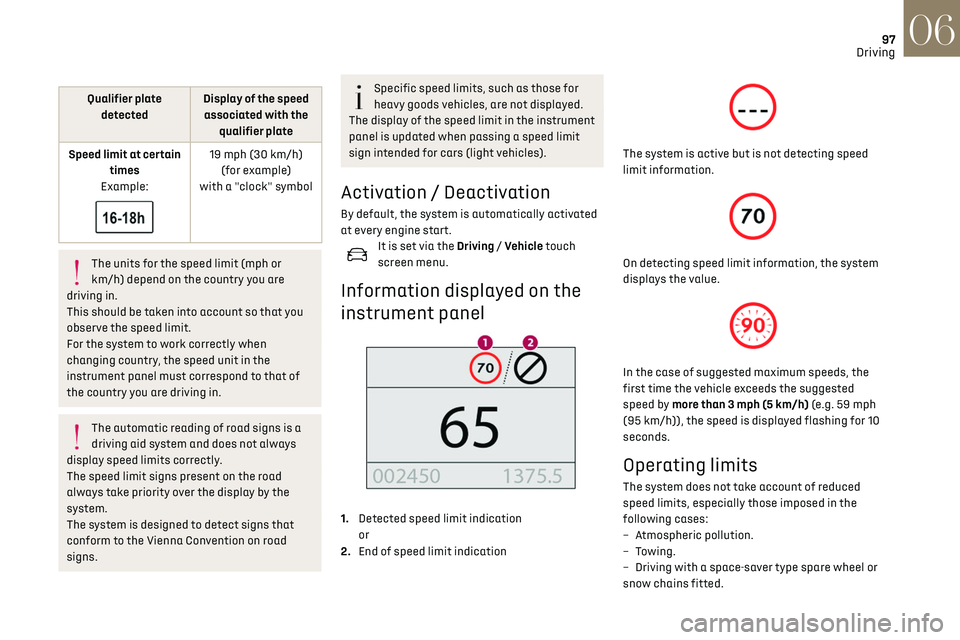
1. Detected speed limit indication
or
2. End of speed limit indication
The system is active but is not detecting speed
limit information.
On detecting speed limit information, the system
displays the value.
In the case of suggested maximum speeds, the
first time the vehicle exceeds the suggested
speed by more than 3 mph (5 km/h) (e.g. 59 mph
(95 km/h)), the speed is displayed flashing for 10
seconds.
Operating limits
The system does not take account of reduced
speed limits, especially those imposed in the
following cases:
–
A
tmospheric pollution.
–
Towing.
–
D
riving with a space-saver type spare wheel or
snow chains fitted.
Page 102 of 244
100
Driving06
Adjusting the limit speed
setting
You do not have to switch the speed limiter on in
order to set the speed.
To modify the limit speed setting based on the
vehicle’s current speed:
► Briefly press button 2 or 3 to change the value
in steps of + or - 1 mph (1.6 km/h).
► Press and hold button 2 or 3 to change the
value in steps of + or - 5 mph (8 km/h).
To change the limit speed setting using
memorised speeds, via the touch screen:
► Press button 5 to display the memorised speed
settings.
► Press the touch screen button for the desired
speed setting.
The selection screen closes after a few moments.
This setting becomes the new limit speed.
To modify the cruise speed setting based on the
speed suggested by the Speed Limit Recognition
and Recommendation, as shown on the
instrument panel:
► Press button 5 once; a message is displayed to
confirm the memorisation request.
► Press button 5 again to save the suggested
speed.
The speed is immediately shown on the
instrument panel as the new speed setting.
Temporarily exceeding the
speed setting
► Press the accelerator pedal down fully.
The speed limiter is deactivated temporarily and
the displayed speed setting flashes.
► Release the accelerator pedal to return to
below the programmed speed.
When the limit speed is exceeded but this is not
due to action by the driver (in case of a steep
slope, for example), an audible signal triggers
immediately.
On a steep descent or in the event of
sharp acceleration, the speed limiter will
not be able to prevent the vehicle from
exceeding the speed setting.
Brake if necessary to control the speed of your
vehicle.
Once the speed of the vehicle returns to the
programmed setting, the speed limiter functions
again: the display of the speed setting becomes
fixed again.
Switching off
► Turn the thumbwheel 1 to the "OFF" position:
the display of information on the speed limiter
disappears.
Malfunction
The display of dashes (flashing then fixed)
indicates a fault with the speed limiter.
Have it checked by a dealer or a qualified
workshop.
Cruise control - particular
recommendations
For the safety of everyone, only use the
cruise control where the driving
conditions allow running at a constant speed
and keeping an adequate safety distance.
Remain vigilant when the cruise control is
activated. If you hold one of the speed setting
modification buttons down, a very rapid
change in the speed of your vehicle may occur.
When descending a steep hill, the cruise
control system cannot prevent the vehicle from
exceeding the set speed. Brake if necessary to
control the speed of your vehicle.
On steep climbs or when towing, the set speed
may not be reached or maintained.
Exceeding the programmed speed setting
The speed setting can be exceeded
temporarily by pressing the accelerator pedal
(the programmed speed flashes).
To return to the speed setting, release the
accelerator pedal (when this speed is reached
again, the display of the speed stops flashing).
Operating limits
Never use the system in the following
situations:
– In an urban area with the risk of pedestrians
crossing the road.
– In heavy traffic (except versions with the
Stop & Go function).
– On winding or steep roads.
– On slippery or flooded roads.
– In poor weather conditions.
– Driving on a speed circuit.
– Driving on a rolling road.
– When using snow chains, non-slip covers or
studded tyres.
Cruise control
Refer to the General recommendations on the use
of driving and manoeuvring aids and to Cruise
control - particular recommendations.
This system automatically keeps the
vehicle’s speed at the cruise value
programmed by the driver (speed setting),
without using the accelerator pedal.
Cruise control is switched on manually.
It requires a minimum vehicle speed of 25 mph
(40 km/h).
With a manual gearbox, third gear or higher must
be engaged.
With an automatic gearbox, mode D or second
gear or higher in mode M must be engaged.
With a drive selector, mode D or B must be
engaged.
Page 103 of 244
101
Driving06
– In an urban area with the risk o f pedestrians
crossing the road.
–
In hea
vy traffic (except versions with the
Stop & Go function).
–
O
n winding or steep roads.
–
O
n slippery or flooded roads.
–
In poor w
eather conditions.
–
D
riving on a speed circuit.
–
D
riving on a rolling road.
–
When using sno
w chains, non-slip covers or
studded tyres.
Cruise control
Refer to the General recommendations on the use
of driving and manoeuvring aids and to Cruise
control - particular recommendations.
This system automatically keeps the
vehicle’s speed at the cruise value
programmed by the driver (speed setting),
without using the accelerator pedal.
Cruise control is switched on manually.
It requires a minimum vehicle speed of 25 mph
(40 km/h).
With a manual gearbox, third gear or higher must
be engaged.
With an automatic gearbox, mode D or second
gear or higher in mode M must be engaged.
With a drive selector, mode D or B must be
engaged.
Cruise control remains active after
changing gear, regardless of the gearbox
type, on engines fitted with Stop & Start.
Switching off the ignition cancels any
speed setting.
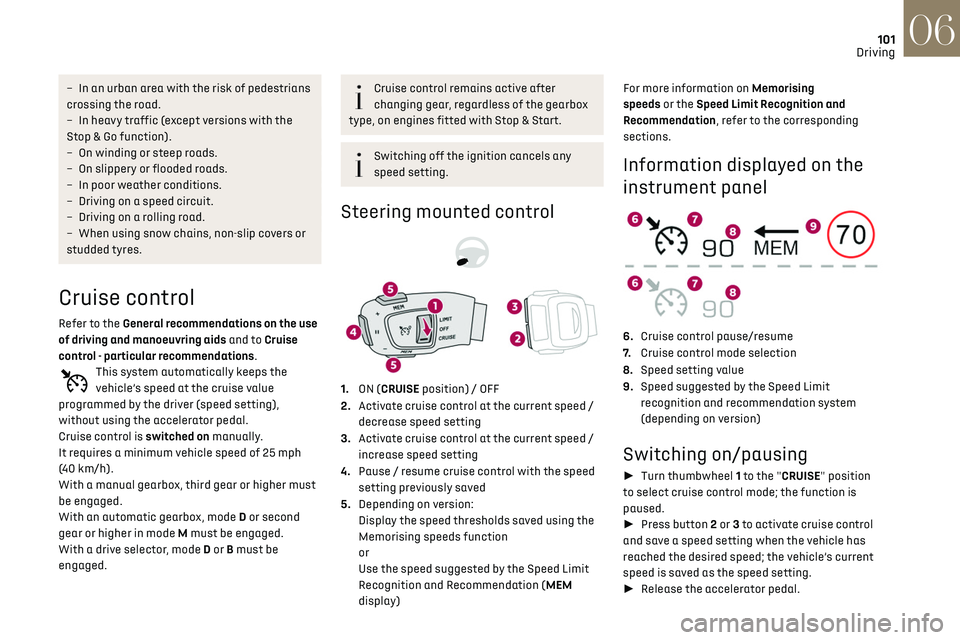
Steering mounted control
1. ON (CRUISE position) / OFF
2. Activate cruise control at the current speed /
decrease speed setting
3. Activate cruise control at the current speed /
increase speed setting
4. Pause / resume cruise control with the speed
setting previously saved
5. Depending on version:
Display the speed thresholds saved using the
Memorising speeds function
or
Use the speed suggested by the Speed Limit
Recognition and Recommendation (MEM
display) For more information on Memorising
speeds or the Speed Limit Recognition and
Recommendation, refer to the corresponding
sections.
Information displayed on the
instrument panel
6.
Cruise control pause/resume
7. Cruise control mode selection
8. Speed setting value
9. Speed suggested by the Speed Limit
recognition and recommendation system
(depending on version)
Switching on/pausing
► Turn thumbwheel 1 to the "CRUISE" position
to select cruise control mode; the function is
paused.
► Press button 2 or 3 to activate cruise control
and save a speed setting when the vehicle has
reached the desired speed; the vehicle’s current
speed is saved as the speed setting.
► Release the accelerator pedal.
Page 104 of 244
102
Driving06
► Pressing button 4 temporarily pauses the
function.
► Pressing button 4 again restores operation of
the cruise control (ON).
Operation of the cruise control can also be
paused temporarily:
–
b
y pressing the brake pedal.
–
aut
omatically, if the electronic stability
control (ESC) system is triggered.
Modifying the cruise speed
setting
Cruise control must be active.
To modify the cruise speed setting, based on the
current speed of the vehicle:
► Briefly press button 2 or 3 to change the value
in steps of + or - 1 mph (km/h).
► Press and hold button 2 or 3 to change the
value in steps of + or - 5 mph (km/h).
Pressing and holding button 2 or 3 results
in a rapid change in the speed of the
vehicle.
As a precaution, we recommend setting a
cruise speed fairly close to the current
speed of your vehicle, to avoid any sudden
acceleration or deceleration of the vehicle.
To change the cruise speed setting using
memorised speed settings and from the touch
screen: ►
Press button 5 to display the memorised speed
settings.
► Press the touch screen button for the desired
speed setting.
The selection screen closes after a few moments.
This setting becomes the new cruise speed.
To modify the cruise speed setting using the
speed suggested by the Speed Limit Recognition
and Recommendation shown on the instrument
panel:
► Press button 5 once; a message is displayed to
confirm the memorisation request.
► Press button 5 again to save the suggested
speed.
The speed is immediately shown on the
instrument panel as the new speed setting.
Switching off
► Turn the thumbwheel 1 to the "OFF" position:
the cruise control information disappears from
the screen.
Malfunction
The display of dashes (flashing then fixed)
indicates a malfunction with the cruise control
system.
Have it checked by a dealer or a qualified
workshop.
Memorising speeds
This function, used only for the speed limiter and
programmable cruise control, lets you save speed
settings that will subsequently be proposed for
the purpose of configuring these two systems.
You can memorise multiple speed settings for
each of the two systems.
By default, some speed settings are already
memorised.
As a safety measure, the driver must only
change speed settings when stationary.
Changing a speed setting
Speed settings can be activated,
deactivated, selected and changed in the
Driving / Vehicle touch screen menu.
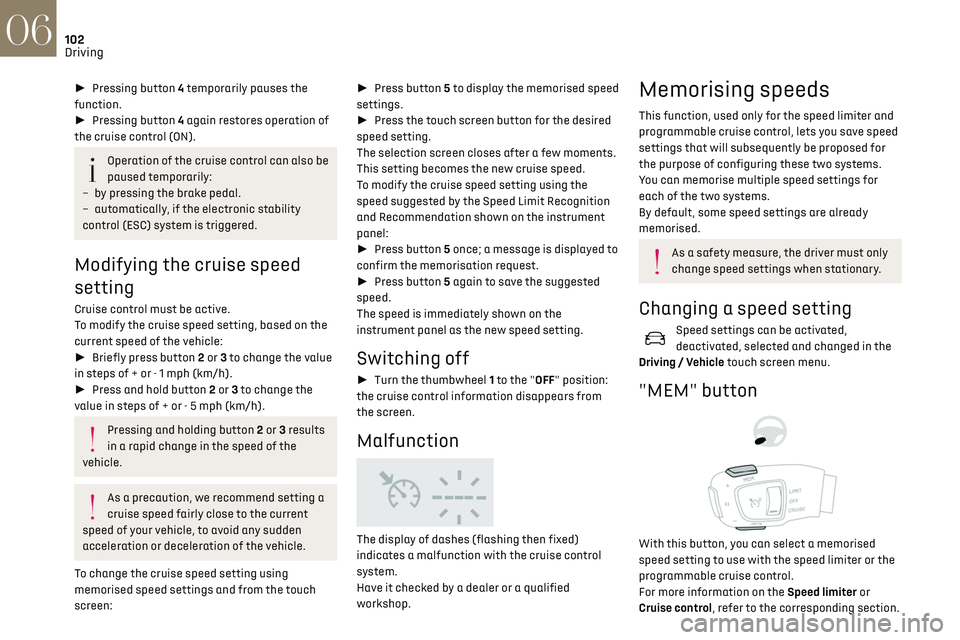
"MEM" button
With this button, you can select a memorised
speed setting to use with the speed limiter or the
programmable cruise control.
For more information on the Speed limiter or
Cruise control, refer to the corresponding section.
DS DRIVE ASSIST
Only available on versions with the EAT8
automatic gearbox and gear selector.
This system automatically adjusts the speed and
corrects the trajectory, using the Adaptive Cruise
Control with Stop & Go function in conjunction
with the Lane Positioning Assist.
These two functions must be activated and in
operation.
This system is especially suitable for driving on
motorways and main roads.
For more information on Adaptive Cruise
Control and Lane Positioning Assist, refer to the
corresponding sections. The system assists the driver by acting on
the steering, acceleration and braking,
within the limits of the laws of physics and the
capabilities of the vehicle. Certain road
infrastructure elements or vehicles present on
the road may not be properly seen or may be
poorly interpreted by the camera and radar,
resulting in an unexpected change in direction,
a lack of steering correction and/or
inappropriate management of acceleration or
braking.
Adaptive Cruise Control
Refer to the General recommendations on the use
of driving and manoeuvring aids and to Cruise
control - particular recommendations.
Page 106 of 244
104
Driving06
5.Depending on version:
Display of speed thresholds recorded using
Memorising speeds
or
Use the speed suggested by the Speed Limit
Recognition and Recommendation (MEM
display)
6. Display and adjustment of the distance
setting to the vehicle in front
Use
Activating the system (pause)
► With the engine running, turn the thumbwheel
1 downwards to the CRUISE position. Cruise
control is ready to operate (grey display).
Switching on cruise control and setting the
speed
With a manual gearbox, your speed must be
between 19 and 112 mph (30 and 180 km/h).
With an EAT8 automatic gearbox or a drive
selector, your speed must be between 0 and
112 mph (0 and 180 km/h).
► Press button 2 or 3: the current speed
becomes the speed setting (minimum 19 mph
(30 km/h)) and cruise control is immediately
activated (green display).
► Press 3 to increase or 2 to decrease the speed
setting (steps of 5 mph (km/h) if held pressed).
Pressing and holding button 2 or 3 results
in a rapid change in the speed of the
vehicle.
Pausing / resumption of cruise control
► Press 4 or depress the brake pedal. To pause
cruise control, it is also possible to: •
shift from mode
D to N;
•
depre
ss the clutch pedal for more than 10
seconds;
•
pre
ss the electric parking brake control.
► Press 4 to restart cruise control. Cruise control
may have been paused automatically: •
when the speed o
f the vehicle goes below 19
mph (30 km/h) with a manual gearbox.
•
when the speed o
f the engine goes below 1100
rpm with a manual gearbox.
•
b
y triggering of the ESC system.
With an EAT8 gearbox or a drive selector,
following braking that has brought the vehicle to
a complete stop, if the traffic conditions do not
allow the vehicle to begin moving again within
3 seconds of stopping, press button 4 or the
accelerator pedal to move off.
If the driver takes no action after the vehicle
has been stopped, the electric parking brake is
applied automatically after about 5 minutes.
Cruise control remains active after
changing gear, regardless of the gearbox
type.
When the driver attempts to reactivate
cruise control, after the function has been
paused, the message "Activation not possible,
unsuitable conditions" is briefly displayed if
reactivation is not possible (safety conditions
not met).
Modifying the programmed speed setting
with the Speed Limit Recognition and
Recommendation function
► Press 5 to accept the speed suggested by
the function on the instrument panel, then press
again to confirm.
To prevent sudden acceleration or
deceleration of the vehicle, select a speed
setting relatively close to the vehicle's current
speed.
Changing the inter-vehicle distance
► Press 6 to display the distance setting
thresholds ("Distant", "Normal" or "Close"), then
press again to select a threshold.
After a few seconds, the option is accepted and
will be memorised when the ignition is switched
off.
Temporarily exceeding the speed setting
► Fully depress the accelerator pedal. Distance
monitoring and cruise control are deactivated
while acceleration is maintained. "Cruise control
suspended" is displayed.
Deactivating the system
► Turn the thumbwheel 1 upwards to the OFF
position.
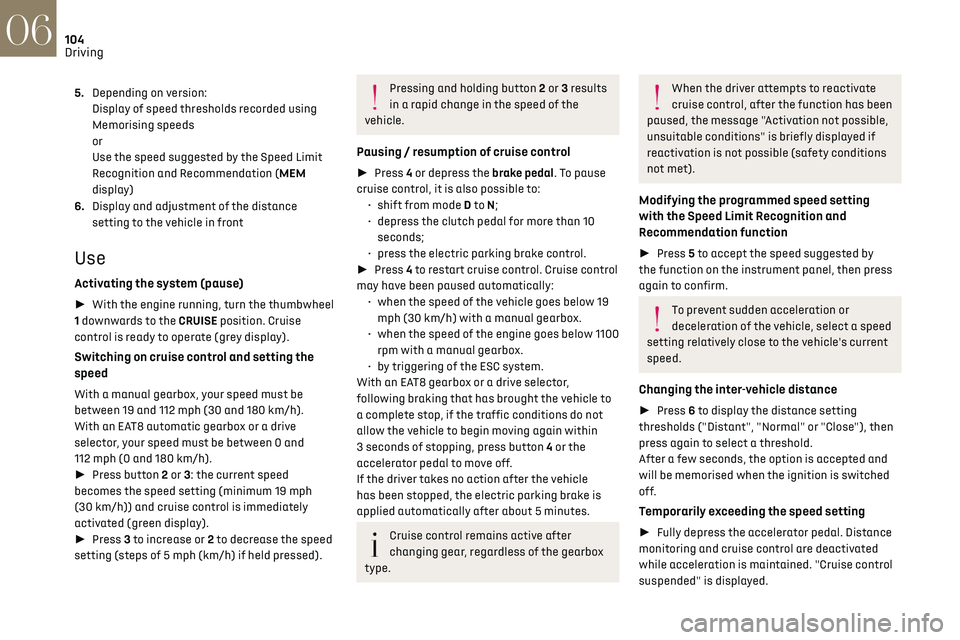
Information displayed on the
instrument panel
7. Vehicle detected by the system (full symbol)
8. Cruise control active (colour not grey)
9. Speed setting value
10. Speed suggested by the Speed Limit
Recognition and Recommendation
11. Vehicle held stationary (versions with
automatic gearbox or drive selector)
12.Inter-vehicle distance setting
13. Position of the vehicle detected by the
system
Page 107 of 244
105
Driving06
Deactivating the system
► Turn the thumbwheel 1 upwards to the OFF
position.
Information displayed on the
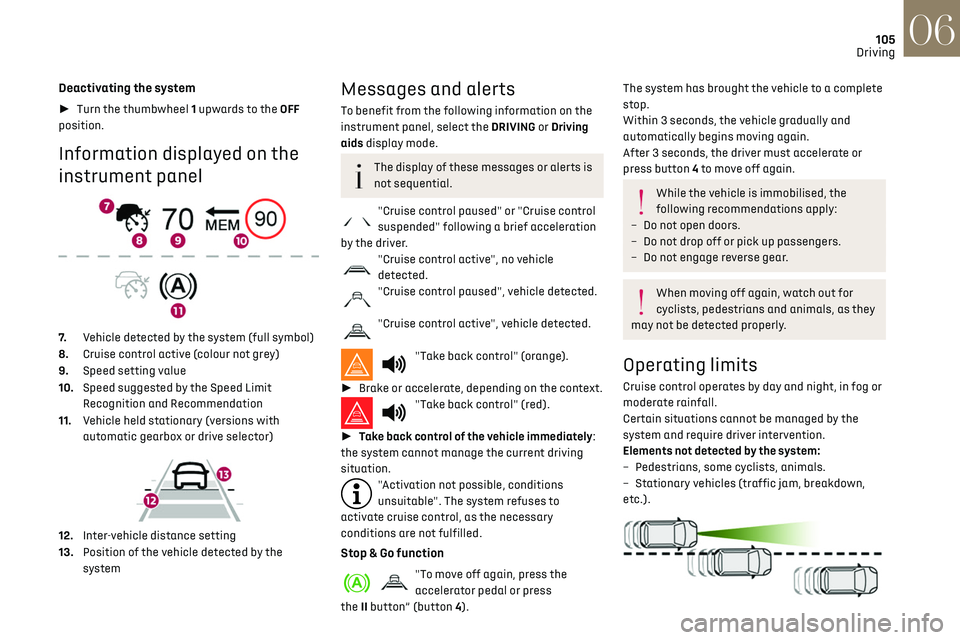
instrument panel
7. Vehicle detected by the system (full symbol)
8. Cruise control active (colour not grey)
9. Speed setting value
10. Speed suggested by the Speed Limit
Recognition and Recommendation
11. Vehicle held stationary (versions with
automatic gearbox or drive selector)
12.Inter-vehicle distance setting
13. Position of the vehicle detected by the
system
Messages and alerts
To benefit from the following information on the
instrument panel, select the DRIVING or Driving
aids display mode.
The display of these messages or alerts is
not sequential.
"Cruise control paused" or "Cruise control
suspended" following a brief acceleration
by the driver.
"Cruise control active", no vehicle
detected.
"Cruise control paused", vehicle detected.
"Cruise control active", vehicle detected.
"Take back control" (orange).
► Brake or accelerate, depending on the context.
"Take back control" (red).
► Take back control of the vehicle immediately:
the system cannot manage the current driving
situation.
"Activation not possible, conditions
unsuitable". The system refuses to
activate cruise control, as the necessary
conditions are not fulfilled.
Stop & Go function
"To move off again, press the
accelerator pedal or press
the II button” (button 4).
The system has brought the vehicle to a complete
stop.
Within 3 seconds, the vehicle gradually and
automatically begins moving again.
After 3 seconds, the driver must accelerate or
press button 4 to move off again.
While the vehicle is immobilised, the
following recommendations apply:
–
Do no
t open doors.
–
Do no
t drop off or pick up passengers.
–
Do no
t engage reverse gear.
When moving off again, watch out for
cyclists, pedestrians and animals, as they
may not be detected properly.
Operating limits
Cruise control operates by day and night, in fog or
moderate rainfall.
Certain situations cannot be managed by the
system and require driver intervention.
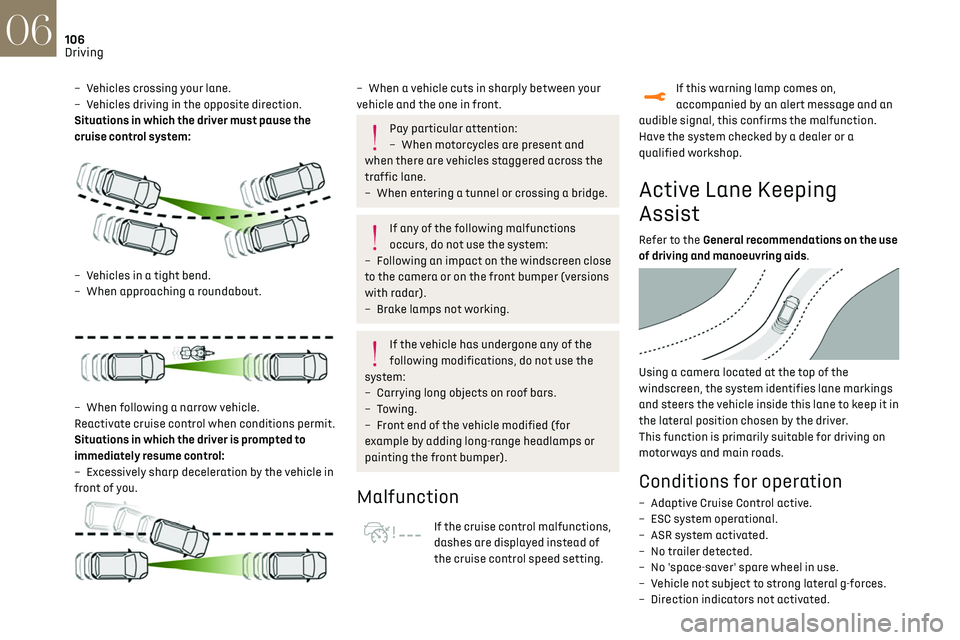
Elements not detected by the system:
–
Pede
strians, some cyclists, animals.
–
St
ationary vehicles (traffic jam, breakdown,
etc.).
Page 108 of 244
106
Driving06
– Vehicles crossing your lane.
– V ehicles driving in the opposite direction.
Situations in which the driver must pause the
cruise control system:
– Vehicles in a tight bend.
– When approaching a roundabout.
– When follo wing a narrow vehicle.
Reactivate cruise control when conditions permit.
Situations in which the driver is prompted to
immediately resume control:
–
Ex
cessively sharp deceleration by the vehicle in
front of you.
– When a vehicle cuts in sharply between your
vehicle and the one in front.
Pay particular attention:
– When mo torcycles are present and
when there are vehicles staggered across the
traffic lane.
–
When en
tering a tunnel or crossing a bridge.
If any of the following malfunctions
occurs, do not use the system:
–
Follo
wing an impact on the windscreen close
to the camera or on the front bumper (versions
with radar).
–
B
rake lamps not working.
If the vehicle has undergone any of the
following modifications, do not use the
system:
–
Carrying long objects on roo
f bars.
–
Towing.
–
F
ront end of the vehicle modified (for
example by adding long-range headlamps or
painting the front bumper).
Malfunction
If the cruise control malfunctions,
dashes are displayed instead of
the cruise control speed setting.
If this warning lamp comes on,
accompanied by an alert message and an
audible signal, this confirms the malfunction.
Have the system checked by a dealer or a
qualified workshop.
Active Lane Keeping
Assist
Refer to the General recommendations on the use
of driving and manoeuvring aids.
Using a camera located at the top of the
windscreen, the system identifies lane markings
and steers the vehicle inside this lane to keep it in
the lateral position chosen by the driver.
This function is primarily suitable for driving on
motorways and main roads.
Conditions for operation
– Adaptive C ruise Control active.
– ESC s ystem operational.
–
ASR s
ystem activated.
–
No trailer det
ected.
–
No '
space-saver' spare wheel in use.
–
V
ehicle not subject to strong lateral g-forces.
–
Direction indic
ators not activated.
Activation/Deactivation
► With the Adaptive Cruise Control with Stop &
Go function activated, press this button.
The action is confirmed by:
– The indicator lamp in the button lighting up
green.
– The following symbol being displayed on the
instrument panel.
The colour of the symbol on the instrument panel
depends on the operating status of the system:
(grey colour)
One or more operating conditions is not
met; the system is paused.
(green colour)
All operating conditions are met; the
system is active.
(orange colour)
System malfunction.
For vehicles equipped with a head-up
display, the information is projected onto
the blade.
Page 109 of 244
107
Driving06
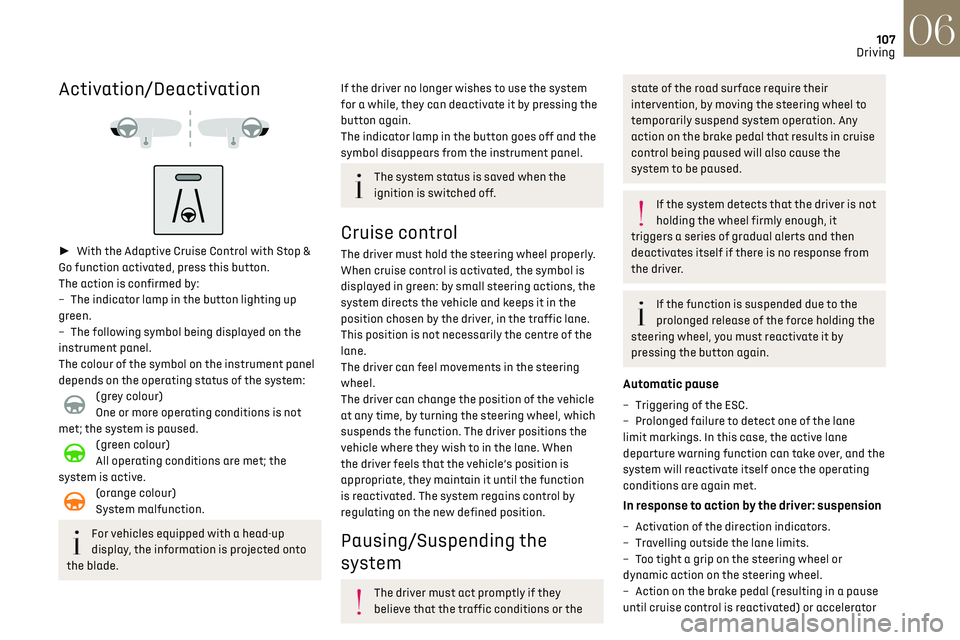
Activation/Deactivation
► With the Adaptive Cruise Control with Stop &
Go function activated, press this button.
The action is confirmed by:
–
The indic
ator lamp in the button lighting up
green.
–
The follo
wing symbol being displayed on the
instrument panel.
The colour of the symbol on the instrument panel
depends on the operating status of the system:
(grey colour)
One or more operating conditions is not
met; the system is paused.
(green colour)
All operating conditions are met; the
system is active.
(orange colour)
System malfunction.
For vehicles equipped with a head-up
display, the information is projected onto
the blade.
If the driver no longer wishes to use the system
for a while, they can deactivate it by pressing the
button again.
The indicator lamp in the button goes off and the
symbol disappears from the instrument panel.
The system status is saved when the
ignition is switched off.
Cruise control
The driver must hold the steering wheel properly.
When cruise control is activated, the symbol is
displayed in green: by small steering actions, the
system directs the vehicle and keeps it in the
position chosen by the driver, in the traffic lane.
This position is not necessarily the centre of the
lane.
The driver can feel movements in the steering
wheel.
The driver can change the position of the vehicle
at any time, by turning the steering wheel, which
suspends the function. The driver positions the
vehicle where they wish to in the lane. When
the driver feels that the vehicle’s position is
appropriate, they maintain it until the function
is reactivated. The system regains control by
regulating on the new defined position.
Pausing/Suspending the
system
The driver must act promptly if they
believe that the traffic conditions or the
state of the road surface require their
intervention, by moving the steering wheel to
temporarily suspend system operation. Any
action on the brake pedal that results in cruise
control being paused will also cause the
system to be paused.
If the system detects that the driver is not
holding the wheel firmly enough, it
triggers a series of gradual alerts and then
deactivates itself if there is no response from
the driver.
If the function is suspended due to the
prolonged release of the force holding the
steering wheel, you must reactivate it by
pressing the button again.
Automatic pause
– Triggering o f the ESC.
– Prolonged failure t o detect one of the lane
limit markings. In this case, the active lane
departure warning function can take over, and the
system will reactivate itself once the operating
conditions are again met.
In response to action by the driver: suspension
– Activation of the direction indicators.
– Tra velling outside the lane limits.
–
T
oo tight a grip on the steering wheel or
dynamic action on the steering wheel.
–
Action on the brak
e pedal (resulting in a pause
until cruise control is reactivated) or accelerator