steering CITROEN DS3 CROSSBACK 2018 Service Manual
[x] Cancel search | Manufacturer: CITROEN, Model Year: 2018, Model line: DS3 CROSSBACK, Model: CITROEN DS3 CROSSBACK 2018Pages: 244, PDF Size: 7.7 MB
Page 128 of 244
126
Driving06
an obstacle is detected, or by driver action. If the
driver notices a hazard, they may also interrupt
the manoeuvre permanently.
To suspend the manoeuvre, the driver can:
–
R
elease the function control button.
–
Depre
ss the brake pedal.
–
R
esume control of the steering.
–
C
hange the gearbox status (except changing
to P).
The vehicle is immediately immobilised if the
manoeuvre is suspended.
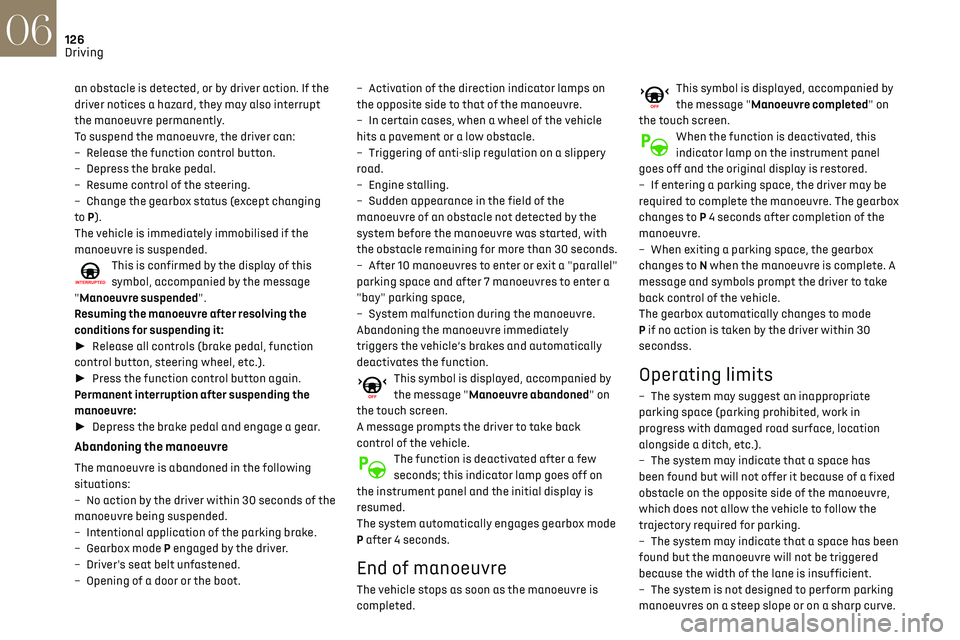
This is confirmed by the display of this
symbol, accompanied by the message
"Manoeuvre suspended".
Resuming the manoeuvre after resolving the
conditions for suspending it:
► Release all controls (brake pedal, function
control button, steering wheel, etc.).
► Press the function control button again.
Permanent interruption after suspending the
manoeuvre:
► Depress the brake pedal and engage a gear.
Abandoning the manoeuvre
The manoeuvre is abandoned in the following
situations:
–
No action b
y the driver within 30 seconds of the
manoeuvre being suspended.
–
In
tentional application of the parking brake.
–
Gearbo
x mode P engaged by the driver.
–
D
river's seat belt unfastened.
–
O
pening of a door or the boot. –
Activ
ation of the direction indicator lamps on
the opposite side to that of the manoeuvre.
–
In c
ertain cases, when a wheel of the vehicle
hits a pavement or a low obstacle.
–
Triggering o
f anti-slip regulation on a slippery
road.
–
Engine st
alling.
–
Sudden appearanc
e in the field of the
manoeuvre of an obstacle not detected by the
system before the manoeuvre was started, with
the obstacle remaining for more than 30 seconds.
–
A
fter 10 manoeuvres to enter or exit a "parallel"
parking space and after 7 manoeuvres to enter a
"bay" parking space,
–
Sy
stem malfunction during the manoeuvre.
Abandoning the manoeuvre immediately
triggers the vehicle’s brakes and automatically
deactivates the function.
This symbol is displayed, accompanied by
the message "Manoeuvre abandoned" on
the touch screen.
A message prompts the driver to take back
control of the vehicle.
The function is deactivated after a few
seconds; this indicator lamp goes off on
the instrument panel and the initial display is
resumed.
The system automatically engages gearbox mode
P after 4 seconds.
End of manoeuvre
The vehicle stops as soon as the manoeuvre is
completed.
This symbol is displayed, accompanied by
the message "Manoeuvre completed" on
the touch screen.
When the function is deactivated, this
indicator lamp on the instrument panel
goes off and the original display is restored.
–
If en
tering a parking space, the driver may be
required to complete the manoeuvre. The gearbox
changes to P 4 seconds after completion of the
manoeuvre.
–
When e
xiting a parking space, the gearbox
changes to N when the manoeuvre is complete. A
message and symbols prompt the driver to take
back control of the vehicle.
The gearbox automatically changes to mode
P if no action is taken by the driver within 30
secondss.
Operating limits
– The system may suggest an inappropriate
parking space (parking prohibited, work in
progress with damaged road surface, location
alongside a ditch, etc.).
–
The s
ystem may indicate that a space has
been found but will not offer it because of a fixed
obstacle on the opposite side of the manoeuvre,
which does not allow the vehicle to follow the
trajectory required for parking.
–
The s
ystem may indicate that a space has been
found but the manoeuvre will not be triggered
because the width of the lane is insufficient.
–
The s
ystem is not designed to perform parking
manoeuvres on a steep slope or on a sharp curve.
– The system does not detect spaces that
are much larger than the vehicle itself or that
are delimited by obstacles that are too low
(pavements, studs, etc.) or too thin (trees, posts,
wire fences, etc.).
– The system may be impaired by incorrect
inflation of the vehicle’s tyres.
– The tilting of the vehicle if the boot is heavily
loaded can affect the distance measurements.
Do not use the function under the
following exterior conditions:
– Alongside a soft shoulder (ditch) or quay or
on the edge of a drop.
– When the road surface is slippery (ice).
Do not use the function in the presence of
one of the following malfunctions:
– If a tyre is under-inflated.
– If one of the bumpers is damaged.
– If one of the cameras is faulty.
– If the brake lamps are not working.
Do not use the function if the vehicle has
been subject to one of the following
modifications:
– When carrying an object extending beyond
the dimensions of the vehicle (ladder on the
roof bars, bicycle carrier on the tailgate, etc.).
– With a non-approved towball in place.
– With snow chains fitted.
– When driving on a small-diameter or "space-
saver" type spare wheel.
Page 129 of 244

127
Driving06
– The system does not detect spaces that
are much larger than the vehicle itself or that
are delimited by obstacles that are too low
(pavements, studs, etc.) or too thin (trees, posts,
wire fences, etc.).
–
The s
ystem may be impaired by incorrect
inflation of the vehicle’s tyres.
–
The tilting o
f the vehicle if the boot is heavily
loaded can affect the distance measurements.
Do not use the function under the
following exterior conditions:
–
Alongside a so
ft shoulder (ditch) or quay or
on the edge of a drop.
–
When the road surfac
e is slippery (ice).
Do not use the function in the presence of
one of the following malfunctions:
–
If a tyre is under-in
flated.
–
If one o
f the bumpers is damaged.
–
If one o
f the cameras is faulty.
–
If the brak
e lamps are not working.
Do not use the function if the vehicle has
been subject to one of the following
modifications:
–
When c
arrying an object extending beyond
the dimensions of the vehicle (ladder on the
roof bars, bicycle carrier on the tailgate, etc.).
–
With a non-appro
ved towball in place.
–
With sno
w chains fitted.
–
When driving on a small-diamet
er or "space-
saver" type spare wheel.
– When the wheels fitt ed are a different size
from the original ones.
–
A
fter modifying one or both bumpers (added
protection).
–
If the sensors ha
ve been repainted outside
the dealer network.
–
With sensors no
t approved for the vehicle.
Malfunctions
When the function is not activated, the
temporary flashing of this warning lamp
and an audible signal indicate a DS PARK PILOT
malfunction.
If the malfunction occurs while the system is in
use, the warning lamp goes off.
If a parking sensor malfunction, indicated
by this warning lamp coming on, occurs
during DS PARK PILOT use, the function is
deactivated.
Contact a dealer or a qualified workshop.
In the event of a power steering
malfunction, this warning lamp is
displayed on the instrument panel, accompanied
by a message.
You must stop as soon as it is safe to do so.
Contact a dealer or a qualified workshop.
Page 162 of 244
160In the event of a breakdown08
The Manufacturer accepts no
responsibility for the cost incurred in
repairing your vehicle or for rectifying
malfunctions resulting from the installation of
accessories not supplied and not
recommended and not installed in accordance
with specifications, in particular when the
combined power consumption of all of the
additional equipment connected exceeds 10
milliamperes.
Fuses in the dashboard
The fusebox is located in the lower dashboard
(left-hand side).
To access the fuses, follow the same procedure
as that described for accessing the tool kit for
changing fuses.
For more information on Access to the tool kit,
refer to the corresponding section.
Fuse tables
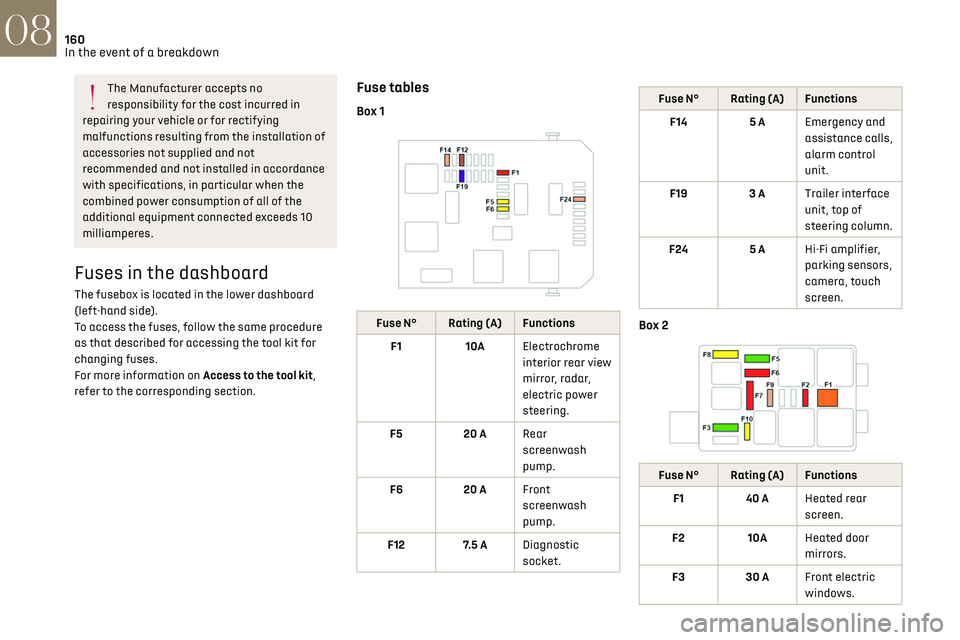
Box 1
Fuse N° Rating (A) Functions
F1 10AElectrochrome
interior rear view
mirror, radar,
electric power
steering.
F5 20 ARear
screenwash
pump.
F6 20 AFront
screenwash
pump.
F12 7.5 A Diagnostic
socket.
Fuse N° Rating (A) Functions
F14 5 AEmergency and
assistance calls,
alarm control
unit.
F19 3 ATrailer interface
unit, top of
steering column.
F24 5 AHi-Fi amplifier,
parking sensors,
camera, touch
screen.
Box 2
Fuse N° Rating (A) Functions
F1 40 AHeated rear
screen.
F2 10AHeated door
mirrors.
F3 30 AFront electric
windows.
Fuse N° Rating (A) Functions
F5 30 ARear electric
windows.
F6 10 AFolding door
mirrors.
F7 10 AFolding door
mirrors.
F8 20 ALeft-hand side
retractable
handles.
F9 25 AHi-Fi amplifier.
F10 20 ARight-hand side
retractable
handles.
Engine compartment fuses
The fusebox is placed in the engine compartment
near the battery.
Page 167 of 244
165In the event of a breakdown08
Referring to the relevant section, reset certain
equipment:
–
Electronic k
ey.
–
Electric windo
ws.
–
Da
te and time.
–
Pre
set radio stations.
After reconnection of the battery, the
“Collision risk detection system fault”
message is displayed on the instrument panel
when the ignition is switched on. This
operation is perfectly normal. The message
will disappear while driving.
The Stop & Start system may not be
operational during the trip following the
first engine start.
In this case, the system will only be
available again after a continuous period of
immobilisation of the vehicle, a period which
depends on the exterior temperature and the
state of charge of the battery (up to about 8
hours).
Towing the vehicle
General recommendations
Observe the legislation in force in the
country where you are driving.
Ensure that the weight of the towing vehicle is
higher than that of the towed vehicle.
The driver must remain at the wheel of the
towed vehicle and must have a valid driving
licence.
When towing a vehicle with all four wheels on
the ground, always use an approved towing
arm; rope and straps are prohibited.
The towing vehicle must move off gently.
When the vehicle is towed with its engine
off, there is no longer braking and steering
assistance.
A professional towing service must be
called if:
–
B
roken down on a motorway or main road.
–
No
t possible to put the gearbox into neutral,
unlock the steering, or release the parking
brake.
–
No
t possible to tow a vehicle with an
automatic gearbox, with the engine running.
–
T
owing with only two wheels on the ground.
–
Four-wheel driv
e vehicle.
–
No appro
ved towbar available.
Before towing the vehicle, it is essential to
put the vehicle in free-wheeling mode.
For more information on Changing to free-
wheeling, refer to the corresponding section.
Electric motor
An electric vehicle must never be used for
road transfers.
It may be used, for example, to exit a rut.
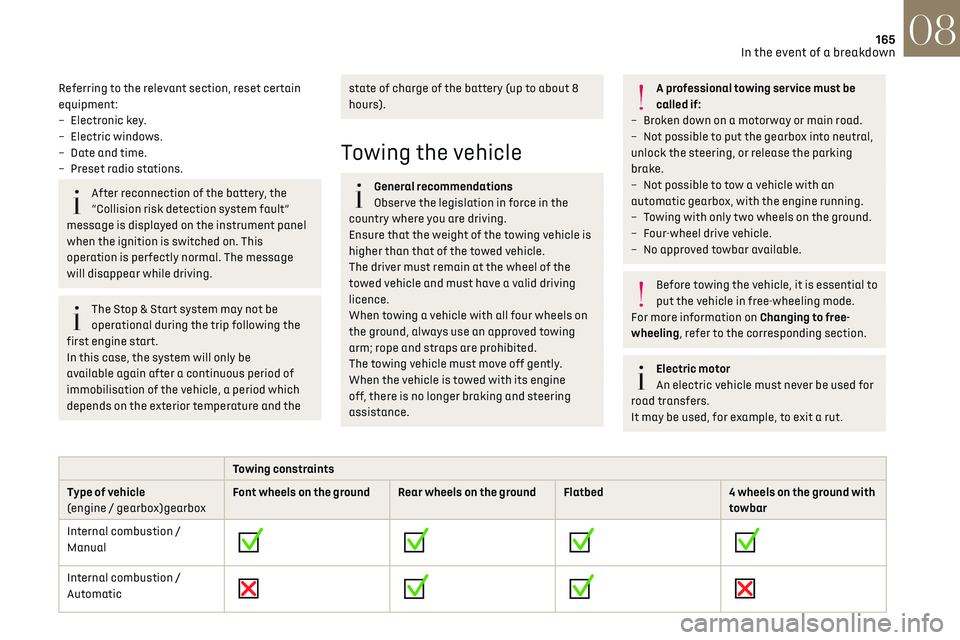
Towing constraints
Type of vehicle
(engine / gearbox)gearbox Font wheels on the ground Rear wheels on the ground Flatbed
4 wheels on the ground with
towbar
Internal combustion /
Manual
Internal combustion /
Automatic
Page 168 of 244
166In the event of a breakdown08
Towing constraints
Type of vehicle
(engine / gearbox)gearbox Font wheels on the ground Rear wheels on the ground Flatbed
4 wheels on the ground with
towbar
Electric
In case of battery or electric parking brake failure, it is essential to call a professional using flatbed recovery vehicles (excluding manual gearbox).
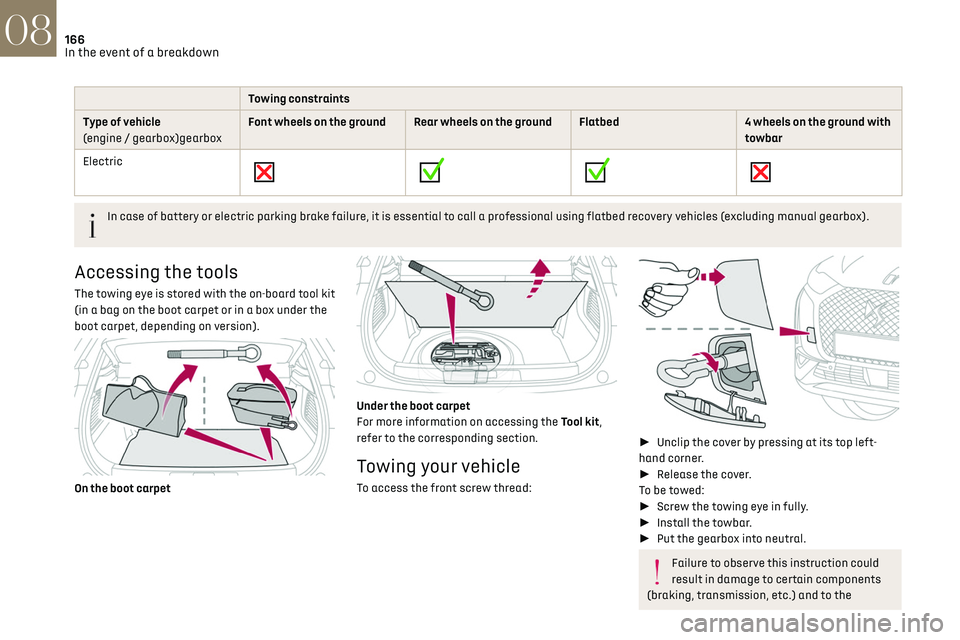
Accessing the tools
The towing eye is stored with the on-board tool kit
(in a bag on the boot carpet or in a box under the
boot carpet, depending on version).
On the boot carpet
Under the boot carpet
For more information on accessing the Tool kit,
refer to the corresponding section.
Towing your vehicle
To access the front screw thread:
►
Unclip the cover by pressing at its top left-
hand corner.
► Release the cover.
To be towed:
► Screw the towing eye in fully.
► Install the towbar.
► Put the gearbox into neutral.
Failure to observe this instruction could
result in damage to certain components
(braking, transmission, etc.) and to the
absence of braking assistance the next time
the engine is started.
Automatic gearbox: never tow the vehicle
with the driving wheels on the ground and
the engine off.
► Unlock the steering and release the parking
brake.
► Switch on the hazard warning lamps on both
vehicles.
► Move off gently, drive slowly and only for a
short distance.
Towing another vehicle
To access the rear screw thread:
► Unclip the cover by pressing at its left-hand
section.
► Pull the cover downwards.
To tow:
► Screw the towing eye in fully.
Page 169 of 244
167In the event of a breakdown08
absence of braking assistance the next time
the engine is started.
Automatic gearbox: never tow the vehicle
with the driving wheels on the ground and
the engine off.
► Unlock the steering and release the parking
brake.
► Switch on the hazard warning lamps on both
vehicles.
► Move off gently, drive slowly and only for a
short distance.
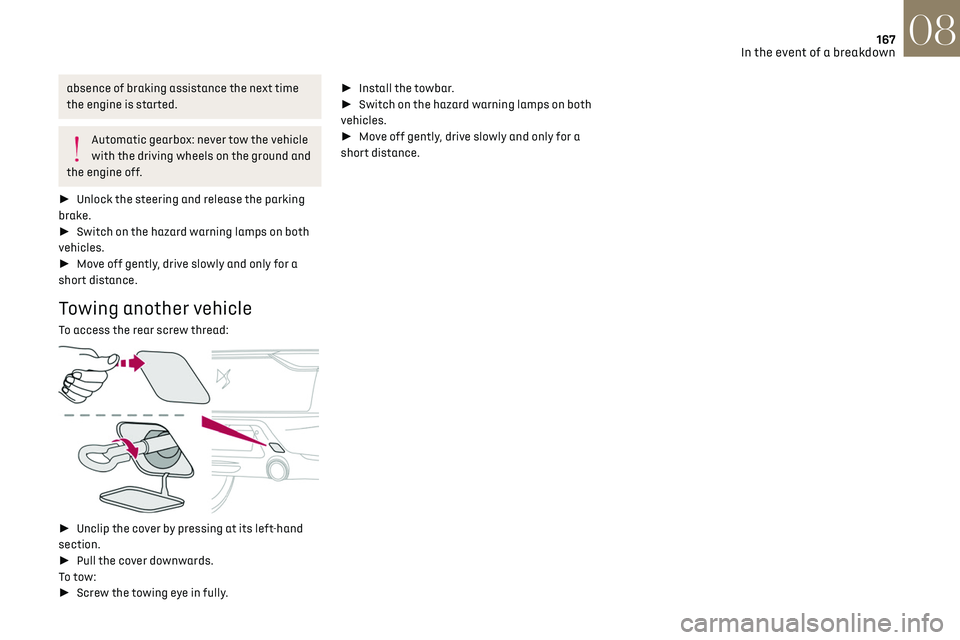
Towing another vehicle
To access the rear screw thread:
► Unclip the cover by pressing at its left-hand
section.
► Pull the cover downwards.
To tow:
► Screw the towing eye in fully. ►
Install the towbar.
► Switch on the hazard warning lamps on both
vehicles.
► Move off gently, drive slowly and only for a
short distance.
Page 175 of 244
173
Touch screen BLUETOOTH audio system10
Touch screen BLUETOOTH
audio system
Multimedia audio system -
Bluetooth
® telephone
The functions and settings described vary
according to the vehicle version and
configuration.
For safety reasons and because they
require sustained attention by the driver,
the following operations must be carried out
with the vehicle stationary and the ignition on:
–
Pairing the smartphone with the s
ystem in
Bluetooth mode.
–
U
sing the smartphone.
–
C
hanging the system settings and
configuration.
The system is protected in such a way
that it will only operate in the vehicle.
The Energy Economy Mode message is
displayed when the system is about to enter
the corresponding mode.
First steps
With the engine running, a press mutes the
sound.
With the ignition off, a press turns the system on.
Increase or decrease the volume using the
thumbwheel on the left-hand side.
To access the menus, press this button on
the touch screen.
Press the back arrow to go back a level.
To clean the screen, use a soft, non-
abrasive cloth (e.g. spectacles cloth) with
no additional product.
Do not use sharp objects on the screen.
Do not touch the screen with wet hands.
Certain information is displayed permanently in
the upper bar of the touch screen:
–
Air c
onditioning information (depending on
version).
–
Bluet
ooth connection.
–
Indic
ation of location data sharing.
Selection of the audio source:
–
FM/
AM/DAB radio stations (depending on
equipment).
– Telephone connected via Bluetooth and
Bluetooth multimedia broadcast (streaming).
–
USB memory stick.
–
Media pla
yer connected via the auxiliary socket
(depending on equipment).
In very hot conditions, the volume may be
limited to protect the system. It may go
into standby (screen and sound off) for at least
5 minutes.
The return to normal takes place when the
temperature in the passenger compartment
has dropped.
Steering mounted controls
Steering mounted controls -
Type 1
Radio:
Select the previous/next preset radio
station.
Select the previous/next item in a menu or a list.
Media:
Select the previous/next track.
Select the previous/next item in a menu or a list.
Radio:
Short press: display the list of radio
stations.
Long press: update the list.
Page 176 of 244
174
Touch screen BLUETOOTH audio system10
Telephone
Connect a mobile phone via Bluetooth®.
Driving
Activate, deactivate or configure certain
vehicle functions (depending on
equipment/version).
Media:
Short press: display the list of folders.
Long press: display the available sorting options.
Short press: change audio source (radio;
USB; AUX if equipment connected; CD;
streaming).
Long press: display the call log.
Short press during an incoming call: accept the
call.
Short press during a call in progress: end the call.
Confirm a selection.
Increase volume.
Decrease volume.
Mute/restore sound by simultaneously
pressing the increase and decrease
volume buttons.
Steering mounted controls -
Type 2
Voice commands:
This control is located on the steering
wheel or at the end of the lighting control stalk
(depending on equipment).
Short press, smartphone voice commands via the
system.
Increase volume.
Decrease volume.
Mute by pressing the volume increase and
decrease buttons simultaneously (depending on
equipment).
Restore the sound by pressing one of the two
volume buttons.
Change the multimedia source.
Short press: display the calls log.
Short press during an incoming call:
accept the call.
Long press during an incoming call: reject the call.
Short press during a call in progress: end the call.
Radio (rotate): previous/next preset
station.
Media (rotate): previous/next track, move in a list.
Short press: confirm a selection; if nothing
selected, access to presets.
Radio: display the list of stations.
Media: display the list of tracks.
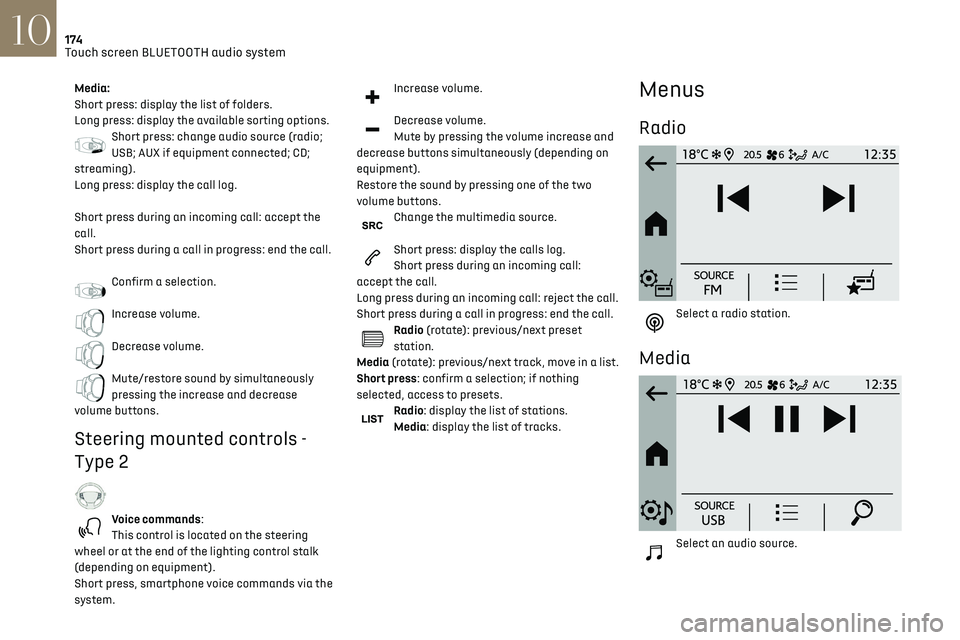
Menus
Radio
Select a radio station.
Media
Select an audio source.
Page 180 of 244
178Touch screen BLUETOOTH audio system10
Automatic reconnection
On return to the vehicle, if the last telephone
connected is present again, it is automatically
recognised and within about 30 seconds
of switching on the ignition, the pairing is
established automatically (Bluetooth activated).
Managing paired telephones
To connect or disconnect a paired telephone:Select the "Telephone" menu.
Press "Bluetooth" to display the list of
paired devices.
Press on the name of the telephone chosen in the
list to disconnect it.
Press again to connect it.
Deleting a telephone
Press the "Bluetooth" button.
Press "Manage connections".
In the displayed window select "Delete".
The list of paired devices is displayed.
Press on the name of the telephone to delete.
Receiving a call
An incoming call is announced by a ring and a
superimposed display in the screen.
To accept the call:
Make a short press on the steering
mounted TEL button.
To reject the call:
The audio settings are the same as the
audio settings for the radio. For more
information on the "Audio settings", refer to
the corresponding section.
Information and advice
The system supports USB mass storage devices,
BlackBerry® devices or Apple® players via the USB
ports. The adapter cable is not supplied.
Devices are managed using the audio system
controls.
Other devices, not recognised on connection,
must be connected to the auxiliary socket using
a jack cable (not supplied) or via Bluetooth
streaming, if compatible.
To protect the system, do not use a USB
hub.
The audio system will only play audio files with
".wav", ".wma", ".aac", ".mp3", ".mp4", ".m4a",
".flac", ".ogg" file extensions and with a bit rate
of between 32 Kbps and 320 Kbps (300 Kbps
maximum for ".flac" files).
It also supports VBR (Variable Bit Rate) mode.
All ".wma" files must be standard WMA 9 files.
The supported sampling rates are 11, 22, 44 and
48 KHz.
To avoid reading and display problems, we
recommend choosing file names less than 20
characters long that do not contain any special
characters (e.g. “ ? . ; ù).
Use only USB memory sticks in FAT or FAT32
format (File Allocation Table).
We recommend using the original USB
cable for the portable device.
Telephone
Pairing a Bluetooth® telephone
Up to 10 phones can be paired to the system.
Activate the Bluetooth function on the telephone
beforehand and ensure that it is "visible to all"
(telephone configuration).
To complete the pairing, whichever procedure is
used (from the telephone or from the system),
ensure that the code is the same in the system
and in the telephone.
The services available depend on the
network, the SIM card and the
compatibility of the Bluetooth devices used.
Check for services availability in the phone's
manual and with the operator.
The profiles compatible with the system
are: HFP, OPP, PBAP, DID, A2DP, AVRCP, SPP
and PAN.
Go to the Brand's website for more information
(compatibility, additional help, etc.).
Procedure from the telephone
Select the name of the system in the list of
devices detected.
In the system, accept the connection request
from the telephone.
Procedure from the system
Press the Home button to access the
menus.
Select the "Telephone" menu.
Press "Manage connections".
The list of telephones detected is displayed.
Select the name of the telephone in the list.
The system offers to connect the telephone with
two profiles:
–
as "
Telephone": hands-free kit, telephone only.
–
as "
Streaming": wireless playing of audio files
on the telephone.
The system cannot be connected to
multiple telephones with the same profile.
No more than 2 phones can be connected
simultaneously (1 per profile).
The Bluetooth profiles chosen on the
phone have priority over the profiles
selected on the system.
If the pairing procedure fails, it is recommended
that you deactivate and then reactivate the
Bluetooth function on the telephone.
Depending on the type of telephone, the
option is given to accept or not accept the
transfer of contacts and the call log.
Page 181 of 244
179Touch screen BLUETOOTH audio system10
Automatic reconnection
On return to the vehicle, if the last telephone
connected is present again, it is automatically
recognised and within about 30 seconds
of switching on the ignition, the pairing is
established automatically (Bluetooth activated).
Managing paired telephones
To connect or disconnect a paired telephone:Select the "Telephone" menu.
Press "Bluetooth" to display the list of
paired devices.
Press on the name of the telephone chosen in the
list to disconnect it.
Press again to connect it.
Deleting a telephone
Press the "Bluetooth" button.
Press "Manage connections".
In the displayed window select "Delete".
The list of paired devices is displayed.
Press on the name of the telephone to delete.
Receiving a call
An incoming call is announced by a ring and a
superimposed display in the screen.
To accept the call:
Make a short press on the steering
mounted TEL button.
To reject the call:
Make a long press
on the steering mounted TEL button.
Or
Press "End call" on the touch screen.
Making a call
Using the telephone is not recommended
while driving.
Parking the vehicle.
Make the call using the steering mounted
controls.
Calling a new number
Press "Telephone".
Press the "Keypad" button.
Enter the phone number using the digital keypad.
Press "OK" to start the call.
Calling a contact
Press the "Telephone" menu.
Or make a long press
on the steering mounted TEL button.
Press "Contacts".
Select the desired contact from the list offered.
Calling a recently used number
Press "Telephone".
Press "Calls".
Or
Make a long press
on the steering mounted TEL button.
Select the desired contact from the list offered.
A call in progress remains active in the
vehicle for 10 minutes after switching off
the ignition. After that, the system switches
off and the call automatically redirects to the
telephone.
It is always possible to make a call
directly from the telephone; as a safety
measure, first park the vehicle.
Settings
Adjusting the brightness
Press "Settings".
Select "Display".