fuel consumption CITROEN DS3 CROSSBACK 2020 User Guide
[x] Cancel search | Manufacturer: CITROEN, Model Year: 2020, Model line: DS3 CROSSBACK, Model: CITROEN DS3 CROSSBACK 2020Pages: 244, PDF Size: 7.7 MB
Page 146 of 244
144
Practical information07
reading and have an adverse effect on road
holding.
Fitting different tyres on the front and rear axles
can cause the ESC to mistime.
Shock absorbers
It is not easy for drivers to detect when
shock absorbers are worn. Nevertheless,
the shock absorbers have a major impact on
road-holding and braking performance.
For your safety and driving comfort, it is important
to have them regularly checked by a dealer or a
qualified workshop.
Timing and accessory kits
Timing and accessory kits are used from
the time the engine is started until it is
switched off. It is normal for them to wear over
time.
A faulty timing or accessory kit can damage
the engine, rendering it unusable. Observe the
recommended replacement frequency, stated in
distance travelled or time elapsed, whichever is
reached first.
AdBlue® (BlueHDi)
To respect the environment and ensure
compliance with the Euro 6 standard, without
adversely affecting the performance or fuel
consumption of Diesel engines, the Manufacturer
has taken the decision to equip its vehicles with a
system that associates SCR (Selective Catalytic
Reduction) with a Diesel particle filter (DPF) for
the treatment of exhaust gases.
SCR System
Using a liquid called AdBlue® that contains
urea, a catalytic converter turns up to 85% of
the nitrogen oxides (NOx) into nitrogen and
water, which are harmless to health and the
environment.
The AdBlue® is contained in a special tank
holding about 15 litres.
Its capacity allows a driving range of
approximately 5,600 miles (9,000 km), which may
vary considerably depending on your driving style.
An alert system is triggered once the reserve level
is reached: it is then possible to drive for a further
1,500 miles (2,400 km) before the tank is empty
and the vehicle blocked.
For more information on the Warning and
indicator lamps and the associated alerts,
or the Indicators, please refer to the
corresponding sections.
Once the AdBlue® tank is empty, a system
required by legislation prevents starting
of the engine.
If the SCR system is faulty, the level of
emissions from the vehicle will no longer meet
the Euro 6 standard: the vehicle becomes
polluting.
In the event of a confirmed SCR system
malfunction, it is essential to visit a dealer or a
qualified workshop. After 680 miles (1,100 km),
a device is automatically activated to prevent
the engine from starting.
In both cases, a range indicator indicates
the distance that can be travelled before the
vehicle is stopped.
Freezing of the AdBlue®
AdBlue® freezes at temperatures below
around -11°C.
The SCR system includes a heater for the
AdBlue
® tank, allowing you to continue driving
in very cold conditions.
Supply of AdBlue®
It is recommended that the AdBlue® be topped up
as soon as the first alert is issued indicating that
the reserve level has been reached.
For the correct operation of the SCR
system:
–
U
se only AdBlue
® fluid that meets the ISO
22241 standard.
–
Ne
ver transfer AdBlue
® to another container
as it would lose its purity.
–
Ne
ver dilute AdBlue
® with water.
It is possible to obtain AdBlue
® from a dealer or a
qualified workshop as well as at service stations
equipped with AdBlue
® pumps specially designed
for passenger vehicles.
Recommendations on storage
AdBlue® freezes at about -11°C and deteriorates
above +25°C. Containers should be stored in a
cool area and protected from direct sunlight.
Under these conditions, the fluid can be kept for
at least a year.
If the fluid has frozen, it can be used once it has
completely thawed out at room temperature.
Never store AdBlue
® containers in your
vehicle.
Precautions for use
AdBlue® is a urea-based solution. This fluid is non-
flammable, colourless and odourless (when kept
in a cool place).
In the event of contact with the skin, wash the
affected area with soap and running water. In the
event of contact with the eyes, immediately rinse
the eyes with large amounts of water or with an
eye wash solution for at least 15 minutes. Seek
medical attention if you feel a persistent burning
sensation or irritation.
If swallowed, immediately wash out the mouth
with clean water and then drink plenty of water.
In certain conditions (high temperature, for
example), the risk of release of ammonia cannot
be excluded: do not inhale the fluid. Ammonia
vapours have an irritant effect on mucous
membranes (eyes, nose and throat).
Store AdBlue
® out of the reach of children,
in its original container.
Page 182 of 244
180Touch screen BLUETOOTH audio system10
► Press the "Radio Settings" button then select
"Update list". The radio reception is cut off while
searching for available stations (approximately
30 seconds).
Media
Playback of my USB memory stick starts only
after a very long wait (around 2 to 3 minutes).
Some files supplied with the memory stick may
greatly slow down access to reading the memory
stick (multiplication by 10 of the cataloguing
time).
► Delete the files supplied with the memory
stick and limit the number of sub-folders in the
file structure on the memory stick.
Some characters in information about the
currently playing media are not displayed
correctly.
The audio system is unable to process certain
types of character.
► Use standard characters to name tracks and
folders.
Playback of streaming files does not start.
The connected device does not automatically
launch playback.
► Start playback from the device.
Track names and playing times are not displayed
on the audio streaming screen.
The Bluetooth profile does not allow the transfer
of this information.
Telephone
I cannot connect my Bluetooth telephone.
Press the buttons to adjust the
brightness of the screen and/or of
the instrument panel (depending on version).
Modifying system settings
Press "Settings".
Press "System".
Press "Privacy" to access the privacy
settings.
Select "Units" to change the units of
distance, fuel consumption and
temperature.
Press "Factory settings" to return to the
initial settings.
Press "System Info" to check the system
version.
Privacy settings
Three data privacy options are available:"No data sharing (data, vehicle position)"
"Only data sharing"
“Data and vehicle position sharing"
When data and vehicle position sharing
are enabled, this symbol is displayed in the
upper bar of the touch screen.
Selecting the language
Press "Settings".
Select "Languages" to change the
language.
Set date and time
Press "Settings".
Press "Date/Time".
Setting the date:
Press the arrows to set the day, month and
year.
Setting the time:
Press these buttons to set hours and
minutes.
Select or deselect the 24h format.
In 12h format, choose "AM" or "PM".
The system does not automatically
manage the change between winter and
summer time.
Date format:
Select the display format of the date.
Frequently asked
questions
The following information groups together the
answers to the most frequently asked questions
concerning the system.
Radio
The reception quality of the tuned radio station
gradually deteriorates or the station presets are
not working (no sound, 87.5 MHz is displayed,
etc.).
The vehicle is too far from the selected station’s
transmitter, or no transmitter is present in the
geographical area.
► Activate the "RDS" function in the upper bar
to enable the system to check whether there is
a more powerful transmitter in the geographical
area.
The environment (hills, buildings, tunnels,
basement car parks, etc.) is blocking reception,
including in RDS mode.
This is a perfectly normal phenomenon, and is not
indicative of an audio system malfunction.
The aerial is missing or has been damaged
(for example while entering a car wash or
underground car park).
► Have the aerial checked by a dealer.
I cannot find some radio stations in the list of
received stations.
The name of the radio station changes.
The station is no longer received or its name has
changed in the list.
Some radio stations send other information in
place of their name (the title of the song for
example).
The system interprets these details as the station
name.
Page 194 of 244
192
DS CONNECT RADIO11
Press "Ring volume" to display the volume
bar.
Press the arrows or move the slider to set
the ring volume.
Settings
Configuring profiles
Press Settings to display the main page.
Press "Profiles".
Select "Profile 1", "Profile 2", "Profile 3” or
"Common profile".
Press this button to enter a name for the
profile using the virtual keypad.
Press "OK" to save.
Press the back arrow to confirm.
Press this button to activate the profile.
Press the back arrow again to confirm.
Press this button to reset the selected
profile.
Adjusting the brightness
Press Settings to display the main page.
Press Brightness.
Move the slider to adjust the brightness of
the screen and/or the instrument panel
(depending on version).
Press in the shaded area to confirm.
Modifying system settings
Press Settings to display the main page.
Press "Configuration" to access the
secondary page.
Press "System configuration".
Press the "Units" tab to change the units of
distance, fuel consumption and temperature.
Press the "Factory settings" tab to restore the
initial settings.
Returning the system to factory settings
activates the English language by default
(depending on version).
Press the "System info" tab to display the
versions of the various modules installed in the
system.
Press the "Privacy" tab,
or
Press Settings to display the main page.
Press "Privacy" to activate or deactivate
the private data mode.
Activate or deactivate:
–
"No sharing (data, vehicle position)". –
"Only data sharing”
– "Data and vehicle position sharing"
Press the back arrow to confirm.
Press Settings to display the main page.
Press "Configuration" to access the
secondary page.
Press "Screen configuration".
Press "Brightness".
Move the slider to adjust the brightness of
the screen and/or the instrument panel
(depending on version).
Press the back arrow to confirm.
Press "Animation".
Activate or deactivate: “Automatic
scrolling”.
Select "Animated transitions".
Press the back arrow to confirm.
Selecting the language
Press Settings to display the main page.
Press "Configuration" to access the
secondary page.
Select "Language" to change the
language.
Press the back arrow to confirm.
Setting the time
Press Settings to display the main page.
Press "Configuration" to access the
secondary page.
Press "Date and time".
Select "Time".
Press this button to set the time using the
virtual keypad.
Press "OK" to save the time.
Press this button to set the time zone.
Select the display format for the time
(12h/24h).
Activate or deactivate summer time (+1
hour).
Activate or deactivate GPS synchronisation
(UTC).
Press the back arrow to save the settings.
The system may not automatically
manage the change between winter and
summer time (depending on the country of
sale).
Setting the date
Press Settings to display the main page.
Page 217 of 244
215DS CONNECT NAV12
Treble sound settings are different and
independent for each audio source.
Activate or deactivate "Loudness".
The "Position” settings (All passengers, Driver
and Front only) are common to all sources.
Activate or deactivate "Touch tones", "Volume
linked to speed" and "Auxiliary input".
Onboard audio: Arkamys Sound Staging©
optimises the sound distribution inside
the passenger compartment.
Configuring profiles
Press Settings to display the main page.
Press the "OPTIONS" button to access the
secondary page.
Select "Setting of the profiles".
Select "Profile 1", "Profile 2", "Profile 3” or
"Common profile".
Press this button to enter a name for the
profile using the virtual keypad.
Press "OK" to confirm.
Press this button to add a photograph to
the profile.
Insert a USB memory stick containing the
photograph in the USB port.
Select the photograph.
Press "OK" to accept the transfer of the
photograph.
Press "OK" again to save the settings.
The location for the photograph is square;
the system reshapes the original
photograph if in another format.
Press this button to reset the selected
profile.
Resetting the selected profile activates
the English language by default.
Select a "Profile" (1 or 2 or 3) to link "Audio
settings" with it.
Select "Audio settings".
Then select "Ambience", "Position"; "Sound",
"Voice" or "Ringtone".
Press "OK" to save the selected profile’s
settings.
Modifying system settings
Press Settings to display the main page.
Press the "OPTIONS" button to access the
secondary page.
Select "Screen configuration".
Select "Animation".
Activate or deactivate:Automatic scrolling
Select "Brightness".
Move the slider to adjust the brightness of
the screen and/or the instrument panel.
Press Settings to display the main page.
Press the "OPTIONS" button to access the
secondary page.
Select "System settings".
Select "Units" to change the units of distance,
fuel consumption and temperature.
Select "Factory settings" to restore the initial
settings.
Resetting the system to "Factory
settings" activates English and degrees
Fahrenheit and deactivates summer time.
Select "System info" to display the versions of the
various modules installed in the system.
Selecting the language
Press Settings to display the main page.
Press the "OPTIONS" button to access the
secondary page.
Select "Languages" to change the
language.
Setting the date
Press Settings to display the main page.
Press the "OPTIONS" button to access the
secondary page.
Page 223 of 244

221
Alphabetical index
Connection, Bluetooth 178, 190, 208, 212–213
Connection, MirrorLink
189–190, 207
Connection, Wi-Fi network
208
Connectivity
206
Consumption figures
25
Container, AdBlue®
145
Control, emergency boot release
34
Control, emergency door
31–32
Control, heated seats
40
Controls, steering mounted
86–89
Control stalk, lighting
54–55
Control stalk, wipers
60–62
Control unit
132–133
Courtesy lamp, front
52
Courtesy lamps
51–52
Cover, load space
53
Cruise control
98, 100–102
Cruise control, adaptive
103
Cruise control by speed limit recognition
98
Cruise control, dynamic with Stop function
98
D
DAB (Digital Audio Broadcasting) -
Digital radio
176, 187–188, 210
Date (setting)
193, 215
Daytime running lamps
55, 156
Deactivating the passenger airbag
70, 74
Deadlocking
28, 30
Defrosting
47
Demisting
47
Demisting, rear
47
Demisting, rear screen
47
Dials and gauges
9
Dimensions
172
Dipstick 141
Direction indicators
55, 156–158
Display, head-up
10–11
Display screen, instrument panel
9, 91
Doors
33–34
Driving
80–81
Driving aids camera (warnings)
95
Driving aids (recommendations)
94
Driving economically
7
Driving modes
90
DS Park Pilot
124
Dynamic stability control (DSC)
66–67
E
EBFD 66
Eco-driving (advice)
7
ECO mode
90
Economy mode
138
Electric motor
5, 25, 130, 171
Electronic brake force distribution (EBFD)
66
Emergency braking assistance (EBA)
66
Emergency call
64
Emergency switching off
83
Emergency warning lamps
63, 148
Emissions control system, SCR
19, 144
Energy economy mode
138
Energy flows
25
Energy recovery
19, 90
Engine
144
Engine compartment
140
Engine, Diesel
129, 140, 148, 170
Engine, petrol
140, 169
Engines
168–170
Environment
7, 33, 80
ESC (electronic stability control) 66
Expanded traffic sign recognition
98–99
F
Filling the AdBlue® tank 142, 145
Filling the fuel tank
129–130
Filter, air
142
Filter, oil
143
Filter, particle
143
Filter, passenger compartment
43, 142
Fitting a wheel
153–154
Fitting roof bars
137–138
Fittings, boot
52
Fittings, interior
48–49
Flap, charging
25, 131, 134–136
Flap, fuel filler
129–130
Flashing indicators
55, 156
Fluid, brake
141
Fluid, engine coolant
141
Foglamp, rear
54, 158
Folding the rear seats
42–43
Frequency (radio)
209–210
Fuel
7, 129
Fuel consumption
7
Fuel tank
129–130
Fusebox, dashboard
159
Fusebox, engine compartment
159, 161
Fuses
159–161
Fuses, dashboard
160
Fuses, engine compartment
161
Page 224 of 244
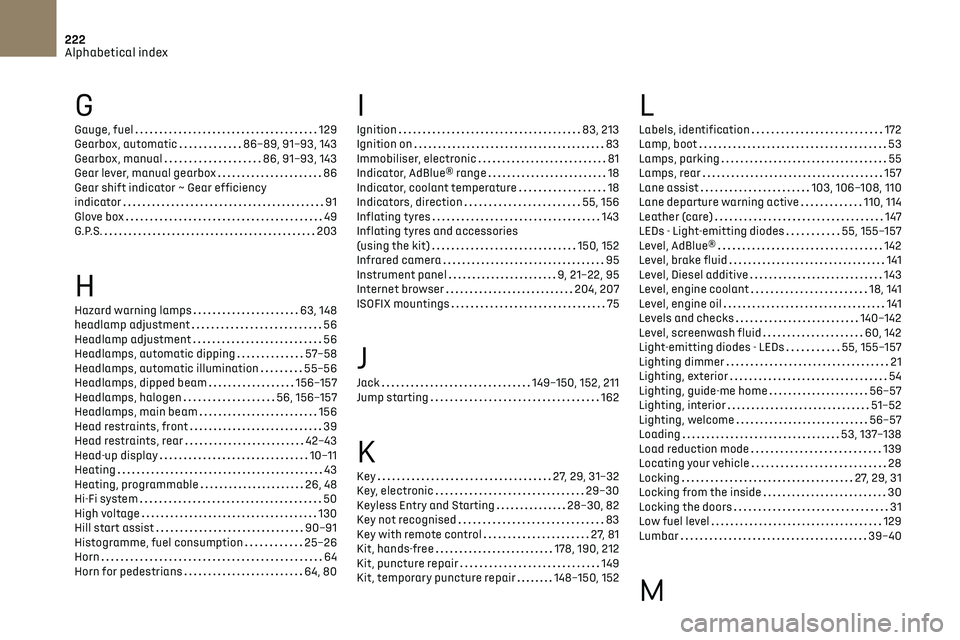
222
Alphabetical index
G
Gauge, fuel 129
Gearbox, automatic
86–89, 91–93, 143
Gearbox, manual
86, 91–93, 143
Gear lever, manual gearbox
86
Gear shift indicator ~ Gear efficiency
indicator
91
Glove box
49
G.P.S.
203
H
Hazard warning lamps 63, 148
headlamp adjustment
56
Headlamp adjustment
56
Headlamps, automatic dipping
57–58
Headlamps, automatic illumination
55–56
Headlamps, dipped beam
156–157
Headlamps, halogen
56, 156–157
Headlamps, main beam
156
Head restraints, front
39
Head restraints, rear
42–43
Head-up display
10–11
Heating
43
Heating, programmable
26, 48
Hi-Fi system
50
High voltage
130
Hill start assist
90–91
Histogramme, fuel consumption
25–26
Horn
64
Horn for pedestrians
64, 80
I
Ignition 83, 213
Ignition on
83
Immobiliser, electronic
81
Indicator, AdBlue® range
18
Indicator, coolant temperature
18
Indicators, direction
55, 156
Inflating tyres
143
Inflating tyres and accessories
(using the kit)
150, 152
Infrared camera
95
Instrument panel
9, 21–22, 95
Internet browser
204, 207
ISOFIX mountings
75
J
Jack 149–150, 152, 211
Jump starting
162
K
Key 27, 29, 31–32
Key, electronic
29–30
Keyless Entry and Starting
28–30, 82
Key not recognised
83
Key with remote control
27, 81
Kit, hands-free
178, 190, 212
Kit, puncture repair
149
Kit, temporary puncture repair
148–150, 152
L
Labels, identification 172
Lamp, boot
53
Lamps, parking
55
Lamps, rear
157
Lane assist
103, 106–108, 110
Lane departure warning active
110, 114
Leather (care)
147
LEDs - Light-emitting diodes
55, 155–157
Level, AdBlue®
142
Level, brake fluid
141
Level, Diesel additive
143
Level, engine coolant
18, 141
Level, engine oil
141
Levels and checks
140–142
Level, screenwash fluid
60, 142
Light-emitting diodes - LEDs
55, 155–157
Lighting dimmer
21
Lighting, exterior
54
Lighting, guide-me home
56–57
Lighting, interior
51–52
Lighting, welcome
56–57
Loading
53, 137–138
Load reduction mode
139
Locating your vehicle
28
Locking
27, 29, 31
Locking from the inside
30
Locking the doors
31
Low fuel level
129
Lumbar
39–40
M
Page 225 of 244

223
Alphabetical index
Maintenance (advice) 131, 146
Maintenance, routine
95, 142
Manoeuvring aids (recommendations)
94
Map reading lamps
51–52
Markings, identification
172
Massage function
39–40
Mat
51, 95
Memorising a speed
102
Menu
189
Menu, main
24
Menus (audio)
174–175, 184–185, 196–197
Menu short cuts
24
Messages
214
Messages, quick
214
Mirror, rear view
41
Mirrors, door
41, 47, 113
Mirror, vanity
49
Misfuel prevention
130
Motor, electric
5, 82, 130, 171
Mountings, ISOFIX
75
N
Navigation 202–204
Navigation, connected
204–206
Net, high load retaining
53
O
Obstacle detection 117
Oil change
141
Oil consumption
141
OIl, engine
141
On-board tools 53, 148–150
Opening the bonnet
139
Opening the boot
29, 34
Opening the doors
29, 33–34
Opening the windows
27
P
Pads, brake 143
Paint
147, 172
Paint colour code
172
Parcel shelf, rear
53
Park Assist
121
Parking brake
143
Parking brake, electric
83–85
Parking sensors, audible and visual
117
Parking sensors, front
118
Parking sensors, rear
117
Personalisation
9–10
Plates, identification
172
Player, Apple®
177, 188
Player, Apple®
211
Player, USB
177, 187, 210
Port, USB
49, 177, 187, 206, 210
Power
19
Power indicator
19
Pressures, tyres
143, 152
Pre-tensioning seat belts
69
Priming the fuel system
148
Profiles
192, 215
Protecting children
70, 72–76
Puncture
150, 152
R
Radar (warnings) 94
Radio
175–176, 185, 187, 209
Radio, digital (Digital Audio
Broadcasting - DAB)
176, 187–188, 210
Range, AdBlue
18, 142
RDS
176, 186, 209
Rear screen, demisting
47
Recharging the battery
163–164
Recirculation, air
47
Recovery
165–167
Reduction of electrical load
139
Regeneration of the particle filter
143
Reinitialisation of the under-inflation
detection system
94
Reinitialising the remote control
33
Reminder, lighting on
54
Remote control
27, 29–31
Removing a wheel
153–154
Removing the mat
51
Replacing bulbs
155–158
Replacing fuses
159–161
Replacing the air filter
142
Replacing the oil filter
143
Replacing the passenger compartment
filter
142
Reservoir, screenwash
142
Reset trip
22
Rev counter
9
Reversing camera
95, 118–119
Reversing lamp
158
Roof bars
137–138
Running out of fuel (Diesel)
148