park assist CITROEN DS3 CROSSBACK 2020 User Guide
[x] Cancel search | Manufacturer: CITROEN, Model Year: 2020, Model line: DS3 CROSSBACK, Model: CITROEN DS3 CROSSBACK 2020Pages: 244, PDF Size: 7.7 MB
Page 119 of 244

117
Driving06
Operation
The system operates subject to the following
conditions:
–
The v
ehicle's speed does not exceed 37 mph (60
km/h) when a pedestrian is detected.
–
The v
ehicle's speed does not exceed 50 mph
(80 km/h) when a stationary vehicle or a cyclist
is detected.
–
The v
ehicle's speed is between 6 mph and
53 mph (10 km/h and 85 km/h) (versions with
camera only) or 87 mph (140 km/h) (versions
with camera and radar) when a moving vehicle is
detected.
This warning lamp immediately flashes
(for approximately 10 seconds) when the
function acts on the vehicle’s braking.
With an automatic gearbox or drive selector, in
the event of automatic emergency braking until
the vehicle comes to a complete stop, keep the
brake pedal pressed down to prevent the vehicle
from moving off again.
With a manual gearbox, in the event of automatic
emergency braking until the vehicle comes to a
complete stop, the engine may stall.
The driver can maintain control of the
vehicle at any time by firmly turning the
steering wheel and/or firmly depressing the
accelerator pedal.
The brake pedal may vibrate slightly while
the function is operating.
If the vehicle comes to a complete stop,
automatic braking is maintained for 1 to 2
seconds.
Malfunction
In the event of a fault with the system, you
are alerted by the fixed illumination of this
warning lamp, accompanied by the display of a
message and an audible signal.
Contact a dealer or a qualified workshop to have
the system checked.
If these warning lamps come on
after the engine has been switched
off and then restarted, contact a dealer or a
qualified workshop to have the system checked.
Parking sensors
Refer to the General recommendations on the use
of driving and manoeuvring aids.
Using sensors located in the bumper, this
system signals the proximity of obstacles (e.g. pedestrian, vehicle, tree, barrier) present in
their field of detection.
Rear parking sensors
The system is switched on by engaging reverse
gear, as confirmed by an audible signal.
The system is switched off when you come out of
reverse gear.
Audible assistance
The system signals the presence of obstacles
within the sensors’ detection zone.
Depending on version, in the example shown, only
the obstacles present in the shaded area will be
signalled by the audible assistance.
The proximity information is given by an
intermittent audible signal, the frequency of
Page 120 of 244

118
Driving06
which increases as the vehicle approaches the
obstacle.
When the distance between the vehicle and
the obstacle becomes less than about thirty
centimetres, the audible signal becomes
continuous.
The sound emitted by the speaker (right or
left) indicates the side on which the obstacle is
located.
Adjusting the audible signalWith DS CONNECT RADIO or DS
CONNECT NAV, pressing this
button opens the window for adjusting the
volume of the audible signal.
Visual assistance
This supplements the audible signal by displaying
bars on the screen that represent the distance
between the obstacle and the vehicle (white:
more distant, orange: close, red: very close).
When the obstacle is very close, the "Danger"
symbol is displayed on the screen.
Front parking sensors
Supplementing the rear parking sensors, the front
parking sensors are triggered when an obstacle
is detected in front and the speed of the vehicle is
still below 6 mph (10 km/h).
Front parking sensor operation is suspended if
the vehicle stops for more than three seconds in
forward gear, if an obstacle is no longer detected
or the vehicle speed exceeds 6 mph (10 km/h).
The sound emitted by the speaker (front
or rear) locates the obstacle relative to
the vehicle, in front or behind it.
Deactivation / Activation
It is set via the Driving / Vehicle touch
screen menu.
The state of the system stays in the memory when
the ignition is switched off.
The rear parking sensors system will be
deactivated automatically if a trailer or
bicycle carrier is connected to a towing device
installed in accordance with the
manufacturer's recommendations.
In this case, the outline of a trailer is displayed
at the rear of the image of the vehicle.
The parking sensors are deactivated while the
Park Assist and DS PARK PILOT functions are
measuring a space.
For more information on the Park Assist or the DS
PARK PILOT, refer to the corresponding section.
When the vehicle is started, the visual and
audible aids will be available after the
touch screen has started up.
Operating limits
If the boot is heavily loaded, the vehicle may tilt,
affecting distance measurements.
Malfunction
In the event of a malfunction when shifting
to reverse, this warning lamp comes on on
the instrument panel, accompanied by the display
of a message and an audible signal (short beep).
Contact a dealer or a qualified workshop to have
the system checked.
Reversing camera
Refer to the General recommendations on the use
of driving and manoeuvring aids.
As soon as reverse gear is engaged with the
engine running, this system displays views of your
Page 122 of 244

120
Driving06
AUTO mode
This mode is activated by default.
Using sensors in the rear bumper, the automatic
view changes from the rear view (standard) to
the view from above (zoom) as an obstacle is
approached at the level of the red line (less than
30 cm) during a manoeuvre.
Standard view
The area behind the vehicle is displayed on the
screen.The blue lines 1 represent the width of your
vehicle, with the mirrors unfolded; their direction
changes according to the position of the steering
wheel.
The red line 2 represents a distance of 30 cm
from the rear bumper; the two blue lines 3 and 4
represent 1 m and 2 m, respectively.
This view is available with AUTO mode or in the
view selection menu.
Zoom view
The camera records the vehicle's surroundings
during the manoeuvre in order to create a
view from above the rear of the vehicle in its
near surroundings, allowing the vehicle to be
manoeuvred around nearby obstacles.
This view is available with AUTO mode or in the
view selection menu.
Obstacles may appear further away than
they actually are.
It is important to monitor the sides of the
vehicle during the manoeuvre, using the
mirrors.
Parking sensors also provide additional
information about the area around the vehicle.
180° view
The 180° view facilitates reversing out of a
parking space, making it possible to see the
approach of vehicles, pedestrians and cyclists.
This view is not recommended for carrying out a
complete manoeuvre.
It features 3 areas: left A, centre B and right C.
This view is only available via the view selection
menu.
Park Assist
Refer to the General recommendations on the use
of driving and manoeuvring aids.
This system provides active parking assistance
for vehicles fitted with a manual gearbox: it
detects a parking space and then steers in
the appropriate direction to park in this space
while the driver controls the driving direction,
engagement of gears, acceleration and braking.
To assist the driver in monitoring the correct
manoeuvring operation, the system automatically
triggers the display of Reversing camera and the
activation of the parking sensors.
The system performs the measurements of
available parking spaces and calculations of
distances to obstacles using ultrasonic sensors
built into the front and rear bumpers of the
vehicle.
The system assists with the following
manoeuvres:
Page 123 of 244

121
Driving06
This view is only available via the view selection
menu.
Park Assist
Refer to the General recommendations on the use
of driving and manoeuvring aids.
This system provides active parking assistance
for vehicles fitted with a manual gearbox: it
detects a parking space and then steers in
the appropriate direction to park in this space
while the driver controls the driving direction,
engagement of gears, acceleration and braking.
To assist the driver in monitoring the correct
manoeuvring operation, the system automatically
triggers the display of Reversing camera and the
activation of the parking sensors.
The system performs the measurements of
available parking spaces and calculations of
distances to obstacles using ultrasonic sensors
built into the front and rear bumpers of the
vehicle.
The system assists with the following
manoeuvres:
A. Entering a "parallel" parking space
B. Leaving a "parallel" parking space
C. Entering a "bay" parking space
Operation
► When approaching a parking area, reduce the
speed of your vehicle to 19 mph (30 km/h) or less.
Activating the function
The function is activated in the Vehicle /
Driving touch screen menu.
Select "Park Assist".
Activating the function deactivates the
Blind Spot Detection.
You can deactivate the function at any
time until the parking space entry or exit
manoeuvre begins, by pressing the arrow
located in the top left-hand corner of the
display page.
Selecting the type of manoeuvre
A manoeuvre selection page is displayed on the
touch screen: by default, the "Entry" page if the
vehicle has been running since the ignition was
switched on, otherwise, the "Exit" page.
► Select the type and side of the manoeuvre to
activate the parking space search.
The selected manoeuvre can be changed at any
time, even while searching for an available space.
This indicator lamp comes on to confirm
the selection.
Parking space search
► You should drive at a distance of between
0.50 m and 1.50 m from the row of parked
vehicles, without ever exceeding 19 mph
(30 km/h), until the system finds an available
space.
The parking space search stops over this limit.
The function automatically deactivates once the
vehicle speed exceeds 31 mph (50 km/h).
Page 126 of 244

124
Driving06
Malfunctions
When the function is not activated, the
temporary flashing of this indicator lamp
and an audible signal indicate a system
malfunction.
If the malfunction occurs while the system is in
use, the indicator lamp goes off.
If the parking sensor malfunction occurs
during use, indicated by this warning lamp
coming on, it causes the function to deactivate.
In the event of a malfunction, have the system
checked by a dealer or a qualified workshop.
In the event of a power steering
malfunction, this warning lamp is
displayed on the instrument panel, accompanied
by a warning message.
You must stop as soon as it is safe to do so.
Contact a dealer or a qualified workshop.
DS PARK PILOT
Refer to the General recommendations on the use
of driving and manoeuvring aids.
This system provides active parking assistance
for vehicles fitted with the EAT8 automatic
gearbox or a gear selector: it detects a free
"parallel" or "bay" parking space and then
operates the vehicle, parking it with no need for
driver intervention. It also allows you to drive out
of a "parallel parking" space automatically.
The system controls the steering, direction,
acceleration and braking. The system measures
the available parking spaces and calculates the distances to obstacles using 12 ultrasonic
sensors built into the front and rear bumpers of
the vehicle.
To help the driver monitor the successful
completion of the manoeuvre, the system
automatically displays the Reversing camera and
activates the parking sensors.
To initiate parking assistance when approaching
a parking area:
►
Reduce the speed of the vehicle to a maximum
of 19 mph (30 km/h).
► Press the button on the gear selector or, on
the touch screen, select Driving / Vehicle > DS
PARK PILOT.
Activating the system deactivates Blind
Spot Detection.
Sequence
Once the system is activated, the following steps
will be performed successively:
–
Select the type o
f manoeuvre via the touch
screen.
–
Search for an a
vailable space.
–
Prepare for the manoeuvre
.
–
Perform the manoeuvre
.
–
Finalise the manoeuvre
.
It is possible to deactivate the system at
any time until the start of the manoeuvre,
by pressing the red arrow in the upper left
corner of the screen.
DS PARK PILOT is not always able to react
automatically and appropriately due to
the performance limits inherent to the system.
The manoeuvre remains the responsibility
of the driver, who must not leave the driving
position and must never try to lock the system
control button.
The driver's seat belt must remain fastened
during the manoeuvre.
Choice of the type of
manoeuvre and search for
space
Depending on whether the vehicle has been
driven or not since the ignition was switched on,
the function proposes the entry to or exit from a
parking space on the touch screen.
► Select the type and side of the manoeuvre to
activate the parking space search.
Illumination of this lamp confirms
activation.
It is possible to change the type of manoeuvre
at any time, including during the available space
search phase.
► Drive at a distance of 0.50 to 1.50 m from the
row of parked vehicles, not exceeding 19 mph
(30 km/h), until the system finds an available
space (indicated by OK on the display and an
audible signal).
For "parallel" parking, the space must at
least equal to the length of your vehicle
plus 1 m.
For "bay" parking, the space must at least
equal to the width of your vehicle plus 0.70 m.
Preparing for the manoeuvre
► Move very slowly until the request to stop
the vehicle and the "STOP" sign are displayed,
accompanied by an audible signal.
Page 154 of 244

152In the event of a breakdown08
Checking / adjusting tyre
pressures
The compressor can be used, without injecting
sealant, to check and, if necessary, adjust the
tyre pressures.
► Remove the valve cap from the tyre and keep it
in a clean place.
► Uncoil the pipe stowed under the compressor.
► Screw the pipe onto the valve and tighten
firmly.
► Check that the compressor switch is in
position "O".
► Fully uncoil the electric cable stowed under
the compressor.
► Connect the compressor's electric plug to the
vehicle's 12 V socket.
► Switch on the ignition.
The tyre inflation pressures are given on
this label.
► Start the compressor by placing the switch
at position "I" and adjust the pressure to the
value shown on the vehicle's tyre pressure label.
To deflate: press the black button located on the
compressor pipe, near the valve connection.
If after 7 minutes the pressure of 2 bar is
not reached, the tyre is damaged; contact
a dealer or a qualified workshop for
assistance.
► Once the correct pressure is reached, put the
switch in position "O".
► Remove the kit and stow it.
Should the pressure of one or more tyres
be adjusted, it is necessary to reinitialise
the under-inflation detection system.
For more information on Tyre under-inflation
detection, refer to the corresponding section.
Spare wheel
Scan the QR Code on page 3 to view
explanatory videos.
For more information on the Tool kit, refer
to the corresponding section.
Access to the spare wheel
The spare wheel is stored under the boot carpet.
The spare wheel is a ‘space-saver’ wheel.
Removing the spare wheel
► Slacken the central nut.
► Remove the fastening device (nut and bolt).
► Lift the spare wheel towards you from the rear.
► Take the wheel out of the boot.
Putting the spare wheel back in place
The punctured wheel cannot be placed in
the boot under the floor.
► Put the spare wheel back in place in its
housing.
► Slacken the nut on the bolt by a few turns.
► Position the fastening device (nut and bolt) in
the middle of the wheel.
► Tighten the central nut sufficiently to retain
the wheel correctly.
► Depending on version, put the tool box back
in place in the middle of the wheel and clip it in
place.
Removing a wheel
Parking the vehicle
Immobilise the vehicle where it does not
obstruct traffic: the ground must be level,
stable and non-slippery.
With a manual gearbox, engage first gear
to lock the wheels, apply the parking brake,
unless it is programmed to be in automatic
mode, and switch off the ignition.
With an automatic gearbox, select mode P
to lock the wheels, apply the parking brake,
unless it is programmed to be in automatic
mode, and switch off the ignition.
Page 162 of 244

160In the event of a breakdown08
The Manufacturer accepts no
responsibility for the cost incurred in
repairing your vehicle or for rectifying
malfunctions resulting from the installation of
accessories not supplied and not
recommended and not installed in accordance
with specifications, in particular when the
combined power consumption of all of the
additional equipment connected exceeds 10
milliamperes.
Fuses in the dashboard
The fusebox is located in the lower dashboard
(left-hand side).
To access the fuses, follow the same procedure
as that described for accessing the tool kit for
changing fuses.
For more information on Access to the tool kit,
refer to the corresponding section.
Fuse tables
Box 1
Fuse N° Rating (A) Functions
F1 10AElectrochrome
interior rear view
mirror, radar,
electric power
steering.
F5 20 ARear
screenwash
pump.
F6 20 AFront
screenwash
pump.
F12 7.5 A Diagnostic
socket.
Fuse N° Rating (A) Functions
F14 5 AEmergency and
assistance calls,
alarm control
unit.
F19 3 ATrailer interface
unit, top of
steering column.
F24 5 AHi-Fi amplifier,
parking sensors,
camera, touch
screen.
Box 2
Fuse N° Rating (A) Functions
F1 40 AHeated rear
screen.
F2 10AHeated door
mirrors.
F3 30 AFront electric
windows.
Fuse N° Rating (A) Functions
F5 30 ARear electric
windows.
F6 10 AFolding door
mirrors.
F7 10 AFolding door
mirrors.
F8 20 ALeft-hand side
retractable
handles.
F9 25 AHi-Fi amplifier.
F10 20 ARight-hand side
retractable
handles.
Engine compartment fuses
The fusebox is placed in the engine compartment
near the battery.
Page 165 of 244
163In the event of a breakdown08
Switch off all electricity-consuming equipment
on both vehicles (audio system, wipers,
lighting, etc.).
Make sure that the jump leads are well away
from the engine’s moving parts (fan, belt, etc.).
Do not disconnect the (+) terminal while the
engine is running.
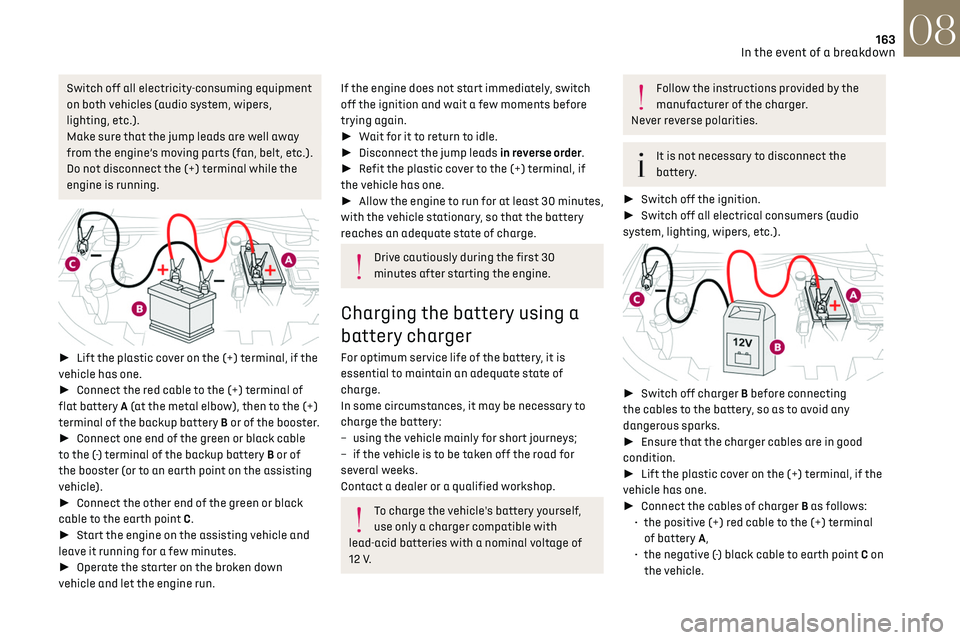
► Lift the plastic cover on the (+) terminal, if the
vehicle has one.
► Connect the red cable to the (+) terminal of
flat battery A (at the metal elbow), then to the (+)
terminal of the backup battery B or of the booster.
► Connect one end of the green or black cable
to the (-) terminal of the backup battery B or of
the booster (or to an earth point on the assisting
vehicle).
► Connect the other end of the green or black
cable to the earth point C.
► Start the engine on the assisting vehicle and
leave it running for a few minutes.
► Operate the starter on the broken down
vehicle and let the engine run.
If the engine does not start immediately, switch
off the ignition and wait a few moments before
trying again.
► Wait for it to return to idle.
► Disconnect the jump leads in reverse order.
► Refit the plastic cover to the (+) terminal, if
the vehicle has one.
► Allow the engine to run for at least 30 minutes,
with the vehicle stationary, so that the battery
reaches an adequate state of charge.
Drive cautiously during the first 30
minutes after starting the engine.
Charging the battery using a
battery charger
For optimum service life of the battery, it is
essential to maintain an adequate state of
charge.
In some circumstances, it may be necessary to
charge the battery:
–
using the v
ehicle mainly for short journeys;
–
if the v
ehicle is to be taken off the road for
several weeks.
Contact a dealer or a qualified workshop.
To charge the vehicle's battery yourself,
use only a charger compatible with
lead-acid batteries with a nominal voltage of
12 V.
Follow the instructions provided by the
manufacturer of the charger.
Never reverse polarities.
It is not necessary to disconnect the
battery.
► Switch off the ignition.
► Switch off all electrical consumers (audio
system, lighting, wipers, etc.).
► Switch off charger B before connecting
the cables to the battery, so as to avoid any
dangerous sparks.
► Ensure that the charger cables are in good
condition.
► Lift the plastic cover on the (+) terminal, if the
vehicle has one.
► Connect the cables of charger B as follows:
•
the po
sitive (+) red cable to the (+) terminal
of battery A,
•
the nega
tive (-) black cable to earth point C on
the vehicle.
Page 167 of 244
165In the event of a breakdown08
Referring to the relevant section, reset certain
equipment:
–
Electronic k
ey.
–
Electric windo
ws.
–
Da
te and time.
–
Pre
set radio stations.
After reconnection of the battery, the
“Collision risk detection system fault”
message is displayed on the instrument panel
when the ignition is switched on. This
operation is perfectly normal. The message
will disappear while driving.
The Stop & Start system may not be
operational during the trip following the
first engine start.
In this case, the system will only be
available again after a continuous period of
immobilisation of the vehicle, a period which
depends on the exterior temperature and the
state of charge of the battery (up to about 8
hours).
Towing the vehicle
General recommendations
Observe the legislation in force in the
country where you are driving.
Ensure that the weight of the towing vehicle is
higher than that of the towed vehicle.
The driver must remain at the wheel of the
towed vehicle and must have a valid driving
licence.
When towing a vehicle with all four wheels on
the ground, always use an approved towing
arm; rope and straps are prohibited.
The towing vehicle must move off gently.
When the vehicle is towed with its engine
off, there is no longer braking and steering
assistance.
A professional towing service must be
called if:
–
B
roken down on a motorway or main road.
–
No
t possible to put the gearbox into neutral,
unlock the steering, or release the parking
brake.
–
No
t possible to tow a vehicle with an
automatic gearbox, with the engine running.
–
T
owing with only two wheels on the ground.
–
Four-wheel driv
e vehicle.
–
No appro
ved towbar available.
Before towing the vehicle, it is essential to
put the vehicle in free-wheeling mode.
For more information on Changing to free-
wheeling, refer to the corresponding section.
Electric motor
An electric vehicle must never be used for
road transfers.
It may be used, for example, to exit a rut.
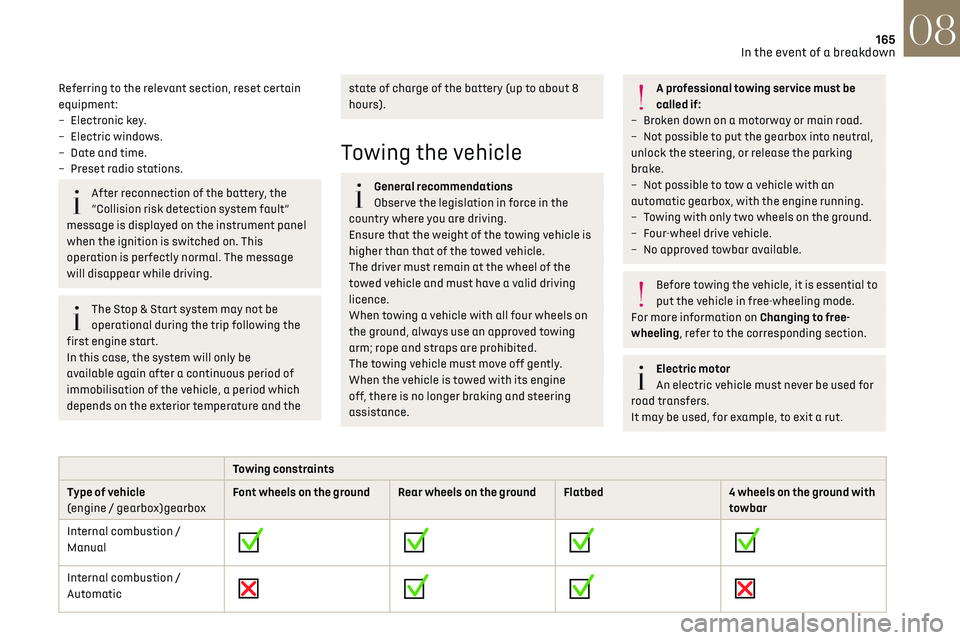
Towing constraints
Type of vehicle
(engine / gearbox)gearbox Font wheels on the ground Rear wheels on the ground Flatbed
4 wheels on the ground with
towbar
Internal combustion /
Manual
Internal combustion /
Automatic
Page 168 of 244
166In the event of a breakdown08
Towing constraints
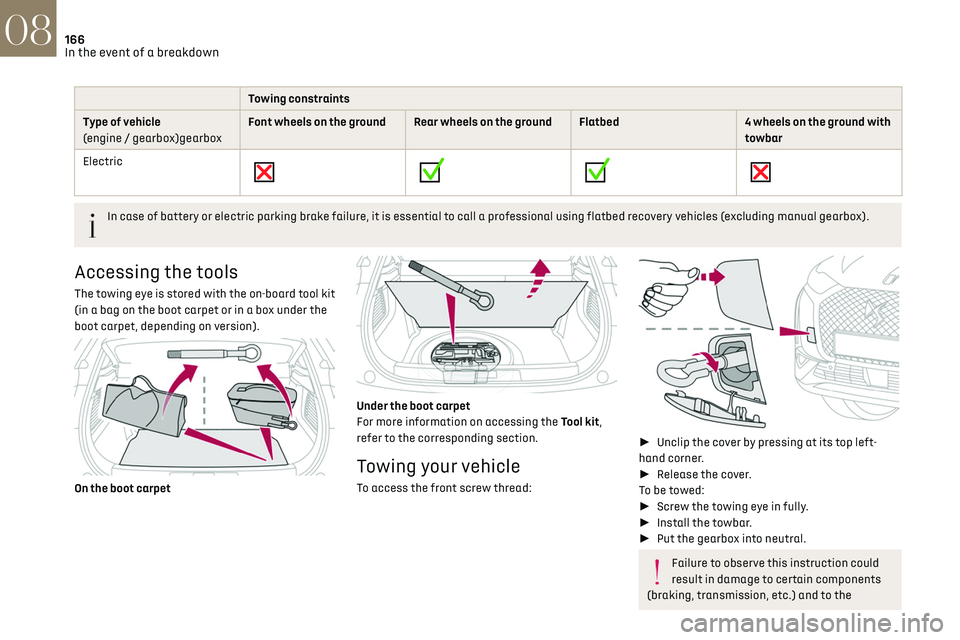
Type of vehicle
(engine / gearbox)gearbox Font wheels on the ground Rear wheels on the ground Flatbed
4 wheels on the ground with
towbar
Electric
In case of battery or electric parking brake failure, it is essential to call a professional using flatbed recovery vehicles (excluding manual gearbox).
Accessing the tools
The towing eye is stored with the on-board tool kit
(in a bag on the boot carpet or in a box under the
boot carpet, depending on version).
On the boot carpet
Under the boot carpet
For more information on accessing the Tool kit,
refer to the corresponding section.
Towing your vehicle
To access the front screw thread:
►
Unclip the cover by pressing at its top left-
hand corner.
► Release the cover.
To be towed:
► Screw the towing eye in fully.
► Install the towbar.
► Put the gearbox into neutral.
Failure to observe this instruction could
result in damage to certain components
(braking, transmission, etc.) and to the
absence of braking assistance the next time
the engine is started.
Automatic gearbox: never tow the vehicle
with the driving wheels on the ground and
the engine off.
► Unlock the steering and release the parking
brake.
► Switch on the hazard warning lamps on both
vehicles.
► Move off gently, drive slowly and only for a
short distance.
Towing another vehicle
To access the rear screw thread:
► Unclip the cover by pressing at its left-hand
section.
► Pull the cover downwards.
To tow:
► Screw the towing eye in fully.