charging CITROEN DS3 CROSSBACK 2023 Owner's Manual
[x] Cancel search | Manufacturer: CITROEN, Model Year: 2023, Model line: DS3 CROSSBACK, Model: CITROEN DS3 CROSSBACK 2023Pages: 244, PDF Size: 7.7 MB
Page 142 of 244
140
Practical information07
► Clip the stay in its housing.
► Lower the bonnet and release it near the end
of its travel.
► Pull on the bonnet to check that it is locked
correctly.
Because of the presence of electrical
equipment under the bonnet, it is
recommended that exposure to water (rain,
washing, etc.) be limited.
Engine compartment
The engine represented is an example given for
illustration purposes only.
The locations of the following elements may vary:
–
Air filt
er.
–
Engine oil dip
stick.
–
Engine oil filler c
ap.
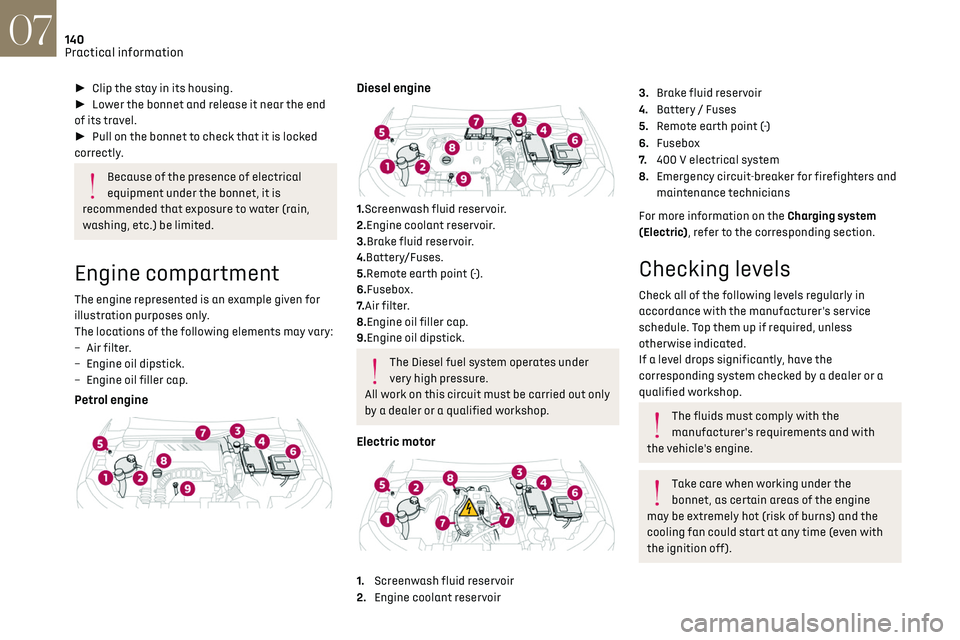
Petrol engine
Diesel engine
1.Screenwash fluid reservoir.
2.Engine coolant reservoir.
3.Brake fluid reservoir.
4.Battery/Fuses.
5.Remote earth point (-).
6.Fusebox.
7. Air filter.
8.Engine oil filler cap.
9.Engine oil dipstick.
The Diesel fuel system operates under
very high pressure.
All work on this circuit must be carried out only
by a dealer or a qualified workshop.
Electric motor
1. Screenwash fluid reservoir
2. Engine coolant reservoir
3.Brake fluid reservoir
4. Battery / Fuses
5. Remote earth point (-)
6. Fusebox
7. 400 V electrical system
8. Emergency circuit-breaker for firefighters and
maintenance technicians
For more information on the Charging system
(Electric), refer to the corresponding section.
Checking levels
Check all of the following levels regularly in
accordance with the manufacturer's service
schedule. Top them up if required, unless
otherwise indicated.
If a level drops significantly, have the
corresponding system checked by a dealer or a
qualified workshop.
The fluids must comply with the
manufacturer's requirements and with
the vehicle's engine.
Take care when working under the
bonnet, as certain areas of the engine
may be extremely hot (risk of burns) and the
cooling fan could start at any time (even with
the ignition off).
Used products
Avoid prolonged contact of used oil or
fluids with the skin.
Most of these fluids are harmful to health and
very corrosive.
Do not discard used oil or fluids into
sewers or onto the ground.
Empty used oil into the containers reserved
for this purpose at a dealer or a qualified
workshop.
Engine oil
The level is checked, with the engine
having been switched off for at least 30
minutes and on level ground, using the dipstick.
It is normal to top up the oil level between two
services (or oil changes). It is recommended that
you check the level, and top up if necessary, every
3,000 miles (5,000 km).
In order to maintain the reliability of the
engine and emissions control system,
never use additives in the engine oil.
Checking using the dipstick
For the location of the dipstick, please refer
to the illustration of the corresponding engine
compartment.
► Grasp the dipstick by its coloured grip and pull
it out completely.
Page 163 of 244
161In the event of a breakdown08
Fuse N° Rating (A) FunctionsF5 30 ARear electric
windows.
F6 10 AFolding door
mirrors.
F7 10 AFolding door
mirrors.
F8 20 ALeft-hand side
retractable
handles.
F9 25 AHi-Fi amplifier.
F10 20 ARight-hand side
retractable
handles.
Engine compartment fuses
The fusebox is placed in the engine compartment
near the battery.
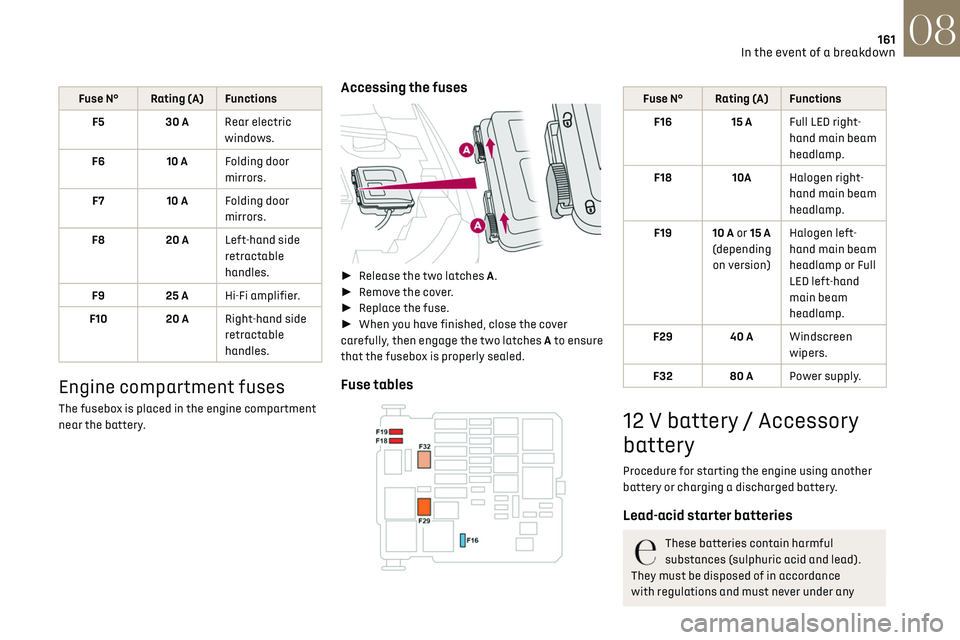
Accessing the fuses
► Release the two latches A.
► Remove the cover.
► Replace the fuse.
► When you have finished, close the cover
carefully, then engage the two latches A to ensure
that the fusebox is properly sealed.
Fuse tables
Fuse N° Rating (A) Functions
F16 15 A Full LED right-
hand main beam
headlamp.
F18 10AHalogen right-
hand main beam
headlamp.
F19 10 A or 15 A
(depending on version) Halogen left-
hand main beam
headlamp or Full
LED left-hand
main beam
headlamp.
F29 40 A Windscreen
wipers.
F32 80 A Power supply.
12 V battery / Accessory
battery
Procedure for starting the engine using another
battery or charging a discharged battery.
Lead-acid starter batteries
These batteries contain harmful
substances (sulphuric acid and lead).
They must be disposed of in accordance
with regulations and must never under any
Page 164 of 244
162In the event of a breakdown08
circumstances be discarded with household
waste.
Take used remote control batteries and vehicle
batteries to a special collection point.
Protect your eyes and face before
handling the battery.
All operations on the battery must be carried
out in a well ventilated area and away from
naked flames and sources of sparks, to avoid
any risk of explosion or fire.
Wash your hands afterwards.
Electric motor
Flat accessory battery
It is not possible to start the motor or
recharge the traction battery.
Precautions before working on the
accessory battery
Select mode P, switch off the ignition, check
that the instrument panel is off and that the
vehicle is not plugged in.
Recharging the accessory battery
Do not recharge the battery without first
disconnecting the terminals and removing the
battery from the motor compartment.
Do not disconnect the battery terminals while
the READY lamp is lit, or while the vehicle is
charging.
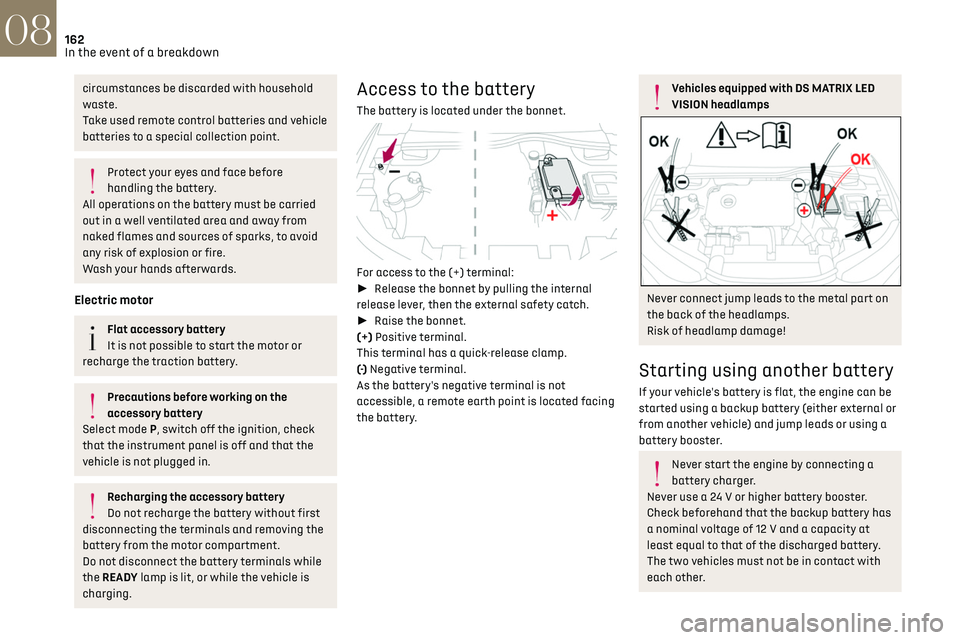
Access to the battery
The battery is located under the bonnet.
For access to the (+) terminal:
► Release the bonnet by pulling the internal
release lever, then the external safety catch.
► Raise the bonnet.
(+) Positive terminal.
This terminal has a quick-release clamp.
(-) Negative terminal.
As the battery's negative terminal is not
accessible, a remote earth point is located facing
the battery.
Vehicles equipped with DS MATRIX LED
VISION headlamps
Never connect jump leads to the metal part on
the back of the headlamps.
Risk of headlamp damage!
Starting using another battery
If your vehicle's battery is flat, the engine can be
started using a backup battery (either external or
from another vehicle) and jump leads or using a
battery booster.
Never start the engine by connecting a
battery charger.
Never use a 24 V or higher battery booster.
Check beforehand that the backup battery has
a nominal voltage of 12 V and a capacity at
least equal to that of the discharged battery.
The two vehicles must not be in contact with
each other.
Page 165 of 244
163In the event of a breakdown08
Switch off all electricity-consuming equipment
on both vehicles (audio system, wipers,
lighting, etc.).
Make sure that the jump leads are well away
from the engine’s moving parts (fan, belt, etc.).
Do not disconnect the (+) terminal while the
engine is running.
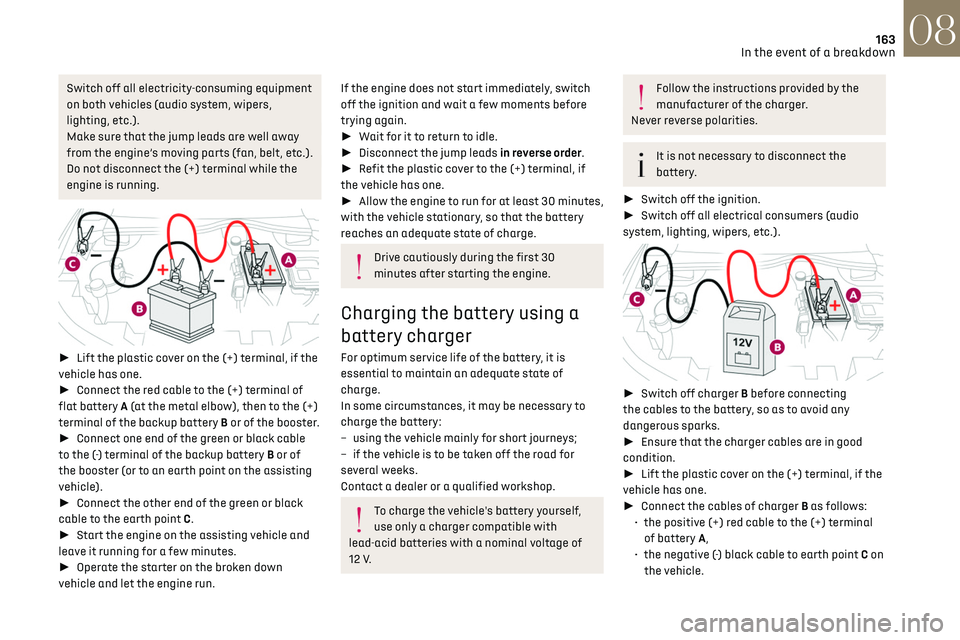
► Lift the plastic cover on the (+) terminal, if the
vehicle has one.
► Connect the red cable to the (+) terminal of
flat battery A (at the metal elbow), then to the (+)
terminal of the backup battery B or of the booster.
► Connect one end of the green or black cable
to the (-) terminal of the backup battery B or of
the booster (or to an earth point on the assisting
vehicle).
► Connect the other end of the green or black
cable to the earth point C.
► Start the engine on the assisting vehicle and
leave it running for a few minutes.
► Operate the starter on the broken down
vehicle and let the engine run.
If the engine does not start immediately, switch
off the ignition and wait a few moments before
trying again.
► Wait for it to return to idle.
► Disconnect the jump leads in reverse order.
► Refit the plastic cover to the (+) terminal, if
the vehicle has one.
► Allow the engine to run for at least 30 minutes,
with the vehicle stationary, so that the battery
reaches an adequate state of charge.
Drive cautiously during the first 30
minutes after starting the engine.
Charging the battery using a
battery charger
For optimum service life of the battery, it is
essential to maintain an adequate state of
charge.
In some circumstances, it may be necessary to
charge the battery:
–
using the v
ehicle mainly for short journeys;
–
if the v
ehicle is to be taken off the road for
several weeks.
Contact a dealer or a qualified workshop.
To charge the vehicle's battery yourself,
use only a charger compatible with
lead-acid batteries with a nominal voltage of
12 V.
Follow the instructions provided by the
manufacturer of the charger.
Never reverse polarities.
It is not necessary to disconnect the
battery.
► Switch off the ignition.
► Switch off all electrical consumers (audio
system, lighting, wipers, etc.).
► Switch off charger B before connecting
the cables to the battery, so as to avoid any
dangerous sparks.
► Ensure that the charger cables are in good
condition.
► Lift the plastic cover on the (+) terminal, if the
vehicle has one.
► Connect the cables of charger B as follows:
•
the po
sitive (+) red cable to the (+) terminal
of battery A,
•
the nega
tive (-) black cable to earth point C on
the vehicle.
Page 166 of 244
164In the event of a breakdown08
► At the end of the charging operation, switch
off charger B before disconnecting the cables
from battery A.
24v 12v
If this label is present, use only a 12 V
charger to avoid causing irreversible
damage to the electrical components related
to the Stop & Start system.
Never try to charge a frozen battery - risk
of explosion!
If the battery has frozen, have it checked by
a dealer or by a qualified workshop who will
verify that the internal components have not
been damaged and that the case has not
cracked, which would mean a risk of toxic and
corrosive acid leaking.
Some functions, including Stop & Start,
are not available if the battery is not
sufficiently charged.
Disconnecting the battery
In order to maintain an adequate state of charge
for starting the engine, it is recommended that
the battery be disconnected if the vehicle is taken
out of service for a long period. Before disconnecting the battery:
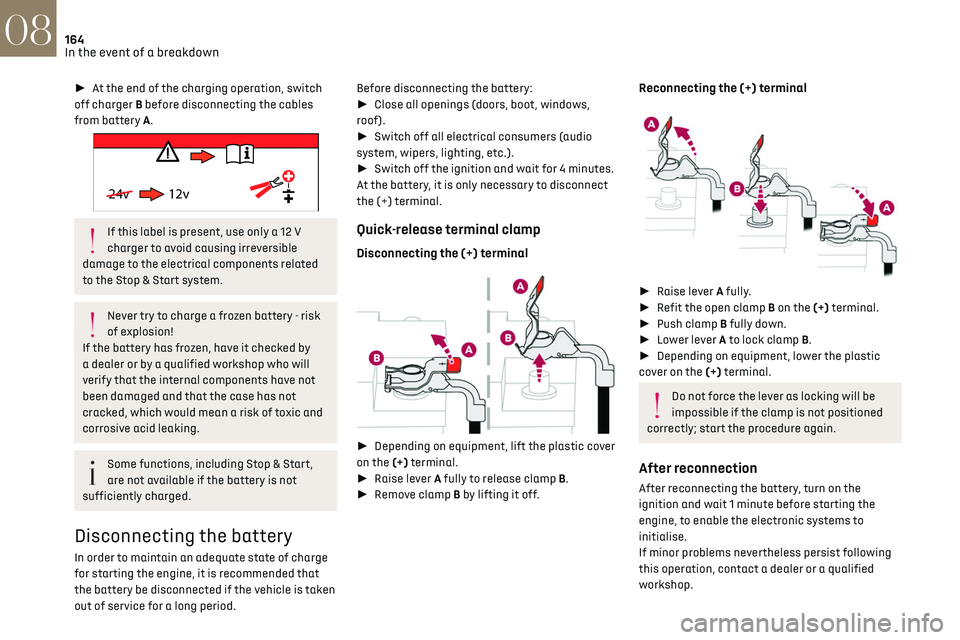
►
Close all openings (doors, boot, windows,
roof).
► Switch off all electrical consumers (audio
system, wipers, lighting, etc.).
► Switch off the ignition and wait for 4 minutes.
At the battery, it is only necessary to disconnect
the (+) terminal.
Quick-release terminal clamp
Disconnecting the (+) terminal
► Depending on equipment, lift the plastic cover
on the (+) terminal.
► Raise lever A fully to release clamp B.
► Remove clamp B by lifting it off.
Reconnecting the (+) terminal
► Raise lever A fully.
► Refit the open clamp B on the (+) terminal.
► Push clamp B fully down.
► Lower lever A to lock clamp B.
► Depending on equipment, lower the plastic
cover on the (+) terminal.
Do not force the lever as locking will be
impossible if the clamp is not positioned
correctly; start the procedure again.
After reconnection
After reconnecting the battery, turn on the
ignition and wait 1 minute before starting the
engine, to enable the electronic systems to
initialise.
If minor problems nevertheless persist following
this operation, contact a dealer or a qualified
workshop.
Referring to the relevant section, reset certain
equipment:
– Electronic key.
– Electric windows.
– Date and time.
– Preset radio stations.
After reconnection of the battery, the
“Collision risk detection system fault”
message is displayed on the instrument panel
when the ignition is switched on. This
operation is perfectly normal. The message
will disappear while driving.
The Stop & Start system may not be
operational during the trip following the
first engine start.
In this case, the system will only be
available again after a continuous period of
immobilisation of the vehicle, a period which
depends on the exterior temperature and the
Towing constraints
Type of vehicle
(engine / gearbox)gearbox Font wheels on the ground Rear wheels on the ground Flatbed
4 wheels on the ground with
towbar
Internal combustion /
Manual
Internal combustion /
Automatic
Page 172 of 244

170
Technical data09
Engines and towed loads - Diesel
EnginesBlueHDi 100BlueHDi 130
Gearboxes BVM6
(Manual 6-speed) EAT8
(Automatic 8-speed)
Codes DV5RD MB6 STTdDV5RC ATN8 STTd
Model codes
UC... YHYJ
YHZR
Cubic capacity (cm³) 14991499
Max. power: EC standard (kW) 7593
Fuel DieselDiesel
Braked trailer (within the GTW limit) (kg)
on a 10% or 12% gradient 1200
1200
Unbraked trailer (kg) 640640
Maximum authorised nose weight (kg) 4848
Electric motor
Model codes: ZKXZ
Braked trailer (within the GTW limit) (kg)
on a 10% or 12% gradient 0
Unbraked trailer (kg) 0
Maximum authorised nose weight (kg) 0
Electric motor
Technology Synchronous with permanent magnets
Max. power: EC standard (kW) 100
Traction battery
Technology Lithium-Ion
Installed capacity (kWh) 50
Domestic charging
Alternating current voltage (Vac)
Rating (A) 230 (single-phase)
8 or 16
Accelerated charging
Alternating current voltage (Vac)
Rating (A) 230 (single-phase or three-phase)
16 or 32
Fast charging
Direct current voltage (Vdc) 400
Page 173 of 244

171
Technical data09
Electric motor
Model codes: ZKXZ
Braked trailer (within the GTW limit) (kg)
on a 10% or 12% gradient 0
Unbraked trailer (kg) 0
Maximum authorised nose weight (kg) 0
Electric motor
TechnologySynchronous with permanent magnets
Max. power: EC standard (kW) 100
Traction battery
Technology Lithium-Ion
Installed capacity (kWh) 50
Domestic charging
Alternating current voltage (Vac)
Rating (A) 230 (single-phase)
8 or 16
Accelerated charging
Alternating current voltage (Vac)
Rating (A) 230 (single-phase or three-phase)
16 or 32
Fast charging
Direct current voltage (Vdc) 400
Page 207 of 244

205DS CONNECT NAV12
Settings specific to connected
navigation
Press Navigation to display the main page.
Press the "MENU" button to access the secondary
page.
Select "Settings".
Select the "Map” tab.
Activate or deactivate:
– "Allow declaration of danger zones".
–
"Guidance to final destination on foot".
These settings must be configured for each
profile.
Press “OK” to confirm your selection.
Select the "Alerts” tab.
Activate or deactivate:
–
"Advise of car park nearby".
–
"Filling station alert".
–
“Risk areas alert" then press the warning icon
(triangle) to configure alerts.
–
"Give an audible warning".
–
"Advise proximity of POI 1".
–
"Advise proximity of POI 2".
Press “OK” to confirm your selection.
The "Notifications", in the upper bar, can
be accessed at any time.
Danger zone alerts may or may not be
displayed, depending on the applicable
legislation and subscription to the
corresponding service.
When "TOMTOM TRAFFIC” appears, the
services are available.
The services offered with connected
navigation are as follows.
A Connected Services pack:
–
Weather,
–
Filling st
ations,
–
Car park,
–
Traffic,
–
POI loc
al search.
A Danger area pack (optional).
Declaration: "Risk areas alert"
To send information about danger zones,
select the option:Allow declaration of
danger zones
Press Navigation to display the main page.
Press the "Declare a new danger zone"
button located in the side bars or the upper
bar of the touch screen (depending on
equipment).
Select the "Type” option to select the type
of "Danger area".
Select the ""Speed" option and enter it
using the virtual keypad.
Press "OK" to save and send the
information.
Displaying fuel information
Press Navigation to display the main page.
Press this button to display the list of
services.
Press "POI on map" to display the list of
points of interest.
Press one of the buttons to search for
"Stations".
Activate/deactivate "Stations".
Press this button to display a secondary
page.
Select the "Settings” tab.
Select the desired fuel.
Press "OK" to save.
Displaying charging station
details
Press Navigation to display the main page.
Press this button to display the list of
services.
Press "POI on map" to display the list of
points of interest.
Page 222 of 244
220
Alphabetical index
A
ABS 66
Accessories
63
Active Safety Brake
115–117
AdBlue®
18, 144
AdBlue® tank
145
Additive, Diesel
143
Adjusting headlamps
56
Adjusting head restraints
39
Adjusting seat
38–39
Adjusting the air distribution
44, 46
Adjusting the air flow
44–45
Adjusting the date
193, 215
Adjusting the height and reach of
the steering wheel
40
Adjusting the lumbar support
39
Adjusting the seat angle
38
Adjusting the temperature
44–45
Adjusting the time
180, 193, 216
Advanced Traction Control
67
Advice on care and maintenance
131, 146
Advice on driving
7, 80–81
Airbags
70–72, 74
Airbags, curtain
71–72
Airbags, front
70–71, 74
Airbags, lateral
71–72
Air conditioning
43, 46
Air conditioning, automatic
45
Air conditioning, manual
44
Air intake
47
Air vents
43
Alarm
34–36
Amplifier, audio
50
Android Auto connection
207
Anti-lock braking system (ABS)
66
Antitheft / Immobiliser 31, 81
Apple CarPlay connection
189, 206
Applications
207
Armrest, front
49
Assistance call
64
Assistance, emergency braking
66, 116
Audible warning
64
Audio streaming (Bluetooth)
177–178, 187, 211
B
Battery 138
Battery, 12 V
142, 161–164
Battery, ancillaries
161–162
Battery, charging
130, 134, 163–164
Battery, remote control
32–33
Blind spot monitoring system, active
114
Blind spot sensors
113–114
BlueHDi
18, 142, 148
Bluetooth (hands-free)
178, 190, 212
Bluetooth (telephone)
178, 190, 212–213
Bodywork
147
Bonnet
139
Boot
34, 53
Brake discs
143
Brake lamps
157–158
Brakes
143
Braking
90
Braking assistance system
66
Braking, automatic emergency
115–117
Braking, dynamic emergency
84–85
Brightness
179, 192
Bulbs
156
Bulbs (changing)
155–158
C
Cable, audio 211
Cable, Jack
211
Capacity, fuel tank
129
Cap, fuel filler
129
Care of the bodywork
147
CD
177, 187
CD, MP3
177, 187
Central locking
30
Changing a bulb
155–158
Changing a fuse
159–161
Changing a wheel
149, 152
Changing a wiper blade
61
Changing the remote control battery
32
Charger, induction
50
Charger, wireless
50
CHECK
21
Checking the levels
140–142
Checking tyre pressures
(using the kit)
150, 152
Checks
140, 142–144
Checks, routine
142–143
Child lock
79
Children
69, 75–76
Children (safety)
79
Child seats
69, 72–74
Child seats, conventional
74
Child seats, i-Size
76
Child seats, ISOFIX
75–76
Cleaning (advice)
131, 146–147
Closing the boot
30, 34
Closing the doors
29–30, 33
Collision Risk Alert
115–116
Configuration, vehicle
24
Connected applications
207
Page 223 of 244
221
Alphabetical index
Connection, Bluetooth 178, 190, 208, 212–213
Connection, MirrorLink
189–190, 207
Connection, Wi-Fi network
208
Connectivity
206
Consumption figures
25
Container, AdBlue®
145
Control, emergency boot release
34
Control, emergency door
31–32
Control, heated seats
40
Controls, steering mounted
86–89
Control stalk, lighting
54–55
Control stalk, wipers
60–62
Control unit
132–133
Courtesy lamp, front
52
Courtesy lamps
51–52
Cover, load space
53
Cruise control
98, 100–102
Cruise control, adaptive
103
Cruise control by speed limit recognition
98
Cruise control, dynamic with Stop function
98
D
DAB (Digital Audio Broadcasting) -
Digital radio
176, 187–188, 210
Date (setting)
193, 215
Daytime running lamps
55, 156
Deactivating the passenger airbag
70, 74
Deadlocking
28, 30
Defrosting
47
Demisting
47
Demisting, rear
47
Demisting, rear screen
47
Dials and gauges
9
Dimensions
172
Dipstick 141
Direction indicators
55, 156–158
Display, head-up
10–11
Display screen, instrument panel
9, 91
Doors
33–34
Driving
80–81
Driving aids camera (warnings)
95
Driving aids (recommendations)
94
Driving economically
7
Driving modes
90
DS Park Pilot
124
Dynamic stability control (DSC)
66–67
E
EBFD 66
Eco-driving (advice)
7
ECO mode
90
Economy mode
138
Electric motor
5, 25, 130, 171
Electronic brake force distribution (EBFD)
66
Emergency braking assistance (EBA)
66
Emergency call
64
Emergency switching off
83
Emergency warning lamps
63, 148
Emissions control system, SCR
19, 144
Energy economy mode
138
Energy flows
25
Energy recovery
19, 90
Engine
144
Engine compartment
140
Engine, Diesel
129, 140, 148, 170
Engine, petrol
140, 169
Engines
168–170
Environment
7, 33, 80
ESC (electronic stability control) 66
Expanded traffic sign recognition
98–99
F
Filling the AdBlue® tank 142, 145
Filling the fuel tank
129–130
Filter, air
142
Filter, oil
143
Filter, particle
143
Filter, passenger compartment
43, 142
Fitting a wheel
153–154
Fitting roof bars
137–138
Fittings, boot
52
Fittings, interior
48–49
Flap, charging
25, 131, 134–136
Flap, fuel filler
129–130
Flashing indicators
55, 156
Fluid, brake
141
Fluid, engine coolant
141
Foglamp, rear
54, 158
Folding the rear seats
42–43
Frequency (radio)
209–210
Fuel
7, 129
Fuel consumption
7
Fuel tank
129–130
Fusebox, dashboard
159
Fusebox, engine compartment
159, 161
Fuses
159–161
Fuses, dashboard
160
Fuses, engine compartment
161