Seat CITROEN DS3 CROSSBACK 2023 Owners Manual
[x] Cancel search | Manufacturer: CITROEN, Model Year: 2023, Model line: DS3 CROSSBACK, Model: CITROEN DS3 CROSSBACK 2023Pages: 244, PDF Size: 7.7 MB
Page 4 of 244
2
Contents
Overview
Eco-driving
01 Instruments
9 Digital instrument panel
10 Head-up display
11 Warning and indicator lamps
17 Indicators
21 Manual test
21 Total distance recorder
21 Lighting dimmer
22 Trip computer
22 5-inch touch screen
23 7-inch or 10-inch touch screen
26 Remotely operable features (Electric)
02 Access
27 Electronic key with remote control function and
built-in key,
28
Proximity Keyless Entry and Start
30 DS SMART ACCESS
30 Central locking
31 Emergency procedures
33 Doors
34 Boot
34 Alarm
36 Electric windows
03 Ease of use and comfort
38 Front seats
40 Steering wheel adjustment
41 Mirrors
42 Rear bench seat
43 Heating and Ventilation
44 Manual air conditioning
45 Automatic air conditioning
47 Front demist - defrost
47 Rear screen demist - defrost
47 Heated windscreen and washer jets
48 Remote-controlled heating and air conditioning
(Electric)
48
Interior fittings
51 Courtesy lamps
52 Touch-sensitive courtesy lamps
52 Boot fittings
04 Lighting and visibility
54 Exterior lighting control stalk
55 Daytime running lamps/Sidelamps
55 Direction indicators
55 Automatic illumination of headlamps
56 Headlamp beam height adjustment
56 Guide-me-home and welcome lighting
57 Automatic headlamp dipping
58 DS MATRIX LED VISION
60 Wiper control stalk
61 Changing a wiper blade
62 Automatic wipers
05 Safety
63 General safety recommendations
63 Hazard warning lamps
64 Horn
64 Pedestrian horn (Electric)
64 Emergency or assistance call
66 Electronic stability control (ESC)
67 Advanced Traction Control
68 Seat belts
70 Airbags
72 Child seats
74 Deactivating the front passenger airbag
75 ISOFIX child seats
76 i-Size child seats
79 Child lock
06 Driving
80 Driving recommendations
81 Anti-theft protection
81 Starting/Switching off the engine
83 Starting/Switching off the engine with DS
SMART ACCESS
83
Electric parking brake
86 6-speed manual gearbox
86 Automatic gearbox (EAT8)
89 Drive selector (Electric)
90 Driving modes
90 Hill start assist
91 Gear shift indicator
92 Stop & Start
93 Under-inflation detection
94 Driving and manoeuvring aids - General
recommendations
95
Speed Limit Recognition and Recommendation
99 Speed limiter
100 Cruise control - particular recommendations
101 Cruise control
102 Memorising speeds
103 DS DRIVE ASSIST
103 Adaptive Cruise Control
106 Active Lane Keeping Assist
110 Active Lane Departure Warning System
113 Blind Spot Detection
114 Active Blind Spot Detection
Page 6 of 244
4
Overview
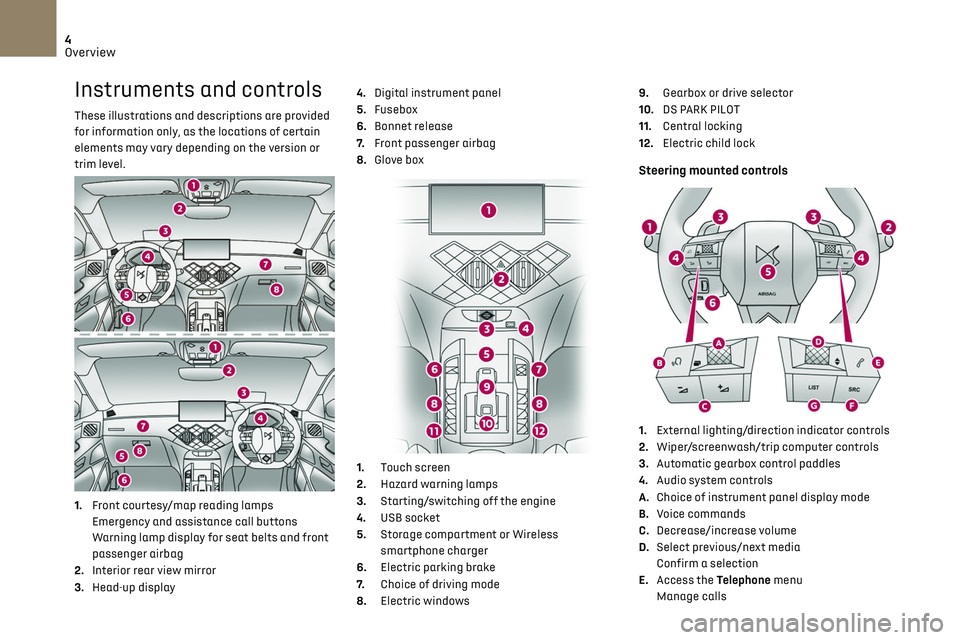
Instruments and controls
These illustrations and descriptions are provided
for information only, as the locations of certain
elements may vary depending on the version or
trim level.
1.Front courtesy/map reading lamps
Emergency and assistance call buttons
Warning lamp display for seat belts and front
passenger airbag
2. Interior rear view mirror
3. Head-up display 4.
Digital instrument panel
5. Fusebox
6. Bonnet release
7. Front passenger airbag
8. Glove box
1. Touch screen
2. Hazard warning lamps
3. Starting/switching off the engine
4. USB socket
5. Storage compartment or Wireless
smartphone charger
6. Electric parking brake
7. Choice of driving mode
8. Electric windows 9.
Gearbox or drive selector
10. DS PARK PILOT
11. Central locking
12. Electric child lock
Steering mounted controls
1.External lighting/direction indicator controls
2. Wiper/screenwash/trip computer controls
3. Automatic gearbox control paddles
4. Audio system controls
A. Choice of instrument panel display mode
B. Voice commands
C. Decrease/increase volume
D. Select previous/next media
Confirm a selection
E. Access the Telephone menu
Manage calls
Page 7 of 244
5
Overview
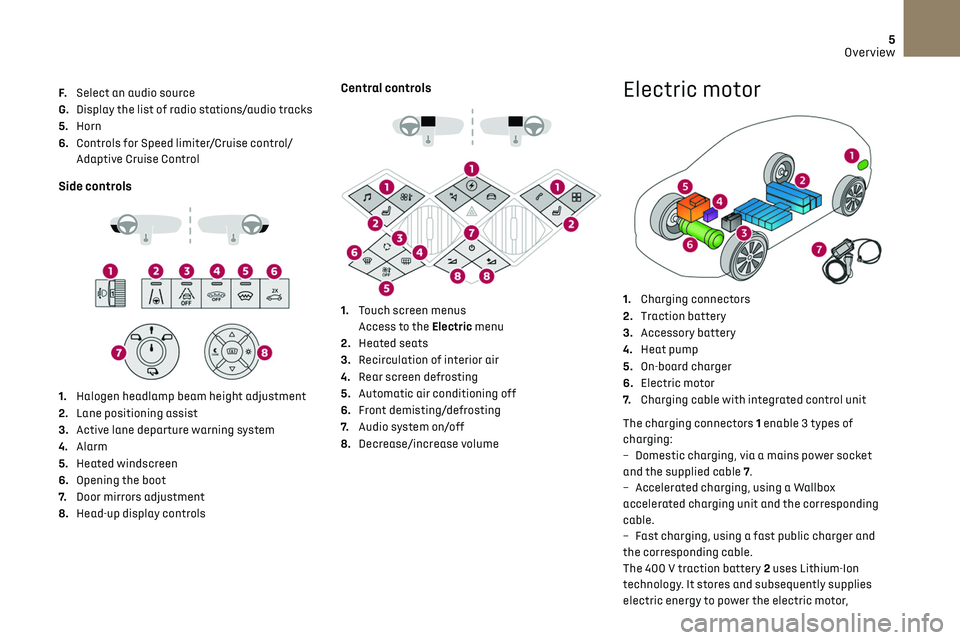
F. Select an audio source
G. Display the list of radio stations/audio tracks
5. Horn
6. Controls for Speed limiter/Cruise control/
Adaptive Cruise Control
Side controls
1. Halogen headlamp beam height adjustment
2. Lane positioning assist
3. Active lane departure warning system
4. Alarm
5. Heated windscreen
6. Opening the boot
7. Door mirrors adjustment
8. Head-up display controls
Central controls
1. Touch screen menus
Access to the Electric menu
2. Heated seats
3. Recirculation of interior air
4. Rear screen defrosting
5. Automatic air conditioning off
6. Front demisting/defrosting
7. Audio system on/off
8. Decrease/increase volume
Electric motor
1.Charging connectors
2. Traction battery
3. Accessory battery
4. Heat pump
5. On-board charger
6. Electric motor
7. Charging cable with integrated control unit
The charging connectors 1 enable 3 types of
charging:
–
Dome
stic charging, via a mains power socket
and the supplied cable 7.
–
Ac
celerated charging, using a Wallbox
accelerated charging unit and the corresponding
cable.
–
Fast charging, using a fast public charger and
the c
orresponding cable.
The 400 V traction battery 2 uses Lithium-Ion
technology. It stores and subsequently supplies
electric energy to power the electric motor,
Page 9 of 244
7Eco-driving
Eco-driving
Eco-driving refers to a range of everyday practices
that allow the motorist to optimise their fuel
consumption and CO
2emissions.
Optimise your use of the gearbox
With a manual gearbox, move off gently and
change up promptly. While accelerating, change
up early.
With an automatic gearbox, favour automatic
mode and avoid pressing the accelerator pedal
heavily or suddenly.
The gear efficiency indicator prompts you to
engage the most suitable gear: whenever this
indication is displayed on the instrument panel,
follow it straight away.
With an automatic gearbox, this indicator
appears only in manual mode.
Drive smoothly
Maintain a safe distance between vehicles, use
engine braking rather than the brake pedal and
press the accelerator gradually. These attitudes
help to save fuel, reduce CO
2 emissions and
decrease general traffic noise.
Favour the use of the "Eco" driving mode by
selecting it using the "Drive Mode" control.
If the vehicle has the steering-mounted "CRUISE"
control, use cruise control at speeds above 25
mph (40 km/h) when the traffic is flowing well.
Use electrical equipment wisely
Before moving off, if the passenger compartment
is too warm, ventilate it by opening the windows
and air vents before using the air conditioning.
At speeds above 31 mph (50 km/h), close the
windows and leave the air vents open.
Consider using equipment that can help keep
the temperature in the passenger compartment
down.
Unless automatically regulated, switch off the air
conditioning as soon as the desired temperature
has been reached.
Switch off the demisting and defrosting
functions, if they are not managed automatically.
Switch off the heated seat as soon as possible.
Switch off the headlamps and foglamps when the
visibility conditions do not require their use.
Avoid running the engine before moving off,
particularly in winter; your vehicle will warm up
much faster while driving.
As a passenger, avoid connecting your multimedia
devices (film, music, video game, etc.) to help
reduce consumption of electrical energy, and
hence fuel.
Disconnect all portable devices before leaving the
vehicle.
Limit the causes of excess consumption
Spread loads throughout the vehicle; place the
heaviest items in the boot, as close as possible to
the rear seats. Limit the loads carried in the vehicle and minimise
wind resistance (roof bars, roof rack, bicycle
carrier, trailer, etc.). Preferably, use a roof box.
Remove roof bars and roof racks after use.
At the end of winter, remove snow tyres and refit
summer tyres.
Comply with servicing instructions
Check tyre pressures regularly, with the tyres
cold, referring to the label in the door aperture on
the driver's side.
Carry out this check in particular:
–
before a long journe
y.
–
a
t each change of season.
–
a
fter a long period out of use.
Do not overlook the spare wheel and, where
applicable, the tyres on your trailer or caravan.
Have your vehicle serviced regularly (engine oil,
oil filter, air filter, passenger compartment filter,
etc.) and observe the schedule of operations in
the manufacturer's service schedule.
With a BlueHDi Diesel engine, if the SCR system
is faulty, your vehicle will emit pollution; visit a
dealer or a qualified workshop as soon as possible
to restore your vehicle’s nitrogen oxide emissions
to regulatory compliance.
When filling the fuel tank, do not continue after
the third nozzle cut-out, to avoid overflow.
You will only see the fuel consumption of your new
vehicle settle down to a consistent average after
the first 1,900 miles (3,000 kilometres).
Page 15 of 244
13Instruments01
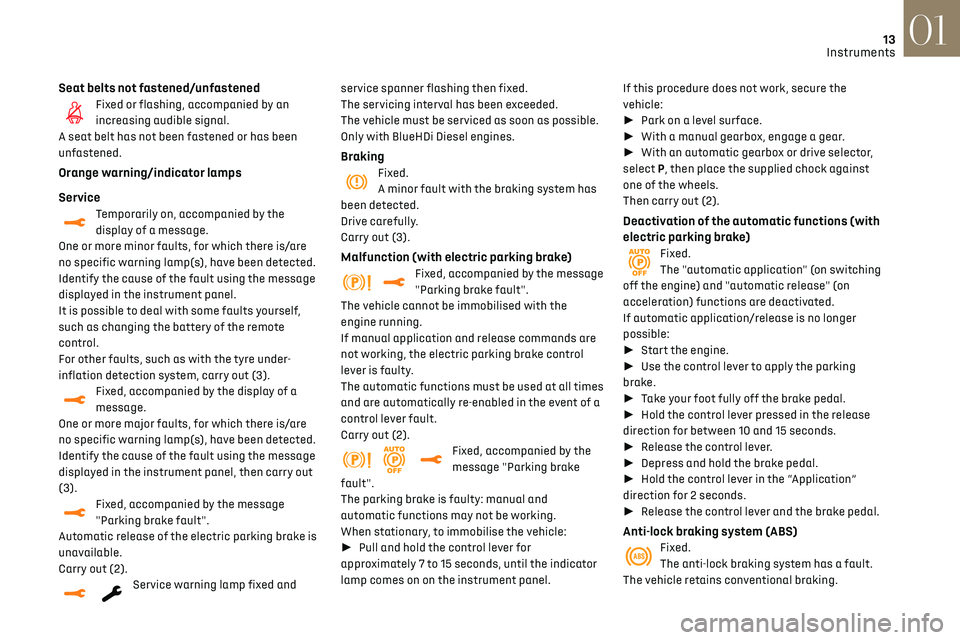
Seat belts not fastened/unfastenedFixed or flashing, accompanied by an
increasing audible signal.
A seat belt has not been fastened or has been
unfastened.
Orange warning/indicator lamps
Service
Temporarily on, accompanied by the
display of a message.
One or more minor faults, for which there is/are
no specific warning lamp(s), have been detected.
Identify the cause of the fault using the message
displayed in the instrument panel.
It is possible to deal with some faults yourself,
such as changing the battery of the remote
control.
For other faults, such as with the tyre under-
inflation detection system, carry out (3).
Fixed, accompanied by the display of a
message.
One or more major faults, for which there is/are
no specific warning lamp(s), have been detected.
Identify the cause of the fault using the message
displayed in the instrument panel, then carry out
(3).
Fixed, accompanied by the message
"Parking brake fault".
Automatic release of the electric parking brake is
unavailable.
Carry out (2).
Service warning lamp fixed and service spanner flashing then fixed.
The servicing interval has been exceeded.
The vehicle must be serviced as soon as possible.
Only with BlueHDi Diesel engines.
BrakingFixed.
A minor fault with the braking system has
been detected.
Drive carefully.
Carry out (3).
Malfunction (with electric parking brake)Fixed, accompanied by the message
"Parking brake fault".
The vehicle cannot be immobilised with the
engine running.
If manual application and release commands are
not working, the electric parking brake control
lever is faulty.
The automatic functions must be used at all times
and are automatically re-enabled in the event of a
control lever fault.
Carry out (2).
Fixed, accompanied by the
message "Parking brake
fault".
The parking brake is faulty: manual and
automatic functions may not be working.
When stationary, to immobilise the vehicle:
► Pull and hold the control lever for
approximately 7 to 15 seconds, until the indicator
lamp comes on on the instrument panel. If this procedure does not work, secure the
vehicle:
►
Park on a level surface.
► With a manual gearbox, engage a gear.
► With an automatic gearbox or drive selector,
select P, then place the supplied chock against
one of the wheels.
Then carry out (2).
Deactivation of the automatic functions (with
electric parking brake)
Fixed.
The "automatic application" (on switching
off the engine) and "automatic release" (on
acceleration) functions are deactivated.
If automatic application/release is no longer
possible:
► Start the engine.
► Use the control lever to apply the parking
brake.
► Take your foot fully off the brake pedal.
► Hold the control lever pressed in the release
direction for between 10 and 15 seconds.
► Release the control lever.
► Depress and hold the brake pedal.
► Hold the control lever in the “Application”
direction for 2 seconds.
► Release the control lever and the brake pedal.
Anti-lock braking system (ABS)Fixed.
The anti-lock braking system has a fault.
The vehicle retains conventional braking.
Page 16 of 244
14
Instruments01
Drive carefully at moderate speed, then carry out
(3).
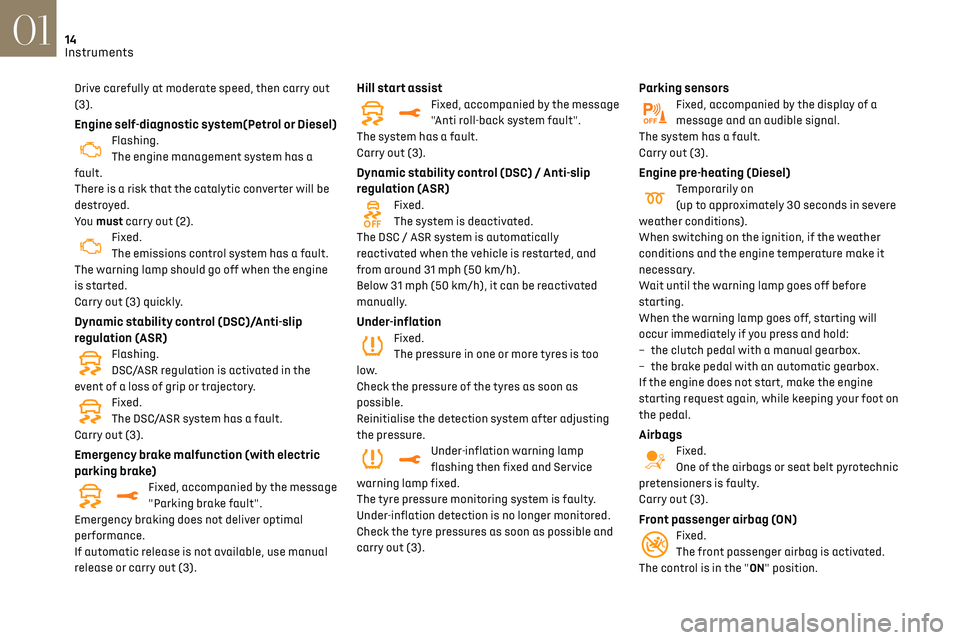
Engine self-diagnostic system(Petrol or Diesel)Flashing.
The engine management system has a
fault.
There is a risk that the catalytic converter will be
destroyed.
You must carry out (2).
Fixed.
The emissions control system has a fault.
The warning lamp should go off when the engine
is started.
Carry out (3) quickly.
Dynamic stability control (DSC)/Anti-slip
regulation (ASR)
Flashing.
DSC/ASR regulation is activated in the
event of a loss of grip or trajectory.
Fixed.
The DSC/ASR system has a fault.
Carry out (3).
Emergency brake malfunction (with electric
parking brake)
Fixed, accompanied by the message
"Parking brake fault".
Emergency braking does not deliver optimal
performance.
If automatic release is not available, use manual
release or carry out (3).
Hill start assistFixed, accompanied by the message
"Anti roll-back system fault".
The system has a fault.
Carry out (3).
Dynamic stability control (DSC) / Anti-slip
regulation (ASR)
Fixed.
The system is deactivated.
The DSC / ASR system is automatically
reactivated when the vehicle is restarted, and
from around 31 mph (50 km/h).
Below 31 mph (50 km/h), it can be reactivated
manually.
Under-inflationFixed.
The pressure in one or more tyres is too
low.
Check the pressure of the tyres as soon as
possible.
Reinitialise the detection system after adjusting
the pressure.
Under-inflation warning lamp
flashing then fixed and Service
warning lamp fixed.
The tyre pressure monitoring system is faulty.
Under-inflation detection is no longer monitored.
Check the tyre pressures as soon as possible and
carry out (3).
Parking sensorsFixed, accompanied by the display of a
message and an audible signal.
The system has a fault.
Carry out (3).
Engine pre-heating (Diesel)Temporarily on
(up to approximately 30 seconds in severe
weather conditions).
When switching on the ignition, if the weather
conditions and the engine temperature make it
necessary.
Wait until the warning lamp goes off before
starting.
When the warning lamp goes off, starting will
occur immediately if you press and hold:
–
the clut
ch pedal with a manual gearbox.
–
the brak
e pedal with an automatic gearbox.
If the engine does not start, make the engine
starting request again, while keeping your foot on
the pedal.
AirbagsFixed.
One of the airbags or seat belt pyrotechnic
pretensioners is faulty.
Carry out (3).
Front passenger airbag (ON)Fixed.
The front passenger airbag is activated.
The control is in the "ON" position.
Page 17 of 244
15
Instruments01
In this case, do NOT install a "rearward facing"
child seat on the front passenger seat - risk of
serious injury!
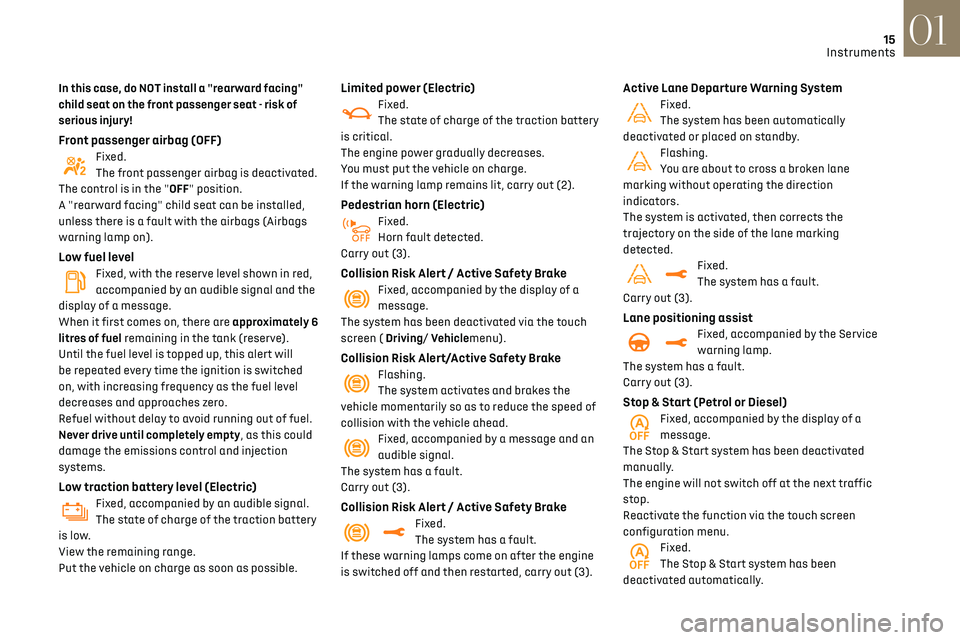
Front passenger airbag (OFF)Fixed.
The front passenger airbag is deactivated.
The control is in the "OFF" position.
A "rearward facing" child seat can be installed,
unless there is a fault with the airbags (Airbags
warning lamp on).
Low fuel levelFixed, with the reserve level shown in red,
accompanied by an audible signal and the
display of a message.
When it first comes on, there are approximately 6
litres of fuel remaining in the tank (reserve).
Until the fuel level is topped up, this alert will
be repeated every time the ignition is switched
on, with increasing frequency as the fuel level
decreases and approaches zero.
Refuel without delay to avoid running out of fuel.
Never drive until completely empty, as this could
damage the emissions control and injection
systems.
Low traction battery level (Electric)Fixed, accompanied by an audible signal.
The state of charge of the traction battery
is low.
View the remaining range.
Put the vehicle on charge as soon as possible.
Limited power (Electric)Fixed.
The state of charge of the traction battery
is critical.
The engine power gradually decreases.
You must put the vehicle on charge.
If the warning lamp remains lit, carry out (2).
Pedestrian horn (Electric)Fixed.
Horn fault detected.
Carry out (3).
Collision Risk Alert / Active Safety BrakeFixed, accompanied by the display of a
message.
The system has been deactivated via the touch
screen ( Driving/ Vehiclemenu).
Collision Risk Alert/Active Safety BrakeFlashing.
The system activates and brakes the
vehicle momentarily so as to reduce the speed of
collision with the vehicle ahead.
Fixed, accompanied by a message and an
audible signal.
The system has a fault.
Carry out (3).
Collision Risk Alert / Active Safety BrakeFixed.
The system has a fault.
If these warning lamps come on after the engine
is switched off and then restarted, carry out (3).
Active Lane Departure Warning SystemFixed.
The system has been automatically
deactivated or placed on standby.
Flashing.
You are about to cross a broken lane
marking without operating the direction
indicators.
The system is activated, then corrects the
trajectory on the side of the lane marking
detected.
Fixed.
The system has a fault.
Carry out (3).
Lane positioning assistFixed, accompanied by the Service
warning lamp.
The system has a fault.
Carry out (3).
Stop & Start (Petrol or Diesel)Fixed, accompanied by the display of a
message.
The Stop & Start system has been deactivated
manually.
The engine will not switch off at the next traffic
stop.
Reactivate the function via the touch screen
configuration menu.
Fixed.
The Stop & Start system has been
deactivated automatically.
Page 22 of 244
20
Instruments01
With the ignition off, opening the driver's
door activates the indicator, which moves
to the "neutral" position.
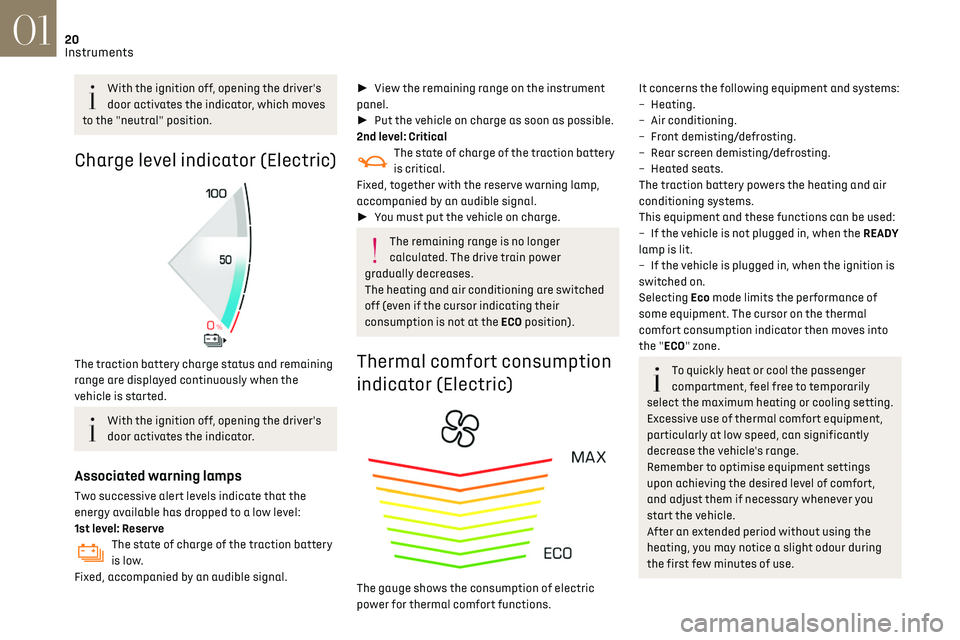
Charge level indicator (Electric)
The traction battery charge status and remaining
range are displayed continuously when the
vehicle is started.
With the ignition off, opening the driver's
door activates the indicator.
Associated warning lamps
Two successive alert levels indicate that the
energy available has dropped to a low level:
1st level: Reserve
The state of charge of the traction battery
is low.
Fixed, accompanied by an audible signal.
► View the remaining range on the instrument
panel.
► Put the vehicle on charge as soon as possible.
2nd level: Critical
The state of charge of the traction battery
is critical.
Fixed, together with the reserve warning lamp,
accompanied by an audible signal.
► You must put the vehicle on charge.
The remaining range is no longer
calculated. The drive train power
gradually decreases.
The heating and air conditioning are switched
off (even if the cursor indicating their
consumption is not at the ECO position).
Thermal comfort consumption
indicator (Electric)
The gauge shows the consumption of electric
power for thermal comfort functions.
It concerns the following equipment and systems:
– Heating.
–
Air c
onditioning.
–
F
ront demisting/defrosting.
–
R
ear screen demisting/defrosting.
–
Hea
ted seats.
The traction battery powers the heating and air
conditioning systems.
This equipment and these functions can be used:
–
If the v
ehicle is not plugged in, when the READY
lamp is lit.
–
If the v
ehicle is plugged in, when the ignition is
switched on.
Selecting Eco mode limits the performance of
some equipment. The cursor on the thermal
comfort consumption indicator then moves into
the "ECO" zone.
To quickly heat or cool the passenger
compartment, feel free to temporarily
select the maximum heating or cooling setting.
Excessive use of thermal comfort equipment,
particularly at low speed, can significantly
decrease the vehicle's range.
Remember to optimise equipment settings
upon achieving the desired level of comfort,
and adjust them if necessary whenever you
start the vehicle.
After an extended period without using the
heating, you may notice a slight odour during
the first few minutes of use.
Page 27 of 244
25
Instruments01
– Access to the Settings of the touch screen and
digital instrument panel (date/time, languages,
units, etc.).
Side banners of the DS CONNECT NAV
– Exterior temperature (a blue warning lamp
appears when there is a risk of ice).
–
Ac
cess to the Settings of the touch screen and
digital instrument panel (date/time, languages,
units, etc.).
–
Notifications.
–
R
eminder of the air conditioning information,
and direct access to the corresponding menu.
–
Ac
cess to the heated seat settings.
–
Time.
Electric / Energy menu
Depending on version, this is accessible either:– directly, by pressing the button near the
touch screen.
– via the Applications menu.
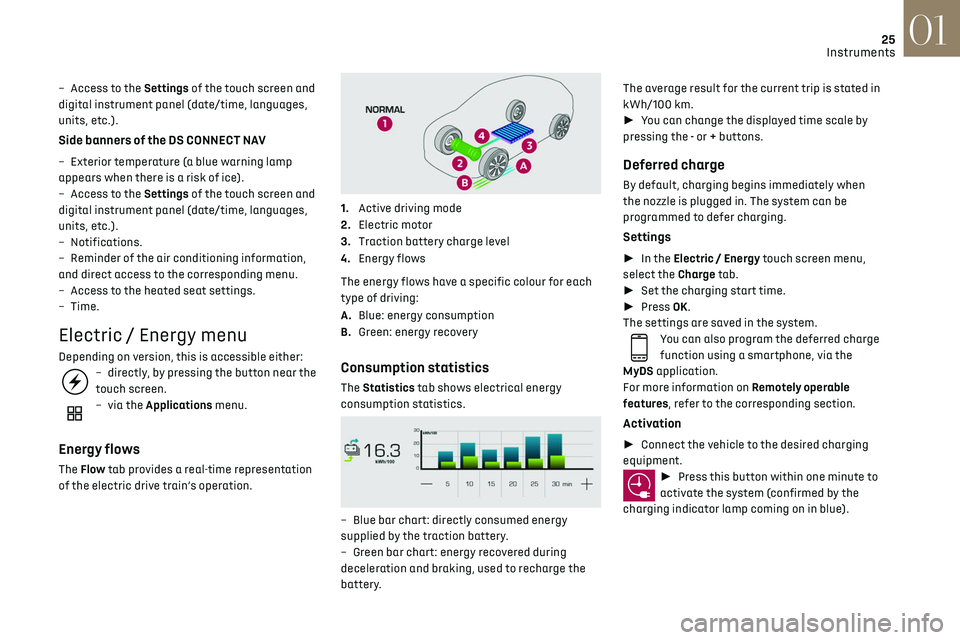
Energy flows
The Flow tab provides a real-time representation
of the electric drive train’s operation.
1.Active driving mode
2. Electric motor
3. Traction battery charge level
4. Energy flows
The energy flows have a specific colour for each
type of driving:
A. Blue: energy consumption
B. Green: energy recovery
Consumption statistics
The Statistics tab shows electrical energy
consumption statistics.
– Blue bar chart: directly c onsumed energy
supplied by the traction battery.
–
G
reen bar chart: energy recovered during
deceleration and braking, used to recharge the
battery. The average result for the current trip is stated in
kWh/100 km.
►
You can change the displayed time scale by
pressing the - or + buttons.
Deferred charge
By default, charging begins immediately when
the nozzle is plugged in. The system can be
programmed to defer charging.
Settings
► In the Electric / Energy touch screen menu,
select the Charge tab.
► Set the charging start time.
► Press OK.
The settings are saved in the system.
You can also program the deferred charge
function using a smartphone, via the
MyDS application.
For more information on Remotely operable
features, refer to the corresponding section.
Activation
► Connect the vehicle to the desired charging
equipment.
► Press this button within one minute to
activate the system (confirmed by the
charging indicator lamp coming on in blue).
Page 36 of 244
34
Access02
System which protects and provides a deterrent
against theft and break-ins.
Exterior perimeter monitoring
The system checks for opening of the vehicle.
The alarm is triggered if anyone tries to open a
door, the boot or the bonnet, for example.
Interior volumetric monitoring
The system checks for any variation in volume in
the passenger compartment.
The alarm is triggered if anyone breaks a window,
enters the passenger compartment or moves
inside the vehicle.
Self-protection function
The system checks for the putting out of service
of its components.
The alarm is triggered if the battery, the central
control or the siren wiring is put out of service or
damaged.For all work on the alarm system, contact
a dealer or a qualified workshop.
Locking the vehicle with full
alarm system
Activation
► Switch off the ignition and exit the vehicle.
► Lock or deadlock the vehicle using the remote
control or by pressing on one of the front door
handles.
Too frequent presses on the handle up to
the point of resistance may damage its
mechanism.
In case of frost, press the handle to
release it.
From inside the vehicle, it is possible to unfold the
handles:
–
b
y opening a door,
–
b
y pressing the central locking button once
when the vehicle is locked or twice when
unlocked.
When driving, the handles automatically retract
once the vehicle speed exceeds 2 mph (3 km/h).
Opening
From outside
► Unlock your vehicle to unfold the door handles.
► Pull the handle.
When selective unlocking is activated,
only the driver door's handle will unfold
and only the driver's door can be opened.
From inside
► Pull the interior door opening lever; the exterior
door handles unfold automatically.
Opening one of the doors from inside unlocks the
rest of the vehicle.
With selective unlocking activated:
– O pening the driver's door unlocks the
driver's door only (if the vehicle has not already
been completely unlocked).
–
O
pening one of the passenger doors unlocks
the rest of the vehicle.
–
O
pening a door from inside causes the
unfolding of all the exterior handles.
Boot
Opening
► After unlocking the vehicle or just the boot,
press the opening control and then raise the
tailgate.
Closing
► Lower the tailgate using one of the interior
grab handles.
Back-up release
To manually unlock the boot in the event of a
battery or central locking failure.
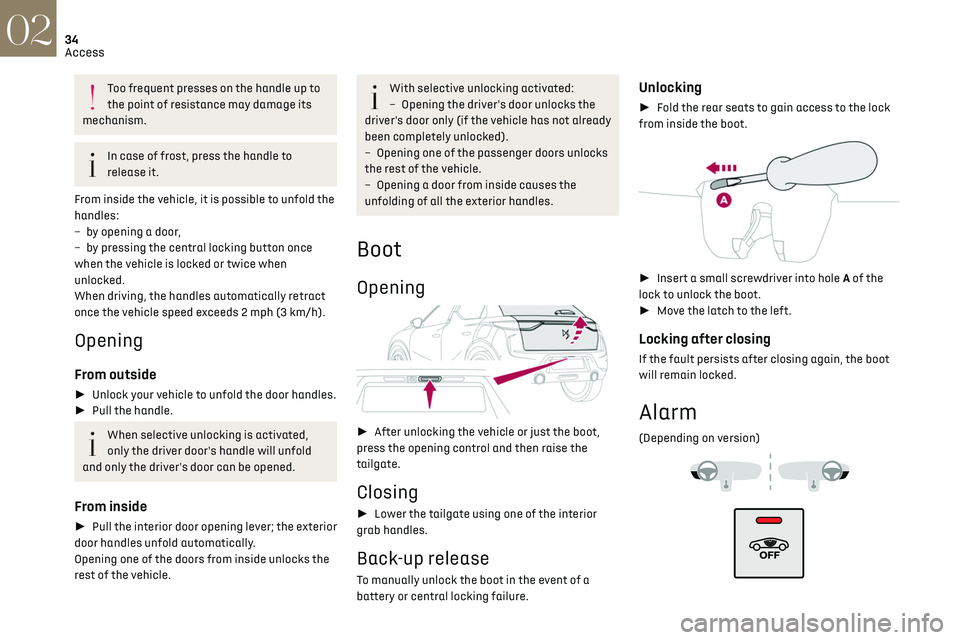
Unlocking
► Fold the rear seats to gain access to the lock
from inside the boot.
► Insert a small screwdriver into hole A of the
lock to unlock the boot.
► Move the latch to the left.
Locking after closing
If the fault persists after closing again, the boot
will remain locked.
Alarm
(Depending on version)