mirror Citroen DS3 RHD 2015 1.G User Guide
[x] Cancel search | Manufacturer: CITROEN, Model Year: 2015, Model line: DS3 RHD, Model: Citroen DS3 RHD 2015 1.GPages: 387, PDF Size: 12.26 MB
Page 145 of 387

143
Operating fault
If an automatic wiping fault occurs, the wipers will operate in intermittent mode.
Have
it checked by a CITROËN dealer or a
q
ualified
w
orkshop.
To retain the effectiveness of the flat
wiper
blades, it is advisable to:
-
h
andle them with care,
-
c
lean them regularly using soapy
w
ater,
-
n
ot use them to hold a sheet of
c
ardboard against the windscreen,
-
r
eplace them at the first signs of
w
e a r.
Do
not cover the rain sensor, linked
w
ith the sunshine sensor and located in
t
he centre of the windscreen behind the
r
ear view mirror.
Switch
off the automatic wiping when
u
sing an automatic car wash.
In
winter, it is advisable to wait until the
w
indscreen is completely clear of ice
b
efore activating the automatic wiping.This
position allows the wiper blades to
b
e lifted for winter parking, cleaning or
r
eplacement without damaging the bonnet.
In
the minute following switching off of the
i
gnition, any action on the wiper stalk positions
t
he wipers vertically.
To
park the wipers after this has been done,
s
witch on the ignition and operate the wiper stalk.
Vertical windscreen wiper
position
Visibility
Page 217 of 387
215
To obtain a replacement module, contact your CITROËN dealer or a qualified workshop.
I f you experience any difficulty in replacing bulbs, contact your CITROËN dealer or a
q
ualified
w
orkshop.
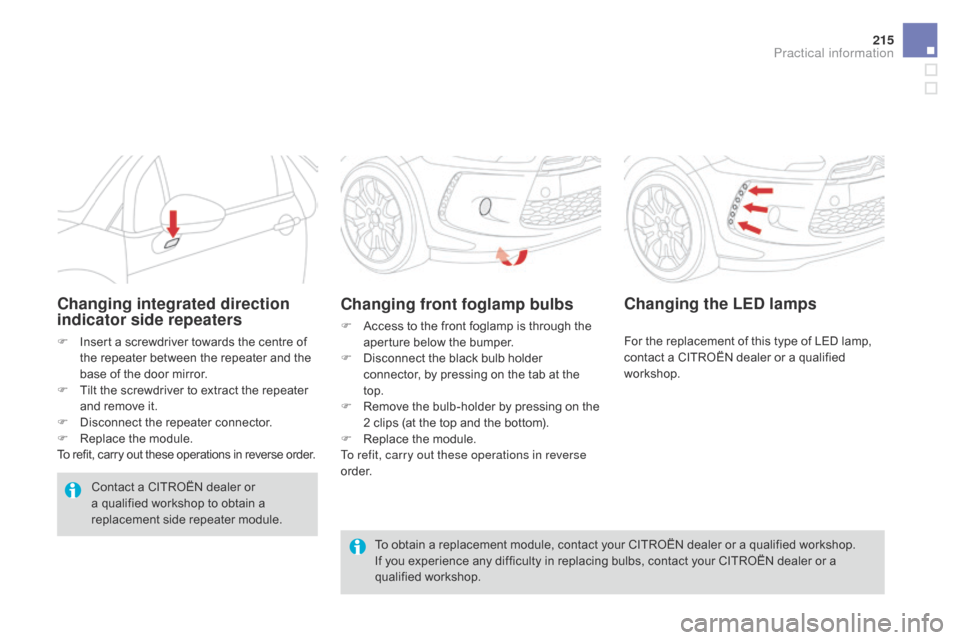
Changing front foglamp bulbs
F Access to the front foglamp is through the a
perture below the bumper.
F
D
isconnect the black bulb holder
c
onnector, by pressing on the tab at the
t
op.
F
R
emove the bulb-holder by pressing on the
2
clips (at the top and the bottom).
F
R
eplace the module.
To refit, carry out these operations in reverse
o r d e r.
Changing integrated direction
indicator side repeaters
F Insert a screwdriver towards the centre of t
he repeater between the repeater and the
b
ase of the door mirror.
F
T
ilt the screwdriver to extract the repeater
a
nd remove it.
F
D
isconnect the repeater connector.
F
R
eplace the module.
To
refit, carry out these operations in reverse order.
Contact
a CITROËN dealer or
a
qualified workshop to obtain a
r
eplacement side repeater module.
Changing the LEd lamps
For the replacement of this type of LED lamp, c
ontact a CITROËN dealer or a qualified
w
orkshop.
Practical information
Page 223 of 387

221
dashboard fusebox
The fusebox is loacted inside the glove box.
Access to the fuses
F Refer to the paragraph "Access to the t
o o ls".
Fuse tables
Fuse n° R ating Functions
FH36 5 ATrailer
relay unit.
FH37 -Not
used.
FH38 20 AHi-Fi
amplifier.
FH39 -Not
used.
FH40 40 ATrailer
relay unit.
Fuse
n
° R
ating Functions
F1 15 ARear
wiper.
F2 -Not
used.
F3 5 AAirbags
and pretensioners control unit.
F4 10 AAir
conditioning, clutch switch, electrochromatic mirror,
p
article filter pump (Diesel), diagnostic socket, air flow
sen
sor
(
Diesel).
F5 30 AElectric
windows panel, passenger's electric window
c
ontrol, front electric window motor.
F6 30 ADriver's
electric window motor.
F7 5 ACourtesy
lamp.
Practical information
Page 224 of 387
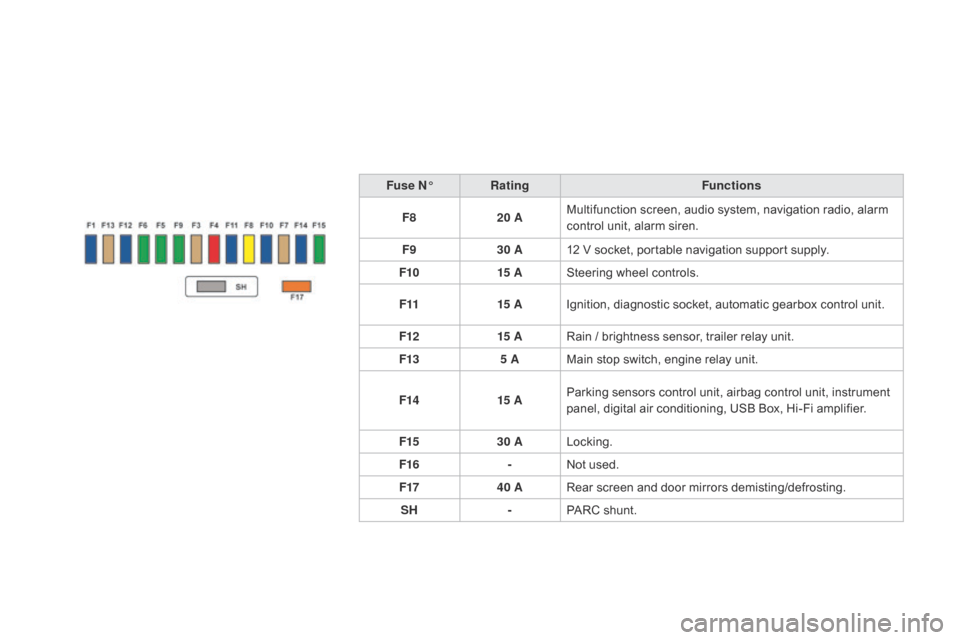
Fuse n°R ating Functions
F8 20 AMultifunction
screen, audio system, navigation radio, alarm
c
ontrol unit, alarm siren.
F9 30 A12
V socket, portable navigation support supply.
F10 15 ASteering
wheel controls.
F11 15 AIgnition,
diagnostic socket, automatic gearbox control unit.
F12 15 ARain
/ brightness sensor, trailer relay unit.
F13 5 AMain
stop switch, engine relay unit.
F14 15 AParking
sensors control unit, airbag control unit, instrument
p
anel, digital air conditioning, USB Box, Hi-Fi amplifier.
F15 30 ALocking.
F16 -Not
used.
F17 40 ARear
screen and door mirrors demisting/defrosting.
SH -PARC
shunt.
Page 275 of 387
273
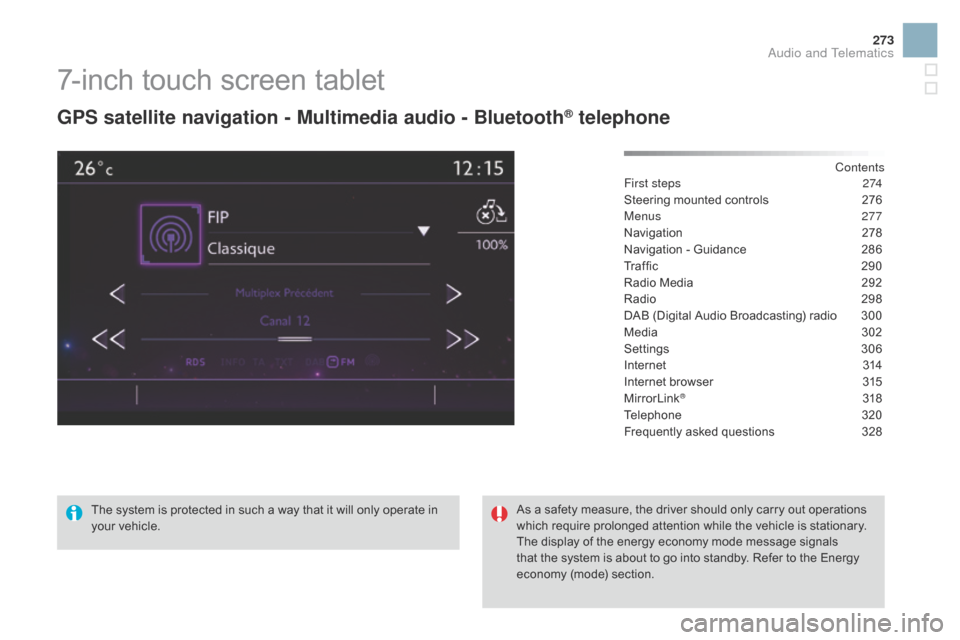
7-inch touch screen tablet
gPS satellite navigation - Multimedia audio - Bluetooth® telephone
Contents
First steps
2 74
Steering
mounted
controls
2
76
Menus
277
Navigation
2
78
Navigation
-
Guidance
2
86
Traffic
29
0
Radio
Media
2
92
Radio
2
98
DAB
(Digital
Audio
Broadcasting)
radio
3
00
Media
3
02
Settings
3
06
Internet
3
14
Internet
browser
3
15
MirrorLink
® 31 8
Telephone
3
20
Frequently
asked questions
3
28
The
system
is
protected
in
such
a
way
that
it
will
only
operate
in
y
our
vehicle. As
a
safety
measure,
the
driver should only carry out operations
w
hich
require
prolonged
attention while the vehicle is stationary.
The
display
of
the
energy
economy mode message signals
t
hat
the
system
is
about
to
go
into standby. Refer to the Energy
ec
onomy
(
mode)
s
ection.
Audio and Telematics
Page 279 of 387
277
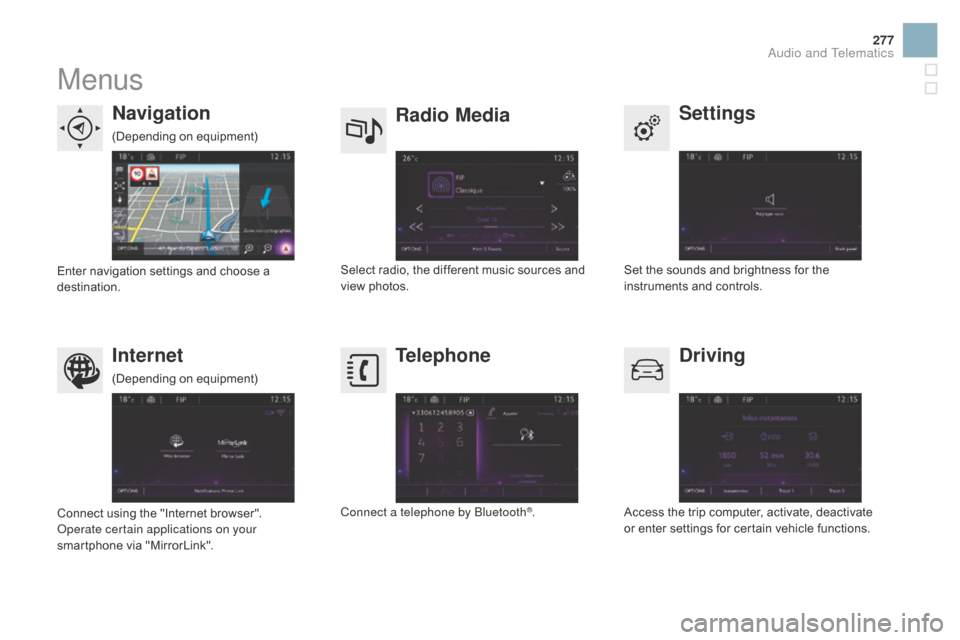
Menus
Settings
Radio Mediana
vigation
dr
iving
Internet Telephone
Set the sounds and brightness for the i
nstruments and controls.
Select
radio,
the
different
music
sources
and
vi
ew pho
tos.
Enter
navigation
settings
and
choose
a
d
estination.
Access
the trip computer, activate, deactivate
o
r enter settings for certain vehicle functions.
Connect
using
the
"Internet
browser".
Operate certain applications on your
smartphone
via
"MirrorLink". Connect a telephone by Bluetooth
®.
(Depending
o
n
e
quipment)
(Depending
o
n
e
quipment)
Audio and Telematics
Page 295 of 387

3
2
293
Level 1Level 2 Comments
Radio Media
List List of FM stations
Press
on a radio station to select it.
Radio Media Source FM Radio
Select
change of source.
d
AB Radio
AM Radio
Jukebox
USB
MirrorLink
iPod
Bluetooth
AUX
Radio Media
Preset Press
an empty location to Preset it.
Audio and Telematics
Page 320 of 387
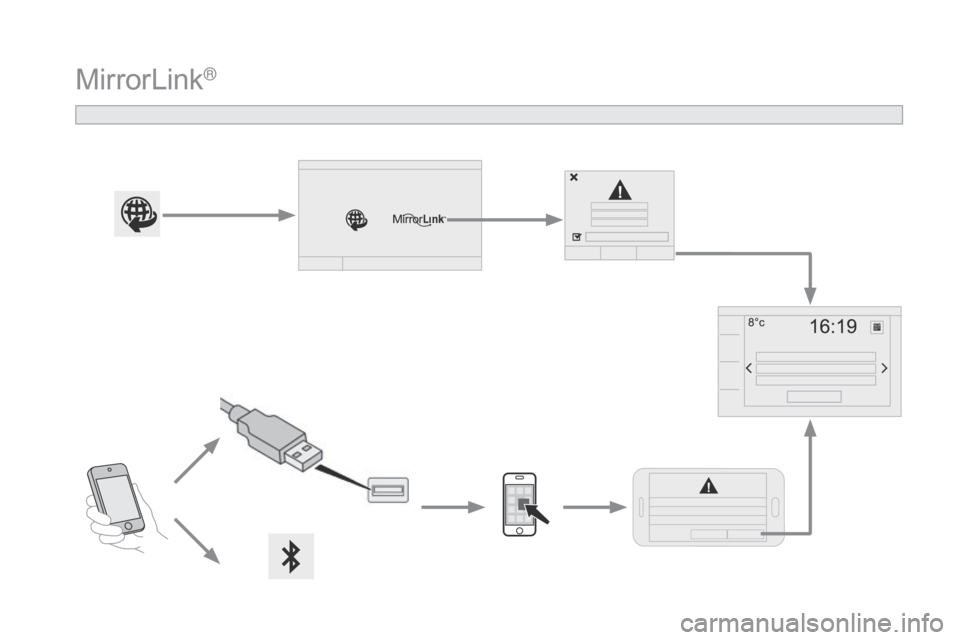
MirrorLink®
Page 321 of 387

319
As a safety measure and because it requires sustained attention by the
d
river, using a smartphone when
d
riving is prohibited.
All
operations must be done with the
v
ehicle stationary .
The synchronisation of a personal
smartphone
allows applications on a
s
martphone that are adapted to the
M
irrorLink
® technology to be displayed i
n
the
vehicle's screen.
The
principles and standards are
c
onstantly
evolving; for information
o
n
supported smartphones, go to the
C
ITROËN
website for your country.
S
elect
MyCITROËN if present. Please
note:
-
i
f
y
our
m
obile
i
s
s
upported,
t
o
m
ake
it "
MirrorLink
®" compatible, some p
hone
manufacturers nevertheless
i
nvite
you
to
first download a
d
edicated
a
pplication.
-
i
Phone
® is not supported yet; an A
pple® application, "CarPlay®", is
being d
eveloped.
When connecting a smartphone to t he system, it is recommended that Bl
uetooth
® be started on the smartphone
Start the application on the
smartphone.
Go
to
the
home page to return to the
"M
irrorLink
®" display.
D
uring the procedure, a page
s
howing the conditions for use is
d
isplayed.
Accept to start and end the
c
onnection.
a
USB
cable
is
connected.
The
s
martphone
charges
when
c
onnected
by
a
USB
cable. Press "
MirrorLink
®" to start
the
application
in
the system.
The " Audio source "
and
" Telephone "
functions
remain
available
in
the
margin of the
M
irrorLink
® display.
MirrorLink® smartphone
connection
Press the end of the lighting control stalk to s
tart voice recognition of your smartphone via
t
he system.
Voice
recognition requires a compatible
t
elephone connected to the vehicle by
Bl
uetooth.
Voice recognition
As a safety measure, applications can only be viewed with the vehicle
s
tationary; display is interrupted once
t
he vehicle is moving.
and From
the system, press "Internet " to
display
the primary page.
Audio and Telematics
Page 358 of 387
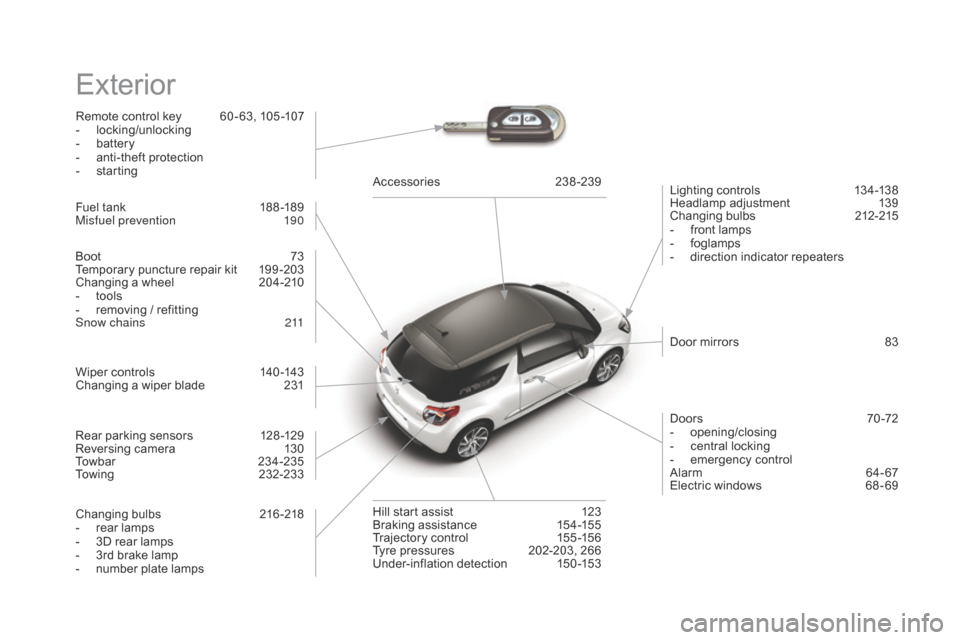
Exterior
Remote control key 60 - 63, 105 -107
- l ocking/unlocking
-
b
attery
-
a
nti-theft protection
-
s
tarting Lighting
controls
1
34-138
Headlamp
adj
ustment
1
39
Changing
bu
lbs
2
12-215
-
f
ront lamps
-
fo
glamps
-
d
irection indicator repeaters
Wiper
controls
1
40 -143
Changing
a wiper blade
2
31 Door
mirrors
8
3
Doors
7
0 -72
-
ope
ning/closing
-
c
entral locking
-
em
ergency
c
ontrol
Alarm
6
4-67
Electric
windows
6
8 - 69
Fuel
tank
1
88 -189
Misfuel prevention
1
90Accessories
23
8-239
Hill
start assist
1
23
Braking
assistance
1
54-155
Trajectory
control
1
55 -156
Tyre
pressures
2
02-203, 266
Under-inflation
d
etection
1
50-153
Boot
7
3
Temporary
puncture repair kit
1
99 -203
Changing
a wheel
2
04-210
-
t
ools
-
r
emoving / refitting
Snow chains
2
11
Changing
bu
lbs
2
16-218
-
r
ear lamps
-
3
D rear lamps
-
3
rd brake lamp
-
n
umber plate lamps
Rear
parking sensors
1
28 -129
Reversing
camera
1
30
Towbar
23
4-235
Towing
23
2-233