reset Citroen DS3 RHD 2016 1.G Owner's Manual
[x] Cancel search | Manufacturer: CITROEN, Model Year: 2016, Model line: DS3 RHD, Model: Citroen DS3 RHD 2016 1.GPages: 380, PDF Size: 10.11 MB
Page 38 of 380
System which informs the driver when the next service is due, in accordance with the
ma
nufacturer's
ser
vicing
s
chedule.
Service indicator
Between 600 miles (1 000 km)
and 1 800 miles (3 000 km) remain
before the next service is due
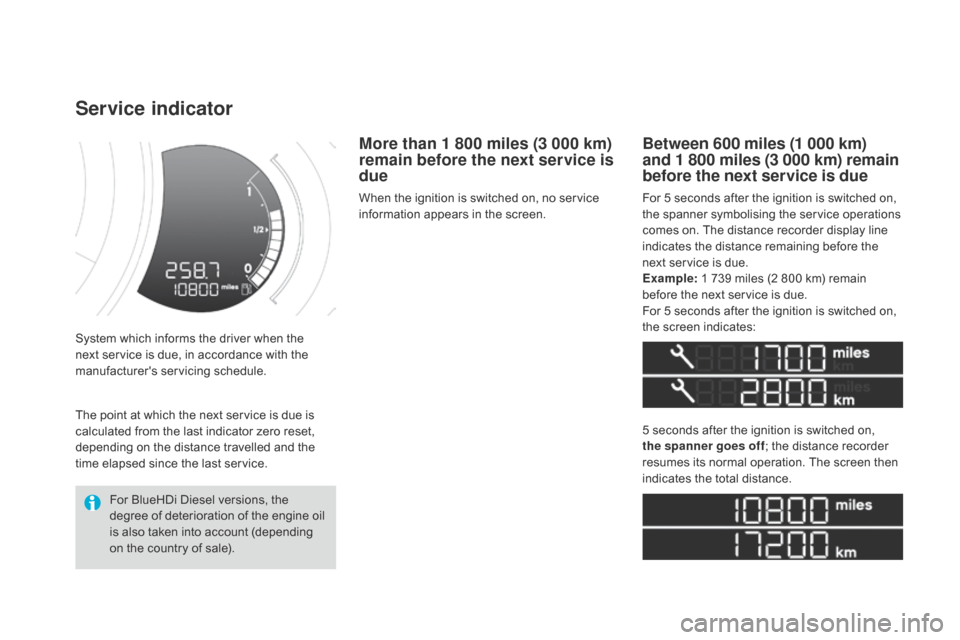
For 5 seconds after the ignition is switched on, the spanner symbolising the service operations
c
omes on. The distance recorder display line
i
ndicates the distance remaining before the
n
ext service is due.
Example:
1 739 miles (2 800 km) remain
b
efore the next service is due.
For
5 seconds after the ignition is switched on,
t
he screen indicates:
5
seconds after the ignition is switched on,
t
he spanner goes off ;
the distance recorder
r
esumes its normal operation. The screen then
i
ndicates the total distance.
For
BlueHDi
Diesel
versions,
the
d
egree
of
deterioration
of
the
engine
oil
i
s
also
taken
into
account
(depending
o
n
the
country
of
sale).
The
point
at
which
the
next
service
is
due
is
c
alculated
from
the
last
indicator
zero
reset,
d
epending
on
the
distance
travelled
and
the
t
ime
elapsed
since
the
last
service.
More than 1 800 miles (3 000 km)
remain before the next service is
due
When the ignition is switched on, no service i nformation appears in the screen.
Page 40 of 380
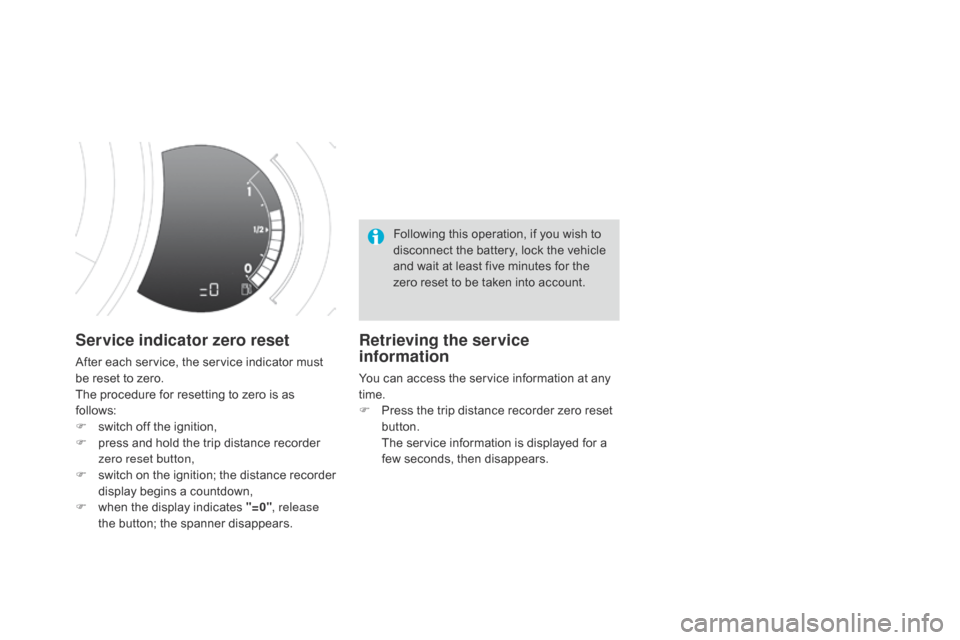
Service indicator zero reset
After each service, the service indicator must be reset to zero.
The
procedure for resetting to zero is as
f
ollows:
F
s
witch off the ignition,
F
p
ress and hold the trip distance recorder
z
ero reset button,
F
s
witch
o
n
t
he
i
gnition;
t
he
d
istance
r
ecorder
d
isplay begins a countdown,
F
w
hen the display indicates "=0", release
the
button; the spanner disappears. Following
this operation, if you wish to
d
isconnect the battery, lock the vehicle
a
nd wait at least five minutes for the
z
ero reset to be taken into account.
Retrieving the service
information
You can access the service information at any t
ime.
F
P
ress the trip distance recorder zero reset
b
utton.
T
he service information is displayed for a
f
ew seconds, then disappears.
Page 56 of 380

Trip computer
Monochrome screen A
Information displays
F Press the button, located at the end of the w
iper stalk ,
to display the various items of
t
rip computer information in succession.The
trip computer provides the following
i
nformation:
-
ra
nge,
-
c
urrent fuel consumption,
-
S
top & Start time counter,
- d istance travelled,
-
a
verage fuel consumption,-
a
verage
s
peed.
F
T
he next press then returns you to the
n
ormal
d
isplay.
System that gives you information on the current journey (range, fuel consumption…).
Trip reset
F Press
the control for more than two s
econds to reset to zero the distance
t
ravelled, the average fuel consumption
a
nd the average speed.
Page 57 of 380

55
Monochrome screen C
Information displays
F Press the button, located at the end of t
he wiper stalk ,
to display the various trip
c
omputer tabs in succession. -
t
he current information tab
w
ith:
●
t
he range,
●
t
he current fuel
c
onsumption,
●
t
he distance remaining
to be travelled or the
Stop & Start time counter.
-
t
he trip "1"
tab with:
●
t
he distance travelled,
●
t
he average fuel
c
onsumption,
● t he average speed, f
or the first trip.
-
t
he trip "2"
tab with:
●
t
he distance travelled,
●
t
he average fuel
c
onsumption,
●
t
he average speed,
f
or the second trip.
F
P
ressing the button again returns you to
t
he normal display.
Trip reset
F When the trip required is displayed, press t
he button on the end of the wiper stalk for
m
ore than two seconds.
Tr i p s "1"
and "2"
are independent but their use
i
s identical.
For
example, trip "1"
can be used for daily
f
igures, and trip "2"
for monthly figures.
Monitoring
Page 58 of 380

Touch screen tablet
Information display
F Press the MEnU button, then select
"dr iving",
to display the various tabs.
F
S
elect the desired tab using your finger.-
T
he "
Instantaneous " tab with:
●
t
he range,
●
t
he current fuel consumption,
●
t
he Stop & Start time counter.
-
t
he "
Tr i p 1 " tab with:
●
t
he distance travelled,
●
t
he average fuel consumption,
●
t
he average speed,
f
or the first trip.
-
t
he "Tr i p 2 "
tab with:
●
t
he distance travelled,
●
t
he average fuel consumption,
●
t
he average speed,
f
or the second trip.
Trip reset
F When the desired trip is displayed, press t
he reset button.
Tr i p s "1"
and "2"
are independent but their use
i
s identical.
For
example, trip "1"
can be used for daily
f
igures, and trip "2"
for monthly figures.
Page 59 of 380

57
A few definitions
Range
(miles or km)
Current fuel consumption
(mpg or l/100 km or km/l)
Stop & Start time
counter
(minutes / seconds or hours / minutes)
This
value
may
vary
following
a
change
i
n
the
style
of
driving
or
the
relief,
r
esulting
in
a
significant
change
in
the
c
urrent
fuel
consumption.
If
dashes
are
displayed
continuously
w
hile
driving
in
place
of
the
digits,
c
ontact
a
CITROËN
dealer
or
a
q
ualified
w
orkshop.
When
the
range
falls
below
20
miles
(30
km),
d
ashes
are
displayed.
After
filling
with
at
least
5
litres
of
fuel,
the
range
is
recalculated
and
is
d
isplayed
when
it
exceeds
60
miles
(100
km).
distance remaining to
destination
(miles or km)
T
he
distance
which
can
still
be
travelled
with
t
he
fuel
remaining
in
the
tank
(related
to
the
a
verage
fuel
consumption
over
the
last
few
m
iles
(
kilometres)
t
ravelled). Calculated
over
the
last
few
seconds.
This
is
the distance remaining to be travelled
t
o
the
final destination. It can be entered by
t
he user.
If
the
distance is not entered, dashes are
d
isplayed
in place of the digits.
If
your
vehicle is fitted with Stop & Start, a time
c
ounter
calculates the time spent in STOP
m
ode
during a journey.
I
t
resets
to zero every time the ignition is
s
witched
on with the key.
distance travelled
(miles or km)
C
alculated
since the last trip reset.
Average speed
(mph or km/h)
C
alculated since the last trip reset.
Average fuel
consumption
(mpg or l/100 km or km/l)
C
alculated
since the last trip reset.
This
function is only displayed from
2
0 mph
(30 km/h).
Trip computer
Monitoring
Page 236 of 380

disconnecting the battery
In order to maintain an adequate state of charge for starting the engine, it is
r
ecommended that the battery be disconnected
i
f the vehicle is taken out of service for a long
p
eriod.
Wait
2 minutes after switching off the ignition
b
efore disconnecting the battery:
F
c
lose all openings (doors, boot, windows,
r
oof (for Cabrio versions)),
F
s
witch off all electrical consumers (audio
s
ystem, wipers, lighting, ...),
F
s
witch off the ignition and wait for
f
our minutes.
Having
exposed the battery, it is only
n
ecessary to disconnect the (+) terminal.
Following reconnection of the
battery
After reconnecting the battery, switch on the ignition and wait 1 minute before starting to
a
llow initialisation of the electronic systems.
However,
if minor problems persist following
t
his operation, contact a CITROËN dealer or a
q
ualified
w
orkshop.
Referring
to the corresponding section, you
m
ust yourself reinitialise or reset certain
s
ystems, such as:
-
t
he remote control,
-
t
he electric windows,
-
t
he date and time,
-
t
he radio preset stations.
Quick release terminal
di
sconnecting the (+) terminal
F Raise the lever A fully to release the clamp B.
Reconnecting the (+) terminal
F Position the open clamp B of the cable on
the positive post (+) of the battery.
F
P
ress down on the clamp to position it
c
orrectly on the battery post.
F
L
ock the clamp by lowering the lever A. The
Stop & Start system may not be
o
perational during the trip following the
f
irst engine start.
In
this case, the system will only be
a
vailable again after a continuous
p
eriod of immobilisation of the vehicle,
a
period which depends on the ambient
t
emperature and the state of charge of
t
he battery (up to about 8 hours).
Do
not force the lever as locking
w
ill not be possible if the clamp is
n
ot positioned correctly; start the
p
rocedure again.
Page 282 of 380
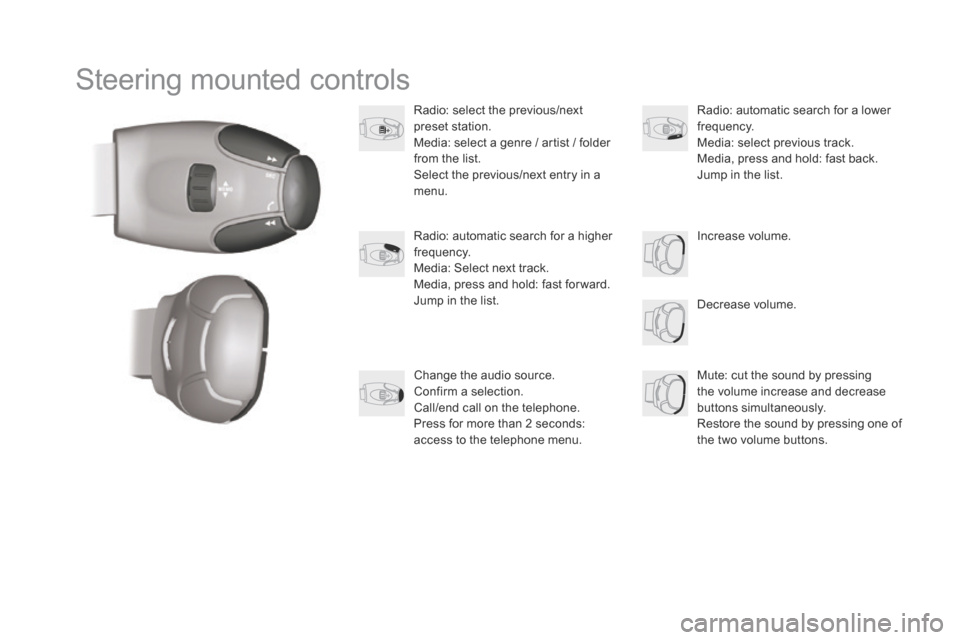
Steering mounted controls
Radio: select the previous/next preset s tation.
Media:
select a genre / artist / folder
f
rom the list.
Select
the previous/next entry in a
m
enu.
Decrease
volume.
Radio:
automatic search for a higher
f
requency.
Media:
Select next track.
Media,
press and hold: fast for ward.
Jump
in the list. Mute:
cut the sound by pressing
t
he volume increase and decrease
bu
ttons
s
imultaneously.
Restore
the sound by pressing one of
t
he two volume buttons.
Radio:
automatic search for a lower f
requency.
Media:
select previous track.
Media,
press and hold: fast back.
Jump
in the list.
Change
the audio source.
Confirm
a selection.
Call/end
call on the telephone.
Press
for more than 2 seconds:
a
ccess to the telephone menu. Increase
volume.
Page 299 of 380
3
2
297
Level 1Level 2 Comments
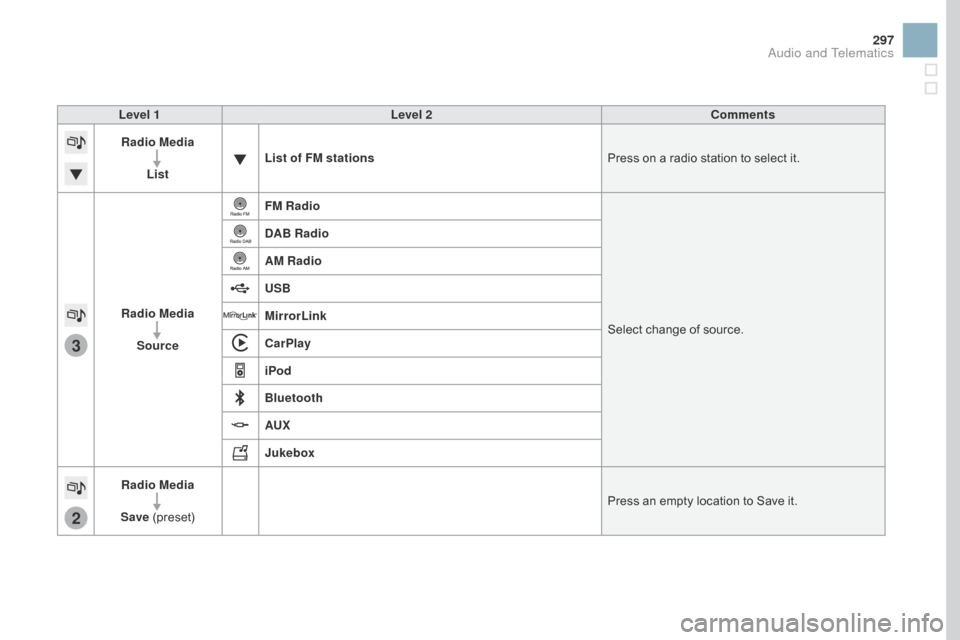
Radio Media
List List of FM stations
Press
on a radio station to select it.
Radio Media Source FM Radio
Select
change of source.
d
AB Radio
AM Radio
USB
MirrorLink
CarPlay
iPod
Bluetooth
AUX
Jukebox
Radio Media
Save
(
preset) Press
an empty location to Save it.
Audio and Telematics
Page 304 of 380
2
3
3
1
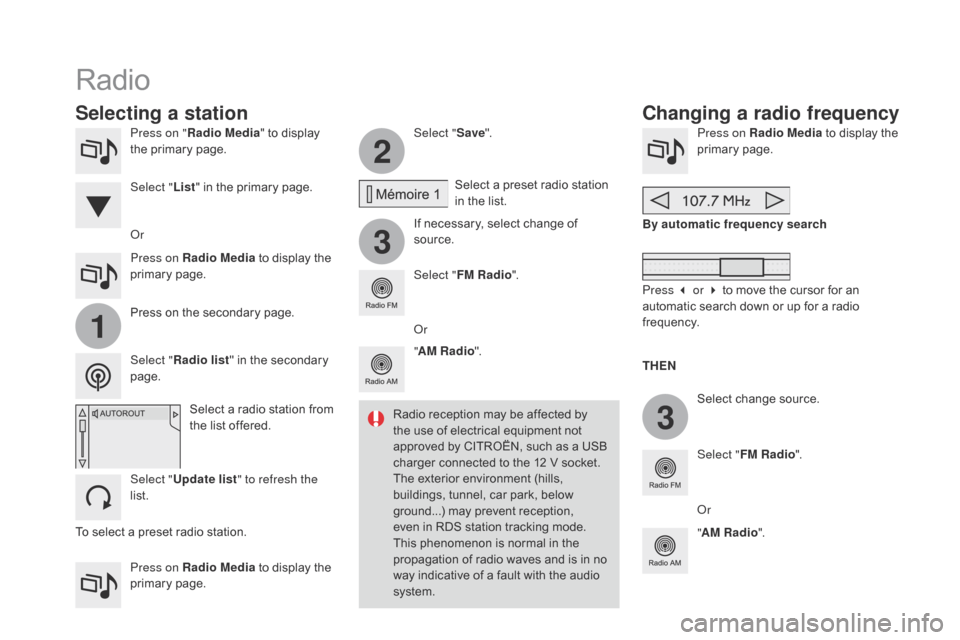
Press on "Radio Media " to display t
he primary page.
Press on Radio Media
to display the
p
rimary
pag
e. Select "
Save".
If necessary, select change of
s
ource.Press on Radio Media
to display the p
rimary pag e.
Select
change source.
"
AM Radio ". By automatic frequency search
Select "FM Radio ".
" AM Radio ".
Press on Radio Media
to display the
p
rimary
pag
e.
Or Select
a preset radio station
i
n the list.
Select " FM Radio ".
Select
a radio station from
t
he list offered.
Select " Update list " to refresh the
list. Press
on the secondary page.
Select " Radio list "
in the secondary
pag
e.
Select "
List"
in the primary page.
Radio
Changing a radio frequency
Selecting a station
THEn
R
adio
reception
may
be
affected
by
t
he
use
of
electrical
equipment
not
a
pproved
by
CITROËN,
such
as
a
USB
c
harger
connected
to
the
12
V
socket.
The
exterior
environment
(hills,
b
uildings,
tunnel,
car
park,
below
g
round...)
may
prevent
reception,
e
ven
in
RDS
station
tracking
mode.
T
his
phenomenon
is
normal
in
the
p
ropagation
of
radio
waves
and
is
in
no
w
ay
indicative
of
a
fault
with
the
audio
s
ystem. Or
Press 3 or 4 to move the cursor for an
a
utomatic search down or up for a radio
f
requency.
Or
To
select
a
preset
radio
station.