radio Citroen DS4 2010.5 1.G User Guide
[x] Cancel search | Manufacturer: CITROEN, Model Year: 2010.5, Model line: DS4, Model: Citroen DS4 2010.5 1.GPages: 341, PDF Size: 10.59 MB
Page 288 of 341

320
07
1a
1b
1c
1
2
RADIO
By alphabetical list
Press RADIO or LIST , select the station of your choice and confi rm.
By automatic frequency search
Press or for the automatic search for a lower or higher radio frequency.
Or turn the thumb wheel on the steering mounted control.
By manual frequency search
Press or to adjust the radio frequency step by step.
Press the button on the numerical keypad to recall a preset station.
Or press then turn the thumb wheel at the steering mounted controls.
SELECTING A STATION
The external environment (hill, building, tunnel, underground car park...) may interfere with the re ception, including in RDS station tracking mode. Th is phenomenon is a normal result of the way in which r adio waves are transmitted and does not in any way indicate a fault with the audio system.
PRESETTING A STATION
Press one of the buttons on the numerical keypad for 2 seconds to preset the current station.
An audible signal confi rms that the station has been preset.
The quality of reception is represented by this symbol.
Page 289 of 341
321
1
2
3
07
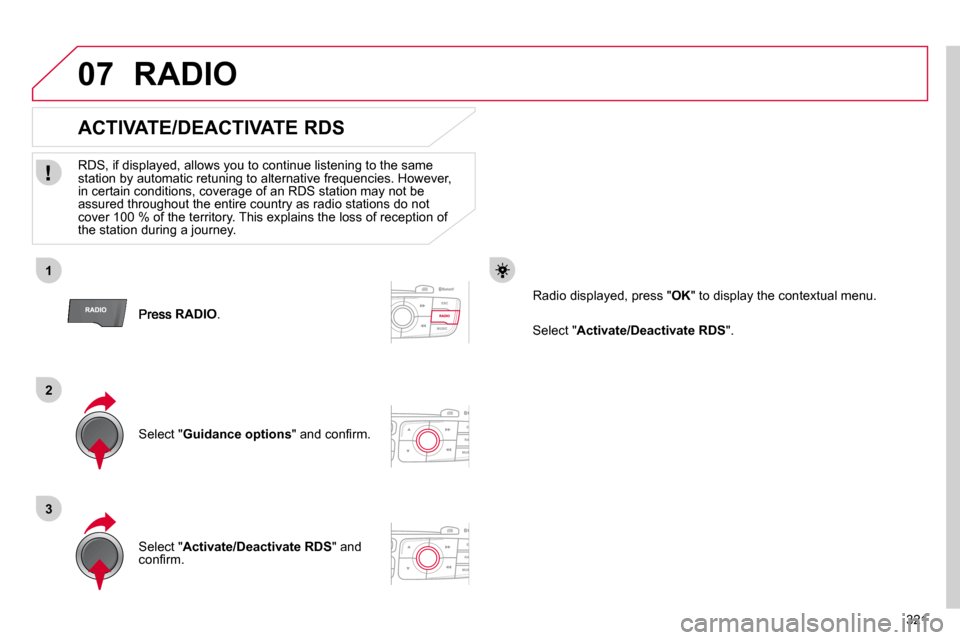
RADIO .
ACTIVATE/DEACTIVATE RDS
RDS, if displayed, allows you to continue listening to the same station by automatic retuning to alternative frequencies. How ever, in certain conditions, coverage of an RDS station may not be assured throughout the entire country as radio stations do not cover 100 % of the territory. This explains the loss of receptio n of the station during a journey.
Select " Guidance options " and confi rm.
Select " Activate/Deactivate RDS " and confi rm.
RADIO
Select " Activate/Deactivate RDS ".
Radio displayed, press " OK " to display the contextual menu.
Page 292 of 341

324
08
1
2
3
MUSIC MEDIA PLAYERS
CD, MP3 CD, USB PLAYER
Insert the CD in the player, insert the USB memory stick in the USB player or connect the USB peripheral to the USB port using a suitable cable (not supplied).
The system builds playlists (in temporary memory), an operation which can take from a few seconds to several minutes.
Reduce the number of non-music fi les and the number of folders to reduce the waiting time.
The playlists are updated every time the ignition is switched off or connection of a USB memory stick.
Play starts automatically after a period which depends on the capacity of the USB memory stick.
SELECTION OF SOURCE
The SOURCE button on the steering mounted controls allows a direct change to the next media source.
" CD/CD MP3 "
" USB, IPod "
" AUX " " STREAMING "
" RADIO "
Press MUSIC to display the " MEDIA " menu.
Select " Following media source " and confi rm.
Repeat the operation as many times as necessary to obtain the desired media source (except for radio which is accessible either with SOURCE or RADIO ).
Page 296 of 341
328
09
1
2
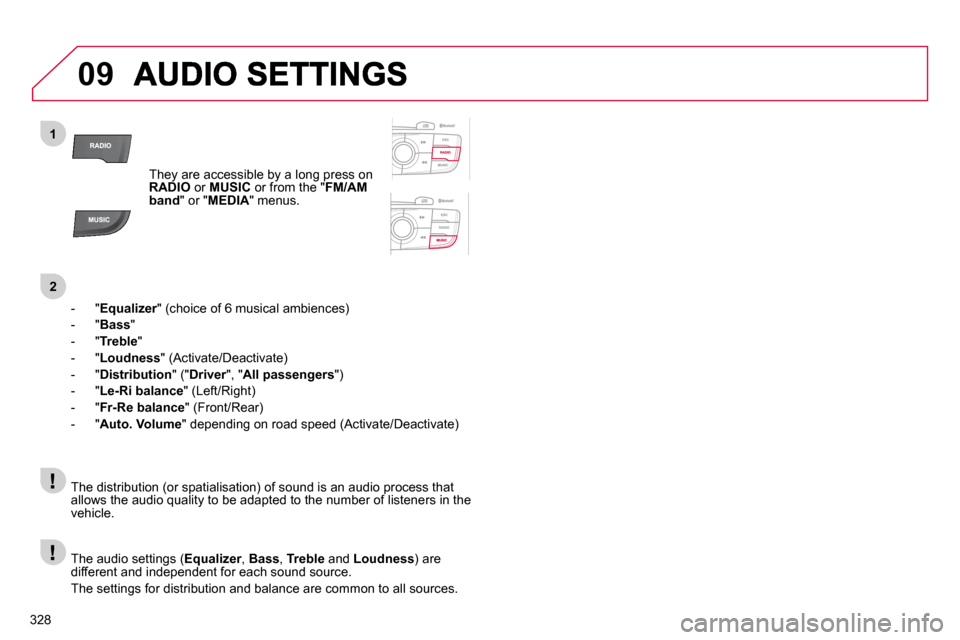
They are accessible by a long press on RADIO or MUSIC or from the " FM/AM band " or " MEDIA " menus.
- " Equalizer " (choice of 6 musical ambiences) Equalizer
- " Bass "
- " Treble "
- " Loudness " (Activate/Deactivate)
- " Distribution " (" Driver ", " DriverAll passengers ")
- " Le-Ri balance " (Left/Right)
- " Fr-Re balance " (Front/Rear)
- " Auto. Volume " depending on road speed (Activate/Deactivate)
The audio settings ( Equalizer , EqualizerBass , Treble and Loudness ) are different and independent for each sound source.
The settings for distribution and balance are common to all sources.
The distribution (or spatialisation) of sound is an audio process that allows the audio quality to be adapted to the number of listeners in the vehicle.
Page 299 of 341

331
11 SCREEN MENU MAP
Dial
Directory of contacts
Call
Open
Import
Phone MENU
1
2
2
2
1
2
2
2
2
1
2
3
3
3
2
2
2
1
1
1
3
3
3
2
3
2
2
31
2
2
1
1
3
3
3
3
3
3
2
List of the paired peripherals
Connect
Disconnect
Delete
Delete all
Contact mem. status
Phone functions
Ring options
Delete calls log
Bluetooth functions Equalizer
"RADIO" MENU Following waveband
Guidance options
Activate/Deactivate TA
Activate/Deactivate RDS
Audio settings
Peripherals search
Rename radiotelephone
Hang up
Display all phone contacts
Delete
Contacts management
New contact
Delete all contacts
Import all the entries
Synchronizing contacts
Display telephone contacts
No synchronization
Display SIM card contacts
None
Classical
Jazz
Rock
Techno
Vocal
Page 300 of 341

332
11 SCREEN MENU MAP
2
3
3
1
4
2
2
1
4
4
2
2
1
1
1
2
1
1
2
2
2
2
2
2
2
3
3
2
2
2
1
Random on all media
Repetition
Audio settings (same as RADIO)
Activate/Deactivate AUX input
"MEDIA" MENU Following media source
Eject USB support
Read mode
Normal
Random
All passengers
Le-Ri balance
Fr-Re balance
Auto. Volume
Update radio list
Bass
Treble
Loudness
Distribution
Driver
Night mode
Auto Day/Night
Adjust luminosity
Set date and time
"SETUP" MENU Display configuration
Choose colour
Harmony
Cartography
Day mode
Voice synthesis
Guidance instructions volume
Select male voice/Select female voice
Page 304 of 341

336
FREQUENTLY ASKED QUESTIONS
QUESTIONANSWERSOLUTION
Some characters in the media information are not displayed correctly while playing.
The audio system does not display some types of characters. Use standard characters to name tracks and folders.
Playing of streaming fi les does not start. The peripheral device connected does not support automatic play. Start the playback from the device.
The names of tracks and the track length are not displayed on the screen when streaming audio.
The Bluetooth profi le does not allow the transfer of this information.
The quality of reception of the radio station listened to gradually deteriorates or the stored stations do not function (no sound, 87.5 Mhz is displayed...).
The vehicle is too far from the transmitter used by the station listened to or there is no transmitter in the geographical area through which the vehicle is travelling.
Activate the "RDS" function by means of the short-cut menu to enable the system to check whether there is a more powerful transmitter in the geographical area.
The environment (hills, buildings, tunnels, basement car parks.. .) block reception, including in RDS mode. This phenomenon is normal and does not indicate a fault with the audio system.
The aerial is absent or has been damaged (for example when g oing through a car wash or into an underground car park). Have the aerial checked by a CITROËN dealer.
I cannot fi nd some radio stations in the list of stations received.
The station is not received or its name has changed in the list.
Some radio stations send other information in place of their name (the title of the song for example).
The system interprets this information as the name of the stati on. The name of the radio station changes.
Page 308 of 341

340
01
1
2
7
45
6
3
8
9
10
13
1112
14
FIRST STEPS
1. On/Off and volume adjustment. 2. CD eject. 3. Selection of the display on the screen from the following modes: Full screen: Audio (or if a telephone call is in progress)/ New window: Audio (or telephone if a call is in progress) - Time or Trip computer. Long press: black screen (DARK). 4. Selection of source: Radio, CD, AUX, USB, Streaming. Accept an incoming call. 5. Selection of FM1, FM2, DAB and AM wavebands. 6. Buttons 1 to 6: Selection of a preset radio station. Long press: preset a station.
7. Display the list of stations received, the CD/MP3 tracks or folders. Long press: MP3/WMA fi le order/update the list of stations received. 8. TA (Traffi c Announcement) function on/off. Long press: access to the type of information. 9. Confi rmation or display of contextual menu. 10. Abandon current operation. Up one level (menu or folder). 11. Automatic search for a lower/higher radio frequency. Selection of previous/next CD, USB, streaming track. Navigation in a list.
12. Manual step by step search for a lower/higher radio frequency. Selection of the previous/next MP3 folder. Selection of the previous/next USB device folder/genre/artist/playlist. Navigation in a list. 13. Main menu. 14. Audio settings: equalizer, treble, bass, loudness, distribution, left/right balance, front/rear, automatic volume.
Page 310 of 341

342
03
" Multimedia ": Media parameters, Radio parameters.
" Trip computer ": Warning log. rip computer
For a detailed global view of the menus available, refer to "Screen menu map" in this section.
" Bluetooth connection ": Connections management, Search for a device.
" Telephone ": Call, Directory management, Telephone management, Hang up.
MAIN MENU
" Personalisation-confi guration ": Defi ne the vehicle parameters, Choice of language, Display confi guration, Choice of units, Date and time adjustment.
> SCREEN C
Page 311 of 341

343
1
2
1
04
AUDIO
Press SOURCE several times in succession and select radio.
Press BAND to select a waveband among: FM1, FM2, DAB (digital radio), AM.
Press LIST to display the list of stations received in alphabetical order.
A press changes to the next or previous letter (e.g. A, B, D, F, G, J, K, …).
RADIO
Select the desired radio station and confi rm by pressing OK .
SELECTING A STATION
A long press on LIST builds or updates the list of stations; audio reception is cut momentarily.
The exterior environment (hills, buildings, tunnel, car park,
below ground…) may prevent reception, even in RDS station tracking mode. This phenomenon is normal in the propagation of radio waves and is in no way indicative of a fault with the audio system.