ignition CITROEN DS4 2010 Owners Manual
[x] Cancel search | Manufacturer: CITROEN, Model Year: 2010, Model line: DS4, Model: CITROEN DS4 2010Pages: 421, PDF Size: 8.05 MB
Page 290 of 421

288
Changing a fuse
The extraction tweezer is fitted to a carrier
clipped to the dashboard fusebox cover.
For access to it:
F
o
pen the glove box lid,
F
u
nclip the carrier on the fusebox cover by
pulling on the right,
Access to the tools
F remove the tweezer. Before changing a fuse:
F
t
he cause of the failure must be identified
and rectified,
F
a
ll electrical consumers must be
switched off,
F
t
he vehicle must be immobilised with the
ignition off,
F
i
dentify the failed fuse using the tables and
layout drawings in the following pages.
Changing a fuse
Good Failed
The replacement of a fuse not shown in
the tables below may cause a serious
malfunction of your vehicle. Contact
a CITROËN dealer or a qualified
workshop. Tw e e z e r
To replace a fuse, you must:
F
u
se the special tweezer to extract the fuse
from its housing and check the condition of
its filament.
F
a
lways replace the failed fuse with a fuse
of the same rating (same colour); using a
different rating could cause faults (risk of
f i r e).
If the fuse fails again soon after replacement,
have the vehicle's electrical system checked by
a CITROËN dealer or a qualified workshop.
08
In the event of a breakdown
Page 295 of 421
293
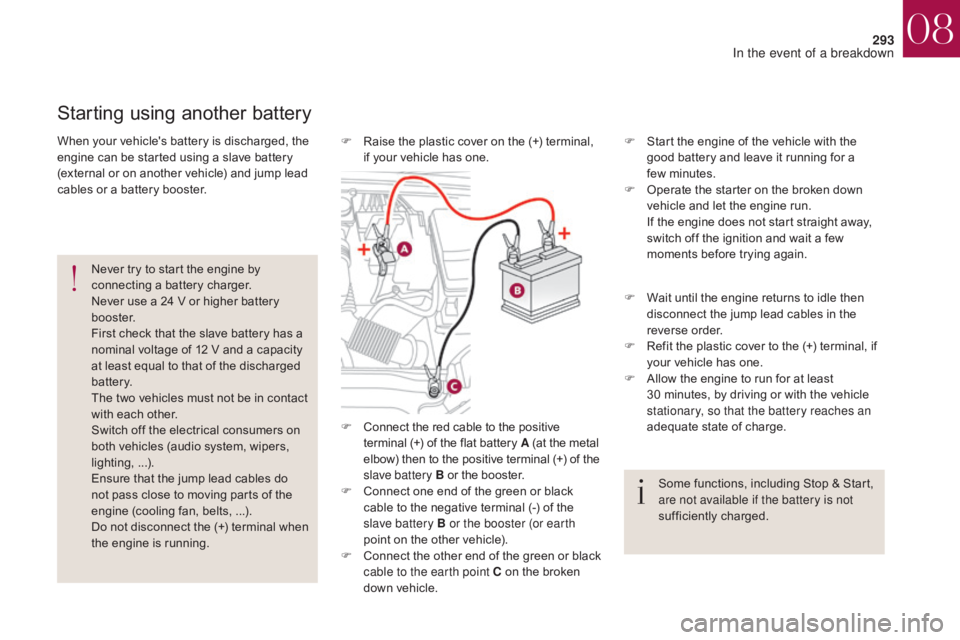
F Connect the red cable to the positive terminal (+) of the flat battery A (at the metal
elbow) then to the positive terminal
(+) of the
slave battery B or the booster.
F
C
onnect one end of the green or black
cable to the negative terminal (-) of the
slave battery B or the booster (or earth
point on the other vehicle).
F
C
onnect the other end of the green or black
cable to the earth point C on the broken
down vehicle. F
S
tart the engine of the vehicle with the
good battery and leave it running for a
few
m
inutes.
F
O
perate the starter on the broken down
vehicle and let the engine run.
I
f the engine does not start straight away,
switch off the ignition and wait a few
moments before trying again.
Starting using another battery
Never try to start the engine by
connecting a battery charger.
Never use a 24 V or higher battery
b o o s t e r.
First check that the slave battery has a
nominal voltage of 12 V and a capacity
at least equal to that of the discharged
battery.
The two vehicles must not be in contact
with each other.
Switch off the electrical consumers on
both vehicles (audio system, wipers,
lighting, ...).
Ensure that the jump lead cables do
not pass close to moving parts of the
engine (cooling fan, belts, ...).
Do not disconnect the (+) terminal when
the engine is running.
When your vehicle's battery is discharged, the
engine can be started using a slave battery
(external or on another vehicle) and jump lead
cables or a battery booster.
F
W
ait until the engine returns to idle then
disconnect the jump lead cables in the
reverse order.
F
R
efit the plastic cover to the (+) terminal, if
your vehicle has one.
F
A
llow the engine to run for at least
30
minutes, by driving or with the vehicle
stationary, so that the battery reaches an
adequate state of charge.
Some functions, including Stop & Start,
are not available if the battery is not
sufficiently charged.
F
R
aise the plastic cover on the (+) terminal,
if your vehicle has one.
08
In the event of a breakdown
Page 296 of 421

294
If you envisage charging your vehicle's
battery yourself, use only a charger
compatible with lead-acid batteries of a
nominal voltage of 12 V.
If this label is present, it is essential
to use only a 12 V charger, to avoid
causing irreversible damage to the
electrical components related to the
Stop & Start system.Never try to charge a frozen battery.
If the battery has been frozen, have
it checked by a CITROËN dealer or
a qualified workshop, who will check
that the internal components have not
been damaged and the casing is not
cracked, which could cause a leak of
toxic and corrosive acid.
Charging the battery using a battery charger
For optimum service life of the battery, it is
essential to maintain an adequate state of
charge.
In some circumstances it may be necessary to
charge the battery:
-
i
f you use your vehicle essentially for short
journeys,
-
i
f the vehicle is to be taken off the road for
several weeks.
Contact a CITROËN dealer or a qualified
workshop. It is not necessary to disconnect the
battery. Follow the instructions for use provided
by the manufacturer of the charger.
Never reverse polarities.
F
S
witch off the ignition.
F
S
witch off all electrical consumers (audio
system, lighting, wipers, ...).
F
S
witch off the charger B before connecting
the cables to the battery, so as to avoid any
dangerous sparks.
F
E
nsure that the charger cables are in good
condition.
F
R
aise the plastic cover, if your vehicle has
one, on the (+) terminal.
F
C
onnect the charger B cables as follows:
-
t
he positive (+) red cable to the (+)
terminal of the battery A ,
-
t
he negative (-) black cable to the earth
point C on the vehicle.
F
A
t the end of the charging operation, switch
off the charger B before disconnecting the
cables from the battery A .
08
In the event of a breakdown
Page 297 of 421

295
In order to maintain an adequate state
of charge for starting the engine, it is
recommended that the battery be disconnected
if the vehicle is taken out of service for a long
period.
Before disconnecting the battery:
F
c
lose all openings (doors, boot, windows),
F
s
witch off all electrical consumers (audio
system, wipers, lighting, etc.),
F
s
witch off the ignition and wait for
four
m
inutes.
At the battery, it is only necessary to
disconnect the (+) terminal.
Disconnecting the battery
The Stop & Start system may not be
operational during the trip following the
first engine start.
In this case, the system will only be
available again after a continuous
period of immobilisation of the vehicle,
a period which depends on the exterior
temperature and the state of charge of
the battery (up to about 8 hours).
F
Ra
ise the lever A fully.
F
R
efit the open clamp B on the (+)
terminal.
F
P
ush the clamp B fully down.
F
L
ower the lever A to lock the clamp B
.
Do not force the lever as locking
will not be possible if the clamp is
not positioned correctly; start the
procedure again.
Following reconnection of the
battery
After reconnecting the battery, switch on the
ignition and wait 1 minute before starting to
allow initialisation of the electronic systems.
However, if minor problems persist following
this operation, contact a CITROËN dealer or a
qualified workshop.
Referring to the corresponding section, you
must yourself initialise or reset certain systems,
such as:
-
t
he one-touch electric windows,
-
t
he date and time,
-
t
he settings of the audio system or of the
satellite navigation system.
Quick-release terminal clamp
F Raise the lever A fully to release the clamp B .
F R emove the clamp B by lifting it off.
Disconnecting the (+) terminal Reconnecting the (+) terminal
08
In the event of a breakdown
Page 300 of 421

298
Running out of fuel (Diesel)
On vehicles fitted with Diesel engines, the fuel
system must be primed if you run out of fuel.
For all versions other than BlueHDi, refer to the
corresponding engine compartment view.Other HDi engines
(except BlueHDi version)
For more information on Diesel
misfuel prevention , refer to the
corresponding section.
If the engine does not start first
time, don't keep trying but start the
procedure again from the beginning. F
A
dd at least five litres of Diesel fuel to the
tank.
F
O
pen the bonnet.
F
I
f necessary, unclip the styling cover for
access to the priming pump.
F
S
queeze and release the priming
pump repeatedly until resistance
is felt (there may be resistance at
the first press).
F
O
perate the starter to start the engine
(if the engine does not start at the first
attempt, wait around 15 seconds before
trying again).
F
I
f the engine does not start after a few
attempts, operate the priming pump again
then start the engine.
F
R
efit the styling cover and clip it in place.
F
C
lose the bonnet.
BlueHDi engines
F Fill the fuel tank with at least five litres of Diesel.
F
S
witch on the ignition (without starting the
engine).
F
W
ait around 6 seconds and switch off the
ignition.
F
R
epeat the operation 10 times.
F
O
perate the starter to run the engine.
08
In the event of a breakdown
Page 317 of 421
315
With the engine running, press to
mute the sound.
With the ignition off, press to switch
the system on.
Volume adjustment (each source
is independent, including traffic
announcements (TA) and navigation
instructions).
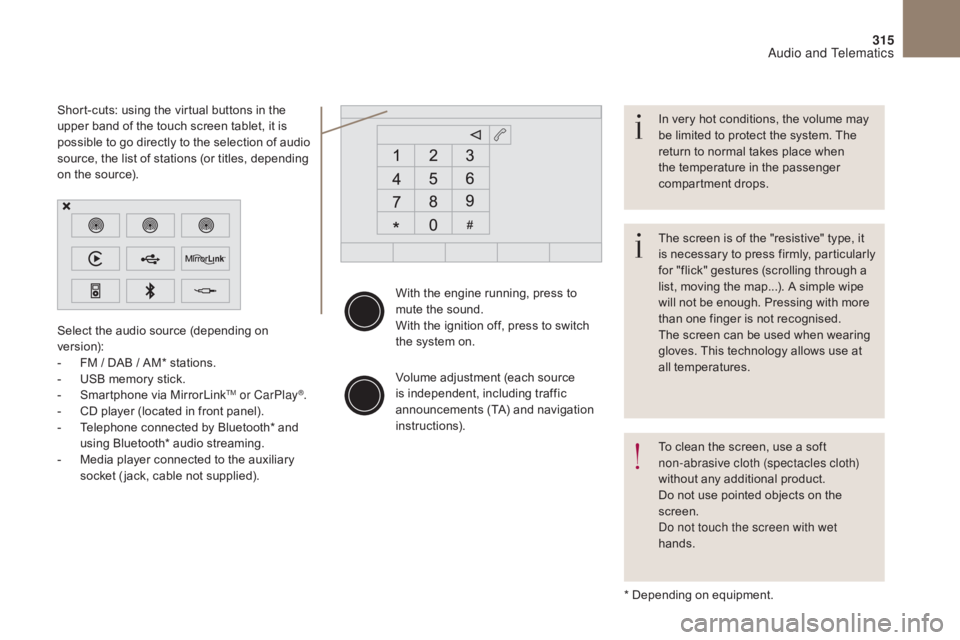
Select the audio source (depending on
version):
-
F
M
/ DAB
/ AM* stations.
-
U
SB memory stick.
-
S
martphone via MirrorLink
TM or CarPlay®.
-
C
D player (located in front panel).
-
T
elephone connected by Bluetooth* and
using Bluetooth* audio streaming.
-
M
edia player connected to the auxiliary
socket ( jack, cable not supplied).
* Depending on equipment.
Short-cuts: using the virtual buttons in the
upper band of the touch screen tablet, it is
possible to go directly to the selection of audio
source, the list of stations (or titles, depending
on the source).
The screen is of the "resistive" type, it
is necessary to press firmly, particularly
for "flick" gestures (scrolling through a
list, moving the map...). A simple wipe
will not be enough. Pressing with more
than one finger is not recognised.
The screen can be used when wearing
gloves. This technology allows use at
all temperatures. In very hot conditions, the volume may
be limited to protect the system. The
return to normal takes place when
the temperature in the passenger
compartment drops.
To clean the screen, use a soft
non-abrasive cloth (spectacles cloth)
without any additional product.
Do not use pointed objects on the
screen.
Do not touch the screen with wet
hands.
Audio and Telematics
Page 344 of 421
3
342
Media
USB portSelecting the source
First adjust the volume of your portable device
(to a high level). Then adjust the volume of your
audio system.
Display and management of the controls are
via the portable device.The steering mounted SRC
(s o u r c e)
button can be used to go to the next
media source, available if the source
is active.
Press on OK to confirm the selection.
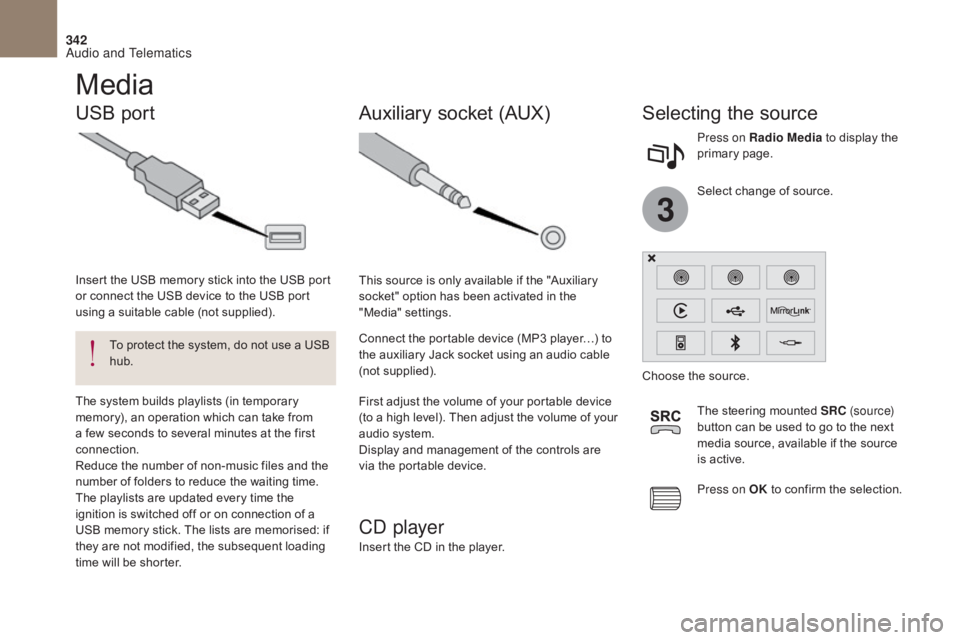
Select change of source. Press on Radio Media
to display the
primary page.
To protect the system, do not use a USB
hub.
Insert the USB memory stick into the USB port
or connect the USB device to the USB port
using a suitable cable (not supplied).
Auxiliary socket (AUX)
CD player
Insert the CD in the player. This source is only available if the "Auxiliary
socket" option has been activated in the
"Media" settings.
Connect the portable device (MP3 player…) to
the auxiliary Jack socket using an audio cable
(not supplied).
Choose the source.
The system builds playlists (in temporary
memory), an operation which can take from
a few seconds to several minutes at the first
connection.
Reduce the number of non-music files and the
number of folders to reduce the waiting time.
The playlists are updated every time the
ignition is switched off or on connection of a
USB memory stick. The lists are memorised: if
they are not modified, the subsequent loading
time will be shorter.
Audio and Telematics
Page 367 of 421
1
19
365
The services available depend
on the network, the SIM card and
the compatibility of the Bluetooth
®
telephone used. Check the telephone
manual and with your network provider
for details of the services available to
you.
The ability of the system to connect
with only one profile depends on the
telephone. The three profiles may all
connect by default.
Visit www.citroen.co.uk for more information
(compatibility, additional help, ...).
The recognised telephone
appears in the list.
Depending on your telephone, you may be
asked to accept automatic connection every
time the ignition is switched on. On return to the vehicle, if the last telephone
connected is present again, it is reconnected
automatically and within around 30 seconds
after switching on the ignition the pairing is
done without any action on your part, with
(Bluetooth
® activated).
To modify the automatic connection mode,
select the telephone in the list then select the
desired profile. Depending on the type of telephone,
the system will ask you to accept or not
the transfer of your contacts.
If not, select " Update".
Connecting a Bluetooth®
peripheral device
Automatic reconnection
On switching on the ignition, the telephone
connected when the ignition was last switched
off is automatically reconnected, if this
connection mode had been activated during the
pairing procedure.
The connection is confirmed by the display of a
message and the name of the telephone.
Manual connection
Press on Telephone to display the
primary page.
Press on the secondary page.
Select " Bluetooth " to display the list
of paired peripherals.
Select the peripheral to connect. Press on " Search for devices ".
The connection is confirmed by the display of a
message and the name of the telephone.
Audio and Telematics
Page 388 of 421

386
Up a level in the menu.
Select a line in the list. Press one of the buttons to select the
next or previous track.
Press and hold one of the buttons for
fast for wards or backwards. Skip a track. Select a track or a folder.
Press LIST to display the menu of
folders in the compilation. To play a disc or memory stick which
has already been inserted, press
SOURCE or SRC several times in
succession and select " CD" or " USB".
Press one of the buttons to select the
next or previous folder in the order
chosen.
CD, USB
Playing a compilation
Insert an MP3 compilation in the CD
player or connect a memory stick
to the USB port, directly or via an
extension lead.
The system creates playlists (temporary
memory) the creation time for which can take
from a few seconds to several minutes.
The playlists are updated every time the
ignition is switched off or a USB memory stick
is connected.
Play starts automatically after a period which
depends on the capacity of the USB memory
stick.
At a first connection, the order suggested is
by folder. When connecting again, the order
previously chosen is retained.
Audio and Telematics
Page 392 of 421
390
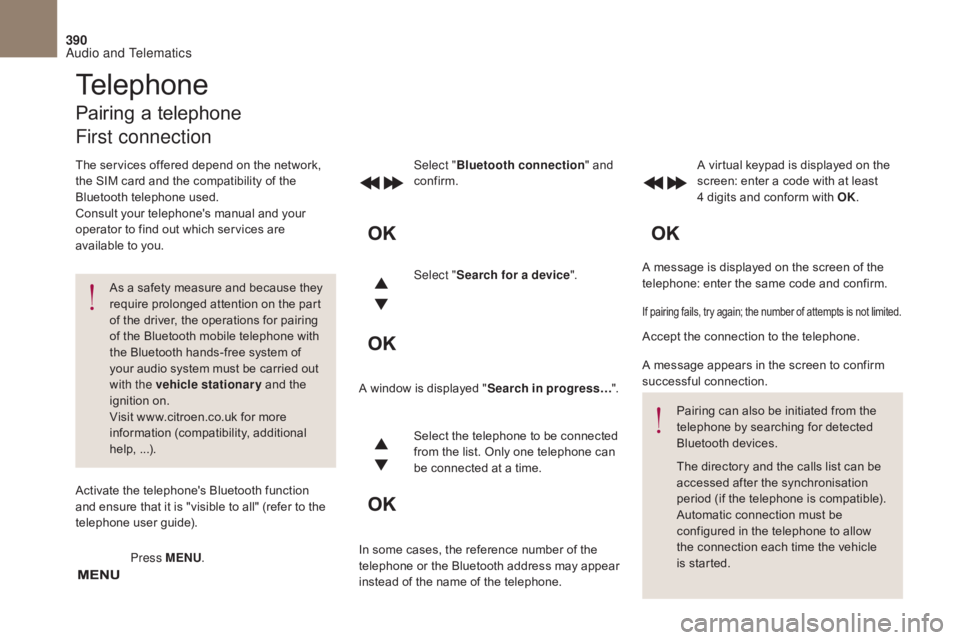
A message is displayed on the screen of the
telephone: enter the same code and confirm.
Select "
Bluetooth connection " and
confirm. A virtual keypad is displayed on the
screen: enter a code with at least
4 digits and conform with OK.
Select " Search for a device".
Select the telephone to be connected
from the list. Only one telephone can
be connected at a time.
A window is displayed "
Search in progress…".
In some cases, the reference number of the
telephone or the Bluetooth address may appear
instead of the name of the telephone.
If pairing fails, try again; the number of attempts is not limited.
Accept the connection to the telephone.
A message appears in the screen to confirm
successful connection. Pairing can also be initiated from the
telephone by searching for detected
Bluetooth devices.
The directory and the calls list can be
accessed after the synchronisation
period (if the telephone is compatible).
Automatic connection must be
configured in the telephone to allow
the connection each time the vehicle
is started.
Press MENU
.
Telephone
Pairing a telephone
First connection
The services offered depend on the network,
the SIM card and the compatibility of the
Bluetooth telephone used.
Consult your telephone's manual and your
operator to find out which services are
available to you.
As a safety measure and because they
require prolonged attention on the part
of the driver, the operations for pairing
of the Bluetooth mobile telephone with
the Bluetooth hands-free system of
your audio system must be carried out
with the vehicle stationary and the
ignition on.
Visit www.citroen.co.uk for more
information (compatibility, additional
help, ...).
Activate the telephone's Bluetooth function
and ensure that it is "visible to all" (refer to the
telephone user guide).
Audio and Telematics