reset CITROEN DS4 2010 User Guide
[x] Cancel search | Manufacturer: CITROEN, Model Year: 2010, Model line: DS4, Model: CITROEN DS4 2010Pages: 421, PDF Size: 8.05 MB
Page 341 of 421
1
1
20
5
4
2
7
339
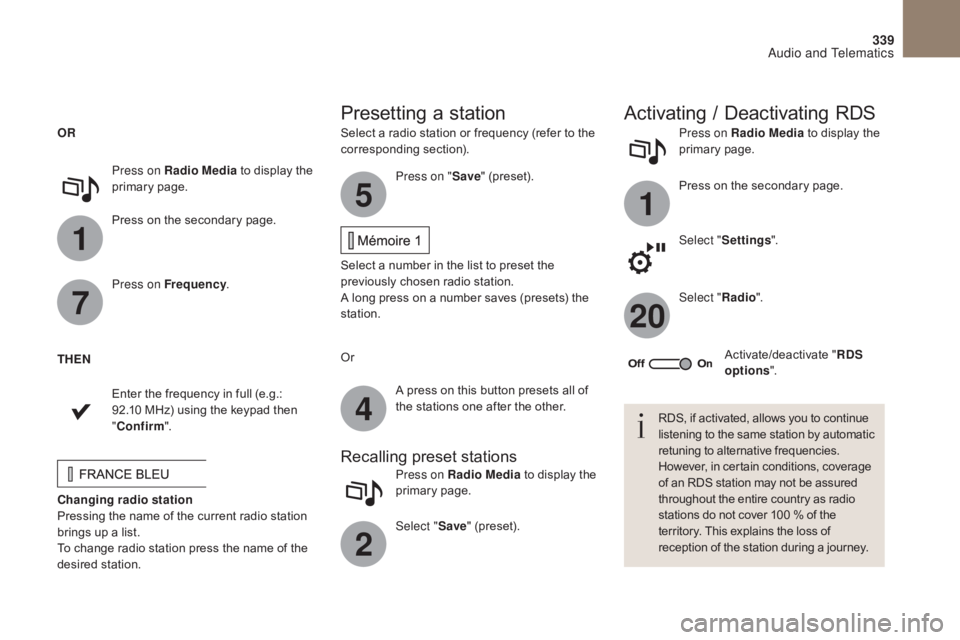
Select a radio station or frequency (refer to the
corresponding section).Press on Radio Media
to display the
primary page.
Press on the secondary page.
Select " Settings ".
Select " Radio".
Activate/deactivate " RDS
options ".
Press on Radio Media
to display the
primary page.
Press on the secondary page. Press on "
Save" (preset).
Select a number in the list to preset the
previously chosen radio station.
A long press on a number saves (presets) the
station.
Press on Frequency
.
Enter the frequency in full (e.g.:
92.10 MHz) using the keypad then
" Confirm ".
Changing radio station
Pressing the name of the current radio station
brings up a list.
To change radio station press the name of the
desired station. Or
Press on Radio Media to display the
primary page.
Select " Save" (preset).
Presetting a station Activating / Deactivating RDS
OR
THEN
A press on this button presets all of
the stations one after the other.
Recalling preset stations
RDS, if activated, allows you to continue
listening to the same station by automatic
retuning to alternative frequencies.
However, in certain conditions, coverage
of an RDS station may not be assured
throughout the entire country as radio
stations do not cover 100 % of the
territory. This explains the loss of
reception of the station during a journey.
Audio and Telematics
Page 342 of 421
340
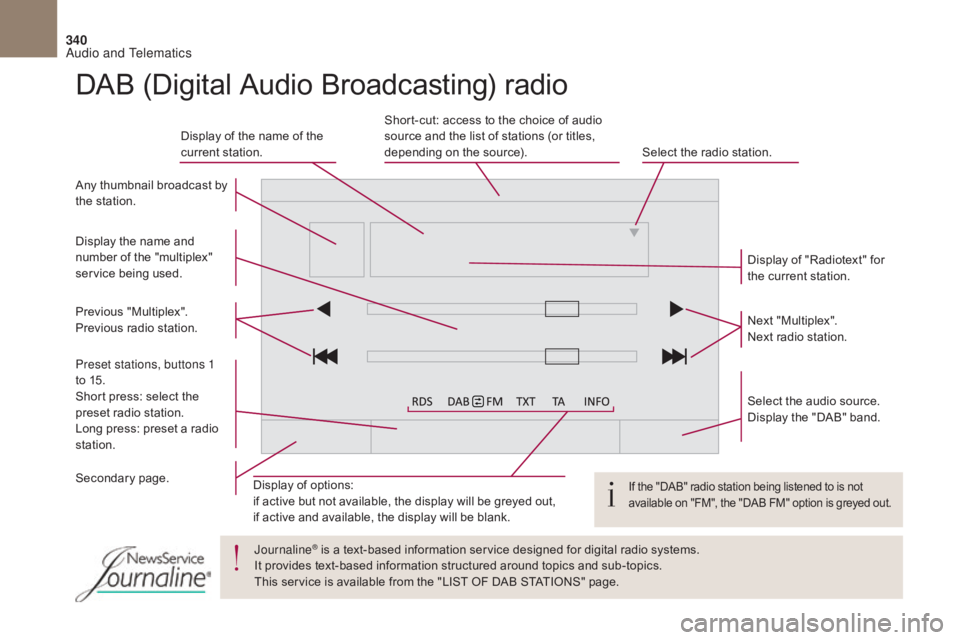
Display of options:
if active but not available, the display will be greyed out,
if active and available, the display will be blank.Display of "Radiotext" for
the current station.
Select the audio source.
Display the "DAB" band.
Display of the name of the
current station.
Short-cut: access to the choice of audio
source and the list of stations (or titles,
depending on the source).
Select the radio station.
Any thumbnail broadcast by
the station.
Preset stations, buttons 1
to 15.
Short press: select the
preset radio station.
Long press: preset a radio
station. Next "Multiplex".
Next radio station.
Secondary page. Display the name and
number of the "multiplex"
service being used.
Previous "Multiplex".
Previous radio station.
DAB (Digital Audio Broadcasting) radio
If the "DAB" radio station being listened to is not
available on "FM", the "DAB FM" option is greyed out.
Journaline® is a text-based information service designed for digital radio systems.
I
t provides text-based information structured around topics and sub-topics.
This service is available from the "LIST OF DAB STATIONS" page.
Audio and Telematics
Page 380 of 421

378
First steps
On/Off.
Volume adjustment.
Select preset radio station.
Long press: store a station.Display the list of stations received,
CD/MP3 tracks or folders.
Long press: managing the
classification of MP3/ WMA files/
update the list of stations received.
Audio settings:
audio ambiences, treble, bass,
loudness, distribution, left /right
balance, front /rear fader, automatic
volume. TA (Traffic Announcement) function
On/Off.
Long press: access to type of
information.Automatic search up/down for radio
frequencies.
Select previous/next CD, USB,
streaming track.
Navigation in a list.
Access to main menu. Abandon the current operation.
Up one level (menu or folder). Confirmation or display of contextual
menu.
Manual step by step search up/down
for radio frequencies.
Select previous/next MP3 folder.
Select previous/next folder/genre/
artist /playlist in the USB device.
Navigation in a list.
Select source:
Radio, CD, AUX, USB, Streaming.
Accept an incoming call. Select screen display between
modes:
Full screen: Audio
(or telephone if call in progress)/
In a window: Audio (or telephone
if call in progress) - Time or Trip
computer.
Long press: black screen (DARK).
* Depending on model. Selection of FM / DAB / AM*
wavebands.
Audio and Telematics
Page 385 of 421

383
DAB (Digital Audio Broadcasting) radio
Display options:
if active but not available, the display will be
struck out.Preset stations, buttons 1 to 6.
Short press: select the preset radio
station.
Long press: preset a radio station.
Display the name of the multiplex
service being used.
Represents the signal strength for the
band being listened to. Display of RadioText (TXT) for the
current radio station. Display the name of the current
station.
If the "DAB" station being listened to
is not available on "FM", "DAB FM" is
struck out.
Audio and Telematics
Page 411 of 421

409
Pads, brake ........................................... 251, 252
Paint colour code .......................................... 3
08
Parcel shelf, rear
........................................... 12
2
Parking brake
................................ 1
92, 251, 252
Parking brake, electric
................ 1
9, 20, 31, 193
Parking sensors, front
...................................2
22
Parking sensors, rear.................................... 221
Personalisation
...............................
................46
Player, Apple
® .............................. .................345
Player, MP3 CD ............................ 3 42, 385, 386
Player, USB
................................................... 3
42
Port, USB
...................................... 1
13, 342, 387
Pre-heater, Diesel
...............................
............30
Pressures, tyres
............................................ 3
08
Pre-tensioning seat belts
.............................. 16
0
Priming pump
...............................
.................298
Priming the fuel system
................................ 29
8
Protecting
children
......... 1
62, 166, 167, 171, 173, 175 -178
Puncture
................
................................ 260, 267
P
Radio ............... ..................... 338, 339, 342, 381
Radio, digital (Digital Audio Broadcasting - DA B) .................................................... 340, 341
Range, AdBlue
...............................
........... 37, 39
RDS
................
............................................... 339
Rear screen, demisting
......................... 1
0 0 , 111
Recharging the battery
.................................29
4
Reduction of electrical load
..........................23
9
Regeneration of the particle filter
.................25
0
Reinitialising the electric windows
.................. 87
R
einitialising the remote control
......... 6
9, 75, 76
Reminder, key in ignition
...............................18
8
R
Remote control ........................ 64, 65, 70 -73, 77
Removing a wheel .............................. ..........275
Removing the mat
...............................
..........11 9
Replacing bulbs
..............................
...... 279, 285
Replacing fuses
..............................
..............288
Replacing the air filter
...................................25
0
Replacing the oil filter
................................... 25
0
Replacing the passenger
compartment filter
...................................... 25
0
Resetting the service indicator
.......................36
R
esetting the trip recorder
..............................44
R
eset trip
......................................................... 59
R
ev counter
................................................ 1
4 -16
Reversing camera
...............................
..........223
Reversing lamps
........................................... 28
5
Risk areas (update)
....................................... 32
9
Roof bars
....................................................... 24
0
Running out of fuel (Diesel)
..........................29
8
Safety, children
............................ 1
62, 166, 167,
171, 173 , 175 -178
Screen, cold climate
..................................... 2
32
Screen, colour and mapping........................... 16
Screen menu map
........3
18, 320, 324, 332, 334,
336, 346, 348, 350, 360, 362, 398, 399
Screen, monochrome
............................. 4
7, 398
Screen, multifunction
(with audio system)
............................... 4
7, 380
Screenwash, front
......................................... 13
9
Screenwash, rear
...............................
...........141
SCR (Selective Catalytic Reduction)
............25
3
SCR system
..............................
.............. 37, 253
Seat belts
.............................. 1
57, 158, 160, 172
S
Seat, rear bench .............................. ...............98
Seats, electric ................................................. 93
Se
ats, front
...............................
........... 92, 93, 97
Seats, heated
...............................
...................95
Seats, rear
....................................................... 98
S
erial number, vehicle
..................................3
08
Service indicator
....................................... 3
4, 43
Servicing
...............................
..........................10
Settings, equipment
............................ 1
6, 47, 53
Settings (Menus)
.......................... 3
46, 348, 350
Settings, system
...............................
.............353
Sidelamps
............................. 1
31, 280, 283, 285
Side repeater
..............................
..................283
Ski flap
..............................
............................121
Snow chains
.................................................. 2
31
Socket, 12 V accessory
.................1
12, 121, 12 2
Socket, auxiliary
...............................
.....342, 388
Socket, JACK
...............................
. 113, 342, 388
Sockets, audio
.............................. 1
13, 387, 388
Sockets, auxiliary
.......................................... 11
3
Speed limiter
...............................
..........213, 215
Speedometer
..............................
.............. 14, 15
Spotlamps, side
.................................... 1
33, 284
Starting the engine
....................................... 18
6
Starting the vehicle
............... 1
86, 189, 190, 198
Starting using another battery
......................2
93
Station, radio
......................................... 33
8, 339
Stay, bonnet
...............................
...................242
Steering wheel, adjustment
............................99
S
topping the vehicle
............. 1
86, 189, 190, 198
Stop & Start
...............................2
7, 60, 103, 107,
110, 206, 227, 242, 250, 295
Storage
................
............................112 , 115 -117
Storage box
................................................... 11
5
Storage compartments
................................. 11
5
Storing driving positions
.................................97
S
towing rings
..............................
..................124
Sun visor
....................................................... 11
4
Alphabetical index