instrument panel CITROEN DS4 2010 Owner's Manual
[x] Cancel search | Manufacturer: CITROEN, Model Year: 2010, Model line: DS4, Model: CITROEN DS4 2010Pages: 421, PDF Size: 8.05 MB
Page 49 of 421

47
Monochrome screen C
This displays the following information:
- t ime,
-
d
ate,
-
a
mbient temperature (this flashes if there is
a risk of ice),
-
p
arking sensor information,
-
c
urrent audio source,
-
t
elephone or Bluetooth system information,
-
t
rip computer,
-
a
lert messages,
-
s
ettings menus for the screen and the
vehicle equipment.
Displays in the screen
From the control panel of your audio system,
you can press:
F
button A to chooses between the display
of audio information in full screen or the
shared display of audio and trip computer
information,
F
the "MENU" button for access to the main
menu ,
F
t
he "5" or " 6" buttons to scroll through the
items on the screen,
F
t
he "7" or " 8" buttons to change a setting
value,
F
the "OK" button to confirm,
or
F
the "Back" button to abandon the
operation in progress.
Controls
F Press the "MENU" button for access to the
main menu :
-
"
Multimedia",
-
"
Telephone",
-
"
Trip computer",
-
"
Bluetooth connection",
-
"
Personalisation-configuration",
F
P
ress the " 7" or " 8" button to select the
menu required, then confirm by pressing
the "OK" button.
Main menu
01
Instruments
Page 54 of 421
52
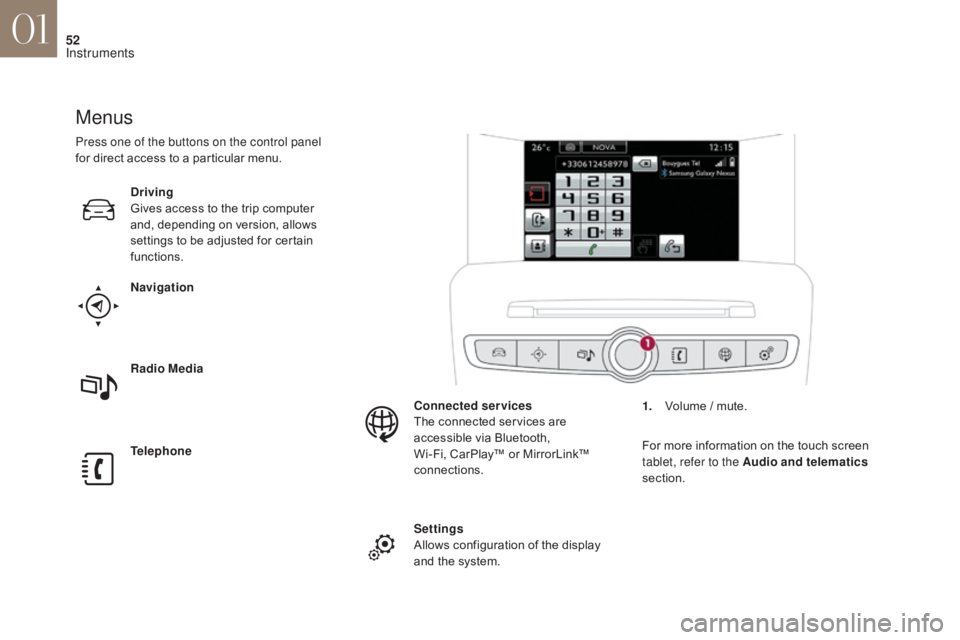
Menus
Navigation
Telephone Radio Media Driving
Gives access to the trip computer
and, depending on version, allows
settings to be adjusted for certain
functions.Settings
Allows configuration of the display
and the system. Connected services
The connected services are
accessible via Bluetooth,
Wi-Fi, CarPlay™ or MirrorLink™
connections.
Press one of the buttons on the control panel
for direct access to a particular menu.
1.
V
olume / mute.
For more information on the touch screen
tablet, refer to the Audio and telematics
section.
01
Instruments
Page 60 of 421
58
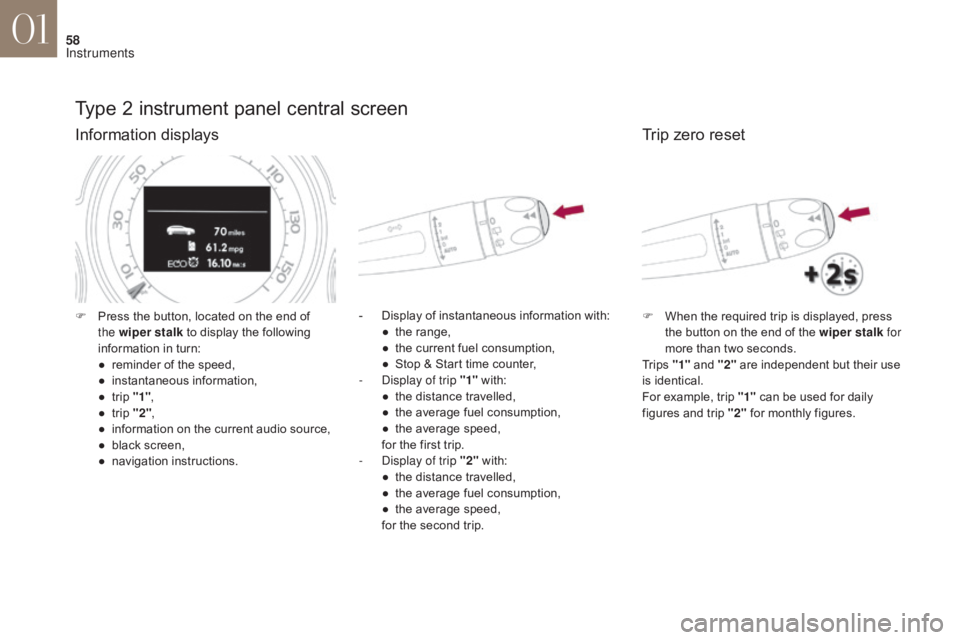
Type 2 instrument panel central screen
Information displays
- Display of instantaneous information with:● t he range,
●
t
he current fuel consumption,
●
S
top & Start time counter,
-
D
isplay of trip "1" with:
●
t
he distance travelled,
●
t
he average fuel consumption,
●
t
he average speed,
for the first trip.
-
D
isplay of trip "2" with:
●
t
he distance travelled,
●
t
he average fuel consumption,
●
t
he average speed,
for the second trip.
F
P
ress the button, located on the end of
the wiper stalk to display the following
information in turn:
●
r
eminder of the speed,
●
in
stantaneous information,
●
t
rip "1" ,
●
t
rip "2" ,
●
i
nformation on the current audio source,
●
b
lack screen,
●
n
avigation instructions.
Trip zero reset
F When the required trip is displayed, press the button on the end of the wiper stalk for
more than two seconds.
Tr i p s "1" and "2" are independent but their use
is identical.
For example, trip "1" can be used for daily
figures and trip "2" for monthly figures.
01
Instruments
Page 81 of 421

79
This system allows automatic simultaneous locking of the doors and boot as soon as the speed of
the vehicle exceeds 6 mph (10 km/h).
Anti-intrusion security
OperationActivation / Deactivation
If one of the doors or the boot is open, the
automatic central locking does not take place.
Carrying long or
voluminous objects
If you want to drive with the boot open,
you should press the central locking
button to lock the doors. Other wise,
every time the speed of the vehicle
exceeds 6 mph (10 km/h), the locks
will rebound and the alerts mentioned
above will appear.
Pressing the central locking button unlocks the
vehicle.
Above 6 mph (10 km/h), this unlocking is
te m p o r a r y. Driving with the doors locked may
render access for the emergency
services difficult in an emergency.
This is signalled by the sound of
the locks rebounding, accompanied
by illumination of this symbol in the
instrument panel, an audible signal
and the display of an alert message.
F
W
ith the ignition on, press this button
until an audible signal starts and a
corresponding message is displayed.
The state of the system stays in memory when
switching off the ignition. You can activate or deactivate this function
permanently.
02
Access
Page 133 of 421

131
The temporary illumination of the dipped beam
headlamps after the vehicle's ignition has been
switched off makes the driver's exit easier
when the light is poor.
F
W
ith the ignition off, "flash" the headlamps
using the lighting stalk.
F
A f
urther "headlamp flash" switches the
function off.
Switching off
The manual guide-me-home lighting switches
off automatically after a set time.
Manual guide-me-home
lighting Parking lamps
Side markers for the vehicle by illumination of
the sidelamps on the traffic side only.
F
D
epending on version, within one minute
of switching off the ignition, operate the
lighting control stalk up or down depending
on the traffic side (e.g. when parking on
the left, lighting control stalk upwards, the
right-hand sidelamps are on).
This is confirmed by an audible signal and
illumination of the corresponding direction
indicator warning lamp in the instrument panel.
To switch off the parking lamps, return the
lighting control stalk to the central position.
Daytime running lamps
Daytime lighting which comes on automatically
when the engine is started making the vehicle
more visible to other users.
This function is assured by dedicated lamps.
Switching on
04
Lighting and visibility
Page 134 of 421

132
When a low level of ambient light is detected
by a sunshine sensor, the number plate
lamps,
s
idelamps and dipped beam headlamps
are switched on automatically, without any
action on the part of the driver. They can also
come on if rain is detected, at the same time as
automatic operation of the windscreen wipers.
As soon as the ambient light returns to a
sufficient level or after the windscreen wipers
are switched off, the lamps are switched off
automatically.
Activation Deactivation
F Turn the ring to another position.
Deactivation of the function is accompanied
by the display of a message in the screen.
Automatic guide-me-home
lighting
Operating fault
In the event of a malfunction of the
sunshine sensor, the lighting comes
on, this warning lamp is displayed
in the instrument panel and/or a
message appears in the screen,
accompanied by an audible signal.
In fog or snow, the sunshine sensor
may detect sufficient light. In this
case, the lighting will not come on
automatically.
Do not cover the sunshine sensor,
coupled with the rain sensor and
located in the centre of the windscreen
behind the rear view mirror; the
associated functions would no longer
be controlled.
When the automatic illumination of headlamps
function is activated (lighting control stalk in
the
"
AUTO " position), under low ambient light
the dipped beam headlamps remain on when
the ignition is switched off.
Programming
Activation or deactivation, as well
as the duration of the guide-me-
home lighting, is set in the vehicle
configuration menu.
Contact a CITROËN dealer or a qualified
workshop.
Automatic illumination of headlamps
F Turn the ring to the "AUTO" position. The
activation of the function is accompanied
by the display of a message in the screen.
04
Lighting and visibility
Page 136 of 421

134
Automatic adjustment of xenon and full-LED
headlamps
In the event of a fault, do not touch the
xenon bulbs.
Have them checked by a CITROËN
dealer or a qualified workshop.
This system adjusts the height of the xenon
headlamp beams automatically and when
stationary, according to the load in the vehicle, so
as to avoid causing a nuisance to other road user. If a malfunction occurs, this warning
lamp is displayed in the instrument
panel, accompanied by an audible
signal and a message in the screen.
Headlamp beam height adjustment
0. 1 or 2 people in the front seats.
-. 3 people.
1.
5 p
eople.
-.
I
ntermediate setting.
2.
5 p
eople + maximum authorised load.
-.
I
ntermediate setting.
3.
D
river + maximum authorised load. The system then places your headlamps in the
lowest position.
Manual adjustment of halogen
headlamps
The initial setting is position "0".
To avoid causing a nuisance to other road
users, the height of the halogen headlamp
beams should be adjusted according to the
load in the vehicle.
04
Lighting and visibility
Page 137 of 421

135
Directional lighting
When the dipped or main beam headlamps
are on, this function, allows the light beams to
better follow the road.
The use of this function, coupled with the
xenon headlamps and the cornering lighting,
considerably improves the quality of your
lighting round bends.This function is inactive:
-
w
hen stationary or at low speeds,
-
w
hen reverse is engaged.
The system is activated by default.
Wi
th directional lighting
Wi
thout directional lighting
Programming
The system is activated or
deactivated in the vehicle
configuration menu.
The state of the system stays in memory on
switching off the ignition.
Contact a CITROËN dealer or a qualified
workshop.
Operating fault
If a fault occurs, this warning lamp
flashes in the instrument panel,
accompanied by a message in the
screen.
04
Lighting and visibility
Page 140 of 421

138
Automatic rain sensitive windscreen wipers
Briefly push stalk downwards.The instruction is confirmed by
a wiping cycle, accompanied by
illumination of this warning lamp
in the instrument panel and an
activation message.
Switching off
Briefly push stalk downwards again.The instruction is confirmed by
this warning lamp going off in the
instrument panel and/or the display of
a deactivation message.
The automatic rain sensitive
windscreen wipers must be reactivated
if the ignition has been off for more
than one minute.
Operating fault
If an automatic rain sensitive wiper malfunction
occurs, the wipers will operate in intermittent
mode.
Contact a CITROËN dealer or a qualified
workshop.
Do not cover the rain sensor, linked with
the sunshine sensor and located in the
centre of the windscreen behind the rear
view mirror.
Switch off the automatic rain sensitive
wipers when using an automatic car wash.
In winter, it is advisable to wait until the
windscreen is completely clear of ice
before activating the automatic rain
sensitive wipers.
Switching on
The windscreen wipers operate automatically, without any action on the part of the driver, if rain is
detected (sensor behind the rear view mirror), adapting their speed to the intensity of the rainfall.
04
Lighting and visibility
Page 145 of 421

143
Interior mood lighting
At night, the audio system and digital air
conditioning illumination, together with the
illumination of the central dashboard storage
box, comes on automatically when the
sidelamps are on.The interior mood lighting switches off
automatically when the sidelamps are
switched off.
It can be switched off manually by adjusting the
instrument panel lighting dimmer button to one
of the lowest settings.
On certain versions, three LEDs, located in the
rail linking the rear view mirror to the roof come
on as well.
Switching on
Switching off
The dimmed passenger compartment lighting improves visibility in the vehicle when
the light is poor.
04
Lighting and visibility