mirror CITROEN DS4 2010 Owner's Manual
[x] Cancel search | Manufacturer: CITROEN, Model Year: 2010, Model line: DS4, Model: CITROEN DS4 2010Pages: 421, PDF Size: 8.05 MB
Page 145 of 421

143
Interior mood lighting
At night, the audio system and digital air
conditioning illumination, together with the
illumination of the central dashboard storage
box, comes on automatically when the
sidelamps are on.The interior mood lighting switches off
automatically when the sidelamps are
switched off.
It can be switched off manually by adjusting the
instrument panel lighting dimmer button to one
of the lowest settings.
On certain versions, three LEDs, located in the
rail linking the rear view mirror to the roof come
on as well.
Switching on
Switching off
The dimmed passenger compartment lighting improves visibility in the vehicle when
the light is poor.
04
Lighting and visibility
Page 212 of 421

210
Blind spot monitoring system
This driving assistance system warns the driver
of the presence of another vehicle in the blind
spot angle of their vehicle (areas masked from
the driver's field of vision), as soon as this
presents a potential danger.
Operation
This system is designed to improve safety when driving and is in no circumstances a
substitute for the use of the interior rear view mirror and door mirrors. It is the driver's
responsibility to constantly check the traffic, to assess the distances and relative speeds of
other vehicles and to predict their movements before deciding whether to change lane.
The blind spot sensor system can never replace the need for vigilance on the part of
the
d
river. F
O
n switching on the ignition, or engine
running, press this button to activate the
function; the warning lamp comes on.
Sensors fitted in the front and rear bumpers
monitor the blind spots.
A warning lamp appears in the door mirror on
the side in question:
-
i
mmediately, when being overtaken,
-
a
fter a delay of about one second, when
overtaking a vehicle slowly.
06
Driving
Page 213 of 421

2 11
No alert will be given in the following situations:
- i n the presence of immobile objects
(parked vehicles, barriers, street lamps,
road signs...),
-
w
ith vehicles moving in the opposite
direction,
-
d
riving on a sinuous road or a sharp
c o r n e r,
The alert is given by a warning lamp which
comes on in the door mirror on the side in
question as soon as a vehicle - car, lorry,
cycle
- is detected.
For this, the following conditions must be met:
-
a
ll the vehicles must be moving in the
same direction,
-
t
he speed of your vehicle is between 7 and
75 mph (12 and 140 km/h),
-
w
hen you overtake a vehicle with a speed
difference of less than 6 mph (10 km/h),
-
w
hen a vehicle overtakes you with a speed
difference of less than 15 mph (25 km/h),
-
t
he traffic must be flowing normally,
-
i
n the case of an overtaking manoeuvre,
if this is prolonged and the vehicle being
overtaken remains in the blind spot,
-
y
ou are driving on a straight or slightly
curved road,
-
y
our vehicle is not pulling a trailer,
a
c
aravan... -
w hen overtaking (or being overtaken by) a
very long vehicle (lorry, coach...) which is
at the same time detected at the rear in the
blind spot angle and present in the driver's
for ward field of vision,
-
i
n very heavy traffic: vehicles detected in
front and behind are confused with a lorry
or a stationary object,
-
w
hen overtaking quickly.
06
Driving
Page 214 of 421

212
Operating fault
The system may suffer temporary
interference in certain weather
conditions (rain, hail...).
In particular, driving on a wet sur face
or moving from a dry area to a wet area
can cause false alerts (for example, the
presence of a fog of water droplets in
the blind spot angle is interpreted as a
vehicle).
In bad or wintry weather, ensure that
the sensors are not covered by mud,
ice or snow.
Take care not to cover the warning
zone in the door mirrors or the
detection zones on the front and rear
bumpers with adhesive labels or other
objects; they may hamper the correct
operation of the system.
F
T
o deactivate the system, press this button
again; the warning lamp goes off.
The state of the system remains in memory on
switching off the ignition.
The system is automatically
deactivated when towing with a towbar
approved by CITROËN. In the event of a fault, the warning lamp in the
button flashes then goes off.
Have it checked by a CITROËN dealer or a
qualified workshop.
06
Driving
Page 285 of 421

283
F Remove the protective cover by pulling the tab.
F
D
isconnect the wiring connector.
F
T
urn the bulb holder a quarter of a turn and
extract it.
F
P
ull the bulb and change it.
To reassemble, carry out these operations in
reverse order. F
I nsert a flat screwdriver towards the centre
of the repeater between the repeater and
the base of the mirror.
F
T
ilt the flat screwdriver to extract the
repeater and remove it.
F
D
isconnect the repeater connector.
To reassemble, carry out these operations in
reverse order.
Contact a CITROËN dealer or a qualified
workshop to obtain replacement repeaters.
For the replacement of this type of LED lamp,
contact a CITROËN dealer or a qualified
workshop.
Changing daytime running lamp /
s idelamp bulbs (on models with
type
1 halogen headlamps) Changing daytime running lamp
/
sidelamp bulbs (on models with
type
2 halogen or xenon headlamps)Changing integrated direction
indicator side repeaters
08
In the event of a breakdown
Page 315 of 421

313
7-inch touch screen tablet
GPS satellite navigation - Multimedia audio - Bluetooth® telephone
Contents
First steps
3 14
Steering mounted controls
3
16
M e n u s
3
17
Navigation
3
18
Navigation - Guidance
3
26
Tr a f fi c
3
3 0
Radio Media
3
32
Radio
3
38
DAB (Digital Audio Broadcasting) radio
3
40
Media
3
42
Settings
3
46
Connected services
3
54
MirrorLink
TM 354
CarPlay® 358
Telephone
3
60
Frequently asked questions
3
68
The system is protected in such a way that it will only operate in
your vehicle. As a safety measure, the driver should only carry out operations
which require prolonged attention while the vehicle is stationary.
The display of an energy economy mode message signals that
electrical systems operating are going into standby.
Refer to the energy economy mode section.
Audio and Telematics
Page 317 of 421
315
With the engine running, press to
mute the sound.
With the ignition off, press to switch
the system on.
Volume adjustment (each source
is independent, including traffic
announcements (TA) and navigation
instructions).
Select the audio source (depending on
version):
-
F
M
/ DAB
/ AM* stations.
-
U
SB memory stick.
-
S
martphone via MirrorLink
TM or CarPlay®.
-
C
D player (located in front panel).
-
T
elephone connected by Bluetooth* and
using Bluetooth* audio streaming.
-
M
edia player connected to the auxiliary
socket ( jack, cable not supplied).
* Depending on equipment.
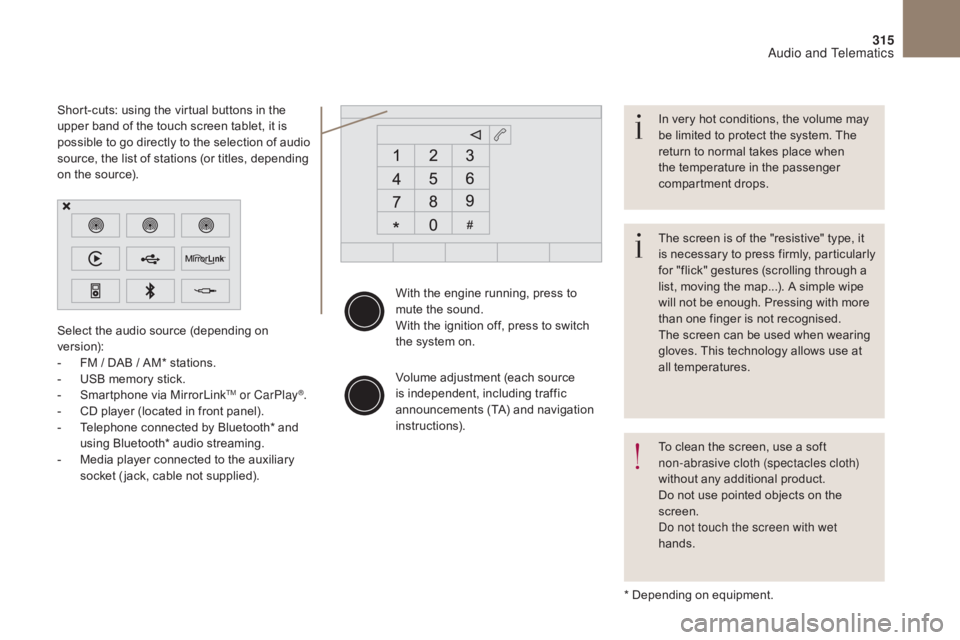
Short-cuts: using the virtual buttons in the
upper band of the touch screen tablet, it is
possible to go directly to the selection of audio
source, the list of stations (or titles, depending
on the source).
The screen is of the "resistive" type, it
is necessary to press firmly, particularly
for "flick" gestures (scrolling through a
list, moving the map...). A simple wipe
will not be enough. Pressing with more
than one finger is not recognised.
The screen can be used when wearing
gloves. This technology allows use at
all temperatures. In very hot conditions, the volume may
be limited to protect the system. The
return to normal takes place when
the temperature in the passenger
compartment drops.
To clean the screen, use a soft
non-abrasive cloth (spectacles cloth)
without any additional product.
Do not use pointed objects on the
screen.
Do not touch the screen with wet
hands.
Audio and Telematics
Page 319 of 421

317
Menus
Settings
Radio Media
Navigation
Driving
Connected services Telephone
Adjust the settings for sound (balance,
ambience, ...), colour schemes and the display
(language, units, date, time, ...).
Select an audio source, a radio station, display
photographs.
Enter navigation settings and choose a
destination.
Access to the trip computer.
Activate, deactivate or enter settings for certain
vehicle functions.
Operate certain applications on your
smartphone via MirrorLink
TM or CarPlay®.
Connect a telephone by Bluetooth
®.
Access to the CarPlay® function after
connection of your smartphone by USB cable.
(Depending on equipment)
(Depending on equipment)
Audio and Telematics
Page 335 of 421

3
2
333
Level 1Level 2 Comments
Radio Media
List List of FM stations
Press on a radio station to select it.
Radio Media Source FM Radio
Select change of source.
DAB Radio
AM Radio
USB
CD
MirrorLink
TM
CarPlay®
iPod
Bluetooth
AUX
Radio Media
Save Press an empty location to Save it.
Audio and Telematics
Page 356 of 421

354
MirrorLinkTM
Optional depending on the
smartphone and operating system.
Connected services
Audio and Telematics