USB Citroen DS4 2014 1.G User Guide
[x] Cancel search | Manufacturer: CITROEN, Model Year: 2014, Model line: DS4, Model: Citroen DS4 2014 1.GPages: 444, PDF Size: 12.68 MB
Page 385 of 444

383
Media
QUESTIONANSWER SOLUTION
Playback of my USB
memory stick starts only
after a very long wait
(around 2 to 3 minutes). Some files supplied with the memory stick may greatly slow down
access to reading the memory stick (multiplication by 10 of the
catalogue time).
Delete the files supplied with the memory stick
and limit the number of sub-folders in the file
structure on the memory stick.
When I connect my iPhone
as a telephone and to
the USB port at the same
time, I am unable to play
the music files. When the iPhone connects automatically as a telephone, it forces
the streaming function. The streaming function takes the place
of the USB function which is then not useable, there is a period
without sound of the track being played with Apple
® players.
Disconnect and reconnect to the USB port
(the
USB function takes priority over streaming).
The CD is ejected
automatically or is not
played by the player. The CD is inserted upside down, is unplayable, does not contain any
audio data or contains an audio format which the player cannot play.
-
C
heck that the CD is inserted in the player the
right way up.
-
C
heck the condition of the CD: the CD cannot
be played if it is too damaged.
-
C
heck the content in the case of a recorded
CD: refer to the advice in the "AUDIO" section.
-
T
he audio system's CD player does not play
DVDs.
-
S
ome recorded CDs will not be played by
the audio system because they are not of the
correct quality.
The CD has been recorded in a format that is not compatible with the player (udf, ...).
The CD is protected by an anti-pirating protection system which is
not recognised by the audio system.
There is a long waiting
period following the insertion
of a CD or connection of a
USB memory stick. When a new medium is inserted, the system reads a certain
amount of data (directory, title, artist, etc.). This may take from a few
seconds to a few minutes.
This phenomenon is normal.
Audio and Telematics
Page 392 of 444
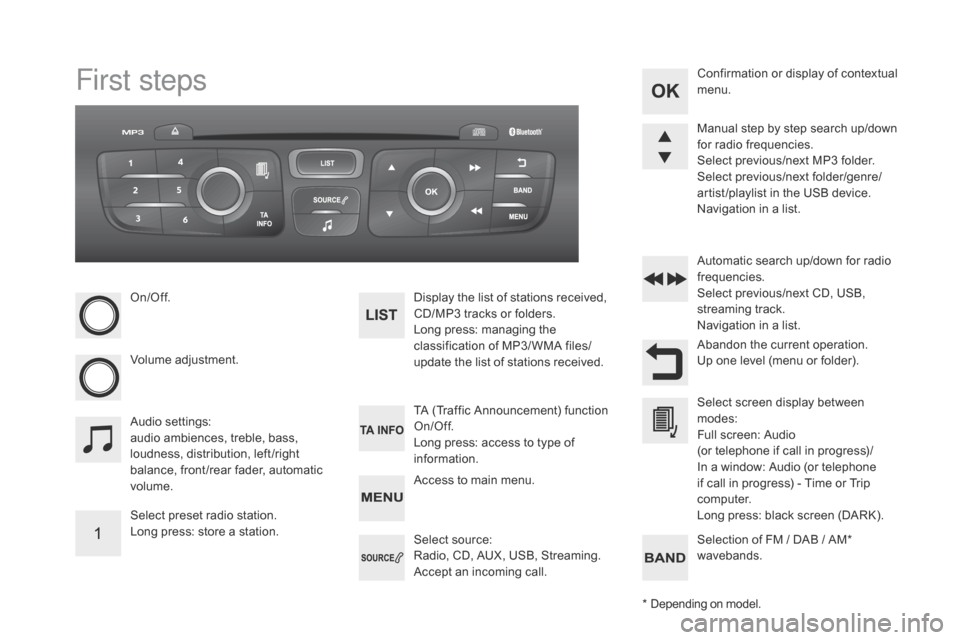
First steps
On/Off.
Volume adjustment.
Select preset radio station.
Long press: store a station.Display the list of stations received,
CD/MP3 tracks or folders.
Long press: managing the
classification of MP3/ WMA files/
update the list of stations received.
Audio settings:
audio ambiences, treble, bass,
loudness, distribution, left /right
balance, front /rear fader, automatic
volume. TA (Traffic Announcement) function
On/Off.
Long press: access to type of
information.Automatic search up/down for radio
frequencies.
Select previous/next CD, USB,
streaming track.
Navigation in a list.
Access to main menu. Abandon the current operation.
Up one level (menu or folder). Confirmation or display of contextual
menu.
Manual step by step search up/down
for radio frequencies.
Select previous/next MP3 folder.
Select previous/next folder/genre/
artist /playlist in the USB device.
Navigation in a list.
Select source:
Radio, CD, AUX, USB, Streaming.
Accept an incoming call. Select screen display between
modes:
Full screen: Audio
(or telephone if call in progress)/
In a window: Audio (or telephone
if call in progress) - Time or Trip
computer.
Long press: black screen (DARK).
* Depending on model. Selection of FM / DAB / AM*
wavebands.
Page 396 of 444

Select "RadioText (TXT) display "
and confirm OK to save.
Select or deselect categories to
activate or deactivate the reception of
the corresponding messages.
Press TA I N FO
to activate or
deactivate the reception of traffic
messages. With the radio displayed on the
screen, press OK
to display the
contextual menu.
Make a long press on TA I N FO to
display the list of categories.
The TA (Traffic Announcement)
function gives priority to TA alert
messages. To operate, this function
needs good reception of a radio station
transmitting this type of message.
When a traffic report is transmitted,
the current audio source (Radio, CD,
USB,
...) is interrupted automatically to
play the TA message. Normal playback
of the audio source resumes at the end
of the transmission of the message.
Receiving TA messages Receiving INFO messages
The INFO function gives priority to
TA alert messages. To be active, this
function needs good reception of a
radio station that transmits this type
of message. When a message is
transmitted, the current audio source
(Radio, CD, USB,
...) is interrupted
automatically to receive the INFO
message. Normal play resumes at the
end of the message transmission. Radio text is information transmitted by
the radio station related to the current
programme or song.
display RAd
IO TEXT
Screen C
Page 399 of 444

397
Press and hold one of the buttons for
fast for ward or backward. Press one of the buttons to select a
track on the CD.
Press LIST to display the list of
tracks on the CD. To play a disc which has already
been inserted, press the SOURCE
or SRC button several times in
succession and select " C d
".
Audio Cd
Playing a Cd
Insert 12 cm diameter circular compact discs
o n l y.
Some anti-pirating systems, on original discs
or CDs copied using a personal recorder, may
cause faults which are no reflection on the
quality of the original player.
Without pressing the EJECT
button, insert a
CD in the player, play begins automatically.
Cd , USB
Information and advice
The audio system will only play files with
extension ".mp3" or ".wma" and a compression
rate that is constant or variable between
32
Kbps and 320 Kbps.
It is advisable to restrict file names to
20
characters without using special characters
(e.g. " ? ; ù) to avoid any playing or displaying
problems.
The playlists accepted are types .m3u and .pls.
The number of files is limited to 5 000 in
500
directories on a maximum of 8 levels.On a single disc, the CD player can
read up to 255 MP3 files spread
over 8 directory levels. However, it
is recommended that this be kept to
2
levels so as to limit the time taken to
access and play the CD.
During play, the folder structure is not
observed. In order to be able to play a recorded CDR or
CDRW, when recording it is preferable to select
standards ISO 9660 level 1.2 or Joliet.
If the disc is recorded in another format, it may
not be played correctly.
It is recommended that the same recording
standard is always used for an individual disc,
with as low a speed as possible (4x maximum)
for optimum sound quality.
In the particular case of a multi-session CD, the
Joliet standard is recommended.
Use only USB memory sticks formatted FAT32
(File Allocation Table).
Do not connect a hard disk or USB
device other than audio players to the
USB port. This may cause damage to
your installation.
Media
Audio and Telematics
Page 400 of 444

Up a level in the menu.
Select a line in the list. Press one of the buttons to select the
next or previous track.
Press and hold one of the buttons for
fast for wards or backwards. Skip a track. Select a track or a folder.
Press LIST to display the menu of
folders in the compilation. To play a disc or memory stick which
has already been inserted, press
SOURCE or SRC several times in
succession and select " C
d
" o
r "
USB ".
Press one of the buttons to select the
next or previous folder in the order
chosen.
Cd , USB
Playing a compilation
Insert an MP3 compilation in the CD
player or connect a memory stick to the
USB port, directly or via an extension
lead.
The system creates playlists (temporary
memory) the creation time for which can take
from a few seconds to several minutes.
The playlists are updated every time the
ignition is switched off or a USB memory stick
is connected.
Play starts automatically after a period which
depends on the capacity of the USB memory
stick.
At a first connection, the order suggested is
by folder. When connecting again, the order
previously chosen is retained.
Page 401 of 444

399
Having selected the desired sorting
("By folders ", "By ar tists ", "By
genres ", "By playlists ") press OK.
Then confirm OK to save the
modifications.
-
B
y folders : all folders containing
audio files recognised on the
peripheral device, in alphabetical
order without following the folder
structure.
-
B
y ar tists : all of the artist names
defined in the ID3 Tags, in
alphabetical order.
-
B
y genres : all of the genres
defined in the ID3 Tags.
-
By
playlists : if playlists have
been saved.
Make a long press on LIST
or press
MENU , select " Multimedia ", then
" Media parameters " and finally
" Choice of track listing " to display
the different types of sorting.
USB memory stick - File
sorting
* Check your player's manual.
USB players
The audio files on a Mass Storage portable
player* can be heard through the vehicle's
speakers by connecting it to the USB port
(cable not supplied).
Management of the device is via the
audio system controls. If the portable player is not recognised by
the USB port, connect it to the auxiliary Jack
socket.
The Apple
® player must be updated regularly
for the best connection.
The playlists are those defined in the Apple
®
p l aye r.
The Apple
® player must be generation 5 or
later.
Audio and Telematics
Page 402 of 444
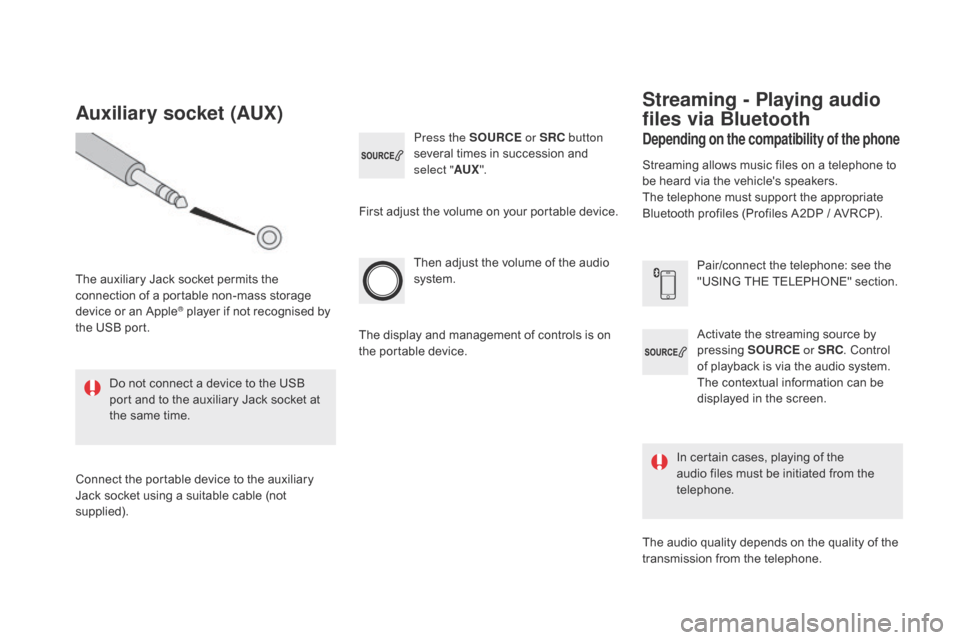
Activate the streaming source by
pressing SOURCE or SRC. Control
of playback is via the audio system.
The contextual information can be
displayed in the screen.
Then adjust the volume of the audio
system.
Pair/connect the telephone: see the
"USING THE TELEPHONE" section.
Press the SOURCE
or SRC button
several times in succession and
select " AUX".
Auxiliary socket (AUX)
The auxiliary Jack socket permits the
connection of a portable non-mass storage
device or an Apple
® player if not recognised by
the USB port.
Do not connect a device to the USB
port and to the auxiliary Jack socket at
the same time.
Connect the portable device to the auxiliary
Jack socket using a suitable cable (not
supplied). First adjust the volume on your portable device.
The display and management of controls is on
the portable device.
depending on the compatibility of the phone
Streaming - Playing audio
files via Bluetooth
Streaming allows music files on a telephone to
be heard via the vehicle's speakers.
The telephone must support the appropriate
Bluetooth profiles (Profiles A2DP / AVRCP).
In certain cases, playing of the
audio files must be initiated from the
telephone.
The audio quality depends on the quality of the
transmission from the telephone.
Page 417 of 444
415
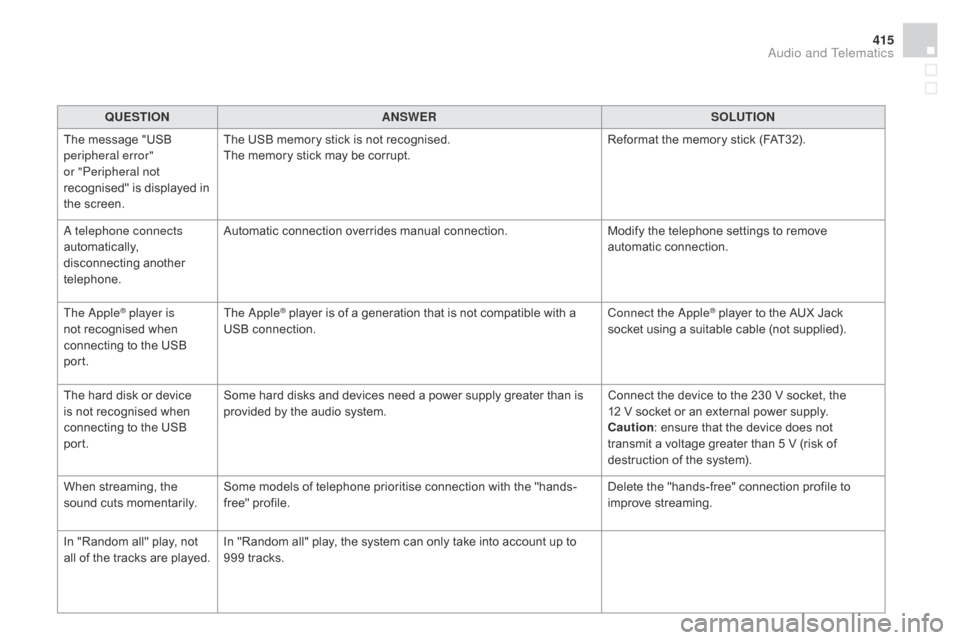
QUESTIONANSWER SOLUTION
The message "USB
peripheral error"
or "Peripheral not
recognised" is displayed in
the screen. The USB memory stick is not recognised.
The memory stick may be corrupt.
Reformat the memory stick (FAT32).
A telephone connects
automatically,
disconnecting another
telephone. Automatic connection overrides manual connection.
Modify the telephone settings to remove
automatic connection.
The Apple
® player is
not recognised when
connecting to the USB
port. The Apple® player is of a generation that is not compatible with a
USB connection. Connect the Apple® player to the AUX Jack
socket using a suitable cable (not supplied).
The hard disk or device
is not recognised when
connecting to the USB
port. Some hard disks and devices need a power supply greater than is
provided by the audio system.
Connect the device to the 230 V socket, the
12
V
socket or an external power supply.
Caution : ensure that the device does not
transmit a voltage greater than 5 V (risk of
destruction of the system).
When streaming, the
sound cuts momentarily. Some models of telephone prioritise connection with the "hands-
free" profile. Delete the "hands-free" connection profile to
improve streaming.
In "Random all" play, not
all of the tracks are played. In "Random all" play, the system can only take into account up to
999 tracks.
Audio and Telematics
Page 425 of 444
423
Markings, identification .................................31 9
Massage function ............................... ..........102
Mat
.......
......................................................... 117
Memorising
a speed
...............
.................................. 49, 219
Menu
........................... 3
30, 332, 336, 344, 346,
348, 358, 360, 362, 372, 374
Menu, main
..............................
.....................392
Menus (audio)
.............................. 3
44, 346, 348
Menus (Touch screen tablet)
...............
................................... 325, 329
Mirror, rear view
............................................ 10
7
Mirrors, door.................................. 105, 106, 216
Misfuel prevention
...............................
..........236
Mountings, Isofix
...............................
............157
MP3 CD
................
................................. 397, 398
Navigation
...............................
......330, 332, 336
Net, storage................................................... 121
Number plate lamps
...................................... 28
0
Pads, brake ...................................................2 47
Paint colour code .......................................... 31
9
Parcel shelf, rear
........................................... 12
2
Parking brake
........................................ 1
98, 247
Parking brake, electric
..............................
.................... 24, 192
Parking sensors, front
...................................2
28
Parking sensors, rear.................................... 227
Personalisation
...............................
................42
Petrol
...............................
..............................235
Player, Apple
® .............................. .................356
Player, MP3 CD ............................. 3 54, 397, 398
Player, USB
................................................... 35
4
Port, USB
...................................... 1
12, 354, 399
Pressures, tyres
............................................ 31
9
Priming the fuel system
................................ 2
37
Protecting children
....... 1
48, 149, 153, 155, 157, 158, 159, 160, 176
Puncture
................
........................................ 260
Opening the boot .............................. ........ 67, 82
Opening the doors ............................... ..... 67, 81Range, AdBlue
............................... ...............249
RDS ................ ...............................................3 51
Rear screen, demisting
.............................................. 9
8, 105
Recharging the battery
......................... 2
90, 291
Reduction of electrical load
............................................................. 2
92
Regeneration of the particle filter
........
.....................................................246
Reinitialising the electric windows
........................................................ 84
R
einitialising the remote
control
............................................... 6
6, 72, 73
Reminder, key in ignition ..................................................... 187
Remote control
......................... 6
0, 62, 67-70, 74
Removing a wheel
..............................
..........269
Removing the mat
...............................
..........117
Replacing bulbs
..............................
...... 274, 279
Replacing fuses
..............................
..............282
Replacing the air filter
........
.....................................................245
Replacing the oil filter
...............
.........................................245
Replacing the passenger
compartment filter
......................................24
5
Resetting the service indicator
...............................
.........................38
Resetting the trip recorder
..............................
..........................40
Reset trip
.........................................................55
R
ev counter
................................................18
-20
Reversing lamps
........................................... 2
79
Risk areas (update)
................
.......................................3 41
Roof bars
....................................................... 29
4
Running out of fuel (Diesel)
....................................................... 2
37
Oil change
...............................
...................... 2 41
Oil consumption
............................................ 2
41
OIl, engine
...............................
...................... 2 41
Opening the bonnet
...................................... 23
8
Radio ............... ......................350, 351, 354, 393
Radio, digital (Digital Audio Broadcasting - DA B) .................................................... 352, 353
Alphabetical index
Page 427 of 444

425
Unlocking ........................................................67
Unlocking from the inside ...............................75
U
nlocking the boot
.......................................... 60
U
nlocking the doors
........................................ 60
U
pdating risk areas
....................................... 3
41
Updating the date
............................................ 51
U
pdating the time
............................................ 51
U
REA
...............
..................................... 248, 249
USB
........
....................................................... 354
USB player
.................................................... 11
2
Ventilation ............................................14, 88 -91
Warning and indicator
lamps .............................. .................. 21, 30, 34
Warning lamp, Diesel engine pre-heater
...............................
......................32
Warning lamps
.............................. 2
1, 24, 31, 39
Warning lamp, SCR emissions control system
.............................................. 29
W
arning lamp,
Service
...............................
...........................25
Weights
...............
.................................. 308, 312
Wheel, spare
................................................. 2
67Window controls
.............................................
84
W
indscreen, panoramic
................................
11
9
Wiper blades (changing)
....................... 1
40, 293
Wiper, rear ..................................................... 141
Wipers
............................................. 3
2, 137, 138
Wipers, automatic rain sensitive
........................................ 13
7, 13 8
Alphabetical index