ignition Citroen DS4 2016 1.G Repair Manual
[x] Cancel search | Manufacturer: CITROEN, Model Year: 2016, Model line: DS4, Model: Citroen DS4 2016 1.GPages: 436, PDF Size: 10.28 MB
Page 205 of 436
203
DS4_en_Chap08_conduite_ed03-2015
Invalid value during manual
operation
This symbol is displayed if a gear
is not engaged correctly (selector
between two positions).
Stopping the vehicle
Before switching off the engine, put the selector
in position P or N to place the gearbox in
neutral.
In both cases, apply the parking brake to
immobilise the vehicle, unless it is programmed
to automatic mode.If the selector is not in position P ,
when the driver's door is opened or
approximately 45 seconds after the
ignition is switched off, there is an
audible signal and a message appears.
F
R
eturn the selector to position P ;
the audible signal stops and the
message disappears.
Operating fault
When the ignition is on, a message appears
in the instrument panel screen to indicate a
gearbox fault.
In this case, the gearbox switches to back-up
mode and is locked in 3rd gear. You may feel
a substantial knock when changing from P
to R and from N to R . This will not cause any
damage to the gearbox.
Do not exceed 60 mph (100 km/h), local speed
restrictions permitting.
Have it checked by a CITROËN dealer or a
qualified workshop. You risk damaging the gearbox:
-
i
f you press the accelerator and
brake pedals at the same time,
-
i
f you force the selector from
position P to another position when
the battery is flat.
To reduce fuel consumption when
stationary for long periods with the
engine running (traffic jam...), position
the gear selector at N and apply the
parking brake, unless it is programmed
in automatic mode.
driving
Page 210 of 436
DS4_en_Chap08_conduite_ed03-2015
Stop & StartThe Stop & Start system puts the engine temporarily into standby - STOP mode - during stops in the traffic (red lights, traffic jams, or other...).
T he engine restarts automatically - START mode - as soon as you want to move off. The restart takes place instantly, quickly and silently.
Per fect for urban use, the Stop & Start system reduces fuel consumption and exhaust emissions as well as the noise level when stationary.
Operation
Going into engine STOP mode
STOP mode does not affect the
functionality of the vehicle, such as
braking, power steering, for example.
Never refuel with the engine in STOP
mode; you must switch off the ignition
with the key or the "START/STOP"
button.
The "ECO" warning lamp comes on in
the instrument panel and the engine
goes into standby automatically:
- with a manual gearbox, at speeds below 12 mph (20 km/h), or vehicle stationary with
PureTech 130 petrol and BlueHDi 115 and
120 Diesel versions, when you put the gear
lever into neutral and release the clutch
pedal,
-
w
ith an automatic gearbox, vehicle
stationary, when you press the brake pedal
or place the gear selector in position N .
If your vehicle is fitted with the
system, a time counter calculates
the sum of the periods in STOP
mode during a journey. It resets
itself to zero every time the
ignition is switched on with the key
or the "START/STOP" button.
STOP mode is not invoked when:
-
t he vehicle is on a steep slope (up or down),
-
t
he driver's door is open,
-
t
he driver's seat belt is not fastened,
-
t
he vehicle has not exceeded 6 mph (10 km/h)
since the last engine start (using the key or the
"START/STOP" button),
-
t
he electric parking brake is applied or being
applied,
-
t
he engine is needed to maintain a comfortable
temperature in the passenger compartment,
-
d
emisting is active,
-
s
ome special conditions (battery charge,
engine temperature, braking assistance,
ambient temperature...) where the engine is
needed to assure control of a system.
Special cases: STOP mode
unavailable
In this case, the "ECO" warning lamp
flashes for a few seconds, then goes
of f.
This operation is perfectly normal.
Page 213 of 436
2 11
DS4_en_Chap08_conduite_ed03-2015
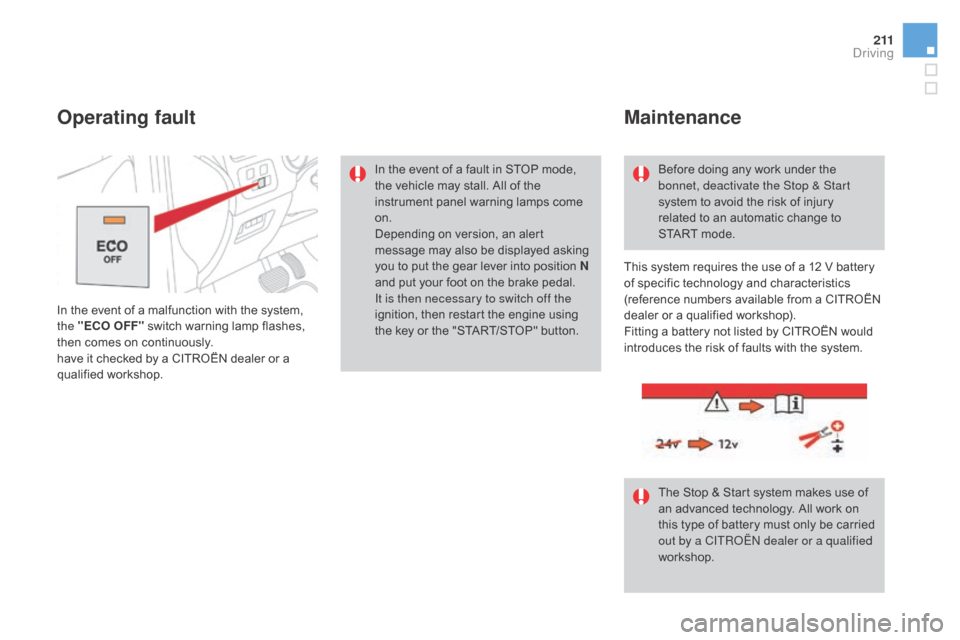
In the event of a malfunction with the system,
the "ECO OFF" switch warning lamp flashes,
then comes on continuously.
have it checked by a CITROËN dealer or a
qualified workshop.
Operating fault
In the event of a fault in STOP mode,
the vehicle may stall. All of the
instrument panel warning lamps come
on.
Depending on version, an alert
message may also be displayed asking
you to put the gear lever into position N
and put your foot on the brake pedal.
It is then necessary to switch off the
ignition, then restart the engine using
the key or the "START/STOP" button.Before doing any work under the
bonnet, deactivate the Stop & Start
system to avoid the risk of injury
related to an automatic change to
START
mode.
The Stop & Start system makes use of
an advanced technology. All work on
this type of battery must only be carried
out by a CITROËN dealer or a qualified
workshop.
Maintenance
This system requires the use of a 12 V battery
of specific technology and characteristics
(reference numbers available from a CITROËN
dealer or a qualified workshop).
Fitting a battery not listed by CITROËN would
introduces the risk of faults with the system.
driving
Page 214 of 436

DS4_en_Chap08_conduite_ed03-2015
Lane departure warning system
System which detects the involuntary crossing
of longitudinal traffic lane markings on the
ground (solid or broken line).
Sensors, fitted below the front bumper, trigger
a warning if the vehicle drifts over a lane
marking (speed higher than 50 mph (80 km/h)).
This system is particularly useful on motor ways
and main roads.
Activation
F When switching the ignition on or with the engine running, press this button; the
indicator lamp comes on.
The lane departure warning system
cannot in any circumstances replace
the need for vigilance on the part of the
driver.
It is necessary to observe driving
regulations and take a break every
two
hours.
deactivation
You are warned by the vibration of the driver's
seat cushion:
-
o
n the right-hand side, if the marking on
the ground has been crossed on the right,
-
o
n the left-hand side, if the marking on the
ground has been crossed on the left.
No warning is transmitted while the direction
indicator is active and for approximately
20
seconds after the direction indicator is
switched off.
A warning may be transmitted if a direction
marking (e.g. arrow) or non-standard marking
(e.g. graffiti) is crossed.
detection Operating fault
The detection may be impeded:
- i
f the sensors are dirty (mud, snow...),
-
i
f the markings on the ground are
worn,
-
i
f there is little contrast between
the markings on the ground and
the road sur face.
F
P
ress this button again, the indicator lamp
goes off.
The status of the system remains in the
memory when the ignition is switched off. In the event of a malfunction, the
service warning lamp comes on,
accompanied by an audible signal
and a message in the screen.
Contact a CITROËN dealer or a qualified
workshop.
Page 215 of 436

213
DS4_en_Chap08_conduite_ed03-2015
Blind spot sensors
This driving assistance system warns the driver
of the presence of another vehicle in the blind
spot angle of their vehicle (areas masked from
the driver's field of vision), as soon as this
presents a potential danger.
Operation
This system is designed to improve safety when driving and is in no circumstances a
substitute for the use of the interior rear view mirror and door mirrors. It is the driver's
responsibility to constantly check the traffic, to assess the distances and relative speeds of
other vehicles and to predict their movements before deciding whether to change lane.
The blind spot sensor system can never replace the need for vigilance on the part of
the
d
river. F
O
n switching on the ignition, or engine
running, press this button to activate the
function; the warning lamp comes on.
Sensors fitted in the front and rear bumpers
monitor the blind spots.
A warning lamp appears in the door mirror on
the side in question:
-
i
mmediately, when being overtaken,
-
a
fter a delay of about one second, when
overtaking a vehicle slowly.
driving
Page 217 of 436
215
DS4_en_Chap08_conduite_ed03-2015
Operating fault
In the event of a fault, the warning lamp in the
button flashes then goes off.
Have it checked by a CITROËN dealer or a
qualified workshop.The system may suffer temporary
interference in certain weather
conditions (rain, hail...).
In particular, driving on a wet sur face
or moving from a dry area to a wet area
can cause false alerts (for example, the
presence of a fog of water droplets in
the blind spot angle is interpreted as a
vehicle).
In bad or wintry weather, ensure that
the sensors are not covered by mud,
ice or snow.
Take care not to cover the warning
zone in the door mirrors or the
detection zones on the front and rear
bumpers with adhesive labels or other
objects; they may hamper the correct
operation of the system.
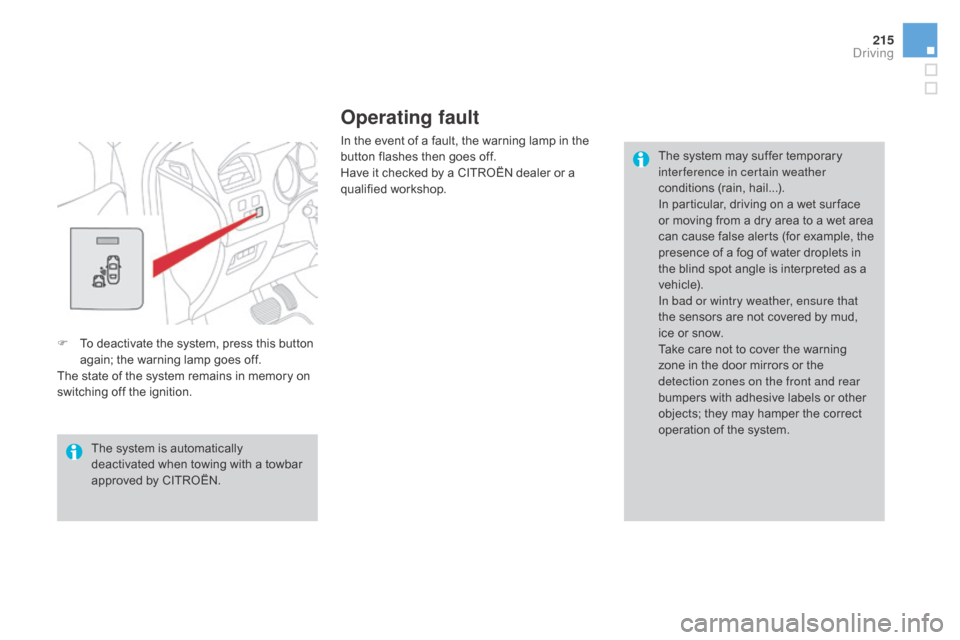
F
T
o deactivate the system, press this button
again; the warning lamp goes off.
The state of the system remains in memory on
switching off the ignition.
The system is automatically
deactivated when towing with a towbar
approved by CITROËN.
driving
Page 220 of 436

DS4_en_Chap08_conduite_ed03-2015
System which prevents the vehicle from exceeding the speed programmed by the driver.
Speed limiter
The speed limiter is a driving aid that
cannot, in any circumstances, replace the
need to observe speed limits or the need
for vigilance on the part of the driver.1.
S
peed limiter mode selection wheel.
2.
P
rogrammed value decrease button.
3.
P
rogrammed value increase button.
4.
S
peed limiter on / pause button.
5.
D
isplay memorised speed settings button.
Steering mounted controls
6. Speed limiter on / pause indication.
7. S
peed limiter mode selection indication.
8.
P
rogrammed speed value.
9.
S
election of a memorised speed setting.
displays in the instrument panel
The speed limiter is switched on manually.
The minimum programmed speed is
20
mph (30 km/h).
The programmed speed remains in the
system memory when the ignition is
switched off.
Page 223 of 436
221
DS4_en_Chap08_conduite_ed03-2015
Cruise control
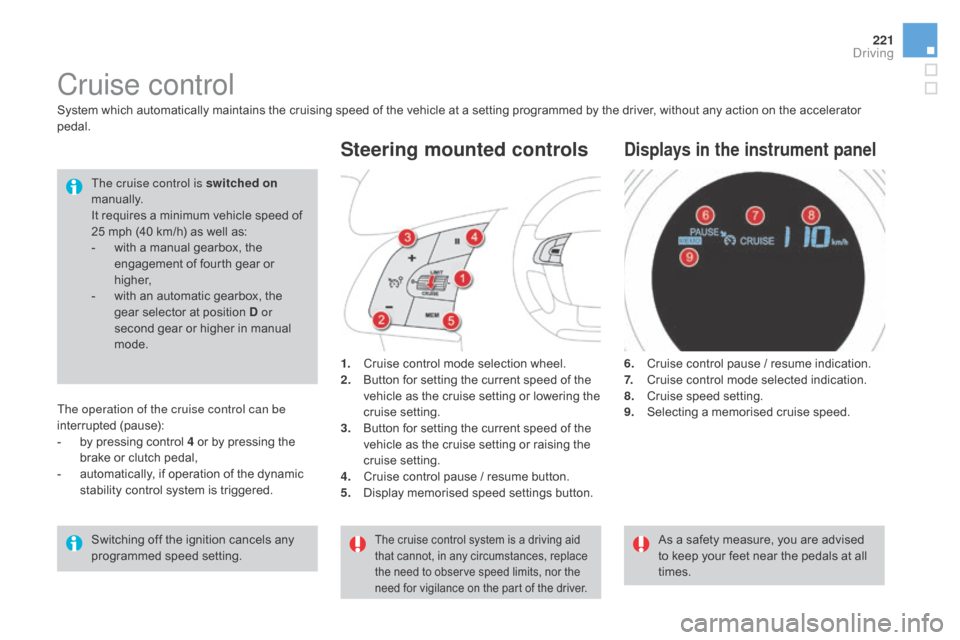
1. Cruise control mode selection wheel.
2. Button for setting the current speed of the
vehicle as the cruise setting or lowering the
cruise setting.
3.
B
utton for setting the current speed of the
vehicle as the cruise setting or raising the
cruise setting.
4.
C
ruise control pause / resume button.
5.
D
isplay memorised speed settings button.
Steering mounted controls
6. Cruise control pause / resume indication.
7. Cruise control mode selected indication.
8.
C
ruise speed setting.
9.
S
electing a memorised cruise speed.
displays in the instrument panel
System which automatically maintains the cruising speed of the vehicle at a setting programmed by the driver, without any action on the accelerator
pedal.
The cruise control is switched on
manually.
It requires a minimum vehicle speed of
25 mph (40 km/h) as well as:
-
w
ith a manual gearbox, the
engagement of fourth gear or
higher,
-
w
ith an automatic gearbox, the
gear selector at position
d or
second gear or higher in manual
mode.
As a safety measure, you are advised
to keep your feet near the pedals at all
times.
Switching off the ignition cancels any
programmed speed setting.
The cruise control system is a driving aid
that cannot, in any circumstances, replace
the need to observe speed limits, nor the
need for vigilance on the part of the driver.
The operation of the cruise control can be
interrupted (pause):
-
b
y pressing control 4 or by pressing the
brake or clutch pedal,
-
a
utomatically, if operation of the dynamic
stability control system is triggered.
driving
Page 233 of 436
231
DS4_en_Chap09_info-pratiques_ed03-2015
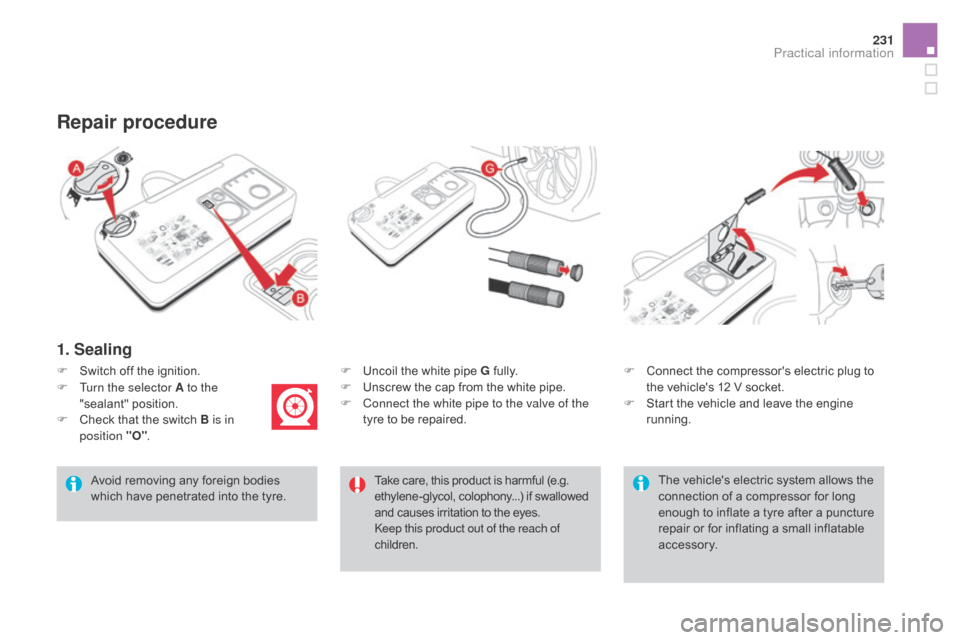
1. Sealing
F Uncoil the white pipe G fully.
F U nscrew the cap from the white pipe.
F
C
onnect the white pipe to the valve of the
tyre to be repaired.
Repair procedure
Avoid removing any foreign bodies
which have penetrated into the tyre. F
C
onnect the compressor's electric plug to
the vehicle's 12 V socket.
F
S
tart the vehicle and leave the engine
running.
F
S
witch off the ignition.
Take care, this product is harmful (e.g.
ethylene-glycol, colophony...) if swallowed
and causes irritation to the eyes.
Keep this product out of the reach of
children.
F
T
urn the selector A to the
"sealant" position.
F
C
heck that the switch B is in
position "O" .
The vehicle's electric system allows the
connection of a compressor for long
enough to inflate a tyre after a puncture
repair or for inflating a small inflatable
accessory.
Practical information
Page 241 of 436
239
DS4_en_Chap09_info-pratiques_ed03-2015
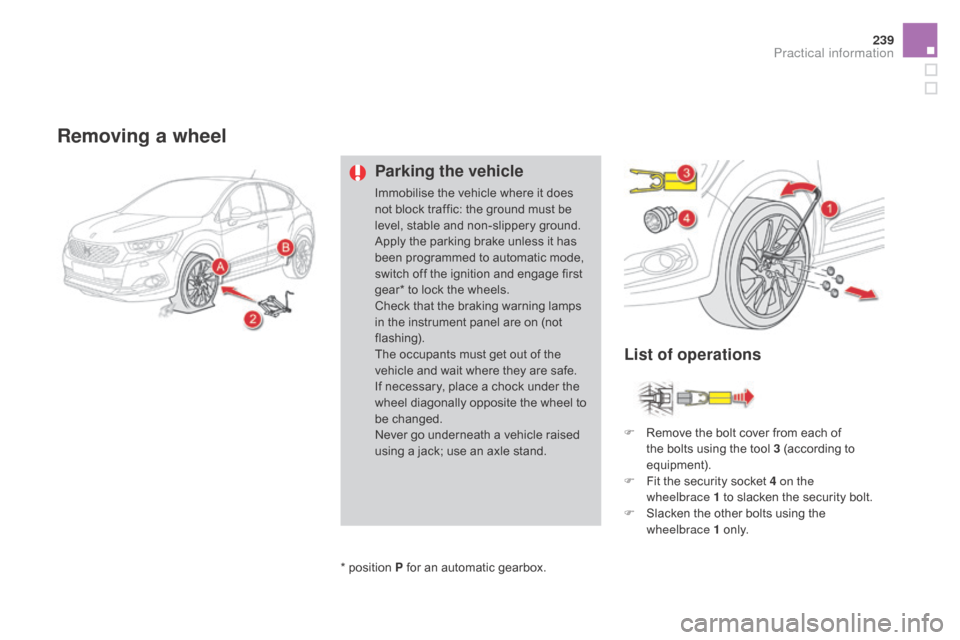
Removing a wheel
Parking the vehicle
Immobilise the vehicle where it does
not block traffic: the ground must be
level, stable and non-slippery ground.
Apply the parking brake unless it has
been programmed to automatic mode,
switch off the ignition and engage first
gear* to lock the wheels.
Check that the braking warning lamps
in the instrument panel are on (not
flashing).
The occupants must get out of the
vehicle and wait where they are safe.
If necessary, place a chock under the
wheel diagonally opposite the wheel to
be changed.
Never go underneath a vehicle raised
using a jack; use an axle stand.F
R
emove the bolt cover from each of
the bolts using the tool 3 (according to
equipment).
F
F
it the security socket 4 on the
wheelbrace
1 to slacken the security bolt.
F
S
lacken the other bolts using the
wheelbrace 1 o n l y.
*
position P for an automatic gearbox.
List of operations
Practical information