wheel Citroen DS4 DAG 2010.5 1.G Owner's Guide
[x] Cancel search | Manufacturer: CITROEN, Model Year: 2010.5, Model line: DS4 DAG, Model: Citroen DS4 DAG 2010.5 1.GPages: 342, PDF Size: 10.62 MB
Page 178 of 342

201Driving
Six-speed electronic gearbox system which offers a choice between the comfor t of fully automatic operation or the pleasure of manual gear changing. There are two driving modes:
- automatic mode for automatic control of the gears by the gearbox, - manual mode for sequential gear changing by the driver. In automatic mode, it remains possible to change gear manually by using the steering mounted control paddles, when over taking, for example.
6-speed electronic gearbox system
R. Reverse With your foot on the brake, lift the lever and push for wards. N. Neutral.
With your foot on the brake, select this position to star t. A. Automatic mode.
Move the lever backwards to select this mode. M. Manual mode with sequential gear changing. Move the lever backwards then to the left to select this mode, then use the steering mounted control paddles to change gear.
Gear lever
+. Change up paddle to the right of the steering wheel. Press the back of the "+" steering mounted paddle to change up a gear.
-. Change down paddle to the left of the steering wheel. Press the back of the "-" steering mounted
paddle to change down a gear.
Steering mounted control
paddles
The steering mounted paddles cannot be used to select neutral or to engage or disengage reverse gear.
Page 190 of 342
213Driving
Memorising speeds
This memorisation of speeds applies to both the speed limiter and the cruise control.
Operation
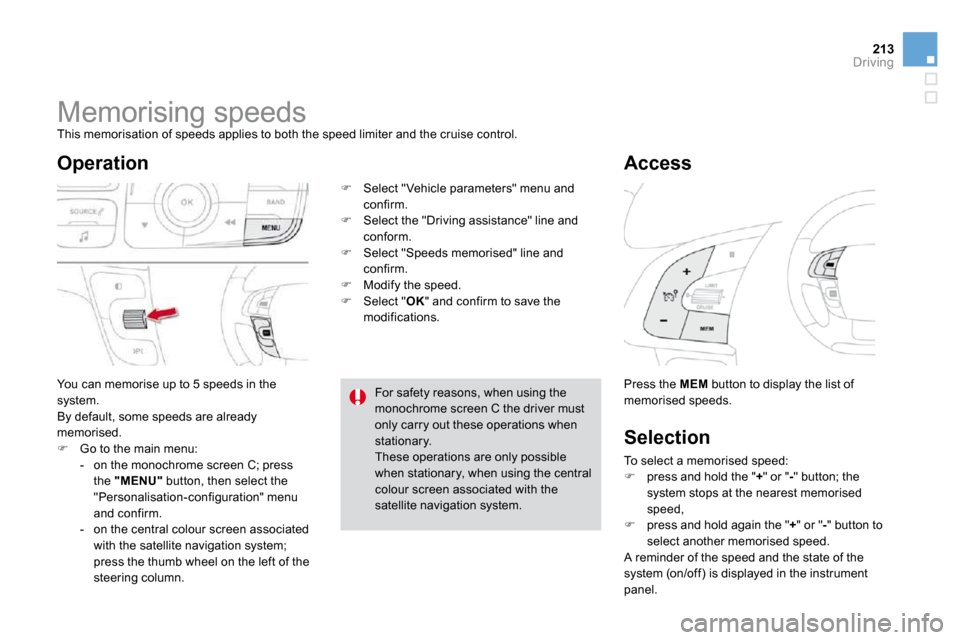
You can memorise up to 5 speeds in the system. By default, some speeds are already memorised. Go to the main menu: - on the monochrome screen C; press the "MENU" button, then select the "Personalisation-configuration" menu and confirm. - on the central colour screen associated
with the satellite navigation system; press the thumb wheel on the left of the steering column.
Select "Vehicle parameters" menu and confirm. Select the "Driving assistance" line and
conform. Select "Speeds memorised" line and confirm. Modify the speed. Select " OK " and confirm to save the modifications.
Access
Press the MEM button to display the list of memorised speeds.
Selection
To select a memorised speed: press and hold the " + " or " - " button; the system stops at the nearest memorised speed, press and hold again the " + " or " - " button to select another memorised speed. A reminder of the speed and the state of the system (on/off) is displayed in the instrument panel.
For safety reasons, when using the monochrome screen C the driver must only carry out these operations when stationary. These operations are only possible
when stationary, when using the central colour screen associated with the satellite navigation system.
Page 210 of 342
Temporary puncture repair kit
and a sealant car tridge which permits temporar y repair of a tyre so that you can pairdrive to the nearest garage. It is designed to repair most punctures which
could affect the tyre, located on the tyre tread or shoulder.
Access to the kit
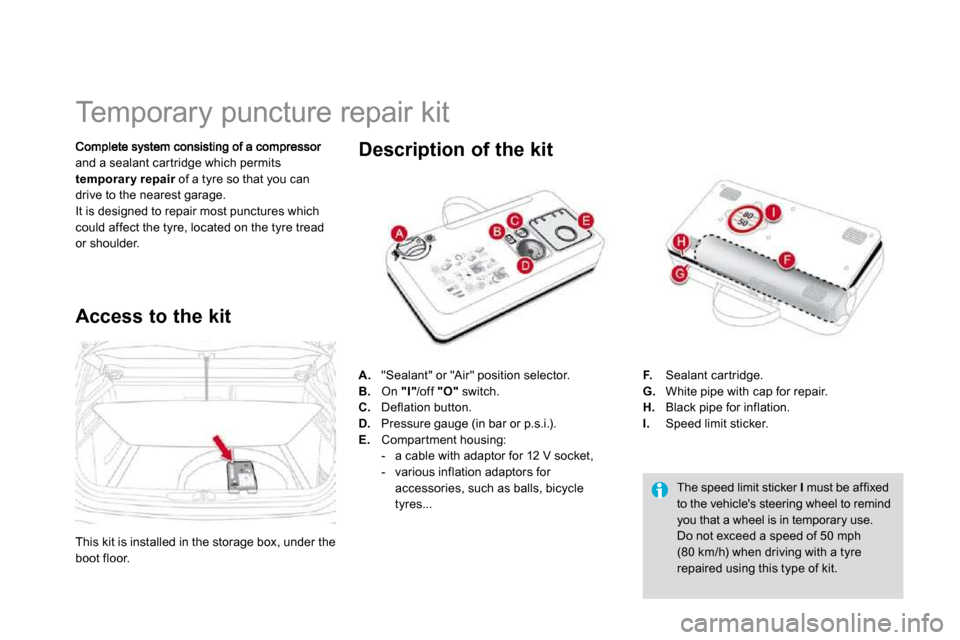
The speed limit sticker I must be affixed to the vehicle's steering wheel to remind you that a wheel is in temporary use. Do not exceed a speed of 50 mph (80 km/h) when driving with a tyre repaired using this type of kit.
Description of the kit
A. "Sealant" or "Air" position selector. B. On "I" /off "O" switch. C. Deflation button. D. Pressure gauge (in bar or p.s.i.). E. Compar tment housing: - a cable with adaptor for 12 V socket, - various inflation adaptors for accessories, such as balls, bicycle tyres...
F. Sealant car tridge. G. White pipe with cap for repair. H. Black pipe for inflation. I. Speed limit sticker.
This kit is installed in the storage box, under the boot floor.
Page 212 of 342

Switch on the compressor by moving the switch B to position "I" until the tyre
pressure reaches 2.0 bars. The sealant is injected into the tyre under pressure; do not disconnect the pipe from the valve during this operation (risk of splashing).
Remove the kit and screw the cap back on the white pipe.
Take care to avoid staining your vehicle with traces of fluid. Keep the kit to hand. Drive immediately for approximately three miles (five kilometres), at reduced speed (between 15 and 35 mph [20 and 60 km/h]), to plug the puncture. Stop to check the repair and the tyre
pressure using the kit.
If after around 5 to 7 minutes the pressure is not attained, this indicates that the tyre is not repairable; contact a CITROËN dealer or a qualified workshop for assistance.
Tyre under-infl ation detection
If the vehicle is fitted with tyre under-inflation detection, the under-inflation warning lamp will remain on after the wheel has been repaired until the system is reinitialised by a CITROËN dealer or a qualified workshop.
Page 213 of 342

241Practical information
2. Infl ation
Adjust the pressure using the compressor (to inflate: switch B in position "I" ; to
deflate: switch B in position "O" and press button C ), in accordance with the vehicle's tyre pressure label (located on the left hand door aper ture). A loss of pressure indicates that the puncture has not been fully plugged; contact a CITROËN dealer or qualified
workshop for assistance. Remove and stow the kit. Drive at reduced speed (50 mph [80 km/h] max) limiting the distance travelled to approximately 120 miles (200 km).
Turn the selector A to the "air" position.
Uncoil the black pipe H fully. Connect the black pipe to the valve of the wheel.
Connect the compressor's electric plug to the vehicle's 12 V socket.
Star t the vehicle again and leave the engine running.
Visit a CITROËN dealer or a qualified workshop as soon as possible. You must inform the technician that you have used this kit. After inspection, the technician will inform you whether the tyre can be
repaired or must be replaced.
Page 214 of 342

Removing the cartridge
Stow the black pipe. Detach the angled base from the white pipe. Suppor t the compressor ver tically. Unscrew the car tridge from the bottom.
Checking tyre pressures/
inflating accessories
Beware of discharges of fluid. The expiry date of the fluid is indicated
on the car tridge. The sealant car tridge is designed for single use; even if only par tly used, it must be replaced. After use, do not discard the cartridge into the environment, take it to an authorised waste disposal site or a CITROËN dealer. Do not forget to obtain a new sealant car tridge, available from CITROËN dealers or from a qualified workshop.
You can also use the compressor, without injecting any product, to: - check or adjust the pressure of your tyres, - inflate other accessories (balls, bicycle tyres...).
Connect the compressor's electrical connector to the vehicle's 12 V socket. Star t the vehicle and let the engine run. Adjust the pressure using the compressor (to inflate: switch B in position "I" ; to deflate: switch B in position "O" and press button C ), according to the vehicle's tyre
pressure label or the accessory's pressure label. Remove the kit then stow it.
Turn the selector A to the "Air" position. Uncoil the black pipe H fully. Connect the black pipe to the valve of the wheel or accessory. If necessary, fit one of the adaptors supplied with the kit first.
Page 215 of 342

243Practical information
Changing a wheel
Procedure for changing a faulty wheel for the spare w heel using the tools provided with the vehicle.
The tools are installed in the boot under the floor. To gain access to them: open the boot, raise the floor, secure it by hooking its cord on the hook on the rear shelf suppor t, with a standard size spare wheel, unclip and remove the box in the middle of the wheel containing the tools,
or with a "space-saver" spare wheel; lift the wheel at the rear towards you for access to the storage box containing the tools.
Access to the tools
List of tools
All of these tools are specific to your vehicle. Do not use them for other purposes.
Wheel with trim
When removing the wheel , detach the trim first using the wheelbrace 1 pulling at the valve passage hole. When refitting the wheel , refit the trim star ting by placing its notch facing the valve and press around its edge with the palm of your hand.
3. "Bolt cover" tool.
For removing the bolt protectors (covers) on alloy wheels. 4. Socket for the security bolts (located in the glove box).
For adapting the wheelbrace to the special "security" bolts.
1. Wheelbrace.
For removing the wheel trim and the wheel fixing bolts. 2. Jack with integral handle. For raising the vehicle.
Page 216 of 342

The spare wheel is installed in the boot under the floor. Depending on version, the spare wheel may be a standard size steel or alloy wheel, or for some countries it is the "space saver" type. For access to the spare wheel, refer to the paragraph "Access to the tools" on the previous page.
Access to the spare wheel
Tyre under-infl ation detection
The spare wheel is not fitted with a sensor. The punctured wheel must be repaired by a CITROËN dealer or aqualified workshop.
Taking out the standard wheel
Unscrew the yellow central bolt. Raise the spare wheel towards you from
the rear. Take the wheel out of the boot.
Page 217 of 342

245Practical information
Putting the standard wheel back in place
Put the box back in place in the centre of
the wheel and clip it.
Put the wheel back in its housing.
Unscrew the yellow central bolt by a few turns then put it in place in the centre of the wheel.
Tighten fully until the central bolt clicks to retain the wheel correctly.
Page 218 of 342

Removing a wheel
Parking the vehicle
Immobilise the vehicle where it does not block traffic: the ground must be level, stable and non-slippery ground. Apply the parking brake unless it has been programmed to automatic mode, switch off the ignition and engage first gear * to lock the wheels. Check that the braking warning lamps in the instrument panel are on (not flashing). If necessary, place a chock under the wheel diagonally opposite the wheel to be changed. The occupants must get out of the vehicle and wait where they are safe. Never go underneath a vehicle raised using a jack; use an axle stand.
List of operations
Remove the chromed bolt cover from each of the bolts using the tool 3 (according to
equipment). Fit the security socket 4 on the wheelbrace 1 to slacken the security bolt.
Slacken the other bolts using the wheelbrace 1 only.
* position R for the electronic gearbox system.