lock Citroen DS5 2014 1.G Owner's Guide
[x] Cancel search | Manufacturer: CITROEN, Model Year: 2014, Model line: DS5, Model: Citroen DS5 2014 1.GPages: 372, PDF Size: 32.58 MB
Page 106 of 372
Starting-switching off the engine
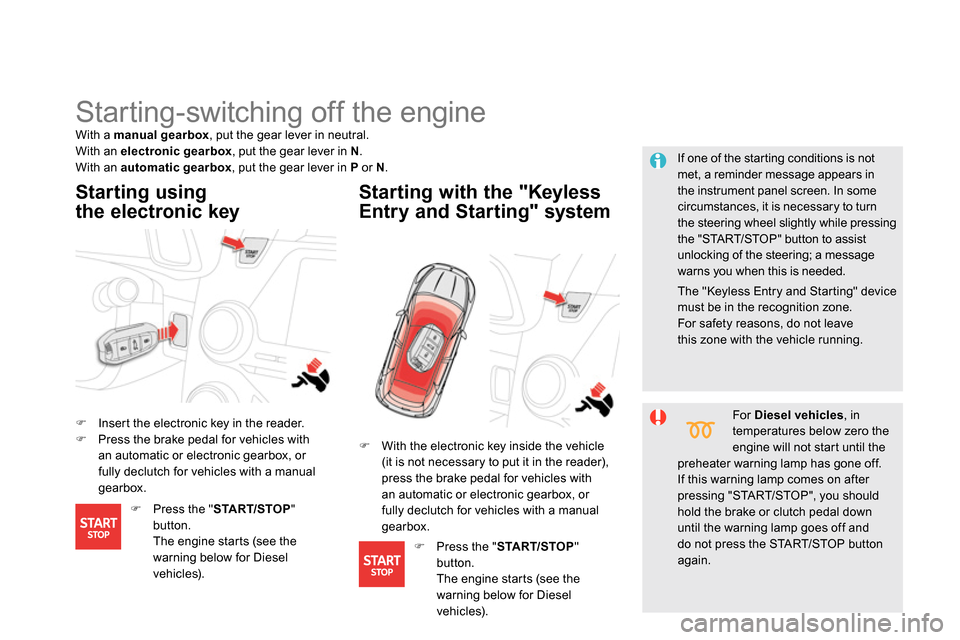
Insert the electronic key in the reader.
Press the brake pedal for vehicles with
an automatic or electronic gearbox, or
fully declutch for vehicles with a manual
gearbox.
Starting using
the electronic key
Starting with the "Keyless
Entry and Starting" system
If one of the starting conditions is not
met, a reminder message appears in
the instrument panel screen. In some
circumstances, it is necessary to turn
the steering wheel slightly while pressing
the "START/STOP" button to assist
unlocking of the steering; a message
warns you when this is needed.
With a manual gearbox
, put the gear lever in neutral.
With an electronic gearbox
, put the gear lever in N
.
With an automatic gearbox
, put the gear lever in P
or N
.
For Diesel vehicles
, in
temperatures below zero the
engine will not start until the
preheater warning lamp has gone off.
If this warning lamp comes on after
pressing "START/STOP", you should
hold the brake or clutch pedal down
until the warning lamp goes off and
do not press the START/STOP button
again.
With the electronic key inside the vehicle
(it is not necessary to put it in the reader),
press the brake pedal for vehicles with
an automatic or electronic gearbox, or
fully declutch for vehicles with a manual
gearbox.
Press the " START/STOP
"
button.
The engine starts (see the
warning below for Diesel
vehicles).
Press the " START/STOP
"
button.
The engine starts (see the
warning below for Diesel
vehicles).
The "Keyless Entry and Starting" device
must be in the recognition zone.
For safety reasons, do not leave
this zone with the vehicle running.
Page 107 of 372

105Driving
Switching off using the
electronic key
Immobilise the vehicle.
Electronic key left in the reader
If the electronic key is left in the reader,
on opening the driver's door a message
appears to warn you.
Stopping with the "Keyless
Entry and Starting" system
Immobilise the vehicle.
If the vehicle is not immobilised, the
engine will not stop.
Ignition on without
starting
With the electronic key inside
the vehicle, press the " START/
STOP
" button.
The engine stops and the
steering column locks.
Press the " START/STOP
" button
The engine stops and the
steering column locks.
Anti-theft protection
Electronic engine immobiliser
The keys contain an electronic chip which has
a secret code. When the ignition is switched
on, this code must be recognised in order for
starting to be possible.
This electronic engine immobiliser locks the
engine management system a few minutes
after the ignition is switched off and prevents
starting of the engine by anyone who does not
have the key.
In the event of a malfunction, you are informed
by a message in the instrument panel screen.
In this case, your vehicle does not start; contact
a CITROËN dealer as soon as possible.
With the electronic key in the reader or the
Keyless Entry and Starting key inside the
vehicle, pressing the "START/STOP" button,
with no action on the pedals
, allows the
ignition to be switched on.
Remove the electronic key from the reader.
Press the "START/STOP" button,
the instrument panel comes on
but the engine does not start.
Press the button again to switch
off the ignition and so allow the
vehicle to be locked.
With the ignition on, the system goes
into energy economy mode when
necessary to maintain the state of
charge of the battery.
Switching off the engine leads to a loss
of braking assistance.
Page 108 of 372

Emergency starting with the
Keyless Entry and Starting
system
When the electronic key is in the recognition
zone and your vehicle does not start after
pressing the "START/STOP" button:
Insert the electronic key in the reader.
Press the brake pedal on vehicles with an
automatic or electronic gearbox, or fully
declutch with a manual gearbox.
Press the "START/STOP" button.
The engine starts.
In the event of an emergency only, the engine
can be switched of without conditions. To do
this, press and hold the "START/STOP" button
for about 3 seconds.
In this case the steering column locks as soon
as the vehicle stops.
If the electronic key is no longer in the
recognition zone when driving or when you
(later) request switching off the engine, a
message appears in the instrument panel.
Emergency switch- off
Electronic key not recognised by
the "Keyless Entry and Starting"
system
Press and hold the "START/STOP"
button for about 3 seconds if you want to
force switching off the engine (note that
restarting will not be possible without the
key).
Page 121 of 372

11 9Driving
Invalid value during manual
operation
This symbol is displayed if a gear
is not engaged correctly (selector
between two positions).
Stopping the vehicle
Before switching off the engine, put the lever in
position P
or N
to place the gearbox in neutral.
In both cases, apply the parking brake to
immobilise the vehicle, unless it is programmed
to automatic mode.
If the lever is not in position P
, when the
driver's door is opened or approximately
45 seconds after the ignition is switched
off, there is an audible signal and a
message appears.
Return the lever to position P
;
the audible signal stops and the
message disappears.
Operating fault
When the ignition is on, a message appears
in the instrument panel screen to indicate a
gearbox fault.
In this case, the gearbox switches to back-up
mode and is locked in 3rd gear. You may feel
a substantial knock when changing from P
to R
and from N
to R
. This will not cause any
damage to the gearbox.
Do not exceed 60 mph (100 km/h), local speed
restrictions permitting.
Have it checked by a CITROËN dealer or a
qualified workshop.
You risk damaging the gearbox:
- if you press the accelerator and
brake pedals at the same time,
- if you force the lever from position P
to another position when the
battery is flat.
To reduce fuel consumption when
stationary for long periods with the
engine running (traffic jam...), position
the gear lever at N
and apply the
parking brake, unless it is programmed
in automatic mode.
Page 134 of 372
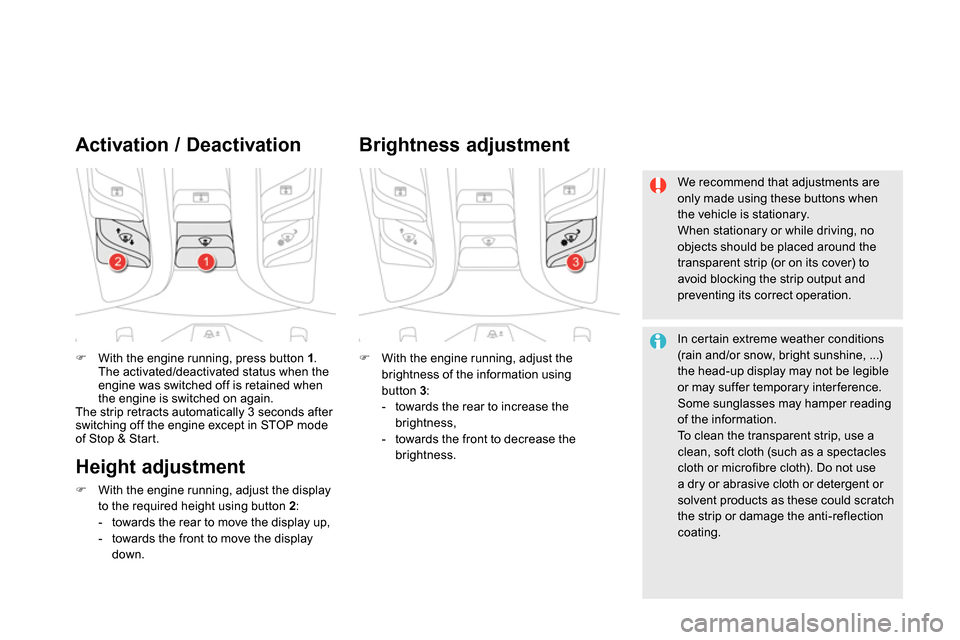
With the engine running, press button 1
.
The activated/deactivated status when the
engine was switched off is retained when
the engine is switched on again.
The strip retracts automatically 3 seconds after
switching off the engine except in STOP mode
of Stop & Start.
Activation / Deactivation
With the engine running, adjust the
brightness of the information using
button 3
:
- towards the rear to increase the
brightness,
- towards the front to decrease the
brightness.
Brightness adjustment
We recommend that adjustments are
only made using these buttons when
the vehicle is stationary.
When stationary or while driving, no
objects should be placed around the
transparent strip (or on its cover) to
avoid blocking the strip output and
preventing its correct operation.
In certain extreme weather conditions
(rain and/or snow, bright sunshine, ...)
the head-up display may not be legible
or may suffer temporary inter ference.
Some sunglasses may hamper reading
of the information.
To clean the transparent strip, use a
clean, soft cloth (such as a spectacles
cloth or microfibre cloth). Do not use
a dry or abrasive cloth or detergent or
solvent products as these could scratch
the strip or damage the anti-reflection
coating.
Height adjustment
With the engine running, adjust the display
to the required height using button 2
:
- towards the rear to move the display up,
- towards the front to move the display
down.
Page 153 of 372

151Visibility
Exterior welcome
lighting
The remote switching on of the lighting makes
your approach to the vehicle easier in poor
light. It is activated according to the level of
light detected by the sunshine sensor.
Switching on
Switching off
The exterior welcome lighting switches off
automatically after a set time, when the ignition
is switched on or on locking the vehicle.
Programming
The lighting duration is selected via
the vehicle configuration menu.
The duration of the welcome lighting is
associated with and identical to that of
the automatic guide-me-home lighting.
Press the open padlock on the
remote control or the door handle
with Keyless Entry and Starting.
Door mirror spotlamps
Switching on
The spotlamps come on:
- when you unlock the vehicle,
- when you switch off the ignition,
- when you open a door,
- when you use the remote control to locate
the vehicle.
Switching off
They are timed to go off automatically.
To make your approach to the vehicle easier,
these illuminate:
- the zones facing the driver’s and
passenger’s doors,
- the zones for ward of the door mirrors and
rear ward of the front doors.
The dipped beam headlamps and the
sidelamps come on; your vehicle is also
unlocked.
Page 161 of 372
159Visibility
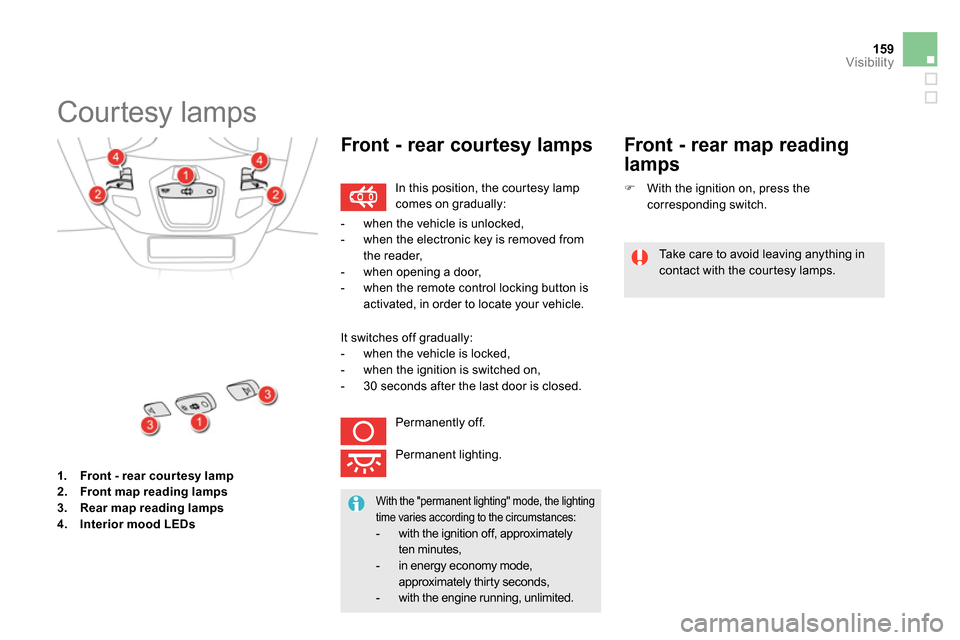
1.
Front - rear cour tesy lamp
2.
Front map reading lamp
s
3.
Rear map reading lamp
s
4.
Interior mood LEDs
Courtesy lamps
In this position, the courtesy lamp
comes on gradually:
Front - rear courtesy lamps
Take care to avoid leaving anything in
contact with the courtesy lamps.
With the "permanent lighting" mode, the lighting
time varies according to the circumstances:
- with the ignition off, approximately
ten minutes,
-
in energy economy mode,
approximately thir ty seconds,
-
with the engine running, unlimited.
- when the vehicle is unlocked,
- when the electronic key is removed from
the reader,
- when opening a door,
- when the remote control locking button is
activated, in order to locate your vehicle.
It switches off gradually:
- when the vehicle is locked,
- when the ignition is switched on,
- 30 seconds after the last door is closed.
Permanently off.
Permanent lighting.
Front - rear map reading
lamps
With the ignition on, press the
corresponding switch.
Page 178 of 372

The incorrect installation of a child seat in a
vehicle compromises the child's protection in
the event of an accident.
Ensure that there is no seat belt or seat belt
buckle under the child seat, as this could
destabilise it.
Remember to fasten the seat belts or the
child seat harnesses keeping the slack
relative to the child's body to a minimum,
even for short journeys.
When installing a child seat using the seat
belt, ensure that the seat belt is tightened
correctly on the child seat and that it secures
the child seat firmly on the seat of your
vehicle. If your passenger seat is adjustable,
move it for wards if necessary.
At rear seating positions, always leave
sufficient space between the front seat and:
- a "rear ward facing" child seat,
- the child's feet for a child seat fitted
"forward facing".
To do this, move the front seat for wards
and, if necessary, move its backrest into the
upright position.
Advice on child seats
For optimum installation of the "for ward-
facing" child seat, ensure that the back of
the child seat is as close as possible to the
backrest of the vehicle's seat, in contact if
possible.
You mst remove the head restraint before
installing a child seat with backrest to a
passenger seat.
Ensure that the head restraint is stored or
attached securely to prevent it from being
thrown around the vehicle in the event of
sharp braking. Refit the head restraint when
the child seat is removed.
Children at the front
Installing a booster seat
The chest part of the seat belt must be
positioned on the child's shoulder without
touching the neck.
Ensure that the lap part of the seat belt
passes correctly over the child's thighs.
CITROËN recommends the use of a booster
seat which has a back, fitted with a seat belt
guide at shoulder level.
As a safety precaution, do not leave:
- a child or children alone and
unsuper vised in a vehicle,
- a child or an animal in a vehicle which
is exposed to the sun, with the windows
closed,
- the keys within reach of children inside
the vehicle.
To prevent accidental opening of the doors
and rear windows, use the "Child lock".
Take care not to open the rear windows by
more than one third.
To protect young children from the rays of
the sun, fit side blinds on the rear windows.
The legislation on carrying children on the front
passenger seat is specific to each country.
Refer to the legislation in force in your country.
Deactivate the passenger airbag when a
"rear ward-facing" child seat is installed on the
front seat.
Other wise, the child would risk being seriously
injured or killed if the airbag were to inflate.
Page 179 of 372

177Child safety
Electric child lock
Remote control system to prevent opening of the rear doors using their interior controls and use of the rear electric windows.
Switching on
Switching off
Any other status of the indicator lamp
indicates a fault with the electric child
lock.
Have it checked by a CITROËN dealer
or a qualified workshop.
This system is independent and in no
circumstances does it take the place of
the central locking control.
Check the status of the child lock each
time you switch on the ignition.
Always remove the key from the ignition
when leaving the vehicle, even for a
short time.
In the event of a serious impact, the
electric child lock is switched off
automatically to permit the exit of the
rear passengers.
With the ignition on, press this
button.
With the ignition on, press this
button again.
The indicator lamp in the button comes on,
accompanied by a message to confirm that the
child lock is on.
This indicator lamp remains on until the child
lock is switched off.
It is still possible to open the doors from the
outside and operate the rear electric windows
from the driver's control panel. The indicator lamp in the button goes off,
accompanied by a message to confirm that the
child lock is off.
This indicator lamp remains off while the child
lock is switched off.
Page 184 of 372
Electronic Stability Programme incorporating
the following systems:
- the anti-lock braking system (ABS) and the
electronic brake force distribution (EBFD),
- the emergency braking assistance,
- the anti-slip regulation (ASR) or traction
control,
- the dynamic stability control (DSC).
Electronic stability programme (ESC)
Definitions
Anti-lock braking system (ABS)
and electronic brake force
distribution (EBFD)
This system improves the stability and
manoeuvrability of your vehicle when braking
and provides improved control in corners, in
particular on poor or slippery road sur faces.
The ABS prevents wheel lock in the event of
emergency braking.
The electronic brake force distribution system
manages the braking pressure wheel by wheel.
Emergency braking assistance
In an emergency, this system enables you to
reach the optimum braking pressure more
quickly and therefore reduce the stopping
distance.
It is triggered in relation to the speed at which
the brake pedal is pressed. This is felt by a
reduction in the resistance of the pedal and an
increase in the effectiveness of the braking.
Anti-slip regulation (ASR)
The ASR system (also known as Traction
Control) optimises traction in order to avoid
wheel slip by acting on the brakes of the driving
wheels and on the engine. It also improves
the directional stability of the vehicle on
acceleration.
Dynamic stability control (DSC)
If there is a difference between the path
followed by the vehicle and that required by
the driver, the DSC monitors each wheel and
automatically acts on the brake of one or more
wheels and on the engine to return the vehicle
to the required path, within the limits of the laws
of physics.