alarm Citroen DS5 2016 1.G User Guide
[x] Cancel search | Manufacturer: CITROEN, Model Year: 2016, Model line: DS5, Model: Citroen DS5 2016 1.GPages: 500, PDF Size: 55.11 MB
Page 236 of 500
DS5_en_Chap08_info-pratiques_ed02-2015
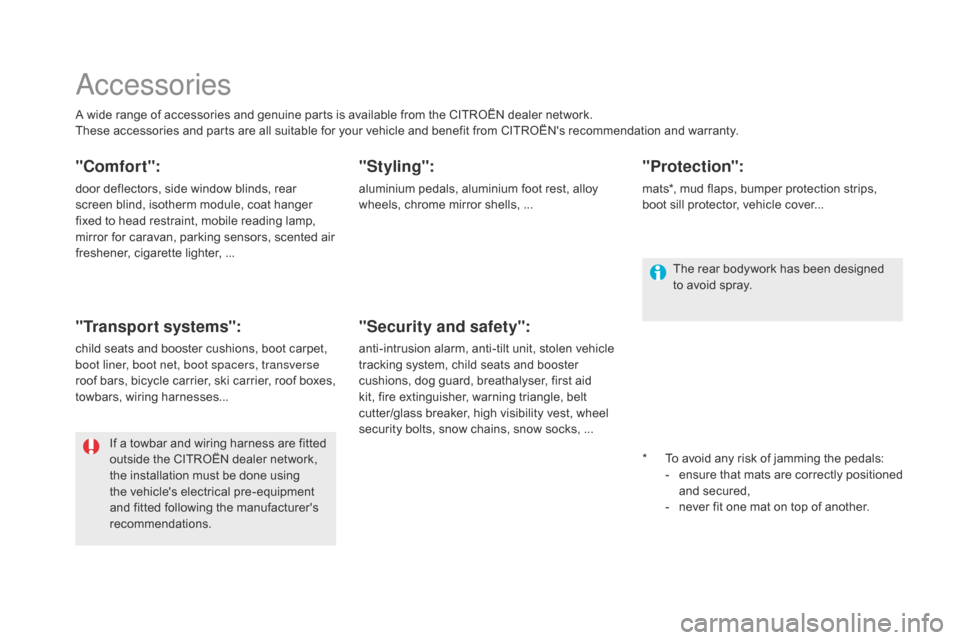
Accessories
A wide range of accessories and genuine parts is available from the CITROËN dealer network.
These accessories and parts are all suitable for your vehicle and benefit from CITROËN's recommendation and warranty.
"comfort":
door deflectors, side window blinds, rear
screen blind, isotherm module, coat hanger
fixed to head restraint, mobile reading lamp,
mirror for caravan, parking sensors, scented air
freshener, cigarette lighter, ...
"Transport systems":
child seats and booster cushions, boot carpet,
boot liner, boot net, boot spacers, transverse
roof bars, bicycle carrier, ski carrier, roof boxes,
towbars, wiring harnesses...
"Styling":
aluminium pedals, aluminium foot rest, alloy
wheels, chrome mirror shells, ...*
To a
void any risk of jamming the pedals:
-
en
sure that mats are correctly positioned
and secured,
-
ne
ver fit one mat on top of another.
"Security and safety":
anti-intrusion alarm, anti-tilt unit, stolen vehicle
tracking system, child seats and booster
cushions, dog guard, breathalyser, first aid
kit, fire extinguisher, warning triangle, belt
cutter/glass breaker, high visibility vest, wheel
security bolts, snow chains, snow socks, ...
"Protection":
mats*, mud flaps, bumper protection strips,
boot sill protector, vehicle cover...
If a towbar and wiring harness are fitted
outside the CITROËN dealer network,
the installation must be done using
the vehicle's electrical pre-equipment
and fitted following the manufacturer's
recommendations. The rear bodywork has been designed
to avoid spray.
Page 339 of 500

1
1
1
23
24
25
26
27
28
29
30
31
32
33
13 Audio and Telematics
Level 1
Level 2
Level 3
Comments
Navigation
Secondary page
Tr a f f i c m e s s a g e s
On the route
Settings for the choice of messages and the
filter radius.
Around vehicle
Near destination
Detour
Detour over a distance
Recalculate route
Finish
Save your selections.
Navigation
Secondary page
Map settings
Orientation
Flat view north heading
Choose the display and orientation of the
map. Flat view vehicle heading
Perspective view
Maps
Aspect
"Day" map colour
"Night" map colour
Automatic day/night
Confirm
Save the settings.
Navigation
Secondary page
Settings
Route settings
Enter settings and choose the volume for the
voice and announcement of street names.
Voice
Alarm!
Traffic options
Confirm
Save your selections.
Page 344 of 500

11
23
24
25
32
Risk areas / Danger zone
alert settings
Press on Navigation
to display the
primary page.
Press on the secondary page.
Select " Settings
".
Select " Alarm!
" (Alert).
It is then possible to activate Risk areas alerts
then:
- "Audible warning"
- "Alert only when navigating"
- "Alert only for overspeed"
- "Display speed limits"
- Timing: the choice of timing allows the
time before giving a Risk areas alert to be
defined.
Select " Confirm
".
This series of alerts and displays is
only available if Risk areas have first
been downloaded and installed on the
system.
Tr a ffi c
Traffic information
Display of messages
Press on Navigation
to display the
primary page.
Press on the secondary page.
Select " Tr a f f i c m e s s a g e s
".
Choose filter settings for:
" On the route
",
" Around
",
" Near destination
", filters to fine-
tune the list of messages.
Press again to remove the filter.