ad blue CITROEN DS5 2017 User Guide
[x] Cancel search | Manufacturer: CITROEN, Model Year: 2017, Model line: DS5, Model: CITROEN DS5 2017Pages: 403, PDF Size: 15.62 MB
Page 41 of 403
39
DS5_en_Chap01_controle-de-marche_ed01-2015
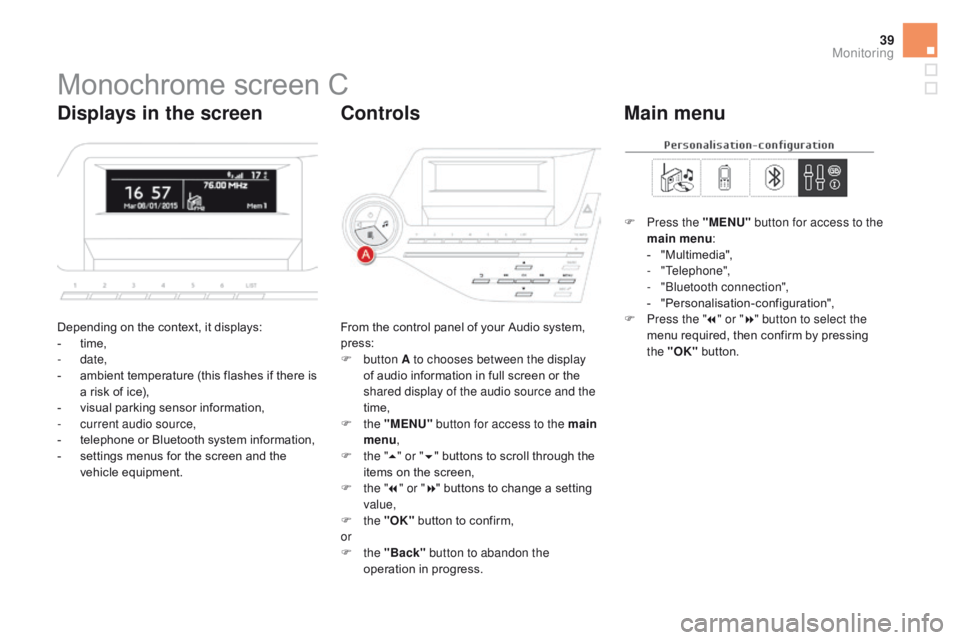
Monochrome screen C
Depending on the context, it displays:
- t ime,
-
date,
-
a
mbient temperature (this flashes if there is
a risk of ice),
-
v
isual parking sensor information,
-
c
urrent audio source,
-
t
elephone or Bluetooth system information,
-
s
ettings menus for the screen and the
vehicle equipment. From the control panel of your Audio system,
press:
F
button A to chooses between the display
of audio information in full screen or the
shared display of the audio source and the
time,
F
the "MENU" button for access to the main
menu ,
F
t
he "5" or " 6" buttons to scroll through the
items on the screen,
F
t
he "7" or " 8" buttons to change a setting
value,
F
the "OK" button to confirm,
or
F
the "Back" button to abandon the
operation in progress. F
P
ress the "MENU"
button for access to the
main menu :
-
"
Multimedia",
-
"Telephone",
-
"
Bluetooth connection",
-
"
Personalisation-configuration",
F P ress the "
7" or " 8" button to select the
menu required, then confirm by pressing
the "OK" button.
displays in the screencont rolsMain menu
Monitoring
Page 42 of 403
DS5_en_Chap01_controle-de-marche_ed01-2015
With the audio system switched on, this
menu allows you to activate or deactivate the
functions associated with use of the radio
(RDS, DAB / FM auto tracking, RadioText
(TXT) display) or to choose the media play
mode (Normal, Random, Random all, Repeat).
For more information on the "Multimedia"
application, refer to the "Audio and telematics"
section.
With the audio system switched on, this menu
allows you to make a call or view the various
telephone directories.
For more information on the "Telephone"
application, refer to the "Audio and telematics"
section. Wit the audio system on, this menu allows a
Bluetooth device (telephone, media player)
to be connected or disconnected and the
connection mode to be defined (hands-free,
playing audio files).
For more information on the "Bluetooth
connection" application, refer to the "Audio and
telematics" section.
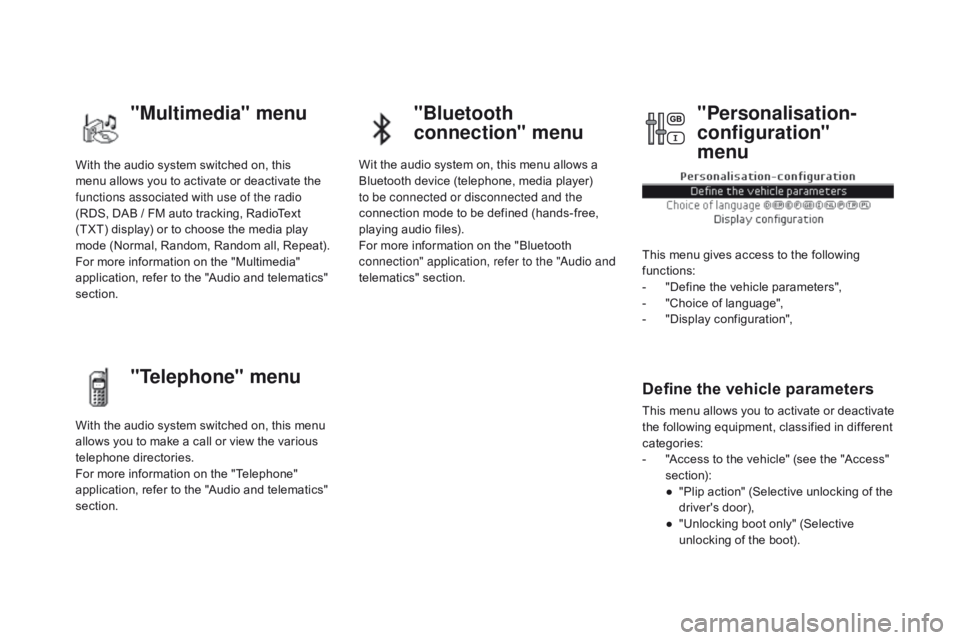
This menu gives access to the following
functions:
-
"
Define the vehicle parameters",
-
"
Choice of language",
-
"
Display configuration",
Define the vehicle parameters
This menu allows you to activate or deactivate
the following equipment, classified in different
categories:
-
"
Access to the vehicle" (see the "Access"
section):
●
"
Plip action" (Selective unlocking of the
driver's door),
●
"
Unlocking boot only" (Selective
unlocking of the boot).
"Multimedia" menu "Bluetooth
connection" menu
"Telephone" menu "Personalisation-
configuration"
menu
Page 45 of 403
43
DS5_en_Chap01_controle-de-marche_ed01-2015
Touch screen tablet
This system gives access to:
- m enus for adjusting settings for vehicle
functions and systems,
-
a
udio and display settings menus,
-
a
udio system and telephone controls and
the display of associated information.
-
t
he display of the ambient temperature
(a blue snowflake appears if there is a risk
of ice),
-
t
he display of visual parking sensor
information,
-
t
he controls for the navigation system
and Internet services and the display of
associated information.
As a safety measure, the driver
should only carr y out operations
that require close attention, with the
vehicle stationary.
Some functions are not accessible
when driving.General operation
Recommendations
It is necessary to press firmly, particularly for
"flick" gestures (scrolling through lists, moving
the map...). Just a light touch is not enough.
The screen does not recognise pressing with
more than one finger.
This technology allows use at all temperatures
and when wearing gloves.
Do not use pointed objects on the touch screen
tablet.
Do not touch the touch screen tablet with wet
hands.
Uses a soft clean cloth to clean the touch
screen tablet.
Principles
Press the virtual buttons in the touch screen
tablet.
Each menu is displayed over one or two pages
(primary page and secondary page).
Use the "Options" button to go to the
secondary page.
After a few moments with no action on
the secondary page, the primary page
is displayed automatically.
Use this button for access to
additional information and to the
settings for certain functions.
Use this button to confirm.
Use this button to quit the current
display and return to the primary
page.
Monitoring
Page 46 of 403
DS5_en_Chap01_controle-de-marche_ed01-2015
Menus
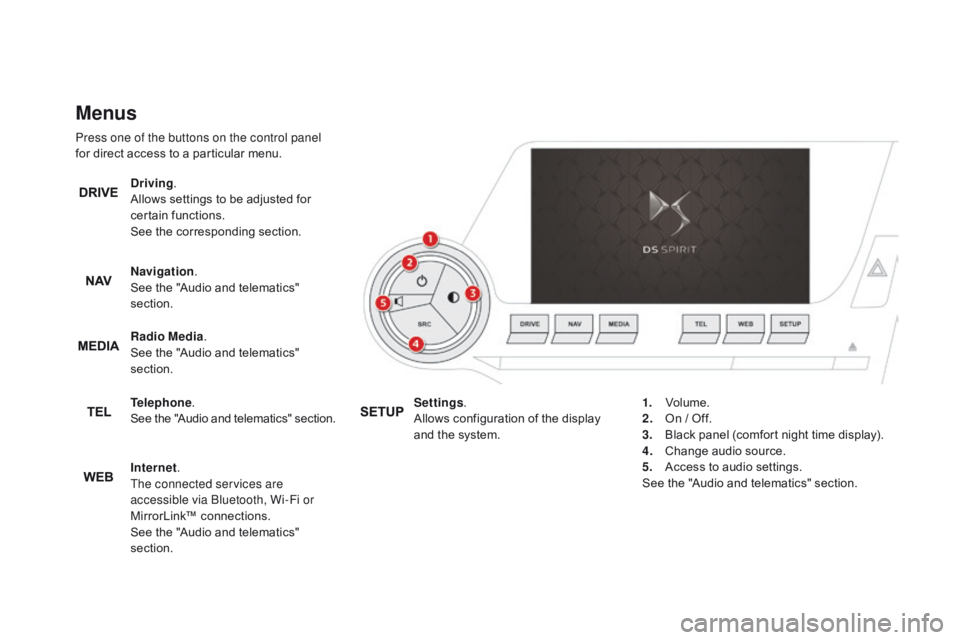
Press one of the buttons on the control panel
for direct access to a particular menu.
dr
iving.
Allows settings to be adjusted for
certain functions.
See the corresponding section.
Navigation .
See the "Audio and telematics"
section.
Radio Media .
See the "Audio and telematics"
section.
Telephone .
See the "Audio and telematics" section.
Internet.
The connected services are
accessible via Bluetooth, Wi-Fi or
MirrorLink™ connections.
See the "Audio and telematics"
section. Settings
.
Allows configuration of the display
and the system. 1.
Vo
lume.
2.
O
n / Off.
3.
B
lack panel (comfort night time display).
4.
C
hange audio source.
5.
A
ccess to audio settings.
See the "Audio and telematics" section.
Page 120 of 403
DS5_en_Chap04_conduite_ed01-2015
Gear shift indicator*
System which reduces fuel consumption by recommending the most appropriate gear.The information appears in the instrument
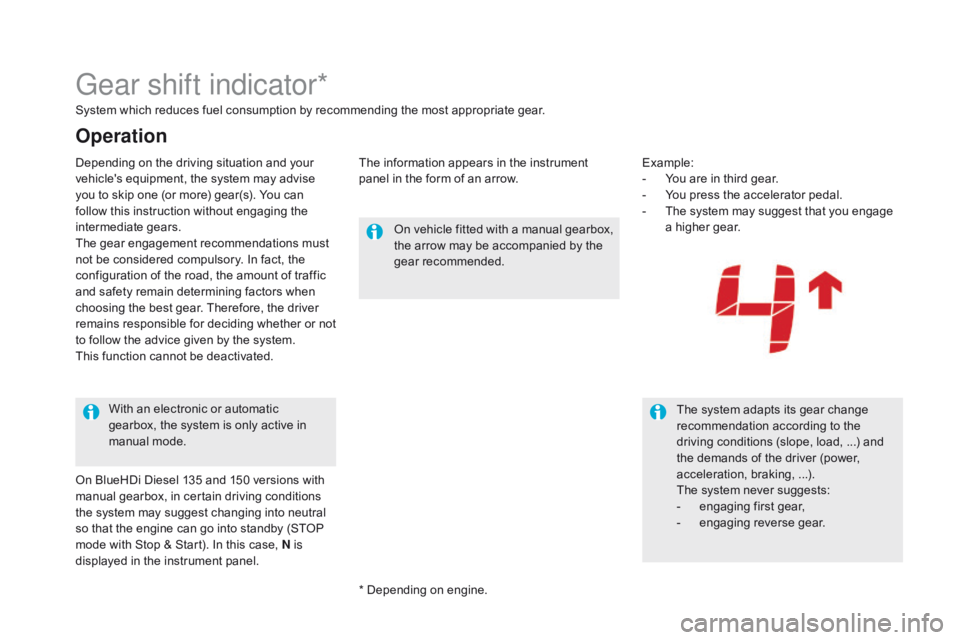
panel in the form of an arrow.Example:
-
Y
ou are in third gear.
-
Y
ou press the accelerator pedal.
-
T
he system may suggest that you engage
a higher gear.
On vehicle fitted with a manual gearbox,
the arrow may be accompanied by the
gear recommended.
The system adapts its gear change
recommendation according to the
driving conditions (slope, load, ...) and
the demands of the driver (power,
acceleration, braking, ...).
The system never suggests:
-
e
ngaging first gear,
-
enga
ging reverse gear.
With an electronic or automatic
gearbox, the system is only active in
manual mode.
Operation
* Depending on engine.
Depending on the driving situation and your
vehicle's equipment, the system may advise
you to skip one (or more) gear(s). You can
follow this instruction without engaging the
intermediate gears.
The gear engagement recommendations must
not be considered compulsory. In fact, the
configuration of the road, the amount of traffic
and safety remain determining factors when
choosing the best gear. Therefore, the driver
remains responsible for deciding whether or not
to follow the advice given by the system.
This function cannot be deactivated.
On BlueHDi Diesel 135 and 150 versions with
manual gearbox, in certain driving conditions
the system may suggest changing into neutral
so that the engine can go into standby (STOP
mode with Stop & Start). In this case, N is
displayed in the instrument panel.
Page 123 of 403
121
DS5_en_Chap04_conduite_ed01-2015
Stop & Start
Operation
Going into engine STOP
mode
The "E cO" warning lamp comes on
in the instrument panel and the engine
goes into standby automatically:
-
w
ith a manual gearbox, at speeds below
12 mph (20 km/h) or vehicle stationary with
the BlueHDi 115 and 120 versions, when
you place the gear lever in neutral and you
release the clutch pedal,
-
w
ith an electronic gearbox, at speeds
below 5 mph (8 km/h), when you press
the brake pedal or put the gear lever in
position
N,
-
w
ith an automatic gearbox, vehicle
stationary, when you press the brake pedal
or put the gear lever in position N .If your vehicle is fitted with the
system, a time counter calculates
the sum of the periods in STOP
mode during a journey. It resets itself
to zero every time the ignition is
switched on with the START/STOP
button.
Never refuel with the engine in STOP
mode; you must switch off the ignition
with the START/STOP button. For your comfort, during parking
maoeuvres, STOP mode is not
available for a few seconds after
coming out of reverse gear.
STOP mode does not affect the
functionality of the vehicle, such as for
example, braking, power steering...
The Stop & Start
system puts the engine temporarily into standby - STOP mode - during stops in the traffic (red lights, traffic jams, or other...).
The
engine restarts automatically - START mode - as soon as you want to move off. The restart takes place instantly, quickly and silently.
Per fect for urban use, the Stop & Start system reduces fuel consumption and exhaust emissions as well as the noise level when
stationary.
driving
Page 124 of 403
DS5_en_Chap04_conduite_ed01-2015
Special cases: STOP mode not
available
STOP mode is not invoked when:
- t he vehicle is on a steep slop (rising or
falling),
-
t
he driver's door is open,
-
t
he driver's seat belt is not fastened,
-
t
he vehicle has not exceeded 6 mph
(10
km/h) since the last engine start using
the START/STOP button,
-
t
he electric parking brake is applied or
being applied,
-
t
he engine is needed to maintain a
comfortable temperature in the passenger
compartment,
-
d
emisting is active,
-
s
ome special conditions (battery charge,
engine temperature, braking assistance,
ambient temperature...) where the engine is
needed to assure control of a system.
In this case, the "E
c
O
" warning lamp
flashes for a few seconds then goes
of f.
This operation is perfectly normal.
Going into engine START
mode
The "EcO" warning lamp goes off
and the engine starts automatically:
-
w
ith a manual gearbox , when you fully
depress the clutch pedal,
-
w
ith an electronic gearbox:
●
g
ear lever in position A or M , when you
release the brake pedal,
●
o
r gear lever in position N and brake
pedal released, when you place the gear
lever in position A or M ,
●
o
r when you engage reverse.
-
w
ith an automatic gearbox:
●
g
ear lever in position d or M, when you
release the brake pedal,
●
o
r gear lever in position N and brake
pedal released, when you place the gear
lever in position
d or M,
●
o
r when you engage reverse. As a safety measure or to maintain comfort
levels in the vehicle, START mode is invoked
automatically when:
-
y
ou open the driver's door,
-
y
ou unfasten the driver's seat belt,
-
t
he speed of the vehicle exceeds 15 mph
(25 km/h) with a manual gearbox
(2 mph (3 km/h) with the BlueHDi 115 and
120 versions), 7 mph (11 km/h) with an
electronic gearbox or 2 mph (3 km/h) with
an automatic gearbox.
-
t
he electric parking brake is being applied,
-
s
ome special conditions (battery charge,
engine temperature, braking assistance,
ambient temperature...) where the engine is
needed for control of a system.
Special cases: START invoked
automatically
In this case the "EcO " warning lamp
flashes for a few seconds, then goes
of f.
This operation is perfectly normal.
Page 143 of 403
141
DS5_en_Chap04_conduite_ed01-2015
Reversing camera
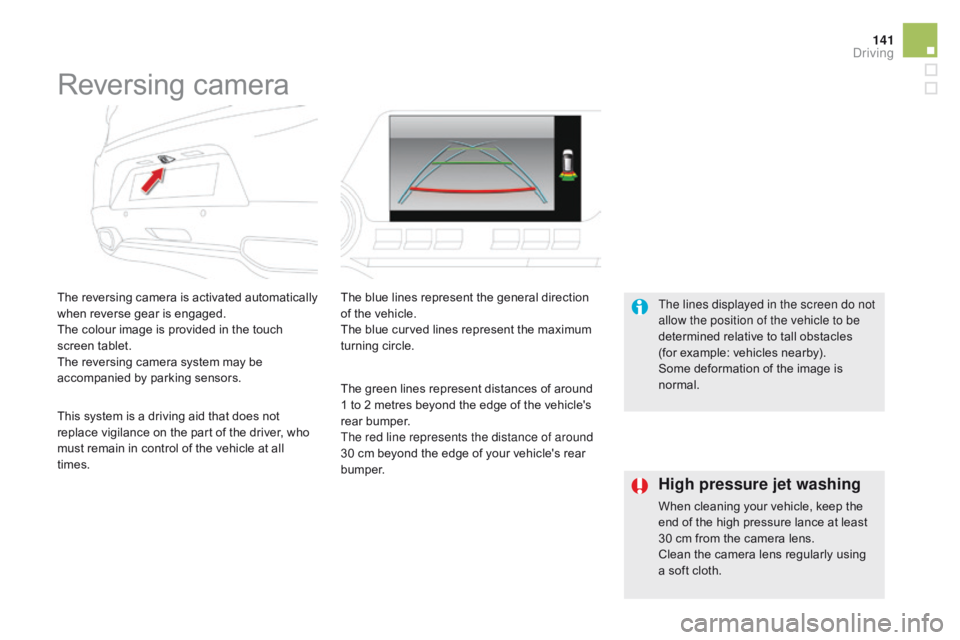
The reversing camera is activated automatically
when reverse gear is engaged.
The colour image is provided in the touch
screen tablet.
The reversing camera system may be
accompanied by parking sensors.The blue lines represent the general direction
of the vehicle.
The blue curved lines represent the maximum
turning circle.
The green lines represent distances of around
1 to 2 metres beyond the edge of the vehicle's
rear bumper.
The red line represents the distance of around
30 cm beyond the edge of your vehicle's rear
b u m p e r. The lines displayed in the screen do not
allow the position of the vehicle to be
determined relative to tall obstacles
(for example: vehicles nearby).
Some deformation of the image is
normal.
This system is a driving aid that does not
replace vigilance on the part of the driver, who
must remain in control of the vehicle at all
times.
High pressure jet washing
When cleaning your vehicle, keep the
end of the high pressure lance at least
30 cm from the camera lens.
Clean the camera lens regularly using
a soft cloth.
driving
Page 229 of 403
227
DS5_en_Chap08_info-pratiques_ed01-2015
Load reduction mode
System which manages the use of certain
functions according to the level of charge
remaining in the battery.
When the vehicle is being driven, the load
reduction function temporarily deactivates
certain functions, such as the air conditioning,
the heated rear screen...
The deactivated functions are reactivated
automatically as soon as conditions permit.System which manages the duration of use of
certain functions to conserve a sufficient level
of charge in the battery.
After the engine has stopped, you can
still use functions such as the audio and
telematics system,
windscreen wipers, dipped
beam headlamps,
courtesy lamps, etc. for
a maximum combined duration of about
forty
m
inutes.
Energy economy mode
Switching to economy mode
A message then appears in the instrument
panel screen indicating that the vehicle has
switched to economy mode and the active
functions are put on standby.
If a telephone call is being made at this time,
it will be maintained for around 10 minutes with
the Bluetooth hands-free system of your audio
system.
Exiting economy mode
These functions are reactivated automatically
next time the vehicle is driven.
In order to restore the use of these functions
immediately, start the engine and let it run:
-
f
or less than ten minutes, to use the
equipment for approximately five minutes,
-
f
or more than ten minutes, to use the
equipment for up to approximately
thirty
m
inutes.
Let the engine run for the duration specified to
ensure that the battery charge is sufficient.
Do not repeatedly and continuously restart the
engine in order to charge the battery.
A flat battery prevents the engine from
starting (refer to the "Battery" section).
Practical information
Page 238 of 403
DS5_en_Chap08_info-pratiques_ed01-2015
The fitting of electrical equipment or
accessories which are not recommended
by CITROËN may result in a failure of
your vehicle's electronic system and
excessive electrical consumption.
Contact a CITROËN dealer
for information on the range of
recommended equipment and
accessories.Installation of radio
communication
transmitters
Before installing any after-market radio
communication transmitter, you can
contact a CITROËN dealer for the
specification of transmitters which can
be fitted (frequency, maximum power,
aerial position, specific installation
requirements), in line with the Vehicle
Electromagnetic Compatibility
Directive (2004/104/EC). Depending on the legislation in force in
the country, certain safety equipment
may be compulsory: high visibility
safety vests, warning triangles,
breathalyzers, spare bulbs, spare fuses,
fire extinguisher, first aid kit, mud flaps
at the rear of the vehicle.
By visiting a CITROËN
dealer you can also
obtain cleaning and maintenance products
(interior and exterior) - including ecological
products in the "TECHNATURE" range,
products for topping up (screenwash...), paint
touch-up pens and aerosols for the exact
colour of your vehicle, refills (sealant cartridge
for the temporary puncture repair kit...), ...
"Multimedia":
Bluetooth hands-free system, portable satellite
navigation system, mapping update CD, driving
assistance systems, portable video screen,
portable video support bracket, multimedia
system support, 230 V/50 Hz socket,
230
V/12 V adaptor, mobile phone charger
compatible with iPhone
®, Wi-Fi on board, ...