parking CITROEN DS5 2018 Owner's Manual
[x] Cancel search | Manufacturer: CITROEN, Model Year: 2018, Model line: DS5, Model: CITROEN DS5 2018Pages: 403, PDF Size: 15.62 MB
Page 113 of 403
111
DS5_en_Chap04_conduite_ed01-2015
F With your foot on the brake, select position P or N.
F
S
tart the engine.
If this procedure is not followed, an audible
signal is heard, accompanied by a message in
the instrument panel screen.
F
W
ith the engine running, press the brake
pedal.
F
Sel
ect position R ,
d or M,
Moving off
When the engine is running at idle, with
the brakes released, if position R ,
d or
M is selected, the vehicle moves even
without the accelerator being pressed.
Never leave children unsupervised in
the vehicle when the engine is running.
When carrying out maintenance with
the engine running, apply the parking
brake and select position P .
If the parking brake does not release
automatically, check that the front doors
are fully closed.
Never select position N while the
vehicle is moving.
Never select positions P or R unless the
vehicle is completely stationary.
Automatic operation
F Select position d for automatic changing
of the six gears.
The gearbox then operates in auto-adaptive
mode, without any intervention on the part
of the driver. It continuously selects the most
suitable gear according to the style of driving,
the profile of the road and the load in the
vehicle.
For maximum acceleration without touching
the selector, press the accelerator pedal down
fully (kick down). The gearbox changes down
automatically or maintains the gear selected
until the maximum engine speed is reached.
On braking, the gearbox changes down
automatically to provide effective engine
braking.
If you release the accelerator sharply, the
gearbox will not change to a higher gear for
safety reasons.
If position N is engaged inadvertently
while driving, allow the engine to
return to idle then engage position
d
to
accelerate.
If you do not press the brake pedal
when trying to move the gear selector
out of position P
, this warning lamp or
this symbol appears in the instrument
panel accompanied by a message,
flashing of the P symbol, the display
of a message and an audible signal.
F
C
heck that the display in the instrument
panel agrees with the position engaged.
F
G
radually release the brake pedal.
The parking brake is released manually, the
vehicle moves off.
If the parking brake is on and automatic mode
is activated, accelerate progressively.
driving
Page 115 of 403
11 3
DS5_en_Chap04_conduite_ed01-2015
Invalid value during manual
operation
This symbol is displayed if a gear
is not engaged correctly (selector
between two positions).
Stopping the vehicle
Before switching off the engine, put the selector
in position P or N to place the gearbox in
neutral.
In both cases, apply the parking brake to
immobilise the vehicle, unless it is programmed
to automatic mode.If the selector is not in position P ,
when the driver's door is opened or
approximately 45 seconds after the
ignition is switched off, there is an
audible signal and a message appears.
F
R
eturn the selector to position P ;
the audible signal stops and the
message disappears.
Operating fault
When the ignition is on, a message appears
in the instrument panel screen to indicate a
gearbox fault.
In this case, the gearbox switches to back-up
mode and is locked in 3rd gear. You may feel
a substantial knock when changing from P
to R and from N to R . This will not cause any
damage to the gearbox.
Do not exceed 60 mph (100 km/h), local speed
restrictions permitting.
Have it checked by a CITROËN dealer or a
qualified workshop. You risk damaging the gearbox:
-
i
f you press the accelerator and
brake pedals at the same time,
-
i
f you force the selector from
position P to another position when
the battery is flat.
To reduce fuel consumption when
stationary for long periods with the
engine running (traffic jam...), position
the gear selector at N and apply the
parking brake, unless it is programmed
in automatic mode.
driving
Page 117 of 403
11 5
DS5_en_Chap04_conduite_ed01-2015
Engagement of reverse gear is
accompanied by an audible signal.If the engine does not start:
-
If
N is flashing in the instrument
panel, move the gear lever to
position A then to position N .
-
I
f the message "
foot on the brake "
is displayed, press the brake pedal
f i r m l y. When the engine is idling with the
brakes off, if position R
, A or M is
selected, the vehicle will move off
on its own without any action on the
accelerator.
displays in the instrument panel
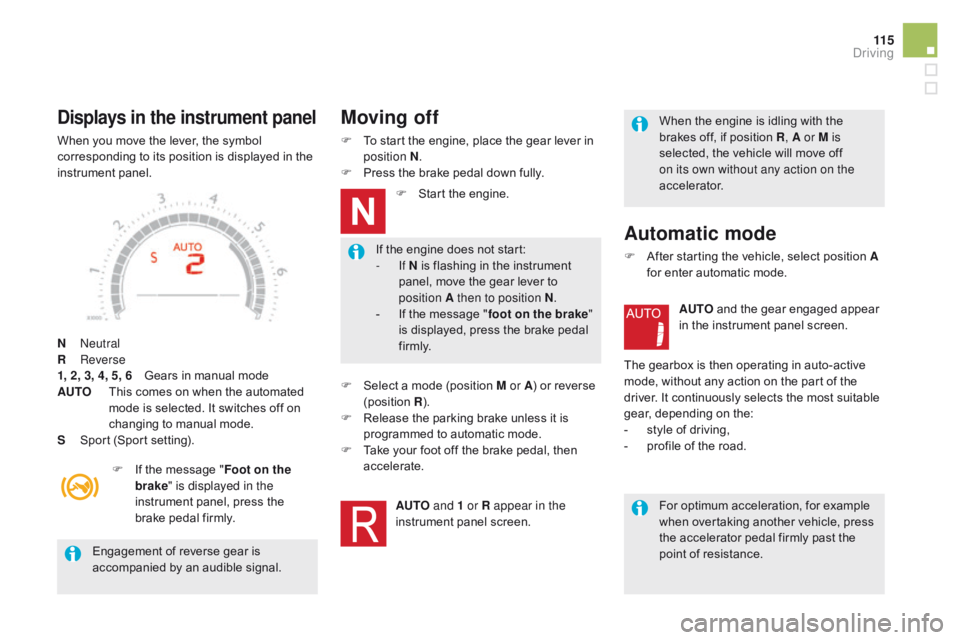
When you move the lever, the symbol
corresponding to its position is displayed in the
instrument panel.
N
Neutral
R
Reverse
1, 2, 3, 4, 5, 6
G
ears in manual mode
AUTO
T
his comes on when the automated
mode is selected. It switches off on
changing to manual mode.
S
S
port (Sport setting).F
I
f the message " Foot on the
brake " is displayed in the
instrument panel, press the
brake pedal firmly.
Moving off
F To start the engine, place the gear lever in position N .
F
P
ress the brake pedal down fully.F
S
tart the engine.
F
S
elect a mode (position M or A ) or reverse
(position R).
F
R
elease the parking brake unless it is
programmed to automatic mode.
F
T
ake your foot off the brake pedal, then
accelerate.
AUTO and 1 or R appear in the
instrument panel screen.
Automatic mode
F After starting the vehicle, select position A for enter automatic mode.
AUTO and the gear engaged appear
in the instrument panel screen.
The gearbox is then operating in auto-active
mode, without any action on the part of the
driver. It continuously selects the most suitable
gear, depending on the:
-
s
tyle of driving,
-
p
rofile of the road.For optimum acceleration, for example
when overtaking another vehicle, press
the accelerator pedal firmly past the
point of resistance.
driving
Page 119 of 403

11 7
DS5_en_Chap04_conduite_ed01-2015
You must press the brake pedal when
starting the engine.
Whatever the circumstances, you must
manually apply the parking brake when
parking, unless the parking brake is
programmed in automatic mode.
When immobilising the vehicle, with
the engine running, you must place the
gear lever in neutral N
.
Before carrying out any work in the
engine compartment, check that the
gear lever is in neutral N and that the
parking brake is applied.
Stopping the vehicle
With the ignition on, the flashing of
this warning lamp, accompanied by
an audible signal and a message
in the instrument panel screen,
indicates a malfunction of the
gearbox.
Before switching off the engine, you can
choose to:
-
m
ove to position N to engage neutral,
-
l
eave the gear engaged; in this case, it will
not be possible to move the vehicle.
In both cases, you should apply the parking
brake to immobilise the vehicle, unless it is
programmed in automatic mode.
Operating fault
Sport setting
F After selection of manual or
automated mode, press the
S
button to switch on the Sport
setting, which provides a more
dynamic driving style.
S
appears alongside the gear
engaged in the instrument panel
screen.
F
P
ress the S button again to switch it off.
S
then disappears from the instrument
panel screen.
The Sport setting is switched off every time the
ignition is switched off. Have it checked by CITROËN or a qualified
workshop.
driving
Page 123 of 403

121
DS5_en_Chap04_conduite_ed01-2015
Stop & Start
Operation
Going into engine STOP
mode
The "E cO" warning lamp comes on
in the instrument panel and the engine
goes into standby automatically:
-
w
ith a manual gearbox, at speeds below
12 mph (20 km/h) or vehicle stationary with
the BlueHDi 115 and 120 versions, when
you place the gear lever in neutral and you
release the clutch pedal,
-
w
ith an electronic gearbox, at speeds
below 5 mph (8 km/h), when you press
the brake pedal or put the gear lever in
position
N,
-
w
ith an automatic gearbox, vehicle
stationary, when you press the brake pedal
or put the gear lever in position N .If your vehicle is fitted with the
system, a time counter calculates
the sum of the periods in STOP
mode during a journey. It resets itself
to zero every time the ignition is
switched on with the START/STOP
button.
Never refuel with the engine in STOP
mode; you must switch off the ignition
with the START/STOP button. For your comfort, during parking
maoeuvres, STOP mode is not
available for a few seconds after
coming out of reverse gear.
STOP mode does not affect the
functionality of the vehicle, such as for
example, braking, power steering...
The Stop & Start
system puts the engine temporarily into standby - STOP mode - during stops in the traffic (red lights, traffic jams, or other...).
The
engine restarts automatically - START mode - as soon as you want to move off. The restart takes place instantly, quickly and silently.
Per fect for urban use, the Stop & Start system reduces fuel consumption and exhaust emissions as well as the noise level when
stationary.
driving
Page 124 of 403

DS5_en_Chap04_conduite_ed01-2015
Special cases: STOP mode not
available
STOP mode is not invoked when:
- t he vehicle is on a steep slop (rising or
falling),
-
t
he driver's door is open,
-
t
he driver's seat belt is not fastened,
-
t
he vehicle has not exceeded 6 mph
(10
km/h) since the last engine start using
the START/STOP button,
-
t
he electric parking brake is applied or
being applied,
-
t
he engine is needed to maintain a
comfortable temperature in the passenger
compartment,
-
d
emisting is active,
-
s
ome special conditions (battery charge,
engine temperature, braking assistance,
ambient temperature...) where the engine is
needed to assure control of a system.
In this case, the "E
c
O
" warning lamp
flashes for a few seconds then goes
of f.
This operation is perfectly normal.
Going into engine START
mode
The "EcO" warning lamp goes off
and the engine starts automatically:
-
w
ith a manual gearbox , when you fully
depress the clutch pedal,
-
w
ith an electronic gearbox:
●
g
ear lever in position A or M , when you
release the brake pedal,
●
o
r gear lever in position N and brake
pedal released, when you place the gear
lever in position A or M ,
●
o
r when you engage reverse.
-
w
ith an automatic gearbox:
●
g
ear lever in position d or M, when you
release the brake pedal,
●
o
r gear lever in position N and brake
pedal released, when you place the gear
lever in position
d or M,
●
o
r when you engage reverse. As a safety measure or to maintain comfort
levels in the vehicle, START mode is invoked
automatically when:
-
y
ou open the driver's door,
-
y
ou unfasten the driver's seat belt,
-
t
he speed of the vehicle exceeds 15 mph
(25 km/h) with a manual gearbox
(2 mph (3 km/h) with the BlueHDi 115 and
120 versions), 7 mph (11 km/h) with an
electronic gearbox or 2 mph (3 km/h) with
an automatic gearbox.
-
t
he electric parking brake is being applied,
-
s
ome special conditions (battery charge,
engine temperature, braking assistance,
ambient temperature...) where the engine is
needed for control of a system.
Special cases: START invoked
automatically
In this case the "EcO " warning lamp
flashes for a few seconds, then goes
of f.
This operation is perfectly normal.
Page 141 of 403
139
DS5_en_Chap04_conduite_ed01-2015
This system indicates the proximity of an
obstacle (person, vehicle, tree, gate, etc.)
which comes within the field of detection of
sensors located in the bumper.
Certain types of obstacle (stake, roadworks
cone, etc.) detected initially will no longer be
detected at the end of the manoeuvre, if they
are located in blind spots in the sensors' field
of detection.
Parking sensors
This function cannot, in any circumstances,
take the place of the vigilance of the driver.
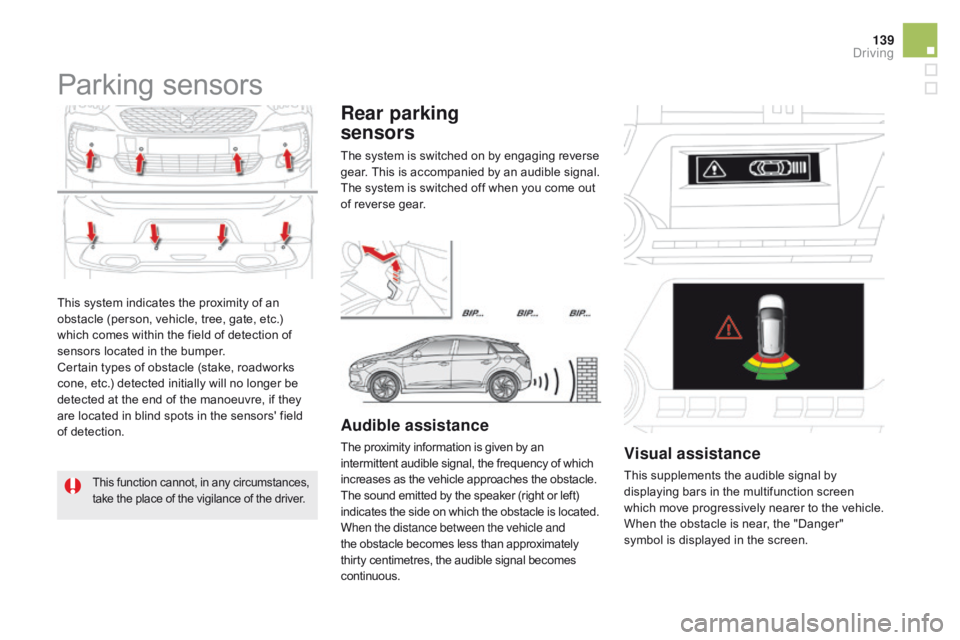
Rear parking
sensors
Audible assistance
The proximity information is given by an
intermittent audible signal, the frequency of which
increases as the vehicle approaches the obstacle.
The sound emitted by the speaker (right or left)
indicates the side on which the obstacle is located.
When the distance between the vehicle and
the obstacle becomes less than approximately
thirty centimetres, the audible signal becomes
continuous.visual assistance
This supplements the audible signal by
displaying bars in the multifunction screen
which move progressively nearer to the vehicle.
When the obstacle is near, the "Danger"
symbol is displayed in the screen.
The system is switched on by engaging reverse
gear. This is accompanied by an audible signal.
The system is switched off when you come out
of reverse gear.
driving
Page 142 of 403
DS5_en_Chap04_conduite_ed01-2015
In bad weather or in winter, ensure
that the sensors are not covered with
mud, ice or snow. When reverse gear is
engaged, an audible signal (long beep)
indicates that the sensors may be dirty.
Certain sound sources (motorcycle,
lorry, pneumatic drill, etc.) may trigger
the audible signals of the parking
sensor system.
In the event of a malfunction of the
system, when reverse gear is engaged
this warning lamp is displayed in the
instrument panel and/or a message
appears in the screen, accompanied
by an audible signal (short beep).
Operating fault
In addition to the rear parking sensors, the
front parking sensors are triggered when an
obstacle is detected in front and the speed of
the vehicle is still below 6 mph (10 km/h).
The front parking sensors are interrupted if
the vehicle stops for more than three seconds
in for ward gear, if no further obstacles are
detected or when the speed of the vehicle
exceeds 6 mph (10 km/h).
Front parking
sensors
The function will be deactivated
automatically if a trailer is being towed
or a bicycle carrier is fitted (vehicle
fitted with a towbar or bicycle carrier
recommended by CITROËN).
deactivation / Activation of
the front and rear parking
sensors
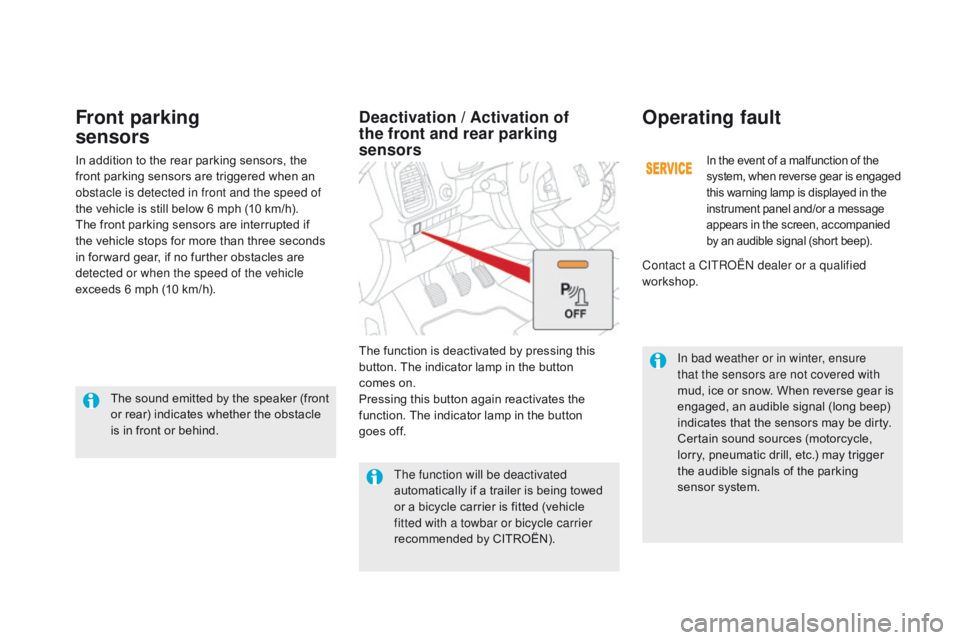
The function is deactivated by pressing this
button. The indicator lamp in the button
comes on.
Pressing this button again reactivates the
function. The indicator lamp in the button
goes off.
The sound emitted by the speaker (front
or rear) indicates whether the obstacle
is in front or behind. Contact a CITROËN dealer or a qualified
workshop.
Page 143 of 403
141
DS5_en_Chap04_conduite_ed01-2015
Reversing camera
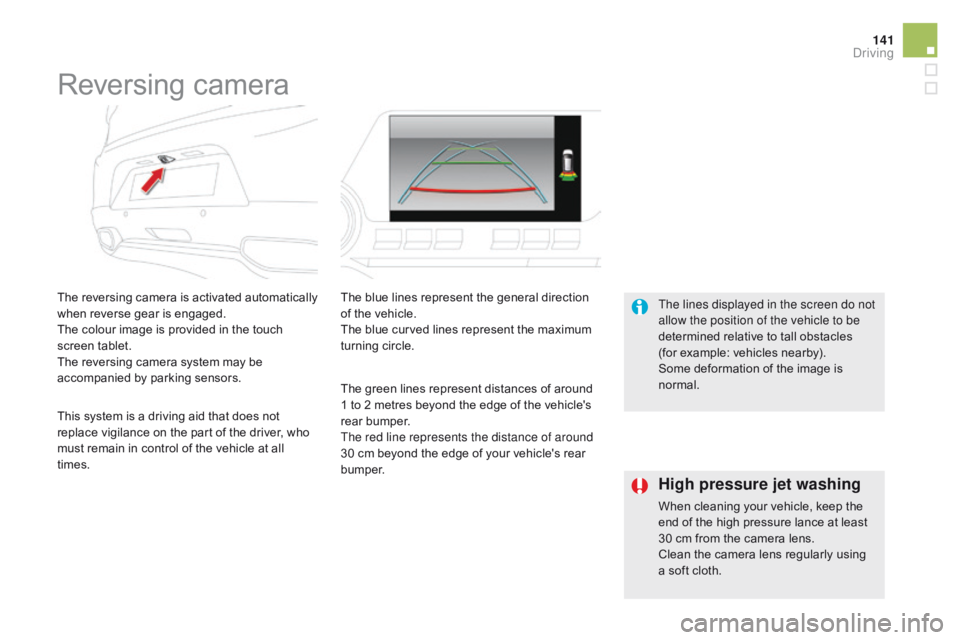
The reversing camera is activated automatically
when reverse gear is engaged.
The colour image is provided in the touch
screen tablet.
The reversing camera system may be
accompanied by parking sensors.The blue lines represent the general direction
of the vehicle.
The blue curved lines represent the maximum
turning circle.
The green lines represent distances of around
1 to 2 metres beyond the edge of the vehicle's
rear bumper.
The red line represents the distance of around
30 cm beyond the edge of your vehicle's rear
b u m p e r. The lines displayed in the screen do not
allow the position of the vehicle to be
determined relative to tall obstacles
(for example: vehicles nearby).
Some deformation of the image is
normal.
This system is a driving aid that does not
replace vigilance on the part of the driver, who
must remain in control of the vehicle at all
times.
High pressure jet washing
When cleaning your vehicle, keep the
end of the high pressure lance at least
30 cm from the camera lens.
Clean the camera lens regularly using
a soft cloth.
driving
Page 146 of 403
DS5_en_Chap05_visibilite_ed01-2015
Lighting controlsControls for selection and operation of the various front and rear lamps providing the vehicle's lighting and signalling.
Main lighting
There are various lamps on the vehicle:
- s idelamps, to be seen,
-
d
ipped beam headlamps to see without
dazzling other drivers,
-
m
ain beam headlamps to see clearly when
the road is clear,
-
d
irectional headlamps for improved
visibility when cornering.
Additional lighting
Other lamps are installed to fulfil the
requirements of particular driving conditions:
-
r
ear foglamps to better signal the presence
of the vehicle in foggy conditions,
-
f
ront foglamps for better visibility in foggy
conditions and to improve lighting at
intersections and when parking,
-
d
aytime running lamps for better visibility of
the vehicle by day.
Lighting function settings
You can activate or deactivate the following
lighting functions:
-
g
uide-me-home lighting,
-
m
ain additional lighting,
-
s
econdary additional lighting,
-
w
elcome lighting,
-
a
utomatic illumination of headlamps,
-
a
utomatic headlamp dipping.