phone Citroen DS5 HYBRID 2016 1.G Owner's Guide
[x] Cancel search | Manufacturer: CITROEN, Model Year: 2016, Model line: DS5 HYBRID, Model: Citroen DS5 HYBRID 2016 1.GPages: 376, PDF Size: 12.57 MB
Page 299 of 376
297
DS5_en_Chap11d_RD5_ed02-2015
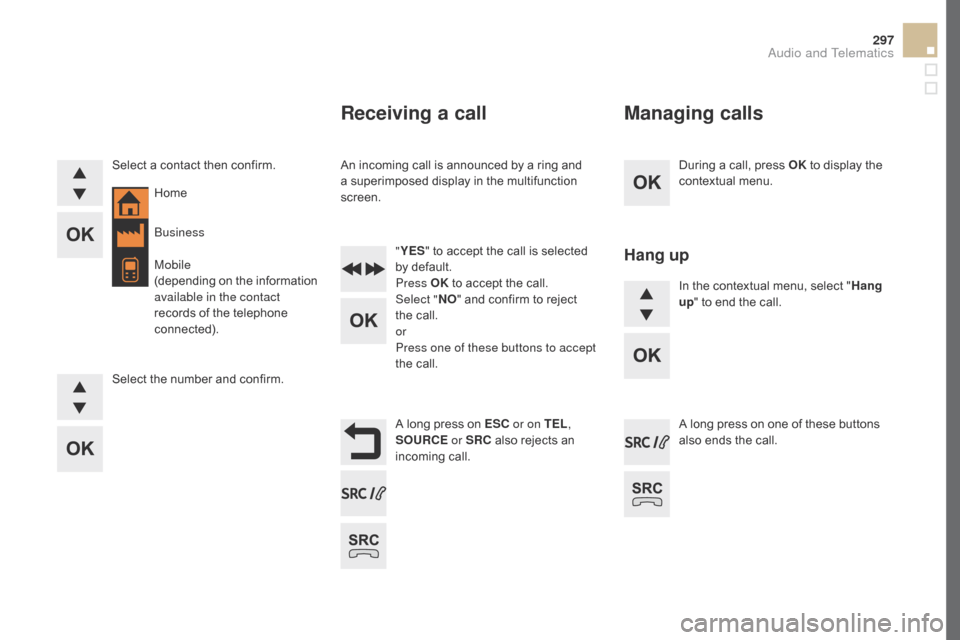
During a call, press OK to display the
contextual menu.
A long press on ES
c or o
n TEL ,
SOUR
cE o
r SR
c al
so rejects an
incoming call.
Select a contact then confirm.
Select the number and confirm.
"
YES " to accept the call is selected
by default.
Press OK to accept the call.
Select " NO" and confirm to reject
the call.
or
Press one of these buttons to accept
the call. In the contextual menu, select "
Hang
up " to end the call.
A long press on one of these buttons
also ends the call.
Home
Receiving a call
An incoming call is announced by a ring and
a superimposed display in the multifunction
screen.
Business
Mobile
(depending on the information
available in the contact
records of the telephone
connected).
Managing calls
Hang up
Audio and Telematics
Page 300 of 376
DS5_en_Chap11d_RD5_ed02-2015
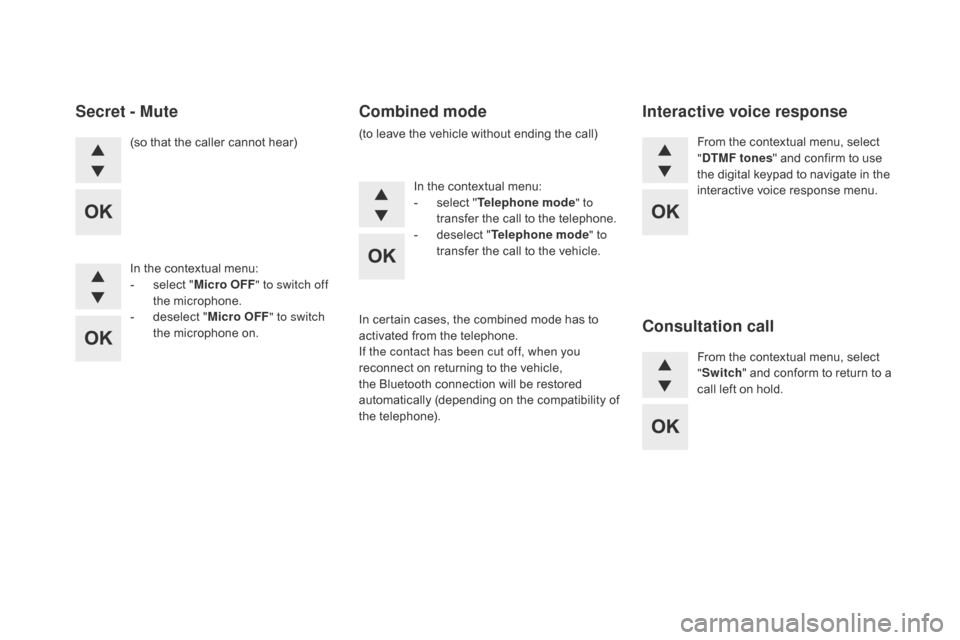
(so that the caller cannot hear)
In the contextual menu:
-
se
lect "Micro OFF " to switch off
the microphone.
-
de
select " Micro OFF " to switch
the microphone on. In the contextual menu:
-
se
lect "Telephone mode " to
transfer the call to the telephone.
-
de
select "Telephone mode " to
transfer the call to the vehicle. From the contextual menu, select
"dTM
F tones" and confirm to use
the digital keypad to navigate in the
interactive voice response menu.
From the contextual menu, select
" Switch " and conform to return to a
call left on hold.
Secret - Mutecomb ined mode
(to leave the vehicle without ending the call)
Interactive voice response
con
sultation call
In certain cases, the combined mode has to
activated from the telephone.
If the contact has been cut off, when you
reconnect on returning to the vehicle,
the Bluetooth connection will be restored
automatically (depending on the compatibility of
the telephone).
Page 301 of 376
299
DS5_en_Chap11d_RD5_ed02-2015
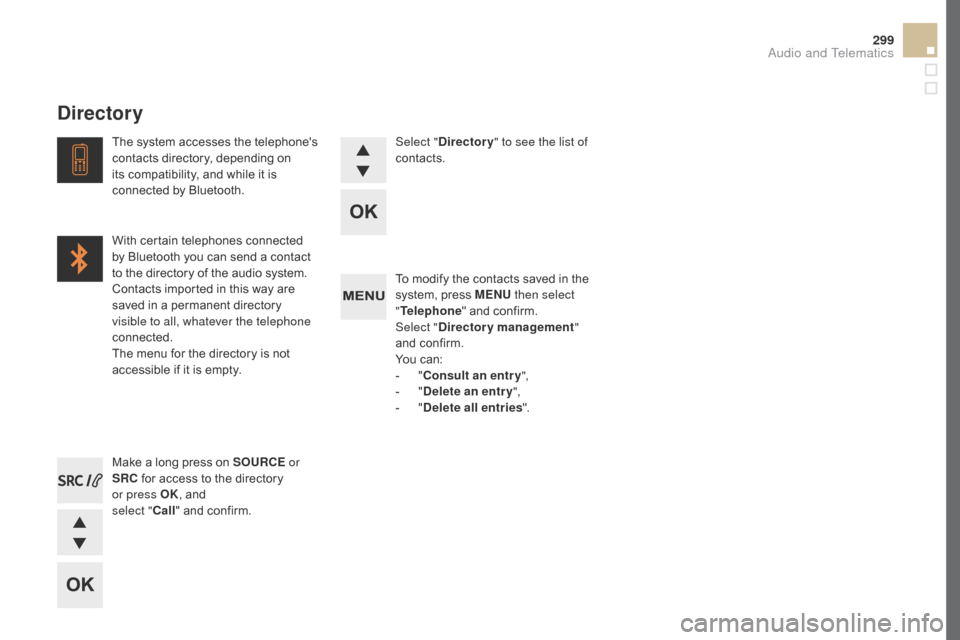
To modify the contacts saved in the
system, press MENU then select
" Telephone " and confirm.
Select "
dire
ctory management "
and confirm.
You can:
-
"con
sult an entr y ",
-
"dele
te an entry ",
-
"dele
te all entries ".
Make a long press on SOUR
cE or
S
R
c fo
r access to the directory
or press OK , and
select "
ca
ll " and confirm.
The system accesses the telephone's
contacts directory, depending on
its compatibility, and while it is
connected by Bluetooth.
With certain telephones connected
by Bluetooth you can send a contact
to the directory of the audio system.
Contacts imported in this way are
saved in a permanent directory
visible to all, whatever the telephone
connected.
The menu for the directory is not
accessible if it is empty.
Select "
dire
ctory
" to see the list of
contacts.
directory
Audio and Telematics
Page 303 of 376
301
DS5_en_Chap11d_RD5_ed02-2015
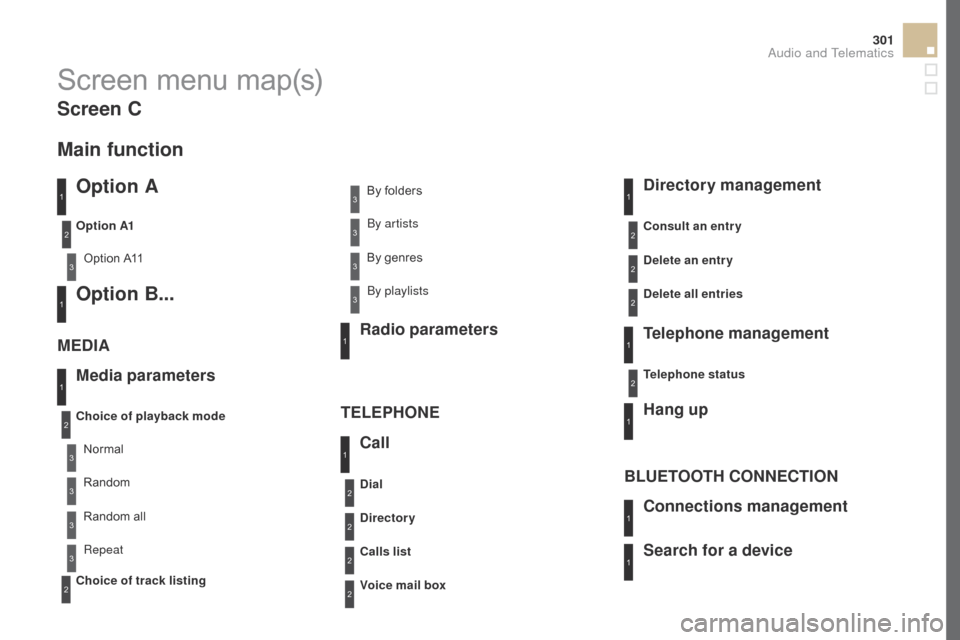
Screen menu map(s)
Option A
Option A11
Option B...
Media parameters
ME
dIA
T
ELEPHONE
choice of playback mode
cho
ice of track listing
Option A1
Normal By folders
Random all By genres
Random By artists
Repeat By playlists
3
3
3
3
3
3
3
3
3
1
1
2
1
2
2
Main function
call
Rad io parameters
directory
call
s list
voice
mail box
dial
directory management
T elephone management
Hang up
con
nections management
BLUETOOTH
cON
NE
cTI
ON
Search for a device
delete an entry
dele
te all entries
con
sult an entr y
Telephone status
1
1
1
1
1
2
2
2
2
1
1
2
2
2
2
Screen c
Audio and Telematics
Page 307 of 376
305
DS5_en_Chap11d_RD5_ed02-2015
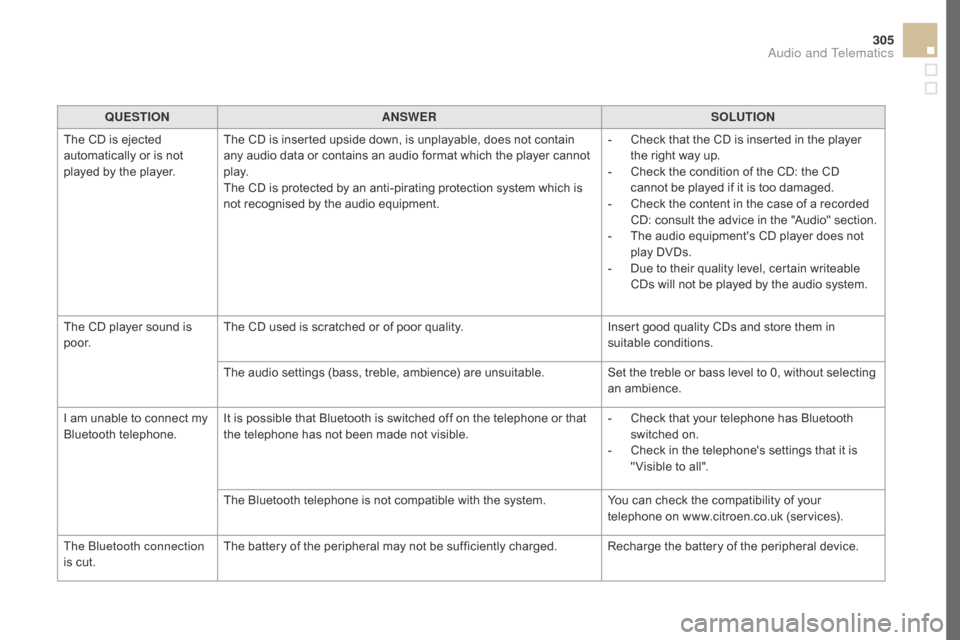
QUESTIONANSWER SOLUTION
The CD is ejected
automatically or is not
played by the player. The CD is inserted upside down, is unplayable, does not contain
any audio data or contains an audio format which the player cannot
p l ay.
The CD is protected by an anti-pirating protection system which is
not recognised by the audio equipment. -
Ch
eck that the CD is inserted in the player
the right way up.
-
Ch
eck the condition of the CD: the CD
cannot be played if it is too damaged.
-
Ch
eck the content in the case of a recorded
CD: consult the advice in the "Audio" section.
-
Th
e audio equipment's CD player does not
play DVDs.
-
Du
e to their quality level, certain writeable
CDs will not be played by the audio system.
The CD player sound is
p o o r. The CD used is scratched or of poor quality.
Insert good quality CDs and store them in
suitable conditions.
The audio settings (bass, treble, ambience) are unsuitable. Set the treble or bass level to 0, without selecting
an ambience.
I am unable to connect my
Bluetooth telephone. It is possible that Bluetooth is switched off on the telephone or that
the telephone has not been made not visible. -
Ch
eck that your telephone has Bluetooth
switched on.
-
Ch
eck in the telephone's settings that it is
" Visible to all".
The Bluetooth telephone is not compatible with the system. You can check the compatibility of your
telephone on www.citroen.co.uk (services).
The Bluetooth connection
is cut. The battery of the peripheral may not be sufficiently charged. Recharge the battery of the peripheral device.
Audio and Telematics
Page 308 of 376
DS5_en_Chap11d_RD5_ed02-2015
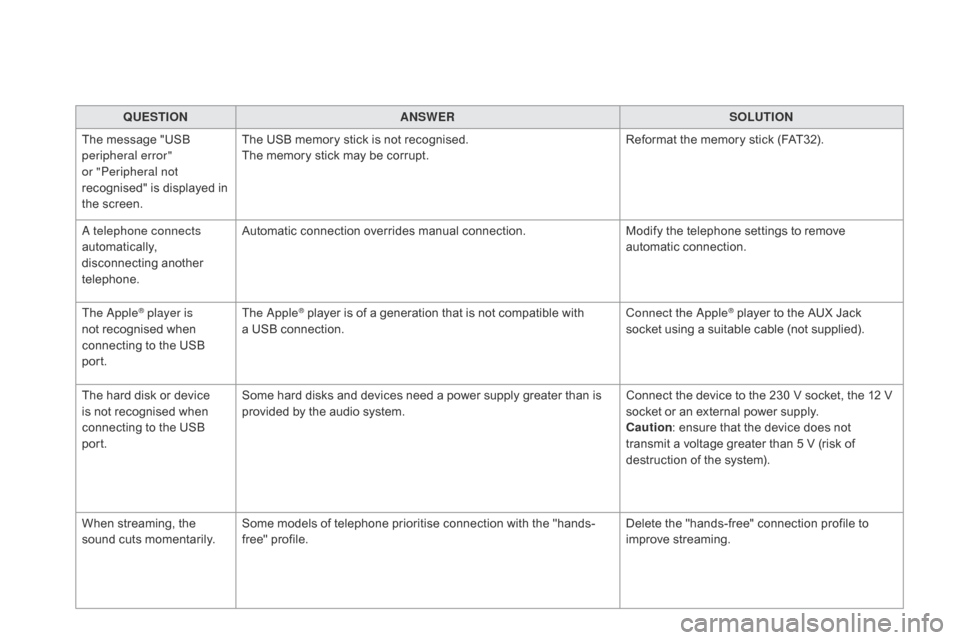
QUESTIONANSWER SOLUTION
The message "USB
peripheral error"
or "Peripheral not
recognised" is displayed in
the screen. The USB memory stick is not recognised.
The memory stick may be corrupt.
Reformat the memory stick (FAT32).
A telephone connects
automatically,
disconnecting another
telephone. Automatic connection overrides manual connection.
Modify the telephone settings to remove
automatic connection.
The Apple
® player is
not recognised when
connecting to the USB
port. The Apple® player is of a generation that is not compatible with
a U
SB connection. Connect the Apple® player to the AUX Jack
socket using a suitable cable (not supplied).
The hard disk or device
is not recognised when
connecting to the USB
port. Some hard disks and devices need a power supply greater than is
provided by the audio system.
Connect the device to the 230 V socket, the 12 V
socket or an external power supply.
cau
tion : ensure that the device does not
transmit a voltage greater than 5 V (risk of
destruction of the system).
When streaming, the
sound cuts momentarily. Some models of telephone prioritise connection with the "hands-
free" profile. Delete the "hands-free" connection profile to
improve streaming.