01 FIRST STEPS
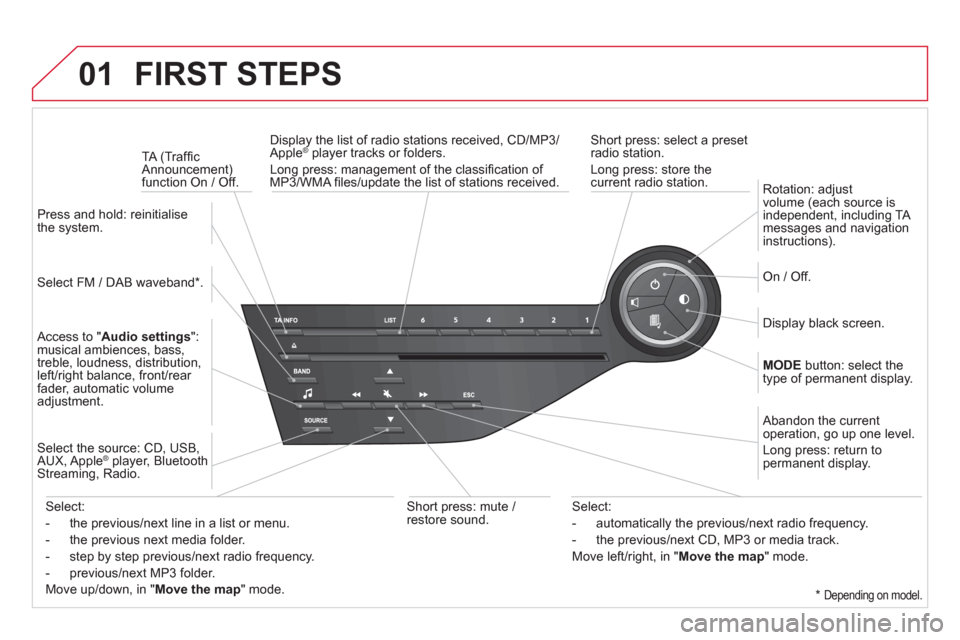
Short press: select a preset
radio station.
Long press: store thecurrent radio station. TA
(Traffi c
Announcement)function On / Off. Displa
y the list of radio stations received, CD/MP3/
Apple® player tracks or folders. ®
Long press: management of the classifi cation of MP3/WMA fi les/update the list of stations received.
Access to "Audio settings":musical ambiences, bass,
treble, loudness, distribution,
left/right balance, front/rear fader, automatic volume
adjustment.
Select FM / DAB waveband * .
Pr
ess and hold: reinitialisethe system.
Select the source: CD
, USB, AUX, Apple®player, Bluetooth®
Streaming, Radio.
Abandon the current
operation, go up one level.
Lon
g press: return topermanent display.
On / Off.
MODEbutton: select the
type of permanent display.
Rotation: adjust
volume (each source is independent, including TA messages and navigation instructions).
Select:
- the previous/next line in a list or menu.
- the previous next media
folder.
- step by step previous
/next radio frequency.
- previous
/next MP3 folder.
Move u
p/down, in " Move the map" mode.
Select:
- automaticall
y the previous/next radio frequency.
- the previous
/next CD, MP3 or media track.
Move le
ft/right, in " Move the map
" mode.
Display black screen.
Short press: mute /
restore sound.
*
Depending on model.