Eco Citroen DS5 HYBRID4 2013 1.G Owner's Manual
[x] Cancel search | Manufacturer: CITROEN, Model Year: 2013, Model line: DS5 HYBRID4, Model: Citroen DS5 HYBRID4 2013 1.GPages: 364, PDF Size: 10.21 MB
Page 3 of 364
CITROËN has a presence on every continent,
a complete product range,
bringing together technology and a permanent spirit of innovation,
for a modern and creative approach to mobility.
We thank you and congratulate you on your choice.
Your vehicle is fitted with only some of theequipment described in this document,
depending on the trim level, version and thespecifications for the country in which it is sold.
The
fitting of electrical equipment or accessories which are not recommended
byCITROËNmay result in a failure of your
vehicle's electronic system. Please note thisspecific warning and contact a CITROËNdealer to be shown the recommendedequipment and accessories.
At the wheel of your new vehicle,
getting to know each system,
each control, each setting,
makes your trips, your journeys
more comfortable and more enjoyable.
Happy motoring!
We draw your attention to the following...
Page 5 of 364
58 Instrument panel
59 Indicator and warning lamps
68Gauges and indicators
72 Adjustment buttons
74 Setting the date and time
74 Clock
76Tr i p c o m p u ter
80Electronic key - remote control
81 "Keyless Entry and Starting"
88Boot
89 Alarm
91Electric windows
93 Cockpit glass roof
95Fuel tank
96 Misfuel prevention (Diesel)
100 Front seats
105 Rear seats
108Mirrors
109Steering wheel adjustment
110Interior fi ttings
114 Boot fi ttings
115Tr i a ngle (stowing)
116 Heating and Ventilation
118Dual-zone digital air conditioning
122Rear screen demist - defrost
28 Presentation
31 Starting / switching off
35 Ready lamp
35 Hybrid4 mode selector
38 Energy consumption / generation indicator
40Display of hybrid power fl ow
43 Hybrid4 frequently askedquestions
46 Eco off
47Eco-driving
49Consumption
50 High voltage battery
54 Car washing machine or
tunnel
55Vehicle recovery
001001002002003003COMFORT ACCESS MONITORING HYBRID SYSTEM
Page 7 of 364
CHECKS PR ACTICAL
INFORMATIONTECHNICAL
DATAAUDIO AND
TELEMATICS
200 Te m p o r a ry puncture repair
kit
206 Changing a wheel
213Snow chains
214Changing a bulb
222Changing a fuse
225 12 V battery
228Energy economy mode
229Changing a wiper blade
229Recovering the vehicle
231Vehic le recovery
231To w i ng a trailer
233 Fitting roof bars
234Accessories
239Opening the bonnet
240 Diesel engine
241 Running out of fuel (Diesel)
242Checking levels
245 Checks
250 Electric motor
251 Diesel engine
252Diesel weights
253 Dimensions
254 Identifi cation markings
258Emergency or assistance
261eMyWay
315 Audio system
008008009009010010011011
Page 11 of 364
9Familiarisation
For economical driving, caring for the environment
The fuel consumptionof a vehicle varies greatly:
- according to the driver's style of driving
(moderate, aggressive, fast, ...),
- accordin
g to the type of journeys
made (urban, main road, motor way, flowing, heavy traffic, …) and the speed.
Main recommendations for driving economically
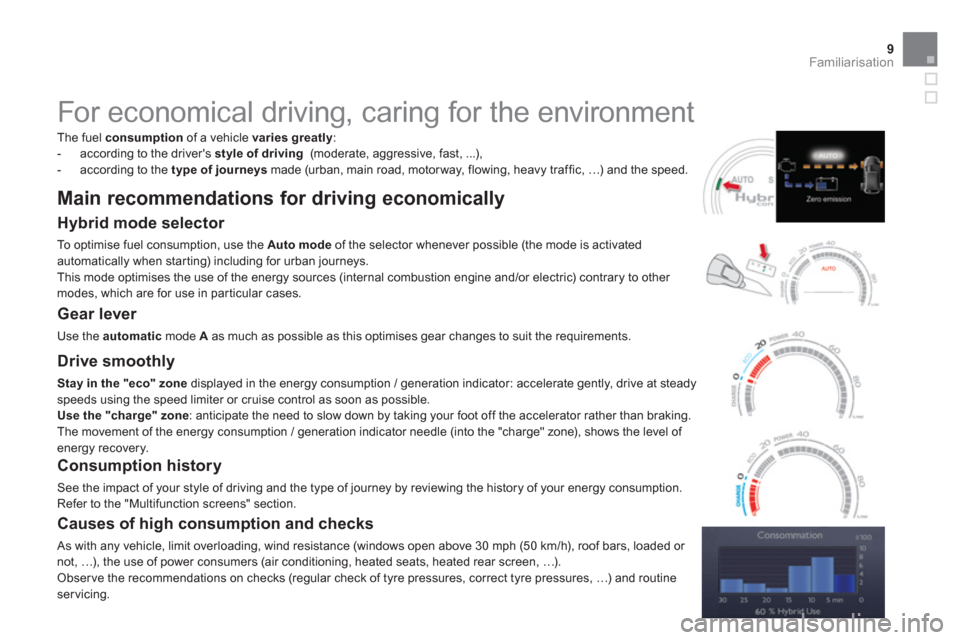
Hybrid mode selector
To optimise fuel consumption, use the Automodeof the selector whenever possible (the mode is activated
automatically when starting) including for urban journeys.
This mode optimises the use of the energy sources (internal combustion engine and/or electric) contrary to other modes, which are for use in par ticular cases.
Gear lever
Use the automatic
mode A
as much as possible as this optimises gear changes to suit the requirements.
Causes of high consumption and checks
As with any vehicle, limit overloading, wind resistance (windows open above 30 mph (50 km/h), roof bars, loaded or not, …), the use of power consumers (air conditioning, heated seats, heated rear screen, …).
Obser ve the recommendations on checks (regular check of tyre pressures, correct tyre pressures, …) and routine servicing.
Drive smoothly
Stay in the "eco" zone
displayed in the energy consumption / generation indicator: accelerate gently, drive at steadyspeeds using the speed limiter or cruise control as soon as possible.Use the "charge" zone: anticipate the need to slow down by taking your foot off the accelerator rather than braking.
The movement of the energy consumption / generation indicator needle (into the "charge" zone), shows the level of energy recovery.
Consumption history
See the impact of your style of driving and the type of journey by reviewing the history of your energy consumption.Refer to the "Multifunction screens" section.
Page 23 of 364
21Familiarisation
Monitoring
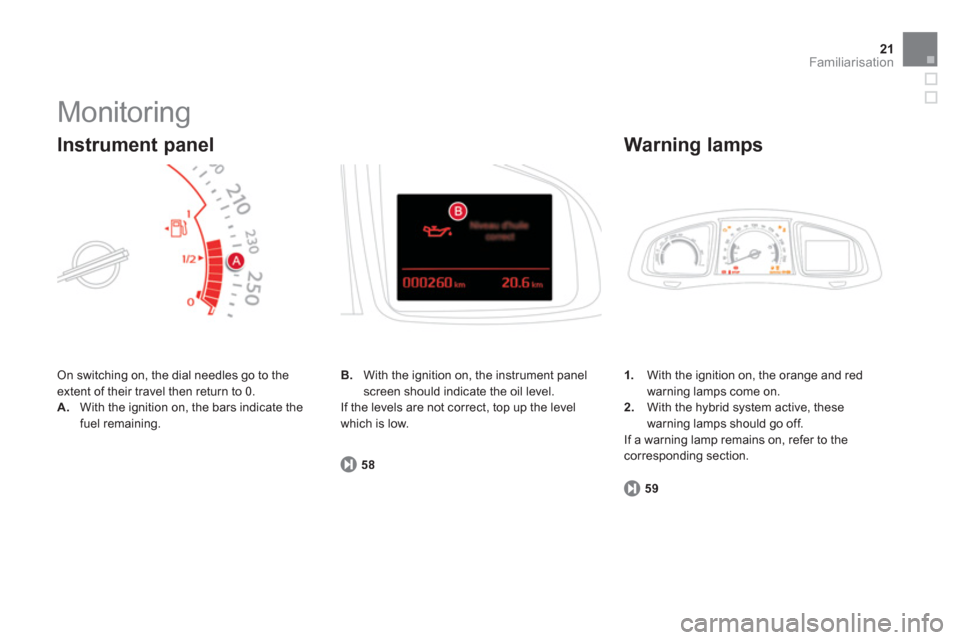
On switching on, the dial needles go to the extent of their travel then return to 0.
A.With the ignition on, the bars indicate the
fuel remaining.
Instrument panel
1.
With the ignition on, the orange and redwarning lamps come on. 2.With the hybrid system active, these
warning lamps should go off.
If a warning lamp remains on, refer to thecorresponding section.
Warning lamps
59
B.
With the ignition on, the instrument panelscreen should indicate the oil level.
If the levels are not correct, top up the level which is low.
58
Page 25 of 364
23Familiarisation
Starting - stopping the engine
Driving safely
Before starting
31
Starting
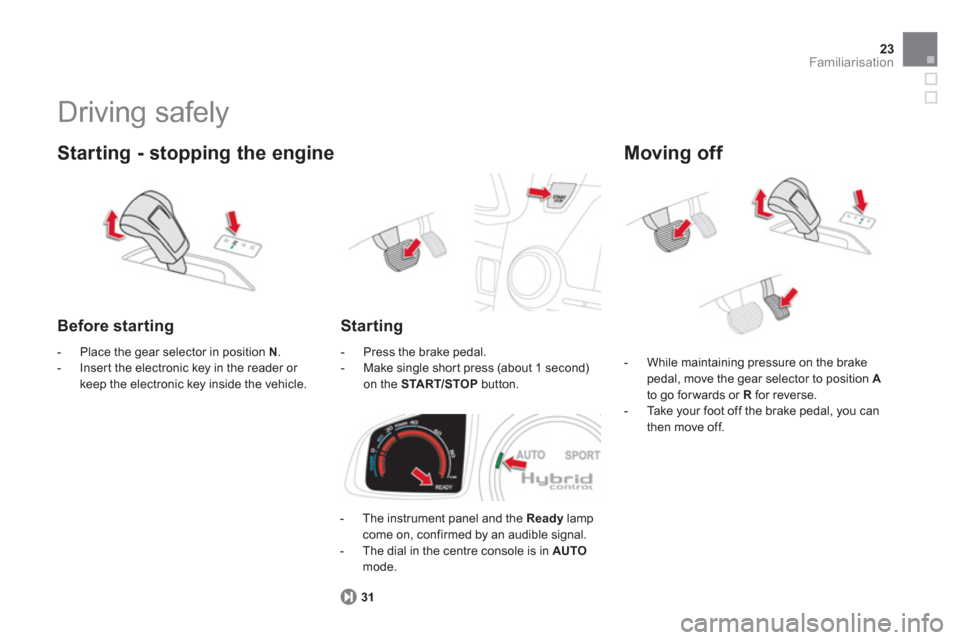
- The instrument panel and the Ready
lampcome on, confirmed by an audible signal.
- The dial in the centre console is in AUTO
mode.
- Place the
gear selector in position N.
- Inser t the electronic key in the reader or keep the electronic key inside the vehicle.- Press the brake pedal.
- Make single shor t press (about 1 second) on the START/STOP
button.
Moving off
- While maintaining pressure on the brakepedal, move the gear selector to position Ato go forwards or Rfor reverse.
- Ta k e your foot off the brake pedal, you can
then move off.
Page 26 of 364
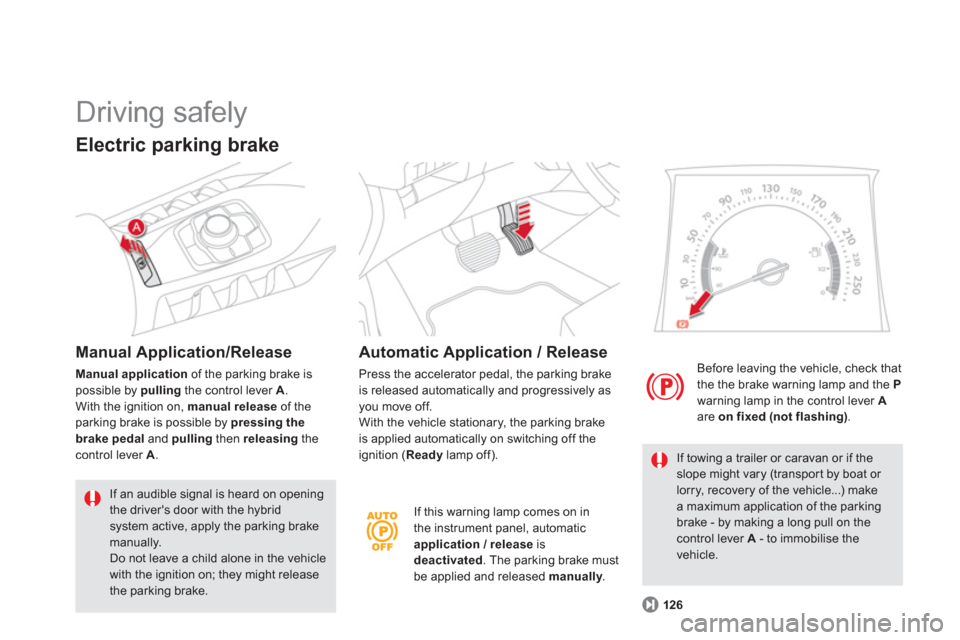
If this warning lamp comes on in
the instrument panel, automatic application / release is
deactivated. The parking brake must
be applied and released manually. y
Before leaving the vehicle, check that
the the brake warning lamp and the Pwarning lamp in the control lever Aare on fixed (not flashing).
126
If towing a trailer or caravan or if theslope might vary (transpor t by boat or lorry, recovery of the vehicle...) make a maximum application of the parking brake - by making a long pull on the
control lever A
- to immobilise thevehicle.
Driving safely
Electric parking brake
Manual Application/Release
Manual applicationof the parking brake is possible by pulling
the control lever A.With the ignition on, manual release
of the parking brake is possible by pressing the brake pedal
and pulling
then releasing
the control lever A
.
If an audible signal is heard on opening the driver's door with the hybrid system active, apply the parking brake
manually. Do not leave a child alone in the vehiclewith the ignition on; they might releasethe parking brake.
Automatic Application / Release
Press the accelerator pedal, the parking brake
is released automatically and progressively as you move off.
With the vehicle stationary, the parking brake
is applied automatically on switching off the
ignition (Readylamp off).
Page 31 of 364
29Hybrid system
Main parts of the Hybrid4 system
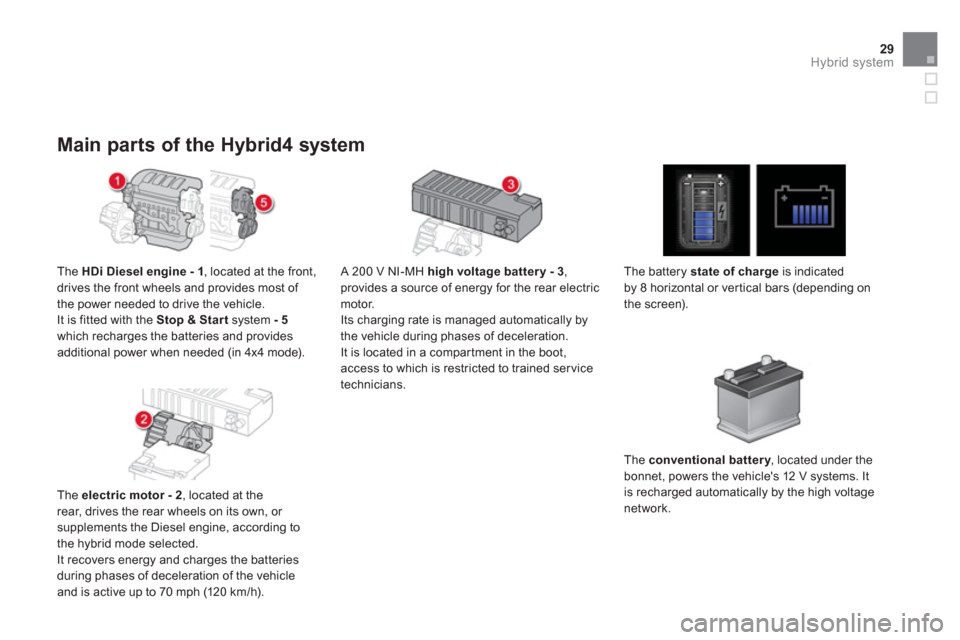
The HDi Diesel engine - 1
, located at the front,
drives the front wheels and provides most of
the power needed to drive the vehicle.
It i
s fitted with the Stop & Start
system - 5which recharges the batteries and provides
additional power when needed (in 4x4 mode).
Th
e electric motor - 2
, located at the
rear, drives the rear wheels on its own, or
supplements the Diesel engine, according to
the hybrid mode selected.
It recovers energy and charges the batteries
during phases of deceleration of the vehicle
and is active up to 70 mph
(120 km/h).
A 200 V NI-MH hi
gh voltage battery - 3,provides a source of energy for the rear electric
motor.
Its charging rate is managed automatically by
the vehicle during phases of deceleration.It is located in a compar tment in the boot, access to which is restricted to trained servicetechnicians.
The batter
y state of charge
is indicated
by 8 horizontal or vertical bars (depending on
the screen).
Th
e conventional battery, located under the ybonnet, powers the vehicle's 12 V systems. It is recharged automatically by the high voltage
network.
Page 33 of 364
31Hybrid system
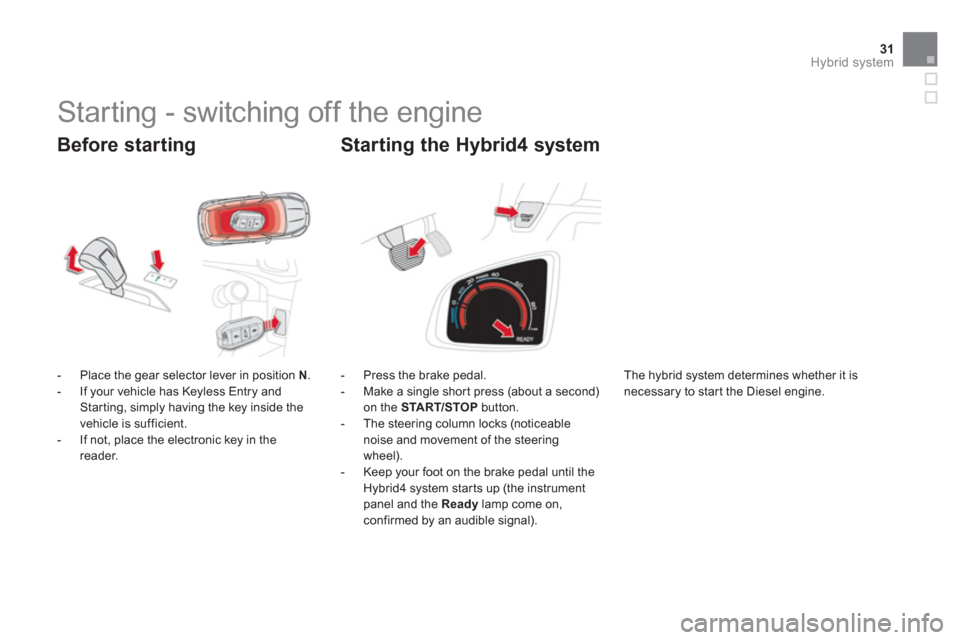
Before starting
- Place the gear selector lever in position N.
- If your vehicle has Keyless Entry and Starting, simply having the key inside the
vehicle is sufficient.
- If not, place the electronic key in the reader.
- Press the brake
pedal.
- Make a single shor t press (about a second) on the START/STOP
button.
- The steering column locks (noticeable
noise and movement of the steeringwheel).
- Keep your foot on the brake pedal until theHybrid4 system starts up (the instrument panel and the Readylamp come on, confirmed by an audible signal).
Starting the Hybrid4 system
Starting - switching off the engine
The hybrid system determines whether it is
necessary to star t the Diesel engine.
Page 35 of 364
33Hybrid system
Anti-theft protection
Electronic engine immobiliser
The keys contain an electronic chip which hasa secret code. When the ignition is switched
on, this code must be recognised in order for
starting to be possible. This electronic engine immobiliser locks the
engine management system a few minutes after the ignition is switched off and prevents
starting of the engine by anyone who does not have the key.
In the event of a malfunction, you are informed
by a message in the instrument panel screen.
In this case, your vehicle does not start; contacta CITROËN dealer as soon as possible.
Ignition on without starting
the engine
(accessory position)
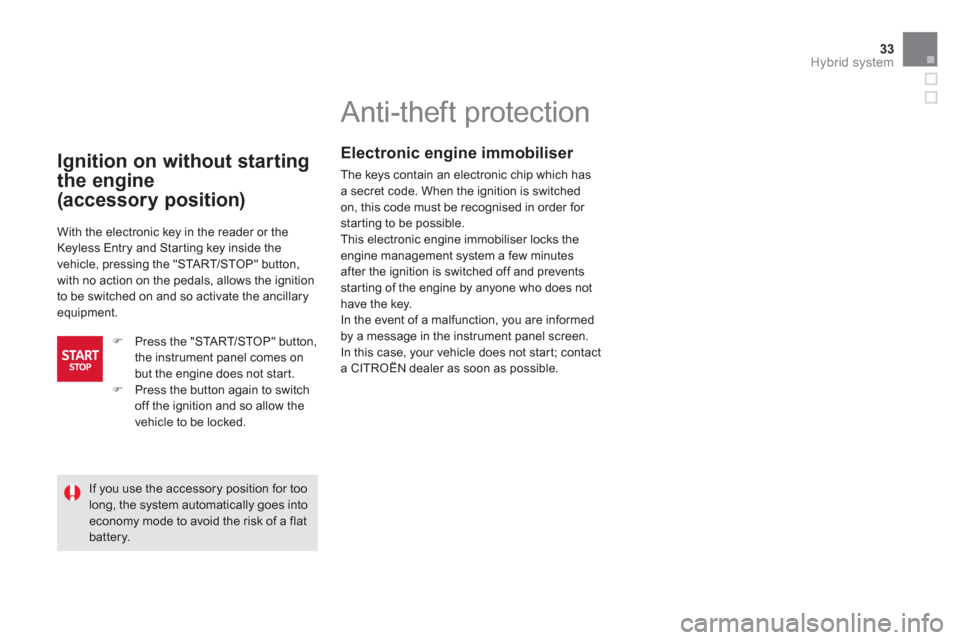
With the electronic key in the reader or the
Keyless Entry and Star ting key inside the
vehicle, pressing the "START/STOP" button,
with no action on the pedals, allows the ignition
to be switched on and so activate the ancillary equipment.
)
Press the "START/STOP" button,
the instrument panel comes on but the engine does not star t.) Press the button again to switch
off the ignition and so allow the
vehicle to be locked.
If you use the accessory position for toolong, the system automatically goes intoeconomy mode to avoid the risk of a flatbattery.