phone Citroen DS5 HYBRID4 RHD 2013.5 1.G Owner's Guide
[x] Cancel search | Manufacturer: CITROEN, Model Year: 2013.5, Model line: DS5 HYBRID4 RHD, Model: Citroen DS5 HYBRID4 RHD 2013.5 1.GPages: 380, PDF Size: 13.63 MB
Page 346 of 380
04 AUDIO
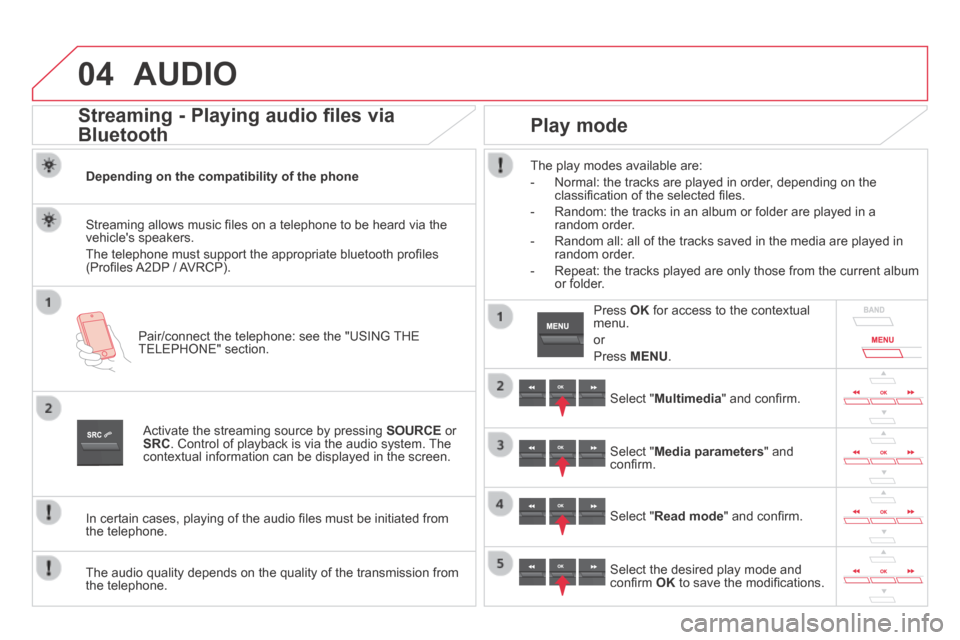
Streaming - Playing audio files via
Bluetooth
Depending on the compatibility of the phone
Pair/connect the telephone: see the "USING THE TELEPHONE" section.
Streaming allows music fi les on a telephone to be heard via the vehicle's speakers.
The telephone must support the appropriate bluetooth profi les (Profi les A2DP / AVRCP).
Activate the streaming source by pressing SOURCE or SRC . Control of playback is via the audio system. The contextual information can be displayed in the screen.
In certain cases, playing of the audio fi les must be initiated from the telephone.
The audio quality depends on the quality of the transmission from the telephone.
Play mode
The play modes available are:
- Normal: the tracks are played in order, depending on the classifi cation of the selected fi les.
- Random: the tracks in an album or folder are played in a random order.
- Random all: all of the tracks saved in the media are played in random order.
- Repeat: the tracks played are only those from the current album or folder.
Select " Multimedia " and confi rm.
Select " Media parameters " and confi rm.
Select " Read mode " and confi rm.
Select the desired play mode and confi rm OK to save the modifi cations.
Press OK for access to the contextual menu.
or
Press MENU .
Page 347 of 380

05
345
USING THE TELEPHONE
Pairing a telephone
First connection
The services offered depend on the network, the SIM card and the compatibility of the B\
luetooth telephone used.
Consult your telephone's manual and your operator to fi nd out which services are available to you.
Activate the telephone's Bluetooth function and ensure that it is "visible to all" (refer to the telephone user guide).
Press MENU . A window is displayed " Search in progress… ".
Select the telephone to be connected from the list. Only one telephone can be connected at a time.
Select " Search for a device ".
For safety reasons and because they require prolonged attention on the p\
art of the driver, the operations for pairing of the Bluetooth mobile telephone with the Bluetooth hands-free system of your audio system must\
be carried out with the vehicle stationary and the ignition on.
Visit www.citroen.co.uk for more information (compatibility, additional help, ...).
Select " Bluetooth connection " and confi rm.
Page 348 of 380
05 USING THE TELEPHONE
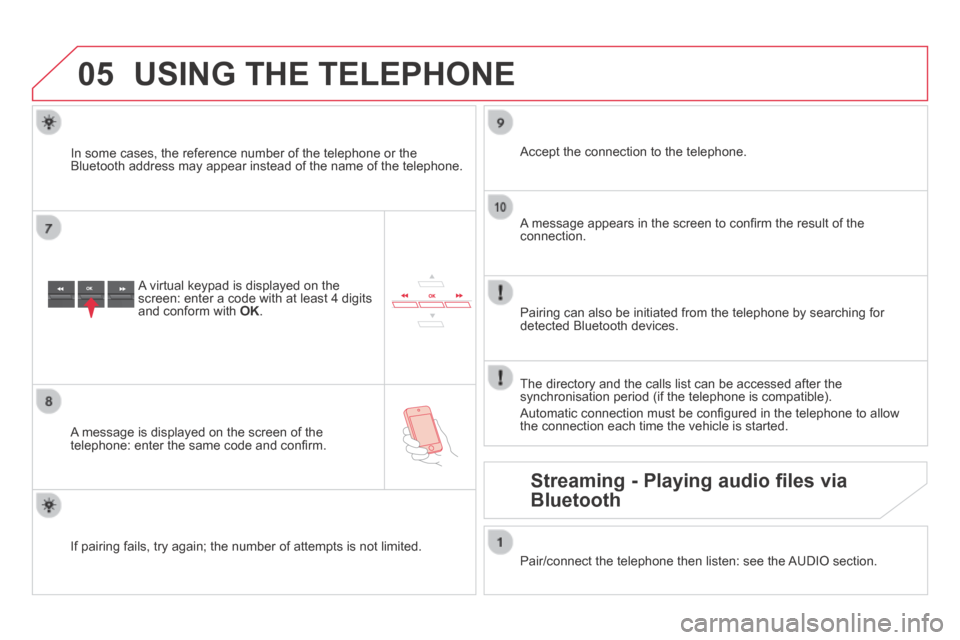
A virtual keypad is displayed on the screen: enter a code with at least 4 digits and conform with OK .
A message is displayed on the screen of the telephone: enter the same code and confi rm.
A message appears in the screen to confi rm the result of the connection.
Pairing can also be initiated from the telephone by searching for detected Bluetooth devices.
Accept the connection to the telephone.
If pairing fails, try again; the number of attempts is not limited.
The directory and the calls list can be accessed after the synchronisation period (if the telephone is compatible).
Automatic connection must be confi gured in the telephone to allow the connection each time the vehicle is started.
In some cases, the reference number of the telephone or the Bluetooth address may appear instead of the name of the telephone.
Pair/connect the telephone then listen: see the AUDIO section.
Streaming - Playing audio files via
Bluetooth
Page 349 of 380
05
347
USING THE TELEPHONE
The telephone connection automatically includes hands free operation and audio streaming.
The ability of the system to connect to just one profi le depends on the telephone. Both profi les may connect by default.
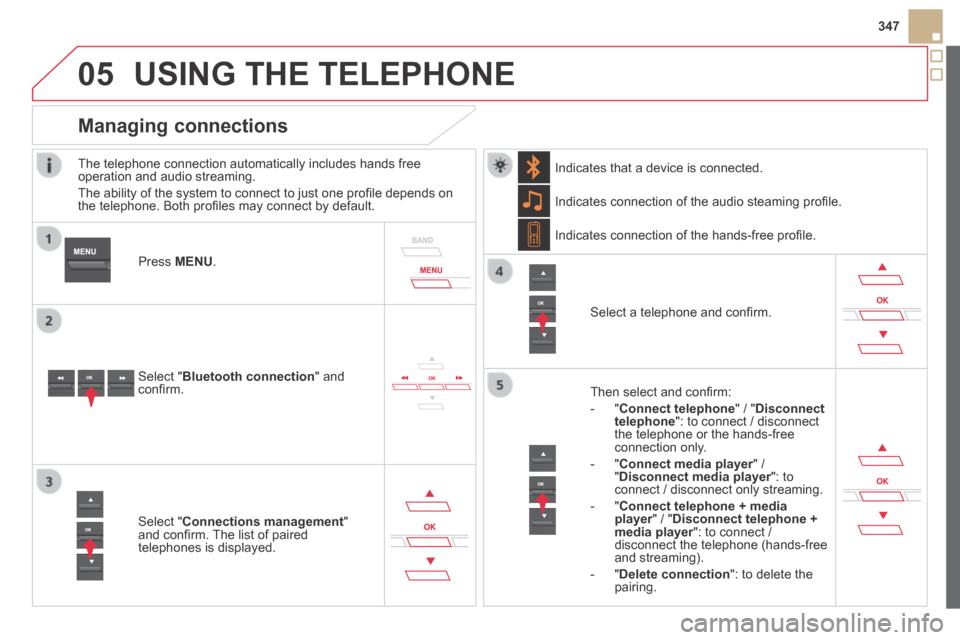
Press MENU .
Select " Bluetooth connection " and confi rm.
Indicates connection of the audio steaming profi le.
Managing connections
Select " Connections management " and confi rm. The list of paired telephones is displayed.
Select a telephone and confi rm.
Indicates connection of the hands-free profi le.
Then select and confi rm:
- " Connect telephone " / " Disconnect telephone ": to connect / disconnect the telephone or the hands-free connection only.
- " Connect media player " / Connect media player " / Connect media player" Disconnect media player ": to Disconnect media player ": to Disconnect media playerconnect / disconnect only streaming.
- " Connect telephone + media player " / " player " / " playerDisconnect telephone + media player ": to connect / media player ": to connect / media playerdisconnect the telephone (hands-free and streaming).
- " Delete connection ": to delete the pairing.
Indicates that a device is connected.
Page 350 of 380
05 USING THE TELEPHONE
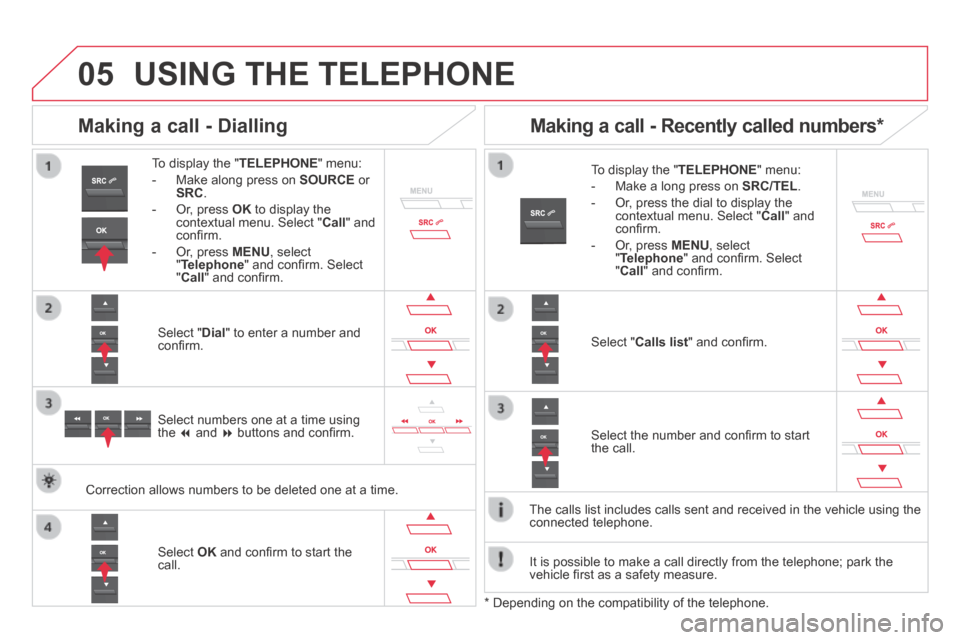
To display the " TELEPHONE " menu:
- Make along press on SOURCE or SRC .
- Or, press OK to display the contextual menu. Select " Call " and confi rm.
- Or, press MENU , select " Telephone " and confi rm. Select " Call " and confi rm.
Select " Dial " to enter a number and confi rm.
To display the " TELEPHONE " menu:
- Make a long press on SRC/TEL .
- Or, press the dial to display the contextual menu. Select " Call " and confi rm.
- Or, press MENU , select " Telephone " and confi rm. Select " Call " and confi rm.
Select OK and confi rm to start the call.
Select " Calls list " and confi rm.
Making a call - Dialling
Select numbers one at a time using the and buttons and confi rm.
Making a call - Recently called numbers *
Select the number and confi rm to start the call.
The calls list includes calls sent and received in the vehicle using the\
connected telephone.
* Depending on the compatibility of the telephone.
Correction allows numbers to be deleted one at a time.
It is possible to make a call directly from the telephone; park the vehicle fi rst as a safety measure.
Page 351 of 380
05
SRC
349
USING THE TELEPHONE
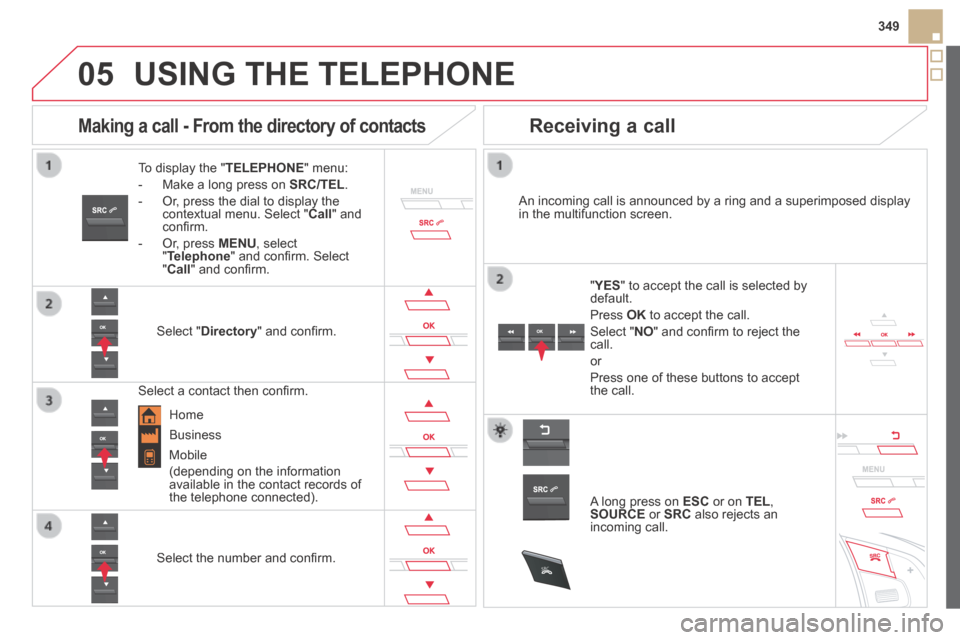
To display the " TELEPHONE " menu:
- Make a long press on SRC/TEL .
- Or, press the dial to display the contextual menu. Select " Call " and confi rm.
- Or, press MENU , select " Telephone " and confi rm. Select " Call " and confi rm.
Select " Directory " and confi rm.
An incoming call is announced by a ring and a superimposed display in the multifunction screen.
Mobile
(depending on the information available in the contact records of the telephone connected).
" YES " YES " " to accept the call is selected by default.
Press OK to accept the call.
Select " NO " and confi rm to reject the call.
or
Press one of these buttons to accept the call.
Making a call - From the directory of contacts
Select a contact then confi rm.
Receiving a call
Select the number and confi rm.
A long press on ESC or on TEL , SOURCE or SRC also rejects an incoming call.
Business
Home
Page 352 of 380
05
SRC
USING THE TELEPHONE
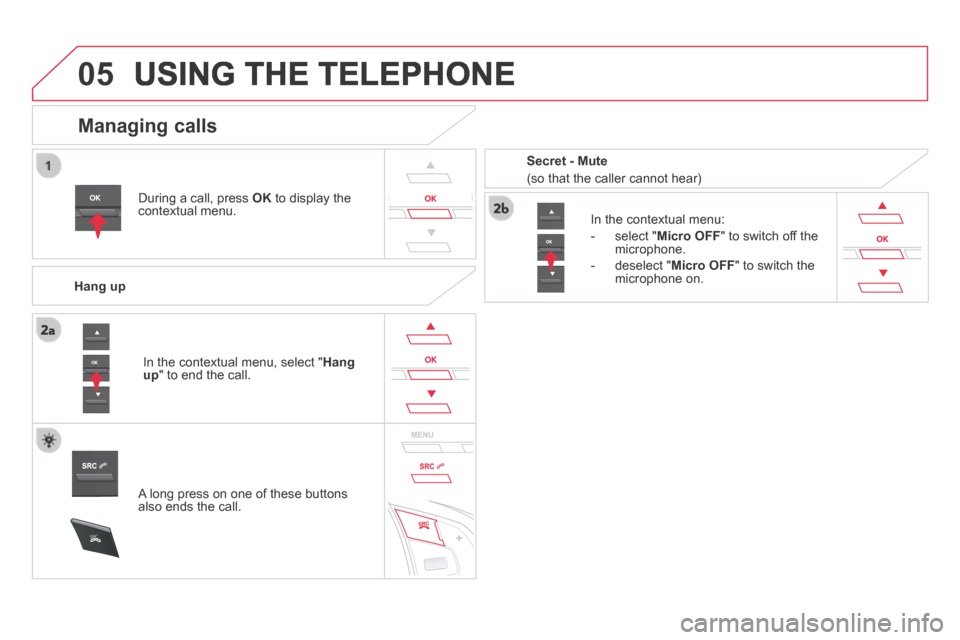
During a call, press OK to display the contextual menu.
Hang up
In the contextual menu:
- select " Micro OFF " to switch off the microphone.
- deselect " Micro OFF " to switch the microphone on.
Managing calls
A long press on one of these buttons also ends the call.
In the contextual menu, select " Hang up " to end the call.
Secret - Mute
(so that the caller cannot hear)
Page 353 of 380
05
351
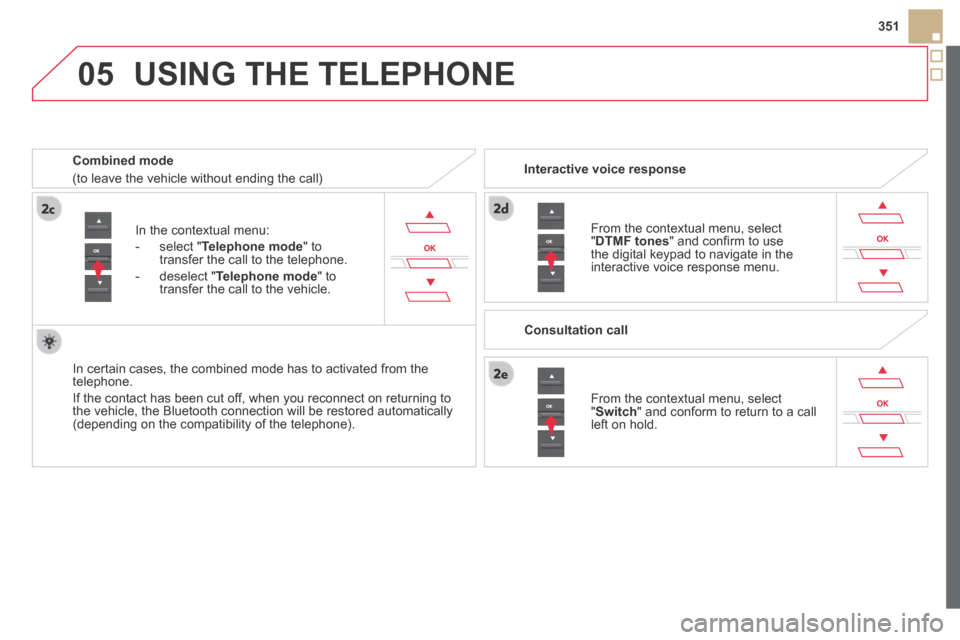
In the contextual menu:
- select " Telephone mode " to transfer the call to the telephone.
- deselect " Telephone mode " to transfer the call to the vehicle.
In certain cases, the combined mode has to activated from the telephone.
If the contact has been cut off, when you reconnect on returning to the vehicle, the Bluetooth connection will be restored automatically (depending on the compatibility of the telephone).
Combined mode
(to leave the vehicle without ending the call)
USING THE TELEPHONE
From the contextual menu, select " DTMF tones " and confi rm to use the digital keypad to navigate in the interactive voice response menu.
From the contextual menu, select " Switch " and conform to return to a call left on hold.
Interactive voice response
Consultation call
Page 354 of 380
05 USING THE TELEPHONE
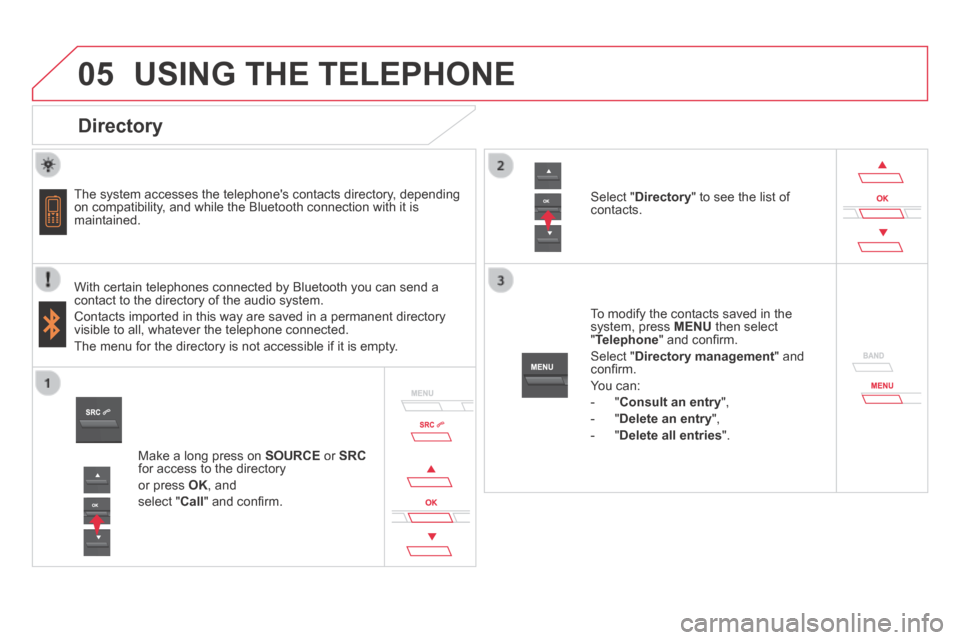
Directory
The system accesses the telephone's contacts directory, depending on compatibility, and while the Bluetooth connection with it is maintained.
With certain telephones connected by Bluetooth you can send a contact to the directory of the audio system.
Contacts imported in this way are saved in a permanent directory visible to all, whatever the telephone connected.
The menu for the directory is not accessible if it is empty.
To modify the contacts saved in the system, press MENU then select " Telephone " and confi rm.
Select " Directory management " and confi rm.
You can:
- " Consult an entry ",
- " Delete an entry ",
- " Delete all entries ".
Select " Directory " to see the list of contacts.
Make a long press on SOURCE or SRCfor access to the directory
or press OK , and
select " Call " and confi rm.
Page 356 of 380
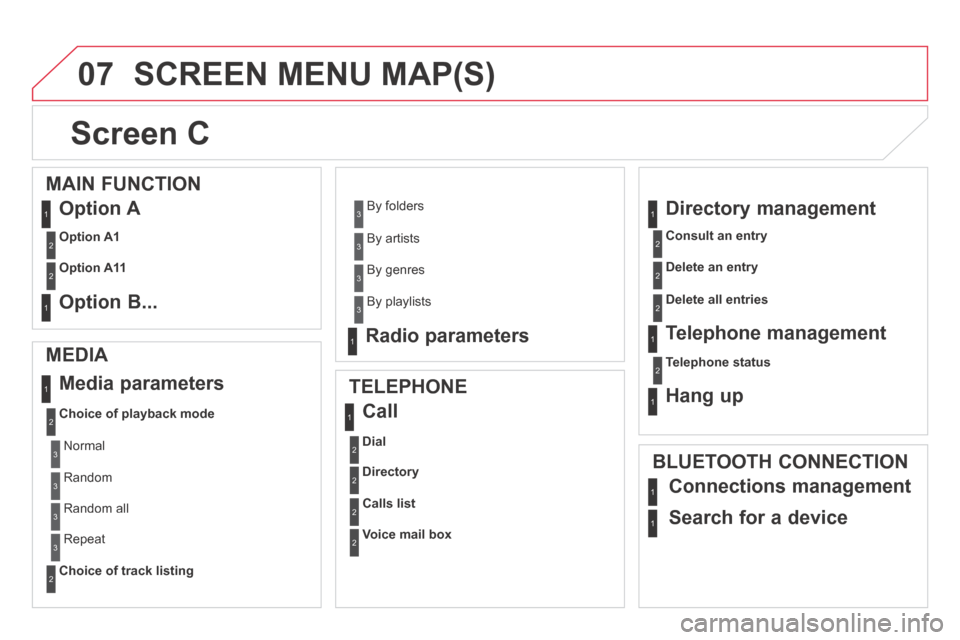
07 SCREEN MENU MAP(S)
Screen C
MEDIA
Media parameters
Choice of playback mode
Choice of track listing
TELEPHONE
Call
Dial
Directory
Calls list
Voice mail box
Directory management
Consult an entry
Delete an entry
Delete all entries
Telephone management
Telephone status
Hang up
BLUETOOTH CONNECTION
Normal
Random
Random all
Repeat
By folders
By artists
By genres
By playlists
Radio parameters
1
2
2
1
2
2
2
2
1
2
2
2
1
2
1
1
1
3
3
3
3
3
3
3
3
1
MAIN FUNCTION
Option A
Option A1
Option A11
Option B...
1
2
2
1
Connections management
Search for a device